by Contributed | May 17, 2021 | Technology
This article is contributed. See the original author and article here.
Claire Bonaci
You’re watching the Microsoft us health and life sciences, confessions of health geeks podcast, a show that offers Industry Insight from the health geeks and data freaks of the US health and life sciences industry team. I’m your host Claire Bonaci. As part of our 2021 nurses week series today guest host Kelly Robke, our chief nursing officer talks with Jennifferr Mancillas, on how more nurses can be at the forefront of creating new innovations in health care.
Kelly Robke
Welcome to the podcast everyone Today I’m super excited to have Jennifrerre Mancillas with us. She’s a visionary, innovative RN, and has done a lot of exciting things. So I’m super, super privileged to have her here with us today. And to hear a little bit about her nursing journey. So without further ado, Jennifferre, tell us a little bit about yourself.
Jennifferre Mancillas
Thank you so much for having me Kelly it’s an honor to be here and kind of share my story with you. But I am a neonatal ICU nurse at a Valley Children’s Health Care in Madera, California so Central California. And I’ve been a nurse now for about nine-ish years. But love what I do and I landed neonatal just because it’s always been a really special part of my heart what I’ve wanted to do, my sister was a patient once upon a time up at Valley Children’s Health Care, and she was born with a cardiac defect. And so we have really strong ties to this children hospital that happens to be right in our backyard, so grateful for them. My sister did end up passing away, but we were always super grateful for the fact that we had the Children’s Hospital so close to where we lived. And we it just full circle to be able to care for the same patients or as patients who have a similar story to hers. So love the NiCU, love the babies and really blessed to be where I am. As far as my nursing journey to nursing school, I started out with just an an adn degree, and got a job working with adults and then ended up in the neonatal world and worked with my BSN. And I’m currently in a dual degree program for my Masters to get my MSN and leadership within healthcare systems and my MBA. So really excited about and fulfilling my academic goals you’d say along this journey with my entrepreneurial endeavors. So it’s a busy time, but I love it.
Kelly Robke
Well, I’m so excited to hear you share all of that great information. First and foremost, I think we’ve talked about it before. But perinatal, neonatal health is very close, near and dear to my heart. That’s where I started out on the labor and delivery high risk obstetrics side. And I know from working in that realm, that there’s a lot of opportunity for innovation. There’s a lot of inspiring work that goes on. And it really can leave an impression on you as a nurse starting your career or entering into the profession. But it’s also a super cool opportunity to really get to know not only your patients, but also the family because it’s such a key essential part. And shout out to you for going back to school. That’s super impressive. My sister just completed her adn as her second career she went back for school. So we watched her graduation ceremony virtually this this weekend. And we’re super excited to have her enter the profession as well. So I appreciate you sharing your journey and good luck with you on your educational endeavors so important to position nurses as thought leaders but also as executives and and entrepreneurs within healthcare given all of the transformation that’s occurring today. So let’s jump right into it. I want to just acknowledge that this week is nurses week. And we’re super excited about that here at Microsoft. And we know that nurses are always creating solutions on the fly like we were just talking about specific to perinatal, neonatal, but in all areas of care that we work in across the healthcare continuum. Why do you think nurses make good innovators
Jennifferre Mancillas
I think that’s so accurate nurses are phenomenal at coming up with real time solutions for the challenges that we face at the bedside. And I believe that that’s attributed in large part to the fact that we’re natural empathizers we can understand a problem intimately and are capable of connecting the dots and recognizing how that problem impacts our patients and the care we’re able to deliver. And because of that super hot power, that ability to empathize with our patients that really leads us to quickly define the problem. And then ideate implement solutions, but it’s always an amazing to me that nurses have been innovating since the beginning of the profession. But it’s only really recently that we’re naming these clever work arounds as innovation. And but we should have been right. And I’m just so grateful that we’re able to sit here and have these conversations that really amplify the value that nurses bring to healthcare innovation, as I believe that as we continue to acknowledge and recognize and encourage nurse led innovation, that the future of healthcare will benefit from it. I think that’s I’m looking forward to to really watching that unfold and being able to be a small part of that story. As a champion for other nurse innovators.
Kelly Robke
Absolutely right on, you know, you’re talking my language here, kindred spirits, I, I want to just kind of shift because I want to spotlight what you’ve done, beyond your bedside endeavors. And you are the co founder and COO of Lumify care. And I’ve been hearing so much about Lumify care in the news, I think you may have just won yet another award. But I wanted to ask you to take some time to explain how you had the idea for Lumify and how you and your colleagues created it. And did you are you involving others beyond nursing in the creation of the product and the solution?
Jennifferre Mancillas
Yes, I am co founder COO for lumify care, along with my amazing co founder Anthony scarpone-lambert would love to share a little bit of that story with you. lumify care was actually inspired from a problem that was presented at a hackathon back in 2019. And fall 2019. And my co founder and I were able to kind of take that excitement and momentum that you often find at a hackathon, and move forward to create Lumify care, which is a nurse led startup focused on improving patient experience by providing innovative tools and resources to support frontline health care workers. And the premise for that mission really was that as nurses, we realize that even though hospitals are where you go to heal and recover, that most oftentimes, it’s difficult to do that comfortably. And if you or a loved one have ever been in a hospital, you can testify to the fact that it’s too loud, it’s too bright, there’s too many interruptions, but sleep is elusive. But in tandem we’re also very aware that frontline health care workers often feel under supported and when we knew that we could do better for our patients and better for each other. So we really set out to work and we spoke with over 1000 nurses and surveyed over 250 more to uncover pain points felt at the bedside. And one that was the most prevalent or stuck out to us the most was that 87% of nurses reported that they struggle to see when providing care to patients in low light or dark environments. And that really resonated to us as being truth because currently we’re using penlight or our cell phones or flashlights to illuminate a space. And we knew that we could do better. So we created the nightlight. It’s a hands free, wearable led device made specifically for frontline healthcare workers, for nurses, by nurses. And we’ve been able to optimize the ability frontline healthcare workers to illuminate their workspace in a manner that decreases patient’s sleep disturbances on an average of 70%. And so we’re not really reinventing the wheel per se, but just reimagining it. And I think lumify care is a great example of how simple and small innovation can lead to impactful change. And we’re just super grateful to be able to find a solution to a problem that’s felt by both patients and healthcare workers across the globe.
Kelly Robke
That’s awesome. And I’m sitting here just relating to everything you’re saying. Because having been a patient and in a hospital inpatient, you don’t get any rest between the alarms, the interruptions, you might be having comfort issues. And then when you finally do get to sleep, someone comes in and they’re either turning on the light, which is very alarming, or they’re struggling. And when you said hands free, I kind of did a silent applause. Because we already need more than two hands in nursing. So having the ability to have light, have minimal interruption allow the patient to get the rest that they need in order to to heal and recover is so essential. There aren’t many pathways right now for nurses to bring their ideas or their work arounds. A lot of us know them as work arounds from inception all the way to completion, meaning you’re ideating you’re developing, you’re choosing the best option from multiple scenarios you’re implementing, you’re educating and getting it commercialized. That’s quite a pathway. I’m interested in how you encourage and make more of innovation actionable for nurses and what would you suggest in terms of how do we become a bigger part of innovations or even lead like you’re doing the creation of new solutions, what suggestions do you have for our audience?
Jennifferre Mancillas
Absolutely. I think that there are three, three kind of takeaways to answer that question. I mean, the first is, I think it’s really important to create a culture within an organization that values newness, but also provides a level of psychological safety or freedom, if you will, to bring those ideas and bring those ideas forward. That’s really important because in general, people who feel that their contributions are recognized and supported are automatically in line to feel more engaged. So having an environment that really fosters that mentality is a catalyst for nurses to push their idea forward. But additionally, I think this might be more nurse centric advice. But equally important to reinforce the truth that innovation becomes tangible when you are able to build relationships with others along the way along your journey. So for example, if there’s a nurse, who’s working within an organization, and they have an amazing idea for a new teaching tool. Next steps would look like determining who in your organization is responsible for disseminating new educational material, and connecting with them to discern what the process is and get feedback on your idea and learn what maybe next steps for implementation or trial would be. And it’s those sorts of connections that are able to give an idea momentum and that feeling is really rewarding can often spark action and engagement to continue to innovate for that particular nurse. But when speaking of relationship building, I think it’s also important to highlight how important community is to encourage nursing innovation among other nurses. And I know Johnson and Johnson has done a really fantastic job of pouring into the profession by means of I’m creating the nurse innovation fellowship, which I am honored to be a part of the quickfire challenge is the collaboration with Microsoft for the nurse, hack for health. All of those different components really can encourage and elicit more nurses participating and being a part of that innovation process. In organizations like Sonseil for the society of nurse scientists, innovators, entrepreneurs, and leaders, I think that is another great resource for nurses looking for a community that will support and kind of help them guide through the innovation process, because it’s not one size fits all, depending upon what your idea is. But as a nurse, innovator myself within my own organization, and while building lumify care, these communities and supporters and mentors have been invaluable instrumental in helping determine what next steps are or providing resources. And I feel like I’m pouring into these programs and these sorts of organizations that allow nurses to plug in and connect is a fantastic way to encourage nurses to continue to lead new solutions and create an idea and bring it to fruition.
Kelly Robke
That’s amazing. Thanks for walking us through that, Jennifer. I’d like to just give a shout out to the nursing hack for health that’s coming up may 14 thru 16th. Like you previously mentioned, Jennifer, we’ve been talking a lot leading up to nurses week and the hack this year, but it’s always a pleasure to talk to you and learn about the new things happening with lumify care, keep on keeping on doing that good work. We’re so appreciative of everything you bring to the table as a care provider and as an innovator and as a leader.
Jennifferre Mancillas
Oh, thank you so much for having me. It’s a pleasure to be here.
Claire Bonaci
Thank you all for watching. Please feel free to leave us questions or comments below and check back soon for more content from the HLS industry team.
by Contributed | May 17, 2021 | Technology
This article is contributed. See the original author and article here.
Our Microsoft Mechanics series on Microsoft Viva kicks into high gear this week with our first module deep dive on Viva Topics. I’ve joined Jeremy Chapman, our Microsoft Mechanics host, to give you a quick overview of the module and the foundational technologies that deliver the experience. We also cover the critical role of knowledge managers and the granular admin controls that determine how information is identified, curated, and discovered.
Viva Topics overview. Viva Topics is a system that transforms information into knowledge and actively delivers it to you in the context of your work. The module works with two basic information “currencies,” actual data and information and expert colleagues, and then surfaces them as combined knowledge in the apps you’re already using. You’ll see these experiences in SharePoint Online, Microsoft Search, and Search in Word and PowerPoint now, and we continue to work to bring this to more apps. The result is topic pages and topic cards for things you might consider “tribal knowledge”: acronyms, terms, or project names. Topic pages look a lot like wiki entries. They include the people, files, and sites relevant to the topic, as well as related topics and a comments section—basically, a starting point to the insider knowledge someone needs to more fully understand that topic.
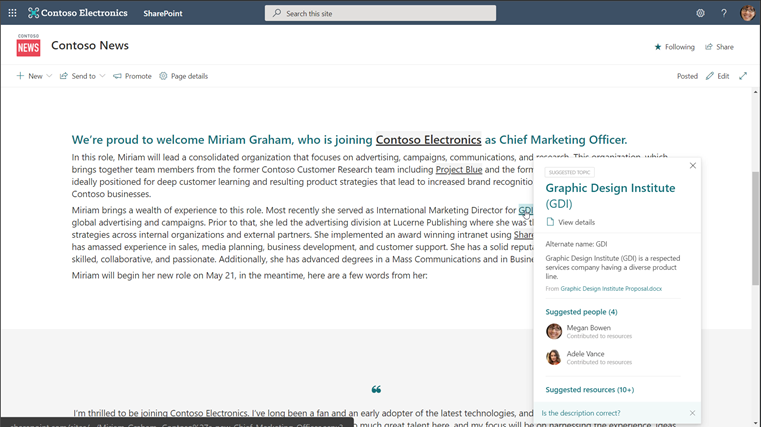
Topic cards are quick summaries of the associated topic page. These appear when users hover over topic page words or phrases and include a link to the associated page itself.
The magic of Viva Topics is that it suggests and gathers all this content for you, leveraging powerful AI, like natural language understanding and entity recognition, and Microsoft Graph to surface the right knowledge to users.
Any information protection and compliance controls you have configured in Microsoft 365 are respected in Viva Topics. The module only shows users the topic pages, topic cards, and resources they are permitted to access, which means they don’t need to spend time requesting (and waiting) for approvals and can’t access knowledge that is inappropriate for their role.
Knowledge managers. While AI provides the initial topic page suggestions and resources, domain knowledge managers help ensure that knowledge is accurate and appropriate. You’ll need to determine the knowledge managers for your organization, but we suggest choosing experts close to the content instead of just assigning the role to IT. Knowledge managers are care how the knowledge in their domain is shared and are ultimately responsible for promoting and engaging their community to contribute to suggested topic pages and their content. They can edit the topic description and add or remove people, files, sites, and related topics as they see fit.
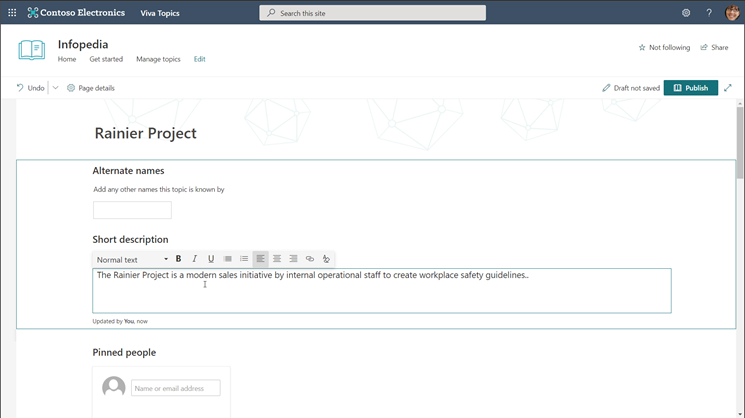
Users. Users can contribute to Viva Topics as well. Users with “topic contributor” permissions can edit topic pages and create new ones manually, while all users can provide feedback on a page’s comments section if the comments are enabled. Users who are authoring and publishing SharePoint pages can also enhance their pages with topics by inserting topic highlights in the content they are creating. These highlights then appear as topic cards to other users.
IT admins. Getting the right knowledge to the right people starts with IT. If you’re an existing Microsoft 365 customer, adding Viva Topics to your tenant is easy. In the Microsoft 365 admin center, navigate to Billing and type “Viva” into the search box. Then, select Details under Viva Topics > Start free trial > Try now > Continue. The one-month trial can help you determine if Viva Topics is right for your organization without a financial commitment upfront.
Signing up for the trial only adds Viva Topics to your tenant; you’ll need to configure the module to make it live for users. There are four simple configuration pages that will determine how Viva Topics functions within your organization: topic discovery, topic visibility, topic permissions, and topic center. To get to these, go to the Microsoft 365 admin center, select Setup, scroll down to the Files and content section, select Connect people to knowledge > Get started.
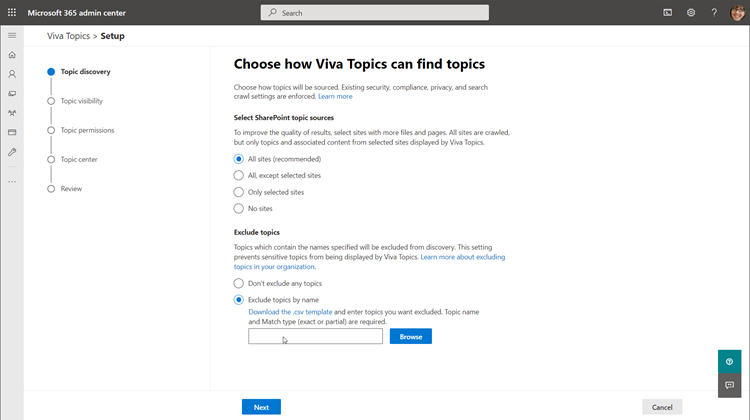
Once configuration is complete, you can review your selections and select Activate to formally launch Viva Topics for your organization. It might take a couple days for the AI to start suggesting topic pages, so hang tight. In the meantime, try manually creating a couple pages yourself, which you can start doing immediately.
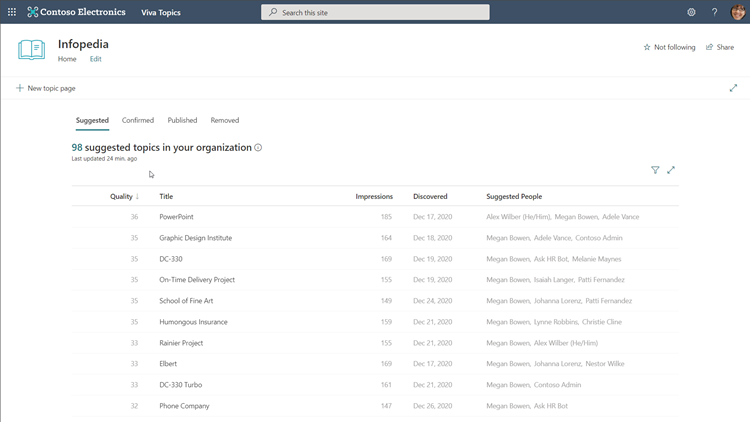
The Microsoft Mechanics video on Viva Topics has even more technical details on the module, so scroll back to the top and check it out. This is Part Two of our Microsoft Mechanics video series about Microsoft Viva. Keep visiting this site or aka.ms/VivaMechanics for the rest of the series. If you’d like more information on Viva in the meantime, head over to aka.ms/Viva.
As always, we want to hear from you! If you have any suggestions, questions, or comments, please visit us on our Microsoft Viva Tech Community page. We will also be hosting our first Microsoft Viva Ask Microsoft Anything (AMA) event on June 23, 2021. There will be more information on that event soon.
Learn more:

by Contributed | May 17, 2021 | Technology
This article is contributed. See the original author and article here.
Microsoft partners like TechLatest, RightFoot, and Heimdall Data deliver transact-capable offers, which allow you to purchase directly from Azure Marketplace. Learn about these offers below:
|
Ansible AWX (GUI alternative to Ansible Tower): This virtual machine offered by TechLatest provides a web-based Ansible Tower environment using AWX, the upstream project from which the Red Hat Ansible Tower offering is derived. Centralize and control IT deployment and configuration with a graphical dashboard, role-based access control, job scheduling, and integrated notifications.
|
 |
MOHR, cloud-based HR system: Digitally transform your human resources department with MOHR from RightFoot. Available in English and Arabic, MOHR helps HR teams manage personnel, payroll processing, job descriptions, key performance indicators, and more. Facial recognition supports mobile-based attendance checks, and managers gain quick access to team data via dashboards.
|
 |
Heimdall Database Proxy: Made for developers, database administrators, and architects, Heimdall Database Proxy offers automated query caching and invalidation, SQL performance analytics for root-cause analysis, automated database failover, and more. Save up to 50 percent on database costs and improve performance up to 20 times with Heimdall Database Proxy.
|
|

by Contributed | May 17, 2021 | Business, Microsoft 365, Technology
This article is contributed. See the original author and article here.
For much of 2020 and 2021, people have endured missing their friends and loved ones. Yet while physical distance has separated us, we have also rediscovered the power and importance of being together. 2020 reminded us that success isn’t fully celebrated without the ones who helped. Holidays aren’t as memorable without connecting with friends and…
The post Microsoft Teams now brings family and friends together to call, chat, and make plans appeared first on Microsoft 365 Blog.
Brought to you by Dr. Ware, Microsoft Office 365 Silver Partner, Charleston SC.
by Contributed | May 17, 2021 | Technology
This article is contributed. See the original author and article here.
Azure Resource Graph is an extremely powerful extension to Azure Resource Management that provides efficient resource exploration at scale. It supports both Azure Lighthouse as well as cross subscription querying. It also provides the ability to do complex filtering and grouping. It can do this because it uses a subset of the Kusto Query Language.
Access
To use Azure Resource Graph successfully, you’ll need read access to any subscription and resource(s) that you wish to query. If you do not have read access to a resource or subscription they will not appear in your resulting data sets.
Queries can be run against the Azure Resource Graph API, with PowerShell, or in the Azure portal. This post will use the Azure portal for its examples.
Resource Types
There are a number of tables you can query in Azure Resource Graph. The most common table is the “resources” table. This is where all resources in your Azure subscriptions will live. With few exceptions everything in Azure is a resource. Notably Azure Sentinel and Azure Security Center are not resources, they are solutions that sit on top of a Log Analytics workspace.
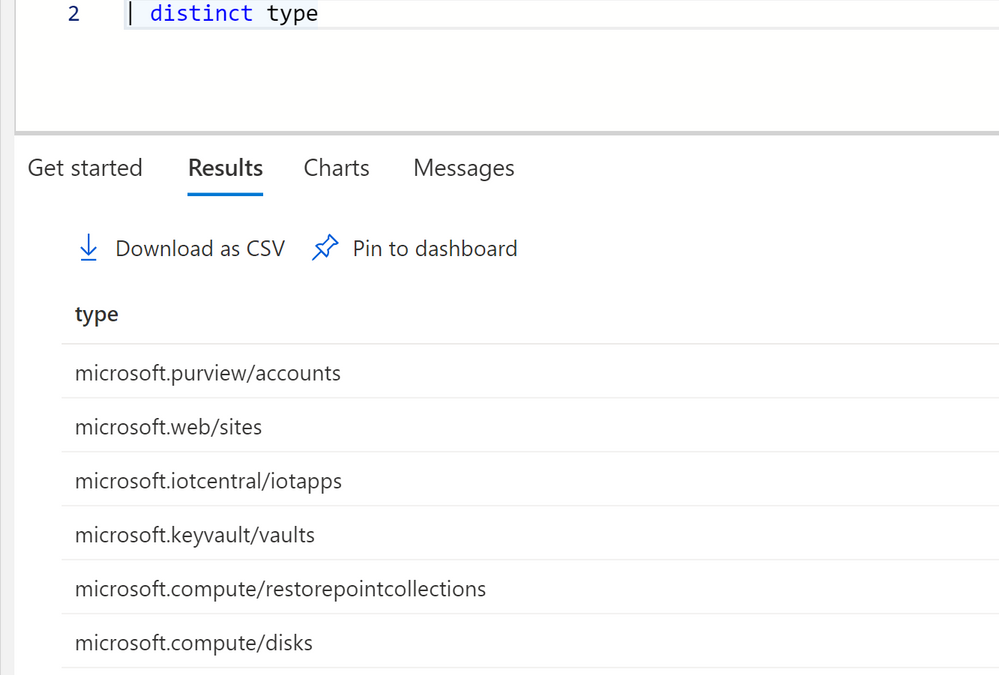
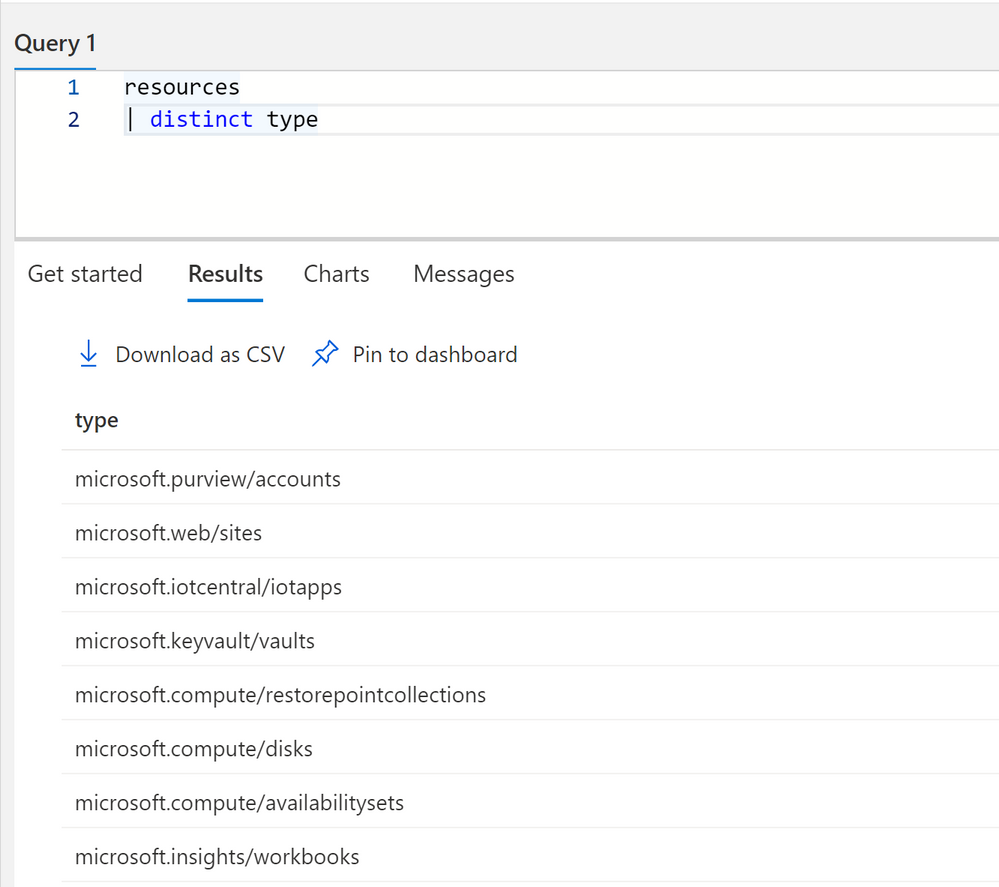
To get a idea of all the different types of resources in your subscriptions you can run the following query.
resources
| distinct type
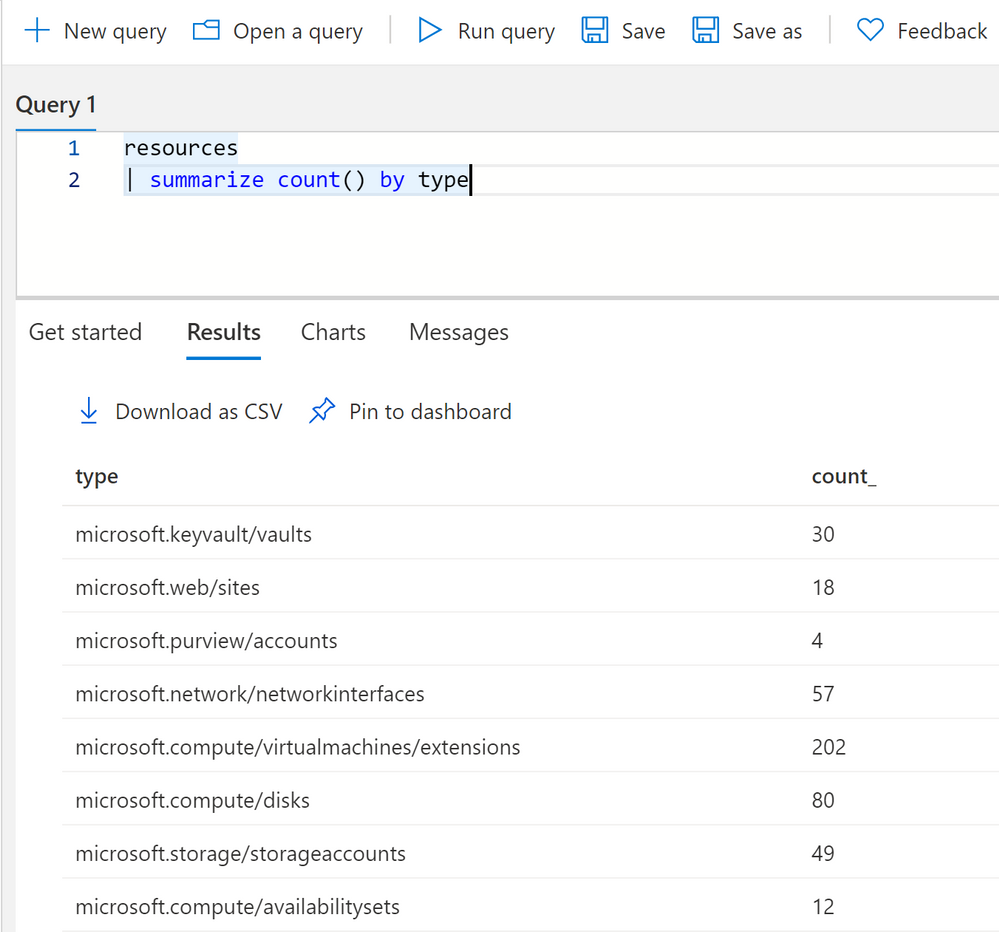
You can get a count of all resources by using summarize.
resources
| summarize count() by type
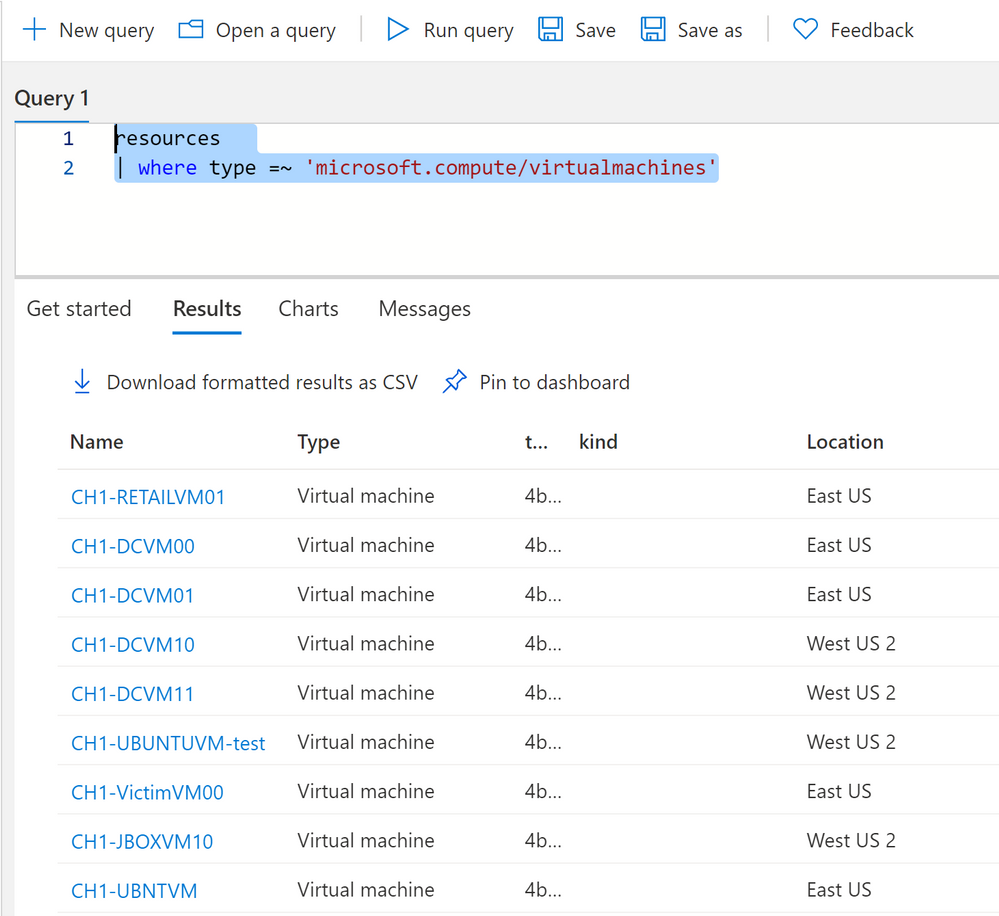
To query a specific resource type, like virtual machines, you can use a where clause with type.
resources
| where type =~ 'microsoft.compute/virtualmachines'
One thing to note on resource types, sometimes types do not match their current name in Azure. For instance Log Analytics resource type is “OperationalInsights/workspaces.” This is because Azure resources are renamed over time but their type cannot necessarily be renamed in Azure.
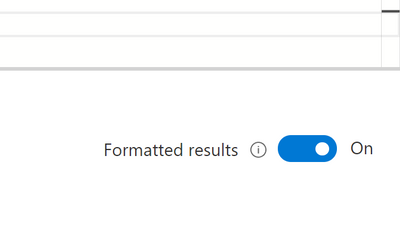
You can turn on formatted results to see a proper translation of resource types to their current Azure names.
Dynamic Types
Dynamic types in Kusto are fields that have multiple values or properties under it. In Azure Resource Graph there are multiple fields, and most commonly the properties field that have multiple values and even nested JSON underneath it. These values have a ton of useful information about your Azure resources in them. But you’ll need to know how to access the information. There are several ways to access information depending on how the information is formatted.
One of the fields that has useful information nested inside it is the Sku field, some resources have the sku type and tier of the Azure service in this field, while others have it under properties.
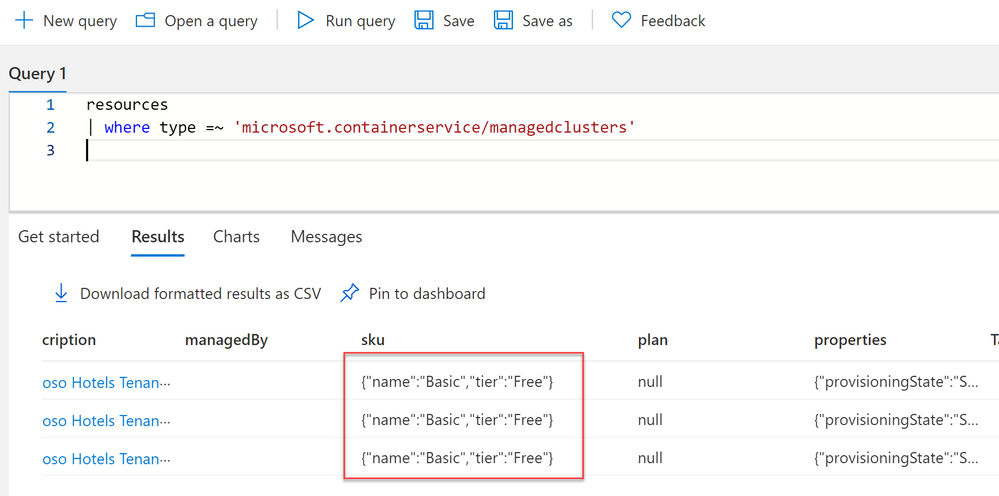
Whenever you see curly braces in Azure Resource Graph that means that there are multiple values in that field.
To access information underneath it we can use dot notation.
resources
| where type =~ 'microsoft.containerservice/managedclusters'
| extend Sku = sku.name
| project id, Sku
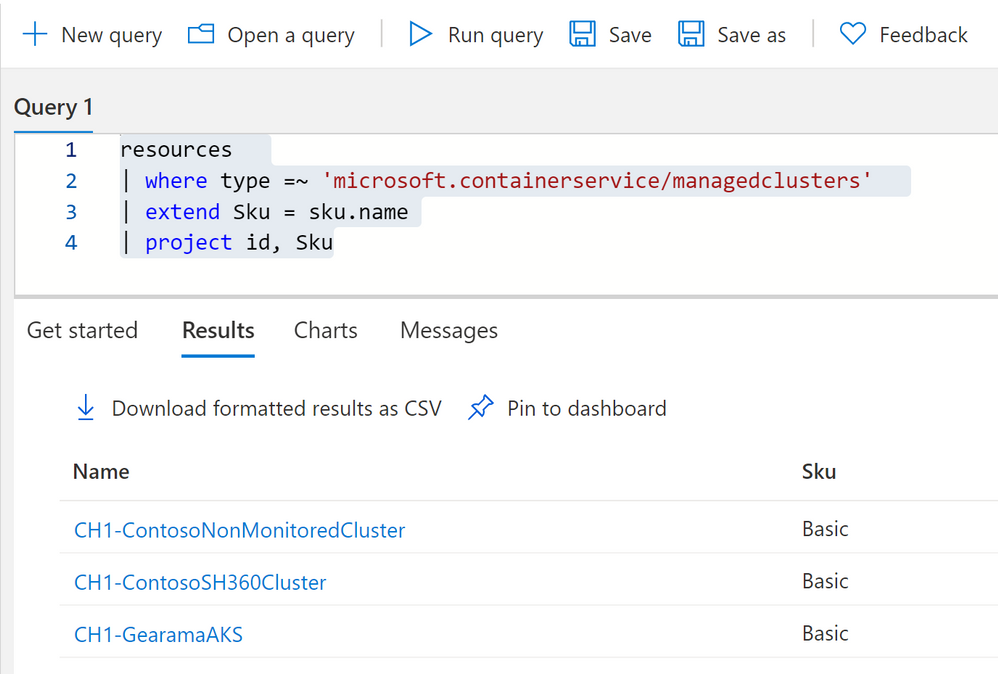
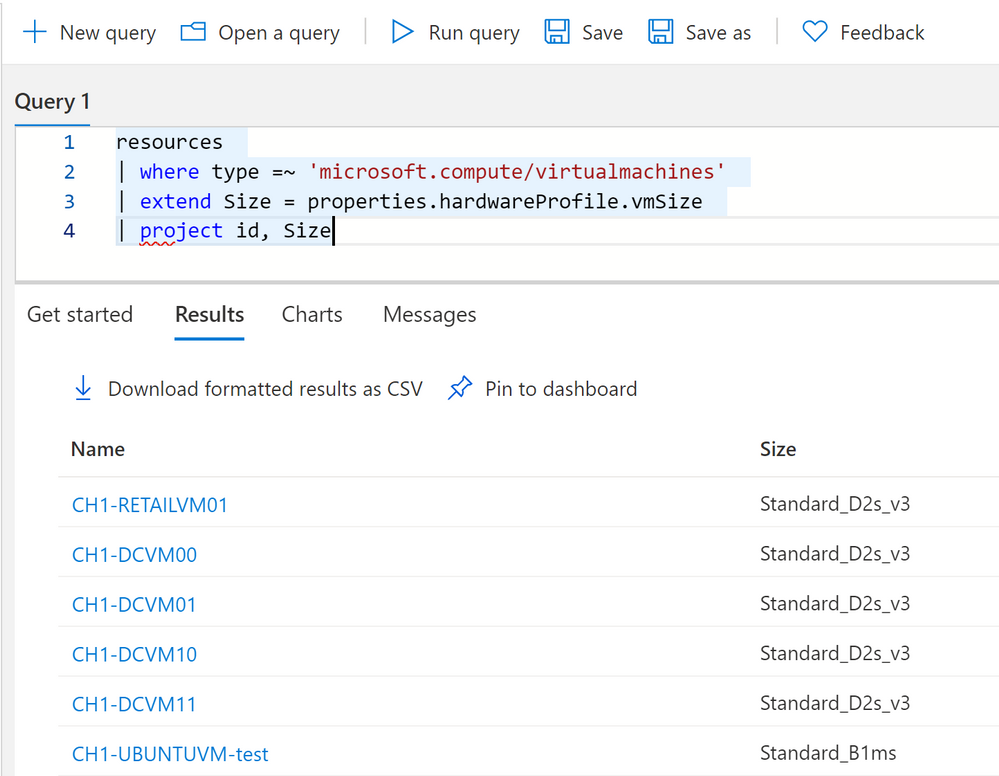
You can click on see details on the right hand side to see all the fields and if they have any nested values. In this case we’re looking at VM properties and its hardware profile size. We can get this information again with dot notation.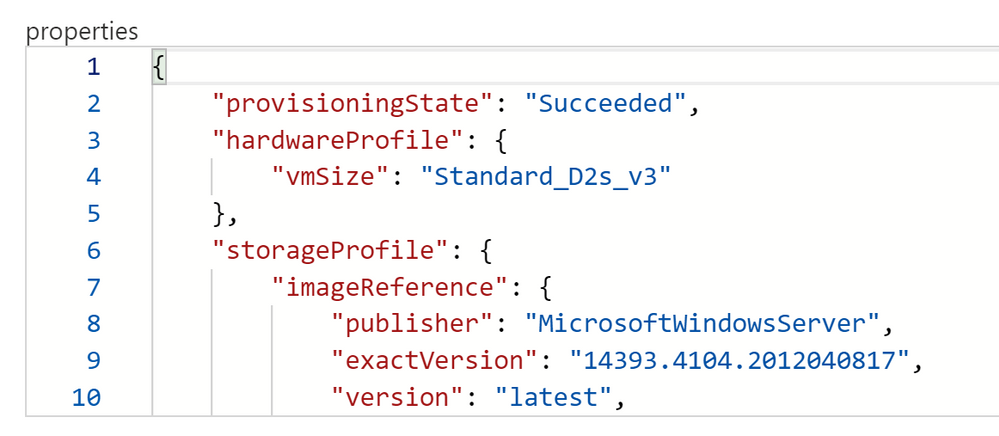
We can use dot notation to extract our VMs hardware profile size.
resources
| where type =~ 'microsoft.compute/virtualmachines'
| extend Size = properties.hardwareProfile.vmSize
| project id, Size
Advanced Dynamic Types
Dot notation works really well for a number of properties. We can go as many levels deep as we want with dot notation, until we run into brackets inside our nested field. See here on the network interface, the nic’s ID is inside brackets. This is because we can have more than one nic to one VM.
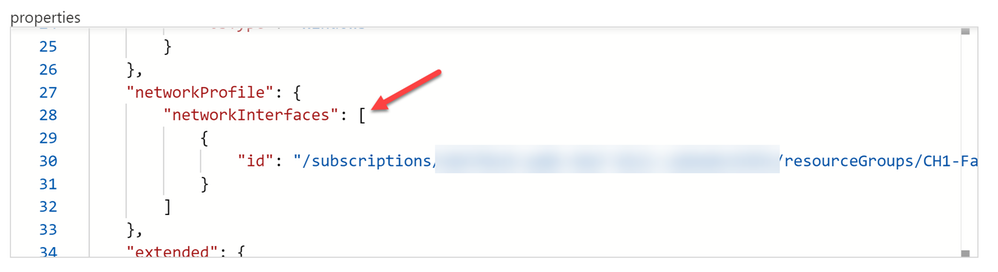
While technically dot notation would still work by using [0] in reference to the object in an array, its not dynamic. Meaning if we don’t necessarily know if we have 2 objects or 20 in the array. We’ll want to use mv-expand for these types of data.
resources
| where type =~ 'microsoft.compute/virtualmachines'
| extend Size = properties.hardwareProfile.vmSize
| mv-expand NicID = properties.networkProfile.networkInterfaces
| project id, Size, NicID
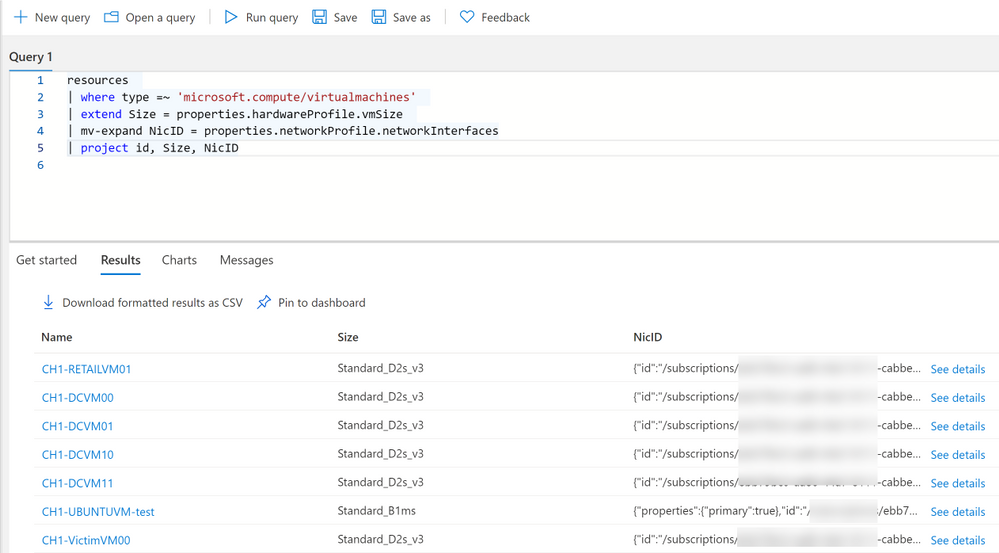
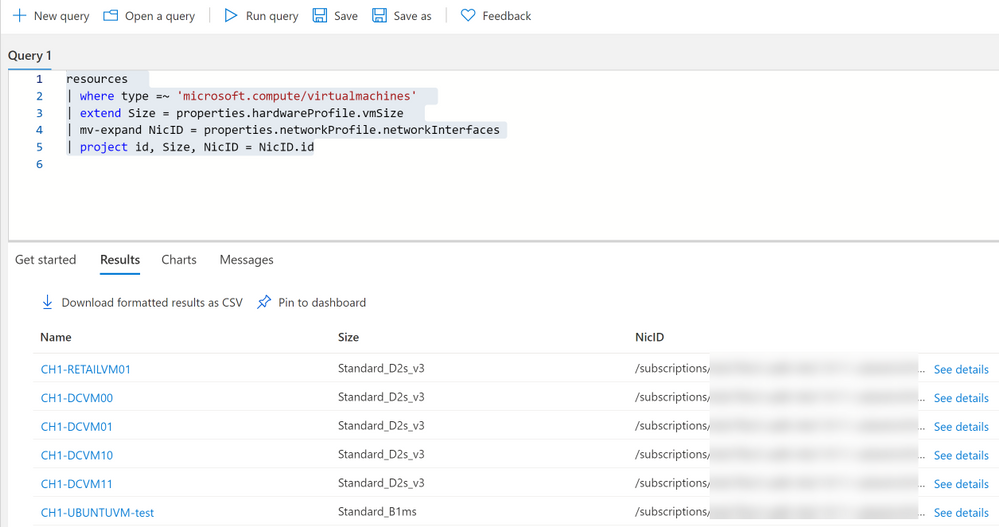
Notice we now have curly braces around our NicID, we can now use dot notation if we want to make this information its own field.
resources
| where type =~ 'microsoft.compute/virtualmachines'
| extend Size = properties.hardwareProfile.vmSize
| mv-expand NicID = properties.networkProfile.networkInterfaces
| project id, Size, NicID = NicID.id
Practical Examples
Now that we know some of the ins and outs, lets apply that knowledge to practical examples you can use in your environment.
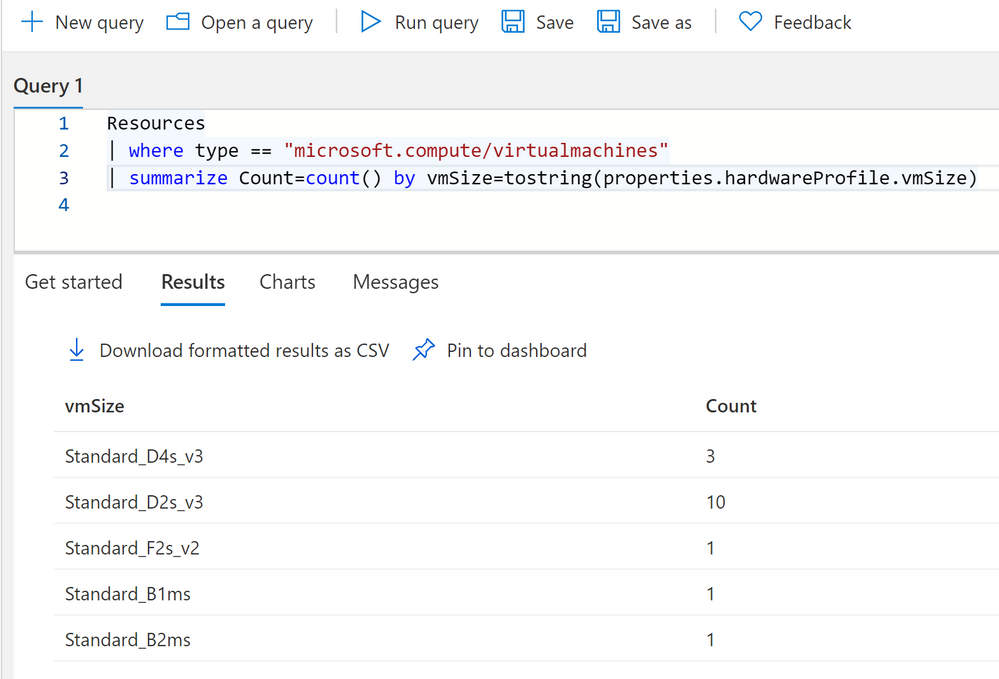
Summary count of VMs by Size
Resources
| where type == "microsoft.compute/virtualmachines"
| summarize Count=count() by vmSize=tostring(properties.hardwareProfile.vmSize)
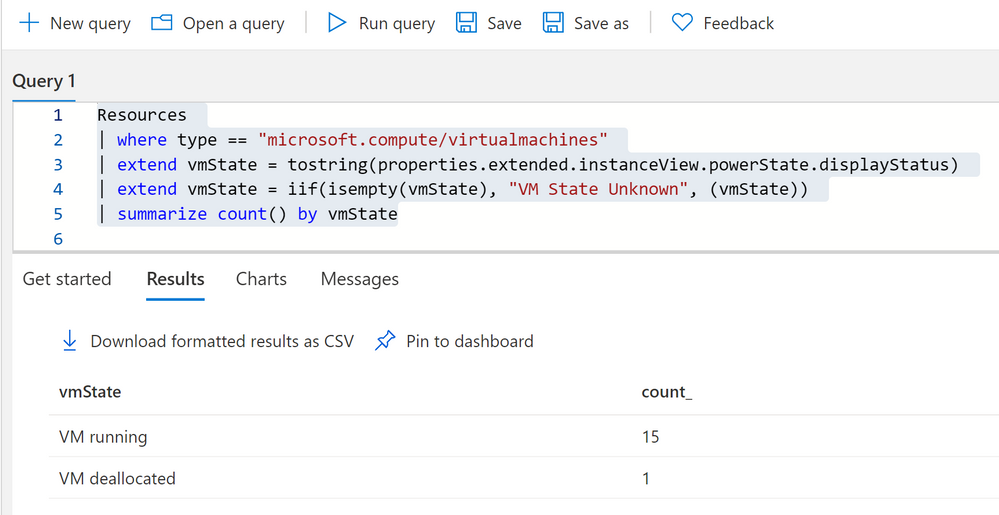
Summary count of VMs by their current state
Resources
| where type == "microsoft.compute/virtualmachines"
| extend vmState = tostring(properties.extended.instanceView.powerState.displayStatus)
| extend vmState = iif(isempty(vmState), "VM State Unknown", (vmState))
| summarize count() by vmState
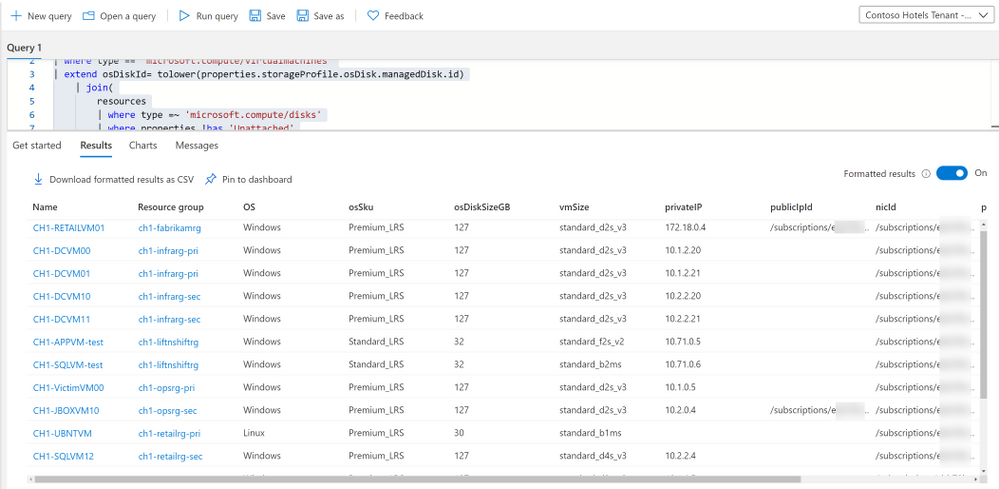
Because almost everything in Azure is an Azure resource, VMs have a VM object, as well as disk and NIC objects, each of which are separate Azure resources. One VM can have multiple disks and NICs. If we want to display VM’s with their corresponding NICs and Disks we have to use Joins as well as our dot notation and mv-expand to get pertinent information.
resources
| where type == "microsoft.compute/virtualmachines"
| extend osDiskId= tolower(properties.storageProfile.osDisk.managedDisk.id)
    | join(
        resources
        | where type =~ 'microsoft.compute/disks'
        | where properties !has 'Unattached'
        | where properties has 'osType'
        | project OS = tostring(properties.osType), osSku = tostring(sku.name), osDiskSizeGB = toint(properties.diskSizeGB), osDiskId=tolower(id))
	on osDiskId
| extend nics=array_length(properties.networkProfile.networkInterfaces)
| mv-expand nic=properties.networkProfile.networkInterfaces
| where nics == 1 or nic.properties.primary =~ 'true' or isempty(nic)
| extend vmId = id, vmName = name, vmSize=tolower(properties.hardwareProfile.vmSize), nicId = tostring(nic.id)
    | join kind=leftouter (
        resources
        | where type =~ 'microsoft.network/networkinterfaces'
        | extend ipConfigsCount=array_length(properties.ipConfigurations)
        | mv-expand ipconfig=properties.ipConfigurations
        | where ipConfigsCount == 1 or ipconfig.properties.primary =~ 'true'
        | project nicId = id, privateIP= tostring(ipconfig.properties.privateIPAddress), publicIpId = tolower(ipconfig.properties.publicIPAddress.id), subscriptionId)
    on nicId
| project id, resourceGroup, OS, osSku, osDiskSizeGB, vmSize, privateIP, publicIpId, nicId, properties
Notes about this query: 1, we want to use tolower() which simultaneously makes the value a string, it makes it all lower case as well. This is useful when doing joins as KQL cannot join dynamic types, and will not see the resource IDs as the same if one if camel case and one is lowercase, as KQL is case sensitive. 2, we use left outer joins because a VM can have a public IP but it can also not have a public IP.
I have included many examples for different resource types on my github repo.
Summary
Azure Resource Graph is extremely powerful for exploring your resources, creating your own inventory dashboard, and more. Many new tables have been added since Azure Resource Graph’s inception. Including the ability to query Azure Monitor Alerts, security scores from Azure Security Center and more.


Recent Comments