Get creation dates of all Azure resources under an Azure subscription

Get creation dates of all Azure resources under an Azure subscription

This article is contributed. See the original author and article here.

Overview:


One of our Azure customers raised a support ticket to find out the creation dates for all their resources on their Azure subscription.


This blog shows you one of the ways to achieve that.


Step 1:


Create an Azure service principal with the az ad sp create-for-rbac command. Make sure to copy the output, as it is required in the next steps.


Input


az ad sp create-for-rbac –name serviceprincipalname –role reader


Output


Creating ‘reader’ role assignment under scope ‘/subscriptions/xxxxxxxx-xxxx-xxxx-xxxx-xxxxxxxxxxxx’


The output includes credentials that you must protect. Be sure that you do not include these credentials in your code or check the credentials into your source control. For more information, see https://aka.ms/azadsp-cli


‘name’ property in the output is deprecated and will be removed in the future. Use ‘appId’ instead.


{


  “appId”: “xxxxxxx”,


  “displayName”: “serviceprincipalname”,


  “name”: “xxxxxxx”,


  “password”: “xxxxxxx”,


  “tenant”: “xxxxxxx”


}


Step 2:


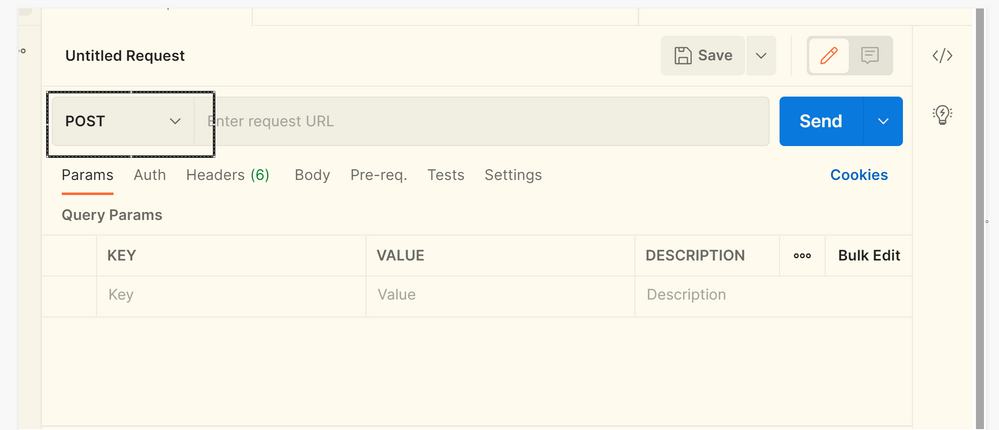
Generate the bearer token using Postman client – Postman API Platform


Type in the below URL with your tenant ID for a POST call


https://login.microsoftonline.com/xxxxtenant-IDxxxxxx/oauth2/token


RoshnaNazir_0-1640261795209.png


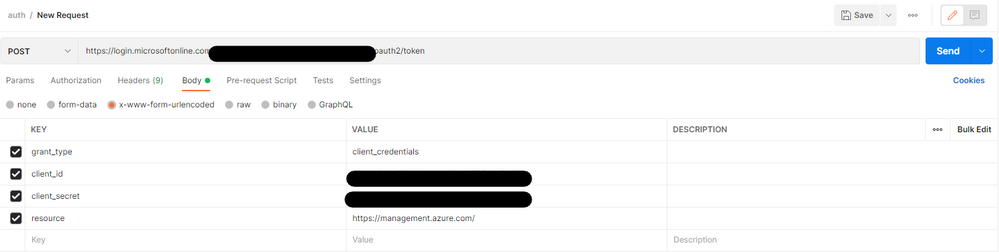
Click on “Body” and type in the details from the output of Step 1 as following.


Note: Client ID = App ID.


Content-Type: application/x-www-form-urlencoded


grant_type=client_credentials


client_id=xxxxxxxxxxxxxxxxxxxxxx


client_secret=xxxxxxxxxxxxxxxxxxxxxxxxxx


resource=https://management.azure.com/


RoshnaNazir_1-1640261795214.png


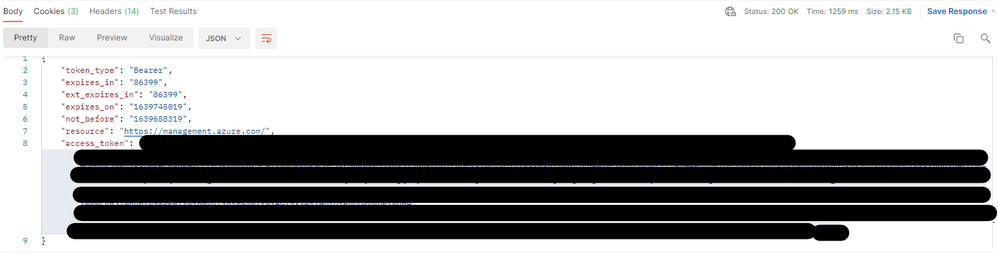
Click on “Send” and you will see a JSON response as below with a bearer/access token


RoshnaNazir_2-1640261795219.png


Copy the access token which will now be used in Step 3 for a Get call.


Step 3:


Make the get call to get the creation dates of your resources on the subscription. You may also do it for a single resource by filtering as needed in the URL.


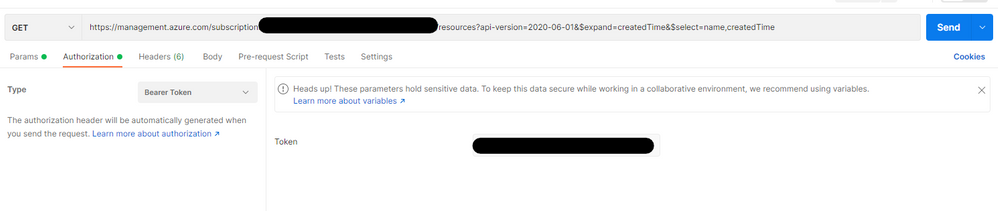
Get URL – https://management.azure.com/subscriptions/XXXX-Your-Subscription- IDXXXX/resources?api-version=2020-06-01&$expand=createdTime&$select=name,createdTime 


Select “Bearer Token” in the Authorization tab and paste the access token copied from Step 2.


RoshnaNazir_3-1640261795222.png


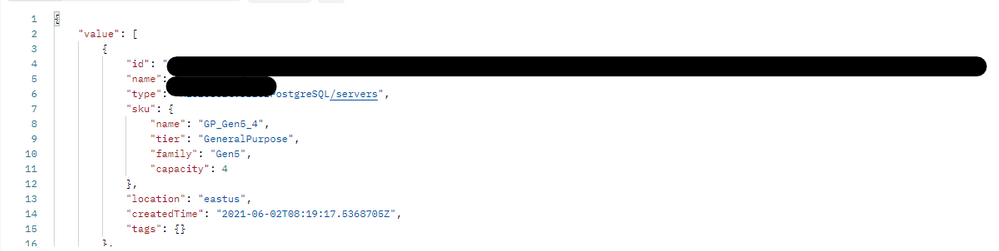
Click on Send and enjoy the results you wanted!


RoshnaNazir_4-1640261795224.png


Credits to @P V SUHAS for the guidance.

Office 365 receives Multi-Tier Cloud Security (MTCS) SS584:2020 Level-3 Certification (2021)

Office 365 receives Multi-Tier Cloud Security (MTCS) SS584:2020 Level-3 Certification (2021)

This article is contributed. See the original author and article here.

Multi-Tier Cloud Security (MTCS) SS584:2020 Overview


MTCS, a cloud security standard, was developed by the Information Technology Standards Committee (ITSC) in Singapore and published in November 2013 for its first version. The ITSC promotes and facilitates national programs to standardize IT and communications, and Singapore’s participation in international standardization activities. Since 2014, Microsoft became one of the first cloud service providers that has received the MTCS certification, for both Microsoft Azure cloud platform and Office 365 services.


In November 2021, Microsoft again successfully attained the Multi-Tier Cloud Security (MTCS) Standard for Singapore Level-3 High Impact certification for Office 365 family of services, this time with the renewed version SS 584:2020. Office 365 services included in scope are:


  • Exchange Online

  • SharePoint

  • Information Protection

  • Microsoft Teams (including Azure Communication Services)

  • Skype for Business

  • Office Online

  • Office Services Infrastructure

  • Microsoft/Office 365 Suite user experience

  • Delve/Loki


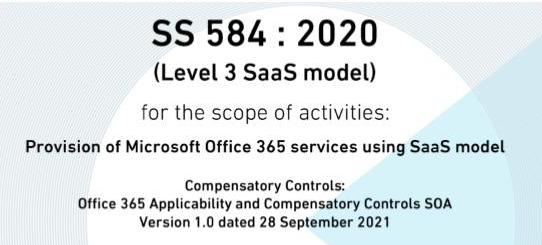
MTCS certification blog image.png


This renewed SS 584:2020 standard was approved and published in October 2020. Compared with the last SS 584:2015 standard, the renewed version has major updated requirements including:


  1. List of applicability and compensatory controls with justifications.

  2. Detailed Risk Assessment Requirements that may apply to cloud services.

  3. Third-party providers must receive compliance or attestations to international standards and provide access to the evidence associated.

  4. Security hardening requirements and service availability for Edge Node services that are used for performance enhancement.


By providing the implementation details of the management and technical controls in place along with their supporting evidence, Office 365 was able to demonstrate how its information systems can support the Level 3 confidentiality, integrity, and availability requirements from the standard. This Level 3 certification means that in-scope Office 365 cloud services can host high-impact data for regulated organizations with much stricter security requirements. It’s required for certain cloud solution implementations by the Singapore government.


Certification is valid for three years with a yearly surveillance audit conducted:


To whom does the standard apply?


It applies to businesses in Singapore that purchase cloud services requiring compliance with the MTCS standard.


What are the differences between MTCS security levels?


MTCS has a total of 535 controls that cover three levels of security:


  • Level 1 is low cost with a minimum number of required baseline security controls. It is suitable for website hosting, testing and development work, simulation, and non-critical business applications.

  • Level 2 addresses the needs of most organizations that are concerned about data security with a set of more stringent controls targeted at security risks and threats to data. Level 2 is applicable for most cloud usage, including mission-critical business applications.

  • Level 3 is designed for regulated organizations with specific requirements and those willing to pay for stricter security requirements. Level 3 adds a set of security controls to supplement those in Levels 1 and 2. They address security risks and threats in high-impact information systems using cloud services, such as hosting applications with sensitive information and in regulated systems.


How do I get started with my organization’s own compliance effort?


The MTCS Certification Scheme provides guidance on audit controls and security requirements.


Can I use Microsoft’s compliance in my organization’s certification process?


Yes. If you have a requirement to certify your services built on these Microsoft cloud services, you can use the MTCS certification to reduce the impact of auditing your IT infrastructure. However, you are responsible for engaging an assessor to evaluate your implementation for compliance, and for the controls and processes within your own organization.


Continue the conversation by joining us in the Microsoft 365 Tech Community! Whether you have product questions or just want to stay informed with the latest updates on new releases, tools, and blogs, Microsoft 365 Tech Community is your go-to resource to stay connected

Azure Marketplace new offers – Volume 180

Azure Marketplace new offers – Volume 180

This article is contributed. See the original author and article here.


We continue to expand the Azure Marketplace ecosystem. For this volume, 109 new offers successfully met the onboarding criteria and went live. See details of the new offers below:


Get it now in our marketplace


AlmaLinux 8.5.png

AlmaLinux 8.5: This image offered by Cognosys provides AlmaLinux 8.5 on an Azure virtual machine. Designed to run critical workloads, AlmaLinux is a 1:1 binary-compatible fork of Red Hat Enterprise Linux 8.


ArcGIS Velocity.png

ArcGIS Velocity: GIS analysts, data scientists, and other professionals working with IoT data use ArcGIS Velocity’s out-of-the-box tools to conduct advanced spatial analysis, remote monitoring, process optimization, and more.


Azul Zulu for Azure EE - Java 17 on Windows 2019.png

Azul Zulu for Azure EE – Java 17 on Windows 2019: Azul Zulu for Azure is a collection of certified builds of OpenJDK that are compatible with the Java SE standard on x64 reference architecture systems. These binaries can be used only with Java applications or Java app components that are being developed for deployment on Azure or Azure Stack.


Banyan Security Team Edition.png

Banyan Security Team Edition: Banyan Security Team Edition delivers simple, secure, zero-trust access to private infrastructure and hosted applications. Quickly onboard new services and gain one-click access to entitled services from a single catalog.


CentOS 8.5.png

CentOS 8.5: This image offered by ProComputers.com provides a minimal version of CentOS 8.5 with an auto-extending root filesystem and cloud-init included. It contains just enough packages to run within Azure, bring up an SSH Server, and allow users to log in.


Discover Dollar Resolve SaaS.png

Discover Dollar Resolve SaaS: Discover Dollar’s AI-enabled negotiation intelligence helps retailers and brands identify and resolve pricing errors, missed discounts, and other financial leakage. Discover Dollar analyzes unstructured negotiations data like contracts and emails, invoices, and purchase orders.


Oracle Linux 8.5.png

Oracle Linux 8.5: This image offered by Ntegral provides Oracle Linux 8.5 and is optimized for production environments on Microsoft Azure. Modernize and secure your infrastructure with this comprehensive and open Linux operating environment.


Production Yield Optimization (PYO) with Project Bonsai.png

Production Yield Optimization (PYO) with Project Bonsai: This application offered by Neal Analytics provides a Project Bonsai AI agent for production yield optimization manufacturing scenarios. The app is developed, trained, and deployed on the customer’s Azure subscription by Neal Analytics.


Resilio Connect.png

Resilio Connect: The peer-to-peer architecture of Resilio Connect, an omnidirectional data synchronization solution, scales out data movement in parallel over any network, overcoming transfer bottlenecks to any number of locations.


Rocky Linux 8.5.png

Rocky Linux 8.5: This image offered by Cognosys provides Rocky Linux 8.5. Rocky Linux is a Linux distribution that is intended to be a downstream, binary-compatible release using the Red Hat Enterprise Linux operating system source code.


Rocky Linux 8.5(2).png

Rocky Linux 8.5: This image offered by ProComputers.com provides a minimal version of Rocky Linux 8.5 with an auto-extending root filesystem and cloud-init included. It contains just enough packages to run within Azure, bring up an SSH Server, and allow users to log in.


SCONE Confidential Computing Playground.png

SCONE Confidential Computing Playground: Try the SCONE confidential computing platform with this preconfigured virtual machine from Scontain UG. The virtual machine includes Scontain UG internal tooling, preloaded container images and Helm charts, a local Kubernetes cluster, and many practical examples.


Solu 365 Teams Governance Solution.png

Solu 365 Teams Governance Solution: Solu 365, a robust provisioning engine for Microsoft Teams, lets you create use-case-based Teams groups, control external sharing of sensitive documents at the Teams group level, and integrate with your line-of-business systems simply by calling a SharePoint list to create provisioning requests.


TAZI Profiler.png

TAZI Profiler: TAZI Profiler enables business analysts, data scientists, and others to automate data discovery and preparation tasks, simplify feature engineering, and review data weaknesses. Get data ready for machine learning with TAZI Profiler.


Tethys Platform 3.3 Ubuntu 20.04.png

Tethys Platform 3.3 Ubuntu 20.04: This image offered by Aquaveo provides a minimal version of Tethys Platform 3.3 on Ubuntu 20.04. Tethys Platform, an open-source web development platform, makes it easier for developers to create geospatial and scientific web applications.


VT AIR Next Generation Enterprise Firewall.png VT AIR Next Generation Enterprise Firewall: VT AIR, a next-generation firewall based on Linux, offers comprehensive network security that pairs the advantages of the enterprise world with those of open source. Its price-to-performance ratio and absence of license costs ensure customers a fast return on investment.

Go further with workshops, proofs of concept, and implementations


1-Day Azure Analytics Vision Workshops.png

1-Day Azure Analytics Vision Workshop: Decision Inc.’s workshop will provide senior executives, analytics managers, and data professionals with a clear road map for implementing Microsoft Azure data and AI products in their organization.


Agile Data Analytics- 10-Week Implementation.png

Agile Data Analytics: 10-Week Implementation: Using Microsoft Azure services, IT-Logix specialists will implement an agile data analytics solution to provide sustainable 360-degree business insights and a high degree of automation.


AVS Migration Services- 4-Week implementation.png

AVS Migration Services: 4-Week Implementation: Softchoice will deliver design and implementation services for Microsoft Azure VMware Solution, enabling IT teams to migrate VMware-based workloads from an on-premises datacenter to Azure.


Azure Assessment and Advisory Service- 3-Week PoC.png

Azure Assessment and Advisory Service: 3-Week Proof of Concept: In this proof of concept, experts from Getronics Global Services will demonstrate the advantages of Microsoft’s virtual data warehousing and Azure Synapse Analytics in a use case.


Azure Data Lake- 10-Week Roadmap and Implementation.png

Azure Database for MySQL: 5-Week Implementation: In this implementation, Datavail’s experts will migrate your databases to Microsoft Azure Database for MySQL, which will result in reliable and performant databases with minimal downtime.


Azure Governance- 10-Week Implementation.png

Azure Governance: 10-Week Implementation: It’s crucial to define a governance strategy from the start of the cloud journey. In this engagement, CTGlobal’s experts will lift your Microsoft Azure environment to a governed state within days, based on best practices and automation.


Azure Kickstarter Pilot- 2-Week Implementation.png

Azure Kickstarter Pilot: 2-Week Implementation: Ready to move to the cloud but not sure where to start? FX Innovation can fast-track your migration. FX Innovation will provide a cost-benefit analysis and support you through an application migration to Microsoft Azure App Service or Azure Virtual Machines.


Azure Managed Services- 4-Week Implementation.png

Azure Managed Services: 4-Week Implementation: In this service, FX Innovation will optimize and govern your foundational technology, documenting supported workloads to establish operational commitments and agree on Azure management investments for each workload.


Azure Optimization with CloudClarity- 3-Day Implementation.png

Azure Optimization with CloudClarity: 3-Day Implementation: Are you confident your cloud governance, cost control, security, and compliance are being managed optimally? Over three days, Cubesys can uncover security improvements, provide you with actionable items, and help you keep tabs on your Azure governance and costs.


Azure Optimization Workshop.png

Azure Optimization Workshop: This workshop from Advaiya Solutions will result in a plan to reduce your cloud costs and optimize your Microsoft Azure tenant. Advaiya’s experts will consult with your team to get a picture of where you stand today and where you’d like to be in the future.


Azure Quantum- 10-Day Proof of Concept.png

Azure Quantum: 10-Day Proof of Concept: Quantum computing opens new possibilities in the areas of optimization, simulation, AI, and IT security. This proof of concept from adesso SE will enable your organization to evaluate Azure Quantum. This service is available in English or German.


Azure Ready and Govern Foundations- 2-Week Implementation.png

Azure Ready and Govern Foundations: 2-Week Implementation: Cubesys will help your organization adopt Microsoft Azure and lay the right foundations for building your cloud environment. Learn how Azure is billed, governed, and operated, and review best practices so you can get started with confidence.


Azure Sentinel- 1-Week Workshop.png

Azure Sentinel: 1-Week Workshop: In this workshop, Netwoven will analyze your requirements and priorities for a SIEM deployment, then deploy Azure Sentinel in your production environment so you can enhance your threat detection and automate responses.


Azure Stack HCI- 5-Week Implementation.png

Azure Stack HCI: 5-Week Implementation: CTGlobal will provide all the tools for your datacenter management, installing and configuring Microsoft Azure Stack HCI. CTGlobal delivers and maintains solutions to ensure your organization’s requirements are met and future-proofed.


Azure Virtual Desktop- 4-Week Implementation.png Azure Virtual Desktop: 4-Week Implementation: Devoteam will assist your migration from other virtual desktop infrastructure solutions, such as Citrix or RDS, to Microsoft Azure Virtual Desktop so you can deliver remote apps and remote desktops to your internal users, external partners, and contractors.
Azure Virtual Desktop FastTrack- 5-Day Implementation.png

Azure Virtual Desktop FastTrack: 5-Day Implementation: Compugen will enable your company to quickly deploy Microsoft Azure Virtual Desktop. In most scenarios, customers are already entitled to deploy the Azure Virtual Desktop service via Office 365 Enterprise or Windows Server Remote Desktop Service with active Software Assurance.


cubesys Azure Managed Services.png

Cubesys Managed Services for Azure: In this managed service offer, Cubesys will work as an extension of your team to help you realize the benefits of Azure DevOps and automation. Cubesys has a deep understanding of cloud-based operational models and significant experience with cloud governance, DevOps, and automation.


DC Cloud-Native Development- 4-Week Proof of Concept.png

DC Cloud-Native Development: 4-Week Proof of Concept: TietoEVRY’s proof of concept gives you the opportunity to test a development idea in practice. TietoEVRY’s software development team creates custom business applications utilizing Microsoft Azure cloud services.


Deploy Computer Vision- 8-Week Implementation.png

Deploy Computer Vision: 8-Week Implementation: Xavor Corporation’s AI team will help you automate manual processes, such as image classification, object detection, and tracking, so you can enhance the adaptability and responsiveness of your IT systems.


Landing Zone- 4-Week Connectivity Implementation.png

Landing Zone: 4-Week Connectivity Implementation: In this implementation, MatrixMind will build an Azure landing zone. This offer will be implemented with three subscriptions concerning connectivity, identity, and management.


Lumen Managed Services Anywhere for AVS.png

Lumen Managed Services Anywhere for AVS: Lumen can simplify the management of your hybrid IT environment, providing support across all phases of the journey to Microsoft Azure. Lumen offers the convenience of a single managed service provider, service subscription term, technical account manager, and 24/7 global operations team.


Master Data Management in Dataverse- 5-Week Implementation.png

Master Data Management in Dataverse: 5-Week Implementation: With this service from Decision Inc., your organization will be able to manage your key reference and master data assets within Microsoft Azure to help you enrich the data used in Microsoft Power BI or other applications.


ORACLE JD Edwards to Azure- 4-Week Implementation.png

ORACLE JD Edwards to Azure: 4-Week Implementation: Modernize your ORACLE JD Edwards infrastructure by migrating to a scalable, reliable, and secure Microsoft Azure infrastructure in as little as four weeks with 9EDGE’s experienced consultants.


Protecting SAP- 3-Day Workshop.png

Protecting SAP: 3-Day Workshop: Protecting SAP systems requires in-depth SAP knowledge and security operations know-how. delaware’s experts will asses your SAP enterprise resource planning system, identify any weaknesses, and create a plan increase the level of protection.


SQL to Azure Migration- Implementation in a Week.png SQL to Azure Migration: Implementation in a Week: Grupo Orsa, also known as Espacios en Red y Servicios, will migrate your SQL databases to Microsoft Azure to optimize performance and facilitate more complex analysis. This offer is available only in Spanish.

Contact our partners


1-Day Azure Stack HCI Hardware Design Assessment


4-Week Azure Security Assessment


Accelerate Item Onboarding
ACI Enterprise Payments Platform
Amico

App Modernization Accelerator: 5-Day Assessment


Argo Workflows Packaged by Bitnami


AVD Implementation (5 Weeks)

Avid on Azure


Azure Application Modernization: 4-Week Assessment


Azure Application Modernization: 30-Day Assessment

Azure Competitive Edge: 2-Week Assessment


Azure LoRaWAN Connectivity


Azure Managed Services – Premium


Azure Migration Plan for Success: 5-Day Assessment

Azure Secure Migration: 10-Day Assessment


Azure Sentinel Survey: 3-Week Assessment


Azure Stack HCI: 2-Hour Briefing


Birlasoft Microservices Framework

Birlasoft TruCare Solution


BlueGranite Catalyst Quickstart MDP: 4-Week Implementation


Bus Connect


Cloud Analytics Services with SAS


Cloud Solution Provider (CSP) Assessment: 1 Week


contentGATE for Office 365

Data Traceability Watcher


DIAS


DX Threat Emulator


DXDR Cyber Detection & Response


Enterprise Architecture Modernization: 2-Hour Briefing

EY Child Protection Intelligence Platform


FortiMonitor OnSight vCollector


Go to Azure: 3-Day Evaluation


Hadoop to Azure Databricks: 2-Week Assessment


HxGN j5 Operations Management Solution


iomoto Card Watch

Machine Vision for Manufacturing


Mainframe Modernization: 6-Week Assessment


Managed Services Complete

Managed Services for Azure Sentinel


Microsoft Azure Assessment (1 Week)


Migration Readiness Assessment: 4-Week Pilot Program


MNP LLP IT Managed Services


Moodle Ready Supported by Readymind


NAKA

NEC I:Delight


NirvaShare


Nspace: Hybrid Workplace Management Solution


OmniLearn LMS


ONwork Basic


Operator Connect for Microsoft Teams

OPTIBAT Studio 6.6.3


People Analytics

Provider Data Repository


RabbitMQ Default User Credential Updater


Recorded Future for Azure Sentinel


SAP on Azure Migration: 3-Day Assessment and Planning


Security Monitoring for Microsoft 365

SIA Cloud Security Posture: 5-Week Assessment


Sonata Managed Services for Azure Lighthouse


Soul Machines Astonishing Digital People


The Retail Score


Tzunami Deployer Migration Solutions


Unity Engine


Well Architected Review: 2-Week Assessment


Windows Server 2022 Azure Hardened VM
Yinzhida Harley Data Lake Warehouse Solution

Zumero: Sync SQL Server Data with Offline SQLite


SAM Name impersonation

SAM Name impersonation

This article is contributed. See the original author and article here.

During the November security update cycle, Microsoft released a patch for two new vulnerabilities, CVE-2021-42287 and CVE-2021-42278. Both vulnerabilities are described as a ‘Windows Active Directory domain service privilege escalation vulnerability’.


A few weeks later, on December 12, 2021, a proof-of-concept tool leveraging these vulnerabilities was publicly disclosed.


When combining these two vulnerabilities, an attacker can create a straightforward path to a Domain Admin user in an Active Directory environment that hasn’t applied these new updates. This escalation attack allows attackers to easily elevate their privilege to that of a Domain Admin once they compromise a regular user in the domain


As Defender for Identity’s mission is to secure Active Directory and your environment against advanced and sophisticated identity threat attacks, our research team reacted fast and published a query that can be used to identify suspicious behavior leveraging these vulnerabilities. This query can help detect abnormal device name changes (which should happen rarely to begin with) and compare them to a list of domain controllers in your environment.


As always, we strongly advise deploying the latest patches on the domain controllers as soon as possible.


  KB5008102—Active Directory Security Accounts Manager hardening changes (CVE-2021-42278)
KB5008380—Authentication updates (CVE-2021-42287)
KB5008602(OS Build 17763.2305) Out-of-band


To investigate if these vulnerabilities might have been exploited in your environment before the hotfixes were deployed, we highly recommend you follow the step-by-step guide below.


Our research team continues its effort in creating more ways to detect these vulnerabilities, either with queries or out-of-the-box detections.


Let’s do a quick dive into each of these vulnerabilities:


CVE-2021-42278 – SAM Name impersonation


Internally, Active Directory (AD) uses several naming schemes for a given object. Like userPrincipalName (UPN), and sAMAccountName (SAM-Account).


How do I find the sAMAccountNames in my Active Directory?


With Active Directory Users and Computers open:


  • Click View > Advanced Features

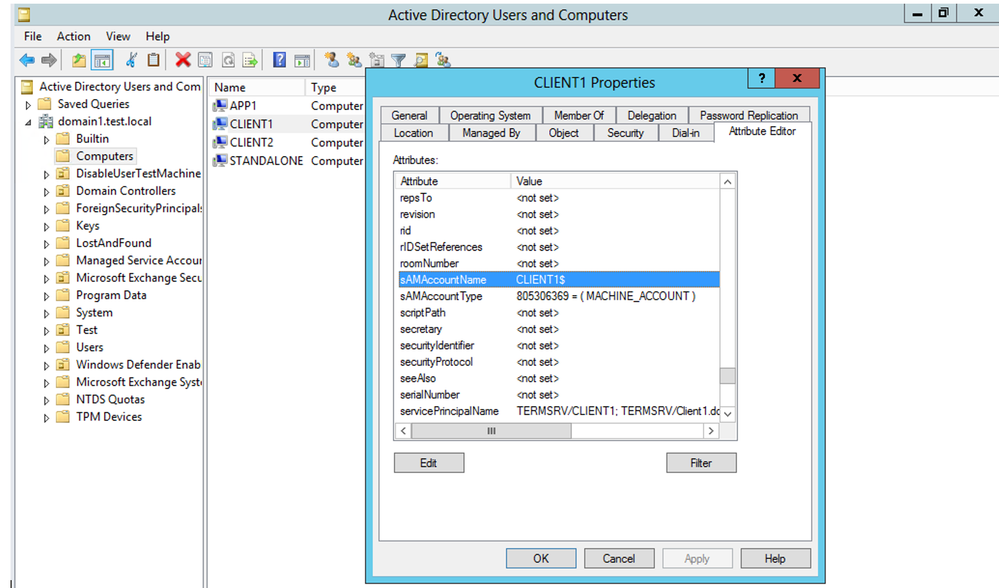
  • Open the properties of an object > Attribute Editor tab > Scroll down to sAMAccountName


1.png


(figure 1 – sAMAccountName of computer object)


In cases of computers – these sAMAccountName attributes usually end with “$” in their name. Traditionally, this $ was used to distinguish between user objects and computer objects. It is important to mention there are no restrictions or validations for changing this attribute to include or not include the $ sign.


With default settings, when the relevant patch is not applied, a normal user has permission to modify a machine account (up to 10 machines) and as its owner, they also have the permissions to edit its sAMAccountName attribute.


CVE-2021-42287 – KDC bamboozling


This CVE addresses a vulnerability that allows a potential attacker to impersonate the domain controllers directly.


When performing an authentication using Kerberos, Ticket-Granting-Ticket (TGT) and the following Ticket-Granting-Service (TGS) are being requested from the Key Distribution Center (KDC). In case a TGS was requested for an account that could not be found, the KDC will attempt to search it again with a trailing $.


For example, if there is a domain controller with a SAM account name of DC1$, an attacker may create a new machine account and rename its SAM account name to DC1, request a TGT, rename it again for a different name, and request a TGS ticket, presenting the TGT he has in hands.


When processing the TGS request, the KDC will fail its lookup for the requestor machine DC1 the attacker had created. Therefore, The KDC will perform another lookup appending a trailing $. The lookup will succeed. As a result, the KDC will issue the ticket using the privileges of DC1$.


Combining the two CVEs, an attacker with domain user credentials can leverage them for granting access as a domain admin user in a few simple steps.


Step by Step Guide to Identify Potential Compromised Computers via Advanced Hunting Query


  1. The sAMAccountName change is based on event 4662. Please make sure to enable it on the domain controller to catch such activities. Learn more of how to do it here.

  2. Open Microsoft 365 Defender and navigate to Advanced Hunting.

  3. Copy the following query (which is also available in the Microsoft 365 Defender GitHub Advanced Hunting query):

    IdentityDirectoryEvents
    | where Timestamp > ago(1d)
    | where ActionType == "SAM Account Name changed"
    | extend FROMSAM = parse_json(AdditionalFields)['FROM SAM Account Name']
    | extend TOSAM = parse_json(AdditionalFields)['TO SAM Account Name']
    | where (FROMSAM has "$" and TOSAM !has "$")
            or TOSAM in ("DC1", "DC2", "DC3", "DC4") // DC Names in the org
    | project Timestamp, Application, ActionType, TargetDeviceName, FROMSAM, TOSAM, ReportId, AdditionalFields


  4. Replace the marked area with the naming convention of your domain controllers

  5. Run the query and analyze the results which contains the affected devices. You can use Windows Event 4741 to find the creator of these machines, if they were newly created

  6. We recommend investigating these compromised computers and determine that they haven’t been weaponized.

  7. Make sure to update the devices with the following KBs:


The Microsoft Defender for Identity security team

AG force failover to DR, then reconnect to Prod nodes. Will AG keep Prod data or DR data ?

AG force failover to DR, then reconnect to Prod nodes. Will AG keep Prod data or DR data ?

This article is contributed. See the original author and article here.

I made a test in my testing environment. Below are my test results


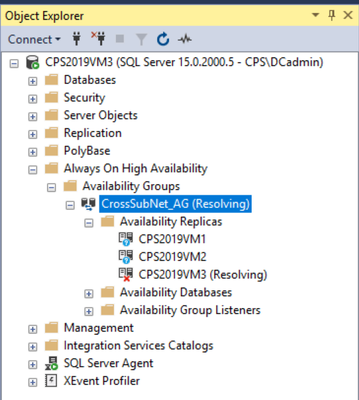
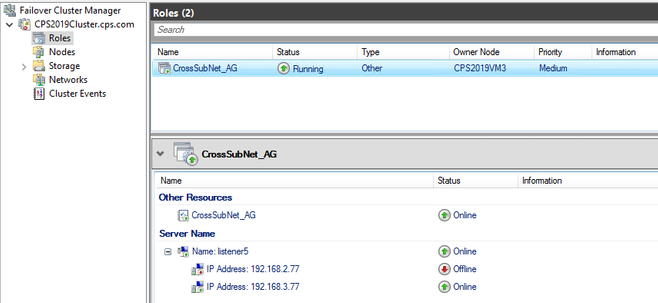
  1. I have 3 nodes in this Alwayson. CPS2019VM3 is DR node. I set firewall rules in VM1 and VM2 to block all network traffics from/to VM3. You can see VM3 became ‘Resolving’ state.


Bob_Cai_0-1639884690106.png


Bob_Cai_1-1639884690121.png


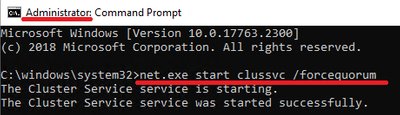
  1. I forced quorum using below command


Bob_Cai_2-1639884690130.png


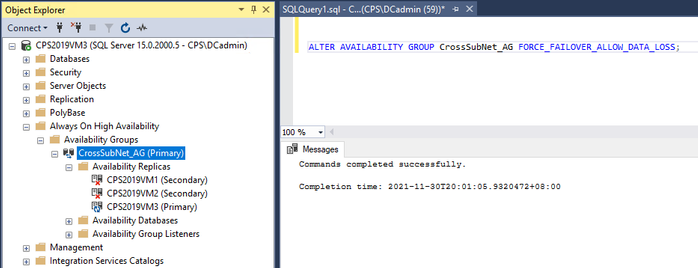
  1. Then I made a force failover allow data loss for AG.


Bob_Cai_3-1639884690135.png


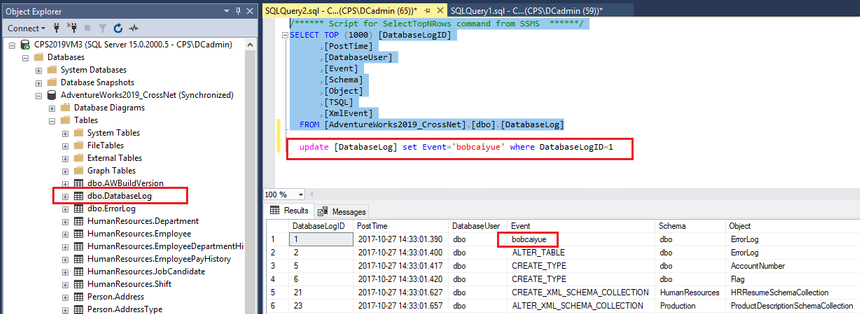
  1. I updated 1 row in VM3. I want to see if this data will be kept after resuming data movement.


Bob_Cai_4-1639884690147.png


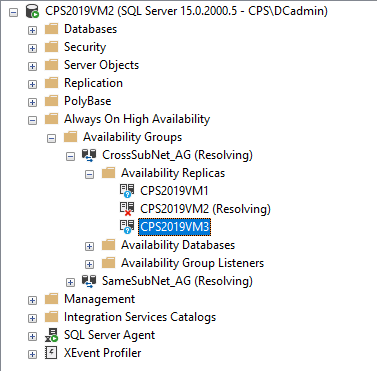
  1. Once I removed firewall rules and 2 subnets are re-connected. The original primary – VM2 became resolving state.  The original secondary – VM1 joined back AG immediately. VM3 was still primary.


Bob_Cai_5-1639884690149.png


  1. After a short while, VM2 joined back AG as secondary. I checked windows cluster. It was not ‘force quorum’ state anymore. The cluster has become normal mode.


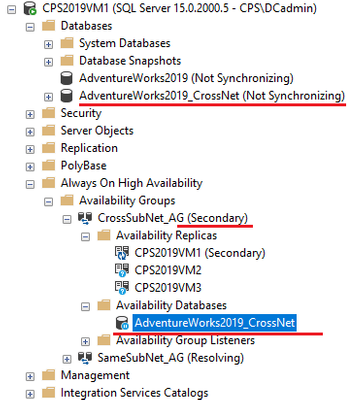
  1. As I expected, VM1 and VM2 data movement were suspended. If you want to abandon data change in VM1 and VM2. Please just resume data movement. Then above data change will be synchronized to VM1 and VM2.


Bob_Cai_6-1639884690152.png


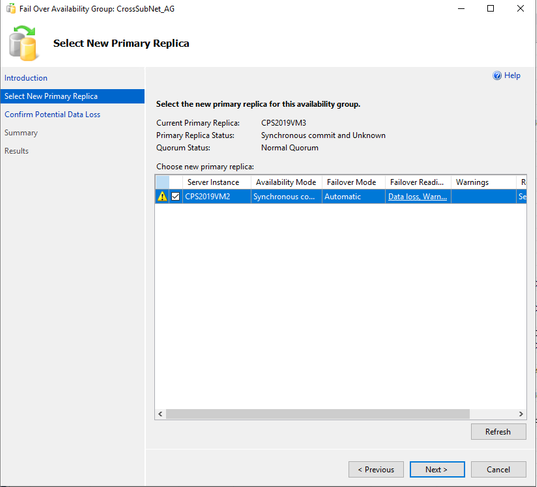
  1. If you want to keep data in VM1 and VM2, but abandon data in DR. You only need to do a manual failover allow data loss.


Bob_Cai_7-1639884690159.png


Conclusion
================


  1. Once you did an AG force failover allow data loss in DR. The DR node will always become primary node after re-connecting. No matter you reboot DR or not.


  1. Another 2 nodes in Prod site will join AG as secondary after re-connecting. Windows cluster will become normal quorum instead of force quorum automatically.


  1. If you want to keep data in DR, just resume data movement manually in secondary nodes.


  1. If you want to keep data in Prod site, do a manual failover allow data loss from DR node to Prod node.