by Contributed | Apr 1, 2021 | Technology
This article is contributed. See the original author and article here.
Reimagine Project Management with Microsoft
You’ve missed our live keynote, but there’s still lots of time to check out the Reimagine Project Management with Microsoft conference! Registration is free.
This conference includes our recorded keynote as well as 6+ hours of on-demand demos and product walkthroughs to help you discover and leverage new features and learn best practices to keep your projects on track. Our engineering team is hosting live roundtables and boardrooms now through June, so you still have a chance to connect with engineers and find out more about Project.
You can sign up for free to check out the entire conference here.
Microsoft Project Trivia
Last Month :
Thanks to everyone who put their guesses in our comments last month!
Question: What year was Microsoft Project first released?
Answer: 1984
Bonus: How many Windows applications did Microsoft release before Project?
Bonus Answer: Project was the third Windows-based application released by Microsoft.
This Month :
Question: Which type of resource is NOT supported by Project for the web?
A:
- Equipment
- Placeholder
- Crew
- Generic
Leave your answer in the comments and check back next month to see if you were right! If you want to learn more about resources & calendars in Project for the web, check out our blog post here.
New Features
- Export Timeline to PDF ~ All users can print their timeline information to a PDF file. You can do this by going to the Timeline view and clicking the ‘…’ menu in the top-right of the screen.
- Email Assignment Notifications ~ Rolling out now, your teammates will get an email whenever they are assigned a task in Project. Edit your notification settings by clicking on the gear icon in the top Office ribbon and clicking on the “Notification settings” under the Project heading.
- Project Accelerator ~ The Project Accelerator allows users to leverage Power Apps to manage the entire lifecycle of their projects, including demand management, financial goals, and more! For more information, check out our blog post on it here.
- Effort in the Project details pane ~ See overall effort on your project directly in the Project details pane, including the total effort, completed effort for your project, and remaining effort on your whole project.
Upcoming Features
- Import from Project Desktop ~ Import your .mpp files into Project for the web.
- Assign tasks to non-group members ~ Assign a task to someone without automatically adding them to your project group.
- Actions on Project Home ~ Copy, rename, export, or delete your project directly from Project Home, without needing to open it in the browser.
FAQ:
This section includes questions we see frequently, either through the in-app Feedback button or from comments on last month’s blog.
Q: Why can’t I change my working days on a project?
A: You actually can change your working days, using work hour templates in Power Apps. Check out our blog post here for more detailed information on how to change your working days.
Q: How can I change the group on a project in Project for the web?
A: You can’t change the group assigned to a project in Project for the web. To get around this, we suggest that you make a copy of the project. Copied projects aren’t shared to any groups, so you can assign your copy to the correct group.
We want to hear from you! If you have feedback, submit it by using the “Feedback” button in Project for the web. Make sure to include your email address so we can contact you directly with any follow up questions or comments. Your comments on our blog posts are also monitored, so let us know what you think about this or other articles.
![[Upcoming Webinar] Enabling customers in their CMMC journey](https://www.drware.com/wp-content/uploads/2021/04/fb_image-4.jpeg)
by Contributed | Apr 1, 2021 | Technology
This article is contributed. See the original author and article here.
Please join Microsoft, CORTAC Group and industry partners to hear about the current state of CMMC adoption and to learn about right-sized and cost-optimized solutions you can leverage in your Cybersecurity Maturity Model Certification (CMMC) journey.
The webinar begins with delivery of the current status of adoption of CMMC including updates and ideas to assist suppliers in their implementation of CMMC presented by Katie Arrington, CISO, Acquisition and Sustainment, United States Department of Defense. Joining us are several national industry experts discussing supply-chain challenges and risks.
We shift to how the DoD supply-chain can leverage industry leading solutions that are right-sized and cost-optimized. This enables small, medium, and large suppliers to achieve and stay CMMC compliant and keep existing business and grow future opportunities as an early CMMC adopter.
In closing, we’ll discuss industry resources available to suppliers empowering them through their journey. Impact Washington and the Pacific Northwest Defense Coalition (PNDC) will discuss how a public/private partnership has been successful in supporting many small and medium suppliers on their CMMC journey across the Pacific Northwest.
Register here today!
Speakers info found below :

Katie Arrington
CISO A&S
United States Department of Defense
Twitter: https://twitter.com/karringtonsc
LinkedIn: https://www.linkedin.com/in/katie-arrington-a6949425/

Ryan Bonner
@rybo3000
Compliance Consultant
DefCERT
LinkedIn: https://www.linkedin.com/in/rybonner/

Richard Wakeman
@RichardWakeman
Sr. Director of Aerospace & Defense, Microsoft Azure Global
Microsoft
LinkedIn: https://www.linkedin.com/in/wakeman/

Scott Edwards
CEO
Summit 7
LinkedIn: https://www.linkedin.com/in/mscottedwards/

Kate Kanapeaux
VP, Marketing & Strategic Partnerships
Pacific Northwest Defense Coalition
LinkedIn: https://www.linkedin.com/in/kate-kanapeaux/

Geoff Lawrence
Account Executive
Impact Washington
LinkedIn: https://www.linkedin.com/in/lawrencegeoff/

Jerry Leishman
@jerryleishman
Executive VP & National Security and Compliance Director
CORTAC
LinkedIn: https://www.linkedin.com/in/jerryleishman/

Saif Rahman
Leader: Cloud Security, Architecture and Application Risk
Quzara
LinkedIn: https://www.linkedin.com/in/saif-rahman-aa19814/

Kris Carter
VP, Technology & Compliance
Verify Inc.
LinkedIn: https://www.linkedin.com/in/kriscarter/
by Contributed | Apr 1, 2021 | Technology
This article is contributed. See the original author and article here.
In this episode of Data Exposed with David Trigano, learn how you can leverage new capabilities in Dynamic Data Masking, help your organization prevent unauthorized access to sensitive data, and gain control by masking it to a non-privileged user at different levels of your database.
Watch on Data Exposed
Resources:
Dynamic data masking
View/share our latest episodes on Channel 9 and YouTube!

by Contributed | Apr 1, 2021 | Technology
This article is contributed. See the original author and article here.
The Problem
Have you ever heard this from a client or colleague?
“I have a list of data on this one site that I need to move to another site.”
Just a simple list of data that they want moved from Site A to Site B. For such a simple request, the solution has, historically, always been anything but simple.
Until now! Thanks to PnP PowerShell, we can handle this request in 5 lines of PowerShell!
The Setup
Aside from the obvious set of SharePoint sites and a list, the only real prerequisite is to make sure you have PnP PowerShell installed.
This blog is running the newer PnP.PowerShell module, which I highly recommend you jump over to.
You can use the link from the introduction for the full instructions, or you can open up PowerShell and…
Install-Module -Name PnP.PowerShell
The Solution
In a previous blog post, we walked through the process of creating custom view formats to create a pretty nifty dashboard full of cards about members of the Fellowship of the Ring.
For the sake of this example, let’s pretend I made a mistake (which never happens IRL), and I put that list on the wrong site.
The solution is pretty straightforward. We’re basically going to create a PnP site template, add our list data to it, and then apply that template to our target site.
Step 1 – Connect to the Source Site
The first thing we’ll do is connect to the source site.
Connect-PnPOnline -Url https://constoso.sharepoint.com/sites/star-wars -Interactive
Step 2 – Create the Template
We actaully have two lists we need to copy. Fellowship Members is the list we care about but, since it contains a lookup column, we need to grab the Middle Earth Locales lookup list as well.
Get-PnPSiteTemplate -Out Lists.xml -ListsToExtract “Middle Earth Locales”, “Fellowship Members” -Handlers Lists
Step 3 – Get the List Data
We’ll use the Add-PnPDataRowToSiteTemplate cmdlet to populate our list instances with actual list item. Because we have two lists, we need to run the cmdlet twice. (So, technically, I guess we’re doing 6 lines of PowerShell. Shh!)
Add-PnPDataRowsToSiteTemplate -Path Lists.xml -List “Middle Earth Locales”
Add-PnPDataRowsToSiteTemplate -Path Lists.xml -List “Fellowship Members”
Step 4 – Connect to Target Site
Now we connect to the target site…
Connect-PnPOnline -Url https://constoso.sharepoint.com/sites/lotr -Interactive
Step 5 – Apply the Template
…and we apply our template using the Invoke-PnPSiteTemplate cmdlet.
Invoke-PnPSiteTemplate -Path Lists.xml
Game Over
Now you’ve got your list(s), complete with data, copied over to another site. All that’s left to do is get rid of the old one, if necessary.

by Contributed | Apr 1, 2021 | Technology
This article is contributed. See the original author and article here.
We are back to announce the release of Update Rollup 3(UR3) for System Center Operations Management 2019! UR3 comes fully loaded with extended auditing capabilities, performance improvements, Linux monitoring enhancements and web console improvements. Let’s dig into each of these aspects below.
Extended auditing capabilities
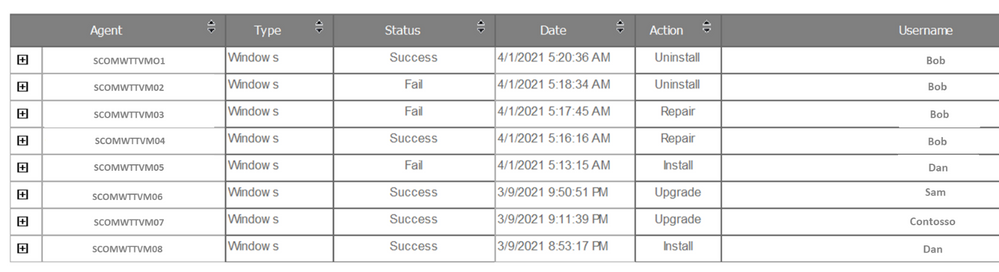
Operations Manager 2019 UR3 includes updates to the change tracking feature for management packs that was well received by our customers in UR2.For SCOM customers with large scale environments it is critical to be able to quickly identify root causes for issues caused due to changes done by any user in SCOM .The change tracking feature provides auditing capabilities for management packs that allows customers to track WHAT changes are done by WHOM and WHEN? This feature has been further rounded off to now support tracing of agents (windows or Linux agents) and the ability to track monitor health reset related actions. There are 2 new reports created in SCOM that show these changes.
- The Agent tracking report gives details on the actions such as install/uninstall/repair/upgrade carried out on Windows or Linux agents. A sample report can be seen below:
- Monitor Health Reset Tracking Report: Change tracking for monitor health reset is the next addition made in UR3. You can see health reset actions on the monitors as a consolidated view under Reports via the Monitor Health Reset Tracking report.

Users can export both the new reports as an Excel, PDF, Notepad and edit the exported content if needed. The reports can also be filtered by date/time, username, and monitor name.
Other enhancements to the change tracking feature include the ability to customize when and how the change tracking data from the Operations Manager DB is synced to the Data Warehouse, this helps in ensuring the DB performance is optimized and data is being stored for the appropriate periods of time based on legal requirements and Data Warehouse sizing . Customers can override the default values for synchronization of change tracking data in Data Warehouse and also customize the parameters of the groom change tracking data workflow through the Data Warehouse Job Status Information Grooming rule based on their specific needs.
Performance Improvements in SCOM
Operations Manager 2019 UR3 also comprises many performance improvements which has been one of the key focus areas for SCOM. Load time of the windows computer view in the operations console and load time of views when any changes are made to a user’s role privileges have been vastly improved by optimizing the relevant SQL queries.
In the past lack of grooming of maintenance mode staging table in Data Warehouse was leading to the increase in utilization of the database that was found to cause decrease in performance of the operations manager’s console. With the Operations Manager 2019 UR3, an index has been added to the maintenance mode staging table that facilitates the efficient grooming of this table leading to performance improvements of the operations console.
Linux Monitoring enhancements
We also continue to invest in enhancing the cross-platform monitoring capabilities of SCOM to cater to the rapidly increasing diverse environments of customers. Cross-platform related enhancements include support for RHEL 6 via the RHEL6 management pack and TLS 1.2 support for Solaris 10 SPARC in UR3. Reliability and performance improvements have correspondingly been added to the Linux agent, for example in earlier releases changes to log-level settings of OMI processes required an agent restart, in UR3 log-level settings can now be changed without the need for restarting the agent .In addition filters have been introduced in the Linux management pack to help users customize the discovery and monitoring scope of the entities of interest.
Last but not the least additional view options in web console widgets have been added and you can now sort the results columns in the Alert widget and State widget, along with being able to group the columns.
Additionally, fixes for critical defects continue to be a part of UR3. Find more details at the following link:
KB Article- Update Rollup 3 (UR3) for System Center 2019 Operations Manager. For the details of features that are released in Update Rollup 3, see the following Microsoft Docs article: What’s New in System Center Operations Manager 2019 Update Rollup 3. We sincerely hope you enjoy the SCOM 2019 Update Roll up 3. Upgrade Now!



Recent Comments