by Contributed | Apr 13, 2021 | Technology
This article is contributed. See the original author and article here.
We’re always adding to our training and certifications portfolio, and now you can discover the new role-based learning paths and modules that we released last month on Microsoft Learn. Look for new ways to build and deepen your skills and then validate them by earning certification. Check out our four new Power Automate modules and a new Finance module. This month, we also have a new learning path (with six modules) that explores how to upgrade from Dynamics AX 2012 to Finance and Operations apps. Work through these and other modules at your own pace. Using free, online training on Microsoft Learn, you can develop new skills to use on the job—and to show your employer that you’re ready to advance your career. If you need help figuring out which training to take, check out the Dynamics 365 learning paths page and the Microsoft Power Platform learning paths page, where you’ll find useful collections, learning paths to get you started, and popular modules.
The following learning paths and modules were released in March 2021.
Power Automate
Finance
Finance and Operations
Learning path/module
|
Role
|
Certification
|
Upgrade Dynamics AX 2012 to Finance and Operations apps
Six modules
|
Solution architect, functional consultant, developer, administrator
|
N/A
|
Compare integrations in Finance and Operations apps with Dynamics AX 2012
(A module in the “Upgrade Dynamics AX 2012 to Finance and Operations apps” learning path)
|
Solution architect, functional consultant, administrator
|
N/A
|
Compare reporting and analytics in Finance and Operations apps with Dynamics AX 2012
(A module in the “Upgrade Dynamics AX 2012 to Finance and Operations apps” learning path)
|
Solution architect, functional consultant, administrator
|
N/A
|
Get started with the extensibility framework in Finance and Operations apps
(A module in the “Upgrade Dynamics AX 2012 to Finance and Operations apps” learning path)
|
Developer, solution architect, functional consultant
|
N/A
|
Tools for code and data upgrade from Dynamics AX 2012 to Finance and Operations apps
(A module in the “Upgrade Dynamics AX 2012 to Finance and Operations apps” learning path)
|
Functional consultant, administrator, solution architect, developer
|
N/A
|
Industry Solutions
Dataverse for Teams
by Contributed | Apr 13, 2021 | Technology
This article is contributed. See the original author and article here.
Some start their workday in email. Some now in Microsoft Teams sifting chats. Either may define a person’s daily communication habits, but it’s the portal that is designed for everyone – the broadest, ongoing two-way dialog across your organization. It’s where people turn to find things like HR answers, IT help, or the latest company news. No matter, the company portal thrives and survives from the curated content top down and through dynamic creations from the bottom up and peer to peer. Let us explore this intranet communications end game and how it began.
In this episode, Chris and I talk with Sam Crewdson (senior program manager | Microsoft) about his role at Microsoft managing *Microsoft Web* (MSW) on SharePoint. MSW is Microsoft’s internal company portal, built for 163,000 full-time employees. We dig into MSW over time – from on-premises to the cloud, from classic to modern, establishing it as a home site, and now its role within Microsoft Viva Connections inside of Microsoft Teams. Lots of learning and insight from over the years across UX, innovation and consistent listening to employee feedback.
By tuning in, the clarity of your intranet plans, by example, over time, come into 20/20 focus.
Note: Scroll below to see screenshots of what MSW looks like today in a Web browser and in Microsoft Teams leveraging the new Viva Connections technology.
Listen to this episode below:
https://html5-player.libsyn.com/embed/episode/id/18701105/height/90/theme/custom/thumbnail/yes/direction/backward/render-playlist/no/custom-color/247bc1/
Subscribe to The Intrazone podcast! And listen to episode 64 now + show links and more below.
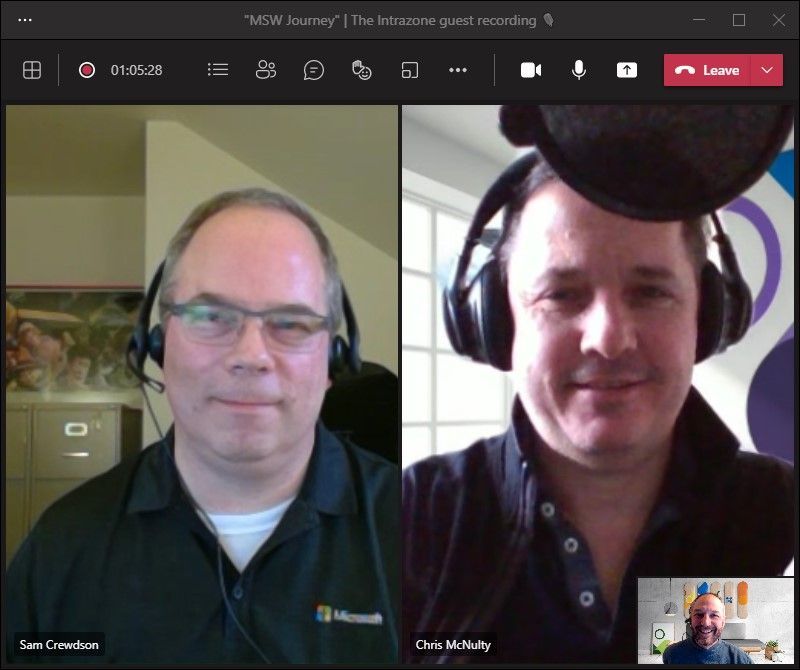
Intrazone guests and co-hosts – clockwise, starting on the left: Sam Crewdson (senior program manager | Microsoft) [guest], Chris McNulty (director | Microsoft) [co-host], and little Mark Kashman (senior product manager | Microsoft) [co-host].
A look at MSW now – both from a modern Web browser and in Teams via our internal use of Microsoft Viva Connections:
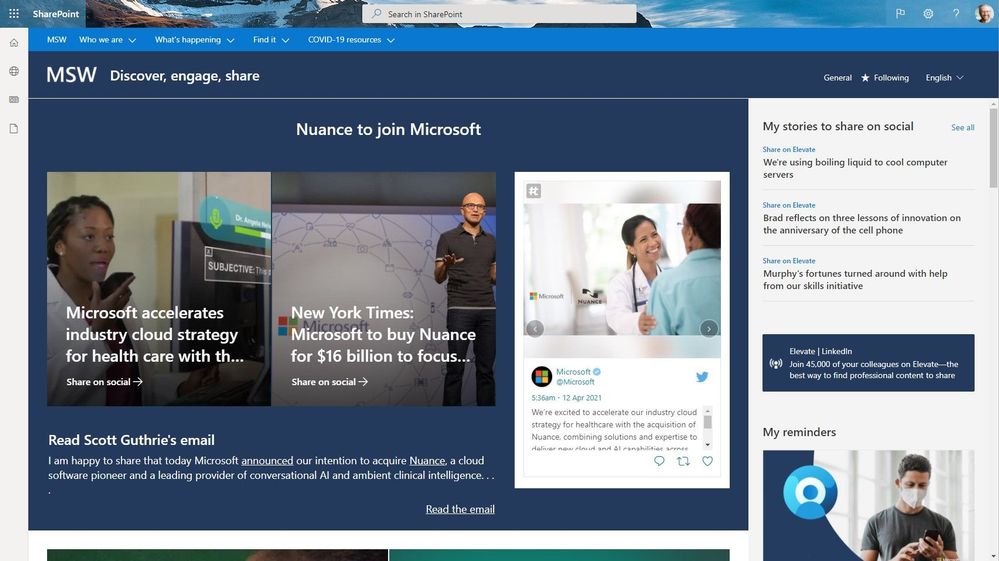 The Microsoft Web (MSW) portal when accessed through a modern browser.
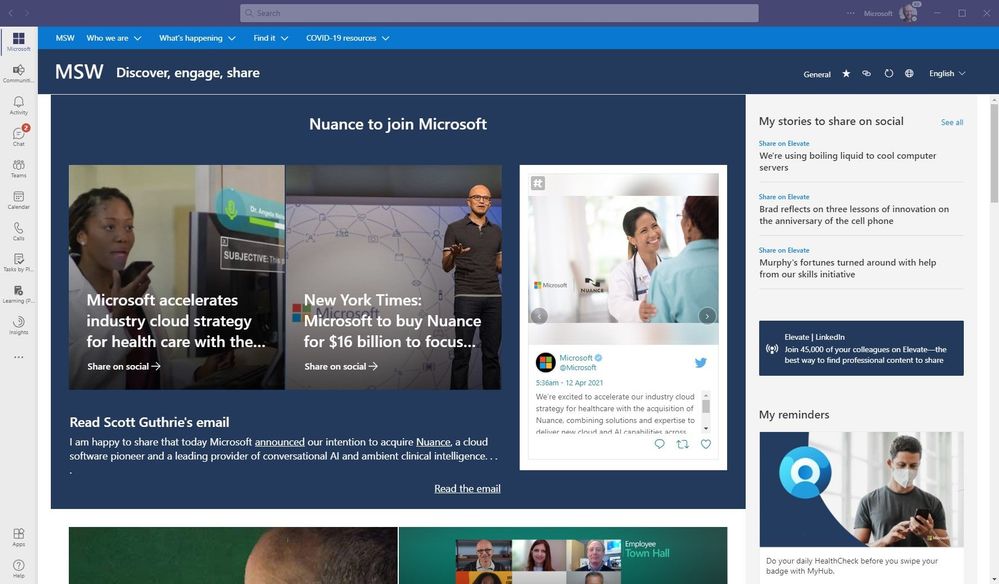 The Microsoft Web (MSW) portal when accessed from within Microsoft Teams enabled by Microsoft Viva Connections. Note how the Microsoft 365 suite bar experience adapts.
Note: both above entry points to MSW also provide access to the SharePoint app bar with global navigation (not shown for company privacy). To access them, a Microsoft employee need only click one of the top left icons under the main Microsoft 365 app launcher (The ‘Waffle’) in the Web view, and the Microsoft logo from the Teams view.
Links to important on-demand recordings and articles mentioned in this episode:
- Hosts and guests
- Articles and sites
- Events
Subscribe today!
Listen to the show! If you like what you hear, we’d love for you to Subscribe, Rate and Review it on iTunes or wherever you get your podcasts.
Be sure to visit our show page to hear all the episodes, access the show notes, and get bonus content. And stay connected to the SharePoint community blog where we’ll share more information per episode, guest insights, and take any questions from our listeners and SharePoint users (TheIntrazone@microsoft.com). We, too, welcome your ideas for future episodes topics and segments. Keep the discussion going in comments below; we’re hear to listen and grow.
Subscribe to The Intrazone podcast! And listen to episode 64 now.
Thanks for listening!
The SharePoint teams want you to unleash your magic, creativity, and productivity – and be compliant about it all. And we will do this, together, one compliance score point at a time.
The Intrazone links
+ Listen to other Microsoft podcasts at aka.ms/microsoft/podcasts.
![Left to right [The Intrazone co-hosts]: Chris McNulty, director (SharePoint/Viva – Microsoft) and Mark Kashman, senior product manager (SharePoint – Microsoft).](https://www.drware.com/wp-content/uploads/2021/04/fb_image-89.jpeg "Chris-Mark_in-studio.jpg") Left to right [The Intrazone co-hosts]: Chris McNulty, director (SharePoint/Viva – Microsoft) and Mark Kashman, senior product manager (SharePoint – Microsoft).
Left to right [The Intrazone co-hosts]: Chris McNulty, director (SharePoint/Viva – Microsoft) and Mark Kashman, senior product manager (SharePoint – Microsoft).
 The Intrazone, a show about the Microsoft 365 intelligent intranet (aka.ms/TheIntrazone)
by Contributed | Apr 13, 2021 | Technology
This article is contributed. See the original author and article here.
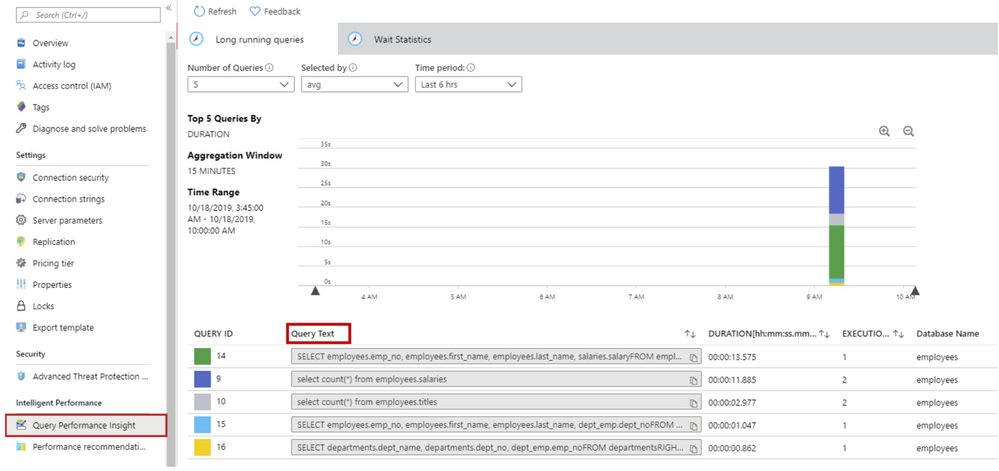
Query Performance Insight helps you to quickly identify what your longest running queries are, how they change over time, and what waits are affecting them. As a pre-requisite of using Query Performance Insight, data must exist in the Query Store.
As per the documentation, Owner or Contributor permissions are required to view the text of the queries in Query Performance Insight. With a Reader role, a user can view charts and tables but not query text.
QPI – query text
There are situations when, for security reasons, we might need to come up with a custom Azure Role-Based Access Control (RBAC) to
grant a user with minimal permissions in order to be able to view the query text, without giving full access with owner or contributor role. This is when the need of having a custom role with minimal permissions to access the query text arises.
To start a custom role from scratch, please follow the steps below.
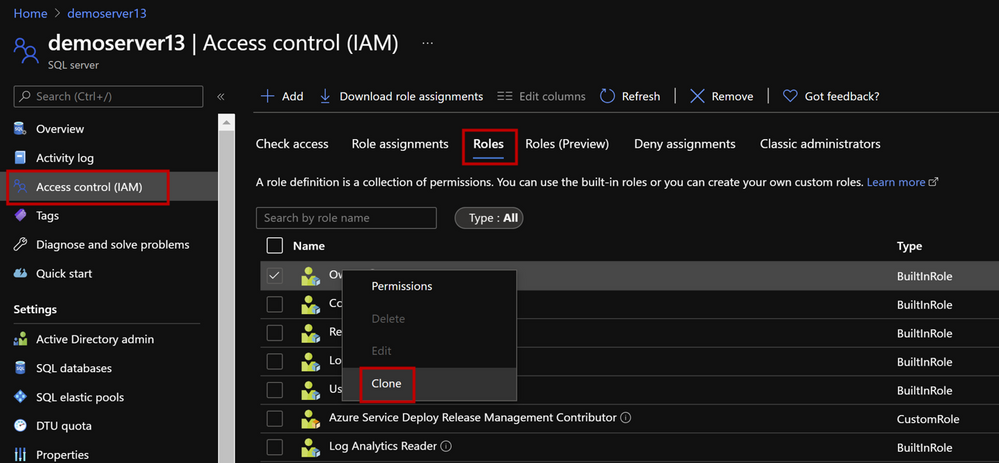
In the Azure portal, open the SQL Server where you need the custom role to be assignable and then open Access control (IAM).
Click Roles and then right-click on any role in the given list and select Clone.
 create custom role
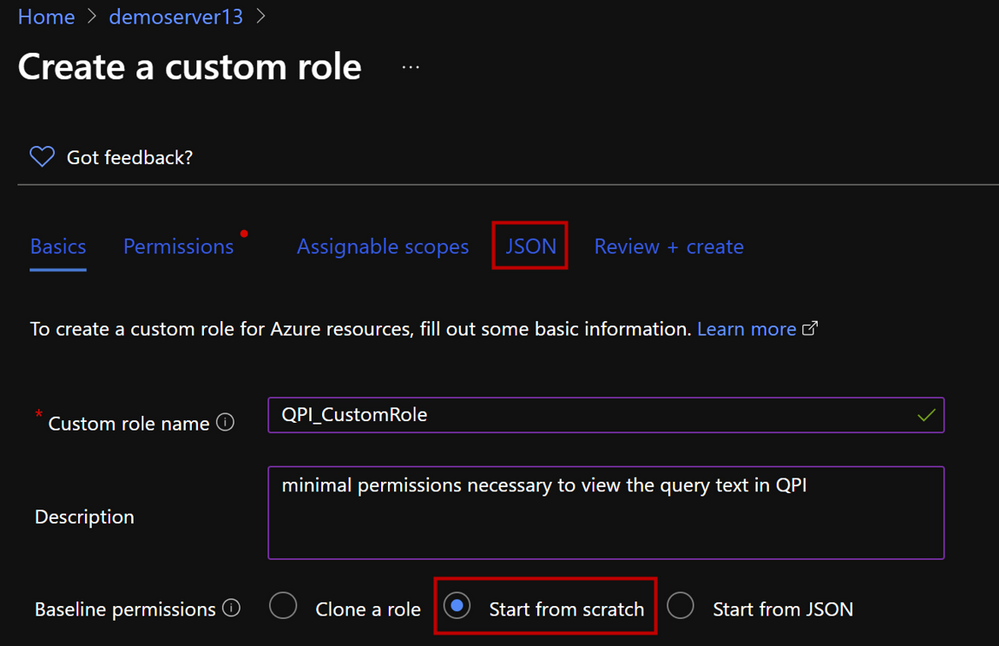
3. This opens the custom roles editor. Select Start from scratch option, then click on the JSON tab.
4. This will open your custom role in JSON format. Click on Edit button and add the following permissions to you JSON.
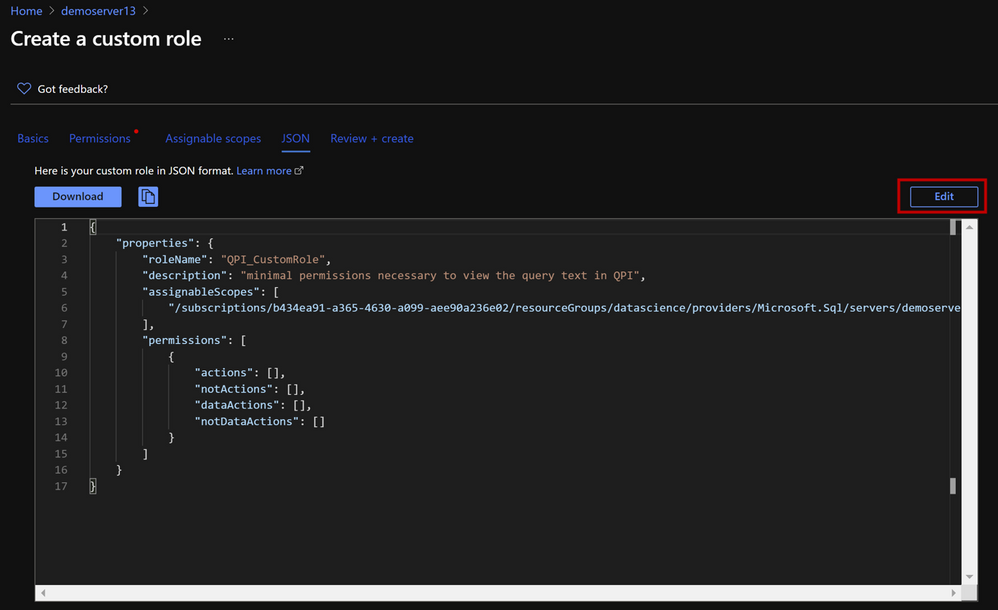 edit JSON
5. Add the following permissions and hit Save. You can also download your custom role as JSON file.
{
"properties": {
"roleName": "QPI_CustomRole",
"description": "minimal permissions necessary to view the query text in QPI",
"assignableScopes": [ "/subscriptions/<Subscription ID>/resourceGroups/<Resource Group Name>/providers/Microsoft.Sql/servers/<Server Name>" ],
"permissions": [
{
"actions": [
"Microsoft.Sql/servers/read",
"Microsoft.Sql/servers/automaticTuning/read",
"Microsoft.Support/*",
"Microsoft.Insights/metrics/read",
"Microsoft.Insights/metricDefinitions/read",
"Microsoft.Sql/locations/databaseOperationResults/read",
"Microsoft.Authorization/*/read",
"Microsoft.Sql/locations/*/read",
"Microsoft.Sql/servers/databases/read",
"Microsoft.Sql/servers/databases/providers/Microsoft.Insights/logDefinitions/read",
"Microsoft.Sql/servers/databases/queryStore/read",
"Microsoft.Sql/servers/databases/queryStore/write",
"Microsoft.Sql/servers/databases/queryStore/queryTexts/read",
"Microsoft.Sql/servers/databases/topQueries/read",
"Microsoft.Sql/servers/databases/topQueries/statistics/read",
"Microsoft.Sql/servers/databases/topQueries/queryText/action",
"Microsoft.Sql/servers/databases/schemas/tables/columns/read",
"Microsoft.Sql/servers/databases/schemas/read",
"Microsoft.Sql/servers/databases/schemas/tables/read",
"Microsoft.Sql/servers/databases/extensions/read"
],
"notActions": [
"Microsoft.Sql/managedInstances/databases/currentSensitivityLabels/*",
"Microsoft.Sql/managedInstances/databases/recommendedSensitivityLabels/*",
"Microsoft.Sql/managedInstances/databases/schemas/tables/columns/sensitivityLabels/*",
"Microsoft.Sql/managedInstances/databases/securityAlertPolicies/*",
"Microsoft.Sql/managedInstances/databases/sensitivityLabels/*",
"Microsoft.Sql/managedInstances/databases/vulnerabilityAssessments/*",
"Microsoft.Sql/managedInstances/securityAlertPolicies/*",
"Microsoft.Sql/managedInstances/vulnerabilityAssessments/*",
"Microsoft.Sql/servers/databases/auditingSettings/*",
"Microsoft.Sql/servers/databases/auditRecords/read",
"Microsoft.Sql/servers/databases/currentSensitivityLabels/*",
"Microsoft.Sql/servers/databases/dataMaskingPolicies/*",
"Microsoft.Sql/servers/databases/extendedAuditingSettings/*",
"Microsoft.Sql/servers/databases/recommendedSensitivityLabels/*",
"Microsoft.Sql/servers/databases/schemas/tables/columns/sensitivityLabels/*",
"Microsoft.Sql/servers/databases/securityAlertPolicies/*",
"Microsoft.Sql/servers/databases/securityMetrics/*",
"Microsoft.Sql/servers/databases/sensitivityLabels/*",
"Microsoft.Sql/servers/databases/vulnerabilityAssessments/*",
"Microsoft.Sql/servers/databases/vulnerabilityAssessmentScans/*",
"Microsoft.Sql/servers/databases/vulnerabilityAssessmentSettings/*",
"Microsoft.Sql/servers/vulnerabilityAssessments/*"
],
"dataActions": [],
"notDataActions": []
}
]
}
}
6. Click on Review + Create.
Note: If you get the error message “No more role assignments can be created (code: RoleAssignmentLimitExceeded)” when you try to assign a role, try to reduce the number of role assignments in the subscription. Azure supports up to 2000 role assignments per subscription. This limit includes role assignments at the subscription, resource group, and resource scopes. The 2000 role assignments limit per subscription is fixed and cannot be increased. Check the following document to see how you can reduce the number of role assignments.
Hope you’ll find it useful!
by Contributed | Apr 13, 2021 | Technology
This article is contributed. See the original author and article here.
In this blog post, we are excited to share how Microsoft Forms powers Approvals templates in Microsoft Teams, an important product for frontline workers to do their job. With Hannover Messe 2021 Digital Edition taking place this week, we shared our outlook on the future of hybrid work and the frontline in manufacturing, in which Approvals templates plays a part. We are grateful to contribute to Microsoft’s work with digital transformation in industries like manufacturing.
Microsoft Forms in Approvals Templates
In the past year, many organizations across the world have had to digitize workflows, including their approvals processes. With the Approvals app in Teams, you can create, manage, and share approvals directly from your workflow. To better support the your Approvals processes, we announced last month at Ignite that we are bringing Approvals templates to you starting at the end of April.
As a joint effort between Forms and the Modern Workplace Transformation team, Approvals templates enable you to customize your approvals processes easily. From time off requests to overtime requests, templates provide a repeatable structure for common approvals—which includes a form.
How does it work?
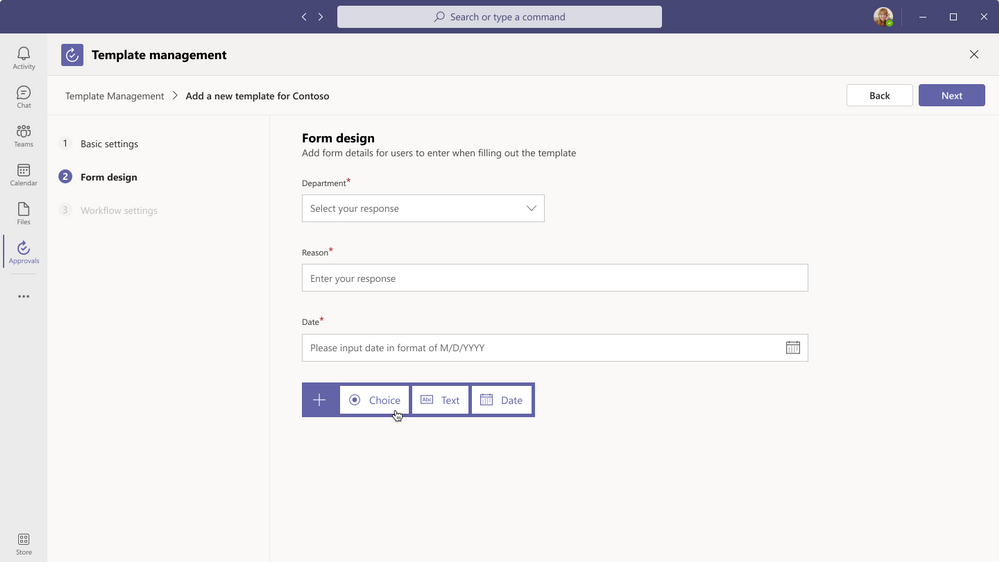
Create Approvals Template – Form Design
As an administrator or Teams channel owner, you can create and manage organization-wide Approvals templates on your desktop or tablet. Microsoft Forms is embedded in these templates as a white-label solution. As seen above, the forms authoring under step 2, “Form design,” is entirely powered by Forms.
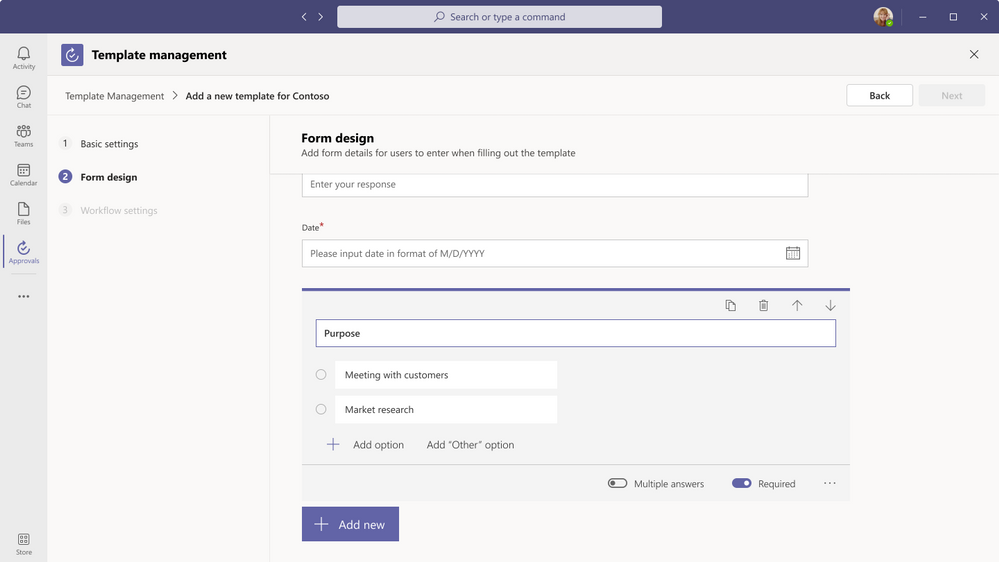 Form Design – Question Types
Currently, you can choose from three question types for your form: multiple-choice, open-text, and date. The experience of designing your form should feel familiar, as it is as simple as your typical form creation experience with Microsoft Forms.
Forms also powers the interface through which your team members fill out the approval request, as seen above. Using the template you created, they can quickly fill in their request on any-sized device.
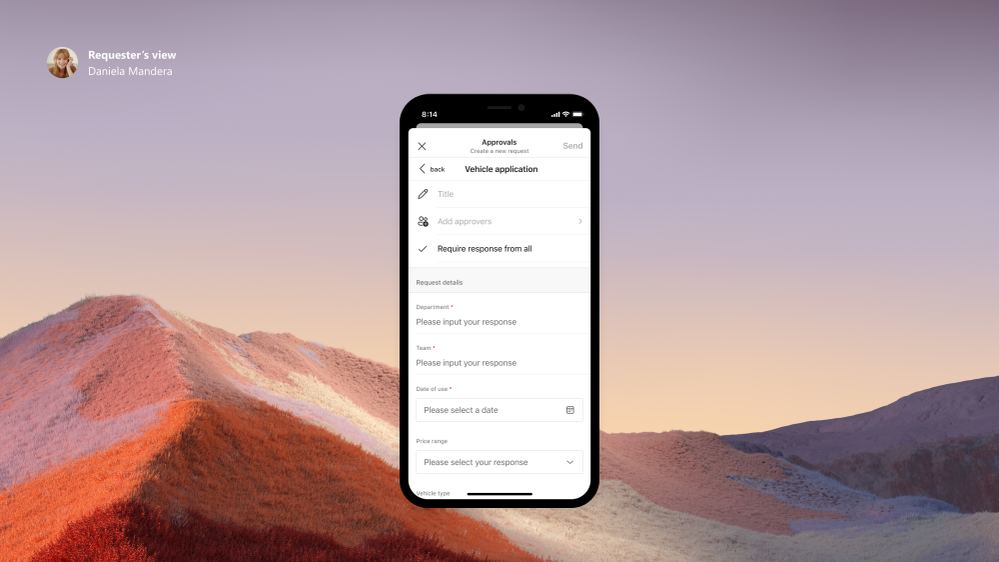 Submit Approval Request on Teams mobile
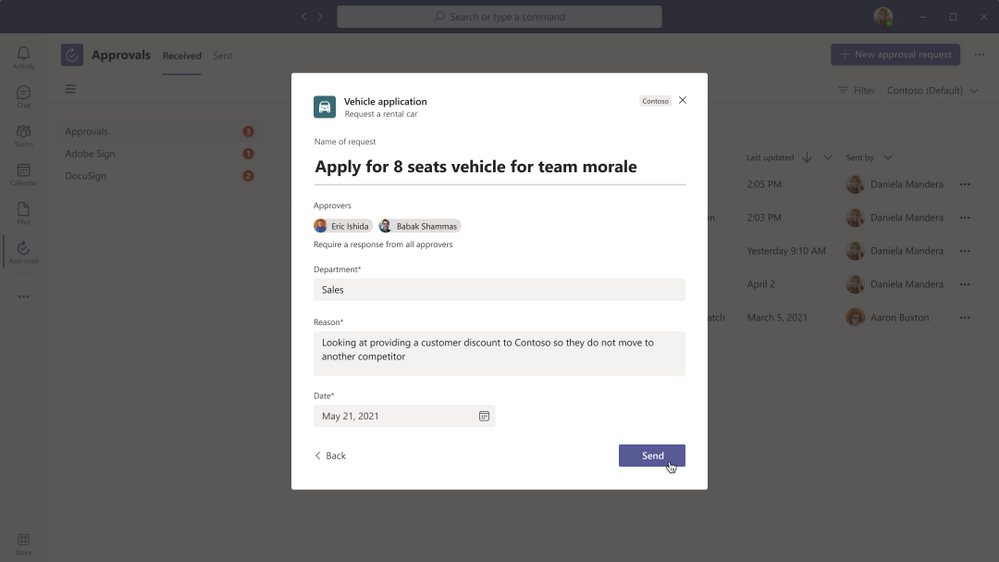 Submit Approval Request on Teams desktop
Forms’ anti-phishing protection, data validation, and user validation also help to ensure a safe and quality request.
After their submission, you, or the relevant approver on your team, can approve the request. At any point, you can view the aggregate information collected from these approvals, as well as export in a CSV file for further analysis in Excel.
We are delighted to contribute to a core part of Approvals templates and, more broadly, Microsoft’s vision to offer a simple, unified experience for essential workflows.
Additional Updates in Microsoft Forms
Enable Forms in PowerPoint Without Having to Deploy Office Add-Ins
Inserting a form or quiz into your PowerPoint on the desktop application has been an integration enjoyed by users in the Enterprise and Education worlds alike. However, if an organization did not want to enable all Office add-ins, its users were unable to add surveys or polls to their PowerPoint decks.
Thus, we are delighted to announce that IT administrators can now use Centralized Deployment to enable only the Forms add-in for PowerPoint, without enabling all Office add-ins. With this improvement, we believe this integration will become more widely accessible to you and your colleagues in your organization.
Send a Form Using a Shortened URL
Now, you can use a shorter URL when collecting responses to your form. A shortened link allows respondents to easily type and access the link; it also looks more shareable and professional.
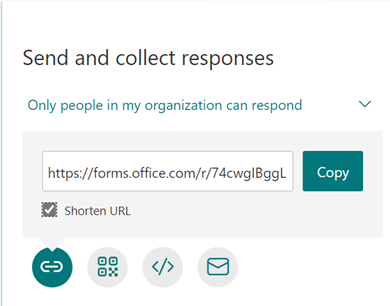 Shortened URL for Sharing Forms to Respondents
Next Steps
We hope you explore these latest updates as they become available to you. To learn more about Approvals in Teams, please see these quick introduction videos. If you have additional questions on Forms surveys, quizzes, or polls, please visit our Support page. You can also join discussions in the Microsoft Forms Tech Community and follow the Forms Blog to stay updated in the future.
by Contributed | Apr 13, 2021 | Technology
This article is contributed. See the original author and article here.
Microsoft 365 Patterns and Practices (PnP) Community April 2021 update is out with a summary of the latest guidance, samples, and solutions from Microsoft or from the community for the community. This article is a summary of all the different areas and topics around the community work we do around Microsoft 365 ecosystem during the past month. Thank you for being part of this success. Sharing is caring!
What is Microsoft 365 Community (PnP)
Microsoft 365 PnP is a nick-name for Microsoft 365 platform community activities coordinated by numerous teams inside of the Microsoft 365 engineering organizations. PnP is a community-driven open source initiative where Microsoft and external community members are sharing their learning’s around implementation practices for Microsoft 365.
Topics vary from Microsoft Viva, Microsoft Graph, Microsoft Teams, OneDrive and SharePoint. Active development and contributions happen in GitHub by providing contributions to the samples, reusable components, and documentation for different areas. PnP is owned and coordinated by Microsoft engineering, but this is work done by the community for the community.
The initiative is facilitated by Microsoft, but we have multiple community members as part of the PnP team (see team details in end of the article) and we are always looking to extend the PnP team with more community members. Notice that since this is open source community initiative, so there’s no SLAs for the support for the samples provided through GitHub. Obviously, all officially released components and libraries are under official support from Microsoft.
Some key statistics around Microsoft 365 PnP initiative from March 2021:
- Unique visitors during the past 2 weeks in PnP, OneDrive, Microsoft-Search, OfficeDev and SharePoint GitHub organization repositories – 72,290
- Overall unique contributors in the PnP, OneDrive, Microsoft-Search, OfficeDev and SharePoint GitHub organizations – 1,799
- Microsoft 365 Community (PnP) YouTube channel had 92,953 views with 6,835 hours of watch time and 21,597 subscribers
- Microsoft 365 Developer YouTube channel had 50,060 views with 3,628 hours of watch time and 13,111 subscribers
Most viewed videos in the Microsoft 365 Community (PnP) YouTube channel during March 2021:
- Working with Microsoft Lists (webinar) – Harini Saladi, Miceile Barrett, Chakkaradeep Chandran and Mark Kashman | 4,207
- Getting started with Site Designs in SharePoint Online – Laura Kokkarinen (Sulava) | 3,974
- Architecting Your Intranet | Melissa Torres (Microsoft) | 2,659
- Building a beautifully designed Intranet with SharePoint – latest design and branding capabilities | Cathy Dew (Microsoft) & Katie Swanson (Microsoft) | 2,431
- SharePoint App Bar – Global navigation and wayfinding | Melissa Torres (Microsoft) | 2,263
- Introducing: New Employee Onboarding – a Microsoft Teams app template | Nidhi Sharma (Microsoft) | 2,227
- SharePoint Framework Tutorial 1 – HelloWorld WebPart | 1,764
- SharePoint at 20 :birthday_cake: | 1,731
- Migration to SharePoint, OneDrive, and Microsoft Teams in Microsoft 365, free and easy – Hani Loza (Microsoft) & Eric Warnke (Microsoft) | 1,718
- Latest on Power Automate integration within SharePoint Online | Chakkaradeep Chandran (Microsoft) | 1,678
Most viewed videos in the Microsoft 365 Developer YouTube channel during March 2021:
- Microsoft Teams community call – March 2021 | 3,817
- Authenticate and connect with Microsoft Graph – June 2019 | 1,639
- Build Outlook Add-ins that integrate your solution seamlessly into your users’ Outlook experience | Juan Balmori, Hitesh Manwar – 1,321
- An introduction to Microsoft Graph for developers – Part I – Getting started – October 2019 | 1,218
- Getting Started with Microsoft Graph and Application Registration | 1,020
- Create interactive conversational bots for Microsoft Teams | 954
- Build and Office add-in using modern JavaScript tools and technologies | 924
- Accessing Files with Microsoft Graph | 772
- Getting Started with Microsoft Graph | 767
- Develop multi-tenant applications with Microsoft Identity Platform – April 2020 | 743
Main resources around Microsoft 365 Community:
Latest Dev Blog posts
Here are the latest blog posts and announcements around Microsoft 365 development topics from https://developer.microsoft.com/en-us/microsoft-365/blogs.
Latest community posts at https://aka.ms/m365pnp/community/blog
Community call recording blog posts:
PnP Weekly video blog / podcast shows:
We highly recommend also subscribing on the Microsoft 365 Developer Podcast show, which is a great show covering also latest development in the Microsoft 365 platform from developer and extensibility perspective.
Community Calls
There are numerous different community calls on different areas. All calls are being recorded and published either from Microsoft 365 Developer or Microsoft 365 Community (PnP) YouTube channels. Recordings are typically released within the following 24 hours after the call. You can find a detailed agenda and links to specific covered topics on blog post articles at the Microsoft 365 developer blog when the videos are published.
If you are interested in doing a live demo of your solution or sample in these calls, please do reach out to the PnP Team members (contacts later in this post) and they are able to help with the right setup. These are great opportunities to gain visibility for example for existing MVPs, for community members who would like to be MVPs in the future or any community member who’d like to share some of their learnings.
Microsoft 365 Community (PnP) Ecosystem in GitHub
Most of the community driven repositories are in the PnP GitHub organization as samples are not product specifics as they can contain numerous different solutions or the solution works in multiple different applications.
- PnPjs – PnPjs Framework repository
- CLI Microsoft 365 – Cross-OS command line interface to manage Office 365 tenant settings
- generator-spfx – Open-source Yeoman generator which extends the out-of-the-box Yeoman generator for SharePoint with additional capabilities
- generator-teams – Open-source Microsoft Teams Yeoman generator – Bots, Messaging Extensions, Tabs, Connectors, Outgoing Web hooks and more
- teams-dev-samples – Microsoft Teams targeted samples from community and Microsoft engineering
- Sharing is Caring – Getting started on learning how to contribute and be active on the community from GitHub perspective.
- pnpcore – The PnP Core SDK is an SDK designed to work against Microsoft 365 with Microsoft Graph API first approach
- powershell – PnP PowerShell module which is PowerShell Core module targeted for Microsoft 365
- pnpframework – PnP Framework is a .Net Standard 2.0 library targeting Microsoft 365 containing the PnP Provisioning engine and a ton of other useful extensions
- https://github.com/pnp/teams-dev-samples – Samples around the Microsoft Teams development models from Microsoft and from the community
- sp-dev-fx-webparts – Client-side web part samples from community and Microsoft engineering
- sp-dev-fx-extensions – Samples and tutorial code around SharePoint Framework Extensions
- sp-dev-fx-library-components – Samples and tutorial code around the SharePoint Framework library components
- sp-starter-kit – Starter kit solution for SharePoint modern experiences
- sp-dev-fx-vs-extension – Open source Visual Studio IDE extension for creating SharePoint Framework solutions in the Visual Studio 2015 or 2017
- sp-dev-build-extensions – Different build extensions like gulp tasks and gulp plugins from the community and engineering around SharePoint development
- sp-dev-solutions – Repository for more polished and fine-tuned reusable solutions build with SharePoint Framework
- sp-dev-samples – Repository for other samples related on the SharePoint development topics – WebHooks etc.
- sp-dev-fx-controls-react – Reusable content controls for SharePoint Framework solutions build with React
- sp-dev-fx-property-controls – Reusable property pane controls to be used in web parts
- sp-dev-list-formatting – Open-source community-driven repository for the column and view formatting JSON definitions
- sp-dev-site-scripts – Open-source community-driven repository for community Site Designs and Site Scripts
- sp-dev-modernization – Tooling and guidance around modernizing SharePoint from classic to modern
- sp-power-platform-solutions – Solution and sample code for SharePoint Power Platform solutions
- powerfx-samples – Samples that demonstrate different usage patterns for the Power Fx low-code programming language
All SharePoint specific repositories or services supported directly by Microsoft are located in the SharePoint GitHub organization
PnP specific repositories – solution designs and tooling
- PnP – Main repository for SP add-in, Microsoft Graph etc. samples
- PnP-Sites-Core – Office Dev PnP Core component
- PnP-PowerShell – Office Dev PnP PowerShell Cmdlets
- PnP-Tools – Tools and scripts targeted more for IT Pro’s and for on-premises for SP2013 and SP2016
- PnP-Provisioning-Schema – PnP Provisioning engine schema repository
- PnP-IdentityModel – Open source replacement of Microsoft.IdentityModel.Extensions.dll
Repositories in the GitHub Microsoft Search organization controlled by the PnP initiative
Other related resources from GitHub
What’s supportability story around the community tooling and assets?
Following statements apply across all of the community lead and contributed samples and solutions, including samples, core component(s) and solutions, like SharePoint Starter Kit, yo teams or PnP PowerShell. All Microsoft released SDKs and tools are supported based on the specific tool policies.
- PnP guidance and samples are created by Microsoft & by the Community
- PnP guidance and samples are maintained by Microsoft & community
- PnP uses supported and recommended techniques
- PnP is an open-source initiative by the community – people who work on the initiative for the benefit of others, have their normal day job as well
- PnP is NOT a product and therefore it’s not supported by Premier Support or other official support channels
- PnP is supported in similar ways as other open source projects done by Microsoft with support from the community by the community
- There are numerous partners that utilize PnP within their solutions for customers. Support for this is provided by the Partner. When PnP material is used in deployments, we recommend being clear with your customer/deployment owner on the support model
Please see the specifics on the supportability on the tool, SDK or component repository or download page.
Microsoft 365 PnP team model
In April 2020 we announced our new Microsoft 365 PnP team model and grew the MVP team quite significantly. PnP model exists for having more efficient engagement between Microsoft engineering and community members. Let’s build things together. Your contributions and feedback is always welcome! During August, we also crew the team with 5 new members. PnP Team coordinates and leads the different open-source and community efforts we execute in the Microsoft 365 platform.
We welcome all community members to get involved on the community and open-source efforts. Your input do matter!
Got feedback, suggestions or ideas? – Please let us know. Everything we do in this program is for your benefit. Feedback and ideas are more than welcome so that we can adjust the process for benefitting you even more.
Area-specific updates
These are different areas which are closely involved on the community work across the PnP initiative. Some are lead and coordinated by engineering organizations, some are coordinated by the community and MVPs.
Microsoft Graph Toolkit
Microsoft Graph Toolkit is engineering lead initiative, which works closely with the community on the open-source areas. The Microsoft Graph Toolkit is a collection of reusable, framework-agnostic web components and helpers for accessing and working with Microsoft Graph. The components are fully functional right of out of the box, with built in providers that authenticate with and fetch data from Microsoft Graph.
All the latest updates on the Microsoft Graph Toolkit is being presented in our bi-weekly Microsoft 365 Generic Dev community call, including the latest community contributors.
Microsoft 365 Community docs
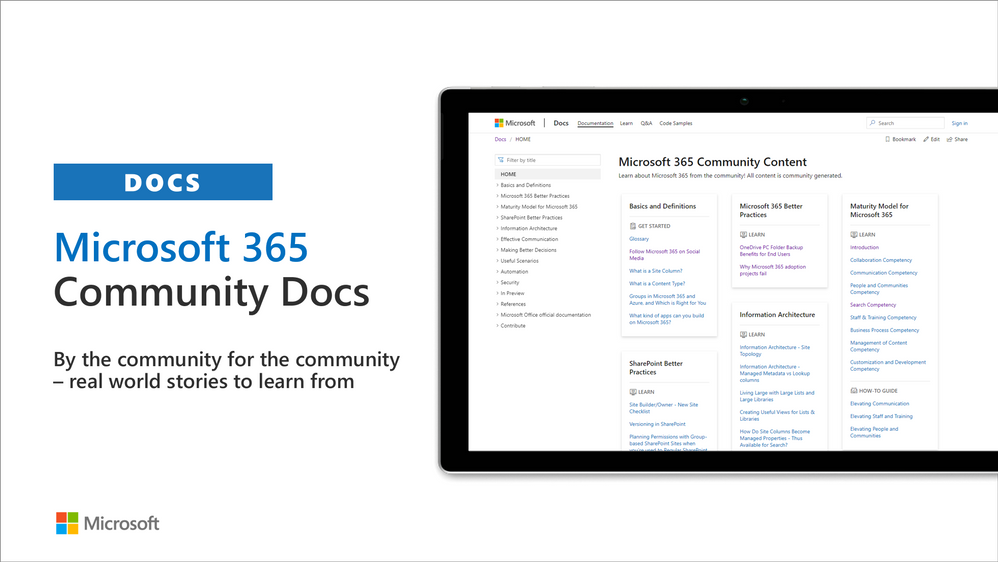
Community docs model was announced in the April 2020 and it’s great to see the interest for community to help each other by providing new guidance on the non-dev areas. See more on the announcement from the SharePoint blog – Announcing the Microsoft 365 Community Docs. We do welcome contributions from the community – our objective is to build a valuable location for articles from Microsoft and community together.
Latest updates on this area as follows:
Have ideas for articles or want to contribute yourself? – Get involved! Here are also some additional resources explaining the model more detailed.
SharePoint Framework development samples
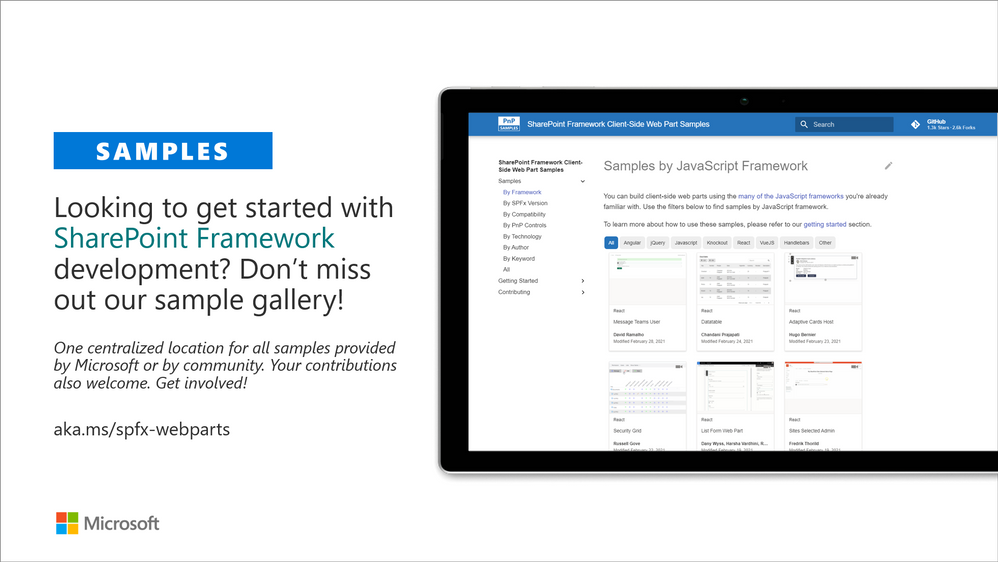
These are the updated SharePoint Framework samples which are available from the the different repositories.
How to find what’s relevant for you? Take advantage of our SharePoint Framework web part and extension sample galleries – includes also solutions which work in Microsoft Teams
Microsoft Teams community samples
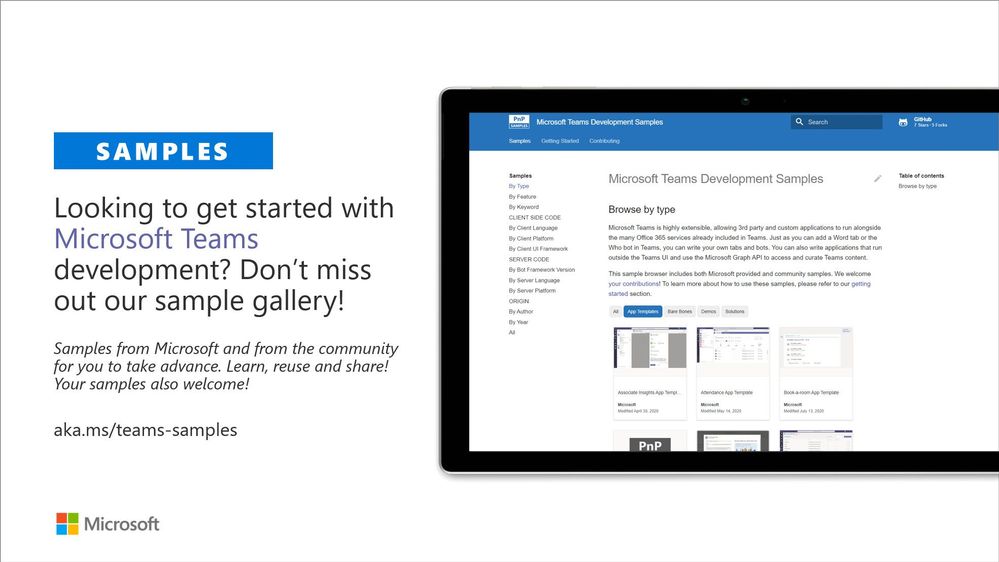
These are samples which have been contributed on the community samples since last summary. We do welcome all Microsoft Teams samples to this gallery. They can be implemented using in any technology.
- Numerous updates on the existing samples provided by community and Microsoft
If you are interested on Microsoft Teams samples, we have just released also new Microsoft Teams sample gallery. Contributions to Microsoft Teams samples is also more than welcome. This gallery already surfaces all Microsoft samples, Microsoft Teams app templates and community samples.
Sharing is Caring initiative
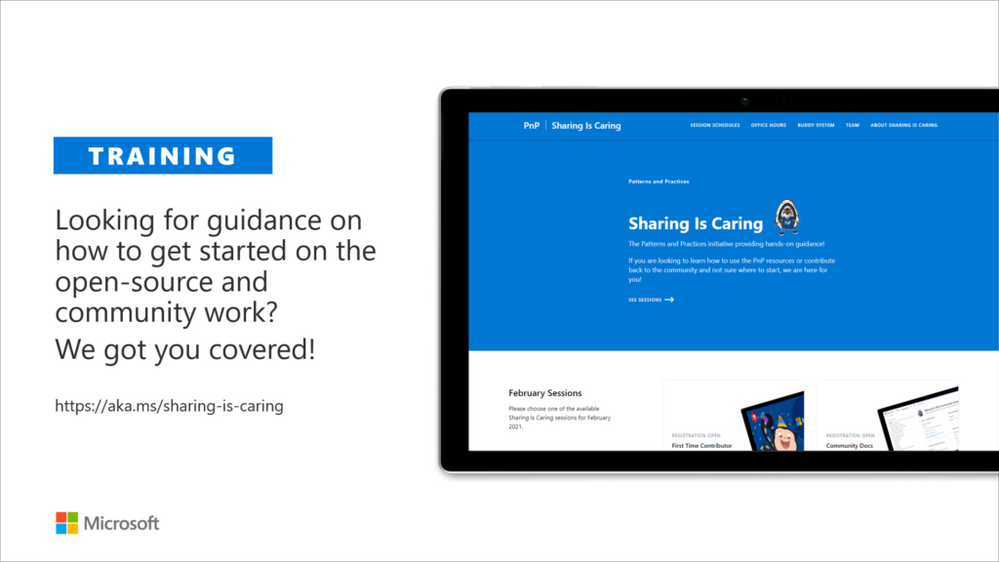
The “Sharing Is Caring” imitative is targeted for learning the basics around making changes in Microsoft Docs, in GitHub, submitting pull requests to the PnP repositories and in GitHub in general. Take advantage of this instructor lead training for learning how to contribute to docs or to open-source solutions. Everyone is welcome to learn how to get started on contributing to open-source docs or code!
- See more from the guidance documentation – including all upcoming instructor lead sessions which you can participate!
Different Microsoft 365 related open-source initiatives build together with the community
See exact details on the latest updates from the specific open-source project release notes. You can also follow up on the project updates from our community calls. There are numerous active projects which are releasing new versions with the community even on weekly basis. Get involved!
- Microsoft Look Book – Discover the modern experiences you can build with SharePoint in Microsoft 365. Look book provides design examples for SharePoint Online which can be automatically provisioned to any tenant in the world. See more from https://lookbook.microsoft.com. This service is also provided as open-source solution sample from GitHub.
- yo teams – Open-source Yeoman generator for Microsoft Teams extensibility. Supports creation of bots, messaging extensions, tabs (with SSO), connectors and outgoing Webhooks. See more from https://aka.ms/yoteams.
- PnP Framework – .NET Standard 2.0 SDK containing the classic PnP Sites Core features for SharePoint Online. More around this package from GitHub.
- PnP Core SDK – The PnP Core SDK is an SDK designed to work for Microsoft 365 with Graph API first approach. It provides a unified object model for working with SharePoint Online and Teams which is agnostic to the underlying API’s being called. See more around the SDK from documentation.
- PnP PowerShell – PnP PowerShell is a .NET Core 3.1 / .NET Framework 4.6.1 based PowerShell Module providing over 400 cmdlets that work with Microsoft 365 environments and more specifically SharePoint Online and Microsoft Teams. See more details from documentation.
- Reusable SharePoint Framework controls – Reusable controls for SharePoint Framework web part and extension development. Separate projects for React content controls and Property Pane controls for web parts. These controls are using Office UI Fabric React controls under the covers and they are SharePoint aware to increase the productivity of developers.
- Office 365 CLI – Using the Office 365 CLI, you can manage your Microsoft Office 365 tenant and SharePoint Framework projects on any platform. See release notes for the latest updates.
- PnPJs – PnPJs encapsulates SharePoint REST APIs and provides a fluent and easily usable interface for querying data from SharePoint sites. It’s a replacement of already deprecated pnp-js-core library. See changelog for the latest updates.
- PnP Provisioning Engine and PnP CSOM Core – PnP provisioning engine is part of the PnP CSOM extension. They encapsulate complex business driven operations behind easily usable API surface, which extends out-of-the-box CSOM NuGet packages. See changelog for the latest updates.
- PnP PowerShell – PnP PowerShell cmdlets are open-source complement for the SharePoint Online cmdlets. There are more than 300 different cmdlets to use and you can use them to manage tenant settings or to manipulate actual SharePoint sites. They See changelog for the latest updates.
- PnP Modern Search solution – The PnP ‘Modern Search’ solution is a set of SharePoint Online modern Web Parts allowing SharePoint super users, webmasters and developers to create highly flexible and personalized search based experiences in minutes. See more details on the different supported capabilities from https://aka.ms/pnp-search.
- Modernization tooling – All tools and guidance on helping you to transform you SharePoint to modern experiences from http://aka.ms/sppnp-modernize.
- SharePoint Starter Kit v2 – Building modern experiences with Microsoft Teams flavors for SharePoint Online and SharePoint 2019 – reference solution in GitHub.
- List formatting definitions – Community contributed samples around the column and view formatting in GitHub.
- Site Designs and Site Scripts – Community contributed samples around SharePoint Site Designs and Site Scripts in GitHub.
- DevOps tooling and scripts – Community contributed scripts and tooling automation around DevOps topics (CI/CD) in GitHub.
- Teams provisioning solution – Set of open-source Azure Functions for Microsoft Teams provisioning. See more details from GitHub.
Documentation updates
Please see all the Microsoft 365 development documentation updates from the related documentation sets and repositories as listed below:
Microsoft 365 Dev and Microsoft 365 Community (PnP) YouTube video channels
You can find all Microsoft 365 related videos on our YouTube Channel at http://aka.ms/m365pnp-videos or at Microsoft 365 Dev. These channels contains already a significant amount of detailed training material, demo videos, and community call recordings.
Here are the new Microsoft demo or guidance videos released since the last monthly summary:
Community demos as following:
PnP Weekly sessions – Community visitors and latest articles from Microsoft and community on Microsoft 365 topics.
Key contributors to the April 2021 update
Here’s the list of active contributors (in alphabetical order) since last release details in GitHub repositories or community channels. PnP is really about building tooling and knowledge together with the community for the community, so your contributions are highly valued across the Microsoft 365 customers, partners and obviously also at Microsoft.
Thank you for your assistance and contributions on behalf of the community. You are truly making a difference! If we missed someone, please let us know.
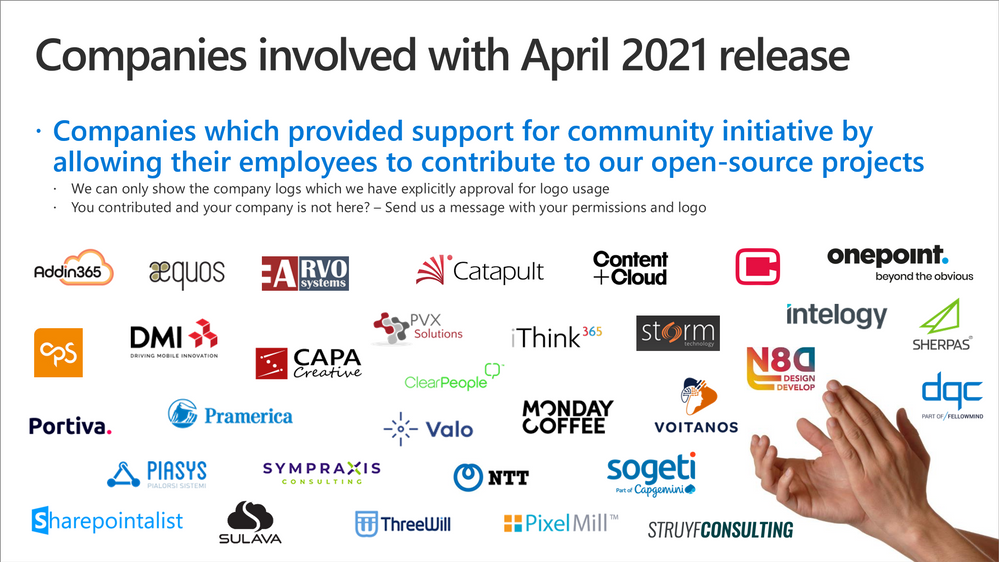
Companies: Here’s the companies, which provided support for PnP initiative for this month by allowing their employees working for the benefit of others in the community. There were also people who contributed from other companies during last month, but we did not get their logos and approval to show them in time for these communications. If you still want your logo for this month’s release, please let us know and share the logo with us. Thx.
Microsoft people: Here’s the list of Microsoft people who have been closely involved with the PnP work during last month.
PnP Team
PnP Team manages the PnP community work in the GitHub and also coordinates different open-source projects around Microsoft 365 topics. PnP Team members have a significant impact on driving adoption of Microsoft 365 topics. They have shown their commitment to the open-source and community-driven work by constantly contributing to the benefit of the others in the community.
Thank you for all that you do!
Here are the Microsoft Internal PnP Core team members:
Next steps
See all of the available community calls, tools, components and other assets from https://aka.ms/m365pnp. Get involved!
Got ideas or feedback on the topics to cover, additional partnerships, product feature capabilities? – let us know. Your input is important for us, so that we can support your journey in Microsoft 365.
“Sharing is caring”
Microsoft 365 Community (PnP) – April 13th 2021


Recent Comments