
by Contributed | Apr 21, 2021 | Technology
This article is contributed. See the original author and article here.
Scenario: The customer wants to configure the notebook to run without using the AAD configuration. Just using MSI.
Synapse uses Azure Active Directory (AAD) passthrough by default for authentication between resources.
Requisites:
- Synapse ( literally the workspace) MSI must have the RBAC – Storage Blob Data Contributor permission on the Storage Account. That is also the prerequisite documented
- However, I worked with a customer that setup ACL -> Read and execute permission on the Storage Account <I also tested and it works>
- It should work with or without the firewall on the storage. I mean firewall enable is not mandatory.
- However, If you by security reasons enabled the firewall on the storage be sure of the following:
ACL
Step 1:
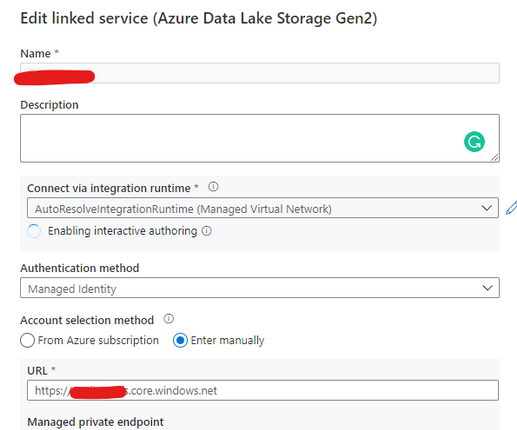
Open Synapse Studio and configure the Linked Server to this storage account using MSI:
Step 2:
Using config set point the notebook to the linked server as documented:
val linked_service_name = "LinkedServerName"
// replace with your linked service name


// Allow SPARK to access from Blob remotely
val sc = spark.sparkContext
spark.conf.set("spark.storage.synapse.linkedServiceName", linked_service_name)
spark.conf.set("fs.azure.account.oauth.provider.type", "com.microsoft.azure.synapse.tokenlibrary.LinkedServiceBasedTokenProvider")
//replace the container and storage account names
val df = "abfss://Container@StorageAccount.dfs.core.windows.net/"

print("Remote blob path: " + df)

mssparkutils.fs.ls(df)
In my example, I am using mssparkutils to list the container.
You can read more about mssparkutils here: Introduction to Microsoft Spark utilities – Azure Synapse Analytics | Microsoft Docs
Additionally:
This link will cover details about ADF, which is not the focus of this post. But, in terms of MSI it covers relevant permissions:
Copy and transform data in Azure Blob storage – Azure Data Factory | Microsoft Docs
Grant the managed identity permission in Azure Blob storage. For more information on the roles, see Use the Azure portal to assign an Azure role for access to blob and queue data.
- As source, in Access control (IAM), grant at least the Storage Blob Data Reader role.
- As sink, in Access control (IAM), grant at least the Storage Blob Data Contributor role.
That is it!
Liliam UK Engineer

by Contributed | Apr 21, 2021 | Technology
This article is contributed. See the original author and article here.
Welcome back to Reconnect, the biweekly series that catches up with former MVPs and their current activities.
This week we are thrilled to be joined by 14-time titleholder Steve Banks! Hailing from the Seattle area, Washington, Steve is President of Banks Consulting Northwest.
The business focuses on servicing the information technology needs of small to medium businesses in the greater Puget Sound region of Washington State. Moreover, Banks Consulting Northwest has participated extensively in Microsoft’s Technology Adoption Program, helping to gather feedback and real-world user experiences of Microsoft solutions in the small business space.
Steve has collaborated with Microsoft, Forbes, Hewlett-Packard, Trend Micro, and others on white papers and case studies. Further, he has been awarded the title of MVP 14 times from 2004 (Windows Server and Cloud & Datacenter Management) and holds Microsoft Certifications in Windows Client and Server products, including Small Business Server.
When he’s not hard at work, Steve plays a vital role in his community. He founded the Puget Sound Small Business Server User Group and likes to keep up to date with all things happening in the Microsoft space.
For example, he has contributed to multiple exams and coursework with Microsoft Learning, co-authored books on Small Business Server, and participated in numerous conferences and workshops related to Microsoft Server products and IT consulting.
For more on Steve, check out his Twitter @stevenabanks.
by Contributed | Apr 21, 2021 | Technology
This article is contributed. See the original author and article here.
In this latest episode of Azure Unblogged, I am chatting to Manoj Prasad from the Azure Event Hubs team, to cover how you can leverage Event Hubs on your Azure Stack Hub in your Hybrid Cloud environment.
Event Hubs on Azure Stack Hub will allow you to realize cloud and on-premises scenarios that use streaming architectures. You can use the same features of Event Hubs on Azure, such as Kafka protocol support, a rich set of client SDKs, and the same Azure operational model. Whether you are using Event Hubs on a hybrid (connected) scenario or on a disconnected scenario, you will be able to build solutions that support stream processing at a large scale that is only bound by the Event Hubs cluster size that you provision according to your needs.
You can watch the video here or on Channel 9.
Learn more:

by Contributed | Apr 20, 2021 | Technology
This article is contributed. See the original author and article here.
A lot has changed in Yammer over the past year and we continue to see new growth, new communities, and new users getting started with Yammer. With this in mind, we are excited to share training videos that you can use to share within your own organization.
Use these training videos to build momentum in your Yammer communities.
Videos for everyone…
Microsoft Yammer conversations and discovery
In this video you’ll learn how to…
- Discover and join new communities
- Understand what’s in your Yammer feed
- Favorite communities for quick access
- Start a conversation, ask a question, post a poll, react and @mention a co-worker.
- Share conversations
- Mark best answer to a question you’ve asked
- Search Yammer for previous conversations
Microsoft Yammer notifications and announcements
In this video you’ll learn how to…
- Stay on top of your notifications in Yammer
- Receive announcements and react and reply directly in Microsoft Teams, Outlook, Yammer
- Adjust your email notification settings in Yammer
Resource: What’s new in Yammer
Resource: End User Training Guide
Training for Yammer community admins…
Microsoft Yammer communities overview
In this video you’ll learn how to …
- create and brand a community
- Post an announcement
- Moderate conversations including how to feature a conversation, pin conversation, close the conversation, and how to mark best answer to a question.
- Host a virtual event
- Evaluate your community by looking at the analytics and insights for the conversations, questions, and events.
Resource: Community Management for Yammer
Resource: Build Yammer Communities
Related blog post: How to create a sustainable Yammer community
Training for Yammer network Admins…
Microsoft Yammer network admin highlights
In this video you’ll learn how to…
- Set up usage policy
- Add your company’s logo to the emails
- Set up Report Conversations process
- Mute a community from the feed
- Configure and customize All Company branding and naming
- Pin Yammer Communities App to Microsoft Teams
More Support: Admin key concepts
Find more Yammer resources
Yammer Support & Help
Yammer Adoption & Resources
Yammer Online Training
by Contributed | Apr 20, 2021 | Technology
This article is contributed. See the original author and article here.
Many customers who embark on a machine learning journey deal with big data, and need the power of distributed data processing engines to prepare their data for ML. By offering Apache Spark® (powered by Azure Synapse Analytics) in Azure Machine Learning (Azure ML), we are empowering customers to work on their end-to-end ML lifecycle including large-scale data preparation, featurization, model training, and deployment within Azure ML workspace without the need to switching between multiple tools for data preparation and model training. The ability to build the full ML lifecycle within Azure ML will reduce the time required for customers to iterate on a machine learning project which typically includes multiple rounds of data preparation and training.
With the preview of managed Apache Spark in Azure ML, customers can use Azure ML notebooks to connect to Spark pools in Azure Synapse Analytics, to do interactive data preparation using PySpark. Customers have the option to configure Spark sessions to quickly experiment and iterate on the data. Once ready, they can leverage Azure ML pipelines to automate their end-to-end ML workflow from data preparation to model deployment all in one environment, while maintaining their data and model lineage. Customers who prefer to train in the Spark environment can choose to install relevant libraries such as Spark MLlib, MMLSpark, etc. to complete their training on Spark pools.
Customers in preview will be able to benefit from the following key capabilities:
Reuse Spark pools from Azure Synapse workspace in Azure ML
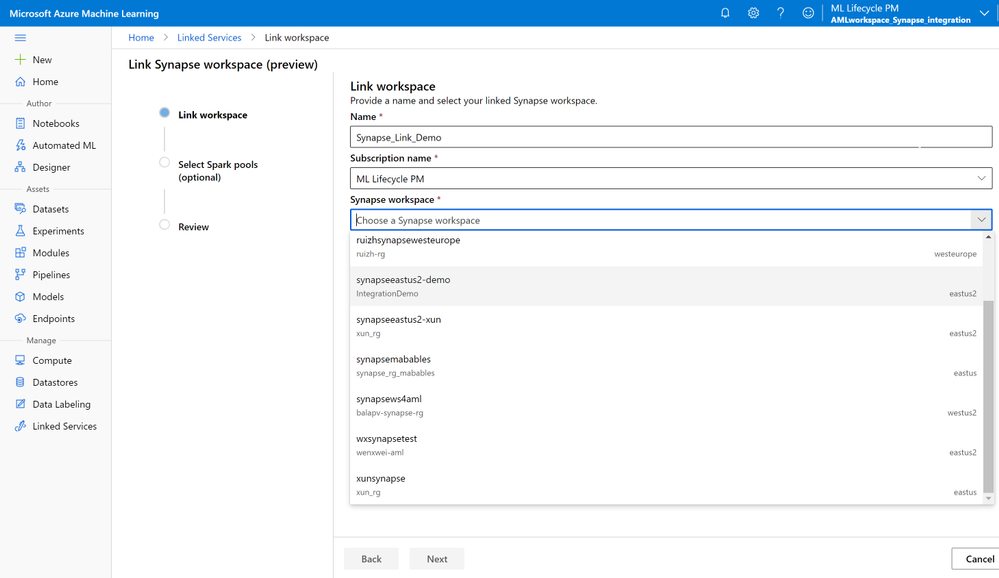
Customers can leverage existing Spark pools from Azure Synapse Analytics (Azure Synapse) in Azure ML by just linking their Azure ML and Synapse workspaces via the Azure ML Studio, the Python SDK, or the ARM template. Customers just need to follow the widget in UI or leverage a few lines of code as described in the documentation here.
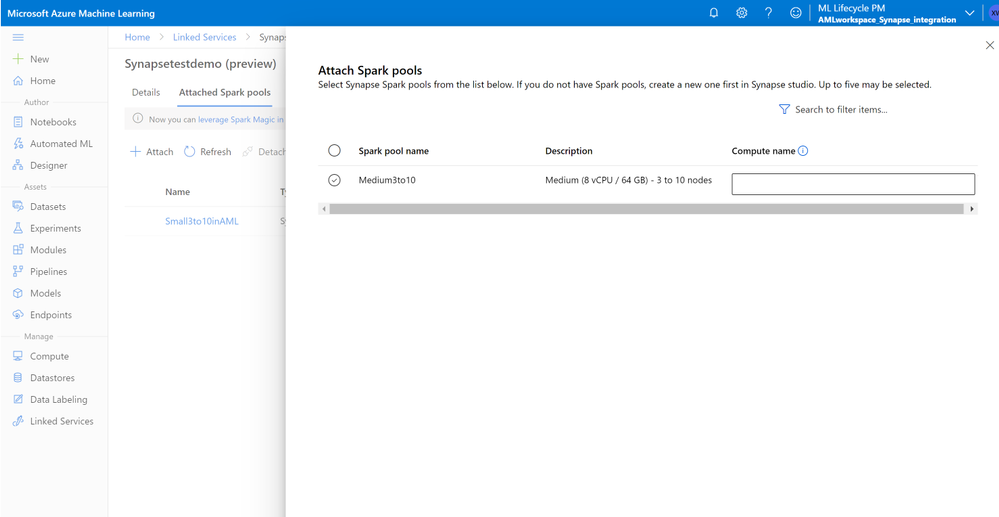
Once the workspaces are linked, customers can attach existing Spark pools into Azure ML workspace and can also register the supported linked services (data store sources).
Perform interactive data preparation via Spark magic from Azure ML notebooks
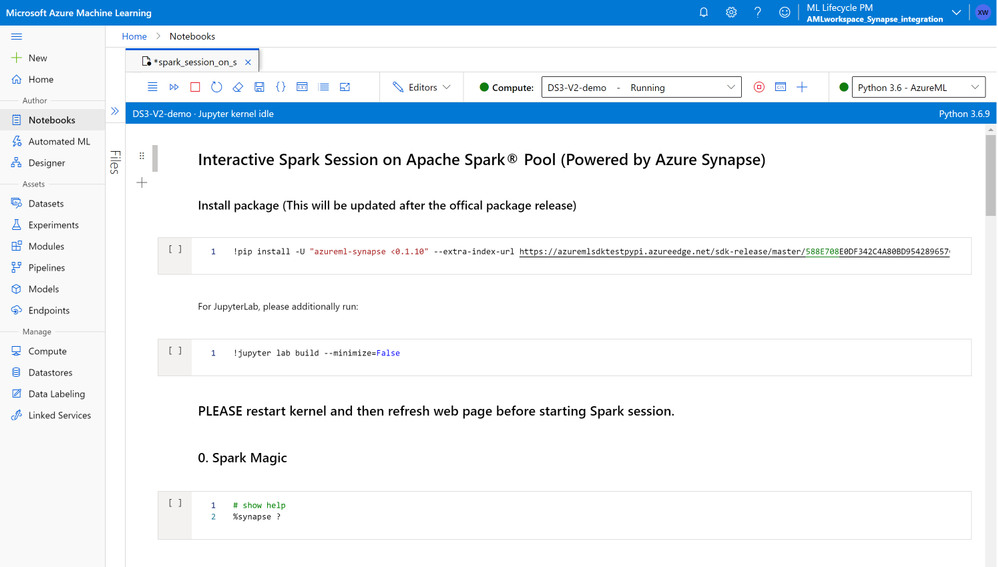
Customers can use Azure ML notebooks to start Spark sessions in PySpark via Spark Magic on attached Spark pools. Customers can register Azure ML datasets to load data from storage of choice. For data in Gen1 and Gen2, customers can use their own identities to authenticate access to data by leveraging AML datasets. The attached Spark pools can be used normally in Azure ML experiments, pipelines, and designer. More information on leveraging Spark Magic for data preparation on AML notebooks here
Productionize via Azure ML pipelines to orchestrate E2E ML steps including data preparation
After completing the interactive data preparation, customers can leverage Azure ML pipelines to automate data preparation on Apache Spark runtime as a step in the overall machine learning workflow. Customers can use the SynapseSparkStep for data preparation and choose either TabularDataset or FileDataset as input. Customers can also set up HDFSOutputDatasetConfig to generate the sparkstep output as a FileDataset, to be consumed by the following AzureML pipeline step. More details on How to use Apache Spark (powered by Azure Synapse) in your machine learning pipeline here.
Get started with big data preparation in Azure ML via Apache Spark powered by Azure Synapse
Get started by visiting our documentation and let us know your thoughts. We are committed to making the data preparation experience in Azure ML better for you!
Learn more about the Azure Machine Learning service and get started with a free trial.


Recent Comments