
Build & Deploy to edge AI devices in minutes
This article is contributed. See the original author and article here.
Azure Percept is a new zero-to-low-code platform that includes sensory hardware accelerators, AI models, and templates to help you build and deploy secured, intelligent AI workloads and solutions to edge IoT devices. Host Jeremy Chapman joins George Moore, Azure Edge Lead Engineer, for an introduction on how to build intelligent solutions on the Edge quickly and easily.
Azure Percept Vision: Optically perceive an event in the real world. Sensory data from cameras perform a broad array of everyday tasks.
Azure Percept Audio: Enable custom wake words and commands, and get a response using real time analytics.
Templates and pre-built AI models: Get started with no code. Go from prototype to implementation with ease.
Custom AI models: Write your own AI models and business logic for specific scenarios. Once turned on, they’re instantly connected and ready to go.
QUICK LINKS:
01:18 — Azure Percept solutions
02:23 — AI enabled hardware accelerators
03:29 — Azure Percept Vision
05:22 — Azure Percept Audio
06:21 — Demo: Deploy models to the Edge with Percept
08:16 — How to build custom AI models
09:57 — How to deploy models at scale
10:57 — Ongoing management
11:40 — Wrap Up
Link References:
Access an example model as an open-source notebook at https://aka.ms/VolumetricAI
Get the Azure Percept DevKit to start prototyping with samples and guides at https://aka.ms/getazurepercept
Whether you’re a citizen developer or advanced developer, you can try out our tutorials at https://aka.ms/azureperceptsamples
Unfamiliar with Microsoft Mechanics?
We are Microsoft’s official video series for IT. You can watch and share valuable content and demos of current and upcoming tech from the people who build it at Microsoft.
- Subscribe to our YouTube: https://www.youtube.com/c/MicrosoftMechanicsSeries?sub_confirmation=1
- Join us on the Microsoft Tech Community: https://techcommunity.microsoft.com/t5/microsoft-mechanics-blog/bg-p/MicrosoftMechanicsBlog
- Watch or listen via podcast here: https://microsoftmechanics.libsyn.com/website
Keep getting this insider knowledge, join us on social:
- Follow us on Twitter: https://twitter.com/MSFTMechanics
- Follow us on LinkedIn: https://www.linkedin.com/company/microsoft-mechanics/
- Follow us on Facebook: https://facebook.com/microsoftmechanics/
Video Transcript:
– Up next, I’m joined by lead engineer George Moore from the Azure Edge Devices Team for an introduction to Azure Percept- A new zero to low-code platform that includes new sensory hardware accelerators, AI models and templates to help you more easily build and deploy secure, intelligent AI workloads and solutions to edge IoT devices in just minutes. So George, welcome to Microsoft Mechanics.
– Thanks for having me on the show.
– And thanks for joining us today. You know, the potential for IoT and intelligence at the edge is well-recognized by nearly every industry now. We’ve featured a number of technology implementations recently on the show, things like smart buildings for safe return back to work during COVID, as well as low-latency, 5G, intelligent edge manufacturing. So, what are we solving for now with Azure Percept?
– Even though IOT is taking off, it’s not as easy as it could be today to build intelligent solutions on the edge. You need to think about everything from the Silicon on the devices, the types of AI models that can run on the edge, security, and how data’s passed the cloud, and how you enable continuous deployment in management. So you can deploy updates when you need them. Because of this complexity, a lot of IoT implementation today that do exist don’t leverage AI at all or run very basic AI models. And being able to deploy intelligence on the edge is the key to tapping into the real value of IoT.
– Okay, so how do things change now with Azure Percept?
– So we’re removing the complexity for building intelligent solutions on the edge, and giving you a golden path to be able to easily create AI models in the cloud and deploy them to your IoT devices. This comes together in a zero-code and low-code experience with Azure Percept Studio, that leverages our prebuilt-AI models and templates. You can also build your own custom models and we support all the popular AI packaging formats including ONNX and TensorFlow. These are then deployed to Azure Percept certified hardware with dedicated Silicon. This new generation of Silicon is optimized for deep neural network acceleration, enables massive gains and performance at a fraction of the wattage. These are connected to Azure and use hardware rooted trust mechanisms on the host. Importantly, the AI hardware accelerator attached to our sensor modules is also tested with the host to protect the integrity of your models. So in effect, we’re giving you an inherently secure and integrated system from the Silicon to the Azure service. This exponentially speeds up the deployment and development of your AI models to your IoT devices at the edge.
– Right, and we’re talking about a brand new genre of certified, AI-enabled hardware accelerators that will natively work with Azure.
– Yes, that’s absolutely right. This hardware is being developed by device manufacturers, who use our hardware reference designs to make sure they work out-of-the-box with Azure. Azure Percept devices integrate directly with services like Azure AI, Azure Machine Learning and IoT. One of the first dev kits has been developed by our partner ASUS, which runs our software stack for AI inferencing and performance at the edge. This includes an optimized version of Linux called CBL-Mariner, as well as Azure Percept specific extensions and the Azure IoT Edge runtime. The kit includes a host module that can connect your network wirelessly or by ethernet along with the Azure Percept Vision hardware accelerator, that connects the host over USB-C. There’s also two USB-A ports. The Azure Percept Vision is an AI camera with built-in AI accelerator for video processing. It has a pilot ready SoM, for custom integration into an array of host devices like cars, elevators, fridges, and more. Now the important part about Vision is it enables you to optically perceive an event in the real world. Let me give you an example where Azure Percept Vision would make a difference. Today, 60% of all fresh food is wasted at retail due to spoilage. In this example, with Azure Percept Vision we’re receiving the ground truth analytics of the actual purchasing and restocking patterns of bananas. Using this time series data retailers can create more efficient supply chains and even reduce CO2 emissions by reducing transportation fertilizer. And the good news is we have released this model as an open source notebook that you can access at aka.ms/VolumetricAI.
– Right, and really beyond making the fresh food supply more efficient, sensory data from cameras can also perform a broad array of everyday tasks like gauging traffic patterns and customer wait times, maybe for planning, so that you can improve customer experiences and also make sure that you’re staffed appropriately as you can see with this example.
– Right, and by the way that example is using Azure Live Video analytics connected to an Azure Media Services endpoint. So I can archive the video, or consume it from anywhere in the world at scale. For example, to further train or refine your models. Here we are showing the raw video without the AI overlay through the Azure portal. Azure Percept opens a lot of opportunities to leverage cognitive data at the edge. And we have privacy baked in by design. For example, if we look at the raw JSON packets in Visual Studio that were generated by Azure Percept in the coffee shop example that I just showed. You can see here, the bounding boxes the people as they’re moving around the frame. These are synchronized by timestamps. So all you’re really seeing are the X and Y coordinates to people. There’s no identifiable information at all. And there are many more examples, from overseeing and mitigating safety issues in the work environment to anomoly detection, like the example we showed recently for mass production, where Azure Percept Vision is being used for defect detection.
– Okay. So Azure Percept Vision then comes with the dev kit and there are other additional AI-optimized hardware modules as well, right?
– So that’s right. We’re developing a number of additional modules that you’ll see over time. This includes Azure Percept Audio, available today, which has a pre-configured four microphone linear array. It also has a 180-degree hinge with locking dial to adjust in any direction. It has pre-integrated Azure Cognitive Speech and language services so it’s easy to enable custom wake words and commands. There’s lots of things you can do here. Imagine being able to just talk to a machine on your production line, using your wake word. And because we sit on top of the award winning Azure speech stack, we support over 90 spoken languages and dialects out-of-the-box. This gives you command and control of an edge device. Here for example, we’re using speech to check on the remaining material left in this spool during mass production. And getting a response using real-time analytics. And of course, audio can also be used for anomoly detection in malfunctioning machinery and many other use cases.
– Alright, why don’t we put this to the test and start with an example of deploying models then to the edge using Azure Percept?
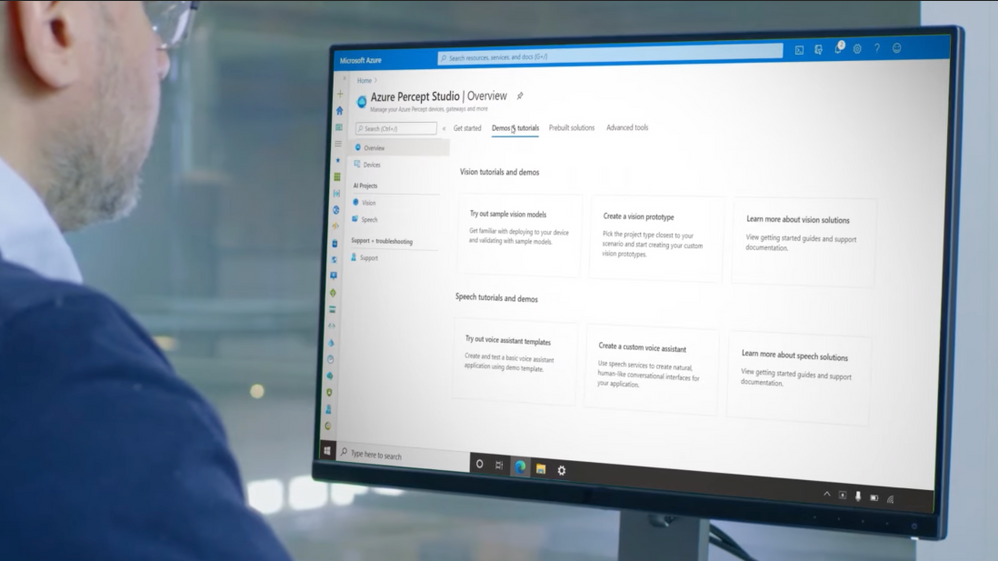
– Sure thing, to begin with any new IoT or intelligent edge solution starts with figuring out what’s possible and experimenting. This is where a lot of current projects get stalled. So we’ve made it easier to go from prototype to implementation. I’ll walk through an example I recorded earlier to show you how you can use our sample solution templates and prebuilt AI models to get started with no code. Here you’re seeing my home office and I set up the Percept camera sensor in the foreground using the 80/20 mounting brackets included in the dev kit. It’s pointing at my desk, so you can see my entire space. Now let’s switch to Azure Percept studio, and you can see that I’ve deployed the general object detection model that’s been trained to detect dozens of real-world objects. Now I’ll switch to camera view. You can see the camera sensors detecting many objects: a potted plant, my chair, my mouse, keyboard. And this is AI that’s been pre-configured out-of-the-box. You can use this to build an application that acts upon these objects it detects. If we switched back to Azure Percept Studio you can see all the models, including the camera here. Let me show you how simple it is to switch from one sample model to another. For example, I can try one of the sample Vision models. I’ll choose one for vehicle detection and deploy it to my new device. And you’ll see the succeeds. If we go back to Azure Percept Vision view you can see it’s able to easily detect the model car. And as I swap out different cars. It doesn’t care about anything else. And you’ll see that when my hand is in the frame it’s confidence level is low on this one, but increases to 94% once I moved my hand. The cool thing here is the model is continually re-inferencing in real time. You can easily imagine this being used in a manufacturing scenario, If you train for other object types to identify defective parts. All you need is an existing image set or one that has been captured by the Azure Percept camera stream. And you can tag and train those images in Azure Percept Studio.
– Right, but I’ve got to say as great as templates are for a starting point or maybe to reverse engineer what’s in the code, what if I need to build out custom AI models and really scale beyond proof of concept?
– Well, if you’re an advanced developer or data scientist, you can write your own AI models and business logic for specific scenarios. In this example, I have the built-in general object detection model running and you can see it does not recognize bowls. It thinks it’s a frisbee. So we can build our own AI model that is trained to specifically recognize bowls. I’m going to use the common objects in context or COCO open source dataset at COCO.org. This gives me access to thousands of tagged images of various different objects, like bicycles, dogs, baseball bats, and pizza to name a few. I’m going to select bowls and click search. As I scroll down, you’ll see tons of examples show up. Each image is tagged with corresponding objects. The overlay color highlight represents what’s called a segment. And I can hide segmentation to see the base image. And there are several thousand images in this case that have tagged bowls. So it’s a great data set to train our model. Now if I switched to Azure ML, you can see my advanced developer Notebook uploaded into Azure Machine Learning studio. If we walk through this, the first part of my Notebook is downloading the COCO dataset to my Azure ML workspace. And if I scroll the Notebook, you can see here I’m loading the images in the tensor flow training infrastructure. This thing gets converted to the OpenVINO format to be consumed by Azure Percept Vision. This is then packaged up, so it can be downloaded to the Azure Percept Vision camera via IoT hub. Now let’s see what happens when you run this new model and you can see that it clearly recognized that the object is a bowl.
– Now we have a custom and working model to automate a business process maybe if we want it to at the edge but, what does it take to deploy that model at scale?
– Typically this would involve manually provisioning each device. With Azure Percept we are introducing a first-in-market feature using WiFi Easy Connect which is based upon the WiFi Alliances DPP protocol. With this, the moment these additional devices are turned on they’re instantly connected and ready to go. During the out-of-box experience you’ll connect to the device’s WiFi SSID that will start with APD and has a device-specific password. It’ll then open this webpage, as you see here. There is an option called Zero Touch Provisioning Configurator that I choose. Now I just need to enter my WiFi, SSID and password, my device provisioning service, our DPS host name and Azure AD tenant. I click save and start, and like magic my device will be connected at the moment it is powered on. This process will also scale deployment across my fleet of IoT devices.
– Okay, so now devices are securely connected to services and rolled out but, what does the ongoing management then look like?
– So this all sits on top of Azure IoT for consistent management and security. You can manage these devices at scale using the same infrastructure we have today with Azure device twins and IoT hub. Here in IT Central for example, you can monitor and build dashboards to get insights into your operations and the health of your devices. Typically you would distribute updates to a gateway device that propagates updates to all the downstream devices. You can also deploy updates to your devices and AI models centrally from Azure, as I showed before. And of course the world’s your oyster from there. You can integrate with a broader set of Azure services to build your app front ends and back ends.
– Great stuff and great comprehensive overview. I can’t wait to see how Azure Percept gets used at the edge. But what can people do right now to learn more?
– So the best way to learn is to try out for yourself. You can get the Azure Percept dev kit to start prototyping with samples and guides at aka.ms/getazurepercept. Our hardware accelerators are also available across several regions, and you can buy them from the Microsoft store. It’s a super low barrier to get started, and whether you’re a citizen developer or an advanced developer, you can try out the tutorials at aka.ms/azureperceptsamples.
– Awesome. So thanks for joining us today, George. And of course keep watching Microsoft Mechanics for the latest updates, subscribe if you haven’t yet. And we’ll see you again soon.






Recent Comments