
by Contributed | May 3, 2021 | Technology
This article is contributed. See the original author and article here.
This past March marked the one-year anniversary of the covid-19 pandemic. I found myself reflecting on the changes I’ve gone through, both personally and professionally. One of the bright spots was realizing how much progress our customers have made with Azure IoT Edge and the number of improvements our team has been able to add to the product. Let’s take a moment to celebrate some of the successes in a year that most of us would prefer never happened.
Product maturity
COVID has caused a noticeable change in the types of scenarios in which customers are using Azure IoT Edge; however, it hasn’t dampened the market’s embrace of our product. In the past year, we documented over 25 new case studies of customers using Azure IoT Edge in their digital transformation. While these case studies are a sampling of the many customers using Azure IoT Edge, they are a great example of how widely used our product is. There is representation from a gamut of industries including: automotive, banking, energy, farming, healthcare, HVAC, industrial automation, manufacturing, packaging, real estate, recycling, retail, and shipping.
Azure IoT Edge hit an important milestone in March with the 1.1.0 release. It is our first long term servicing (LTS) release and will only be serviced with fixes to critical security issues and regressions. All other bug fixes and new feature work goes into our rolling feature releases (1.2.0 and greater). The limited number of changes in makes 1.1.0 it our most stable release and ideal for extended periods of use in production.
Security
Notable security exploits and data breaches continued in the tech industry last year. Azure IoT is a leader in edge security; however, we realize that we cannot rest on our laurels. To that end, we’ve shipped features specifically intended to increase the security posture of Azure IoT Edge.
First, we’ve updated the runtime to acquire needed certificates from EST standard infrastructure. Some customers require that certs come from their on-prem PKI infrastructure and leveraging the EST standard allows the product to integrate with compatible infrastructure.
Simply allowing customers to create their own certs is not enough. These certs must be protected from tampering, or theft, once on the device. Azure IoT Edge now uses the EST standard to integrate with hardware security modules (eg. TPM) to protect these valuable certs.
Just because a device starts off secure does not mean it remains secure. New vulnerabilities are discovered daily. Updating devices is a critical capability in the quest to keep assets protected from the latest threats. IoT Edge already does a great job of allowing customers to update the workload running on a device; however, patching the OS or even updating native components of the runtime was a job left up to the user. No more! Device Update for IoT Hub is in public preview. Customers can update IoT Edge devices, use an IoT Edge device as an update cache for downstream devices, and all of this works in a nested hierarchy often found in ISA 95 networks.
Observability
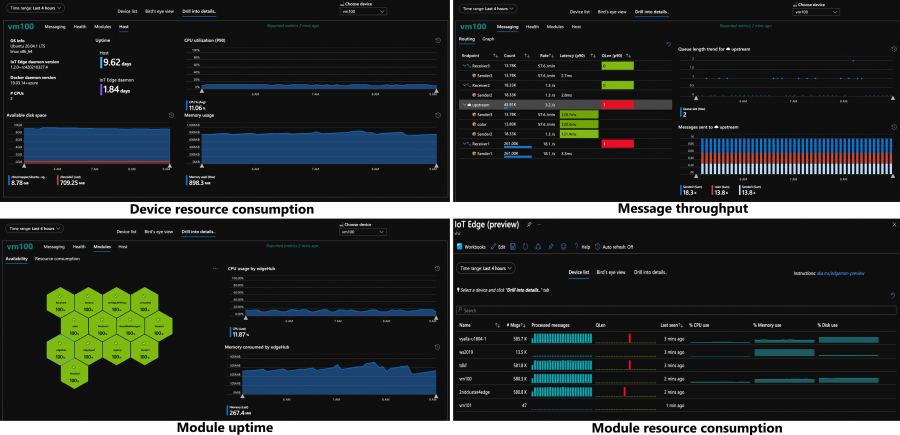
The ability to remotely monitor devices, understand how they are operating, and proactively identify problems is critical for solutions running in production. The IoT Edge runtime is now instrumented to produce metrics like resource consumption, message throughput, and module uptime. There’s a private preview detailing how customers can harvest these metrics and send them to the cloud to create intuitive dashboards, and we’re already working on making this default functionality you get out of the box.
The support experience has also been improved. Once you realize there is an issue which needs more investigation, customers must collect logs from various components and upload them to the cloud. Now the runtime is smart enough to automatically collect the pertinent logs and upload them on the customer’s behalf via the support-bundle command.
Industrial
Over a year ago we undertook a feature set aimed at unblocking industrial customers. We’re now starting to see the benefits of that work. Many industrial customers have ISA 95 networks, a standard that creates a hierarchical topology where networks are layered on top of each other. Devices in one layer can only talk to devices in the previous or subsequent layer. This throws a wrench in IoT Edge solutions because the IoT Edge devices cannot send telemetry, receive updates, or do anything else that requires the internet unless they are in the topmost layer.
IoT Edge in a nested configuration allows customers to create a daisy chain of IoT Edge devices that traverses the network hierarchy. The devices in isolated network levels leverage the connection of their parent to eventually gain access to the internet.
Nesting of IoT Edge devices doesn’t only solve the industrial problem of ISA 95 networks, it’s useful for any customer who wants to run analytics in any type of hierarchy. For example, a customer in smart buildings could use nested edge for granular optimization of energy usage. An IoT Edge device could be used to run a machine learning model which optimizes energy usage for a single floor. This device could then supply data to a parent IoT Edge device which is running AI that optimizes energy usage for the entire building.
Edge analytics
Digital transformation has multiple phases: Connect & Monitor, Analyze & Improve, Transform & Expand. While many customers are still working through the first phase, there are others who have graduated to running analytics on the edge. Azure IoT Edge continues to invest in this area so that we have powerful features available when customers are ready to leverage them. For example, the LTS branch of IoT Edge supports native integration with Nvidia deepstream so that customers can create devices which score AI models on multiple video streams in real time!
The development story for edge analytics is also being moved forwards in leaps and bounds. Recently the Percept family of products was announced. These are best in class dev kits which are built on Azure IoT Edge.
MQTT
We have heard the desire for an MQTT broker that supports customer defined topics, pub/sub semantics, and existing MQTT devices. Azure IoT Hub and Azure IoT Edge are working together to provide this capability in the cloud and on the edge. The beginning of this functionality is available on the edge in a public preview.
Azure IoT Edge on Windows
Windows has a long history of security and best in class manageability. These are key reasons that some customers want to run Azure IoT Edge on a Windows host machine. Unfortunately, using these two products together create issues which are not present when running Azure IoT Edge on Linux. For example, the base image of Azure IoT Edge modules must match the Windows host OS image and RS5 was the only supported OS. Or, partners had to maintain two versions of their modules, both a Linux container and Windows container, to target all Azure IoT Edge devices.
Azure IoT Edge For Linux On Windows, a technology in public preview, fixes these issues. It transparently spins up a Linux VM and runs Azure IoT Edge in the context of this Linux VM. Since the VM is transparent, customers continue to manage the Windows host as they would any other Windows device. Partners writing modules for Azure IoT Edge now only have to create and maintain Linux container versions of their modules since Azure IoT Edge now runs in a Linux environment, regardless of the OS used by the host.
Supporting features
The very large investments detailed above should not overshadow a handful of smaller point improvements that add critical functionality to Azure IoT Edge solutions.
- Message priority ensures that high priority messages are synced to the cloud before lower priority messages after a period of no connectivity.
- Module boot order provides information to the runtime used to try and start modules in a particular order. Please note, that this order is not binding (a module which is started first may take a while to initialize and a subsequent module could begin running before it). Module boot order also does not apply to restarts of individual modules (if the first module crashes, all subsequent modules continue to run and are not restarted with the failed module).
- Module twins now support arrays. This provides module authors to more data structures for syncing information in module twins and prevents them from (serializing/deserializing) arrays (into/out of) module twins.
The work produced by the IoT Edge team over the past year is nothing short of amazing. It’s even more impressive when one realizes that it was delivered under such stressful conditions. Lorenzo and I are truly grateful to lead such a talented and motivated team. Working with them has been a highlight in a year where so many people have struggled. We have many more great innovations coming this year, and we can’t wait to see the solutions our customers continue to build with Azure IoT Edge.
by Contributed | May 3, 2021 | Technology
This article is contributed. See the original author and article here.
Claire Bonaci
You’re watching the Microsoft us health and life sciences, confessions of health geeks podcast, a show that offers Industry Insight from the health geeks and data freaks of the US health and life sciences industry team. I’m your host Claire Bonaci. As part of our 2021 nurses week series today, I welcome Sarah Romotsky, from headspace to the podcast, Sarah and I discussed self care and meditation and how it fits into the healthcare industry. Hi, Sarah, and welcome to the podcast.
Sarah Romotsky
Hi, thanks for having me.
Claire Bonaci
So it is nurses week, and may is also Mental Health Awareness Month, do you mind sharing your background and why you feel like normalizing mental health is so important?
Sarah Romotsky
Sure, I have a unique background, I am a registered dietician, by training, and I spent many years working on helping people change their their eating habits, to adopt healthier lifestyles. And what I kept running into with clients and patients was that there were all these psychological factors were that were at the beneath the surface of why people were eating certain things, why people were acting out certain behaviors around food and health. And I realized unless we really address the the emotional and mental factors that are at play, we can’t really change health overall. And so I’m at headspace to impact health on a much larger scale. So you know, while I still care deeply about getting people to eat a healthy diet, it’s also equally as important to focus on our mental health issues or physical health. And so I think normalizing mental health and conversations about mental health are just so important today, it’s so critical to everyone’s health and your own health and your relationships with others. Whatever that whatever behavior you’re acting out, there’s, it’s important that we address the mental and the emotional struggles below. And I think that’s really important. And that’s we know that mindfulness and meditation can help us improve our mental health, and really help us show up as a better as a better me. And as a better mother, as a better wife, as a better friend, as a better co worker, a better employee, all of these things are crucial. And mental health is really at the core of that.
Claire Bonaci
And I’m curious, so you started out as a dietitian, what made you want to go to a meditation company, it seems like such a large jump, obviously, it does play a role. But I’m curious how you ended up at headspace.
Sarah Romotsky
It is quite a large jump and not clear to a lot of my family why I was making that move to begin with. But it made sense to me and it still does. You know, nutrition is just is one eating behavior. That’s it’s it’s really important that we have healthy eating behaviors. And nutrition is a really big core that of course. And exercise is also one of those established behaviors that we know is helpful in having a healthy lifestyle. But to me, meditation and mindfulness are equally as important. They’re the research is there on meditation and mindfulness. And so I started meditating with headspace, before I was employee headspace during actually when I was having some serious problems with my postpartum depression after my child, and I started meditation and I realized, wow, I’m, I’m eating all this healthy things, I’m exercising, but I’m still not really taking care of my mind in the right way. Those two things weren’t really comprehensive enough. And then I added mindfulness and meditation to my routine. And I really felt a profound change in how I was showing up in the world and my emotional and my physical health. And so I decided that you know, while I still love nutrition, I there’s another healthy behavior out there that I really want to help promote. And it all runs together. There’s, you know, meditation and mindfulness can be mental mindfulness can be incorporated to many aspects of our of our lifestyle, you can have integrate mindfulness into eating, we have a whole course on mindful eating, you can have the just the act of being present and aware and having compassion can be added to everything we do at every part of our day. And so, to me, going to headspace a meditation company was just a was just looking at health on a larger scale, and still working on promoting healthy behaviors. And I will, at dinner parties, I still tell people about gluten and I talk about mindfulness because it’s they’re equally as important.
Claire Bonaci
Well, I think that’s so interesting that you just bring up that parallel between one being healthy and whether that comes just with eating well and exercising. But that side piece of your mental health is just as important as your physical health. So I think that’s honestly forgotten many times. So that is, that’s great that you brought that parallel, and you brought it up just a little bit about the healthcare industry. So how do you think meditation and self care fits into the healthcare industry, especially with the noting that this week is nurses week?
Sarah Romotsky
Yeah. You know, I think self care used to be one of those like luxuries that only people who worked a certain amount or put in invested certain amount could could have the luxury of self care. And we used to think of self cares, you know, bubble baths, and maybe massage or maybe reading a book. But those still totally can be self cared. But my message in our message is headspace is self care is not a luxury, it’s a necessity. And the research shows that meditation and mindfulness in the form of self care is one that can truly have huge impact on mental and physical health, reduce stress, reduce anxiety, depression, improve sleep, better management of chronic conditions. I mean, these are things that have been proven in the research that mindfulness can affect and so while certainly take all the bubble baths you want, it’s really important that we think about other other ideas of self care that can that can truly improve our mental health Who would ever thought that sitting and doing deep breathing for 10 minutes was actually a necessity, right? Like, I don’t know if we’ve ever would have really thought that as a culture, but I think we’re getting to that place. And especially with a pandemic, we’re all really realizing how important it is to develop those self care routines. And when it comes to National Nurses week, I mean, I can’t think of health care professionals that are more in need and deserving of taking that time for self care when you care for others all day. And many of them also care for family members at home, too, when they come back from work. It can be hard to find that time for yourself. But it is so needed, we often fall to the bottom of the list of priorities, you know, of everything we need to do the day but it is the most needed, because that’s how we can show up the best for everyone around us. And so 10 minutes a day of meditation, 10 minutes, even three times a week, can really have such a great impact on your health, because the stressors and the triggers in our life are never are not going to go away. The pandemic might go away, but we’ll still have jobs we’ll still have children will still have finances will still have work. But it’s how we respond to those stressors that are really important. And so finding a self care routine that can really help you react better to those stressors is what’s key. But I think that we should expand the idea of self care and really think about how that can fit into modern mainstream medicine and health care today.
Claire Bonaci
I 100% agree with everything you said you made some really great points. I think definitely, especially with the pandemic happening, people really realize that their mental health is completely affected by what’s going on in the world, and especially what’s going on at home when everything switched to virtual. Think just so much pressure, so much added stress was put on everyone no matter kind of what role you’re in, but especially in the healthcare industry, especially those frontline workers and those nurses and doctors. I know you briefly mentioned just the the research on that. Do you have any research that says that this would help with prevention of kind of healthcare events or just help overall in the healthcare space?
Sarah Romotsky
Yeah, there’s been, you know, there’s so many studies out there on the benefits of meditation. And then also headspace has 27 published studies itself that have really looked at the efficacy of our product, on on mental health and emotional well being. But you know, there’s one study that showed that using headspace can reduce stress in 10 days by 14%. Another one with healthcare workers specifically showed reduce burnout with nurses. And so the best thing about headspace is that there it’s available for you at anytime you need it right in between a shift. I know a lot of healthcare professionals who use headspace right before rounds with their team. I mean, there’s so many different ways you can utilize it. And there’s so many different types of content. The benefit is all of them are based in science and based in the authentic practice of meditation,
Claire Bonaci
when definitely, especially in the healthcare space, especially addressing burnout, I think we always talk about clinician burnout, but this is like a clear, actionable way to help reduce that. And what are some actions or takeaways that you want to leave our listeners with?
Sarah Romotsky
Yeah, I mean, I think there’s three things. Number one, meditation is for everyone. You don’t need to be you don’t need to have a diagnosis, a mental disorder, you don’t need to have a chronic condition, but you can and have had those and also find benefit. Anyone can do it. The second my second thing I want people to know is that it doesn’t have to be daily. And to give it time, it’s not a you know, just like let’s say trying to be on a weight loss journey. You can’t eat a salad and then expect next day to see the pounds change on your scale. And it’s the same thing with meditation you really need to put in the time be consistent with it but you will get to a point where you feel you feel that change you feel different. There’s a difference there that you can, you might not be able,it may not be tangible, but you Like I said, maybe before you used to scream at people in traffic, maybe you know, six weeks later of using headspace and meditation, you feel a little bit more resilient to some of those stressors that usually would really get under your skin. So that’s my second thing. It doesn’t have to be daily, it just has to be consistent. And, and the third thing would be that this is a legitimate practice that healthcare leaders, business leaders, medical experts, scientists, doctors are on board with, because the research is there. So headspace works with healthcare organizations, like the American Medical Association, and others, because they know that meditation can improve your health and well being
Claire Bonaci
even the first point that you made about it is for everyone, I do think that there’s still kind of a weird, taboo stereotype around meditation. And honestly, myself, I was a convert, I did not meditate up until probably last few years. And once I switched to it, I did notice the difference. And I did realize, yes, this is for everyone. This is not just for someone that’s diagnosed with a condition. It really is for anyone in everyone. And I want to thank you again, Sarah, for being part of the podcast, I have one final question for you something a little fun. What is one unexpected kind thing that someone did for you or your family during the pandemic?
Sarah Romotsky
I love that question. You know, you don’t often sit and think, Hmm, what did what did people done for me? And I love that question. And I, the first thing that comes to mind is, um, have a really wonderful neighbor Lupita. And the other day, I had flowers on my doorstep. And it was and it said, you know, to Sarah from Lupita, and I was, wait, it’s not my birthday. It’s not Mother’s Day, like, what would this is, and I realized, it’s because she’s probably watched me every day for the last nine months a year during this pandemic struggle. I mean, we’re gonna put it up in front of our house, she’s watched me, you know, try to shove my kids into the car or watch my four year old run down the street without holding hands, or, you know, watch probably my, my baby run out without any underwear on diapers on you know, and like, she’s, she’s seen, she’s been so close to my life for the last nine months, because we’ve all been home that she’s probably seen, you know, front and center, the what’s been happening in my family, and what’s been happening is just what’s happening in everyone’s family. We’re making it work. We’re trying our best. And just the fact that she just put flowers on my doorstep for no specific reason. But no even caught note note to say why but I know it’s because she has seen and knows and understands and appreciates what we’re going through what I’m going through as a working mom.
Claire Bonaci
this is real life. This is what life is right now, and we’re all getting through it together. So, again, thank you so much, Sarah, and hopefully everyone takes this as a sign to go get headspace and start meditation. Thank you all for watching. Please feel free to leave us questions or comments below. And check back soon for more content from the HLS industry team.
by Contributed | May 3, 2021 | Technology
This article is contributed. See the original author and article here.
We often get questions regarding mail forwarding in Exchange Online. As you already know, Exchange Online is a shared service. We must take care that users cannot take the service down by creating mail loops. It is sometimes a little confusing for our customers that we handle this somewhat differently than in Exchange on-premises organizations. With this blog post we will give you an overview of how we handle possible mail loop scenarios and how this affects your mail flow. If you are the kind of a person that loves digging into the details, this post is for you!
Mail loop insight in the Security & Compliance Center
You may have ended up here because you ran into a possible mail loop scenario. This blog post should help you to get a better understanding about how we handle possible mail loop scenarios, how they can occur and what to do to prevent them. I recommend checking the Fix possible mail loop insight in the Recommended for you area of the Mail flow dashboard in the Security & Compliance Center (protection.office.com) or the converged security portal (security.microsoft.com). It notifies you when a mail loop is detected in your organization.
Read on now if you want to get deeper insights about our loop prevention mechanisms.
Currently stamped and preserved X-headers
It’s important to know that there are some headers which get preserved across Exchange organizational boundaries and most of them will not be removed during transport (neither by Exchange Header Firewall nor using transport rules). These headers are:
- X-MS-Exchange-Inbox-Rules-Loop
- X-MS-Exchange-Transport-Rules-Loop
- X-MS-Gcc-Journal-Report
- X-MS-Exchange-Moderation-Loop
- X-MS-Exchange-Generated-Message-Source
- X-LD-Processed
- X-MS-Exchange-ForwardingLoop
- X-EOPAttributedMessage
- X-EOPTenantAttributedMessage
Please keep in mind that we might change these headers without notice. The purpose of this list is only to provide an overview of different headers we use to prevent loops in the service. Please do not rely on them if you construct business-critical workflows.
To get a better understanding of how loop prevention in Exchange Online works, we will have a look at most of these headers.
X-MS-Exchange-Inbox-Rules-Loop header
First things first: in the cloud, the number of times a message can be redirected, forwarded, or replied to automatically is limited to 1. On-premises Exchange servers are limited to 3 (as documented here).
We set this header for example in the following scenarios:
- User created an inbox rule which forwards the message to another recipient
- User created an inbox rule which redirects the message to another recipient
The value of this header denotes the original recipient of the mail (one which has a mailbox rule to forward to the new recipient in To: header). It looks like this:
X-MS-Exchange-Inbox-Rules-Loop: john.doe@contoso.com
If you run an extended message trace:
Start-HistoricalSearch -ReportType MessageTraceDetail -ReportTitle Inbox-Rules-Loop -MessageID “<1234567890123456789012345678901@AM0PR04MB6531.eurprd04.prod.outlook.com>” -NotifyAddress john.doe@contoso.com -StartDate 05/09/2020 -EndDate 05/10/2020
And you find something like this:
Source: MAILBOXRULE
event_id: THROTTLE
reference: XLoopHeaderCount:1/1
It means that the message got silently dropped because it has reached datacenters X-MS-Exchange-Inbox-Rules-Loop limit which is (as described above) 1.
Mostly important for Exchange Online customers who run an on-premises Exchange organization in a Hybrid configuration: we also check if current recipient mail address is already present within an X-MS-Exchange-Inbox-Rules-Loop header for incoming messages. If that is the case, then we silently drop the message as well (not yet relevant in Exchange Online because the X-MS-Exchange-Inbox-Rules-Loop limit is currently 1 which means we drop the message if any X-MS-Exchange-Inbox-Rules-Loop header exists when the message arrives, regardless of which address the header contains).
X-MS-Exchange-Transport-Rules-Loop header
We set this header in the following scenario:
Mail gets redirected or recipients are added (To, Cc, Bcc) by an Exchange transport rule (ETR)
If the value of this header exceeds its thresholds (in the cloud, the number of times a message can be redirected or forwarded automatically by using a transport rule is limited to 1 – please have a look at Scenario 2 in the Real-life examples – what is the impact on email? how this can happen), we then stop processing, drop the message, log the event, and finally send out an NDR to the original sender like this:
550 5.7.128 TRANSPORT.RULES.RejectMessage; Transport rules loop count exceeded and message rejected
Note: We do not send an NDR to the original sender for any recipient added to Bcc by an Exchange transport rule during the mail flow (we only NDR for To and Cc type recipients).
X-MS-Exchange-Moderation-Loop header
Example scenario when we set this header:
- When a message is forwarded for approval, we stamp this header into the approval message followed by arbitration mailbox SMTP address:
X-MS-Exchange-Moderation-Loop: SPO_Arbitration_fa627f00-12d2-4d68-bd5d-75cd62ead0ee@M365x777241.onmicrosoft.com
- We allow at maximum 1 header. If there are more headers in place, we are going to silently drop the approval message.
You will find the following smtp status logged when running a message trace:
550 5.2.0 Resolver.MT.ModerationLoop; Loop in approval process
X-LD-Processed header
We use this header to track transport processing on a per tenant basis:
- To track potential loops due to mail contact ExternalEmailAddress (TargetAddress) redirection
- If forwarding is configured using the Set-Mailbox -ForwardingSMTPAddress or -ForwardingAddress parameter
If an action like this was detected from our service, we stamp the header followed by the ID of the tenant and a list of strings indicating the list of work that is being tracked.
This may be:
- ExtAddr if we are doing an external redirection by using ExternalEmailAddress
- ExtFwd if we are doing external forwarding by using ForwardingSMTPAddress or ForwardingAddress
If the message is redirected or forwarded to another tenant, we add another X-LD-Processed header containing the tenants ID (we do not replace any existing X-LD-Processed header). If the message comes from an external address and is redirected to another external address, we also stamp the Resent-From header to indicate that Exchange has touched it.
We allow a maximum of 3 loops per tenant for ExternalEmailAddress (TargetAddress) or ForwardingAddress/ForwardingSmtpAddress.
If we exceed the number of forwards, we track the following smtp event (you can find the event by running a message trace). We do not send out an NDR to prevent further loops:
550 5.4.142 RESOLVER.FWD.LoopingTarget; forwarding to a looping external address
We also detect if there is a loop within the directory. You normally should not run into this kind of loop. It can occur, for example, when a mailbox has forwarding configured and ForwardingAddress refers to itself. This job is done while the message is processed. If we detect a loop here, the message will be dropped and we NDR the sender with:
550 5.4.6 RESOLVER.FWD.Loop; there is a forwarding loop configured in the directory
X-MS-Exchange-ForwardingLoop header
This header is added when forwarding happens due to ForwardingSmtpAddress or ForwardingAddress properties set on a mailbox. In the case where the mailbox also has DeliverToMailboxAndForward:$true, when recipient A forwards a message to recipient B, there will be two copies of the message. One to the original recipient A and the other to the forwarded recipient B. The value of the header in the message to the forwarded recipient B will contain <SmtpAddressOfOriginalRecipient>;<TenantGuidOfOriginalRecipient>. The header looks like this:
X-MS-Exchange-ForwardingLoop: JDoe@contoso.com;53bb1ab7-edea-4e35-8c3f-e395807764bf
The purpose of this header is to detect forwarding loops like A forwards to B and B forwards to A. If B attempts to forward to A, the message will be dropped with the smtp response:
550 5.4.142 RESOLVER.FWD.LoopingTarget; forwarding to a looping external address
The message copy to the original recipient A will also have this header added with the value ForwardingHandled;< TenantGuidOfOriginalRecipient>. It looks like this one:
X-MS-Exchange-ForwardingLoop: ForwardingHandled;53bb1ab7-edea-4e35-8c3f-e395807764bf
The purpose of this header with ForwardingHandled value is to prevent forwarding message multiple times in scenarios like Centralized Mail Transport (aka CMT or CMC), where the message to the original recipient is routed out of the service and then back to the service. In a CMC scenario the message will be forwarded first when the message enters the service. When the message gets routed out and sent back to the service, duplicate forwarding will be prevented by looking at this header in the message. Please have a look at Scenario 5 at the end of this post to get a better understanding of the workflow in CMC scenario.
Note: Customers sometimes make use of the X-MS-Exchange-Inbox-Rules-Loop header to check if a message was forwarded to forwarding address or forwarding SMTP address of the mailbox. If you are doing so, you should now use the new X-MS-Exchange-ForwardingLoop header instead.
X-MS-Exchange-Generated-Message-Source header
This header is used to check for loops in Exchange agent-generated messages. In Exchange Online, we do this while they are in submission and smtp process. We make use of this header for example if an automatic reply via inbox rule is in place. We then stamp the following headers:
X-Auto-Response-Suppress: All
X-MS-Exchange-Inbox-Rules-Loop: john.doe@contoso.com
auto-submitted: auto-generated
X-MS-Exchange-Generated-Message-Source: Mailbox Rules Agent
Let us have a closer look at these X-headers:
- X-Auto-Response-Suppress
- Specifies whether a client or server application will forego sending automated replies in response to this message. There are different values available. In case of an automatic reply, Exchange sets the value to All.
- X-MS-Exchange-Inbox-Rules-Loop
- Please have a look at 1) X-MS-Exchange-Inbox-Rules-Loop
- auto-submitted
- Defined in RFC 3834. Let me quote from there:
“The purpose of the Auto-Submitted header field is to indicate that the message was originated by an automatic process, or an automatic responder, rather than by a human; and to facilitate automatic filtering of messages from signal paths for which automatically generated messages and automatic responses are not desirable.”
- X-MS-Exchange-Generated-Message-Source
- Short: This X-header is used to prevent mail loops caused by agent-generated messages.
- Long: If this header is present, it means that the mail you see is an agent-generated message. We check if it does not exceed our limits. We do these checks while the message is processed in submission and smtp. There are different limits in place. If the message is an inter-tenant one (means no intra-tenant organization header exists), we limit this to 3 agents, and they may be the same (for example three times DLP Policy Agent).
You will see multiple agents for example if you have DLP in place and an inbox rule which redirects every message to another mailbox. If your DLP policy matches and you receive a mail notification that gets redirected to another mailbox, you will see something like this:
X-MS-Exchange-Generated-Message-Source: DLP Policy Agent,Mailbox Rules Agent.
If the message is an intra-tenant one, we limit this to a maximum of 2 Exchange agents. Side effect messages are, for example, intra-tenant messages. This kind of messages are generated after a message has been delivered to the mailbox. For example, a message delivered to a mailbox triggers an auto reply or inbox rule that redirects the message to another recipient. In this case, a side effect message is generated. We drop the message if the Exchange agent is the same (for example two times DLP Policy Agent). While in progress, side effect messages are stamped with the following header which is replaced after the message has been delivered.
X-MS-Exchange-Organization-Generated-Message-Source: Mailbox Rules Agent
Some more loop protection insights
We also detect incoming messages that are looping when they pass Exchange Online Protection (EOP). We count every time a message passes through EOP frontdoor and we reject every message that reaches our thresholds. Let me explain this in a little more detail.
To do this, we need some more headers. As this is EOP related work, the headers are named like this:
- X-EOPAttributedMessage
- X-EOPTenantAttributedMessage
- Some more internal loop prevention headers for routing to quarantine and ATP
We increase the X-EOPAttributedMessage header every time the message is processed by EOP frontdoor. It looks like this:
X-EOPAttributedMessage: 1
We also stamp the X-EOPTenantAttributedMessage header with tenant guid and a number which shows how often the message was processed through this tenants EOP. A valid header of a messages that passes EOP for the first time looks like this:
X-EOPTenantAttributedMessage: 543b1ab7-eeea-4a35-8c3f-e396007764bf:0
If the message is re-routed through another tenant (for example, an ETR in Tenant A automatically forwards the message to Tenant B), the X-EOPTenantAttributedMessage header is reset. Anyway, the X-EOPAttributedMessage count is kept and increased. We drop the message if it goes several times through the same tenant (X-EOPTenantAttributedMessage) or when it exceeds a threshold of several more message being routed between different tenants).
If we exceed the number of total hops (which is currently 7 but it but can be changed in the future without being separate announced), you can find the following smtp response logged:
554 5.4.14 Hop count exceeded – possible mail loop ATTR1
If we exceed the hop count within the same tenant (which is currently 3 but can be changed in the future without separate announcement), we then NDR this one out:
554 5.4.14 Hop count exceeded – possible mail loop ATTR34
If you see any of the following smtp responses logged, you then should be open a support case for further investigation. We protocol these if a threshold associated with quarantine or ATP has been reached and a message has been dropped by the service:
454 4.4.15 Hop count exceeded – possible mail loop ATTR39
454 4.4.15 Hop count exceeded – possible mail loop ATTR40
Real-life examples – what is the impact on email?
Here are some examples of how all of this may affect your mail flow:
Scenario 1:
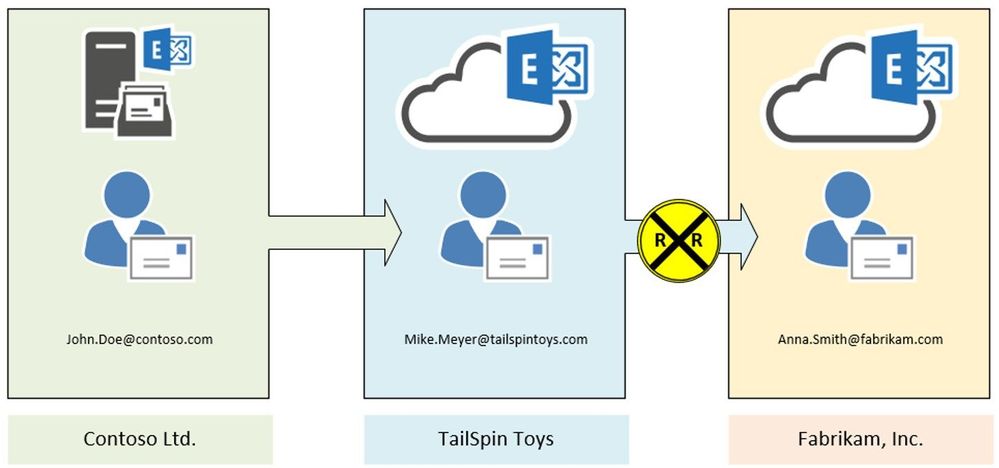
John Doe (Contoso Ltd.) creates an inbox rule to redirect every message to Mike Meyer (TailSpin Toys). Mike in turn has another inbox rule in place to redirect every incoming message to Anna Smith (Fabrikam, Inc.).
Result:
In this case, Exchange stamps the X-MS-Exchange-Inbox-Rules-Loop: John.Doe@contoso.com header after the first redirect is processed. Exchange at TailSpin Toys detects that header (message tracking reference will log XLoopHeaderCount:1/1) and does not redirect the message again. In this case Mike Meyer will not get an NDR. As an administrator you will find this event by running a message trace.
This scenario is one of the most seen and we must be very restrictive because customers can easily build a loop here. Therefore, we restrict this to only 1 redirect/forward by using inbox rules. This limit is hardcoded and cannot be changed. If you make use of Exchange on-premises, it is possible to have up to 3 redirects by inbox rules in place. As an administrator it is your task to protect your users from building loops.
Scenario 2:
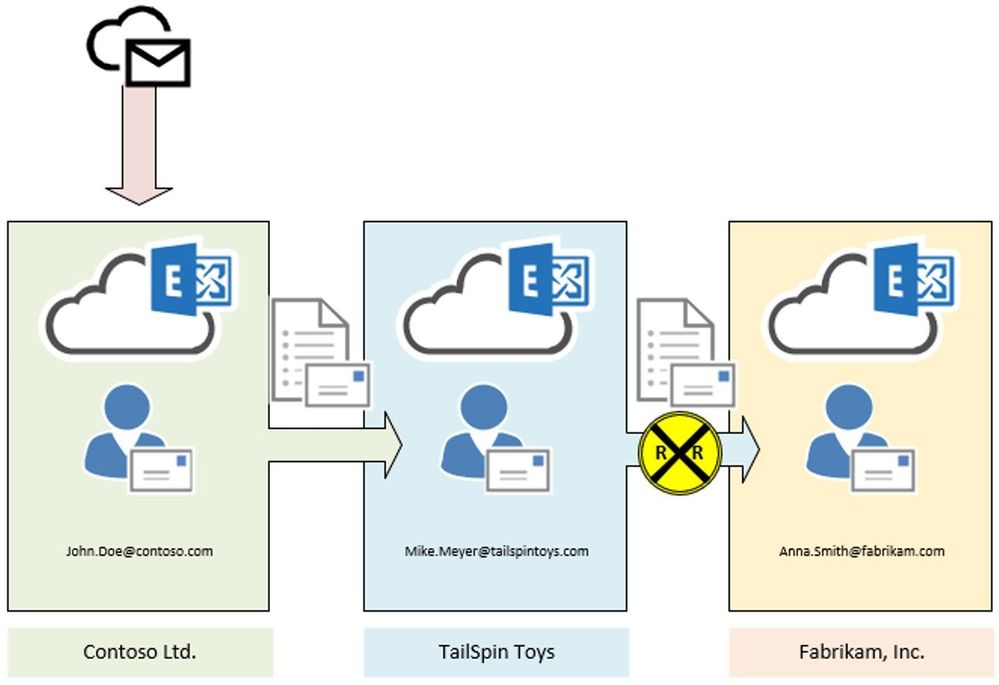
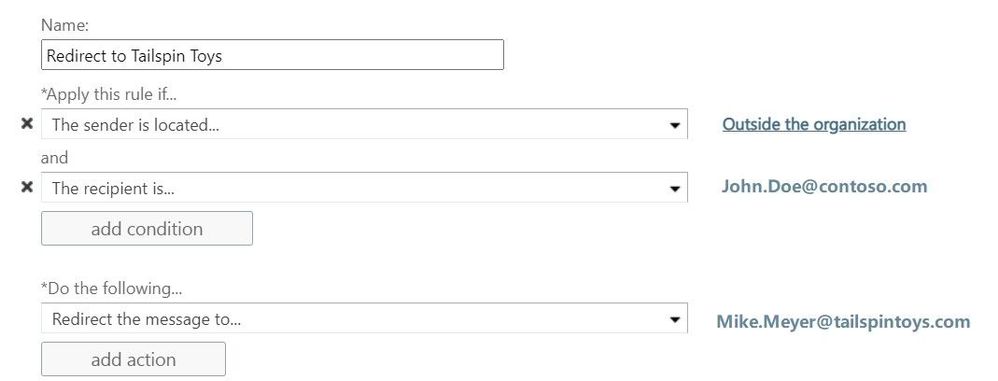
In this scenario we make use of two transport rules. The first one, located at Contoso’s Exchange organization, redirects every message addressed to John.Doe@contoso.com and coming from outside the organization, to Mike Meyer at TailSpin Toys company:
At TailSpin Toys there is also a transport rule in place, to Bcc incoming messages to Anna Smith at Fabrikam:
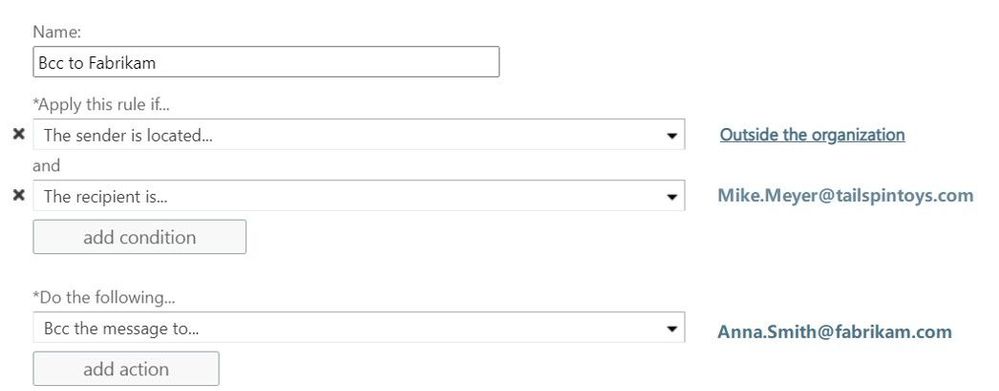
Result:
In this case the message is stamped at transport within Contoso organization. We see the X-MS-Exchange-Transport-Rules-Loop: 1 header. At TailSpin Toys the message is dropped due to X-MS-Exchange-Transport-Rules-Loop: 1 header. If you run a message trace, you will find the following event logged:
550 5.7.128 TRANSPORT.RULES.RejectMessage; Transport rules loop count exceeded and message rejected
Remember: We do not send out an NDR to the original sender. This is because of the second transport rule which is configured to add an additional recipient as BCC into the message. If the second transport rule is configured to add an CC-Recipient or simply redirects the message instead of an additional recipient as BCC, an NDR will be send out to the original sender.
Scenario 3:
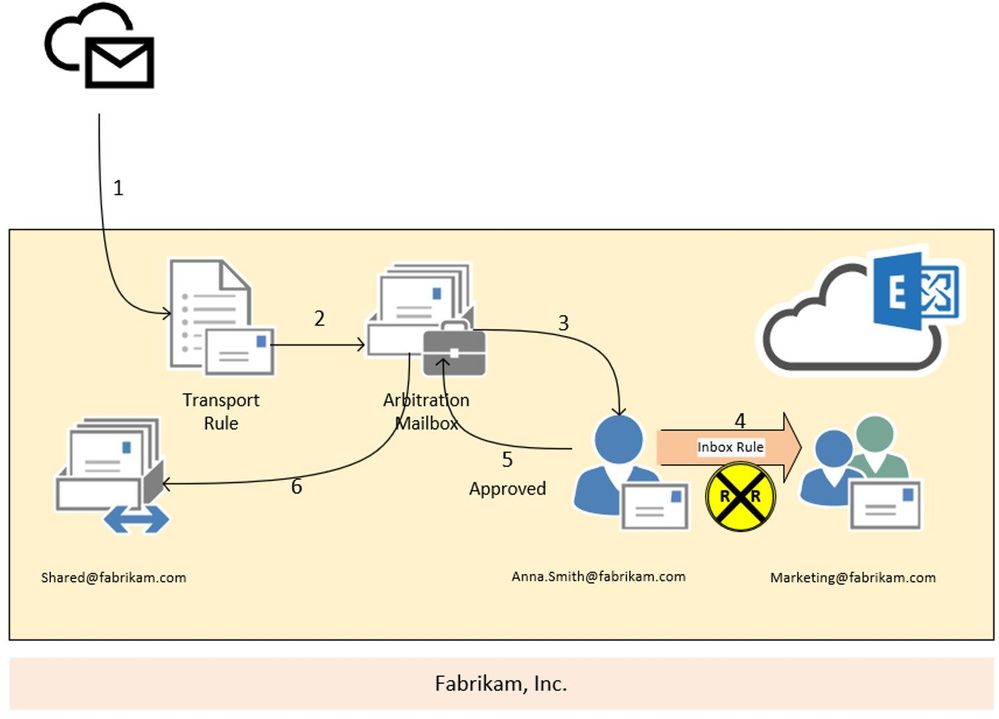
In this scenario we are going to have a look at the moderation loop protection. We have a transport rule (2) that forwards every message, send from outside the organization to shared@fabrikam.com, to Anna Smith for approval (3). Anna is going to holiday and so she has created an inbox rule to redirect every message to the marketing team (4). Unfortunately, the marketing distribution list is also moderated.
Result:
In this case, the moderation message is stamped with the X-MS-Exchange-Moderation-Loop header, followed by the smtp address of the arbitration mailbox:
X-MS-Exchange-Moderation-Loop: SPO_Arbitration_fa627f00-12d2-4d68-bd5d-75cd62ead0ee@M365x777241.onmicrosoft.com
The approval request which is forwarded via inbox rule from Anna’s mailbox to the marketing distribution list is dropped and no NDR is send out to the original sender. If you run a message trace, you will find the following smtp response stamped:
550 5.2.0 Resolver.MT.ModerationLoop; Loop in approval process
Scenario 4:
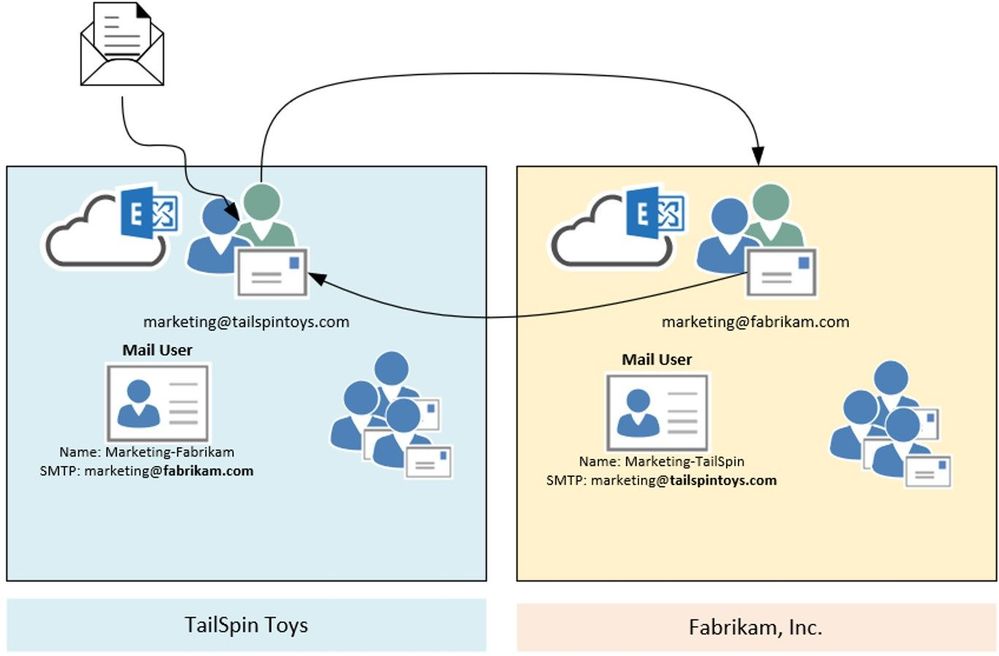
In this scenario we are going to have a look at the X-LD-Processed header and how it works. Assumed we have the following setup: We have two companies – TailSpin Toys and Fabrikam. Both have marketing departments working together. To make this workflow easier, they decide to create mail users for each other company department (Marketing-Fabrikam and Marketing-TailSpin). Unfortunately, someone added the mail users to the local marketing distribution list – and the loop begins.
Result:
What happens here? Someone sends a mail to one of the distribution lists. Exchange expands the list and starts processing the item. For the first time the mail gets processed, we check on transport if any X-LD-Processed header followed by tenants guid is present. If this is not the case, we stamp a header like this:
X-LD-Processed: 6249f43a-676b-4124-a13a-50205140b751,ExtAddr
We do this also for the other tenant. So one more X-LD-Processed header is added:
X-LD-Processed: 53bb1ab7-edea-4e35-8c3f-e395807764bf,ExtAddr
We keep doing this every time the message is processed and at the end (after the message was processed for the 3rd time), the header looks like this:
X-LD-Processed: 6249f43a-676b-4124-a13a-50205140b751,ExtAddr,ExtAddr,ExtAddr
X-LD-Processed: 53bb1ab7-edea-4e35-8c3f-e395807764bf,ExtAddr,ExtAddr,ExtAddr
If the message enters transport again, it will be dropped and NDR is send out to the original sender:
554 5.4.14 Hop count exceeded – possible mail loop ATTR1 [HE1EUR04FT048.eop-eur04.prod.protection.outlook.com]
And so, the loop ends.
Scenario 5:
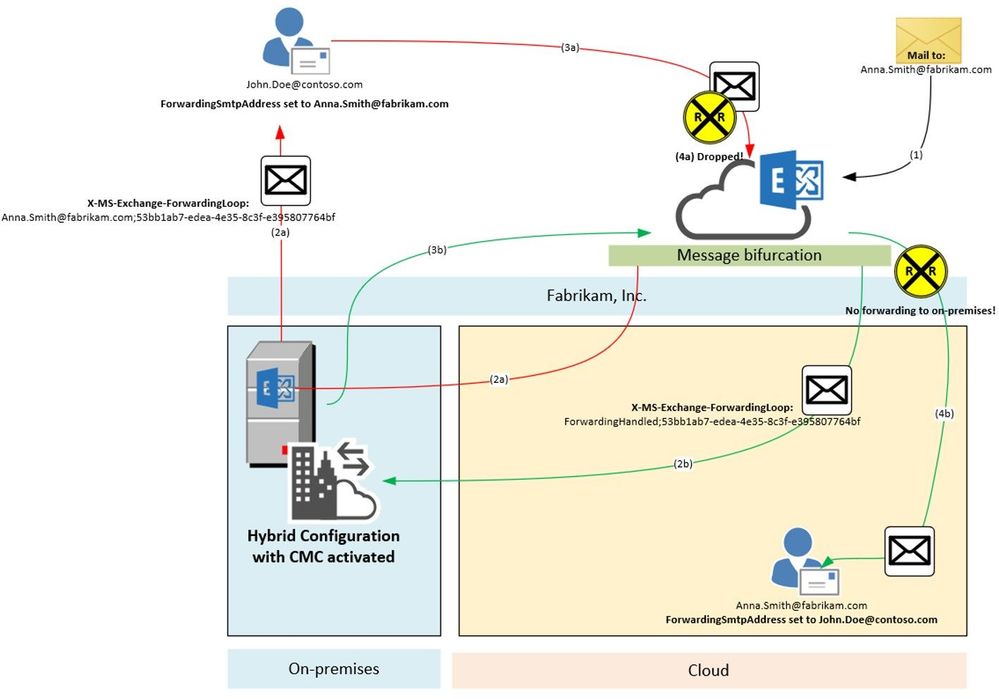
In this scenario we are going to have a look at the X-MS-Exchange-ForwardingLoop header and how it works. Assumed we have the following setup: Fabrikam has a Hybrid configuration and have also enabled Centralized Mail Transport (CMT; also known as CMC, RouteAllMessagesViaOnPremises enabled on the outbound connector). MX points to the Exchange Online service to make use of our malware and spam protection features. They need to route all outgoing messages through Exchange on-premises because of their mail signature and DLP solution which has not been migrated to cloud yet. Anna Smith of Fabrikam has set ForwardingSmtpAddress to John.Doe@contoso.com as well as DeliverToMailboxAndForward set to $true.
Result:
A message addressed to Anna.Smith@fabrikam.com enters the service (1). We notice that ForwardingSmtpAddress is set to John.Doe@contoso.com as well as DeliverToMailboxAndForward is set to $true. Now message bifurcation kicks in and creates another copy of the message. The message which goes to John.Doe@contoso.com gets stamped (2a) with following header:
X-MS-Exchange-ForwardingLoop: Anna.Smith@fabrikam.com;53bb1ab7-edea-4e35-8c3f-e395807764bf
And is routed through Exchange on-premises to John.Doe@contoso.com. Unfortunately, there is also ForwardingSmtpAddress set on John Doe’s mailbox which points to Anna.Smith@fabrikam.com. The message is now routed to the Exchange Online service again (3a). Here we detect that X-MS-Exchange-ForwardingLoop has already been set with that recipient and tenant guid. Result of this is that we drop the message with smtp response:
550 5.4.142 RESOLVER.FWD.LoopingTarget; forwarding to a looping external address
The original message copy to Anna Smith’s mailbox is also on its way. This message also makes an extra round through Exchange on-premises due to requirement imposed by having CMC enabled and it’s coming from Internet (i.e. not having passed through on-premises yet). Before being sent to on-premises, however, this copy was stamped with a header (2b). It looks a little different to the header mentioned before:
X-MS-Exchange-ForwardingLoop: ForwardingHandled;53bb1ab7-edea-4e35-8c3f-e395807764bf
As you can see, it contains ForwardingHandled instead of the recipient’s e-mail address. We need to do this in order to remember that Forwarding was already applied in cases when the message then has a routing requirement out of the EXO service such as Centralized Mail Transport. When on-premises sends it back to Exchange Online (3b), we now figure out that the X-MS-Exchange-ForwardingLoop header has already been stamped with ForwardingHandled flag. Result of this is that we don’t forward the message again (no RESOLVER REDIRECT event in Message Tracking Log/Message Trace Details Report). The message is finally delivered to Anna Smith’s mailbox (4b).
What if I need to do multiple forwards or redirects for handling business processes?
Glad you asked! Basically, there are 3 ways to go:
- Keep these mailboxes on-premises (which is not a real option if you want to use the awesome features available in Exchange Online). Remember: Some limits are different when using Exchange on-premises.
- Configure redirect via Set-Mailbox -ForwardingSMTPAddress or -ForwardingAddress parameter. As described above, we make use of the X-LD-Processed header in this scenario which allows up to 3 redirects per tenant.
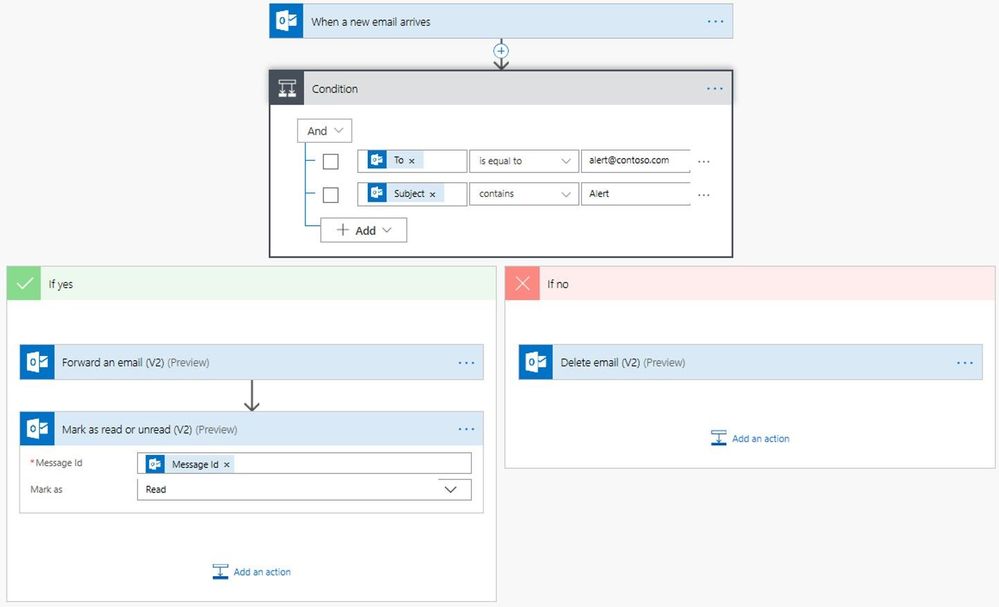
- Make use of Microsoft Power Automate. With Power Automate you can create automated workflows between your favorite apps and services in a centralized way. This includes many email actions when using the Microsoft 365 Outlook Connector. I encourage you to check out the documentation, give it a try and see the power of this Microsoft Power Platform application.
I hope all these insights help you to get a better overview and understanding of how we handle possible loop situations in Exchange Online. It is sometimes a little confusing and may look complicated, but keeping the service running for our customers is a must.
Special thanks to all contributors: Especially to Stan Aleksiev for taking care of the technical review, Arindam Thokder, Dan Li, Guru Prasad, Arnold Kermer and Dmitry Starostin!
Lukas Sassl





























Recent Comments