
Monitoring GPU Metrics in AKS with Azure Managed Prometheus, DCGM Exporter and Managed Grafana
This article is contributed. See the original author and article here.
Azure Monitor managed service for Prometheus provides a production-grade solution for monitoring without the hassle of installation and maintenance. By leveraging these managed services, we can focus on extracting insights from your metrics and logs rather than managing the underlying infrastructure.
The integration of essential GPU metrics—such as Framebuffer Memory Usage, GPU Utilization, Tensor Core Utilization, and SM Clock Frequencies—into Azure Managed Prometheus and Grafana enhances the visualization of actionable insights. This integration facilitates a comprehensive understanding of GPU consumption patterns, enabling more informed decisions regarding optimization and resource allocation.
Azure Managed Prometheus recently announced general availability of Operator and CRD support, which will enable customers to customize metrics collection and add scraping of metrics from workloads and applications using Service and Pod Monitors, similar to the OSS Prometheus Operator.
This blog will demonstrate how we leveraged the CRD/Operator support in Azure Managed Prometheus and used the Nvidia DCGM Exporter and Grafana to enable GPU monitoring.
GPU monitoring
As the use of GPUs has skyrocketed for deploying large language models (LLMs) for both inference and fine-tuning, monitoring these resources becomes critical to ensure optimal performance and utilization. Prometheus, an open-source monitoring and alerting toolkit, coupled with Grafana, a powerful dashboarding and visualization tool, provides an excellent solution for collecting, visualizing, and acting on these metrics.
Essential metrics such as Framebuffer Memory Usage, GPU Utilization, Tensor Core Utilization, and SM Clock Frequencies serve as fundamental indicators of GPU consumption, offering invaluable insights into the performance and efficiency of graphics processing units, and thereby enabling us to reduce our COGs and improve operations.
Using Nvidia’s DGCM Exporter with Azure Managed Prometheus
The DGCM Exporter is a tool developed by Nvidia to collect and export GPU metrics. It runs as a pod on Kubernetes clusters and gathers various metrics from Nvidia GPUs, such as utilization, memory usage, temperature, and power consumption. These metrics are crucial for monitoring and managing the performance of GPUs.
You can integrate this exporter with Azure Managed Prometheus. The section below in blog describes the steps and changes needed to deploy the DCGM Exporter successfully.
Prerequisites
Before we jump straight to the installation, ensure your AKS cluster meets the following requirements:
- GPU Node Pool: Add a node pool with the required VM SKU that includes GPU support.
- GPU Driver: Ensure the NVIDIA Kubernetes device plugin driver is running as a DaemonSet on your GPU nodes.
- Enable Azure Managed Prometheus and Azure Managed Grafana on your AKS cluster.
Refactoring Nvidia DCGM Exporter for AKS: Code Changes and Deployment Guide
Updating API Versions and Configurations for Seamless Integration
As per the official documentation, the best way to get started with DGCM Exporter is to install it using Helm. When installing over AKS with Managed Prometheus, you might encounter the below error:
Error: Installation Failed: Unable to build Kubernetes objects from release manifest: resource mapping not found for name: "dcgm-exporter-xxxxx" namespace: "default" from "": no matches for kind "ServiceMonitor" in version "monitoring.coreos.com/v1". Ensure CRDs are installed first.
To resolve this, follow these steps to make necessary changes in the DCGM code:
- Clone the Project: Go to the GitHub repository of the DCGM Exporter and clone the project or download it to your local machine.
- Navigate to the Template Folder: The code used to deploy the DCGM Exporter is located in the template folder within the deployment folder.
- Modify the service-monitor.yaml File: Find the file service-monitor.yaml. The apiVersion key in this file needs to be updated from monitoring.coreos.com/v1 to azmonitoring.coreos.com/v1. This change allows the DCGM Exporter to use the Azure managed Prometheus CRD.
apiVersion: azmonitoring.coreos.com/v1
4. Handle Node Selectors and Tolerations: GPU node pools often have tolerations and node selector tags. Modify the values.yaml file in the deployment folder to handle these configurations:
nodeSelector:
  accelerator: nvidia

tolerations:
- key: "sku"
  operator: "Equal"
  value: "gpu"
  effect: "NoSchedule"
Helm: Packaging, Pushing, and Installation on Azure Container Registry
We followed the MS Learn documentation for pushing and installing the package through Helm on Azure Container Registry. For a comprehensive understanding, you can refer to the documentation. Here are the quick steps for installation:
After making all the necessary changes in the deployment folder on the source code, be on that directory to package the code. Log in to your registry to proceed further.
1. Package the Helm chart and login to your container registry:
helm package .
helm registry login  --username $USER_NAME --password $PASSWORD
2. Push the Helm Chart to the Registry:
helm push dcgm-exporter-3.4.2.tgz oci:///helm
3. Verify that the package has been pushed to the registry on Azure portal.
4. Install the chart and verify the installation:
helm install dcgm-nvidia oci:///helm/dcgm-exporter -n gpu-resources
#Check the installation on your AKS cluster by running:
helm list -n gpu-resources
#Verify the DGCM Exporter:
Kubectl get po -n gpu-resources
Kubectl get ds -n gpu-resources
You can now check that the DGCM Exporter is running on the GPU nodes as a DaemonSet.
Exporting GPU Metrics and Configuring Azure Managed Grafana Dashboard
Once the DGCM Exporter DaemonSet is running across all GPU node pools, you need to export the GPU metrics generated by this workload to Azure Managed Prometheus. This is accomplished by deploying a PodMonitor resource. Follow these steps:
- Deploy the PodMonitor: Apply the following YAML configuration to deploy the PodMonitor:
apiVersion: azmonitoring.coreos.com/v1
kind: PodMonitor
metadata:
  name: nvidia-dcgm-exporter
  labels:
    app.kubernetes.io/name: nvidia-dcgm-exporter
spec:
  selector:
    matchLabels:
      app.kubernetes.io/name: nvidia-dcgm-exporter
  podMetricsEndpoints:
  - port: metrics
    interval: 30s
  podTargetLabels:
2. Check if the PodMonitor is deployed and running by executing:
kubectl get podmonitor -n
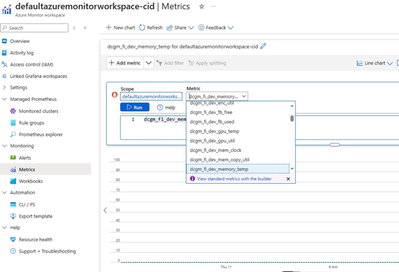
3. Verify Metrics export: Ensure that the metrics are being exported to Azure Managed Prometheus on the portal by navigating to the “Metrics” page on your Azure Monitor Workspace.
Create the DGCM Dashboard on Azure Managed Grafana
The GitHub repository for the DGCM Exporter includes a JSON file for the Grafana dashboard. Follow the MS Learn documentation to import this JSON into your Managed Grafana instance.
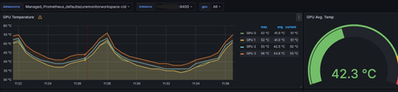
After importing the JSON, the dashboard displaying GPU metrics will be visible on Grafana.




Recent Comments