

Windows Server 2022 Azure Edition in Public Preview

Windows Server 2022 Azure Edition in Public Preview

This article is contributed. See the original author and article here.

Windows Server Azure Edition is a special version of Windows Server built specifically to run either as an Azure IaaS VM in Azure or as a VM on an Azure Stack HCI cluster. Unlike the traditional Standard or Datacenter editions, you can’t install Azure Edition on bare metal hardware, run it under client or Windows Server Hyper-V, or run it on third party hypervisors or within 3rd party Clouds.


Aerial view of a Microsoft Azure datacenterAerial view of a Microsoft Azure datacenter


Whilst there are restrictions on where you can run it, Azure Edition comes with some unique benefits that aren’t available in the traditional “run anywhere” versions of Windows Server. For example, the most noteworthy feature of the Windows Server 2019 version of Azure Edition was that it supports hotpatching. Rather than requiring a reboot each month to complete update installation, hotpatching allows for most monthly updates to be applied without an operating system restart. With hotpatching enabled, you should only need to bounce a server to install cumulative updates that are released every quarter. The only exception to this quarterly cadence will be when an unplanned update is released that addresses a critical vulnerability and that update requires a reboot.


You can find out more about hotpatch for Azure Edition virtual machines at: https://docs.microsoft.com/en-us/azure/automanage/automanage-hotpatch?WT.mc_id=modinfra-33001-orthomas 


This week Microsoft has announced that the Windows Server 2022 version of Azure edition is in public preview. In addition to hotpatching and all the new features of Windows Server 2022 such as Secured Core, TLS 1.3 by default, support 48 TB of RAM, 64 sockets and 2048 logical processors, Windows Server 2022 Azure Edition will also exclusively support SMB over QUIC and Azure Extended Network.


QUIC is an IETF-standardized protocol that replaces TCP with a web-oriented UDP mechanism that aims to improves performance and reduce congestion. Unlike TCP, QUIC is always encrypted and QUIC requires TLS 1.3 with certificate authentication. When enabled, a file server with SMB over QUIC functions in a similar manner to a normal SMB file server except that the TCP protocol is replaced by the QUIC. You can configure SMB over QUIC to allow remote file share access without a complicated VPN setup. It also allows you to dodge the problem that some ISPs that block port 445, something that plagued organizations that leveraged the original Azure File Shares.


Ned Pyle gave an overview of SMB over QUIC early last year and you can review his post here: https://techcommunity.microsoft.com/t5/itops-talk-blog/smb-over-quic-files-without-the-vpn/ba-p/1183449?WT.mc_id=modinfra-33001-orthomas


Azure Extended Network uses to running VMs to form a VXLAN portal for IP mobility between Azure and on-premises. VXLAN is a network virtualization technology that encapsulates layer 2 ethernet frames within layer 4 UDP datagrams. When Azure Extended Network is implemented, layer 2 frames can pass between Azure Edition hosts running on-premises in Azure Stack HCI and in the cloud on an Azure Virtual Network.


Windows Server 2022 Azure Edition has just been released in public preview and you can find out more about gaining access to it at: https://aka.ms/AutomanageWindowsServer


SMB Compression in Windows Server 2022 and Windows Insider

This article is contributed. See the original author and article here.

Heya folks, Ned here again. Today I announced the new SMB compression feature for Windows Server 2022 and Windows Insider at the Windows Server 2022, Best on Azure webinar. A proper article will be on docs.microsoft.com in the next 24 hours or so, but I wanted you to get a taste here right away with a demo!


SMB compression allows an administrator, user, or application to request compression of files as they transfer over the network. This removes the need to first manually deflate a file with an application, copy it, then inflate on the destination computer. Compressed files will consume less network bandwidth and take less time to transfer, at the cost of slightly increased CPU usage during transfers. SMB compression is most effective on networks with less bandwidth, such as a client’s 1Gbs ethernet or or Wi-Fi network; a file transfer over an uncongested 100Gbs ethernet network between two servers with flash storage may be just as fast without SMB compression in practice, but will still create less congestion for other applications.


Here’s SMB compression in action!


You can try this out right now, get 


Check back for the detailed article, shouldn’t be more than a day or two. 


– Ned “smoosh it” Pyle 


How to present videos in Microsoft Teams meetings WITHOUT LAG using web streaming & PowerPoint Live

How to present videos in Microsoft Teams meetings WITHOUT LAG using web streaming & PowerPoint Live

This article is contributed. See the original author and article here.

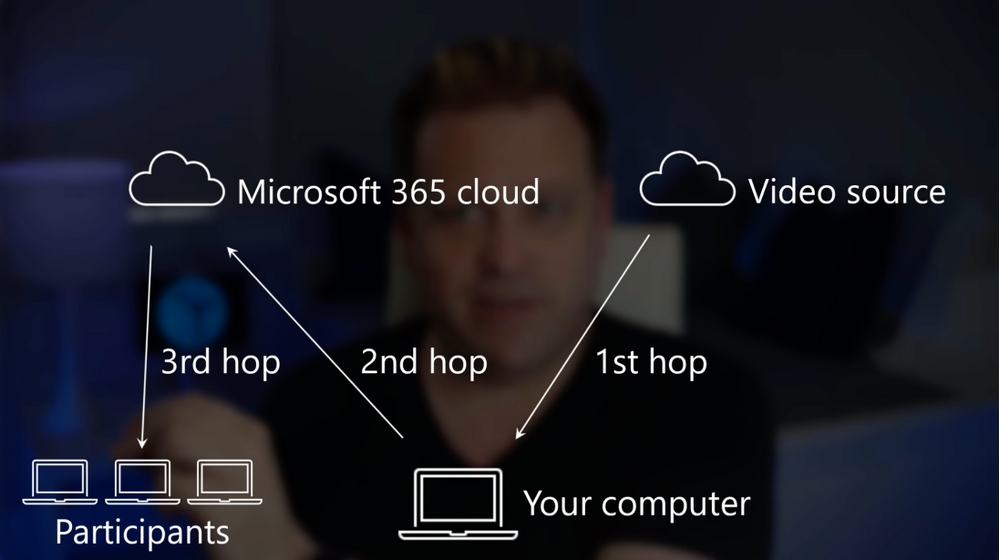
Need to present a video to a group of people online, but when you play it on your computer and share your desktop, it’s laggy and dropping frames for others in a Microsoft Teams meeting, or maybe it’s missing the audio track?


Screen Shot 2021-06-24 at 1.15.19 PM.png


QUICK LINKS:


Link References:


Unfamiliar with Microsoft Mechanics?


Keep getting this insider knowledge, join us on social:


Announcing developer preview of the Microsoft Federated Search Platform

This article is contributed. See the original author and article here.

The amount of information we create has grown exponentially, and more often is distributed across multiple locations, making finding the right information, at the right time, increasingly difficult. One solution to this challenge is to merge your on-premises information with your information in Microsoft 365, but occasionally business requirements, corporate and/or regulatory compliance, or other constraints may limit the ability to merge or store data in the cloud.


The new Microsoft Federated Search Platform is designed specifically for these scenarios.  The Microsoft Federated Search Platform enables you to build custom federated search providers to allow your information to participate in Microsoft Search’s Answers & Vertical experiences without the need for merging that information with your Microsoft 365 index – while still letting you use familiar Microsoft Search apps and services to include SharePoint, Office.com and Microsoft Bing.


The Microsoft Federated Search Platform lets you:


  • Build a custom search provider or bring your existing bot (developed using Microsoft Bot framework protocol 4.0) and register it via the Azure Developer Portal

  • Add trigger phrases for your provider for the most common query patterns used to search over your data to get high precision Answers in the All vertical

  • Define Adaptive Cards UX to render your search results in the Answer card and custom vertical

  • Use the Search & intelligence admin center to enable your custom search providers for your  employees


Today we’re extending an invitation to enroll in our upcoming private preview of the Microsoft Federated Search Developer Platform (opening later this Summer) where you can try out this new experience.


As part of our private preview program, we’ll provide a federated search provider sample which you can download and customize for your specific scenarios using the Bot Framework SDK. 


Once customized and deployed you’ll be able to register it with our platform using the Azure Developer Portal providing its provider icon, name, trigger phrases, Answers & Vertical settings, etc.).  This will allow you to register your provider with Microsoft Search and publish it for your tenant admin for review and approval. 


When enabled, employees in your organization will be to search results from your provider alongside your Microsoft 365 information in Microsoft Search.


If you’re interested in enrolling in this private preview, complete the form at https://aka.ms/SearchDevPrivatePreview.


You can learn more about our plans for federated search and view a demonstration at https://www.youtube.com/watch?v=AZcOskBTwNU.

Azure SQL Database Ledger​ – The power of blockchain with the simplicity of SQL | Data Exposed

This article is contributed. See the original author and article here.

In this episode of Data Exposed with Jason Anderson, learn what the ledger feature of Azure SQL Database is and where using ledger can help enable digital trust in your data. There will also be some quick demos on how to enable this exciting new capability and how to show to others that your data is in-fact, intact.


Watch on Data Exposed


Resources:
