by Contributed | Jun 28, 2021 | Technology
This article is contributed. See the original author and article here.
Managing long term log retention (or any business data)
The shared responsibility model of the public cloud helps us all pass of some of the burden that needed to be solved completely in-house. A notable example of this is the protection and retention of business-critical data, whether it be the digital copies of documents sent to customer’s, financial history records, call recordings or security logs. There are many types of records and objects that we have business, compliance, or legal reasons to ensure that an original point in time copy is kept for a set period.
One of the excellent features that enable this in Azure is Immutable storage, linked with Lifecycle management rules.
Protecting Security log exports
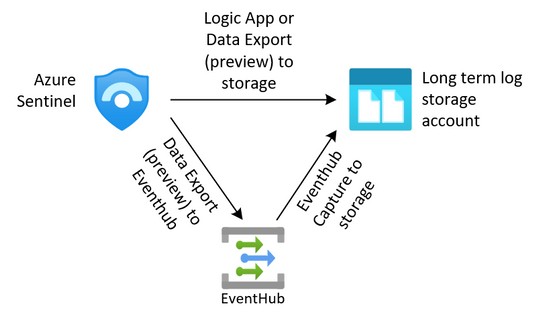
For security teams, this is often a requirement to keep the security logs from the SIEM for an extended period. We can export our data from our log analytics workspaces through several methods outlined in this article (hyperlink here). Once we have exported that data to an Azure storage account we need to protect it from change or deletion for the required time period. We also need to enforce our business rules in ensuring that data that is no longer needed is removed from the system.
The solution we are building here allows for the storage of these logs.
Immutable storage
Immutable storage for Azure Blob storage enables users to store business-critical data objects in a WORM (Write Once, Read Many) state. This state makes the data non-erasable and non-modifiable for a user-specified interval. For the duration of the retention interval, blobs can be created and read, but cannot be modified or deleted.
Immutable storage polices are two types.
- Time base Polices – These allow you to set the minimum retention period for the storage objects. During that time both writes and deletes to the object will be blocked. When the policy is locked (more on that later) the policy will also prevent the deletion of the storage account. Once the retention period has expired, the object will continue to be protected from write operations but delete operations can be executed.
- Legal Hold Policies – These polices allow for a flexible period of hold and can be removed when no longer needed. Legal hold polices need to be associated with one or more tags that are used as identifiers. These tags are often used to represent case or event ID’s. You can place a Legal Hold policy on any container, even if it already has a time-based policy.
For the purposes of this post, we are going to focus on the use of the time-based polies, but if you want to read more on legal hold polices, they can be found here.
Time based polices are implemented simply on a storage container through PowerShell, the Azure CLI or the Portal, but not through ARM templates. This article will go through the use of the portal, the PowerShell and CLI code can be found here.
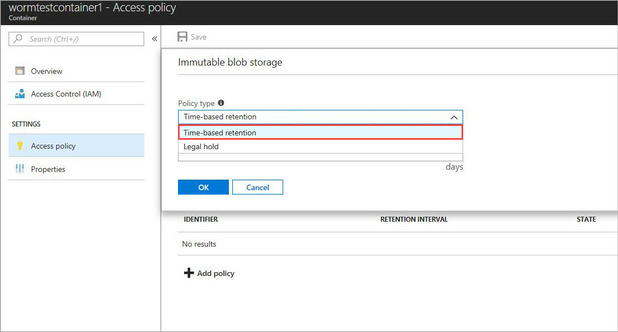
When adding a new Time-based policy, you will need to specify the number of days to enforce protection, this is a number of days between 1 and 146,000 days (400 years – that’s a really long time). At the same time, you can allow for append blobs to continue to be appended to. For systems that are continually adding to a log through the use of Append Blobs (such as continuous export from Log Analytics), this allows them to keep appending to the blob while it is under the policy. Note that the retention time restarts each time a block is added. Also note that a Legal hold policy does not have this option, and thus will deny an append write if a placed on.
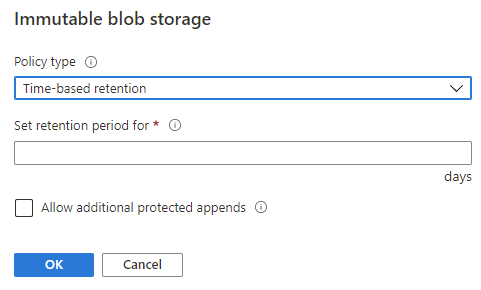
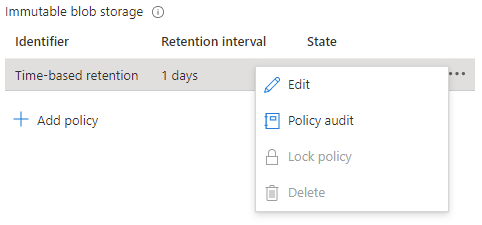
When a time-based policy is first created it starts in an unlocked state. In this state you can toggle the append protection and change the number of days of protection as needed. This state is for testing and ensuring all settings are set correctly, you can even delete the policy if it was created by mistake.
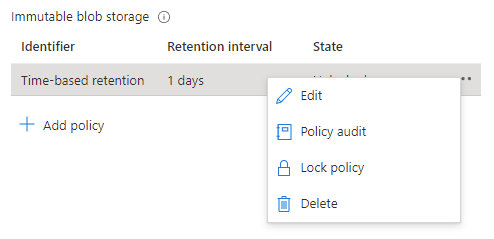
Once the policy settings are confirmed to be correct, it is then time to lock the policy.
Locking the policy is irreversible and after it cannot be deleted. You must delete the container completely, and this can only be done once there are no items that are protected from deletion by a policy. Once locked you can only increase the number of days in the retention setting (never decrease) five times.
Lifecycle management
While protecting the data from deletion or change is half of the problem, we must also consider enforcing removal of data in line with retention policies. We can also take additional actions to contain the costs of the storage account by altering the tiers of storage between Hot, Cool and Archive.
Lifecycle management rules of a storage account can automatically remove the storage objects we no longer need through a simple rule set.
Note: if you enable the Firewall on the storage account, you will need to allow “Trusted Microsoft Services”, otherwise the management rules will be blocked from executing. If your corporate security policy does not allow this exception, then you won’t be able to use the management rules outlined here, but you can implement a similar process though an alternate automation mechanism inside your network.
Lifecycle management rules are set at the Storage Account level and are simple enough to configure. For our logs we just want to set a rule to automatically delete the logs at the end of our retention period.
Again, we will be going through the creation using the portal, but these can be done through PowerShell or ARM template, instructions are here.
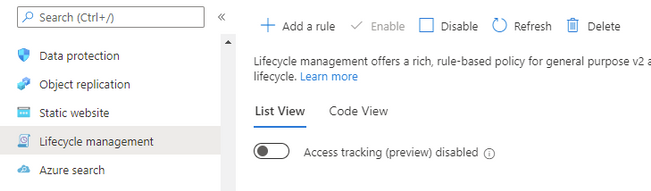
At the Storage account select Lifecycle management, and then Add a rule.
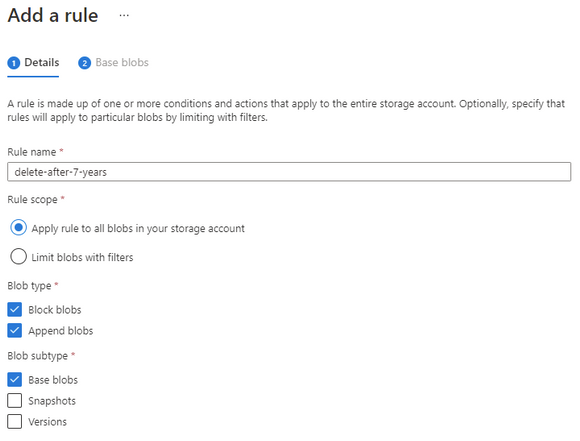
Give the rule a descriptive name and set the scope to capture all the appropriate objects that you need to manage.
Set the number of days you want to keep the object and then set the delete action.
Make sure that the number of days is longer than the immutable time-based policy otherwise the rule will not be able to delete the object.
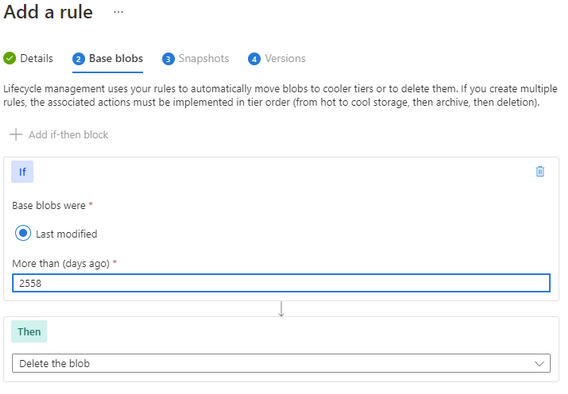
Finally complete your rule.
The rule will continuously evaluate the storage account cleaning up any files that have past their required date.
Note: if you needed to keep some specific files for a more extended period, you could consider a Legal Hold policy on those objects that would then stop the management rule from processing them.
Long Term Costs
Storing these items for such an extended period can often lead into larger costs.
We can also add some additional rules to help us control the costs of the storage.
An important consideration here is the fact that the immutable storage policies will continue to allow us to move the storage between tiers while keeping the data protected from change or deletion.
Note: Lifecycle management rules for changing the storage tier today only apply to Block Blob, not Append Blob.
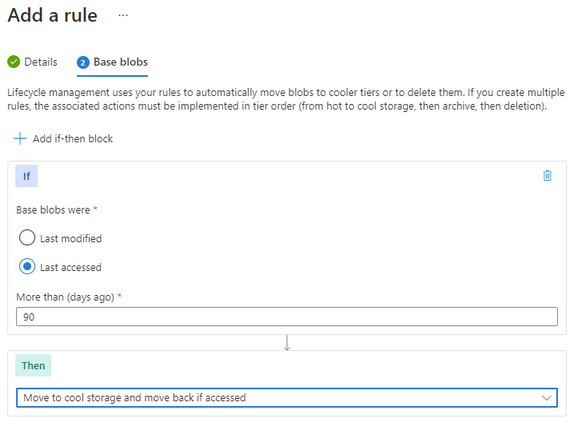
Going thought the same process as above to create a rule, though this time we set the last accessed number of days and then select the “move to cool” action. This will enable the system to move unused Block Blobs to the cool tier.
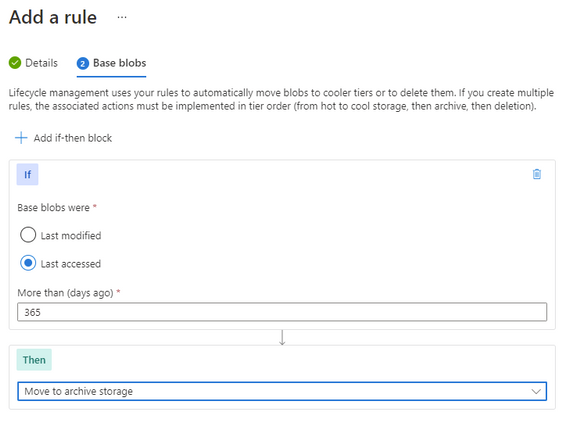
You can further enhance this with an additional rule to move the Block Blob to archive after a further date. There is no requirement to move to cold before moving to archive, so if that suits your business outcome you can move it directly to archive.
Keep in mind that analytical systems that leverage the storage system (such as Azure Data Explorer) won’t be able to interact with archived data and it must be rehydrated back to cool or hot to be used.
Timeline
With these two systems in place, we have set up our logs to be kept for our required period, manage out costs and then automatically removed at the end.

Summary
While in this article we have focused on applying the protection to the logs from the monitoring systems or SIEM, the process and protection applied here could suit any business data that needs long term retention and hold. This data could be in the form of log exports, call recordings or document images.
by Contributed | Jun 28, 2021 | Technology
This article is contributed. See the original author and article here.
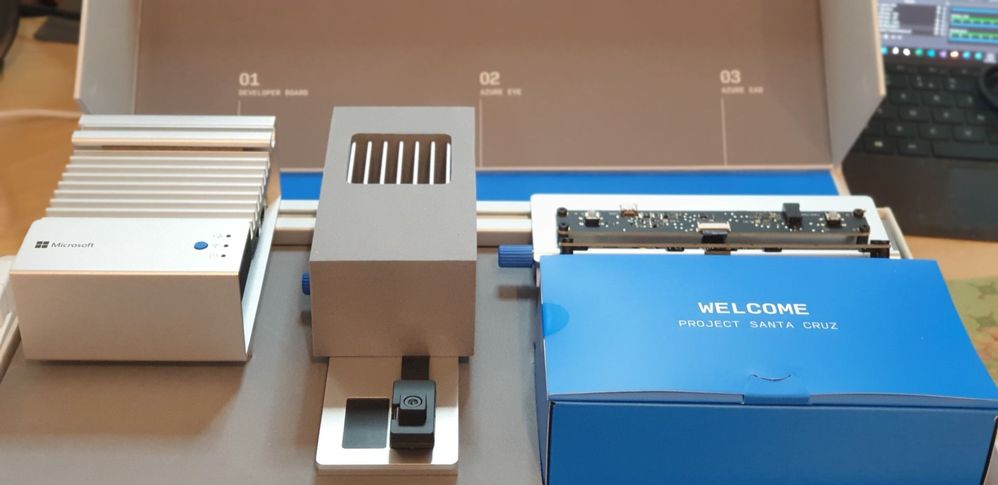
The Azure Percept is a Microsoft Developer Kit designed to fast track development of AI (Artificial Intelligence) applications at the Edge.
Percept Specifications
At a high level, the Percept Developer kit has the following specifications;
Carrier (Processor) Board:
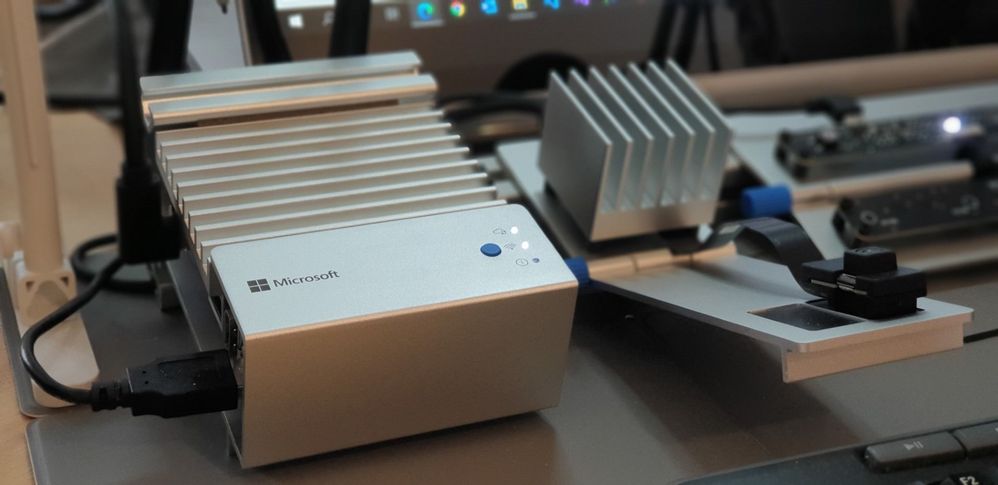
- NXP iMX8m processor
- Trusted Platform Module (TPM) version 2.0
- Wi-Fi and Bluetooth connectivity
Vision SoM:
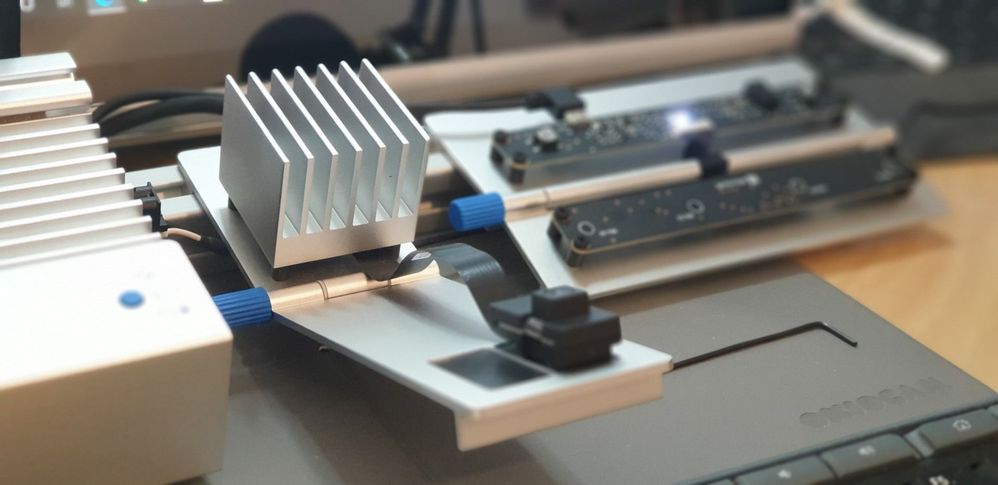
- Intel Movidius Myriad X (MA2085) vision processing unit (VPU)
- RGB camera sensor
Audio SoM:
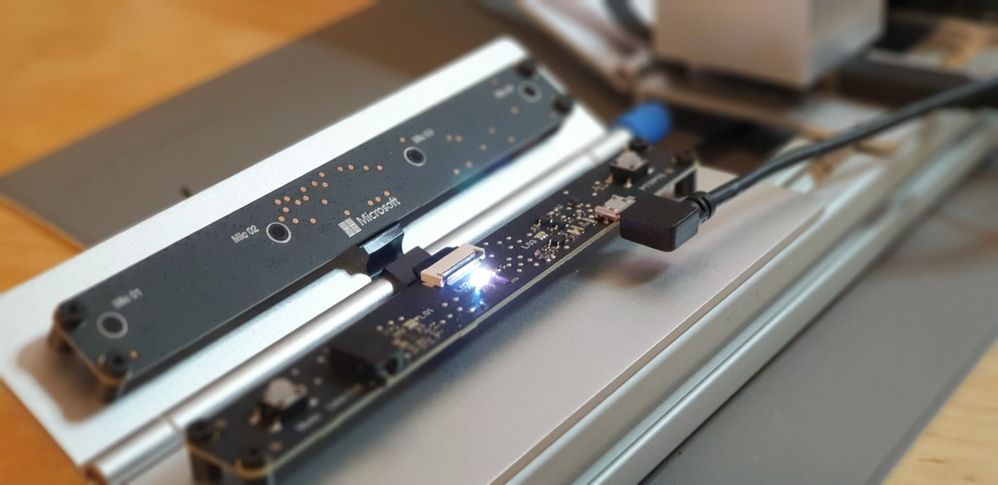
- Four-microphone linear array and audio processing via XMOS Codec
- 2x buttons, 3x LEDs, Micro USB, and 3.5 mm audio jack
Percept Target Verticals
The Percept is a Developer Kit with a variety of target industries in mind. As such, Microsoft have created some pre-trained AI models aimed at those markets.
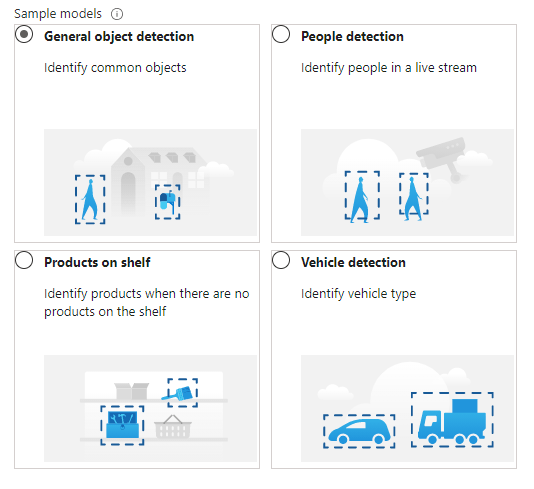
These models can be deployed to the percept to quickly configure the Percept to recognise objects in a set of environments, such as;
- General Object Detection
- Items on a Shelf
- Vehicle Analytics
- Keyword and Command recognition
- Anomaly Detection etc
Azure Percept Studio
Microsoft provide a suite of software to interact with the Percept, centred around Azure Percept Studio, an Azure based dashboard for the Percept.
Azure Percept Studio is broken down into several main sections;
Overview:
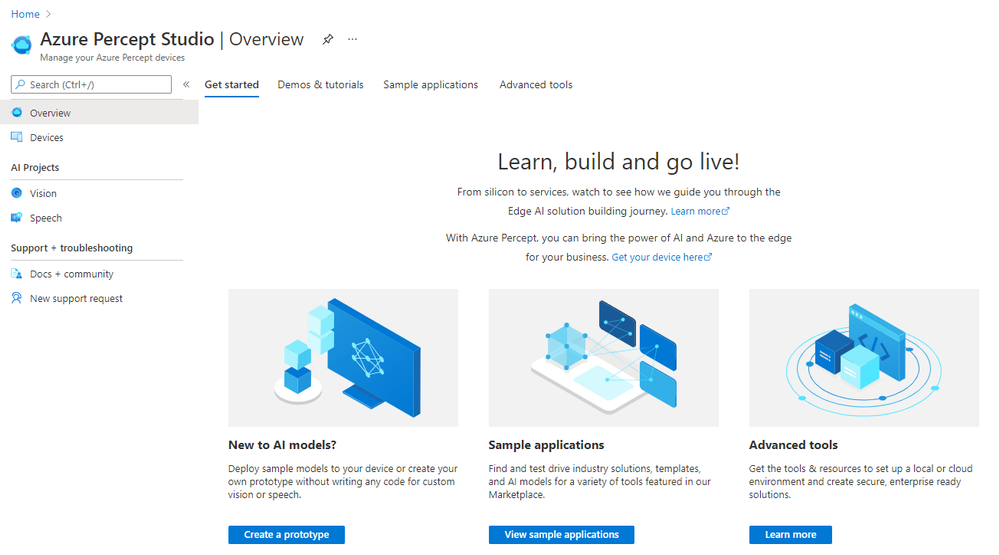
This section gives us an overview of Percept Studio, including;
- A Getting Started Guide
- Demos & Tutorials,
- Sample Applications
- Access to some Advanced Tools including Cloud and Local Development Environments as well as setup and samples for AI Security.
Devices:
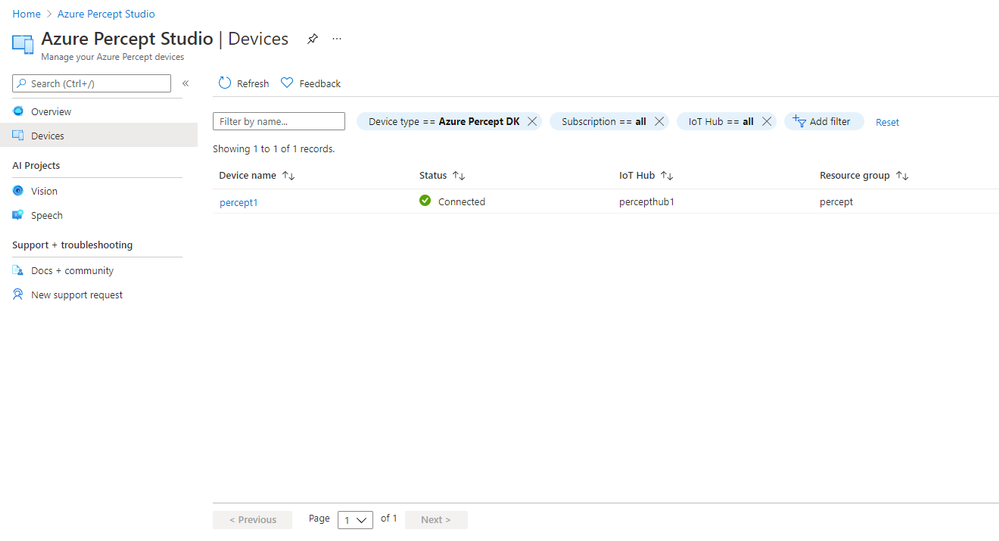
The Devices Page gives us access to the Percept Devices we’ve registered to the solution’s IoT Hub.
We’re able to click into each registered device for information around it’s operations;
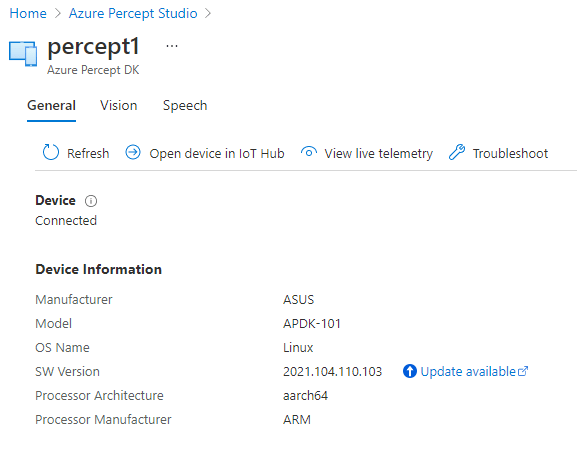
This area is broken down into;
- A General page with information about the Device Specs and Software Version
- Pages with Software Information for the Vision and Speech Modules deployed to the device as well as links to Capture images, View the Vision Video Stream, Deploy Models and so on
- We’re able to open the Device in the Azure IoT Hub Directly
- View the Live Telemetry from the Percept
- Links with help if we need to Troubleshoot the Percept
Vision:
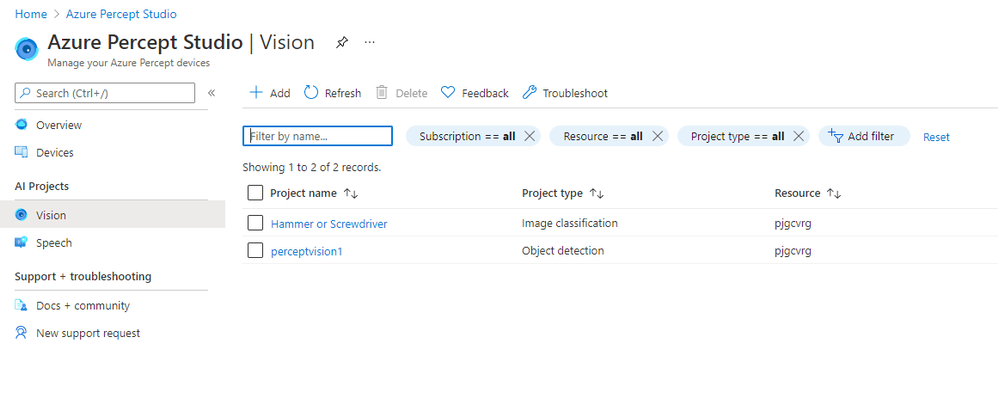
The Vision Page allows us to create new Azure Custom Vision Projects as well as access any existing projects we’ve already created.
Speech:
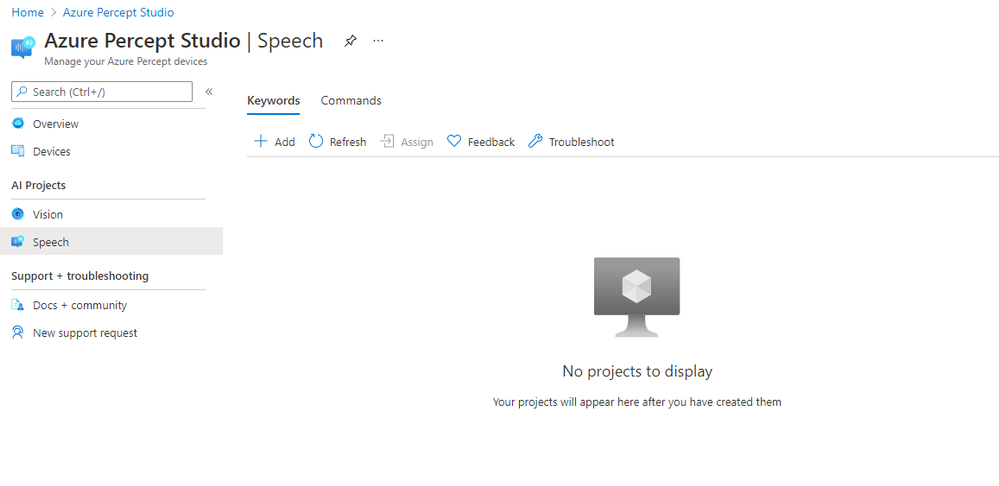
The Speech page gives us the facility to train Custom Keywords which allow the device to be voice activated;
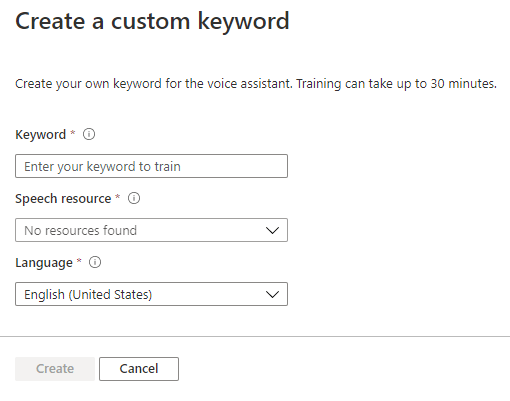
We can also create Custom Commands which will initiate an action we configure;
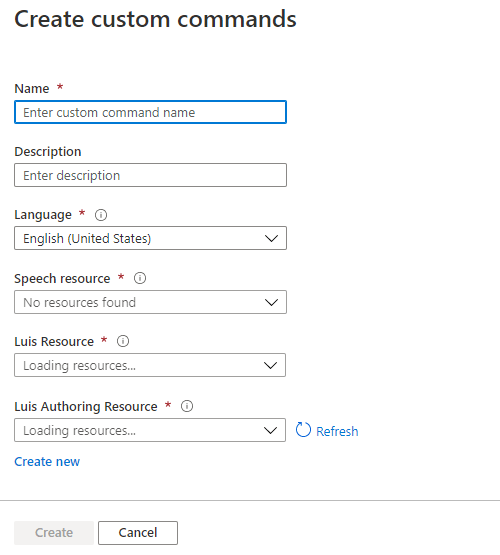
Percept Speech relies on various Azure Services including LUIS (Language Understanding Intelligent Service) and Azure Speech.
Other Resources
by Contributed | Jun 28, 2021 | Technology
This article is contributed. See the original author and article here.
Looking to validate your applications for Windows 11? Test Base for Microsoft 365 can help.
A new operating system can bring back memories of application compatibility challenges. But worry not. Microsoft has embraced the ‘compatible by design’ mantra as part of the operating system (OS) development lifecycle. We spend a lot of time agonizing over how the smallest of changes can affect our app developer and customers. Windows 10 ushered in an era of superior application compatibility, with newer processes such as ring-based testing and flighting strategies to help IT pros pilot devices against upcoming builds of Windows and Office, while limiting exposure to many end users.
Microsoft is committed to ensuring your applications work on the latest versions of our software and Windows 11 has been built with compatibility in mind. Our compatibility promise states that apps that worked on Windows 7/8.x will work on Windows 10. Today we are expanding that promise to include Windows 11. This promise is backed by two of our flagship offerings:
- Test Base for Microsoft 365 to do early testing of critical applications using Windows 11 Insider Preview Builds.
- Microsoft App Assure to help you remediate compatibility issues at no additional cost.
What is Test Base for Microsoft 365?
A little less than a year ago, we announced the availability of a new testing service targeted at desktop applications called Test Base for Microsoft 365. Test Base for Microsoft 365 is a private preview Azure service that facilitates data-driven testing of applications. Backed by the power of data and the cloud, it enables app developers and IT professionals to take advantage of intelligent testing from anywhere in the world. If you are a developer or a tester, Test Base helps you understand your application’s ability to continue working even as platform dependencies such as the latest Windows updates change. It helps you test your applications without the hassle, time commitment, and expenditure of setting up and maintaining complex test environments. Additionally, it enables you to automatically test for compatibility against Windows 11 and other pre-release Windows updates on secure virtual machines (VMs) and get access to world-class intelligence for your applications.
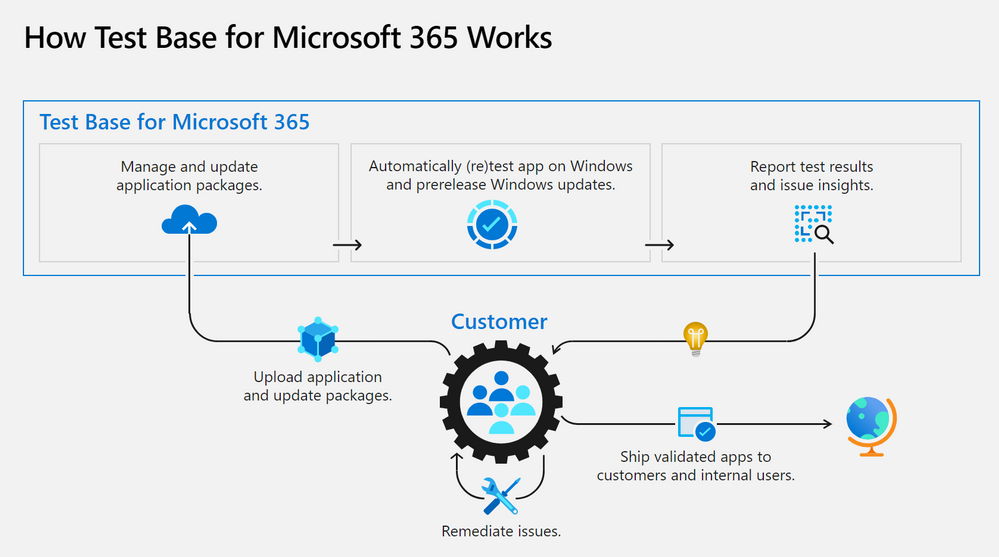
Once a customer is onboarded onto Test Base for Microsoft 365, they can begin by (1) easily uploading their packages for testing. With a successful upload, (2) the packages are tested against Windows updates. After validation, customers (3) can deep dive with insights and regression analysis. If the package failed a test, then the customer can leverage insights such as memory or CPU regressions to (4) remediate and then update the package as needed. All the packages being tested by the customer (5) can be managed in one place and this can help with such needs as uploading and updating packages to reflect new versions of applications.
Desktop Application Program
An important feature for desktop application developers is the ability to view detailed test results and analytics about the total count of failures, hangs, and crashes of applications post OS release. With the integration of Test Base link on the Desk Application Program (DAP) portal developers as part of this program now have access to the ability to track their application performance against the various post release version of Windows OS and subsequently, investigate the failures, replicate them, and apply appropriate fixes to their application for a better end user experience.
Apps and Test Base: coming soon
As a developer, you balance an ever-growing test matrix of testing scenarios. These include the various Windows updates including the monthly security updates. Combined with the challenges around limited infrastructure capacity, device configuration and setup, software licenses, automation challenges etc., testing could quickly turn into a costly operation. Test Base provides a Microsoft managed infrastructure that automates the setup and configuration of Windows builds on a cloud hosted virtual machine. Test Base will make it easy to validate your application with Windows 11 Insider Dev and Beta builds in an environment managed by Microsoft.
Test Base helps IT professionals focus their test efforts and get to the confidence they seek faster. Our initial offering is focused on critical line of business (LOB) applications from enterprises whose applications we all depend on. If you are an Intune customer, you will soon be able to find the link to Test Base on the LOB and Win32 application page on the Microsoft Endpoint Manager admin center.
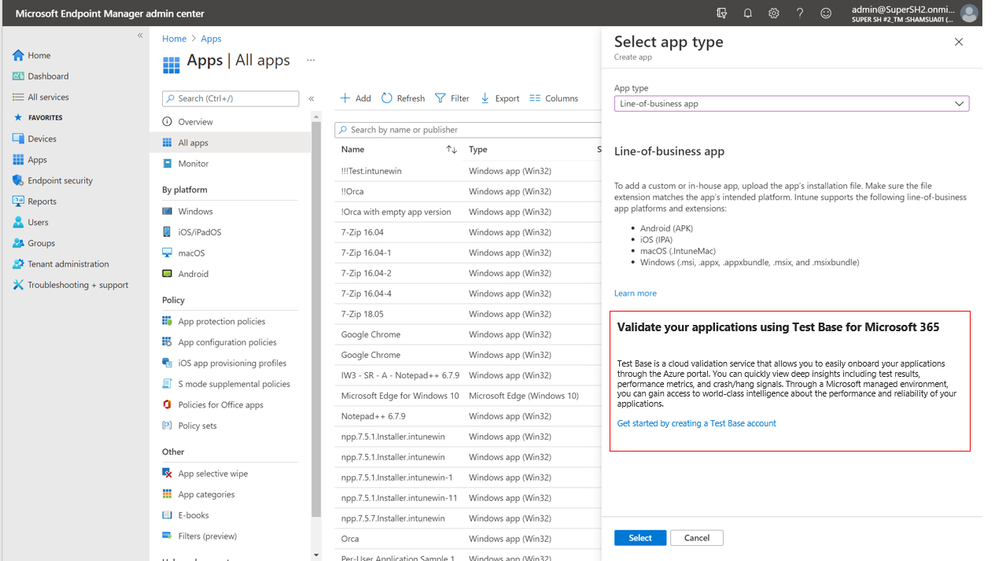
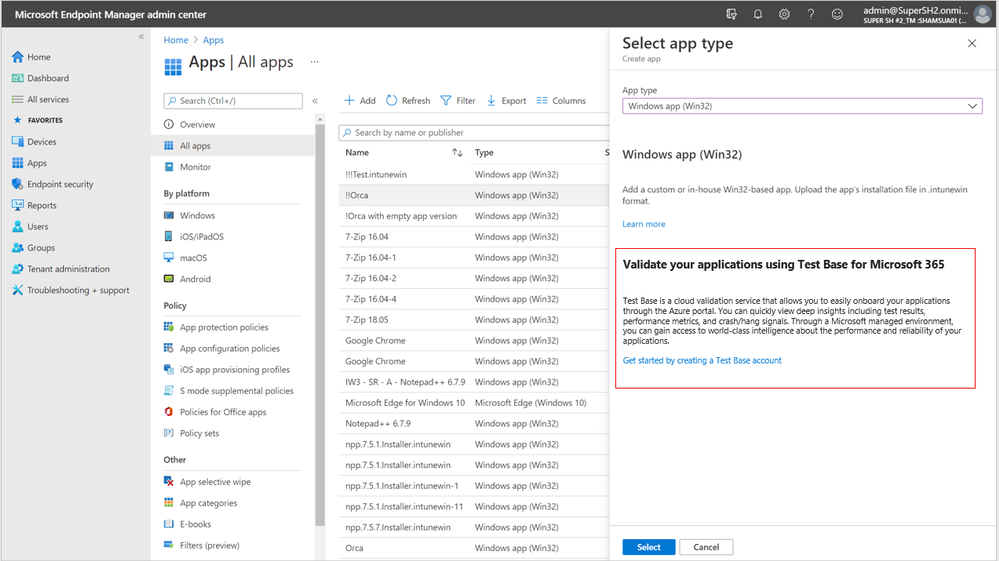
Not only will you get test coverage against Windows 11, and current Windows security and feature updates, you will also get data insights and support on application failures such that you can quickly remediate applications prior to broad release across your organization.
What’s next on the roadmap for Test Base for Microsoft 365?
We are continuously gathering and collaborating on feedback to improve upon and prioritize the future for Test Base. Examples of capabilities that you can expect to light up in the future include asynchronous alerts & notifications, support for API based onboarding, intelligent failure analysis and support for Microsoft 365 client applications.
Join the Test Base community
If you are interested in onboarding your applications to Test Base, please sign up today.
We are actively engaging with application developers and enterprise customers now to add more value and help solve additional use cases. We would also like invite you to come join us on the new Test Base for M365 community on Tech Community so you can share your experiences and connect with others using the service.
by Contributed | Jun 28, 2021 | Technology
This article is contributed. See the original author and article here.
Claire Bonaci
You’re watching the Microsoft US health and life sciences, confessions of health geeks podcast, a show that offers Industry Insight from the health geeks and data freaks of the US health and life sciences industry team. I’m your host Claire Bonaci. On this episode guest host Molly McCarthy talks with Dr. Vickie Tiase, Director of Research science at New York Presbyterian Hospital. They discuss the future of nursing 2020 to 2030 Health Equity report, and how technology can assist in achieving the goals discussed in the report.
Molly McCarthy
Hi, good morning. It’s great to be here back on confessions of health geeks. And with me today I have Dr. Victoria Tiase. She’s the director of research science at New York Presbyterian. Welcome Dr. Tiase. It’s great to have you here.
Vickie Tiase
Hi, Molly. Thank you. It’s great to be with you. And certainly please feel free to call me Vicki, thank you for hosting this and really elevating the visit visibility of the reports. I’m excited to talk with you about it.
Molly McCarthy
Great. Thank you. I would love to give our listeners a brief background of yourself. And how you became involved with the future of nursing 2020 to 2030 charting a path to achieve health equity report.
Vickie Tiase
Yeah, absolutely. So you know, it was certainly my my honor and privilege to represent nursing specifically with technology and informatics expertise on this report. And you know, a little bit about my experience leading into the report kind of, you know, serves as a context for answering your question. So, you know, probably about 10 years ago, we had an effort in New York City called the New York City digital health accelerator, it was formed with this idea of bringing healthcare startups into New York City and have them be mentored by area hospitals. So at the time, I served as our hospitals mentor for that program, and I had a keen interest in piloting mobile health technologies, with our Washington Heights and Inwood patient populations, an underserved area in northern Manhattan. And there were two solutions that stood out. One was collecting medication data through an app called the actual meds using community health workers. And another one was called new health, where we provided the National Diabetes Prevention Program through a mobile app. And in both of these examples, it was, you know, really amazing to see the engagement from these patient populations. And, you know, I know there is great potential in technology, intervention equity, but we really need to gather evidence and share findings, and really think about using community acquired and patient generated health data in our nursing practice. So these are concepts that I wanted to infuse into the report. And I think given that experience and the intersection of some of my National Nursing informatics roles, within hims, and the alliance of nursing informatics, I was nominated for this committee, and then approached regarding my interest in serving, which I gladly said yes, it has been an amazing experience. Two plus years now working on the report with a very diverse interdisciplinary committee, and given COVID we actually received a six month extension to work on this report. So while we were initially slated to have the report out in December of 2020, it just came out last month, early May of 2021. So although it was an arduous process, I’m you know, super proud of the work that’s been done.
Molly McCarthy
Well, congratulations. I’ve been watching the the process and actually participated in the town hall on technology back in August of 2019. So I’m really excited to see the report, but probably even more excited to see how we as nurses can move these recommendations forward and actually take action. The ultimate goal of the report is the achievement of health equity in the United States built on strengthen nursing capacity and expertise, and I know there were multiple recommendations within the report around that and the role that nurses play. I think the report totaled around 503 pages from one I looked at again last night. From your perspective, and looking at the recommendations, do you have a sense of where the biggest opportunity is for nurses in terms of technology? And as well as roles for nurses and education for nurses, and just wanted your thoughts around that? Because I know that’s been your focus?
Vickie Tiase
Yeah, absolutely. Before I get to that question, I just wanted to say thank you for participating in that high tech, high touch Town Hall, it was, you know, really helpful for the committee to go across the country and really hear from the experts and gather evidence. This, I found to be very challenging from a technology and innovation perspective, since a lot of the work that we do in healthcare I.T. is implementing solutions very quickly, without a focus on publishing findings. So it was, you know, really helpful to hear from experts like yourself. But turning question, yeah. But turning to your question and the opportunities, you know, again, just to really, you know, Center, the purpose, and the vision for the report here, on everything that we did, as a committee was really looking through that health equity lens. And, you know, one of the big opportunities I see in the technology and informatics space is really linking to data. So I feel like that is first and foremost. So in order to address health equity, nurses need data, right, we can’t change what we can’t measure. So I think this is a real opportunity for screening tools that can collect social and behavioral determinants of health. You know, in short, social needs data. And it’s not only collecting it, but facilitating the sharing across settings, especially with community based organizations, which we find are not always electronic. So I think this is a real opportunity for us to think deeply about that interoperability component. And figuring out how, you know, nurses are, are generally bridge builders, like that’s what we do. So how can we leverage that talent and expertise of bridge building in a way that facilitates the sharing of data so that we can incorporate them into nursing practice in a meaningful way?
Molly McCarthy
Yeah, I love that. The bridge builder analogy, and I actually, you know, I think about nurses and I think about some of the roles I’ve played in my career. And it’s, I always use the analogy of the the hub of a wheel and all the spokes out to the different components of the care continuum. And really, that nurse is at the center with that patient. So how can we facilitate that patient throughout the system, as well as the data moving from from place to place, whether that’s patient generated data or data from an EMR, etc. So I think that’s a really important point that you bring out.
Vickie Tiase
Yeah, I like that. I think that idea of that that hub and spoke model also is connected to what I think is a another big message in the report, you know, globally, you know, around paying for nursing care. Right, so thinking about transitioning to value based reimbursement models. Nurses are already doing this stuff, right. But how can we measure the nursing contribution to that value? Right, so it’s often super difficult to measure and, and sometimes invisible even within our electronic systems. So one of the things that the report highlights is the need for a unique nurse identifier and how this is critical. You know, this can help us with a lot of things. It can help us associate the characteristics of nurses with patient characteristics within large data sets. And it can measure the nursing impact on patient outcomes, look at efficiencies, clinical effectiveness. So from my perspective, this is a huge message in the report that has the potential to make a really big difference as to how we look at health equity and look for mechanisms, especially around payment mechanisms to incentivize and move this work forward.
Molly McCarthy
Right? You know, I think that’s so important. And I’m definitely a proponent of the unique nurse identifier really from the concept of thinking about the cost of care and understanding the different costs of care. So that, you know, there’s appropriate reimbursement, quite frankly, for nursing care, but also from the perspective of a consumer, understanding the costs of care, so that there’s, you know, leading to price transparency, you know, understanding as a consumer, what we’re paying for care, and I think having an understanding of of nursing and our our role and what we do and the value, and $1 assigned to that I think it’s so important and moving healthcare forward. So I appreciate you pulling that out. And I know there was one other area that we were thinking about too from the report. And so I wanted you just to give you a few more minutes to talk about that third area.
Vickie Tiase
Absolutely. I think that the third big area, and you know, certainly this was front and center in this past year is, you know, the use of technology to effectively manage patient populations. So the use of telehealth, which includes telemedicine visits and remote patient monitoring and other forms of digital technology to increase patient access has just been, you know, transformative. But the trick here is that we, we really need to think about how to involve nurses in these processes. And especially, especially when we think about nurse practitioners, there are, believe it or not, still 27 states where, you know, nurse practitioners are not able to practice at the top of their license. So where their scope of practice limitations. So thinking about how those barriers that were lifted during COVID can be made permanent moving forward. I think that’s going to be important. And I think the other piece related to technology, which I know is something that you’re quite passionate about Molly is that the report also emphasizes that nurses can not only use these novel technologies, but also constructively inform and design the deployment and development of these technologies. And you know, from a health equity perspective, ensuring that they’re free of bias, and can augment our nursing processes rather than create additional burdens, right? So really using these in a way that matches nursing workflows, and getting nurses involved and engaged from the very beginning.
Molly McCarthy
Yes, yes, yes. I often say, you know, nurses need to be at the table, they need to be involved in the design and development of these solutions. And that’s kind of on a personal note where I’ve spent a lot of time in my career. So. So I think that I appreciate you highlighting that because I do think it’s, you know, as we look across the the technology continuum, so to speak, from the from even just, you know, concept to launch, nurses really need to be part of that discussion. And clinicians need to be part of that discussion, so that we’re coming up with solutions that make sense from a technological perspective, but also a clinical workflow perspective, as well as thinking about cost and patient outcomes. So that’s fantastic. The one as we close out here, and I know that we could spend a couple of hours talking about this. But thinking about that, recommendation number six, and I’m going to read it all public and private healthcare systems should incorporate nursing expertise in designing, generating, analyzing and applying data to support initiatives focused on social determinants of health and health equity, using diverse digital platforms, artificial intelligence, and other innovative technologies. That’s a lot in one recommendation, and what what is your takeaway from that? What is your as you think about that goal, as we think about nurses, what would be your Action around this?
Vickie Tiase
Sure, absolutely. So first of all, I am just so excited that we have a recommendation around this. For those that might know the first report well, back in 2010, there was one little mention of the EHR. And other than that there was almost nothing around technology. So I am I’m thrilled that the committee, you know, came up with this recommendation. And so in terms of the action steps, there are actually a couple of sub recommendations related to this, that is, you know, within chapter 11, for this recommendation. So the first one is that, you know, as I mentioned earlier, accelerating interoperability projects, so figuring out how we can build that nationwide infrastructure, specifically thinking about integrating SDoH data. And then related to that the second sub recommendation is thinking about the visualization of SDoH data. So how can we use standards and other ways to ensure that this isn’t an extra burden on nurses and these are brought into our nursing clinical decision making in a meaningful way? The third one, which I think is, which is also a ambitious recommendation is employing more nurses with informatics expertise. So I think in order to do this recommendation, that’s going to need to happen. So we’re going to need nurses that have informatics expertise to look at the large scale integrations, thinking about how to improve individual and population health using technology. And, and right now that that is lacking in parts of our country, right. And then the last two, so so one that we mentioned, ensuring that nurses and clinical settings have responsibility and the resources to innovate, design and evaluate the use of technology. Right. So it’s really empowering all nurses to do this. So I think that’s an important one. And then lastly, providing resources to facilitate telehealth delivered by nurses. So I think there’s a lot of pieces to this, as you mentioned, this is a big ambitious recommendation. But I think that the real point is that this is about looking at the evidence where we need to go and and we’ve got a decade to figure this out, hopefully sooner rather than later. But I think the next step here is really working on that roadmap and action items to collectively move this forward.
Molly McCarthy
Great, thank you. I know that we’re out of time, but I personally look forward to working with you and other of our nursing informaticists colleagues, really throughout the spectrum, whether they’re in a healthcare setting. You know, the other big piece that we didn’t get to touch on today is just the education, whether that’s undergraduate, masters, prepared PhD, you know, I’m a big proponent of bringing in technology and informatics into the undergraduate curriculum. And again, we don’t have time to go on to go into that today. But I look forward to continuing the partnership. And I know that Microsoft is really supportive of nurses and want to thank you for all the work that you’ve done on behalf of nurses.
Vickie Tiase
Thank you, Molly. Thanks for having me on and again for elevating the messages in this report. I look forward to working with you on this in the future. Thank you.
Claire Bonaci
Thank you all for listening. For more information, visit our Microsoft Cloud for healthcare landing page linked below and check back soon for more content from the HLS industry team.
Microsoft Cloud for Healthcare


Recent Comments