by Contributed | Oct 22, 2021 | Technology
This article is contributed. See the original author and article here.
It is fall season in the northern hemisphere, spring season in the southern and time for a new edition of Microsoft Ignite!
If you have not yet registered for the free virtual event, you can do so at https://myignite.microsoft.com.
As you navigate through the many sessions and opportunities to connect with Microsoft’s product teams, you will want to build yourself some learning path, and if you are interested in learning more about IoT, here are some pointers to help you out.
Below is the list of all the IoT related content featured at the event. As you will notice this edition is focused on roundtables to give you an opportunity to not just learn about the latest in IoT technologies at Microsoft but also to provide feedback, share what your needs and pain points are to the teams developing the next generation of IoT tools and services.
Title |
Type |
Speakers |
Description |
Developing AI Edge modules on Windows for IoT devices |
Product Rountables |
Martin Tuip, Terry Warwick |
Linux is often used for AI modules but the hurdle is the management of the devices in the infrastructure. What if you could use the best of both of them? Join the Azure EFLOW team to provide feedback and input on developing IoT Edge Modules, what types of devices you want to create, features you think we should add |
Deploy IoT Solutions with Azure SQL Database |
Connection Zone |
Anna Hoffman, Davide Mauri |
Many organizations are investing in IoT to increase operational efficiency, deliver better customer experiences, increase levels of security, enhance workplace safety, and reduce costs. This session will introduce how Azure SQL Database provides a price-performant backend, including templates that simplify deploying and configuring IoT solutions for any scenario. |
IoT in manufacturing |
Product Roundtables |
Fabian Frank, Jehona Morina, Sean Parham, Ranga Vadlamudi, David Walker |
Tell the Azure IoT engineering team about your experiences with connected devices in manufacturing settings. We’ll share some materials on which we’d like your feedback. Your insights will help inform investments for upcoming releases |
IoT devices are typically an organizations weakest security link. Help us prioritize features to help strengthen your IoT security posture |
Product Roundtables |
Yossi Basha, Nir Krumer, Phil Neray |
Attacks on Enterprise IoT devices are increasing and it’s no wonder. IoT devices are not designed with security in mind like you’ll find with nearly ever every other traditional type of endpoint (workstations, servers mobile devices). In addition, the ability to monitor such devices is limited due to the lack of a deployable agent that can perform configuration management (e.gf.: settings and patching) and internal security monitoring using high fidelity endpoint signals. In this session, we are seeking your feedback so that we can learn and properly prioritize the roadmap for delivering IoT security capabilities to the Microsoft Defender suite. |
How to Develop a Security Vision and Strategy for Cyber-Physical and IoT/OT Systems |
Breakout |
Phil Neray, Katell Thielemann |
Recent ransomware attacks that halted production for a gas pipeline operator and food processor have raised board-level awareness about IoT and Operational Technology (OT) risk. Security leaders are now responsible for new threats from cyber physical systems (CPS) and parts of the organization they never traditionally worried about. Join Katell Thielemann from Gartner® to discuss how to develop a CPS risk strategy using the “language of the business” to show security as a strategic business enabler. GARTNER is a registered trademark and service mark of Gartner, Inc. and/or its affiliates in the U.S. and internationally and is used herein with permission. All rights reserved. |
Onboarding to Azure IoT |
On-Demand |
Ricardo Minguez Pablos, Cory Newton-Smith |
Learn how to onboard to Azure IoT through our recommended approach to solution building. We’ll share how to get started with an aPaaS offering that helps you crystalize your IoT solution needs, set a strategic direction with confidence, and deliver value to your organization. You will learn how Azure IoT is simplifying IoT by providing an out-of-the-box and ready-to-use UX and API surface that works with customization options. |
US Local Connection: Data is the new air – how customers use data & apps to drive innovation |
Connection Zone |
|
How do we break down data silos and derive valuable insights about your customers to deliver transformational experiences? Join us for this session to learn how to leverage data, AI, and IoT to build innovative applications that benefit both your employees and customers. |
Integrating Azure Sphere into products |
Product Roundtables |
Barry Bond, Susmitha Kothari, James Scott |
Calling all developers and device builders who have used Azure Sphere or want to know more about how MT3620 can accelerate your IoT journey. Join the Azure Sphere product team to hear what’s new and upcoming for the MT3620, and to share your feedback on what could be done to make the product better suit your needs. |
Manufacturing a Resilient Future with Microsoft Cloud for Manufacturing |
Breakout |
Çağlayan Arkan, Arun Kumar Bhaskara-baba, Zikar Dawood, Satish Thomas |
Microsoft Cloud for Manufacturing drives new levels of asset and workforce productivity while streamlining and improving security for IT, OT, and industrial IoT across the manufacturing value chain. By aligning cloud services to industry-specific requirements, we give customers a starting point in the cloud that easily integrates into their existing operations. Microsoft Cloud for manufacturing provides access to the broader portfolio of Microsoft cloud services enabling manufacturers to begin where the need for technology or business transformation is most urgent.
|
Ask the Experts: Manufacturing a Resilient Future with Microsoft Cloud for Manufacturing |
Connection Zone |
|
Microsoft Cloud for Manufacturing drives new levels of asset and workforce productivity while streamlining and improving security for IT, OT, and industrial IoT across the manufacturing value chain. By aligning cloud services to industry-specific requirements, we give customers a starting point in the cloud that easily integrates into their existing operations. Microsoft Cloud for manufacturing provides access to the broader portfolio of Microsoft cloud services enabling manufacturers to begin where the need for technology or business transformation is most urgent. |
Scaling Unreal Engine in Azure with Pixel Streaming and Integrating Azure Digital Twins |
On-Demand |
|
Deep dive into how Unreal Engine games or apps can be easily deployed and auto-scaled in Azure using Pixel Streaming, leveraging a new solution built by Azure Engineering that can save hundreds of hours of developer’s time to build the infrastructure and management to deploy at massive scale. Additionally, learn how Unreal Engine can integrate with Azure Digital Twins to deliver immersive and live visualizations of your IoT and digital twin environments. |
Green Transformation: driving measurable sustainability every step of the way |
On-Demand |
|
Microsoft Cloud services are up to 98% more carbon efficient than traditional datacenters, but the sustainability benefits don’t stop there. In this session, our experts discuss how to infuse your digital transformation with sustainable practices every step of the way — from migration and application development to creating more value for clients and measuring results. We’ll also explore a real-world scenario utilizing IoT and edge technology to power green initiatives for a global manufacturer. |
Powering Cloud at the Edge: A Data Story Told Across Three Horizons |
On-Demand |
|
As your organization builds its digital core, how can you develop crucial cloud-native capabilities that will help you quickly scale? Join us to learn what to consider when building edge-to-cloud solutions, and the unique roles that AI, IoT, and cognitive services play in being able to get the most out of the edge. We’ll also share use cases that highlight end-to-end scenarios, the respective Azure edge solutions deployed, and the roles that data, IoT and AI can play. |
![Customizing Lists best practices [guest blog and video]](https://www.drware.com/wp-content/uploads/2021/10/fb_image-8.jpeg)
by Contributed | Oct 20, 2021 | Technology
This article is contributed. See the original author and article here.
Hello, my name is Norm Young, and I am Microsoft MVP from St. Catharines, Ontario, Canada. I am a 20 plus year data professional who has recently made the shift to the collaboration space using Microsoft Lists, Microsoft Teams and SharePoint. Microsoft asked if I would share both the way I approach leveraging technology and highlight a few recent custom solutions I put together. I’m thrilled to be here, so – here, we go.
Background
Many of the solutions I have built using Microsoft Lists reflect the current state of a business process. When I worked in higher education, we used Lists to track student exchange program information (school name, start/end dates, current student counts etc.). In my current role we use Microsoft Lists to track our new customer onboarding program (client name, contact information, products to onboarding, major milestones etc.). Business processes tend to have multiple stages with start and end dates, persons responsible, and other forms of supporting metadata that make the execution of the business process possible. Additional value is brought to the Lists experience through the integration with other apps and services like the Power Platform with list data serving as the foundation for applications developed using Power Apps, workflows using Power Automate and reporting using Power BI.
Approach
When I develop solutions using Microsoft Lists, I take a configure-first approach where the existing out-of-the-box functionality is evaluated to see if the minimum viable product can be achieved without customization. If this is not possible then extending functionality is undertaken.
In the not so recent past, if I needed to hide or rearrange columns in the list new/edit form I had use Power Apps and by doing so I created technical debt that someone would have to own and maintain. Don’t get me wrong, I think Power Apps is a great development platform but not all solutions require customization. In the current state of the new/edit form hiding columns or rearranging columns is as simple as deselecting a checkbox or dragging columns into the desired order with no Power Apps customization required.
In contrast, if the solution requires customization and the value of that customization outweighs the cost the technical debt then customization is the right choice. While working in higher-ed, I developed a Microsoft Lists based solution that was used to track multi-factor authentication token assignments to users. The token identifier was a very long string of numbers with an associated barcode. If we implemented a no-customization solution the user would be forced to manually enter the identifier. This implementation would be prone to data entry error and would be unnecessarily mundane. Integrating Power Apps meant we could use the barcode scanner control to eliminate data entry errors and improve the user experience. In this case the cost of technical debt is outweighed by better data quality and improved user experience.
Because of their availability and low barrier to use, Microsoft Lists are leveraged in many ways. Below are the use cases shown in the above video – with additional context and a few tips and tricks along the way for why and how I customized lists to create business solutions.
Use case | Application submission solution using Forms, Microsoft Lists and Power Automate
Lists can be used to store response data from Microsoft Forms using Power Automate allowing for additional information tracking or analysis using Power BI. Integrating these tools helps to create a self-service platform for enhancing and modernizing business processes. Check out this blog article to learn more: Get responses from Forms to Microsoft Lists using Power Automate.
Connect Microsoft Forms to Power Automate flows to capture and populate Microsoft Lists list items.
Tip | When integrating apps and services into Microsoft Lists, it is important to remember that not all list column types will translate to the destination data types and some concessions in functionality may be required. Complex data types like the person column include additional information like email address, mobile phone number, department name, job title, first name, last name and many more that may need to be split into separate columns to store the additional person information (email, first and last name) or handled in some programmatic way like an expression in a Power Automate.
Use case | Organization specific project management tracker using Microsoft Lists.
If you have created a list-based solution, why not share it with others in your organization using
Custom List Templates? Custom List Templates are a great way to extend the value of one solution to others with similar needs by giving users a well-thought-out starting point that brings value to them in a very quick manner. Read more at: A first look at Templates in Microsoft Lists.
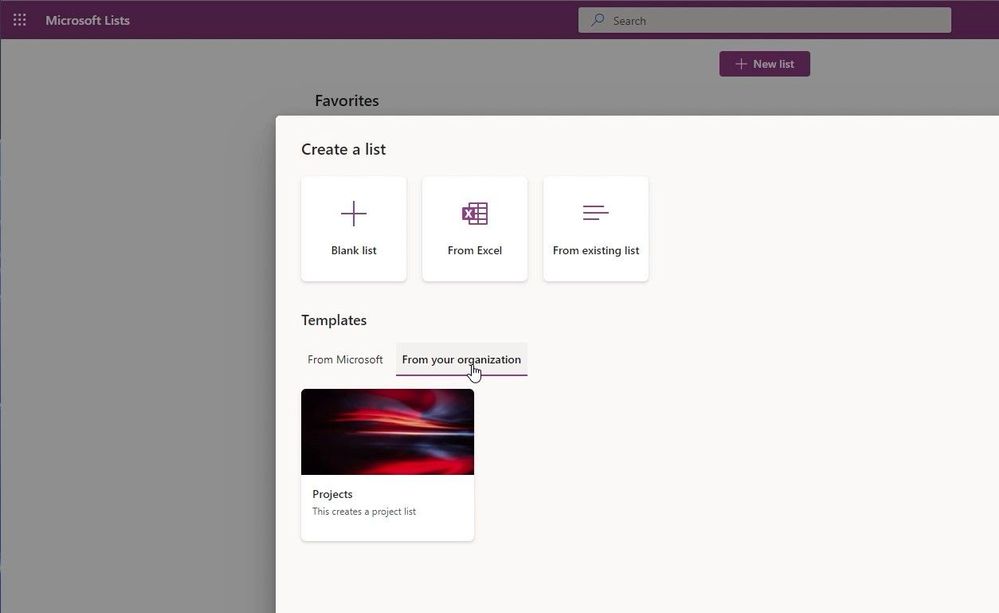
Microsoft Lists now supports custom lists design by your organization.
Use case | Issue tracking management using Microsoft Lists, Microsoft Teams and Power Automate.
Microsoft Lists solutions that leverage a target date or end date will find value added through reminders prior to the date. Value comes in the form of users not having to manually look for items that are coming due, it is pushed to them. Get started with List reminders in teams with this blog post: Send reminders to Teams from Microsoft Lists using Power Automate.
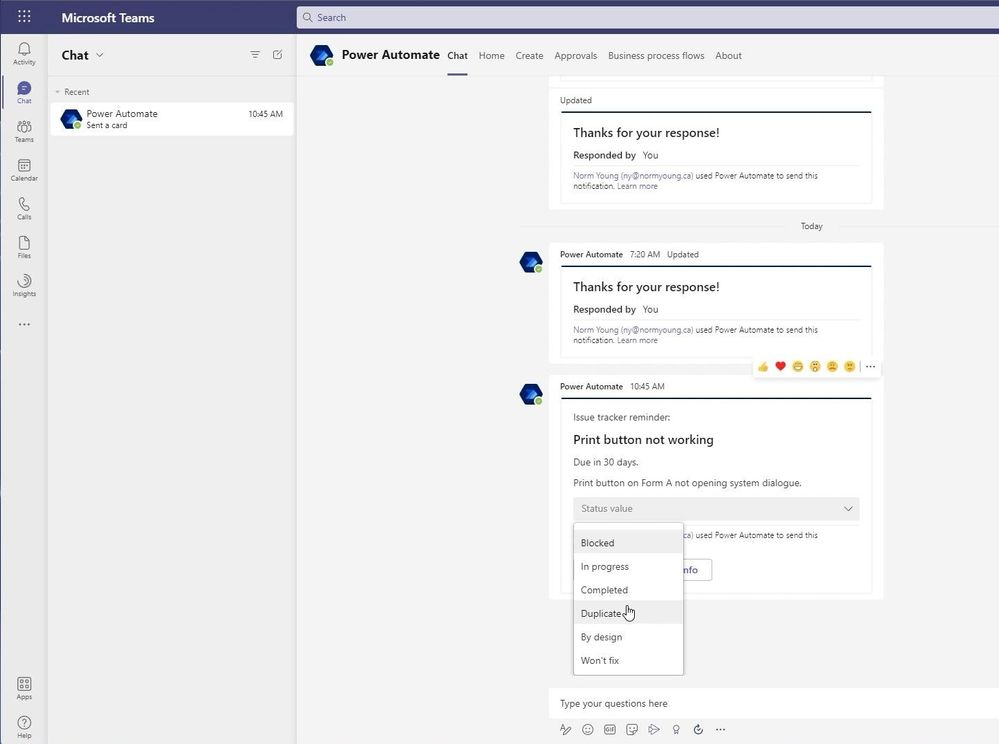
Use adaptive cards populated with Microsoft Lists list item data to push actionable requests into Microsoft Teams chats.
Tip | Another point of consideration are how column names are referenced internally with Microsoft Lists. Depending on how the column was created will influence the internal column name. As an example, if we create two similarly name columns, we will get two different internal names as shown in the table below:
Method
|
External name
|
Internal name
|
From default experience
|
Column 1
|
Column1
|
From List settings
|
Column 2
|
Column_x0020_2
|
Trick | A simple way to view the internal column name is to Edit Column (click on the column name) while in List Settings and check the Field value at the end of the URL.
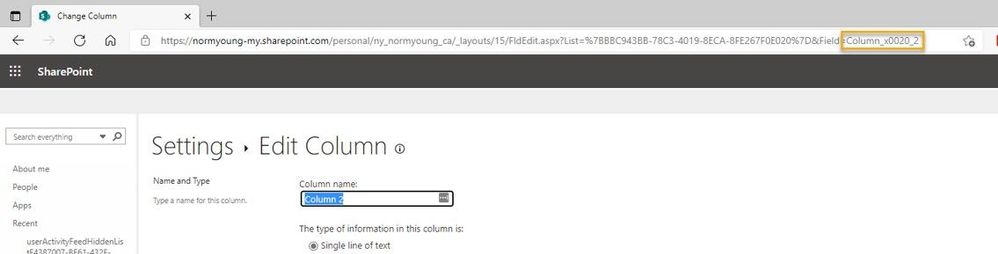
Trick | Go to List setting > Edit Column to view an internal column’s name.
Caution
Lists are great for centralizing and collaborating on data with teams but there are situations where lists are not the right fit. Solutions requiring complex data relationships and/or high-volume transactions should look to other offerings like Dataverse or Azure SQL Database as a more suitable platform.
Another caution when using lists as a data source is exceeding the List View Threshold – when apps and services attempt to fetch more than 5,000 items from a list. This doesn’t mean a list can only store 5,000 items – in fact a list can have up to 30 million items – but it does mean that any single call to a list must be 5,000 or fewer items. Be sure to check out the Living Large with Large Lists and Large Libraries article for more information on the List View Threshold issue, and how to design within it.
Final thoughts
Microsoft Lists are a great platform for collaborating on data using a single, low-barrier platform where solutions, can start modestly and grow as requirements, experience, and features increase. When deciding to customize lists be sure to take a configure-first approach and when it makes sense then customize using app and services like the Power Platform. To learn more be sure to check out the Microsoft Lists Resource Center for the latest blogs, videos, demos, and access to learning resources.
If you want to see more examples of how to extend functionality in Microsoft Lists be sure to check out my blog at https://normyoung.ca/. If you want to keep the conversation going lets connect on LinkedIn or following me on Twitter.
I hope you found some value in this post and thanks for reading!
Cheers, Norm

by Contributed | Oct 19, 2021 | Technology
This article is contributed. See the original author and article here.
Recently Microsoft HLS put on a webinar “Enhance Your Employee Experience with MS Viva.” This all up, high level webinar, led by Microsoft’s Michael Gannotti, covered all four of the current Microsoft Viva modules. Covered were Viva Connections, Viva Insights, Viva Topics, and Viva Learning. To provide deeper insight into each of the Viva modules, and to help customers test and investigate these modules, Microsoft HLS is putting on a 4-part webinar series “Microsoft HLS Viva Webinar Series.” You can read about each of the deep dive webinars below as well as download the individual calendar invites for each. Each session will be delivered by Michael Gannotti, Principal Technical Specialist, Microsoft HLS.
- Webinar Calendar Invites:
Microsoft Viva Connections – The Personalized Next Gen Intranet for Engaging Employees
October 27: Microsoft HLS Viva Webinar Series – 1
Microsoft Viva Connections delivers a role based “curated, company-branded experience that brings together relevant news, conversations, and resources in the apps and devices you use every day.” – Viva Connections. Microsoft Viva Connection is designed not only to inform employees but to also engage them in a meaningful fashion that help reduce feelings of disconnectedness that can arise in a hybrid workplace.
Agenda:
- Overview of Microsoft Viva Connections
- Instructions around its setup (Step by step walkthrough of standing up Viva Connections. Yes, it’s that straightforward and we will show you how.) including configuring the Connections Dashboard and Feed.
- Opportunities for extension of the Microsoft Viva Connections experience to add additional value and employee engagement.
- Open Q&A – Bring your questions, comments, concerns. Wondering what to do if you are still on premise or in SharePoint classic, maybe even another Intranet technology altogether? This will be a great opportunity to ask.
- Resources to get started on your journey to better employee engagement.
- Wrap up/Next steps
Microsoft Viva Insights – Improving Employee Productivity and Well Being
November 10: Microsoft HLS Viva Webinar Series – 2
Microsoft Viva Insights provides powerful, actionable, insights to “improve productivity and wellbeing with data-driven, privacy-protected insights and recommendations.” – Viva Insights
Microsoft Viva Insights enables employees to get personal insights in the flow of work as well as assists employees in managing their day, priorities, breaks, and more. Microsoft Viva Insights also helps managers address team stressors, productivity, and avoid employee burnout. Finally, Microsoft Viva Insights generates valuable insights and reports for business leaders that address challenges within the workplace. In all of these scenarios Microsoft Viva Insights is designed to keep employee data safe, private, while helping to enable organizations to maintain compliance with industry and regional requirements.
Agenda:
- Deep dive into Microsoft Viva Insights capabilities
- Learn how Microsoft Viva Insights can provide deep actionable insights while delivering privacy and ensuring organizational compliance.
- Address areas for expansion, customization, potentially leveraging data from additional non-Microsoft resources.
- Open Q&A
- Resources for Microsoft Viva Insights
- Wrap up/Next Steps
Microsoft Viva Topics – Automatically Organize Content/Expertise Across Your Organization Improving Ease of Information Discovery/Use
November 23: Microsoft HLS Viva Webinar Series – 3
Microsoft Viva Topics “automatically organizes content and expertise across your organization, making it easy for people to find information and put knowledge to work.” – Viva Topics
With Microsoft Viva Topics you can turn content into knowledge using AI to reason over your organization’s data and automatically identify, process, and organize content. You can organize knowledge, improving topics by combining AI and human expertise. Finally, make knowledge easy to discover by automatically displaying topic cards across Microsoft 365 apps to enable knowledge discovery in the context of your work.
Agenda:
During the Microsoft Viva Insights webinar attendees will:
- Deep dive into Microsoft Viva Topics capabilities
- Learn how Microsoft Viva Topics can improve information and expertise discovery within the context of work.
- Address areas for expansion, customization, of Microsoft Viva Topics pages.
- Open Q&A
- Resources for Microsoft Viva Topics
- Wrap up/Next Steps
Microsoft Viva Learning – Bringing Together the Continuum of Learning from AdHoc Projects to LMS hosted Compliance Training
December 23: Microsoft HLS Viva Webinar Series – 4
“Empower employees to discover, share, recommend, and learn from content libraries across your organization with this center for learning in Microsoft 365” – Viva Learning
With Microsoft Viva Learning employees can easily discover, recommend, and share all learning within and organization including Sharepoint content, 3rd party learning/training packages, Microsoft public resources, formalized Learning Management Systems (LMS), and more.
Agenda:
During the Microsoft Viva Insights webinar attendees will:
- Deep dive into Microsoft Viva Learning capabilities
- Learn how Microsoft Viva Learning can improve organizational readiness and skilling.
- Address areas for expansion, customization, of Microsoft Viva Learning content.
- Open Q&A
- Resources for Microsoft Viva Learning
- Wrap up/Next Steps
Thanks for visiting – Michael Gannotti LinkedIn | Twitter
 Michael Gannotti

by Contributed | Oct 19, 2021 | Business, Microsoft 365, Technology
This article is contributed. See the original author and article here.
When the working world split between those who could work from home and those who could not, the frontline transformed beyond anyone’s expectations. Frontline workers—the associates at the forefront of your customer interactions, the clinicians delivering patient care, and those running your operations on the ground—have long been underserved by technology and are only now…
The post 3 ways to support frontline workers in a hybrid world appeared first on Microsoft 365 Blog.
Brought to you by Dr. Ware, Microsoft Office 365 Silver Partner, Charleston SC.
by Contributed | Oct 18, 2021 | Technology
This article is contributed. See the original author and article here.
Intro
Log Analytics continues it’s journey to improve and fine tune our experiences.
One of the core Log Analytics experiences is the ability to save, share and re-use queries.
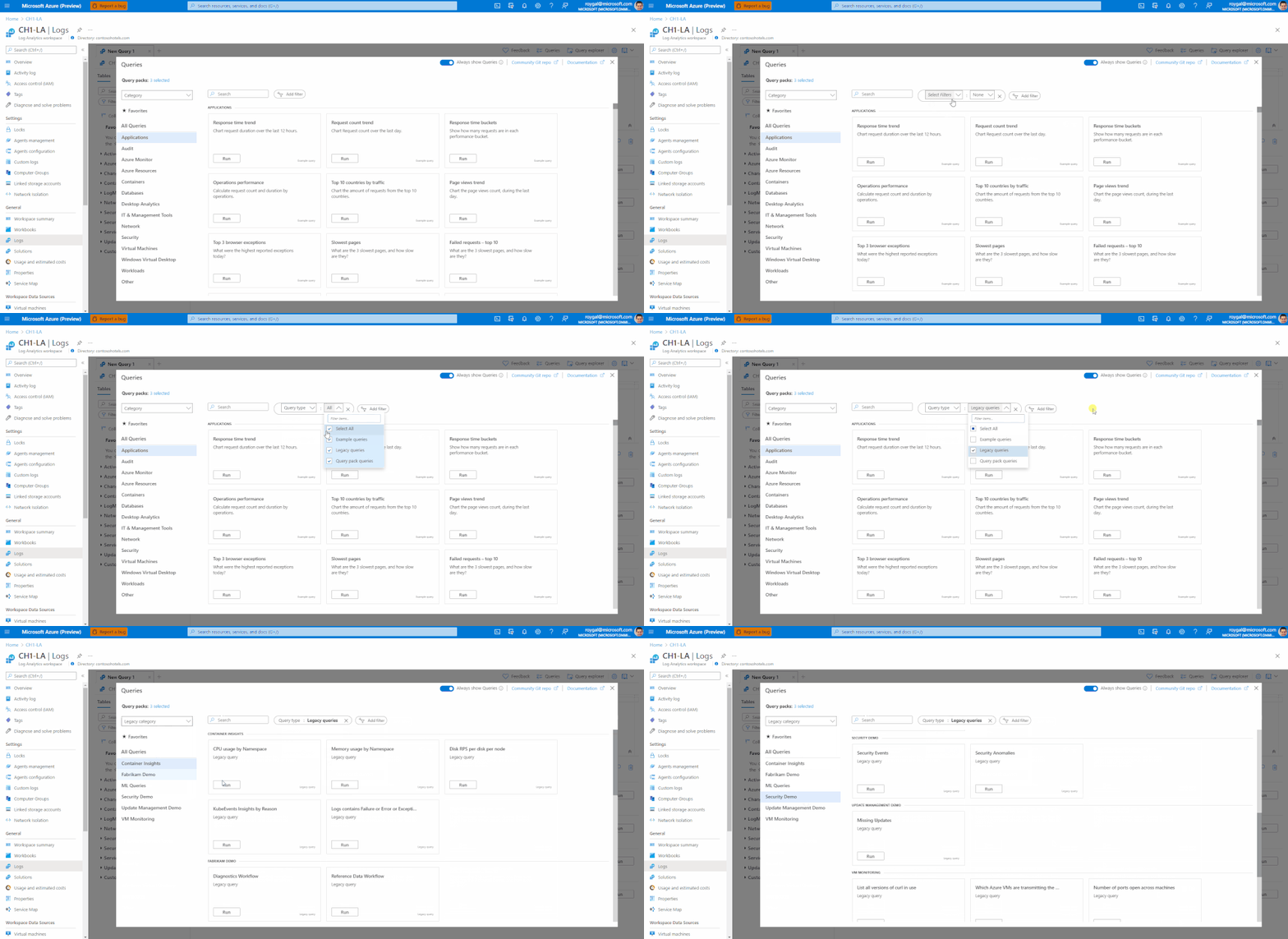
We have recently invested in updating and upgrading our query experience with a new modern UI.
Today we are happy to announce that all of our query experiences will be consolidated in the same UI – allowing a single experience for all types of queries in Logs.
Query Explorer
Query explorer’s functionality is now available in our new query experience only.
The query explorer experience is fully replaced by the new UI.
Please note, there’s no change to any of the API experiences – so everything ‘simply works’, there’s no investment nor changes needed to enable the new experiences.
The new Query Experiences
All Log Analytics experiences have been consolidated to a new, modern UI in the Logs blade.
See the following articles for additional details:
1. Log Analytics Legacy Queries in the new Query UI
2. Legacy Queries Save/Edit Experience
Query packs
Alongside supporting our Legacy Queries, the team has recently introduced a new way for saving, sharing and managing queries in Log Analytics- Query packs.
Using Query packs to save and manage your queries has a lot of advantages over using Legacy Queries. to name a few:
1. Resource centric queries – Legacy Queries only work in Log Analytics workspaces and Application insights and are attached only to one workspaces/AI component. Query packs may be used in all Log Analytics context and may be shared between different resources.
2. Rich metadata and smart filtering – Query packs queries contain rich metadata allowing more control over the queries and easier management and discovery experiences.
3. Enhanced security – Query packs are ARM objects. As such, you may manage access and security at the query pack level
4. Manage queries using code – Query packs API supports advanced deployment and management of your query packs and queries.
We recommend using query packs to manage your Log Analytics queries.
To learn more about query packs – click here.
Feedback
We appreciate your feedback! comment on this blog post and let us know what you think of the this change.
You may also use our in app feedback feature to provide us with additional feedbacks:



Recent Comments