by Contributed | Oct 30, 2021 | Technology
This article is contributed. See the original author and article here.
In today’s digital world tasks are coming our way from many sources. And with that rapid integration with technology, we worry about missing any tasks that are important to us. Microsoft To Do is committed to providing a complete task management solution that keeps people at the center. We want to offer you a single pane of glass for all your tasks by aggregating all tasks that you care for.
To fulfil our promise, we are now integrated with Microsoft Teams for your personal life. Yes, Microsoft Teams isn’t just for work anymore. Now you can connect with your family and friends outside of the office and make calls, chat, plan, and organize things in one place.
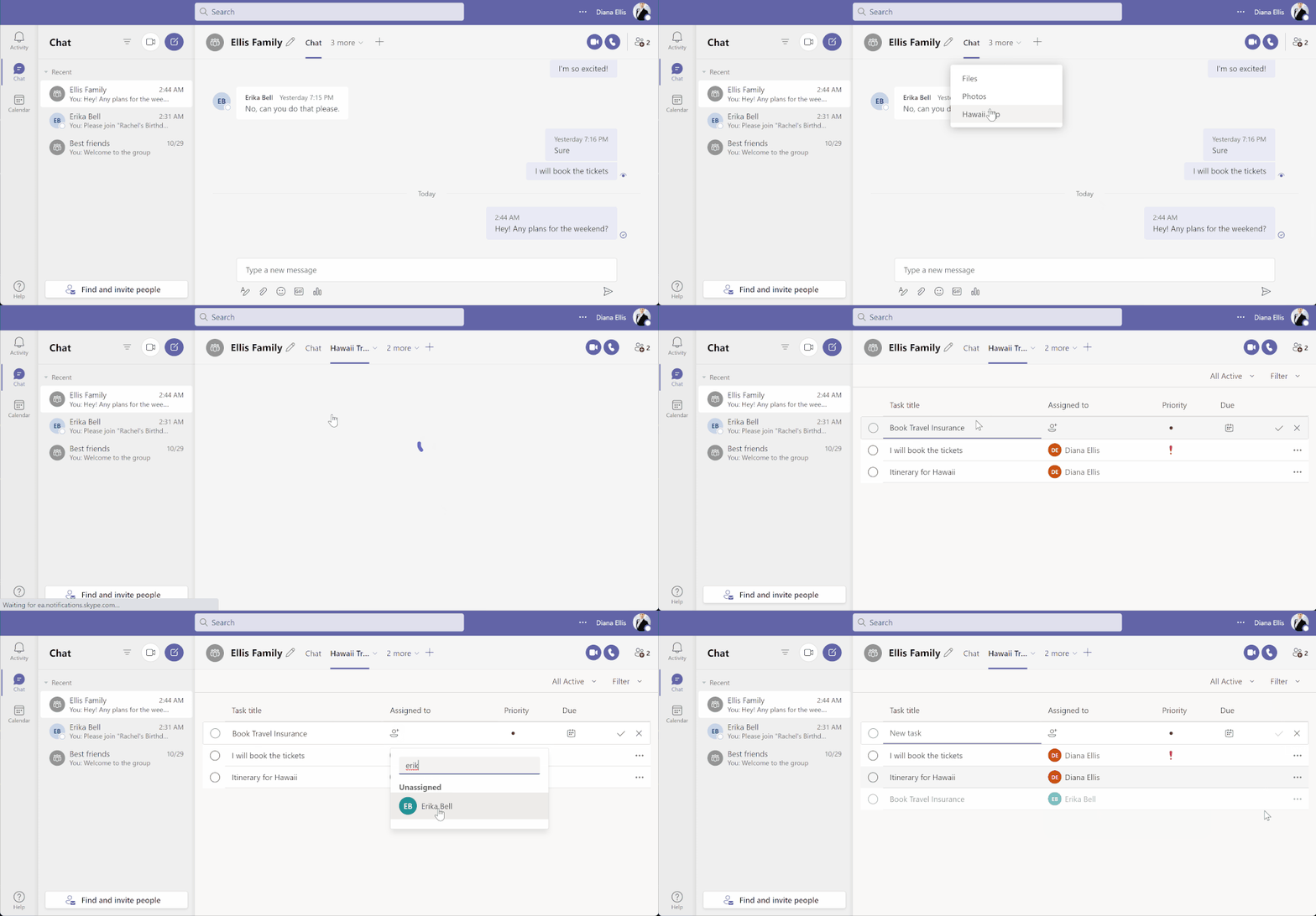
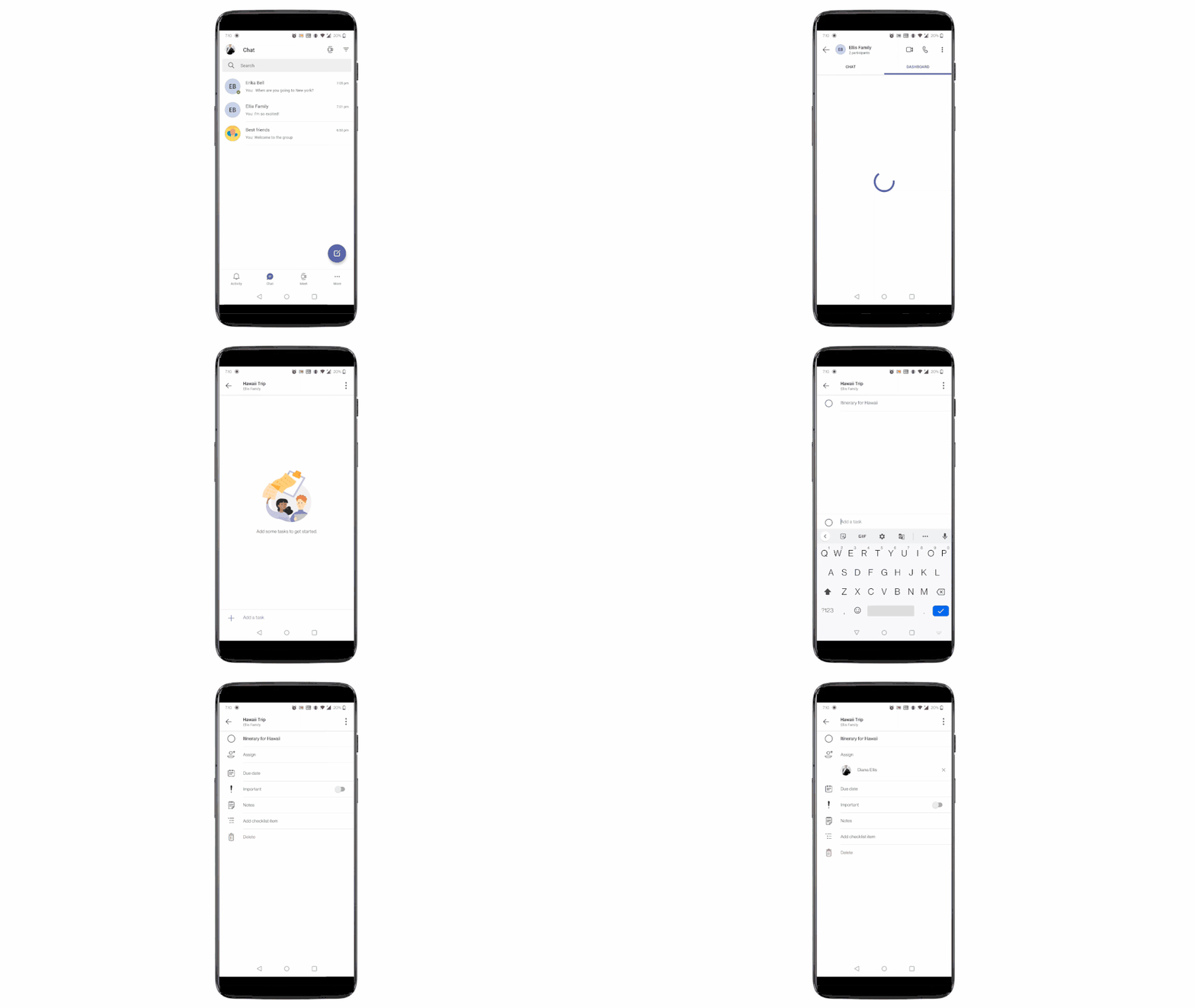
Teams for personal use allows users to create group chats and once in a group chat, you can create a shared to-do list and assign tasks to others in the group. Users can create and assign tasks from Teams web, Desktop, and Mobile applications.
Task assignment in shared lists from Teams for personal use – Desktop (above) and Mobile (below)
Another endpoint to track tasks from? Well, To Do is here to help you!
With this integration, all the tasks assigned to a user in Teams for personal use will now be visible to them under their ‘Assigned to me’ list in To Do. And with this, everything that you are supposed to do from your Teams’ shared lists is now aggregated in one place. No more fear of missing out!
The Richness of To Do
Once in To Do, you can apply some of the rich features of To Do on these tasks. You can mark them important, add sub-steps, add due dates, add to My Day while planning, or add notes to keep track of any information related to the task. To provide the users with more context, the task details in To Do specify the Teams shared list name as well.
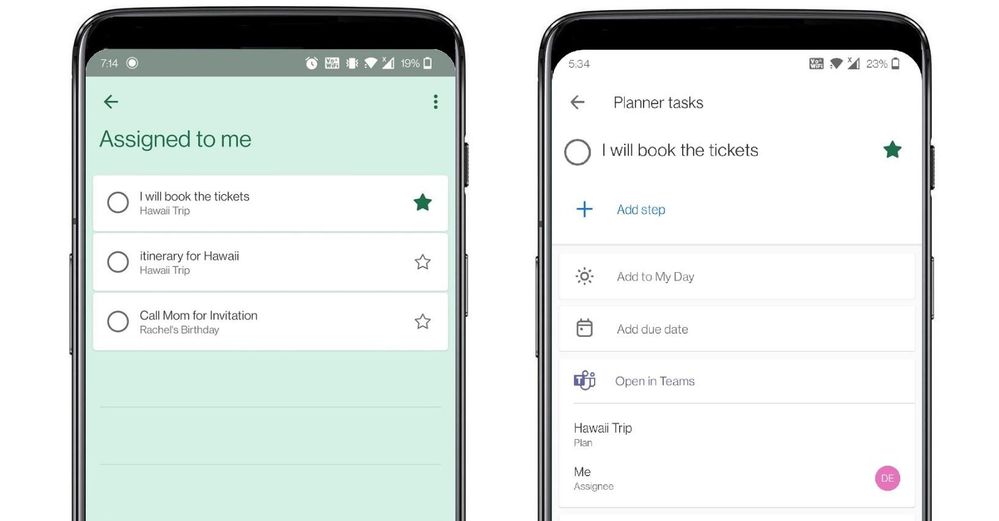 To Do aggregates tasks from shared lists of Teams for personal use in the ‘Assigned to me’ list
Is that all?
Not really! Teams for personal use allows users to capture tasks from their messages in mobile devices. With a long press on the message, you can invoke the message extension menu and from there you can convert your message into a task and add it to either your personal To Do lists or shared lists. Isn’t it amazing?
With this feature you can capture and track tasks in your personal lists, or capture and assign them to either yourself or others in shared lists. And just like we mentioned above, anything assigned to you will again be present in the ’Assigned to me’ list in To Do. To link the assigned tasks back to the chat context, users can click on the deep link provided in the task details in To Do and jump to the message from where the task was created in Teams conversation.
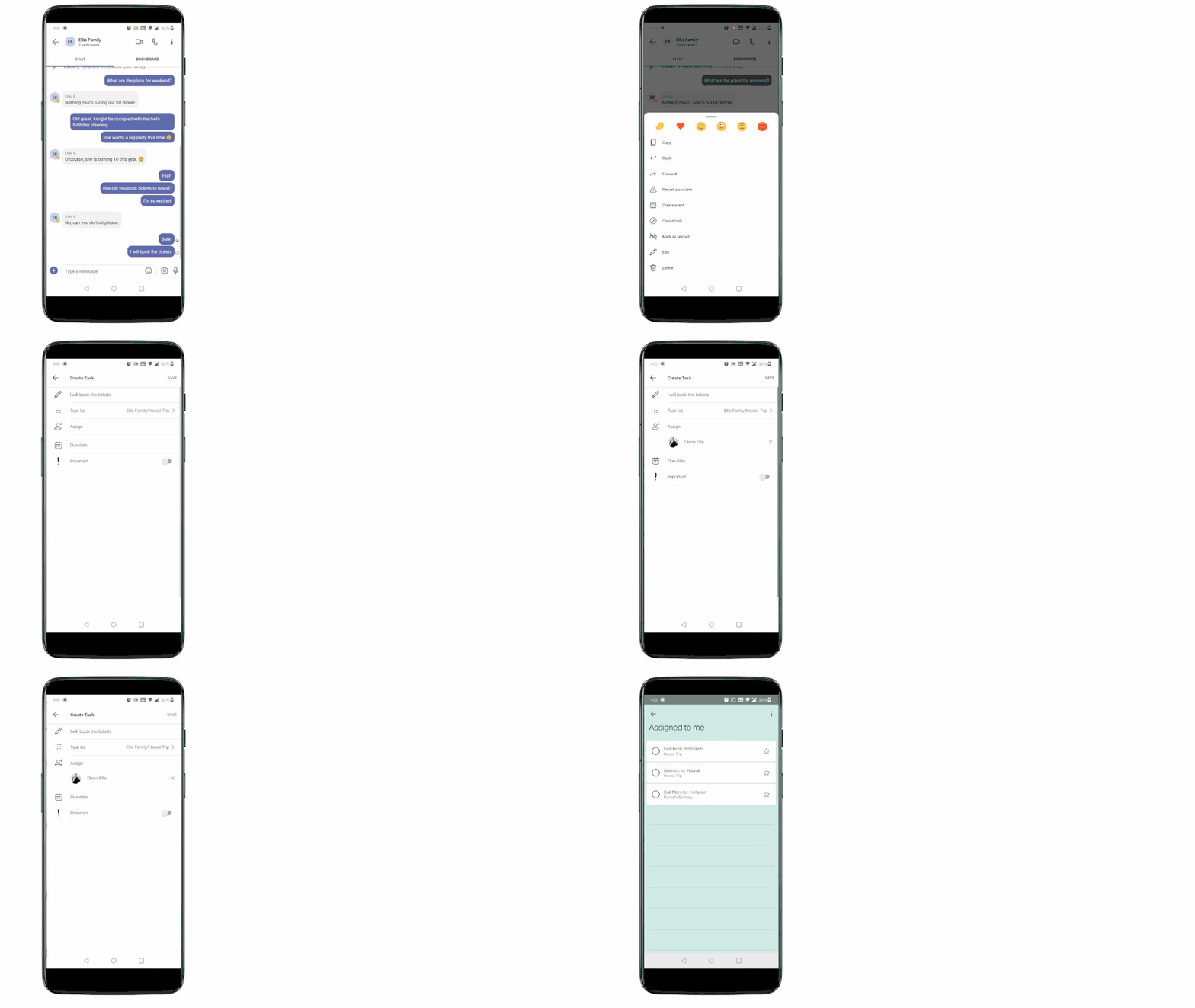 Tasks from Teams messages can be captured into users’ shared lists or personal To Do lists.
If you’re new to Teams, you can download the Teams app to get started today. And To Do, you can download it here.
We can’t wait to hear how To Do is making task management easy for you – let us know in the comments below or over on Twitter and Facebook.
You can also write to us at todofeedback@microsoft.com.
by Contributed | Oct 30, 2021 | Technology
This article is contributed. See the original author and article here.
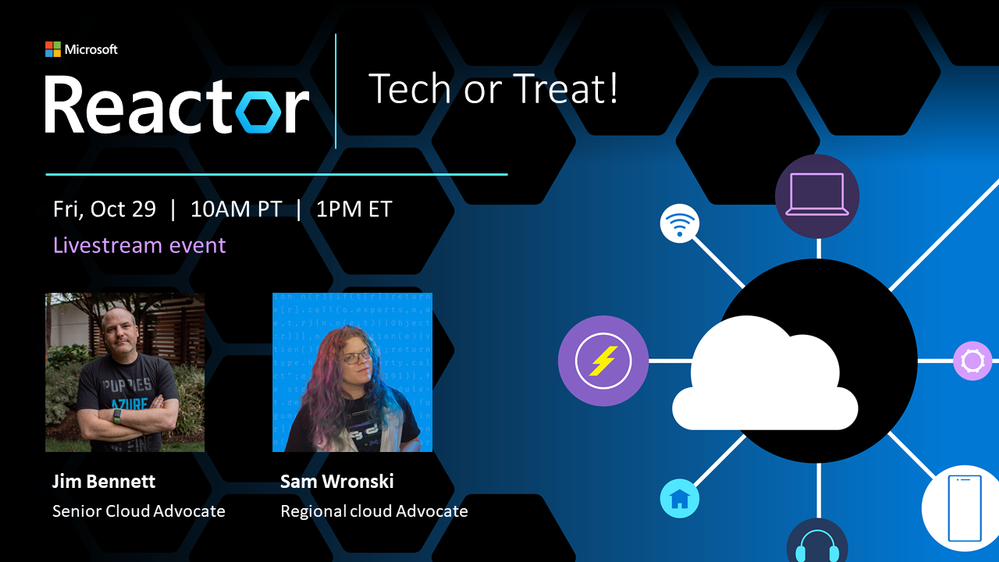
Tech or Treat!
For those who celebrate Halloween, October is spooky season. As the northern hemisphere heads into the chill of winter, and the Southern Hemisphere warms up towards summer, October is a month of ghost, ghouls, and other scary things like bugs in your code and failing unit tests…
Pumpkins are a great way to decorate your house, even better if they are powered by cool tech, and light up or make spooky sounds. Sam Wronski and I decided it would be fun to create some Tech or Treat pumpkins.
Check out the 10-second video below to see what I created.
This was using a Raspberry Pi, some programmable LEDs (WS2812Bs, or NeoPixels as they are also known), and a little bit of Python. Add in some Azure IoT central and I have internet controlled pumpkins.
Sam created these beauties:
 A smiling one-eyed pumpkin
 A glowing flask
Sam used some cool .NET IoT bindings to control the LEDs. It’s always great when there are multiple ways to do something using the technology you know and love!
We had a live stream showing how we got our pumpkins lit up, and you can watch the video below:
If you want to create a pumpkin yourself, check out our Tech or Treat GitHub repo to see some examples of how we did each part, and maybe build your own pumpkin and share it with us!
Lights are for life, not just for Halloween. You can take these code samples and use them for lights for any festive occasion, cool outfit, or just because you can. And if you do – please share in the comments below!
by Contributed | Oct 29, 2021 | Technology
This article is contributed. See the original author and article here.
Microsoft Ignite is back! The event starts November 2nd, 2021, at 8:00 am PT.
If you haven’t already, register now and complete your schedule!
We are excited for you to join us at Microsoft Ignite for a focused exploration of the security market today. Come share and learn with global leaders in cybersecurity and infrastructure, while exploring the most advanced prevention measures and strategies. Learn how to react to increasing threats, prepare for the next frontier in identity proofing, and improve overall productivity.
Let’s take a quick look to see what is in store this year:
Security Focus Area Session
Join Vasu Jakkal’s keynote: Protect Everything with End-to-End Security
- Tuesday, November 2, 10:35 AM – 11:00 PST
- Organizations around the world are facing a surge of sophisticated cyber threats. The hybrid work world is creating new opportunities for bad actors, and increased challenges for IT teams. Join us to learn how Microsoft’s integrated, comprehensive approach to security is helping customers become more secure and resilient. Discover new products and innovations that help you protect everything, from the endpoint to the cloud, across security, compliance, identity, device management, and privacy. Se e how Microsoft Security is helping organizations of all sizes be safe in the face of increased global cyber threats.
Featured Sessions from Day 1
Join Rob Lefferts and Eric Doerr’s session:
Tackling the biggest cybersecurity challenges for 2022
Join Joy Chik’s session:
Strengthen resilience with identity innovations in Azure Active Directory
- Tuesday, November 2, 1:30 PM – 2:00 PM PST
Joy Chik, CVP of Identity
- Nation-states and criminal syndicates are applying significant resources to orchestrate multi-pronged attacks against critical services and infrastructure. No single organization can withstand these onslaughts alone. In this session, we’ll share investments we’re making in Azure AD to help you stay protected and productive: a resilient platform, teams, and tolls that detect and respond to hard-to-identify attacks, and systems that strengthen the security posture of your expanding digital estate
Join Rudra Mitra’s session:
Manage risk and compliance with end-to-end security solutions
- Tuesday, November 2, 2:30 PM – 3:00 PM PST
Rudra Mitra, CVP, Microsoft 365 Compliance, Security and Privacy
- Managing risks is critical to ensuring business continuity, protecting brand reputation, and addressing the various internal and external requirements that you may be subject to. We know your data goes beyond the Microsoft cloud, so we are building solutions to help you reduce risk across your entire digital estate, especially in this hybrid work world. Organizations should not have to make the tradeoff between modern collaboration and modern security. Join our session to learn how our newest innovations help you address these challenges.
Join Alym Rayani’s session:
Build a privacy resilient workplace with Privacy Management for Microsoft 365
- Tuesday, November 2nd, 8:30 AM – 9:00 AM PST
Alym Rayani, GM of Compliance & Privacy
- With increasing complexities and changes in the privacy regulatory landscape, organizations must ensure privacy is central to their business to build customer trust. This means having greater visibility into personal data and associated privacy risks in your environment, automating privacy operations including subject requests fulfillment, and empowering employees to make privacy-compliant decisions without hindering productivity. Learn how Microsoft’s Privacy Management solution can help you build a privacy resilient workplace.
Security sessions from Day 2
Join us on day 2 for various security topics delivered by industry experts and insiders on major trends facing the industry helping attendees understand the latest threats and risks, how to address workforce challenges, and looking into the near and far future of cybersecurity.
Microsoft Into Focus: Security
- Wednesday, November 3rd, 10:30 AM – 12:00 PM PST
Ann Johnson, CVP of SCI Business Development at Microsoft, Vasu Jakkal, CVP of SCI at Microsoft, and more industry experts and insiders
- Attend the Keynote Microsoft Into Focus: Security with Microsoft Security leaders Vasu Jakkal, Bret Arsenault, Ann Johnson, on a series of insightful discussions as Microsoft hosts industry experts and insiders around current cybercrime trends, the evolution of hybrid work, and a look into the future of cybersecurity trends and solutions.
Grounding Zero Trust in Reality: Best Practices and Emerging Trends
- Wednesday, November 3rd, 12:30 PM – 1:00 PM PST
Alex Simons, CVP of Identity Security, Steve Turner, Forrester Analyst
- The events of the last two years confirm Zero Trust is no longer an option—it’s a business imperative. Implementing a Zero Trust strategy is best understood as a journey on which organizations and governments around the world have embarked to meet the expanded threat landscape of today. Come and listen to Alex Simons talk about what best practices Microsoft customers have applied in their Zero Trust implementations and listen to a discussion on emerging trends with Steve Turner from Forrester.
Skilling for Security: Forging the workforce of the future
- Wednesday, November 3rd, 1:30 PM – 2:00 PM PST
Naria Santa Lucia – GM, Digital Inclusion, Microsoft Philanthropies, Laramie County Community College, William Amick – Program Director, Information Technology Pathway, Reinier Moquete – Founder & CEO of CyberWarrior.com
- There are almost half a million unfilled cybersecurity positions in the United States alone, and the pipeline of new students is not on track to fill the demand. This session will discuss the workforce challenges facing the cybersecurity industry, and what Microsoft and training institutions are doing to address this critical need.
An inside view on detecting and mitigating insider risks
- Wednesday, November 3rd, 3:30 PM – 4:00 PM PST
Glenn Kaleta, Microsoft Principal Engineering Program Manager, Erin Miyake, Microsoft Principal Program Manager, Mod Tejavanija, Microsoft Senior Program Manager, Dan Costa, Technical Manager, Carnegie Mellon University
- There is no denying the fact that insider risks can pose as great of a damage threat as other security threats like ransomware, phishing, and malware. Yet unlike these security threats where you can develop and operationalize globally optimized detections, insider risk detections present unique and complex challenges where understanding context and correlations is critical to ensure you have a successful insider risk management program. Having run the Insider Threat program at Microsoft we will be discussing the five primary principles that we have learned in our journey both internally and from our customers to help organizations understand what is required to build an effective insider risk program.
External Attack Surface Management: Intelligence Defense in the Age of Digital Transformation
- Wednesday, November 3rd, 12:30 PM – 1:00 PM PST
Steve Ginty – Director, Threat Intelligence, RiskIQ
- Today’s digital transformation means a rapidly expanding IT ecosystem and an ever-evolving threat and vulnerability landscape of both nation-state and criminal actors that target a growing list of vulnerabilities to breach victim organizations. Understanding today’s external attack surface is essential to assess and protect critical assets. This session will demonstrate the vital role of combining vulnerability and traditional threat-actor intelligence in external attack surface management.
Understanding Nation-State Threats
- Wednesday, November 3rd, 1:30 PM – 2:00 PM PST
Cristin Goodwin, Microsoft General Manager & Associate General Counsel, Digital Security Unit
- The last 12 months have been marked by historic geopolitical events and challenges that have changed the way organizations approach their daily operations. During this time, nation-state actors have created new tactics and techniques to evade detection and increase the scale of their attacks. In this session, Cristin Goodwin, Associate General Counsel and head of Microsoft’s Digital Security Unit, explains the nation-state threat landscape and provides context for security leaders and practitioners who are looking to better understand the relevancy of these new threats.
Cloud Security: A guide for developing a comprehensive multi-cloud security strategy
- Wednesday, November 3rd, 2:30 PM – 3:00 PM PST
Andras Cser – Vice President, Principal Analyst, Forrester – Serving security and risk professionals
- The era of cloud transformation is driving customers to strengthen the security of their complex environment. Join us for an insightful discussion with a leading industry analyst on how to best approach an end-to-end cloud security strategy. We’ll explore top trends, emerging risks, and potential obstacles – along with practical guidance on how to better protect your IaaS, PaaS, and SaaS services.
How to Develop a Security Vision and Strategy for Cyber-Physical and IoT/OT Systems
- Wednesday, November 3rd, 2:30 PM – 3:00 PM PST
Phil Neray, Microsoft Director of IoT & Industrial Cybersecurity, Katell Thielemann, VP Analyst, Gartner
- Recent ransomware attacks that halted production for a gas pipeline operator and food processor have raised board-level awareness about IoT and Operational Technology (OT) risk. Security leaders are now responsible for new threats from cyber-physical systems (CPS) and parts of the organization they never traditionally worried about. Join Katell Thielemann from Gartner® to discuss how to develop a CPS risk strategy using the “language of the business” to show security as a strategic business enabler. GARTNER is a registered trademark and service mark of Gartner, Inc. and/or its affiliates in the U.S. and internationally and is used herein with permission. All rights reserved.
Engage with our security experts
Join in on the Connection Zone sessions with security experts for further engagement. The line-up for Ask the Experts this year has something for everyone!
Ask the Experts:
Explore the full session catalog to find sessions most interesting for your role and interests. Hear from security experts, attend workshops, watch new product demos, and more. To begin your journey, log into Security at Microsoft Ignite and make sure to register to access all the event has to offer.
by Contributed | Oct 28, 2021 | Technology
This article is contributed. See the original author and article here.
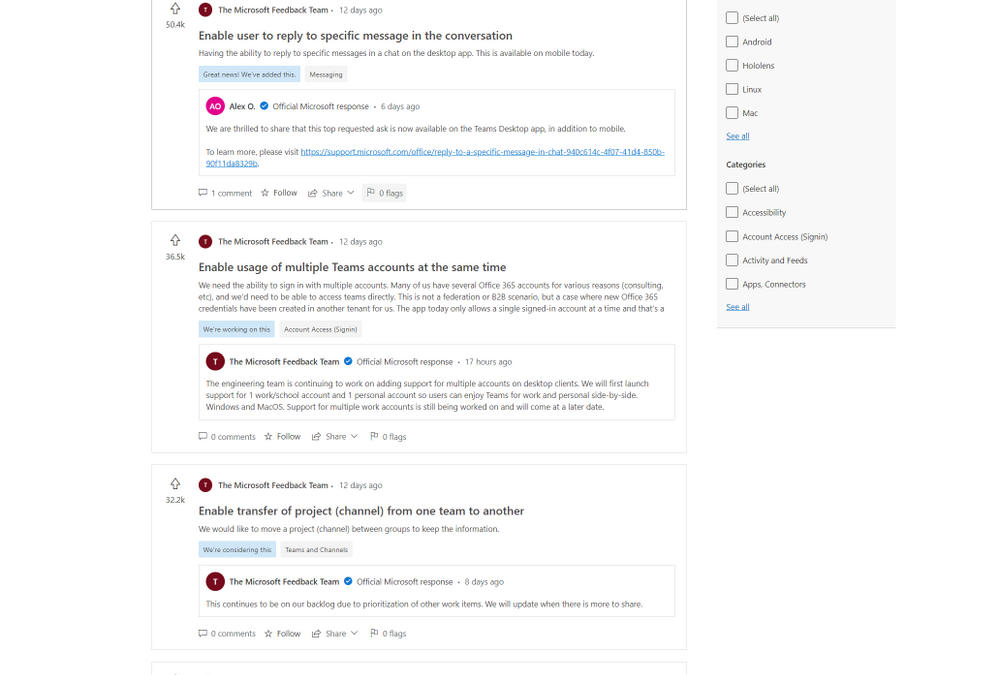
Starting today, the preview of Feedback for Microsoft Teams, a new community feedback experience from Microsoft, is available. Built on Dynamics 365 Customer Service, Feedback continues our dedication to using customer feedback to help with the further development and improvement of Teams. Since 2017, when Teams became the hub for collaboration in Microsoft 365, user submissions have driven the completion of over 500 features and improvements, and we aim to complete thousands more.
The new Feedback portal will allow users to submit their own feedback, browse other publicly submitted ideas, track official Microsoft responses, see our top voted customer ideas, upvote the feedback they agree with, and comment on feedback that matches their own. Top known feedback items remain available in the new portal.
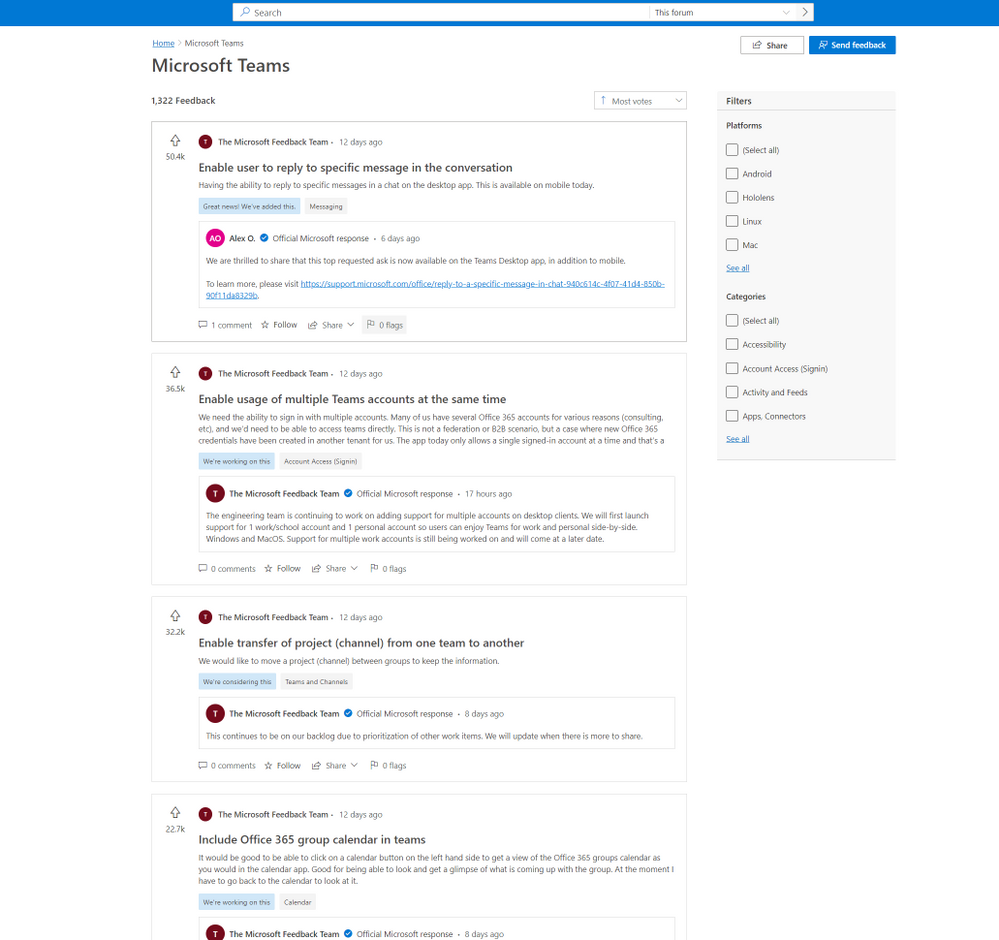
In Feedback, users will also be able to easily track their favorite ideas through the ‘star’ icon and receive notifications when those ideas are responded to by Microsoft.
Explore the new Feedback portal now at https://aka.ms/TeamsFeedback and let us know what you need most from your Teams experience. Learn more about the broad topic of Feedback at Microsoft in our documentation.
by Contributed | Oct 27, 2021 | Technology
This article is contributed. See the original author and article here.
Voices of Healthcare Cloud is a webinar series hosted by myself, @Vasu Sharma & @Joshua Thompson. My name is Shelly Avery, I am currently a Dir, Healthcare Specialist for Health and Life Sciences focusing on the largest Payor and Provider customers in the US, Vasu is a Sr Customer Success Manager for Microsoft 365 for Health and Life Sciences & Josh is a Sr Account Executive for Healthcare. The goal of this webinar series is to showcase how Healthcare is seeing positive business and clinical outcomes with cloud technology.
We will be bringing new and creative solutions to you at least once a month, so we hope you tune in live or catch the on-demand recording after the session is completed.
If you want to get direct invites for these sessions, you can let us know by filling out this form.
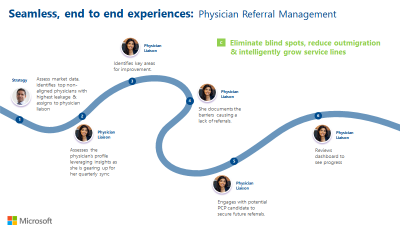
For our next session, we will be joined by Ellary Rose, Healthcare Subject Matter Expert, as she brings a wealth of knowledge around Physision Refferal & Relationship Management. She is going to speak on a handful of industry challenges around referral management such as keeping referrals in house, processing external referrals and how to manage physician relationships to acquire their referrals.
These are frequent challenges, and if the processes are ineffective, it can heavily impact patient experience and patient outcomes. By automating these processes, it helps all parties involved — the health organization retains the patient, the provider gets help for their patient quickly and the patient does not fall through the cracks resulting in better care and better outcomes!
Please join us on November 3rd to learn how your organization can positively impact Physician Referral and Relationship Management with these great process and automation tools!
This session will be on November 3rd at 11:00 PT / 12:00 MT/ 1:00 CT / 2:00 ET
Please click here to join or download the calendar invite here
We also have future sessions lined up and these topics are:
- November 10th – Patient Referral Automation
- November 17th – Data Driven Patient Engagement
- November 24th – No session (Break for Thanksgiving holiday)
Hopefully you joined our last few webinars on:
Please follow the aka.ms/HLSBlog for all this great content.
Thanks for reading, Shelly Avery | Email, LinkedIn


Recent Comments