by Contributed | Jul 1, 2022 | Technology
This article is contributed. See the original author and article here.
The Same KPIs, Different Department
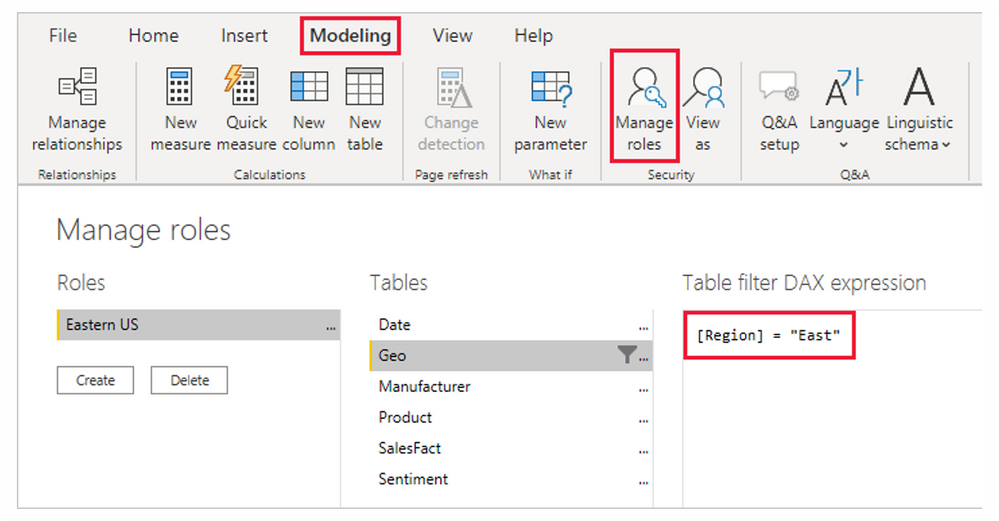
Scenario: You have different managers requesting to see the same KPIs (Customer Count, Revenue Generated, Products Performance, etc) for their different region. Data privacy requires that the various managers only see reports for their regions. A simple way to think about this is by creating different reports for the managers making a total of 3 Reports.
I am sure you will agree with me that this isn’t effective. more efforts and it is not scalable. what if it is a large multinational – country manager, regional manager, group manager, unit head, team leads all across the world? will you also build different reports for over 500 people? With Row Level Security, you can easily address this challenge by building a single Reports and set roles and rules to filter what everyone can see.
Learn and Practice Along here:
Additional Resources
by Contributed | Jun 30, 2022 | Technology
This article is contributed. See the original author and article here.
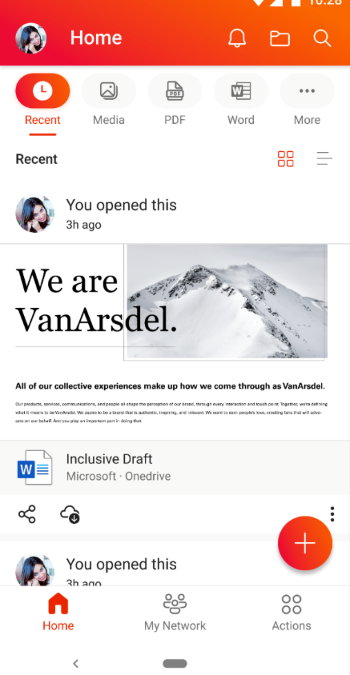
The Office Mobile team is excited to announce the availability of Quick Access filters in Office Mobile on Android phones and tablets! This feature can help you increase your productivity while customizing Office on your Android mobile device, so it works best for you.
Locate your content easily with Quick Access filters
We heard you! We know that you would like to navigate your Office app more efficiently, especially when it comes to accessing your content. Quick Access filters provide you with easy navigation and personalization options, helping you locate your content more quickly.
With Quick Access, you can utilize multiple filters to view different content types. Content-usage filters, such as, “RECENT”, “SHARED”, and “OPENED” help users find their content based on interactions, while content-type filters, such as, “WORD”, “EXCEL”, and “PDF” make it easier to filter by file type. Users can personalize their home screen by adding, removing, or organizing these filters for quick access.
How to get Quick Access filters in Office app for Android
If you don’t have the Office app, you can download it from the Google Play store. If you already have the Office app on your Android device, download the latest version. The next time the app is launched, you will immediately see a guided experience introducing you to this new feature.
To start using the new Quick Access filters experience in the Office app for Android, follow these steps:
- Open the Office app on your Android device and locate the Quick Access options at the top of your home screen.
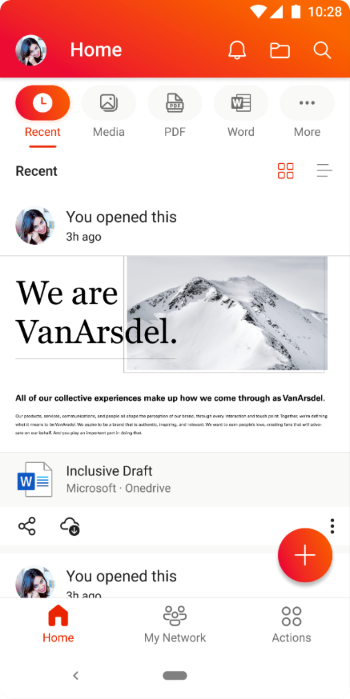 An image demonstrating the Quick Access options available on the Office app home screen on an Android device.
NOTE: These options have replaced the “Recent” and “Shared” options on the home screen.
- Tap on a Quick Access option to see filtered content based on the filter you choose. You can add or remove options on the Quick Access bar by tapping the […] More option at the end.
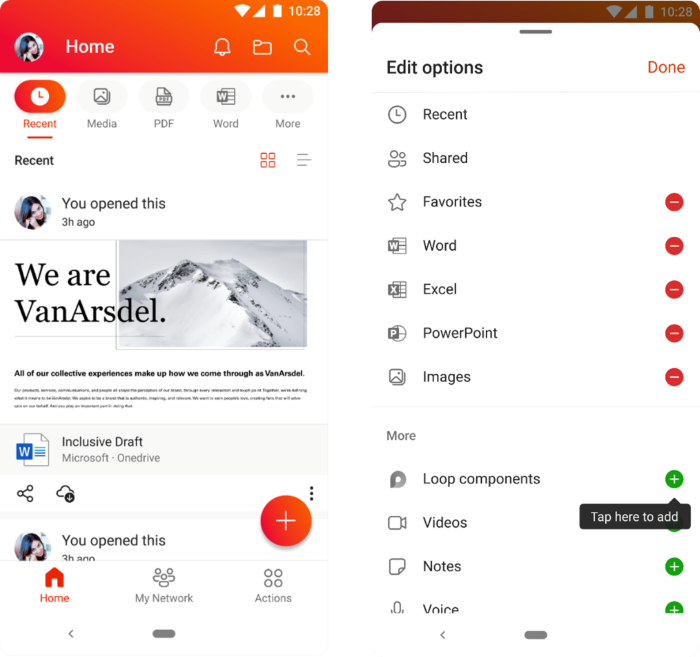 An image demonstrating the additional options available when users click the “More” option on the Quick Access bar on the Office app home screen on an Android device.
Availability
Quick Access for the Office app for Android has been rolled out worldwide and is available on app versions 16.0.5102.20000 and later. To learn more about Office app for Android, check out this helpful Microsoft Support article.
Last but not the least, we are always listening to feedback from users. You can send us in-app feedback or leave us a comment below!
Continue the conversation by joining us in the Microsoft 365 Tech Community! Whether you have product questions or just want to stay informed with the latest updates on new releases, tools, and blogs, Microsoft 365 Tech Community is your go-to resource to stay connected!

by Contributed | Jun 30, 2022 | Business, Microsoft 365, Microsoft Search, Technology
This article is contributed. See the original author and article here.
The ways we work have changed dramatically over the past several years, and those changes go so much further than whether work happens at home, in an office, or somewhere in between. In this collaboration-first world, every organization needs a digital fabric that binds people together—from the C-suite to the frontline, and across every role and function.
The post From Viva Sales to new Office experiences—here’s what’s new in Microsoft 365 appeared first on Microsoft 365 Blog.
Brought to you by Dr. Ware, Microsoft Office 365 Silver Partner, Charleston SC.
by Contributed | Jun 29, 2022 | Technology
This article is contributed. See the original author and article here.
Microsoft is looking to understand employee experience sentiment in government organizations. Fill out our quick poll question below to help shape our products! Microsoft would love to hear from you! Which answer best fits you?
https://forms.office.com/Pages/ResponsePage.aspx?id=v4j5cvGGr0GRqy180BHbR0Hi6pBULXhKuqk2vjrgjgxUMlZFVVBTV0RNSDNSTVNDWkFGNkpaMk5VVi4u&embed=true
* Please take a few minutes to complete our survey. Please ensure you are authorized to provide this information and not violating any company policies. Your responses will be kept confidential with restricted access. For more information, see the Microsoft Privacy Statement. If you have questions about this survey, please contact TechCommunity@microsoft.com
by Contributed | Jun 28, 2022 | Technology
This article is contributed. See the original author and article here.
The OneDrive team is excited to share all the recent OneDrive updates and feature releases we’ve released between April and June 2022. We’re continuing to do everything we can to provide you with a seamless experience for accessing and sharing files with your teammates and external colleagues, to keep you productive in this new world of hybrid work.
Here are the OneDrive features we’ve released in full or in preview in Q2 of 2022:
April 2022
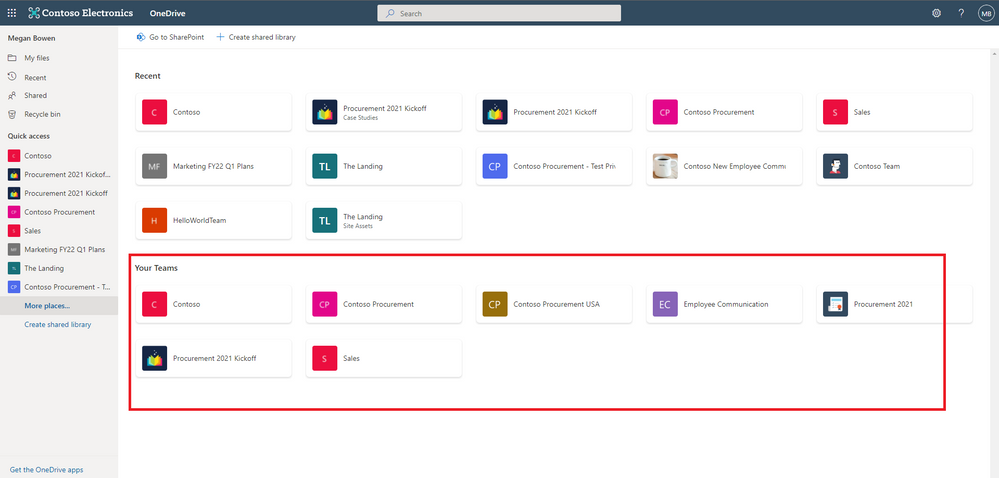
Easily navigate to all your Teams files from OneDrive (88912)
In OneDrive, we are adding a “Your Teams” section to the “More Places” page to allow you to easily find and work with all your files in Teams.
Deleting large folders (88979)
To help you keep your workspace uncluttered, we’ve added the ability for you to delete large folders (with up to 10,000 items) at one time. This means that when you’re finished with a project, you can quickly remove all the files you no longer need from your OneDrive and SharePoint libraries.
Microsoft Stream: Comment on a video or audio file in SharePoint and OneDrive (88521 )
Now, users with view permissions can leave comments in video or audio files. This can be helpful when collaborating on files to share with a larger audience, or for addressing questions of people who were unable to attend a call or meeting.
May 2022
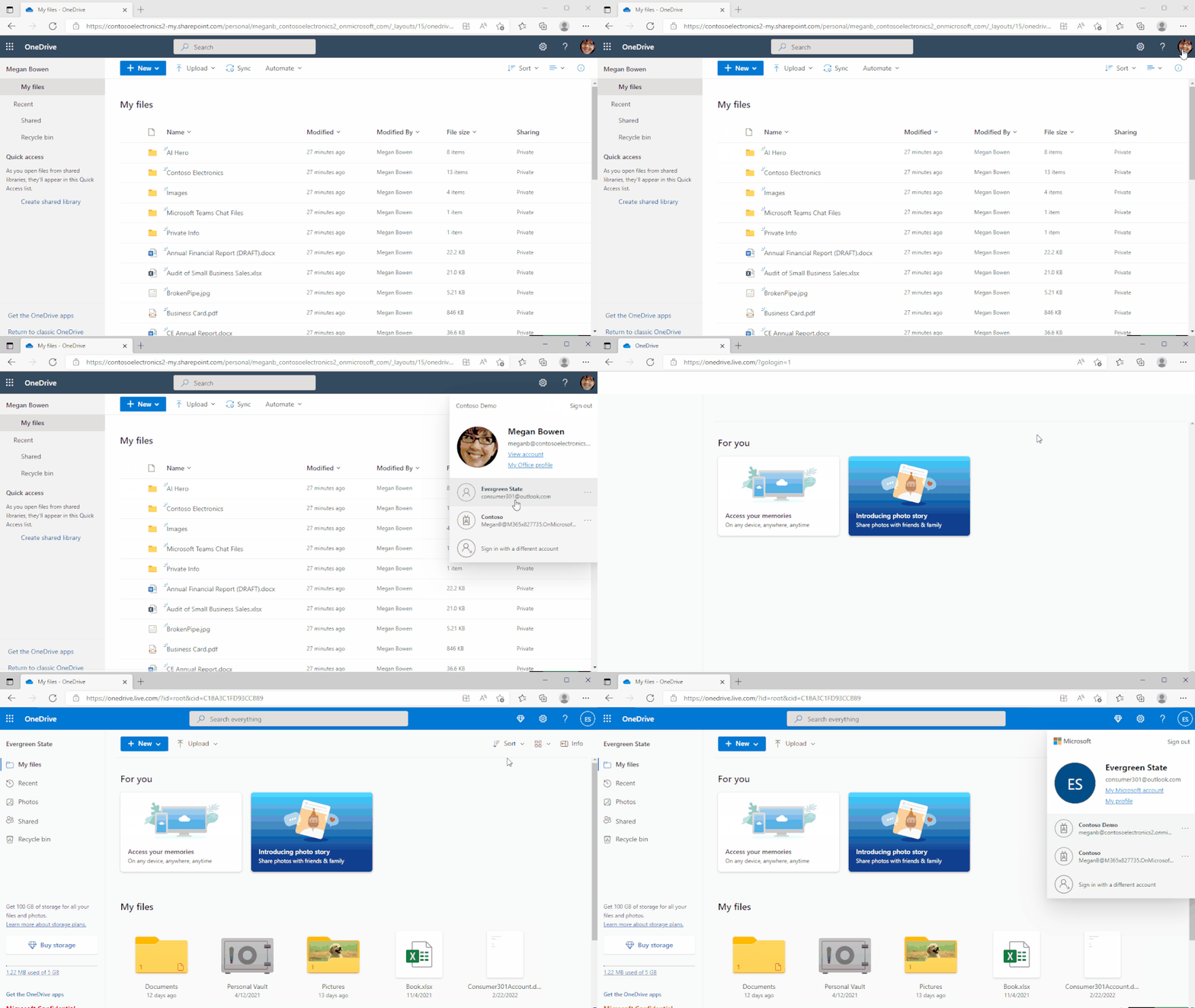
Shift between work and personal files in OneDrive
We’ve made it simpler for you to switch between your professional and personal OneDrive accounts, or even between separate professional accounts you might maintain for multiple clients if you’re a consultant or freelancer. By selecting your profile picture at the top right of the OneDrive page, you’ll see a list of all your Microsoft accounts, or the option to add a new one.
Quickly switch between document libraries
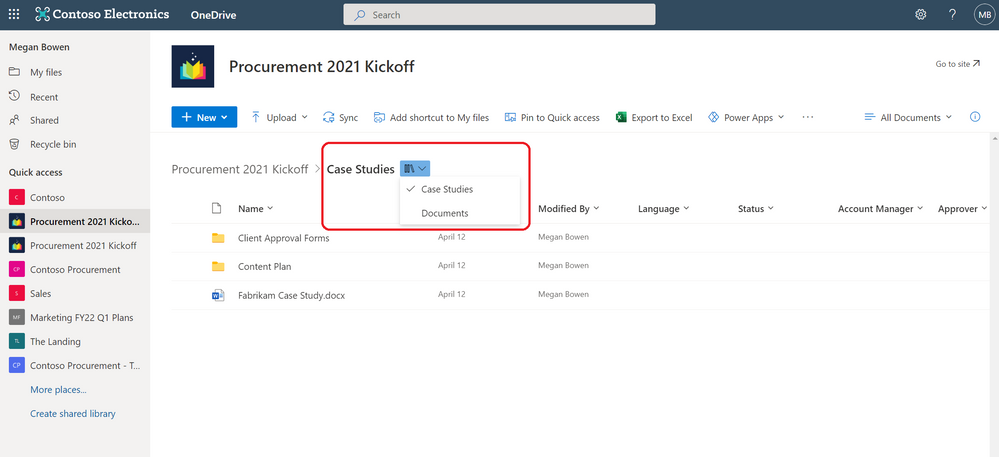
We’ve added a dropdown to OneDrive and SharePoint that lets you easily switch between multiple document libraries associated with a Teams team or a SharePoint Site. You can easily select the Dropdown library icon to switch between document libraries.
Pin important files to Quick Access
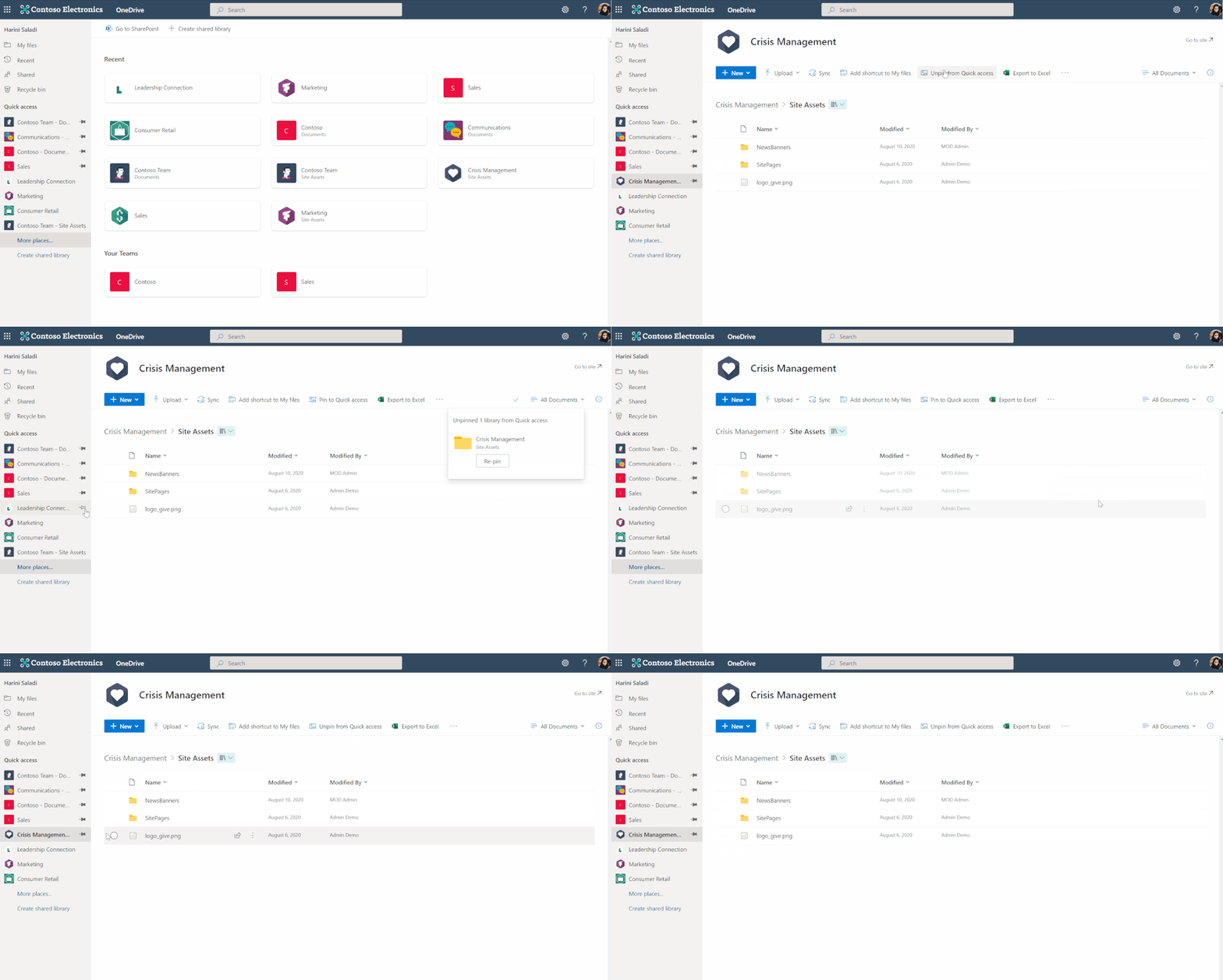
To easily find and access the places where you regularly work, you can pin shared libraries to the Quick Access section in the left nav of OneDrive. Pinning a document library adds it to the top of the Quick Access section. You can also un-pin document libraries from the Quick Access section.
June 2022
File browsing in Teams
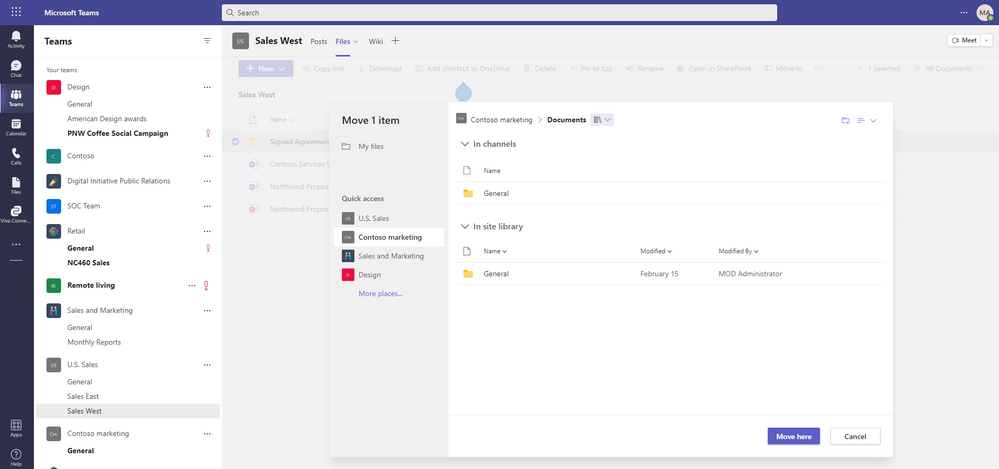
Now when you browse to a Teams channel and click the Files tab at the top, this experience will be powered by OneDrive. For example, you’ll be able to leverage familiar controls to easily move or copy your file to another library within Microsoft Teams.
You can also switch between document libraries associated with specific Teams channels (standard or private) directly in Microsoft Teams and access your files as you would directly in OneDrive and SharePoint.
Add to OneDrive in Teams
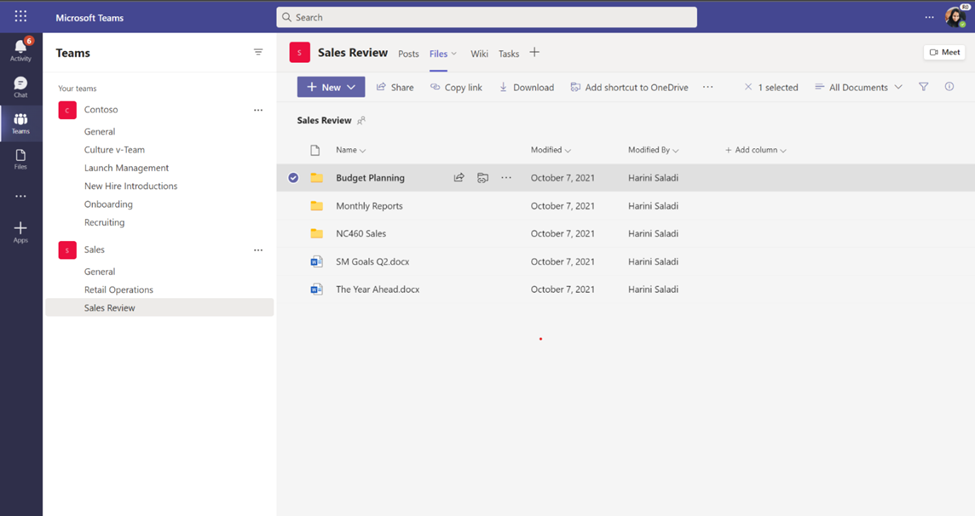
You can now use Add shortcut to OneDrive in Teams to give yourself quick access in OneDrive to the Teams files you work with most frequently. Any changes that occur in Teams are also synced, so your files are also up to date. This feature helps you keep all your files organized in one place, no matter where they are stored.
OneDrive and SharePoint: Access your Teams standard and private channel files (88911)
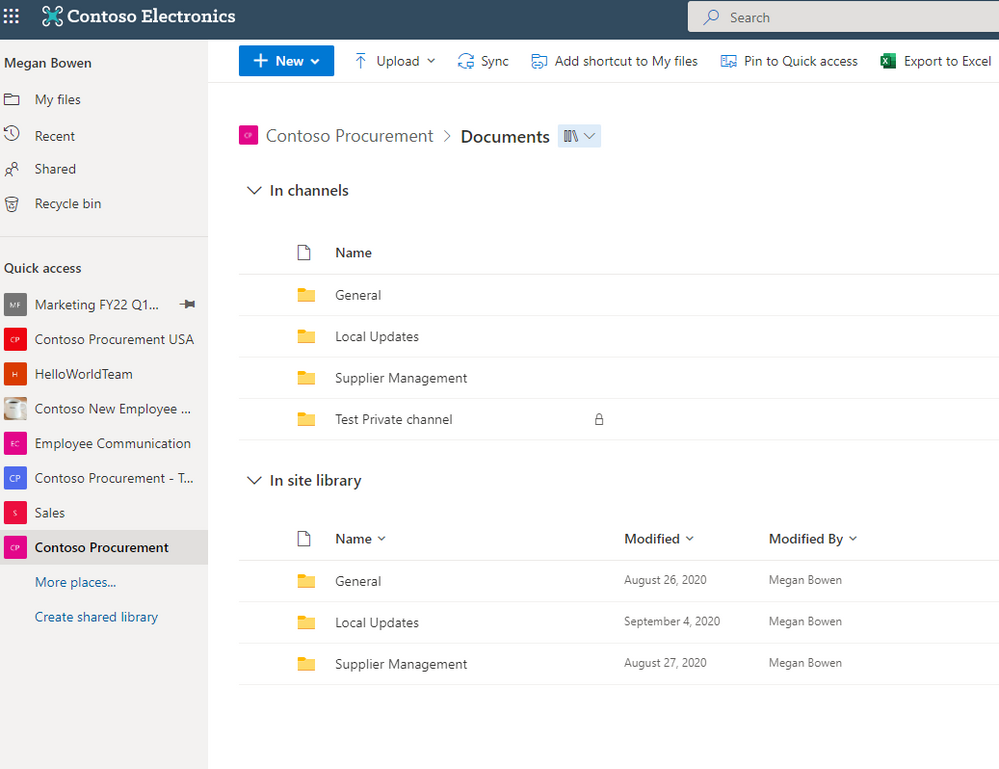
When you navigate to a site in SharePoint or OneDrive, you’ll be able to access the files stored in the Teams standard and private channels associated with that site.
OneDrive Sync Admin reports for macOS in Public Preview (81982)
OneDrive Sync Admin Reports for macOS give you more visibility into who in your organization is running the OneDrive Sync client on macOS and any errors they might be experiencing. When you open the OneDrive Sync health dashboard, you’ll see an executive summary of what’s going on with OneDrive Sync in your organization. On the left, you can see how many devices have at least one sync error. In the middle, you can see at a glance what percentage of the devices in your organization have known folders OneDrive is helping to protect. You can see what percentage of devices have the Desktop and Documents folders syncing with OneDrive, which have only one and which have not opted in to sync those folders at all, meaning if something were to happen to those devices, all the contents of those folders would be lost. On the right, you can see how many devices are running on the current version of OneDrive, meaning they have all the latest and greatest fixes and features from Microsoft.
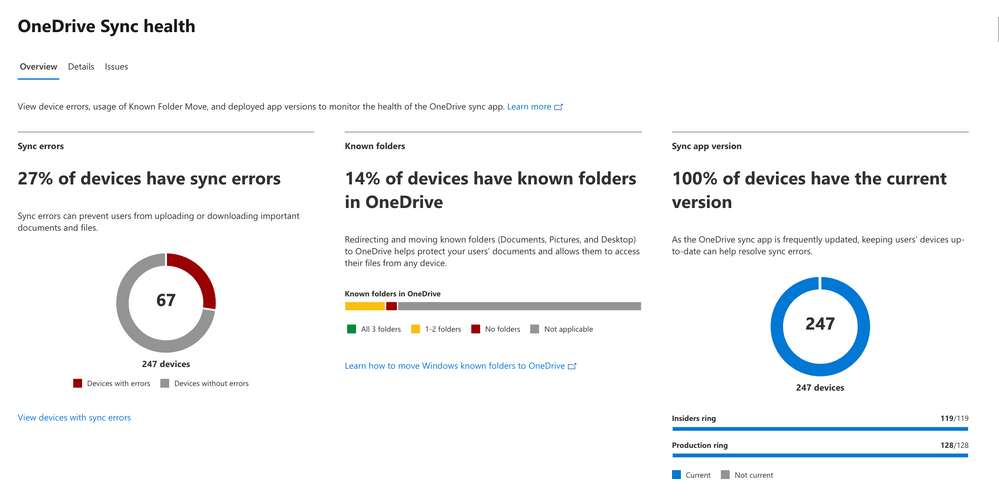 Sync health dashboard
Rename shortcuts (93279)
We’ve added the ability to rename shortcuts you’ve added using the “Add to OneDrive” feature within OneDrive web.
Access your Teams standard and private channel files (88911)
When you navigate to a site in SharePoint or OneDrive, you’ll be able to access the files stored in the Teams standard and private channels associated with that site.
Microsoft Stream Generate captions for a video uploaded to SharePoint and OneDrive for GCC and GCC High (85644)
Users with edit permissions to a video file uploaded to SharePoint and OneDrive can click a button in the player to generate closed captions in English.
OneDrive File Picker v8
The OneDrive File Picker lets you connect your custom web apps to content stored in OneDrive (both the commercial and business versions) and SharePoint. With File Picker v8, you can integrate directly with the Microsoft 365 service, saving you complexity and time during the development phase and providing your users with the same rich, familiar user experience of OneDrive or SharePoint. Users who are already logged into Microsoft 365 can seamlessly access files and content through your web app, without having to log into the Microsoft 365 account a second time.
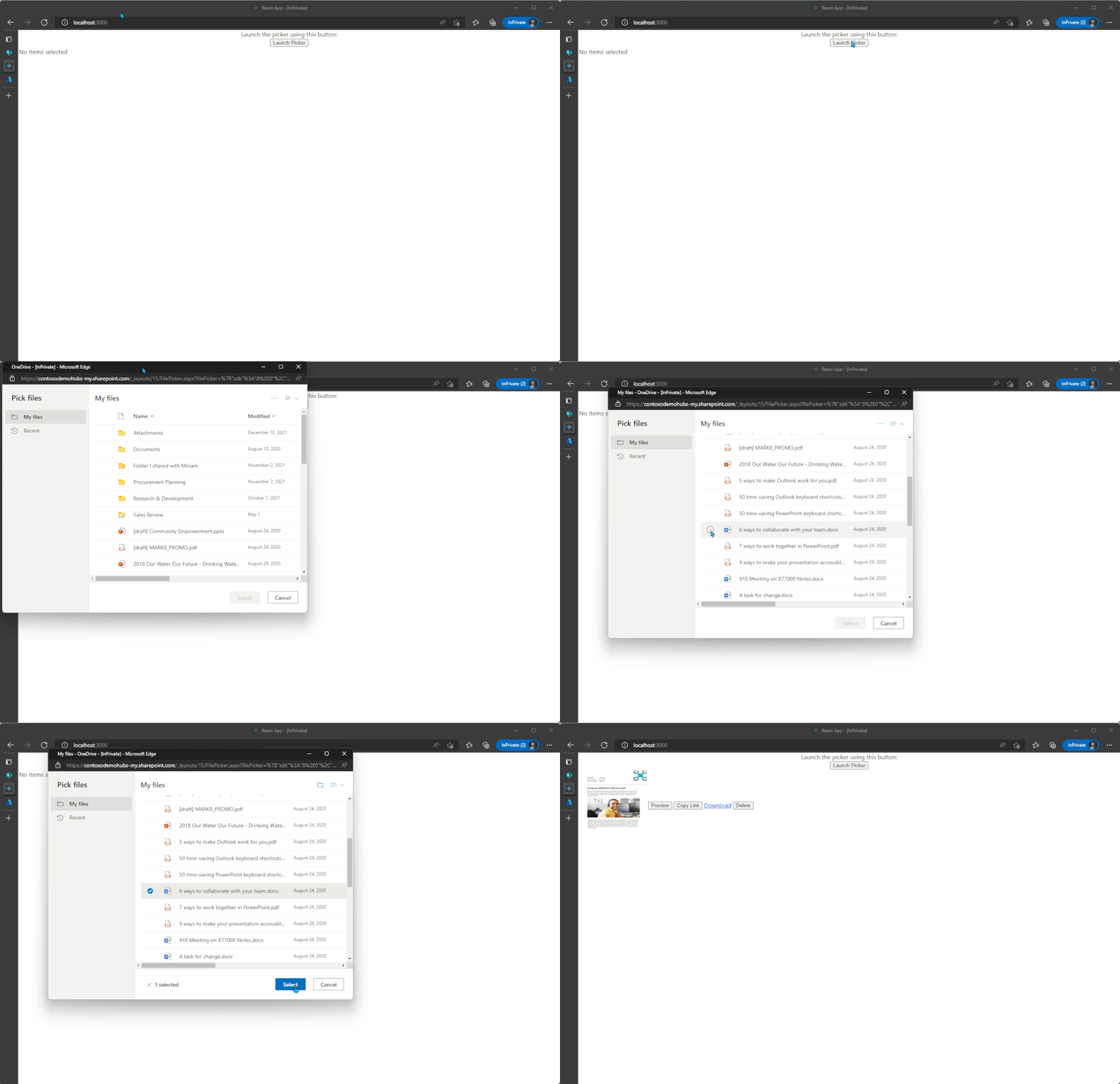 File picker v8 experience
Learn more..
We hope you’re as excited as we are about these new features. Join us for a free webinar tomorrow to learn more about these innovations.
Register here: What’s new in OneDrive: Q2 roadmap roundup
We continue to evolve OneDrive as a place to access, share, and collaborate on all your files in Office 365, keeping them protected and readily accessible on all your devices, anywhere.
You can stay up-to-date on all things via the OneDrive Blog and the OneDrive release notes.
Check out the new and updated OneDrive documentation.
Take advantage of end-user training resources on our Office support center.
Thank you again for your support of OneDrive. We look forward to your continued feedback and hope to connect with you at another upcoming Microsoft or community-led event.
Thanks,
Ankita


Recent Comments