by Contributed | Jul 11, 2022 | Technology
This article is contributed. See the original author and article here.
Azure Communication Services allows you to add communications to your applications to help you connect with your customers and across your teams. Available capabilities include voice, video, chat, SMS and more. Frequently you need to share media, such as a Word document, an image, or a video as part of your communication experience. During a meeting, users want to share, open, or download the media directly. This content can be referenced throughout the conversation for visibility and feedback – whether it is a doctor sending a patient a note in a PDF, a retailer sending detailed images of their product, or a customer sharing a scanned financial document with their advisor.
As part of the Azure Family, Azure Communication Services works together with Azure Blob Storage to share media between communication participants. Azure Blob Storage provides you with globally redundant, scalable, encrypted storage for your content and Azure Communication Services allow you to deliver that content.
Using Azure Communication Services chat SDK and the UI Library, developers can easily enable experiences that incorporate chat communications and media sharing into your existing applications. Check out the recently published tutorial and reference implementation. You can find the completed sample on GitHub.
This tutorial covers how to upload media to Azure Blob Storage and link it to your Azure Communication Services chat messages. Going one step further, the guide shows you how to use the Azure Communication Services UI Library to create a beautiful chat user experience which includes these file sharing capabilities. You can even stylize the UI components using the UI library’s simple interfaces to match your existing app.
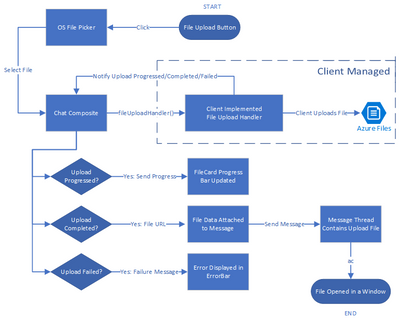
The tutorial yields a sample of how file sharing capability can be enabled. You should ensure that the file system used and the process of uploading and downloading files to be compliant with your requirements related to privacy and security.
We hope you check out the tutorial to learn how you can bring interactive communication and media sharing experiences to your application using Azure Communication Services.
by Contributed | Jul 10, 2022 | Technology
This article is contributed. See the original author and article here.
Introduction
Hi folks! My name is Felipe Binotto, Cloud Solution Architect, based in Australia.
The purpose of this article is to provide a comparison on how you can do something with Bicep vs how you can do the same thing with Terraform. My intension here is not to provide an extensive comparison or dive deep into what each language can do but to provide a comparison of the basics.
I have worked with Terraform for a long time before I started working with Bicep and I can say to Terraform Engineers that it should be an easy learning curve with Bicep if you already have good experience with Terraform.
Before we get to the differences when writing the code, let me provide you with a quick overview of why someone would choose one over the other.
The main differentiator of Terraform is being multi-cloud and the nice UI it provides if you leverage Terraform Cloud to store the state. I like the way you can visualize plans and deployments.
Bicep, on the other hand, is for Azure only, but it provides deep integration which unlocks what some call ‘day zero support’ for all resource types and API versions. This means that as soon as some new feature or resource is released, even preview features, they are immediately available to be used with Bicep. If you have been using Terraform for a while, you know that it can take a long time until a new Azure release is also available in Terraform.
Terraform stores a state of your deployment which is a map with the relationship of your deployed resources and the configuration in your code. Based on my field experience, this Terraform state causes more problems than provides benefits. Bicep doesn’t rely on the state but on incremental deployments.
Code
Both Terraform and Bicep are declarative languages. Terraform files have TF extension and Bicep files have BICEP extension.
The main difference is that for Terraform you can have as many TF files as you want in the same folder, and they will be interpreted as a single TF file which is not true for Bicep.
Throughout this article, you will also notice that Bicep uses single quotes while Terraform uses double quotes.
Variables, Parameters & Outputs
Variables
In Bicep, variables can be used to simplify complex expressions which are equivalent to Terraform “local variables”.
The example below depicts how you can concatenate parameter values in a variable to make up a resource name.
param env string
param location string
param name string

var resourceName = '${location}-${env}-${name}'
The same can be achieved in Terraform as follows.
variable "env" {}
variable "name" {}
variable "location" {}

locals {
  resourceName = "${var.location}-${var.env}-${var.name}"
}
Parameters
In Bicep, parameters can be used to pass inputs to your code and make it reusable which is the equivalent to “input variables” in Terraform.
Parameters in Bicep are made of the key work “param”, followed by the parameter name followed by the parameter type, in the example below, a string.
param env string
A default value can also be provided.
param env string = 'prd'
Parameters in Bicep can also use decorators which is a way to provide constraints or metadata. For example, we can constrain the parameters “env” to be three letters only.
@minLength(3)
@maxLength(3)
param env string = 'prd'
Parameter values can be provided from the command line or passed in a JSON file.
In Terraform, input variables can be declared as simple as the following.
variable "env" {}
A default value can also be provided.
variable "env" {
  default = "prd"
}
In Terraform, a validation block is the equivalent to the Bicep parameter decorators.
variable "env" {
  default = "prd"
  validation {
  	condition     = length(var.env) == 3
  	error_message = "The length must be 3."
  }
}
Parameter values can be provided from the command line or passed in a TFVARS file.
Outputs
Outputs are used when a value needs to be returned from the deployed resources.
In Bicep, an output is represented by the keyword “output” followed by the output type and the value to be returned.
In the example below, the hostname is returned which is the FQDN property of a public IP address object.
output hostname string = publicIP.properties.dnsSettings.fqdn
In Terraform, the same can be done as follows.
output "hostname" {
   value = azurerm_public_ip.vm.fqdn
}
Resources
Resources are the most important element in both Bicep and Terraform. They represent the resources which will be deployed to the target infrastructure.
In Bicep, resources are represented by the keyword “resource” followed by a symbolic name, followed by the resource type and API version.
The following represents a compressed version of an Azure VM.
resource vm 'Microsoft.Compute/virtualMachines@2020-06-01' = {
  name: vmName
  location: location
  …
}
The following is how you can reference an existing Azure VM.
resource vm 'Microsoft.Compute/virtualMachines@2020-06-01' existing = {
  name: vmName
}
The same resource can be represented in Terraform as follows.
resource "azurerm_windows_virtual_machine" "vm" {
  name                  = var.vmName
  location              = azurerm_resource_group.resourceGroup.location
  …
}
However, to reference an existing resource in Terraform, you must use a data block.
data "azurerm_virtual_machine" "vm" {
  name                = vmName
  resource_group_name = rgName
}
The main differences in the examples above are the following:
- Resource Type
- For Bicep, the resource type version is provided in the resource definition.
- For Terraform, the version will depend on the plugin versions downloaded during “terraform init” which depends on what has been defined in the “required_providers” block. We will talk about providers in a later section.
- Scope
- For Bicep, the default scope is the Resource Group unless other scope is specified, and the resources don’t have a Resource Group property which requires to be specified.
- For Terraform, the Resource Group has to be specified as part of the resource definition
- Referencing existing resources
- For Bicep, you can use the same construct using the “existing” keyword.
- For Terraform, you must use a data block.
Modules
Modules have the same purpose for both Bicep and Terraform. Modules can be packaged and reused on other deployments. It also improves the readability of your files.
Modules in Bicep are made of the key word “module”, followed by the module path which can be a local file path or a remote registry.
The code below provides a read-world example of a very simple Bicep module reference.
module vmModule '../virtualMachine.bicep' = {
  name: 'vmDeploy'
  params: {
    name: 'myVM'
  }
}
One important distinction of Bicep modules is the ability to provide a scope. As an example, you could have your main deployment file using subscription as the default scope and a resource group as the module scope as depicted below.
module vmModule '../virtualMachine.bicep' = {
  name: 'vmDeploy'
  scope: resourceGroup(otherRG)
  params: {
    name: 'myVM'
  }
}
The same can be achieved with Terraform as follows.
module "vmModule" {
  source   = "../virtualMachine"
  name     = "myVM"
}
Providers & Scopes
Terraform uses providers to interact with cloud providers. You must declare at least one azurerm provider block in your Terraform configuration to be able to interact with Azure as displayed below.
provider "azurerm" {
  features {}
}
To reference multiple subscriptions, you can use an alias for the providers. In the example below we reference two distinct subscriptions.
provider "azurerm" {
  alias             = "dev"
  subscription_id   = "DEV_SUB_ID"
  tenant_id         = "TENANTD_ID"
  client_id         = "CLIENT_ID"
  client_secret     = "CLIENT_SECRET"
  features {}
}

provider "azurerm" {
  alias             = "prd"
  subscription_id   = "PRD_SUB_ID"
  tenant_id         = "TENANTD_ID"
  client_id         = "CLIENT_ID"
  client_secret     = "CLIENT_SECRET"
  features {}
}
Bicep uses scopes to target different resource groups, subscriptions, management groups or tenants.
For example, to deploy a resource to a different resource group, you can add to the resource, the scope property, and use the “resourceGroup” function.
module vmModule '../virtualMachine.bicep' = {
  name: 'vmDeploy'
  scope: resourceGroup(otherRG)
  params: {
    name: 'myVM'
  }
}
To deploy the resource to a resource group in a different subscription, you can also include the subscription id as per the example below.
module vmModule '../virtualMachine.bicep' = {
  name: 'vmDeploy'
  scope: resourceGroup(otherSubscriptionID, otherRG)
  params: {
    name: 'myVM'
  }
}
Deployment
There are many Bicep and Terraform commands and variations which can be used for deployment or to get to a point where a deployment can be performed, but in this section, I will just compare “terraform plan” and “terraform apply” with Bicep’s equivalent commands.
“terraform plan” is the command used to preview the changes before they actually happen. Running it from the command line will output the resources which would be added, modified, or deleted in plain text. Running the plan from Terraform Cloud, you can see the same information but in a nice visual way. Parameters can be passed as variables or variables files as per below.
terraform plan -var 'vmName=myVM'

terraform plan -var-file prd.tfvars
“terraform apply” deploys the resources according to what was previewed in the plan.
In Bicep, the “terraform plan” command is equivalent to the CLI “az deployment group what-if” command or “New-AzResourceGroupDeployment -Whatif” PowerShell command.
Running it from the command line will also output the resources which would be added, modified, or deleted in plain text. However, Bicep still doesn’t provide a user interface for the what-if visualization.
The “terraform apply” command is equivalent to the Bicep CLI command “az deployment group create” or “New-AzResourceGroupDeployment -Confirm” PowerShell command.
Note that these Bicep commands are for resource group deployments. There are similar commands for subscription, management group and tenant deployments.
Conclusion
Terraform still has its place in companies which are multi-cloud or using it for on-premises deployments. I’m Terraform certified and always loved Terraform. However, I must say when considering Azure by itself, Bicep has the upper hand. Even for multi-cloud companies, if you wish to enjoy deep integration and be able to use all new features as soon as they are released, Bicep is the way to go.
I hope this was informative to you and thanks for reading! Add your experiences or questions in the comments section.
Disclaimer
The sample scripts are not supported under any Microsoft standard support program or service. The sample scripts are provided AS IS without warranty of any kind. Microsoft further disclaims all implied warranties including, without limitation, any implied warranties of merchantability or of fitness for a particular purpose. The entire risk arising out of the use or performance of the sample scripts and documentation remains with you. In no event shall Microsoft, its authors, or anyone else involved in the creation, production, or delivery of the scripts be liable for any damages whatsoever (including, without limitation, damages for loss of business profits, business interruption, loss of business information, or other pecuniary loss) arising out of the use of or inability to use the sample scripts or documentation, even if Microsoft has been advised of the possibility of such damages.

by Contributed | Jul 9, 2022 | Technology
This article is contributed. See the original author and article here.
To be honest, this post is one of my favorites that I was looking to post due to many questions that we get from our customers about how to monitor my elastic database pool. Many customers have a dense elastic database pool and they need a clear picture of what is happening in their elastic database pool. I hope that you can enjoy like as much as I enjoyed during these tests.
In this article and video we are going to monitor the elastic database pool using the monitor an we are going to share a query to obtain all the current processes that your elastic database pool is running.
The first thing is to know the main characteristics of an elastic database pool.
- Databases running on a single SQL Instance.
- Configuration per database
The second, is to know the options that we have to monitor an elastic database pool
- Azure Portal, Azure Monitor, Log Analytics and SQL Auditing
- Select * from sys.dm_db_resource_stats
- Select * from sys.dm_exec_requests in combinations with other
- Query Data Store
- Use the queries provided in the demo
FInally, the best practices:
Demo
In this demo I have the following configuration:
- Elastic Database Pool Name: Jmjuradotest
- Elastic Database Pool Configuration:
- General Purpose 2 vCores
- Storage Size: 316 GB
- Per Database Setting: Unlimited per Database.
- Databases that are part of this Elastic Database Pool:
- Jmjuradotestdb1
- Jmjuradotestdb2
- Jmjuradotestdb3
How to monitor queries that are running in my Elastic Database Pool.
This is the query that I used to monitor the activity
SELECT
 substring(REPLACE(REPLACE(SUBSTRING(ST.text, (req.statement_start_offset/2) + 1, (
(CASE statement_end_offset WHEN -1 THEN DATALENGTH(ST.text) ELSE req.statement_end_offset END
- req.statement_start_offset)/2) + 1) , CHAR(10), ' '), CHAR(13), ' '), 1, 512) AS statement_text
,dbs.name
,program_name
,req.session_id
, req.cpu_time 'cpu_time_ms'
, req.status
, wait_time
, wait_resource
, wait_type
, last_wait_type
, req.total_elapsed_time
, total_scheduled_time
, req.row_count as [Row Count]
, command
, scheduler_id
, memory_usage
, req.writes
, req.reads
, req.logical_reads
FROM sys.dm_exec_requests AS req
inner join sys.dm_exec_sessions as sess on sess.session_id = req.session_id
left join [dbo].[master_data] as dbs on dbs.database_id = sess.database_id
CROSS APPLY sys.dm_exec_sql_text(req.sql_handle) as ST
where req.session_id <> @@SPID
order by dbs.name
If you run this query connected to any database that belongs to your elastic database pool you could find some useful information:
As you could see this query has a special table called master_data, basically it is an external table that is connecting to master database to obtain the name of the database. Unfortunately, in Azure SQL Database is not possible to connect to others databases once you are connected to another. If you don’t want to create an external table, please, basically, remove the reference like I posted below.
SELECT
 substring(REPLACE(REPLACE(SUBSTRING(ST.text, (req.statement_start_offset/2) + 1, (
(CASE statement_end_offset WHEN -1 THEN DATALENGTH(ST.text) ELSE req.statement_end_offset END
- req.statement_start_offset)/2) + 1) , CHAR(10), ' '), CHAR(13), ' '), 1, 512) AS statement_text
--,dbs.name
,req.database_id
,program_name
,req.session_id
, req.cpu_time 'cpu_time_ms'
, req.status
, wait_time
, wait_resource
, wait_type
, last_wait_type
, req.total_elapsed_time
, total_scheduled_time
, req.row_count as [Row Count]
, command
, scheduler_id
, memory_usage
, req.writes
, req.reads
, req.logical_reads, blocking_session_id
FROM sys.dm_exec_requests AS req
inner join sys.dm_exec_sessions as sess on sess.session_id = req.session_id
--left join [dbo].[master_data] as dbs on dbs.database_id = sess.database_id
CROSS APPLY sys.dm_exec_sql_text(req.sql_handle) as ST
where req.session_id <> @@SPID
--order by dbs.name
Definition of external table
CREATE DATABASE scoped CREDENTIAL CredentialJM WITH IDENTITY  ='username', SECREt = 'Password'

CREATE EXTERNAL DATA SOURCE [RemoteDataJM] WITH (TYPE = RDBMS, LOCATION = N'servername.database.windows.net', CREDENTIAL = [CredentialJM], DATABASE_NAME = N'master')
GO

CREATE external TABLE [dbo].[master_data](
name varchar(120), database_id bigint
)
WITH
(
  DATA_SOURCE = [RemoteDataJM],
  SCHEMA_NAME = 'sys', --schema name of remote table
  OBJECT_NAME = 'databases' --table name of remote table
);
In the following video you could see that giving a special workload (running queries that are taking high CPU, Bulk inserts and TempDB operations) how I monitor my elastic database pool, how I know that queries running and how I know which is the database that is taking more resources.
Enjoy!

by Contributed | Jul 8, 2022 | Technology
This article is contributed. See the original author and article here.
This is the next segment of our blog series highlighting Microsoft Learn Student Ambassadors who achieved the Gold milestone and have recently graduated from university. Each blog in the series features a different student and highlights their accomplishments, their experience with the Student Ambassador community, and what they’re up to now.
Today we meet Jason Chee who is from Singapore and recently graduated from the National University of Singapore with a Bachelor of Computing (Honors) degree in Computer Science and a Minor in Communications and New Media.
Responses have been edited for clarity and length.
How has the Student Ambassador community impacted you?
I initially joined the community in July 2012 when it was the Microsoft Student Partners program while I was in Junior College. I focused on developing Microsoft technologies to the detriment of my studies, but after interning at Microsoft Singapore in the Developer and Platform Evangelism (DPE) Group as a Program Lead for the local charter of Microsoft Student Partners, I pursued further studies at my current university and rejoined the Student Ambassador community in August 2018.
The community holds a dear place in my heart because it played a tremendous role in shaping where I am today. The majority of the DPE team were predominantly ex-Student Partners. The culture this created meant the Student Partner/Student Ambassador network in Singapore was extremely strong with great opportunities to work for or with Microsoft. To this day, many of these people are still in contact. We have formed startups together and still very much keep in contact with the DPE team of the past, even though none of them still work for Microsoft.
Ultimately, it was the idea of a community passionate about technology that enthralled me. This was a group of like-minded people who aimed to make the world a better place through technology and have fun while doing it.
In a unique element to myself, this community is what set me on a path traditionally seen as less successful locally, but one I excelled in. I witnessed firsthand how the combined strengths and wisdom from the local Student Partners came together with Microsoft Singapore’s backing to give aspiring developers the opportunities they could otherwise not afford or come to know of. This is what I wanted to cultivate in my time as a Program Lead.
What were the accomplishments that you’re the proudest of and why?
Overseeing 350 Microsoft Student Partners during my time as Program Lead would be my highlight. Creating this network was an absolute joy and has paid off as the strong friendships and professional connections this cultivated are a sight to behold. We ran extremely popular and successful events throughout the campuses such as one called Campus Surprise, a collaboration between various departments at Microsoft — DX, Education, Philanthropies, and Xbox. It was a roadshow event we ran simultaneously across every institute of higher learning in Singapore, showcasing the very best of Microsoft technologies and onboarding students to Office 365 and Microsoft Azure. Each segment of Microsoft Student Partners had free reign to craft the event. One institution even ran an Escape Room challenge to bring in visitors.
I was the Microsoft Student Partner of the Year in 2015. Out of 9,000 Student Partners globally, I was one of the few selected to attend the Student Partner Summit in Redmond, where I received the title for my contributions to the program and because of the success of the Singapore charter.
What are you doing now that you’ve graduated?
I founded a startup with two other ex-Student Partners/Student Ambassadors. We run an events-tech company called FrontHAUS, a play on the term “front of house” which is essentially the ticketing booth. Our company focuses on next generation ticketing experiences and the transformation of traditional events into a digital or hybrid format.
We also run a company called HelloHolo, an official Mixed Reality partner for Microsoft that brings in MR/VR/AR technologies such as the Microsoft HoloLens to the local market and builds solutions for them.
If you could redo your time as a Student Ambassador, is there anything you would have done differently?
I think it is important to live life in the forward direction without regrets. I am proud to say that there is nothing I would have done differently in my time in Microsoft Student Partners and Microsoft Learn Student Ambassadors. I did everything in my power to ensure its continued survival.
If you were to describe the community to a student who is interested in joining, what would you say about it to convince him or her to join?
The community truly provides one with the tools they need to learn more about Microsoft technologies and get ahead of their peers in terms of premier tools and certifications. It also comes with an enormous global network of like-minded people.
What advice would you give to new Student Ambassadors?
Learn as much as you can, do as much as you can, and above all, connect with as many people as you can.
What is your motto in life, your guiding principle?
Celebrate others’ success often and know that it does not diminish your own.
What is one random fact about you that few people are aware of?
I am terrible at math. I never viewed programming as a science or math puzzle and have always viewed it as a language. In that sense, I am more of an “arts” student compared to a “science” / STEM student and therefore am an avid patron of the arts. I seek out musicals and theater when I can, and love absolutely anything Disney.
_________________________________________________________________________________________
Good luck to you in all your endeavors, Jason!
Readers, you can find Jason on LinkedIn.


Recent Comments