by Contributed | Jul 31, 2022 | Technology
This article is contributed. See the original author and article here.
In this article we will create a Docker image from a Java project using Azure Container Registry and then it will be deployed in a Docker compatible hosting environment, for instance Azure Container App.
For this process it is required:
- JDK 1.8+
- Maven
- Azure CLI
- GIT
And the following Azure resources:
- Azure Container Registry
- Azure Container App. This resource can be changed by other container hosting service, such as Azure App Service, Azure Functions or Azure Kubernetes Service.
These Azure resources can be create using the following az cli commands:
LOCATION=westeurope
RESOURCE_GROUP=rg-acrbuild-demo
ACR_NAME=acrbuilddemo
CONTAINERAPPS_ENVIRONMENT=containerapp-demo
CONTAINERAPPS_NAME=spring-petclinic
# create a resource group to hold resources for the demo
az group create --location $LOCATION --name $RESOURCE_GROUP
# create an Azure Container Registry (ACR) to hold the images for the demo
az acr create --resource-group $RESOURCE_GROUP --name $ACR_NAME --sku Standard --location $LOCATION

# register container apps extension
az extension add --name containerapp --upgrade
# register Microsoft.App namespace provider
az provider register --namespace Microsoft.App
# create an azure container app environment
az containerapp env create
    --name $CONTAINERAPPS_ENVIRONMENT
    --resource-group $RESOURCE_GROUP
    --location $LOCATION

# Create a user managed identity and assign AcrPull role on the ACR.
USER_IDENTITY=$(az identity create -g $RESOURCE_GROUP -n $CONTAINERAPPS_NAME --location $LOCATION --query clientId -o tsv)
ACR_RESOURCEID=$(az acr show --name $ACR_NAME --resource-group $RESOURCE_GROUP --query "id" --output tsv)
az role assignment create
    --assignee "$USER_IDENTITY" --role AcrPull --scope "$ACR_RESOURCEID"

# container app will be created once the image is pushed to the ACR
Let’s take a sample application, for instance the well known spring pet clinic.
git clone https://github.com/spring-projects/spring-petclinic.git
cd spring-petclinic
Then create a Dockerfile. For demo purposes it will be as simple as possible.
FROM openjdk:8-jdk-slim
# takes the jar file as an argument
ARG ARTIFACT_NAME
# assumes the application entry port is 8080
EXPOSE 8080

# The application's jar file
ARG JAR_FILE=${ARTIFACT_NAME}

# Add the application's jar to the container
ADD ${JAR_FILE} app.jar

# Run the jar file
ENTRYPOINT ["java","-jar","/app.jar"]
To build it locally the following command would be used:
docker build -t myacr.azurecr.io/spring-petclinic:2.7.0
    -f Dockerfile
    --build-arg ARTIFACT_NAME=target/spring-petclinic-2.7.0-SNAPSHOT.jar
    .
To build it in Azure Container Registry the following command would be used instead:
az acr build
        --resource-group rg-spring-petclinic
        --registry myacr
        --image spring-petclinic:2.7.0
        --build-arg ARTIFACT_NAME=target/spring-petclinic-2.7.0-SNAPSHOT.jar
        .
Instead of execute it manually, this command can be integrated as part of the maven build cycle. To perform this action, we will use
org.codehaus.mojo:exec-maven-plugin. This plugin allows to execute system or Java programs. It will be used to execute the previous az cli command. To include as part of the build lifecycle it will be created a new maven profile.
<profile>
    <id>buildAcr</id>
    <build>
        <plugins>
            <plugin>
                <groupId>org.codehaus.mojo</groupId>
                <artifactId>exec-maven-plugin</artifactId>
                <version>3.0.0</version>
                <executions>
                    <execution>
                        <id>acr-package</id>
                        <phase>package</phase>
                        <goals>
                            <goal>exec</goal>
                        </goals>
                        <configuration>
                            <executable>az</executable>
                            <workingDirectory>${project.basedir}</workingDirectory>
                            <arguments>
                                <argument>acr</argument>
                                <argument>build</argument>
                                <argument>--resource-group</argument>
                                <argument>${RESOURCE_GROUP}</argument>
                                <argument>--registry</argument>
                                <argument>${ACR_NAME}</argument>
                                <argument>--image</argument>
                                <argument>${project.artifactId}:${project.version}</argument>
                                <argument>--build-arg</argument>
                                <argument>ARTIFACT_NAME=target/${project.build.finalName}.jar</argument>
                                <argument>-f</argument>
                                <argument>Dockerfile</argument>
                                <argument>.</argument>
                            </arguments>
                        </configuration>
                    </execution>
                </executions>
            </plugin>
        </plugins>
    </build>
</profile>
To execute this process just execute the following maven goal with the new profile.
mvn package -PbuildAcr -DRESOURCE_GROUP=$RESOURCE_GROUP -DACR_NAME=$ACR_NAME
The resource group and the Azure Container Registry are passed as environment variables, but the can be defined as maven parameters or just hardcoding.
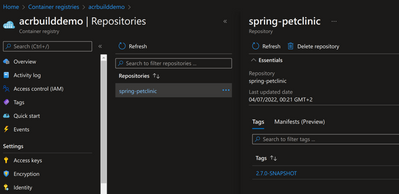
Now the image already exists in Azure Container Registry.
Now it’s time to create the Container App.
# Create the container app
az containerapp create
    --name ${CONTAINERAPPS_NAME}
    --resource-group $RESOURCE_GROUP
    --environment $CONTAINERAPPS_ENVIRONMENT
    --container-name spring-petclinic-container
    --user-assigned ${CONTAINERAPPS_NAME}
    --registry-server $ACR_NAME.azurecr.io
    --image $ACR_NAME.azurecr.io/spring-petclinic:2.7.0-SNAPSHOT
    --ingress external
    --target-port 8080
    --cpu 1
    --memory 2
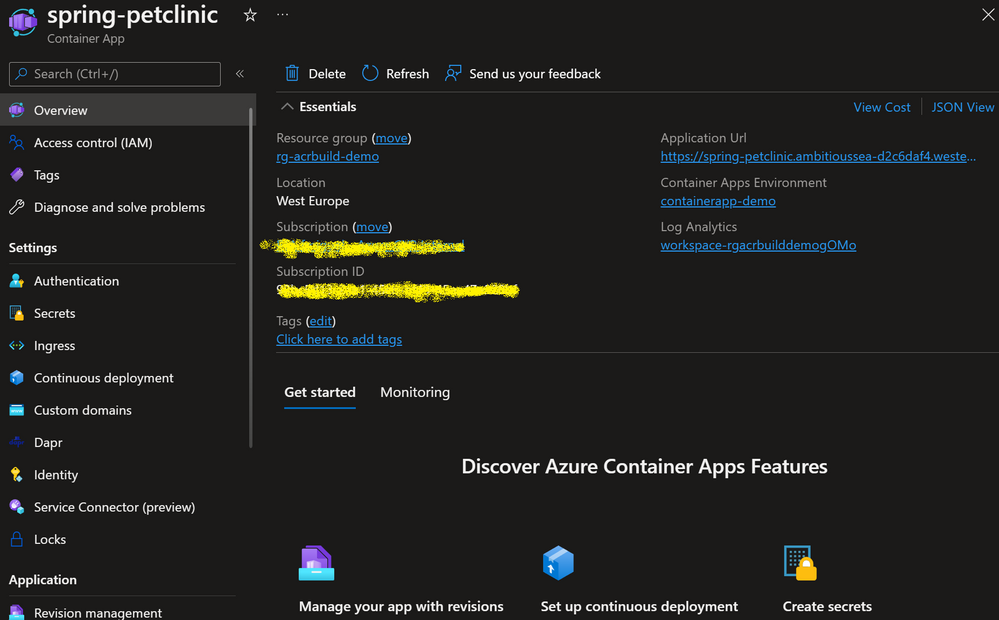
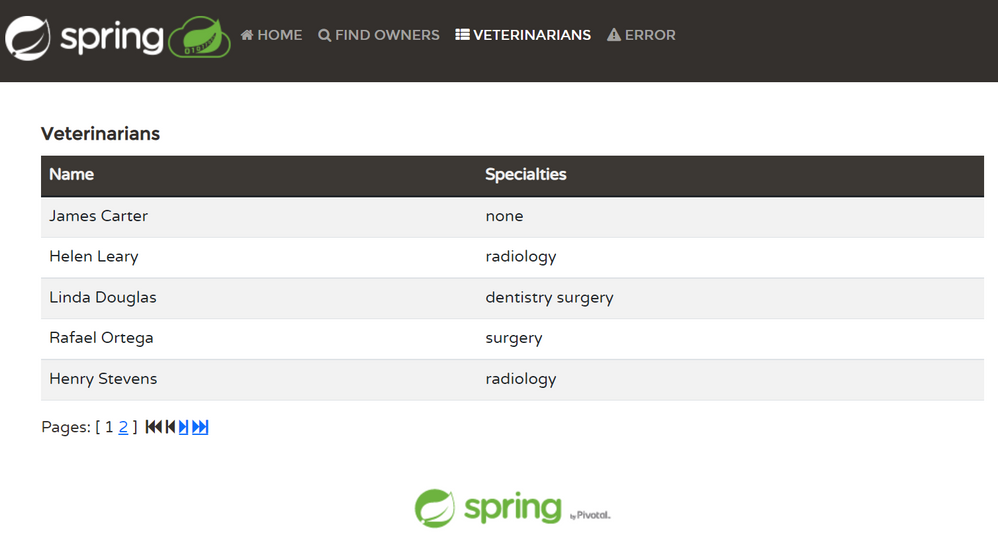
Now the application is deployed and running on Azure Container Apps.
You can find the source code for this application here.

by Contributed | Jul 29, 2022 | Technology
This article is contributed. See the original author and article here.
Microsoft partners like Contentsquare, Connecting Software, and Enlighten Designs deliver transact-capable offers, which allow you to purchase directly from Azure Marketplace. Learn about these offers below:
|
Contentsquare Digital Experience Analytics: More than 1,000 leading brands, including BMW, Giorgio Armani, Samsung, Sephora, and Virgin Atlantic, leverage Contentsquare’s digital experience analytics cloud to understand customer behaviors and empower teams to seize growth-accelerating opportunities. Intuitive visual reporting makes it easy to see how customers are using a brand’s site or app, in turn driving more successful experiences.
|
 |
CB Dynamics 365 to SharePoint Permissions Replicator: This application from Connecting Software automatically synchronizes your Microsoft Dynamics 365 privileges with your SharePoint permissions, enhancing security and avoiding infringement of the European Union’s General Data Protection Regulation. It replicates the Dynamics 365 permission schema and ensures that your SharePoint folders match your CRM security model. |
 |
IDA, the Insights and Discovery Accelerator: Powered by Microsoft Azure Cognitive Search, this solution from Enlighten Designs facilitates journalistic research. The Insights and Discovery Accelerator uses object visioning to identify characteristics like columns and hyphens from text scans to give researchers a full and accurate transcript. Its video indexer can recognize people, topics, and entities and can pull transcripts from video and audio files.
|

by Contributed | Jul 28, 2022 | Technology
This article is contributed. See the original author and article here.
Microsoft partners like Dace IT and PhakamoTech deliver transact-capable offers, which allow you to purchase directly from Azure Marketplace. Learn about these offers below:
|
Intelligent Traffic Management 2022: Detect and track bikes, vehicles, and pedestrians, as well as collisions and near-misses with Intelligent Traffic Management from Dace IT. This data can be used to adjust traffic lights for traffic flow optimization and automatically notify emergency services.
|

|
Managed Cybersecurity Operation Center Service: This multi-tenant 24/7 cybersecurity operations managed service from PhakamoTech will enhance your security investments using Microsoft Azure Sentinel, Microsoft Defender for Cloud, and more. This service centralizes visibility for better threat detection, response, and compliance setting.
|

by Contributed | Jul 27, 2022 | Technology
This article is contributed. See the original author and article here.
Many enterprises deploy applications using Azure Database for PostgreSQL Single Server, a fully managed Postgres database service, that is best suited for minimal customizations of your database. In November 2021, we announced that the next generation of the Azure Database for PostgreSQL, Flexible Server, was generally available. Since then, customers have been using methods like dump/restore, Azure Database Migration Service (DMS), and custom scripts to migrate their databases from Single to Flexible Server.
If you are a user of Azure Database for PostgreSQL Single Server, and looking to migrate to Postgres Flexible Server, At Microsoft, our mission is to empower every person and organization on the planet to achieve more. It’s this mission that drives our firm commitment to collaborate and contribute to the Postgres community and invest in bringing the best migration experience to all our Postgres users.
Why migrate to Azure Database for PostgreSQL Flexible Server?
If you are not familiar with Flexible server, it provides you with the simplicity of a managed database service together with maximum flexibility over your database, and built-in cost-optimization controls. Azure Database for PostgreSQL Flexible Server is the next generation Postgres service in Azure and offers a robust value proposition and benefits including:
- Infrastructure: Linux-based VMs, premium managed disks, zone-redundant backups
- Cost optimization/Dev friendly: Burstable SKUs, start/stop features, default deployment choices
- Additional Improvements over Single Server: Zone-redundant High Availability (HA), support for newer PG versions, custom maintenance windows, connection pooling with PgBouncer, etc.
Learn more about why Flexible Server is the top destination for Azure Database for PostgreSQL
Why do you need the Single to Flexible Server PostgreSQL migration tool?
Now, let’s go over some of the nuances of migrating data from Single to Flexible Server.
Single Server and Flexible Server run on different OS platforms (Windows vs Linux) with different physical layouts (Basic/ 4TB/16TB storage Vs Managed disk), and different collation. Flexible Server supports PostgreSQL DB versions 11 and above. If you are using PG 10 and below on Single Server (those are retired, by the way), you must make sure your application is compatible with higher versions. These challenges prohibit us from making a simple physical copy of the data. Only a logical data copy, such as dump/restore (offline mode), or logical decoding (online mode) can be performed.
While the offline mode of migration is simple, many customers prefer an online migration experience that keeps your source PostgreSQL server up and operational until the cutover, however, there is a lengthy checklist of things to be aware of during this process. These steps include
- Setting the source’s WAL_LEVEL to LOGICAL
- Schema copy
- Creation of databases at the target,
- Disabling foreign keys and triggers at the target.
- Enabling them post migration, and so on.
Here is where the Single to Flexible migration tool comes into help to make the migration experience simpler for you.
What is Single to Flexible Server PostgreSQL migration tool?
This migration tool is tailormade to alleviate the pain of migrating the PostgreSQL schema and data from Single to Flexible Server. This tool offers a seamless migration experience, while abstracting the migration complexities under the hood. This tool is targeted for less than 1 TiB database size. This migration tool automates the majority of the migration steps, allowing you to focus on minor administration and pre-requisite tasks.
You can either use the Azure portal or Azure CLI to perform online or offline migrations.
- Offline mode: This offers a simple database dump and restore of the data and schema and is best for smaller sized databases where downtime can be afforded.
- Online mode: This mode of migration performs data dump and restore, and initiates change data capture using Postgres logical decoding and is best in scenarios where downtime cannot be afforded.
For a detailed comparison, see this documentation.
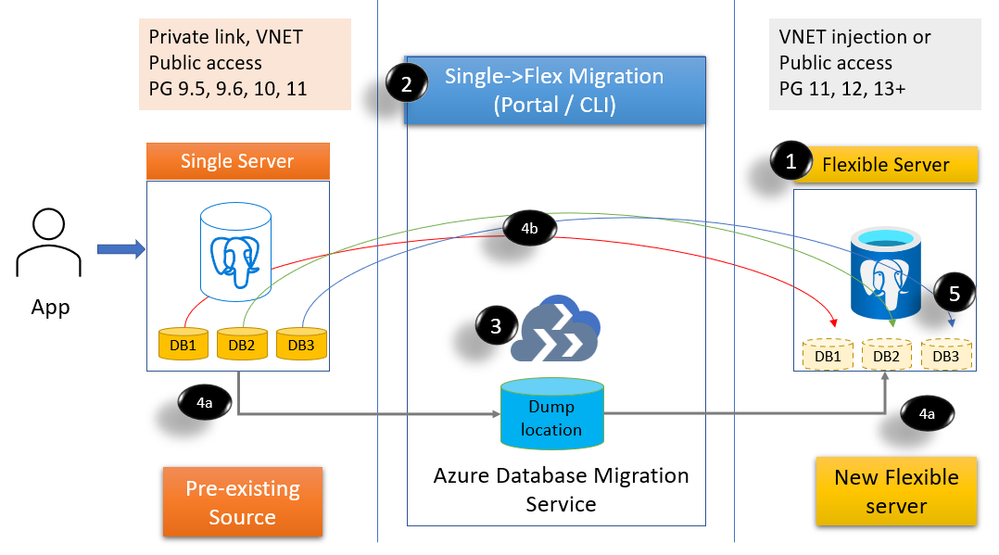
Figure 1: Block diagram to show the migration feature steps and processes
- Create a Flexible PostgreSQL server (public or VNET)
- Invoke migration from Azure Portal or Azure CLI and choose databases to migrate.
- A Migration infrastructure is provisioned (DMS) on your behalf
- Initiates migration
- (4a) Initial dump/restore (online & offline)
- (4b) streams the changes using logical decoding – CDC (online only)
- You can then cutover if you are doing online migration. If you are using offline mode, then post restore, the cutover is automatically performed.
What are the steps involved for a successful migration?
1. Planning for Single to Flexible PostgreSQL server migration
This is a very critical step. Some of the steps in the planning phase include:
- Getting the list of source Single servers, SKUs, storage, public/private access (Discovery)
- Single server provides Basic, General purpose, and Memory optimized SKUs. Flexible Server offers Burstable SKUs, General purpose, and Memory optimized SKUs. While General purpose and Memory optimized SKUs can be migrated to the equivalent SKUs, for your Basic SKU, you can consider either Burstable SKU or General purpose SKU depending in your workload. See Flexible server compute & storage documentation for details.
- Get the list of each database in the server, the size, and extensions usage. If your database sizes are larger than 1TiB, then we recommend you reach out to your account team or contact us at AskAzureDBforPostgreSQL@service.microsoft.com to help with your migration requirement..
- Decide on the mode of migration. This may require batching of databases for each server.
- You can also choose to do a different Database:Server layout compared to Single Server. For example, you can choose to consolidate databases on Flexible (or) you want to spread out databases across multiple Flexible servers.
- Plan for the day/time for migrating your data to make sure your activity is reduced at the source server.
2. Migration pre-requisites
Once you have the plan in place, take care of few pre-requisites. For example
- Provision Flexible Server in public/VNET with the desired compute tier.
- Set the source Single Server WAL level to LOGICAL.
- Create an Azure AD application and register with the source server, target server, and the Azure resource group.
3. Migrating your databases from Single to Flexible Server PostgreSQL
Now that you have taken care of pre-requisites, you can invoke migration using the Azure Portal or Azure CLI. Create one or more migration tasks using Azure portal or Azure CLI. High-level steps include
- Select the source server
- Choose up to 8 databases per migration task
- Choose online or offline mode of migration
- Select network to deploy the migration infrastructure (if using private network).
- Create the migration
Following the invocation of the migration, the source and the target server and details are validated before initiating the migration infrastructure using Azure DMS, copying of schema, perform dump/restore steps, and if doing online then continue with CDC.
- Verify data at the target
- If doing online migration, when ready, perform cutover.
4. Post migration tasks
Once the data is available in the target Flexible PostgreSQL server, perform post-migration tasks including copying of roles, recreating large objects and copying of settings such as server parameters, firewall rules, monitoring alerts, and tags to the target Flexible server.
What are the limitations?
You can find a list of limitations in this documentation.
What do our early adopter customers say about their experience?
We’re thankful to our many customers who have evaluated the managed migration tooling and trusted us with migrating their business-critical applications to Azure Database for PostgreSQL Flexible Server. Customers appreciate the migration tool’s ease of use, features, and functionality to migrate from different Single Server configurations. Below are comments from a few of our customers who have migrated to the Flexible Server using the migration tool.
Allego, a leading European public EV charging network, continued to offer smart charging solutions for electric cars, motors, buses and trucks without interruption. Electric mobility increases the air quality of our cities and reduces noise pollution. To fast forward the transition towards sustainable mobility Allego believes that anyone with an electric vehicle should be able to charge whenever and wherever they need. That’s why we have partnered with Allego and are working towards providing simple, reliable and affordable charging solutions. Read more about the Allego story here.

|
“The Single to Flexible migration tool was critical for us to have a minimal downtime. While migrating 30 databases with 1.4TB of data across Postgres versions, we had both versions living side-by-side until cutover and with no impact to our business.”
Mr. Oliver Fourel, Head of EV Platform, Allego |
Digitate is a leading software provider bringing agility, assurance, and resiliency to IT and business operations.

|
“We had a humongous task of upgrading 50+ PostgreSQL 9.6 of database size 100GB+ to a higher version in Flexible Postgres server. Single to Flexible Server Migration tool provided a very seamless approach for migration. This tool is easy to use with minimum downtime.”
- Vittal Shirodkar, Azure specialist, Digitate
|
Why don’t you try migrating your Single server to Flexible PostgreSQL server?
- If you haven’t explored Flexible server yet, you may want to start with Flexible Server docs, which provide a great place to roll up your sleeves. Also visit our website to learn more about our Azure Database for PostgreSQL managed service.
- Check out the Single Server to Flexible server migration tool demo in the Azure Database for PostgreSQL migration on-demand webinar.
- We look forward to helping you have a pleasant migration experience to Flexible Server using the migration feature. If you would like to reach out us about the migration experience or migrations to PostgreSQL in general, you can always reach out to our product team via email at Ask Azure DB for PostgreSQL.


Recent Comments