by Contributed | Sep 30, 2020 | Azure, Technology, Uncategorized
This article is contributed. See the original author and article here.
For some years Microsoft Azure has been offering several different deployment and management choices for the SQL Server engine hosted on Azure. With the release of the Azure Arc support for SQL Server, the range of different options has grown even further. This article should help you make sense of the different choices and assist in your decision-making process.
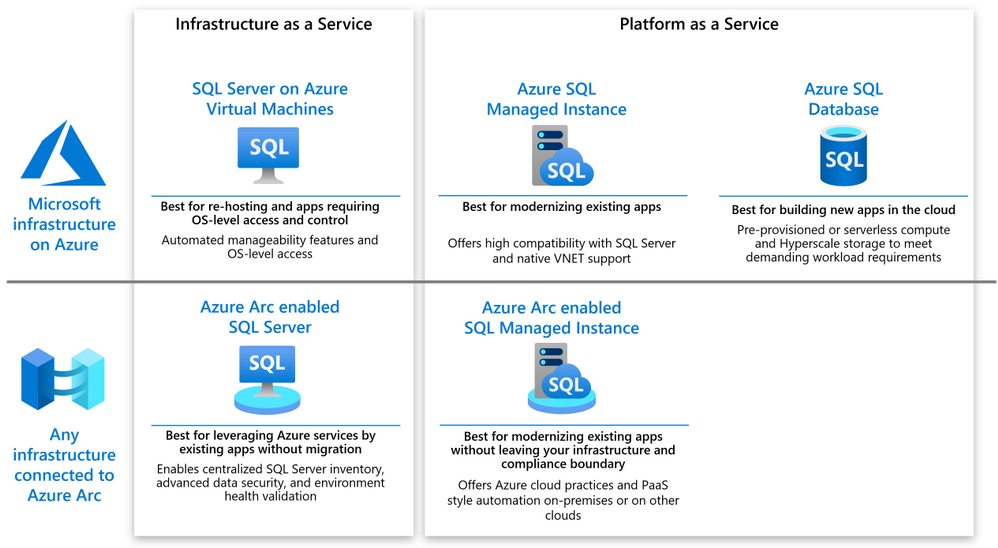
The following diagram shows a high level map of the options available on Azure or via Azure Arc.

As you can see, both on-Azure and off-Azure options offer you a choice between IaaS and PaaS. The IaaS category targets the applications that cannot be changed because of the SQL version dependency, ISV certification or simply because the lack of in-house expertise to modernize. The PaaS category targets the applications that will benefit from modernization by leveraging the latest SQL features, gaining a better SLA and reducing the management complexity.
SQL Server on Azure VM
SQL Server on Azure VM allows you to run SQL Server inside a fully managed virtual machine (VM) in Azure. It is best for lift-and-shift ready applications that would benefit from re-hosting to the cloud without any changes. You will maintain the full administrative control over the application’s lifecycle, the database engine and the underlying OS. You can choose when to start maintenance/patching, change the recovery model to simple or bulk-logged, pause or start the service when needed, and you can fully customize the SQL Server database engine. This additional control involves the added responsibility to manage the virtual machine.
Azure Arc enabled SQL Server
Azure Arc enabled SQL Server (preview) is designed for the SQL Servers running in your own infrastructure or hosted on another public cloud. It allows you to connect the SQL Servers to Azure and leverage the Azure services for the benefit of these applications. The connection and registration with Azure does not impact the SQL Server itself, does not require any data migration and causes no downtime. At present, it offers the following benefits:
- You can manage your entire global inventory of the SQL Servers using Azure Portal as a central management dashboard.
- You can better protect the applications using the advanced security services from Azure Security Center and Azure Sentinel.
- You can regularly validate the health of your SQL Server environment using the On-demand SQL Assessment service, remediate risks and improve performance.
Azure SQL Database
Azure SQL Database is a relational database-as-a-service (DBaaS) hosted in Azure. It is optimized for building modern cloud applications using a fully managed SQL Server database engine, based on the same relational database engine found in the latest stable Enterprise Edition of SQL Server. SQL Database has two deployment options built on standardized hardware and software that is owned, hosted, and maintained by Microsoft.
Unlike SQL Server, it offers limited control over the database engine and the underlying OS, and is optimized for automatic management of the scale up or out operations based on the current demand and bills for the resource consumption on a pay-as-you-go basis. SQL Database has some additional features that are not available in SQL Server, such as built-in high availability, intelligence, and management.
Azure SQL Database offers the following deployment options:
- As a single database with its own set of resources managed via a logical SQL server. A single database is similar to a contained database in SQL Server. This option is optimized for modern cloud-born applications that require a fixed set of compute and storage resources. Hyperscale and serverless options are available.
- An elastic pool, which is a collection of databases with a shared set of resources managed via a logical SQL server. Single databases can be moved into and out of an elastic pool. This option is optimized for modern cloud-born applications using the multi-tenant SaaS application pattern. Elastic pools provide a cost-effective solution for managing the performance of multiple databases that have variable usage patterns.
Azure SQL Managed Instance
Azure SQL Managed Instance is designed for new applications or existing on-premises applications that want migrate to the cloud with minimal changes to use the latest stable SQL Server features. This option provides all of the PaaS benefits of Azure SQL Database but adds capabilities such as native virtual network and near 100% compatibility with on-premises SQL Server. Instances of SQL Managed Instance provide full access to the database engine and feature compatibility for migrating SQL Servers but do not offer admin access to the underlying OS. Azure SQL Managed Instance offers a 99.99% availability SLA.
Azure Arc enabled SQL Managed Instance
Azure Arc enabled SQL Managed Instance is designed to provide the existing SQL server applications an option to migrate to the latest version of the SQL Server engine and gain the PaaS style built in management capabilities without moving outside of the existing infrastructure. The latter allows the customers to maintain the data sovereignty and meet other compliance criteria. This is achieved by leveraging the Kubernetes platform with Azure data services, which can be deployed on any infrastructure.
At present, it offers the following benefits:
- You can easily create, remove, scale up or scale down a SQL Managed Instance within minutes.
- You can setup periodic usage data uploads to ensure that Azure bills you monthly for the SQL Server license based on the actual usage of the managed instances (pay-as-you-go). You can do it even you are running the applications in an air-gapped environment.
- You can leverage the capabilities of latest version of SQL Server that is automatically kept up to date by the platform. No need to manage upgrades, updates or patches.
- Built-in management services for monitoring, backup/restore, and high availability.
Next steps
For related material, see the following articles:
by Contributed | Sep 30, 2020 | Azure, Technology, Uncategorized
This article is contributed. See the original author and article here.
AstraZeneca, which is headquartered in Cambridge, UK, has a broad portfolio of prescription medicines, primarily for the treatment of diseases in Oncology; Cardiovascular, Renal & Metabolism; and Respiratory & Immunology.
“…The vast amount of data our research scientists have access to is exponentially growing each year and maintaining a comprehensive knowledge of all this information is increasingly challenging, ” Gavin Edwards, a Machine Learning Engineer at AstraZeneca wrote.
Edwards is part of AstraZeneca’s Biological Insights Knowledge Graph (BIKG) team. He explains that knowledge graphs are networks of contextualized scientific data such as genes, proteins, diseases, and compounds—and the relationship between them.
As these knowledge graphs grow and become more complex, machine learning gives AstraZeneca’s BIKG team a way to analyze the data within them and find relevant connections more quickly and efficiently.
“We can use this approach to identify, say, the top 10 drug targets our scientists should pursue for a given disease,” Edwards wrote.
Since a great deal of the data used to form knowledge graphs comes in the form of unstructured text, AstraZeneca uses PyTorch’s library of natural language processing (NLP) to define and train models. They use Microsoft’s Azure Machine Learning platform in conjunction with PyTorch to create machine learning models for recommending drug targets.
Learn more about how AstraZeneca is using Microsoft Azure and PyTorch in an effort to accelerate drug discovery.
by Contributed | Sep 30, 2020 | Azure, Technology, Uncategorized
This article is contributed. See the original author and article here.
Microsoft is committed to enabling the industry to move from ‘computing in the clear’ to ‘computing confidentially’. Why? Common scenarios confidential computing have enabled include:
- Multi-party rich and secure data analytics
- Confidential blockchain with secure key management
- Confidential inferencing with client and server measurements & verifications
- Microservices and secure data processing jobs
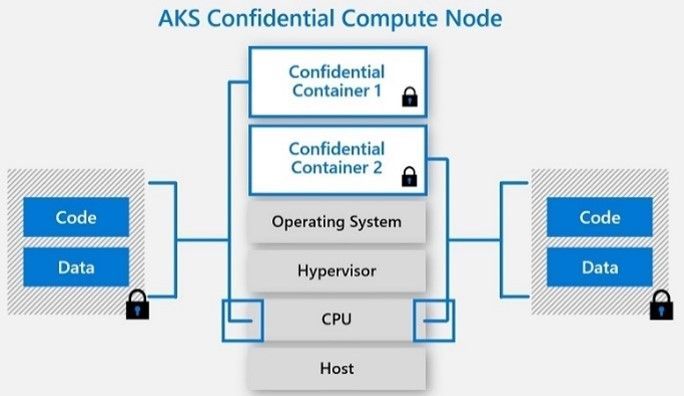
The public preview of confidential computing nodes powered by the Intel SGX DCsv2 SKU with Azure Kubernetes Service brings us one step closer by securing data of cloud native and container workloads. This release extends the data integrity, data confidentiality and code integrity protection of hardware-based isolated Trusted Execution Environments (TEE) to container applications.
Azure confidential computing, based on Intel SGX-enabled virtual machines, continues encrypting data while the CPU is processing it—that’s the “in use” part. This is achieved with a hardware-based TEE that provides a protected portion of the hardware’s processor and memory. Users can run software on top of the protected environment to shield portions of code and data from view or modification outside of the TEE.
Expanding Azure confidential computing deployments
Developers can choose different application architectures based on whether they prefer a model with a faster path to confidentiality or a model with more control. The confidential nodes on AKS support both architecture models and will orchestrate confidential application and standard container applications within the same AKS deployment. Also, developers can continue to leverage existing tooling and dev ops practices when designing highly secure end-to-end applications.

During our preview period, we have seen our customers choose different paths towards confidential computing:
-
Most developers choose confidential containers by taking an existing unmodified docker container application written in a higher programming language like Python, Java etc. and chose a partner like Scone, Fortanix and Anjuna or Open Source Software (OSS) like Graphene or Occlum in order to “lift and shift” their existing application into a container backed by confidential computing infrastructure. Customers chose this option either because it provides a quicker path to confidentiality or because it provides the ability to achieve container IP protection through encryption and verification of identity in the enclave and client verification of the server thumbprint.
-
Other developers choose the path that puts them in full control of the code in the enclave design by developing enclave aware containers with the Open Enclave SDK, Intel SGX SDK or chose a framework such as the Confidential Consortium Framework (CCF). AI/ML developers can also leverage Confidential Inferencing with ONNX to bring a pre-trained ML model and run it confidentially in a hardware isolated trusted execution environment on AKS.
One customer, Magnit, chose the first path. Magnit is one of the largest retail chains in the world and is using confidential containers to pilot a multi-party confidential data analysis solution through Aggregion’s digital marketing platform. The solution focuses on creating insights captured and computed through secured confidential computing to protect customer and partner data within their loyalty program.
We have aggregated more samples of real use cases and continue to expand this sample list here: https://aka.ms/accsamples.
How to get going
Confidential computing, through its isolated execution environment, has broad potential across use cases and industries; and with the added improvements to the overall security posture of containers with its integration to AKS, we are excited and eager to learn more about what business problems you can solve.
Get started today by learning how to deploy confidential computing nodes via AKS.
by Contributed | Sep 30, 2020 | Azure, Technology, Uncategorized
This article is contributed. See the original author and article here.
You can now connect existing sensors to Azure with little to no-code using IoT Plug and Play bridge! For developers who are building IoT solutions with existing hardware attached to a Linux or Windows gateway, the IoT Plug and Play bridge provides you an easy way to connect these devices to IoT Plug and Play compatible services. For supported protocols, the bridge requires modification of a simple JSON. The IoT Plug and Play bridge is open-source and can be easily extended to support additional protocols. It supports the latest version of IoT Plug and Play and Digital Twins Definition Language.
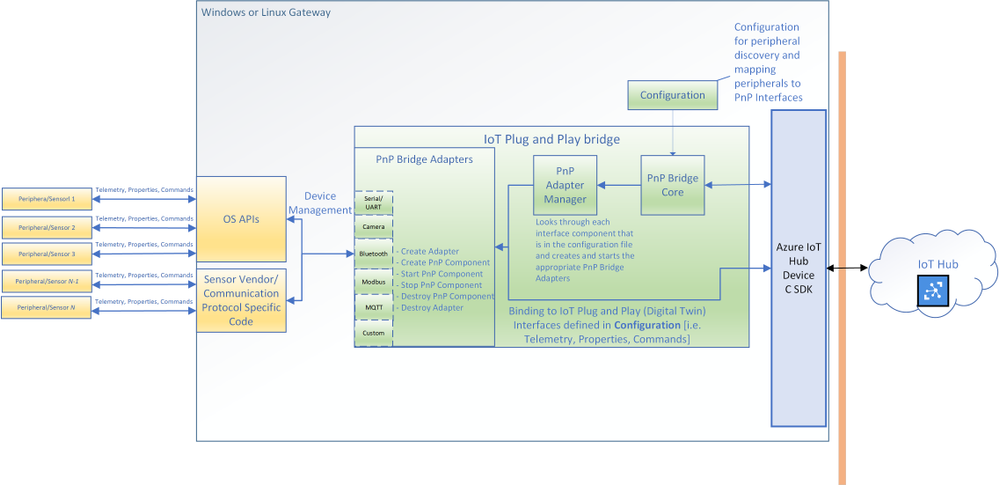
Are you an IoT device developer or IoT solution builder trying to work with existing sensors? Often the code on these sensors can’t be updated to run the latest Azure IoT Device SDK or these sensors are not able to connect directly to the internet. However, many of these sensors can connect to a Windows or Linux gateway with device drivers and support for standard protocols with OS APIs. The IoT Plug and Play bridge enables you to connect these existing sensors without modifying them. It is an open-source application that bridges the gap between the OS APIs and Azure IoT Device SDKs, expanding the reach of devices your IoT solution targets.
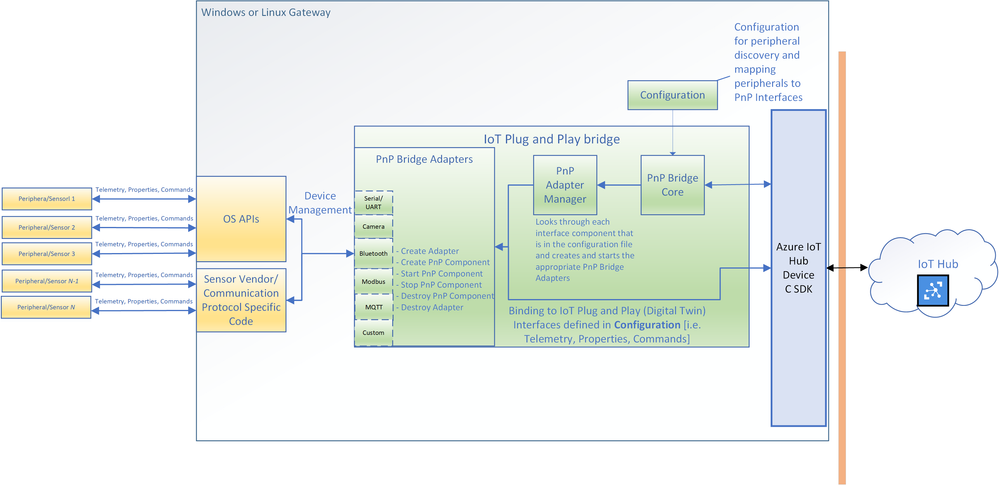 The architecture diagram of the IoT Plug and Play bridge.
The IoT Plug and Play supports multiple protocols through a set of existing “PnP Bridge Adapters”. Here’s what’s supported out of the box today:
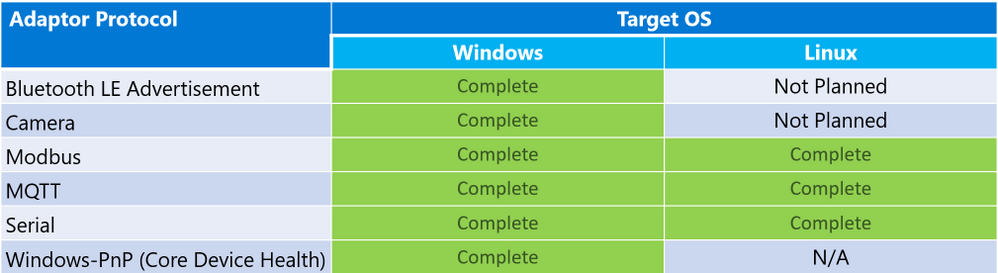 Adaptor protocols currently supported by default for IoT Plug and Play bridge
For example, there is a Windows Bluetooth adapter that let you connect Bluetooth device advertisements to IoT Plug and Play interfaces. All you need to do is modify a configuration JSON and then compile and run the IoT Plug and Play bridge. If you are only using the supported protocols you can download a pre-compiled version of the bridge from our releases page: www.aka.ms/iot-pnp-bridge-releases
Configuring the IoT Plug and Play bridge
Here’s an example of what that configuration looks like. The first part provides the bridge connection details to the bridge. You can use either a connection string or the IoT Hub Device Provisioning Service. You’ll also specify the device id and IoT Plug and Play model ID:
"$schema": "../../../pnpbridge/src/pnpbridge_config_schema.json",
    "pnp_bridge_connection_parameters": {
      "connection_type" : "dps",
      "root_interface_model_id": "dtmi:com:example:RootPnpBridgeBluetoothDevice;1",
      "auth_parameters" : {
        "auth_type" : "symmetric_key",
        "symmetric_key" : "InNbAialsdfhjlskdflaksdDUMMYSYMETTRICKEY=="
      },
      "dps_parameters" : {
        "global_prov_uri" : "global.azure-devices-provisioning.net",
        "id_scope": "0ne00000000",
        "device_id": "bluetooth-sensor-3"
      }
    }
The second part of the configuration maps the hardware parameters of the device to IoT Plug and Play interfaces. Here we map Bluetooth specific addresses and offsets to IoT Plug and Play interfaces. This is done in two parts: a global adapter configuration (think of these as global variables to configure each PnP Bridge Adapter) and interface specific configuration (mappings specific to each Plug and Play interface):
    "pnp_bridge_debug_trace": false,
    "pnp_bridge_config_source": "local",
    "pnp_bridge_interface_components": [
        {
            "_comment": "Component 1 - Bluetooth Device",
            "pnp_bridge_component_name": "Ruuvi",
            "pnp_bridge_adapter_id": "bluetooth-sensor-pnp-adapter",
            "pnp_bridge_adapter_config": {
                "bluetooth_address": "267541100483322",
                "blesensor_identity" : "Ruuvi"
            }
        }
    ],
    "pnp_bridge_adapter_global_configs": {
        "bluetooth-sensor-pnp-adapter": {
            "Ruuvi" : {
                "company_id": "0x499",
                "endianness": "big",
                "telemetry_descriptor":[
                    {
                      "telemetry_name": "humidity",
                      "data_parse_type": "uint8",
                      "data_offset": 1,
                      "conversion_bias": 0,
                      "conversion_coefficient": 0.5
                    },
...
                ]
            }
        }
    }
That’s it! You can now run the bridge with this configuration and start to see telemetry reporting in IoT Hub or IoT Explorer. Each downstream device from the bridge appears as an interface for the root bridge device. In this example you see the BLE sensor exposed a “Ruuvi” interface of the “RootPnpBridgeBluetoothDevice” root device interface:
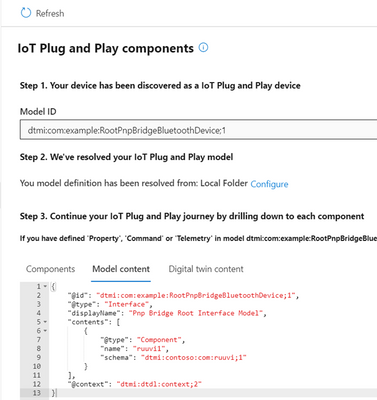 The DTDL model content for IoT Plug and Play bridge
Both the “Ruuvi” and “RootPnpBridgeBluetoothDevice” interface are modeled using Digital Twins Definition Language. You can find more samples of these interfaces for the bridge in the schemas folder. You can author your own models and use them with the bridge. You can use new Visual Studio Code and Visual Studio extensions to help you author these models.
Calls to Action
by Contributed | Sep 30, 2020 | Azure, Technology, Uncategorized
This article is contributed. See the original author and article here.
Post by Vikas Bhatia (@Vikas Bhatia), Head of Product, Azure Confidential Computing
Microsoft is committed to enabling the industry to move from ‘computing in the clear’ to ‘computing confidentially’. Why? Common scenarios confidential computing have enabled include:
- Multi-party rich and secure data analytics
- Confidential blockchain with secure key management
- Confidential inferencing with client and server measurements & verifications
- Microservices and secure data processing jobs
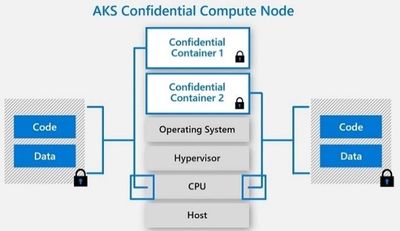
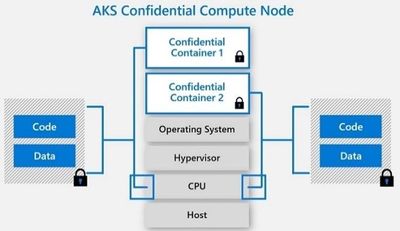
The public preview of confidential computing nodes powered by the Intel SGX DCsv2 SKU with Azure Kubernetes Service brings us one step closer by securing data of cloud native and container workloads. This release extends the data integrity, data confidentiality and code integrity protection of hardware-based isolated Trusted Execution Environments (TEE) to container applications.
Azure confidential computing based on Intel SGX-enabled virtual machines, continues encrypting data while the CPU is processing it—that’s the “in use” part. This is achieved with a hardware-based TEE that provides a protected portion of the hardware’s processor and memory. Users can run software on top of the protected environment to shield portions of code and data from view or modification outside of the TEE.
Expanding Azure confidential computing deployments
Developers can choose different application architectures based on whether they prefer a model with a faster path to confidentiality or a model with more control. The confidential nodes on AKS support both architecture models and will orchestrate confidential application and standard container applications within the same AKS deployment. Also, developers can continue to leverage existing tooling and dev ops practices when designing highly secure end-to-end applications.
During our preview period, we have seen our customers choose different paths towards confidential computing:
- Most developers choose confidential containers by taking an existing unmodified docker container application written in a higher programming language like Python, Java etc. and chose a partner like Scone, Fortanix and Anjuna or Open Source Software (OSS) like Graphene or Occlum in order to “lift and shift” their existing application into a container backed by confidential computing infrastructure. Customers chose this option either because it provides a quicker path to confidentiality or because it provides the ability to achieve container IP protection through encryption and verification of identity in the enclave and client verification of the server thumbprint.
- Other developers choose the path that puts them in full control of the code in the enclave design by developing enclave aware containers with the Open Enclave SDK, Intel SGX SDK or chose a framework such as the Confidential Consortium Framework (CCF). AI/ML developers can also leverage Confidential Inferencing with ONNX to bring a pre-trained ML model and run it confidentially in a hardware isolated trusted execution environment on AKS.
One customer, Magnit, chose the first path. Magnit is one of the largest retail chains in the world and is using confidential containers to pilot a multi-party confidential data analysis solution through Aggregion’s digital marketing platform. The solution focuses on creating insights captured and computed through secured confidential computing to protect customer and partner data within their loyalty program.
We have aggregated more samples of real use cases and continue to expand this sample list here: https://aka.ms/accsamples.
How to get going
- “Lift and shift” your existing application by choosing a partner such as Anjuna, Fortanix, or Scone; or by using Open Source Software such as Graphene or Occlum; or
- Build a new confidential application from scratch using an SDK such as the Open Enclave SDK.
Confidential computing, through its isolated execution environment, has broad potential across use cases and industries; and with the added improvements to the overall security posture of containers with its integration to AKS, we are excited and eager to learn more about what business problems you can solve.
Get started today by learning how to deploy confidential computing nodes via AKS.


Recent Comments