by Scott Muniz | Jul 31, 2020 | Uncategorized
This article is contributed. See the original author and article here.
New management features and capability improvements for Microsoft Teams rolled out in July.
Device management enhancements in the Teams Admin Center to manage your Teams devices in one location
This month we introduced new capabilities for device management in the Teams Admin center, enabling customers to manage their Teams devices from one location, now including Microsoft Teams Rooms. Advancements include simplified devices setup, new granular device management capabilities, improvements across bulk management tasks with better tagging, troubleshooting and health monitoring of devices, as well as the ability to delegate these responsibilities to external partners. Find out more details in the Device management new capabilities blog.
App configuration in Team Admin center
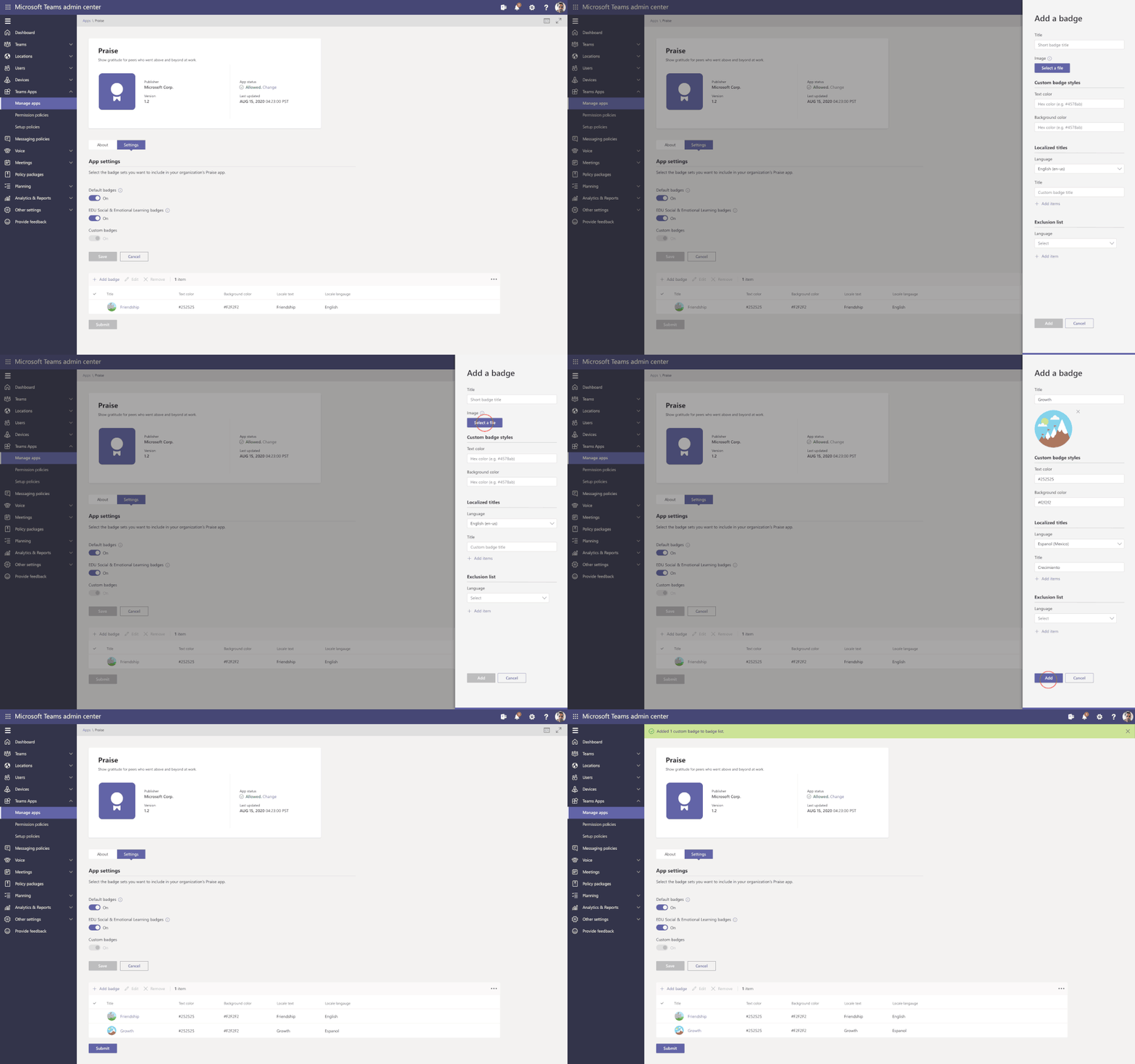
App configuration is now available in Teams Admin Center for Teams and Microsoft apps. This new manageability experience enables you to configure App specific settings that will streamline your management tasks and enable simple customization of apps to the organization needs.
For example, the Praise app (an app that allows users to call out the great work of a teammate or co-worker) in Microsoft Teams, now allows for customization of badges that reflect your company’s values and culture, all while leveraging tools you are already familiar with.
Advisor for Teams is now in GA (General Availability)
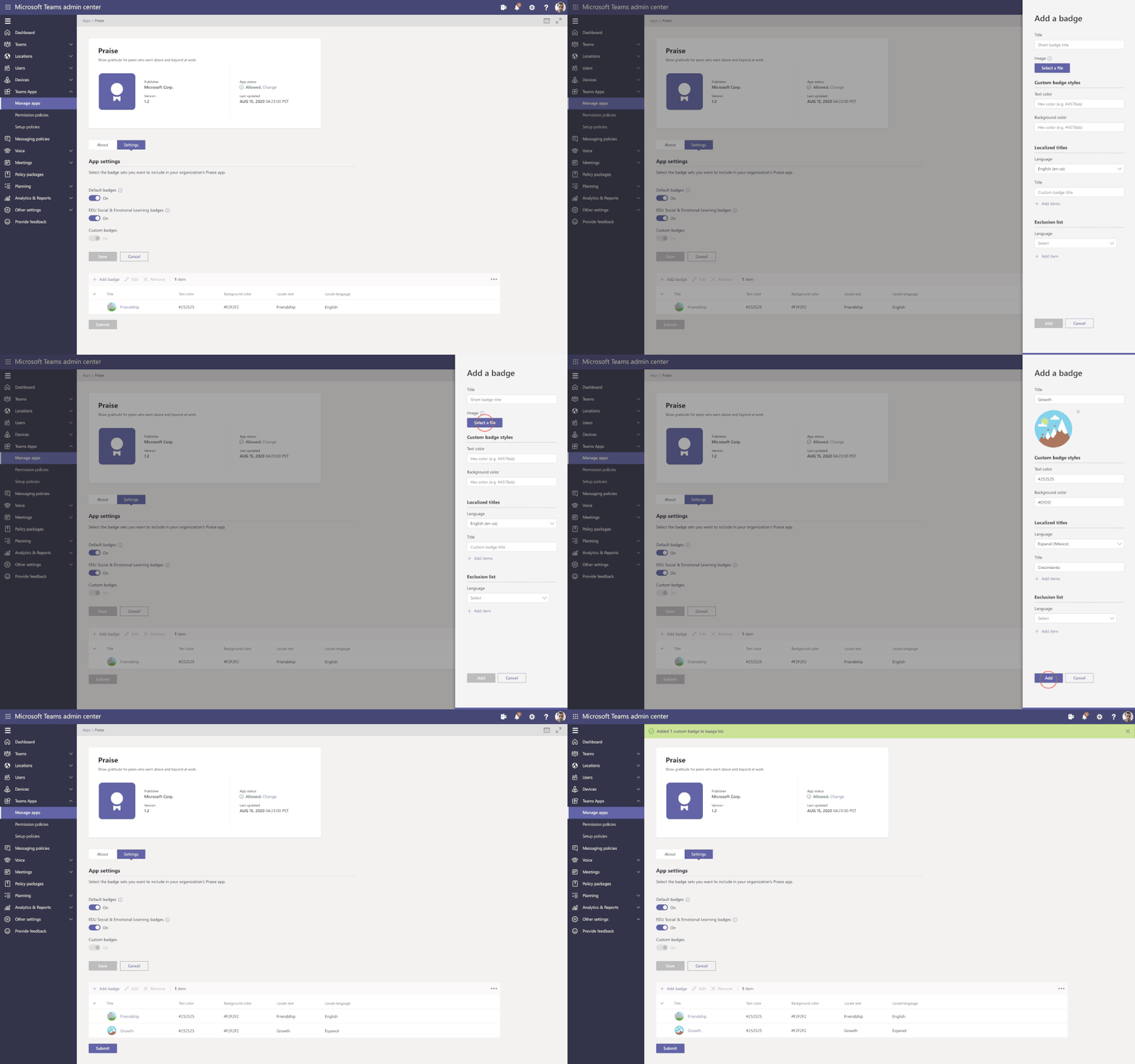
Advisor for Teams is a new onboarding tool to help you plan the best possible Teams deployment in your organization. Advisor offers a customized recommend plan for you to streamline the roll out of all the Teams workloads, including messaging, meetings, calling as well as Skype for Business upgrade workloads.
We have learned that organizations who use this tool increase their deployment velocity by 300%.
Enhancements for Teams life cycle:
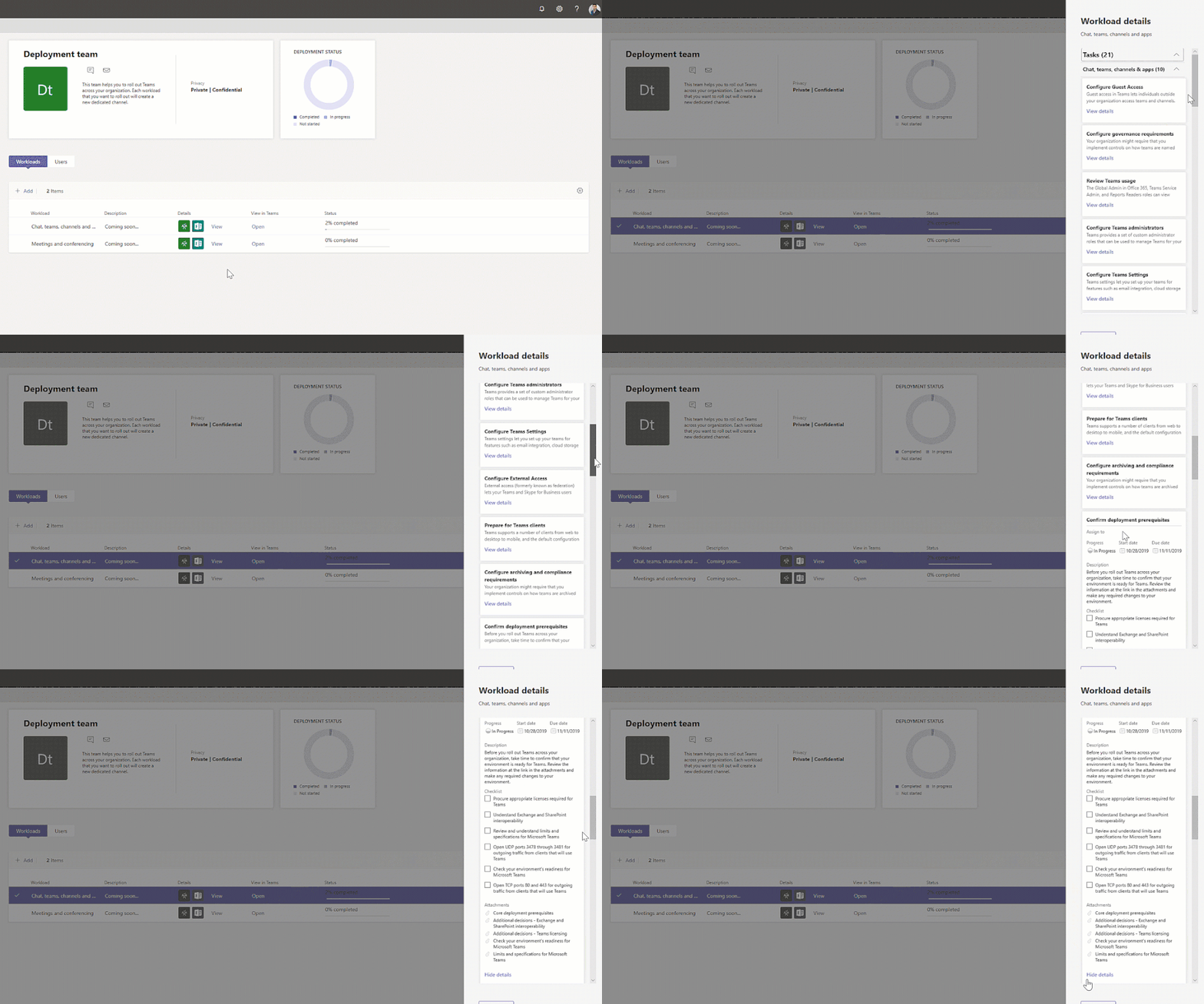
Support for sensitivity labels – To ensure secure collaboration in a scalable way with Microsoft Information Protection Sensitivity Labels now can be applied to teams created within the Teams Admin Center, allowing for the consistent application of policies across your M365 environment.
In addition, you can now associate a sensitivity label with policies related to privacy, external user membership, as well as unmanaged device access.
The first step to securing sensitive content in teams, sites and groups is to create sensitivity labels with policies. For example, you can create a sensitivity label called “Confidential” and specify that any team, site, or group created with this label will be private. This means that a team or site owner cannot add users external to the organization and unmanaged devices will be allowed web access only.
Filtering in Teams summary table – To simplify your work, we are enhancing the tooling across all list tables within Team Admin Center. This means when filtering large data sets as the Teams, you will now find the information you need much more quickly. The Teams summary table is the place where you can view & manage all the Teams configured in the tenant. Currently available for filtering name & classification and will be extended to include more filtering fields in the future.
App Lifecycle Announcements
We are constantly looking for ways to streamline the process of developing, validating, publishing, and managing custom apps in Teams, including the increased automation for the app lifecycle process.
We are excited to announce the following new capabilities to ensure that users can more easily leverage the key business apps they use every day inside of Microsoft Teams.
Custom apps Submission to Approval – Building an app is just the beginning of the journey for app developers. Now developers and admins will enjoy a streamlined custom app submission process and enhanced app management capabilities – providing a connected experience through the development, publishing, and end user discovery process. You will now be able to submit Teams apps through any of these clients and trusted sources (e.g.: Visual Studio Code, Power Virtual Agents, Power Apps and more) via our App Submission Microsoft Graph API – streamlining the process of submitting apps directly to the Teams Admin Center for IT admins to review and approve.
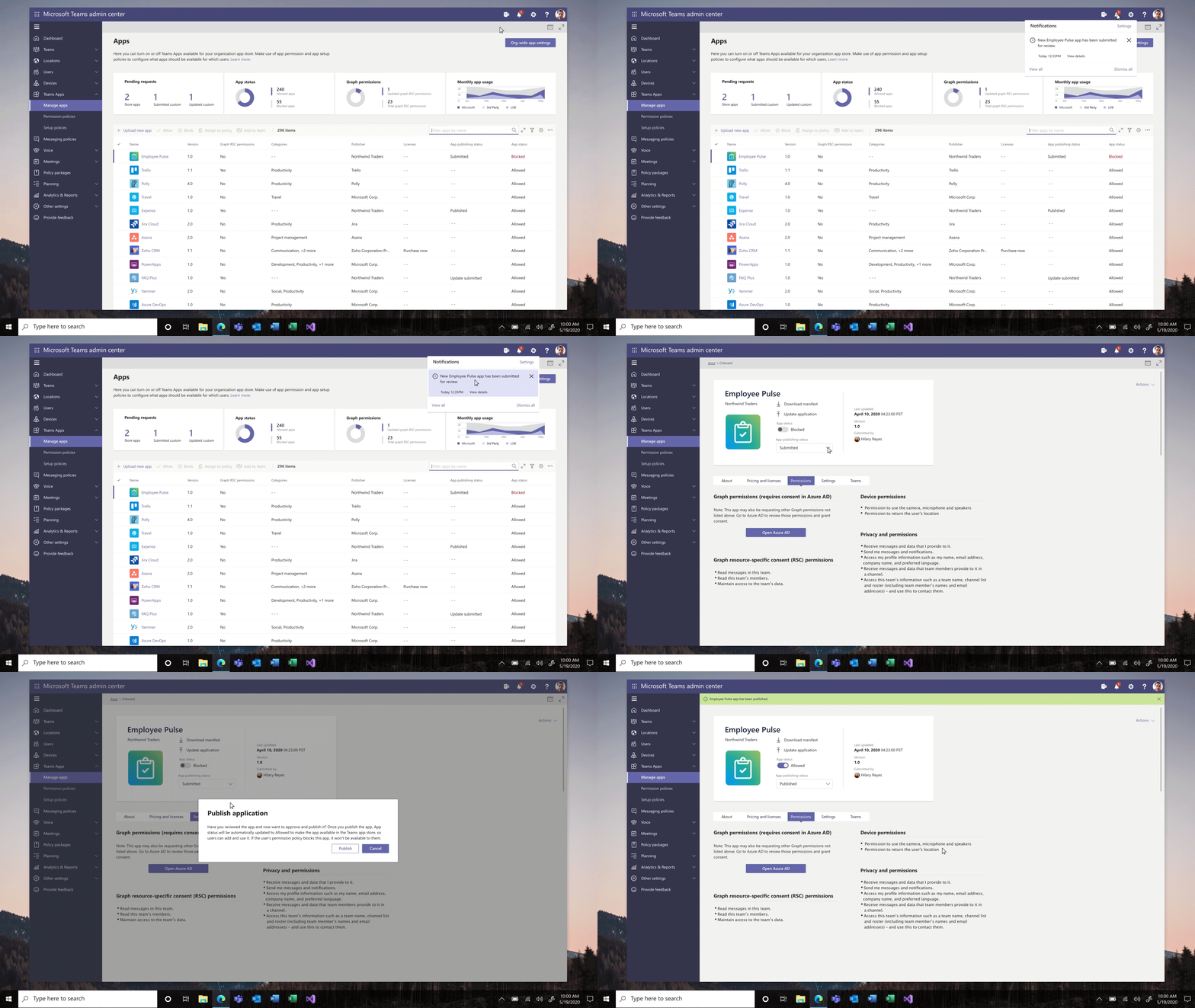
Custom app publishing – You will be able to leverage a streamlined process to manage – review, approve and publish custom apps directly from the Teams Admin Center. These apps will be automatically available on the Teams Admin Center with no need to manually upload them. An admin can view the custom apps publishing status, manifest details, and update their status from ‘submitting’ to ‘publishing’ so that end users will be able to access those apps.
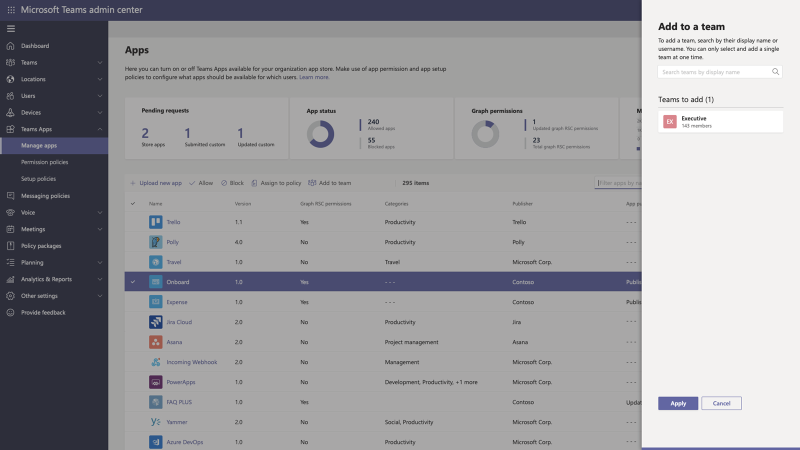
Install app to a team from Teams Admin Center – To create a customized, more productive environment for the users, you can now install an app for any team in your organization.
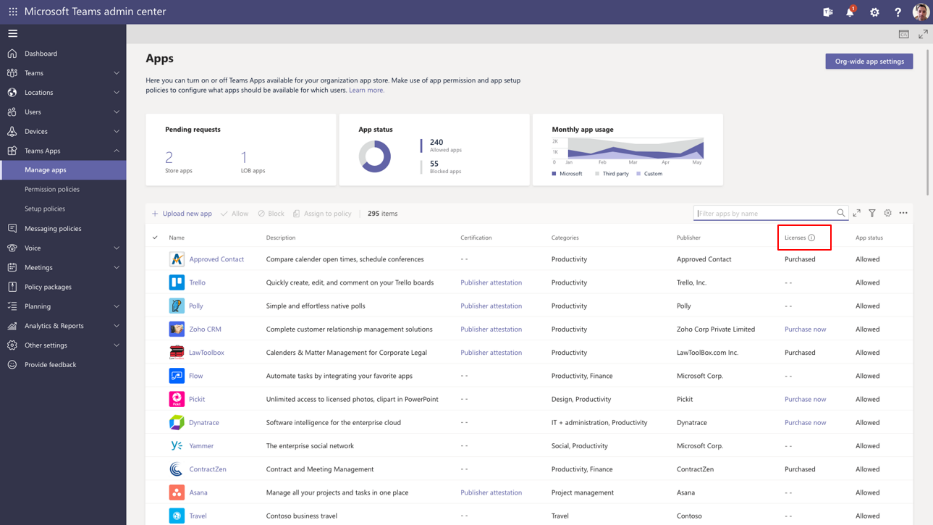
Application monetization and bringing the purchase to Team Admin Center – A new third-party subscription purchase experience will enable you to view and purchase subscriptions associated with the 3rd party Teams apps. You can view app licensing status and link to purchase the app all within the Teams Admin Center.
This new subscription purchase experience will enable you to view and purchase subscriptions associated with the third-party Teams apps. Now you purchase licenses right within the Teams Admin Center. Where you can see offers, plans and pricing information, it is also integrated with Microsoft AppSource to purchase licenses and with Microsoft 365 admin center to manage and renew licenses over time.
Policy Management Announcements
Enhancement on assign policies to your users in Microsoft Teams – package batch assignments are now GA
To help IT administrators assign policies, based on the organizational needs, we introduce the Bulk assignment of policies.
PowerShell module now supports:
- Policy assignment to O365 groups
- Batch assignment of policies (up to 5K users)
- Batch assignment of policy packages (up to 5K users)
A New Audio and Video Policy – Changes in Incoming IP video policy
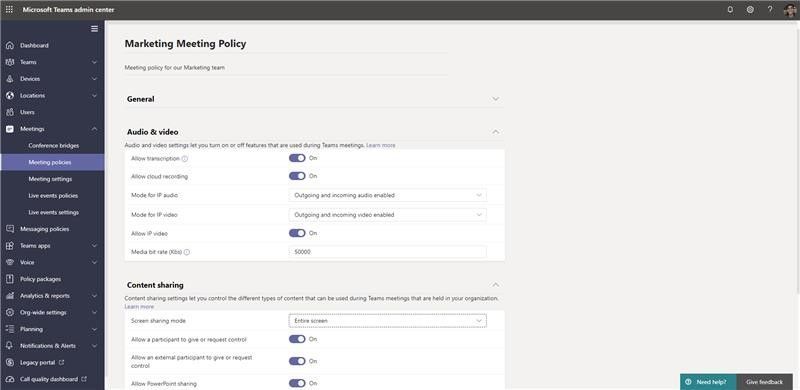
To help you better manage bandwidth, we are updating meeting policies to allow you more control over using IP video in your Teams meetings. While the current capability can only prevent outgoing video, we are extending the policy to also allow you to prevent both outgoing and incoming video as needed. You can update the new policies in the meeting policies:
As we strive to build the best end user and administrator experiences, we continue to ask for your continued input on what is important to you and your users.
Have an idea for a feature or functionality missing from Teams? Please be sure to add or upvote it on the Teams UserVoice page.
We look forward to hearing from you!

by Scott Muniz | Jul 31, 2020 | Alerts, Microsoft, Technology, Uncategorized
This article is contributed. See the original author and article here.

Reduce polygon count
Akihiro Oyamada is a Web Front-End Engineer at PixelGrid inc. in Tokyo, Japan. He specializes in huge product-based websites where CSS scalability and maintainability, as well as performance, are paramount. He is also a community leader as well as an expert in Web graphics technologies, such as SVG, Canvas and WebGL. For more, see his Twitter @yomotsu

Deploy WordPress on Azure Kubernetes Service
Dave Rendón has been a Microsoft Azure MVP for 6 consecutive years. As an IT professional with more than 10 years of experience, he has a strong focus on Microsoft technologies and moreover on Azure since 2010. He supports the business developers and sales teams at Kemp from a technical level. I also support the account managers by developing a firm understanding of their customer’s technical dilemma(s) and providing a sound technical solution. Follow him on Twitter: @DaveRndn

What Is Entity Framework In ASP.NET MVC?
Asma Khalid is an Entrepreneur, ISV, Product Manager, Full Stack .Net Expert, Community Speaker, Contributor, and Aspiring YouTuber. Asma counts more than 7 years of hands-on experience in Leading, Developing & Managing IT related projects and products as an IT industry professional. Asma is the first woman from Pakistan to receive the MVP award three times, and the first to receive C-sharp corner online developer community MVP award four times. See her blog here.

Sergio Govoni is a graduate of Computer Science from “Università degli Studi” in Ferrara, Italy. Following almost two decades at Centro Software, a software house that produces the best ERP for manufacturing companies that are export-oriented, Sergio now manages the Development Product Team and is constantly involved on several team projects. For the provided help to technical communities and for sharing his own experience, since 2010 he has received the Microsoft Data Platform MVP award. During 2011 he contributed to writing the book: SQL Server MVP Deep Dives Volume 2. Follow him on Twitter or read his blogs in Italian and English.

Mohamed El-Qassas is a Microsoft MVP, SharePoint StackExchange (StackOverflow) Moderator, C# Corner MVP, Microsoft TechNet Wiki Judge, Blogger, and Senior Technical Consultant with +10 years of experience in SharePoint, Project Server, and BI.
In SharePoint StackExchange, he has been elected as the 1st Moderator in the GCC, Middle East, and Africa, and ranked as the 2nd top contributor of all the time. Check out his
blog here.
by Scott Muniz | Jul 31, 2020 | Alerts, Microsoft, Technology, Uncategorized
This article is contributed. See the original author and article here.
This week some important Windows Virtual Desktop features moved to be generally available (hello audio and video redirection!), the Android Remote Desktop client now also supports WVD and Azure AD App Proxy now supports the Remote Desktop Services web client,. Azure Blob storage announced (in preview) connectivity using the Network File System 3.0 protocol. And the Azure IoT Device Provisioning Service now supports locking down ingress access to devices connecting via a specified virtual network.
Windows Virtual Desktop and Remote Desktop
New Windows Virtual Desktop capabilities now generally available
New Windows Virtual Desktop capabilities now GA including Azure portal integration for deployment / management and new audio/video redirection capabilities providing seamless meeting and collaboration experience for Microsoft Teams.
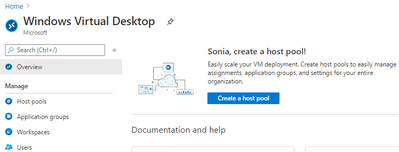
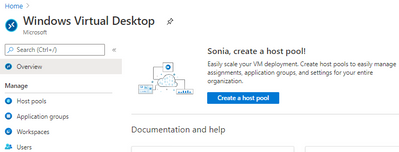 Windows Virtual Desktop blade in the Azure Portal
Remote Desktop client for Android now supports Windows Virtual Desktop connections
The new Remote Desktop client for Android now supports Windows Virtual Desktop connections. This new client (version 10.0.7 or later) features refreshed UI flows for an improved user experience.
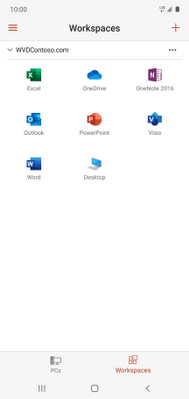
The app also integrates with Microsoft Authenticator on the device to enable conditional access when subscribing to Windows Virtual Desktop workspaces. View the announcement here.
Azure AD Application Proxy now supports the Remote Desktop Services web client
You can now use the RDS web client even when App Proxy provides secure remote access to RDS. The web client works on any HTML5-capable browser such as Microsoft Edge, Internet Explorer 11, Google Chrome, Safari, or Mozilla Firefox (v55.0 and later). You can push full desktops or remote apps to the Remote Desktop web client. The remote apps are hosted on the virtualized machine but appear as if they’re running on the user’s desktop like local applications. The apps also have their own taskbar entry and can be resized and moved across monitors.
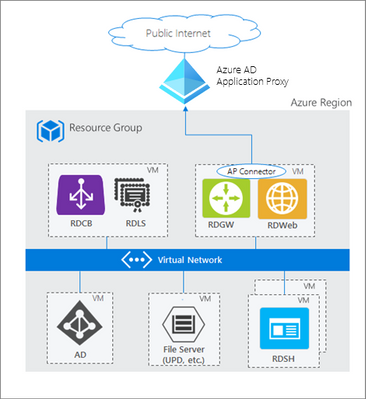 How Azure AD App Proxy works in an RDS deployment
Learn about the requirement to update your App Proxy connectors and configure RDS to work with App Proxy.
NFS 3.0 support for Azure Blob storage is now in preview
Azure Blob storage is the only storage platform that supports the Network File System 3.0 protocol over object storage, natively (with no gateway or data copying required), with crucial object storage economics. This is great news if you need to preserve your legacy data access methods but want to migrate the underlying storage to Azure Blob storage. It also enables you to re-use the same code from on-premises solutions to access files. Learn more, including how to mount a blob container using NFS 3.0.
Azure IoT Device Provisioning Service VNET ingress support is now available
The Azure IoT Device Provisioning Service VNET ingress support feature enables users to lock down DPS ingress access to devices connecting through a specific VNET. DPS egress to IoT Hub uses an internal service-to-service mechanism and does not currently operate over a dedicated VNET.
This core new capability improves the connectivity security and is of special significance to those in the industrial and enterprise sectors with stringent network and compliance requirements. View the documentation Azure IoT Hub Device Provisioning Service (DPS) support for virtual networks.
MS Learn Module of the Week

This week we couldn’t decide, so it’s TWO modules of the week, both about Azure Resource Manager templates.
- Deploy to multiple Azure environments by using ARM templates
Now you understand how ARM templates work, in this module you make your ARM template reusable for different environments by adding variables and expressions via Resource Manager functions. You also add better tracking and organization of your deployed resources by using tags. You complete the goal of improving the flexibility of your deployments by using parameter files.
Those were our highlights this week – tell us about yours! Was something else on the Azure announcements blog relevant to you? Will these announcements help your organization this week? Let us know in the comments.
by Scott Muniz | Jul 30, 2020 | Uncategorized
This article is contributed. See the original author and article here.
We are excited to announce the availability of the new Outlook for Mac for our Insider Slow users. The updated and revamped new Outlook is available via a toggle switch on the top right corner of your Outlook main window. The new Outlook for Mac is built on Microsoft sync technology that is fast, reliable, and allows us to bring you the latest and greatest functionality from Microsoft 365. An updated user experience and added features enable you to customize your email, all while keeping things simple and efficient.
In order to try the new Outlook for Mac, first you will have to . The default experience will be the current version of Outlook. To navigate to the new experience, simply click the “New Outlook” toggle in the top right corner of the Outlook window. You can switch quickly between the new Outlook for Mac and the current version to compare the differences for yourself and see everything it has to offer.
Get caught up with updates across Mail, Search, Calendar and People
The new Outlook for Mac has numerous new features and enhanced capabilities to experience. Here are some highlights of what to expect when you try it out:
- Improved sync – Built on top of Microsoft sync technology, which also powers Outlook Mobile, the new Outlook for Mac syncs your messages with improved speed and reliability.
- Search enhancements – Search is now built using the same engine that powers other Office 365 experiences so you can quickly find exactly what you’re looking for.
- New mail and event compose experiences – Entirely new mail and event compose experiences that help improve your productivity with enhancements such as an easy to access formatting bar, suggested times, and locations.
- My Day – A new addition that brings you a view of your agenda or calendar events right from within your main mail canvas, and includes a 2-week calendar view to give you a quick glance at your upcoming events.
- Customizable toolbar – The new toolbar puts your most used commands front and center and is fully customizable.
- Mail Tips – Get more information about your mail, like a heads up if you’re messaging people with automatic replies turned on, sending an email to recipients outside your organization, or sending an email to a large audience.
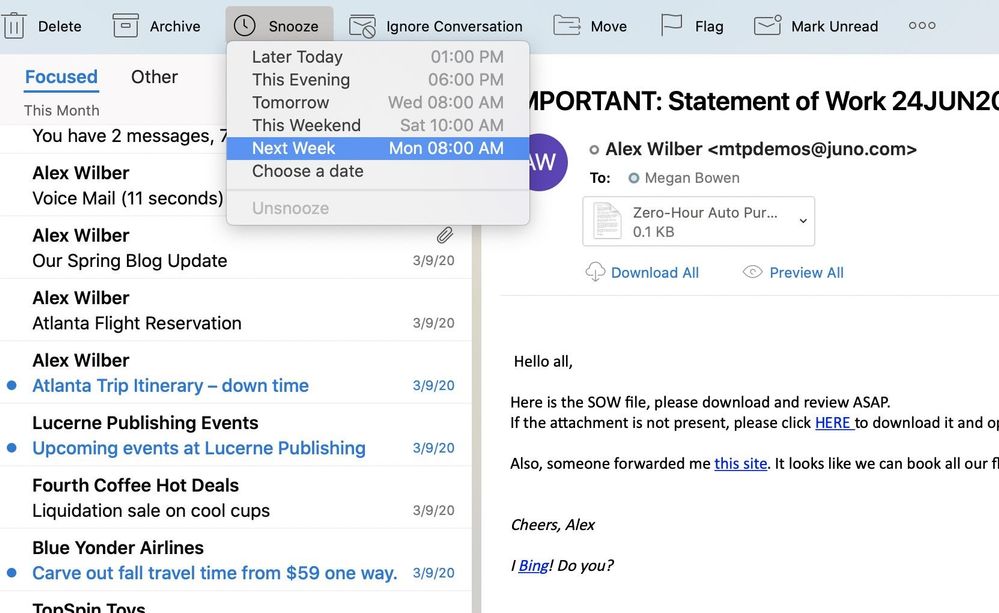
- Snooze – For those moments when you don’t have time to read or respond to an email, simply “snooze” it and select the time that works best for it to show up in your Inbox again as an unread email.
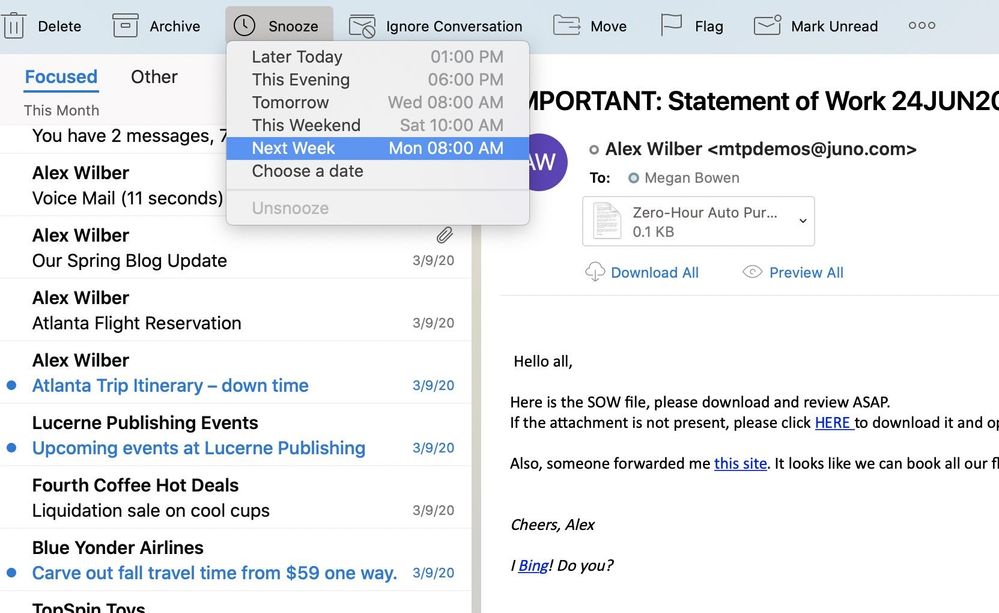 Easily snooze messages or perform quick swipe actions directly in the message list.
- Unified inbox – Combine the multiple mailboxes you manage into one single inbox, making it easier for you to view everything that is important in one place.
- Sensitivity labels – Protect sensitive information across your organization. Classify messages based on their confidentiality and sensitivity to ensure those viewing your email understand how they should treat the information enclosed.
- Add-ins – Install and use your favorite add-ins and enhance your productivity within Outlook. Add-ins that work with Office JavaScript API 1.6 and below are fully supported. We are currently working on support for API 1.7+.
- Actionable Messages – The new Outlook for Mac supports the familiar experience of Actionable Messages created with Adaptive Cards, enabling quick actions directly from your inbox, such as filling out a survey or approving an expense report.
- People view – The new Outlook for Mac comes with a completely revamped People view. Explore contacts that are important to you, you collaborate with often, and even those you may want to follow up with – all from the same place. Easily create new contacts and make updates to existing entries directly from this new view.
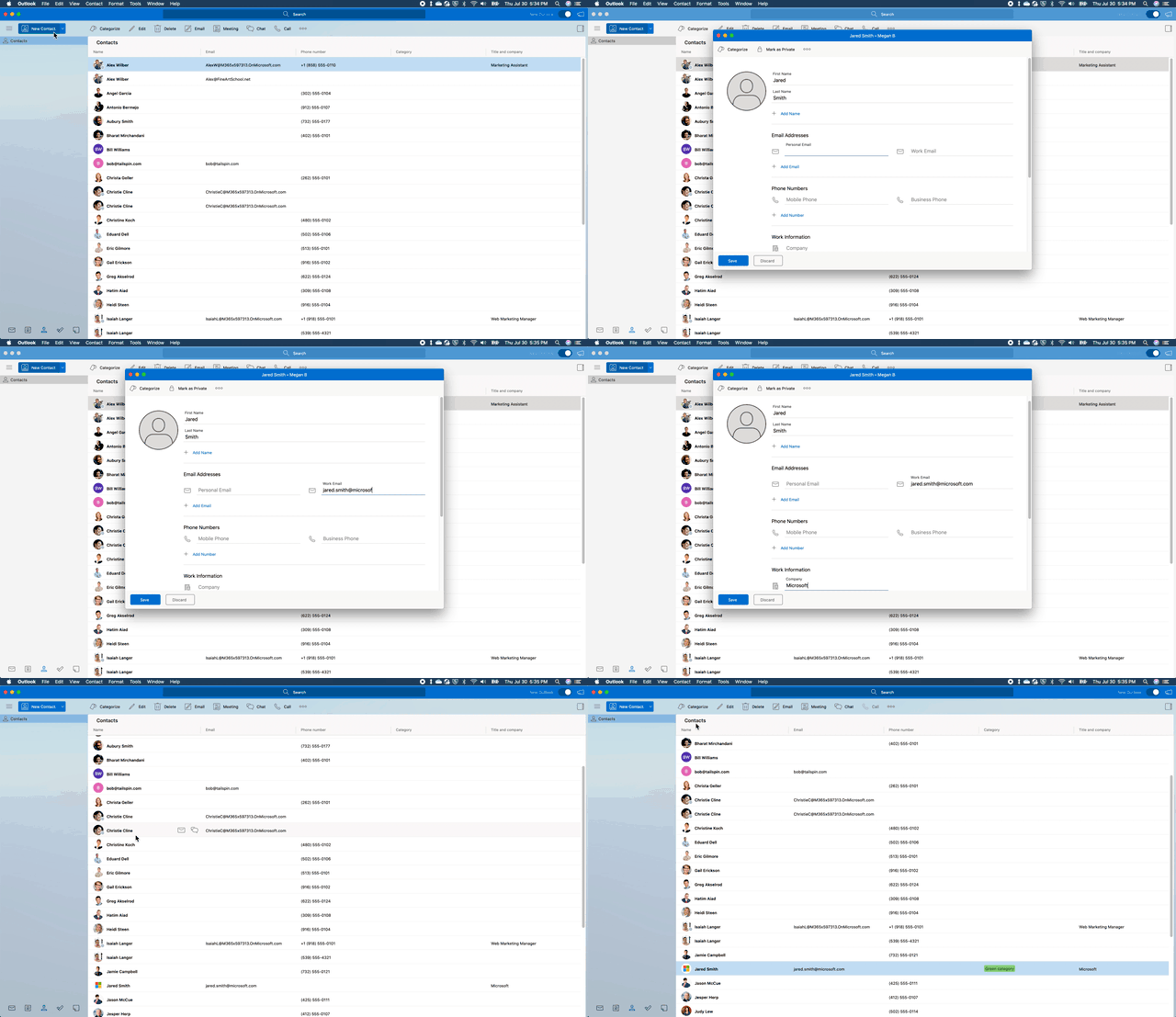 Create new contacts and view them alongside other important colleagues.
- Teams meeting toggle – This toggle will be available when you quickly create a new calendar event. By switching the toggle on you can more easily make any meeting a Teams meeting.
- Meeting Insights – Outlook helps you show up prepared to your meetings by suggesting emails and files that are relevant to the event or attendees.
Explore the most recent feature releases
Since the release of the new Outlook for Mac in Insider Fast last fall, we have been continuously updating the experience to bring you brand new capabilities and an updated look and feel. The past couple of months have been no different, with our most recent updates including:
- Rules – Easily manage your inbox by setting preferences to automatically flag, move, delete, or take other actions on specific email messages you receive.
- Access Tasks and Notes – Keep track of what’s important by flagging an item for follow-up, adding to your to-do list, or jotting something down on a sticky note.
- Send button updates – After testing and gathering user feedback, we have moved the send button to the top of the mail canvas for an improved experience when composing a message.
- Additions to People search – Quickly take action when searching for a contact by starting an email, chat, or call with someone directly from the search results.
- Group header view – Tailor your message list to fit your needs with the ability to show or hide group headers based on your preferences.
- Every meeting online – Set your Calendar preferences to ensure all your newly scheduled meetings are online via Teams or Skype.
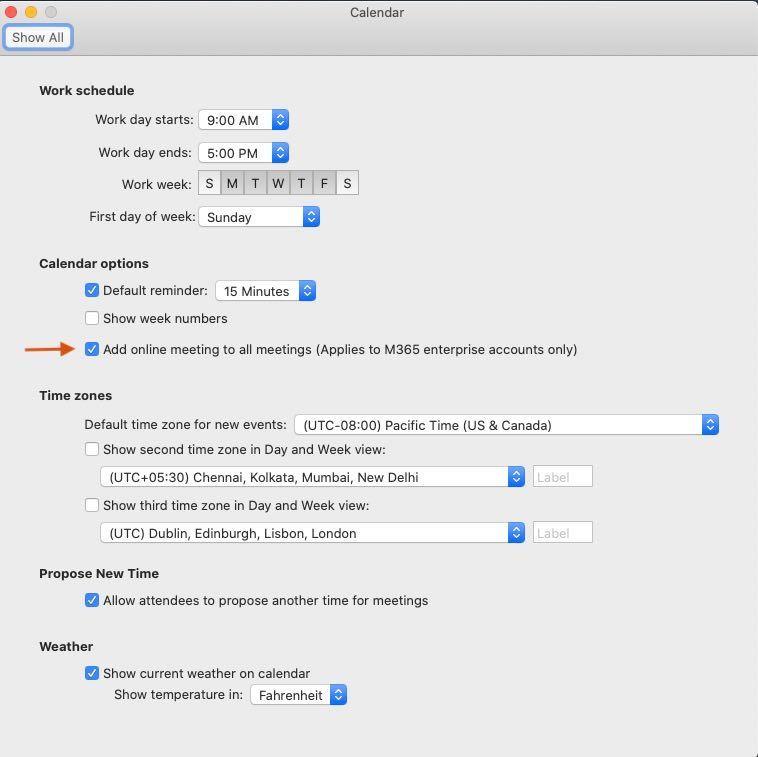 Edit your preferences to ensure every meeting you schedule is online.
Coming soon…
- S/MIME – Enhance the security of your email with digital message encryption, extra protection that ensures emails can only be opened by recipients that have the correct key.
- Mailbox delegation – Allow others in your organization the ability to manage your calendar and edit, schedule, and respond to meetings on your behalf.
- Shared mailboxes – Access all mail from shared mailboxes that you have added to Outlook.
- Open shared calendars – See all your commitments in one place with the ability to open shared calendars you have been added to and see them alongside your personal schedule.
Stay up to date
Experience the new Outlook for Mac firsthand by signing up for Insider Slow and enabling the “New Outlook” toggle. Check back on Tech Community for regular updates and receive detailed information on new features and fixes by visiting our Release Notes. Let us know what you think about the new Outlook for Mac and tell us what you want to see next by providing us feedback on UserVoice.
As a reminder, the new Outlook for Mac is only available for Office 365, Outlook.com, and Google accounts using mac OS 10.14 Mojave and above. We are planning to add new supported account types, including IMAP, in the coming months. you are having account issues, do not see your account, or cannot access it in the new Outlook for Mac, visit the support page.
by Scott Muniz | Jul 30, 2020 | Uncategorized
This article is contributed. See the original author and article here.
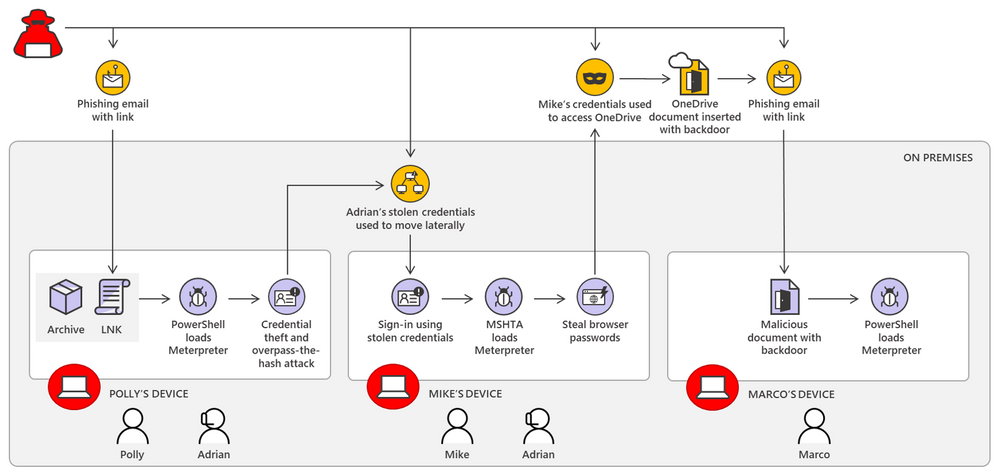
Microsoft Threat Protection continuously and seamlessly scours endpoints, email and docs, cloud app, and identity activities for suspicious signals and uses deep correlation logic to automatically find links between related signals across domains. It connects related existing alerts and generates additional alerts for suspicious events that could otherwise be missed.
Correlated signals, alerts, and relevant entities are collected and consolidated into a single comprehensive incident representing the whole attack.
We put Microsoft Threat Protection’s incident feature to the test by simulating an end-to-end attack chain that involves various attacker techniques across multiple domains, including spear-phishing, credential theft, overpass-the-hash attack, lateral movement, and other techniques observed in actual investigations.

Learn how automatic correlations in Microsoft Threat Protection detected the initial access, lateral movement, and lateral phishing stages of the attack sprawl simulation. Read our latest blog: Inside Microsoft Threat Protection: Solving cross-domain security incidents through the power of correlation analytics.
by Scott Muniz | Jul 30, 2020 | Alerts, Microsoft, Technology, Uncategorized
This article is contributed. See the original author and article here.
What is the issue?
We discovered an issue that affects verification of tenant certificates and we are resolving this by renewing the tenant CA certificates for all impacted tenants. As described in the blog Azure Sphere tenant CA certificate management: certificate rotation, the Azure Sphere tenant certificate authority (CA) certificates that were issued two years ago are being automatically renewed. The Azure Sphere 20.07 SDK, released on July 29, 2020, supports features with which you can download the renewed certificates for your tenants. For certificates created between June 16, 2020 21:00 UTC, and July 28, 2020 00:15 UTC, verification using OpenSSL may fail. The failure is due to a mismatched signature algorithm identifier in the certificate. The error does not compromise the security of these certificates.
Who is impacted?
If the tenant CA certificate issuance date is after June 16, 2020 and before July 28, 2020, the tenant CA certificate may fail to verify with OpenSSL. The Azure Sphere Security Service will renew and activate all impacted certificates as a corrective measure.
What actions should you take?
|
Condition
|
Instructions
|
|
You have not downloaded the tenant CA certificate or tenant CA certificate chain that was issued between June 16, 2020 and July 28, 2020
(If you run ‘azsphere ca list’ in your Azure Sphere Development command prompt, you will see this issue date listed as “Start date”)
|
You don’t have any actions to take and these instructions don’t apply to you.
|
|
You have downloaded the tenant CA certificate or tenant CA certificate chain that was issued between June 16, 2020 and July 28, 2020
|
Between August 5, 2020 and August 18, 2020, please follow the instructions below to ensure that there is no break in service.
- Run ‘azsphere ca list’ in your Azure Sphere Development command prompt
- Use the most recent certificate to register with Azure IoT Hub/Central or other third-party resources following instructions here
|
For tenants that are impacted by this issue, the new and valid tenant CA certificates will be created by August 5, 2020. The new certificates will be activated after August 18, 2020. If you have any additional questions, please reach out to Microsoft Support.
Documentation Resources:


Recent Comments