by Scott Muniz | Aug 17, 2020 | Uncategorized
This article is contributed. See the original author and article here.
A magnet is an invisible force that pulls other ferromagnetic materials – which may include ironclad content and resolute humans articulating nimble technologies.
The LightUp Virtual Conference was one such “magnet” as it brought together Microsoft MVPs and Microsoft leaders with support from their connected tech communities with the noble objective of hosting 24 hours of Microsoft technologies learning and fundraising in the fight against COVID-19.
Event organizer, speaker, and Microsoft Office 365 MVP Manpreet Singh attributes the conference success to community support, with the event raising $4300 for UNICEF.
“Our community is the reason this became so big,” Manpreet says. “When they started to know about this event, they started to reach out and help in any way they could as speakers and volunteers. Soon enough, we were more than 100 registered speakers from the United States, Argentina, Colombia, India, Malaysia, Germany, Singapore, Russia and more! In fact, the requests to speak never stopped – we had people reaching out to us on the night before to be a part of this event. This was our strong community in action!”
The conference brought together 134 speakers (consisting of 22 women speakers, 57 MVPs, and 19 producers who doubled up as moderators) and cut across three timezones for 24 seamless hours on July 14. Impressively, more than 12,400 attendees tuned in on Microsoft Teams and 5,300 users watched on social platforms.
“This event was massive. It ran for 24 hours with five tracks and scores of speakers from across the globe”, says an excited MVP Speaker, Jasjit Chopra. According to Jasjit, the fact that this event stood for giving back to the community via transparent donations to UNICEF is what made many join this event. Fellow MVP speaker Kirti Prajapati agrees. Kirti affirms that the organizing team, volunteers, and speakers did a great job to reach the community by using various technology platforms.
The format of the conference itself was well laid out with 10 insightful keynote sessions interspersed between intervals of four hours during the marathon tech sessions. The keynote engagements ensured a welcome break with elaborate content on topics outside of the agenda. Technology, however, was never off the table. The engaging agenda covered a myriad of Microsoft technologies with unmissable topics to make the conference truly magnetic.
Another MVP speaker Jenkins Nesamony Sundararaj says he loved “learning from speakers round the clock from various countries of the world.” That sentiment was mirrored by another MVP speaker, Prakash Tripathi, saying the best part of the event was its purpose to serve the community and create networking opportunities with global experts and MVPs/RDs.
The LightUp Virtual Conference demonstrated giving back to the community, by the community, with Microsoft MVPs acting as the event’s enabling magnets. This event truly followed on from the words of MVP Manpreet Singh: “Sharing is caring, I loved it!”
by Scott Muniz | Aug 17, 2020 | Uncategorized
This article is contributed. See the original author and article here.
We’re very happy to announce, after a several months work, the release of a new Python/Jupyter notebooks package — MSTICnb, or MSTIC notebooklets.
MSTICnb is a companion package to MSTICpy. It is designed to be used in Jupyter notebooks by security operations engineers and analysts, to allow them to quickly, and easily, run common notebook patterns such as retrieving summary information about a host, an account or IP address.

Each notebooklet is equivalent to multiple cells and many lines of code in a traditional notebook. By contrast, you can import and run a notebooklet in just two lines of code (or even one line, if you are impatient!). Typically, the input parameters to a notebooklet will be an identifier (e.g. a host name) and a time range (over which to query data). Although some notebooklets (primarily packaged analytics) will take a pandas DataFrame as input.
The notebooklets that we have created so far are derived from the some of the notebooks published on the Azure-Sentinel-Notebooks GitHub repo. This makes it easy for you to use these patterns without a lot of tedious copying and pasting. You can also create your own notebooklets and use them in the same framework as the ones already in the package.
It you want to dive straight into the details of what notebooklets are available you can skip the next section but if you are interested in the philosophy and some of the frequent questions and answers around MSTICnb read on.
Notebooklets Background
What are notebooklets?
Notebooklets are collections of notebook cells that implement some useful reusable sequence. They are extensions of, and build upon the MSTICpy package and are designed to streamline authoring of Jupyter notebooks for security operations engineers and analysts conducting hunting and investigations. The goal of notebooklets is to replace repetitive and lengthy boilerplate code in notebooks for common operations.
Some examples of these operations are:
- Get a host summary for a named host (IP address, cloud registration information, recent alerts)
- Get account activity for an account (host and cloud logons and failures, summary of recent activity and any related alerts)
- Triage alerts with Threat Intel data (prioritize your alerts by correlating with Threat intel sources) and browse through them.
Intended Audience
- Cyber security investigators and hunters using Jupyter notebooks for their work
- Security Ops Center (SOC) engineers/SecDevOps building reusable notebooks for SOC analysts
Why did we create notebooklets?
-
Notebook code can quickly become complex and lengthy so that it:
– obscures the information you are trying to display
– can be intimidating to non-developers
- Code in notebook code cells is not easily re-useable:
– You can copy and paste but how do you sync changes back to the original notebook?
– Difficult to discover code snippets in notebooks
- Notebook code is fragile if you try to re-use it:
– Often not parameterized or modular
– Code blocks are frequently dependent on global values assigned earlier in the notebook.
– Output data is not in any standard format
– The code is difficult to test
Why aren’t notebooklets part of MSTICpy?
- MSTICpy aims to be platform-independent, whereas most, if not all, notebooklets assume a data schema that is specific to their data provider/SIEM.
- MSTICpy is mostly for discrete functions such as data acquisition, analysis and visualization. MSTICnb implements common SOC scenarios using this functionality.
Traditional Notebook vs. one using a notebooklets
The notebook on the left is using mostly inline code (occupying more than 50% of the notebook). The one on the right is using a single notebooklet with only 3 or 4 lines of code. The second notebook is actually doing much more than the first one but we’d have ended up with 4-foot high graphic if we displayed equivalent functionality side-by-side!
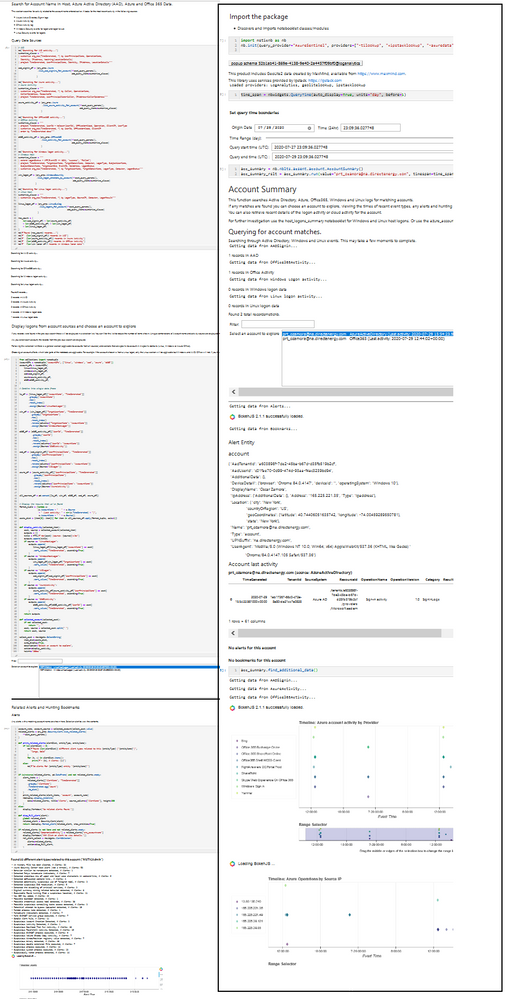 Notebook comparison without and with notebooklets
Using Notebooklets
There are a few simple steps to using notebooklets:
- Install the package (obviously!)
pip install msticnb
import msticnb as nb
nb.init("AzureSentinel")
(what you type here will depend on your data provider, you might also need some additional initialization info).
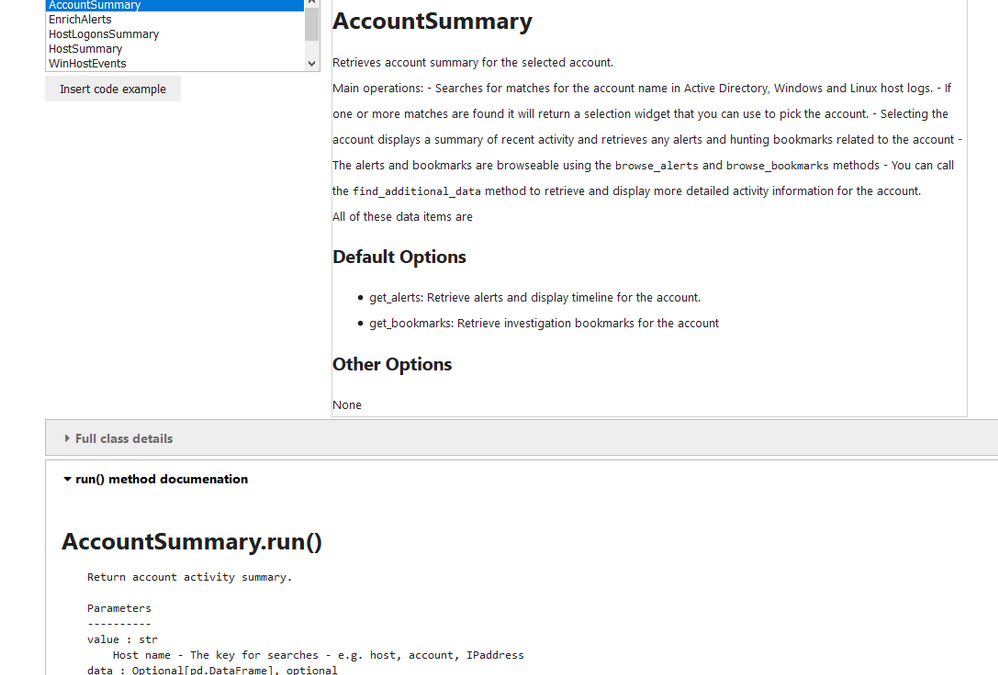
The notebooklets are read into the package and can be accessed using the browser (shown in the first image in the article) or by typing/autocompleting. The notebooklets are organized in a hierarchical structure:
nb.{DataProvider}.{Category}.{notebooklet}
The Category element will generally refer to the type of entity the notebooklet is focused on. Currently we have categories of host, network, alert and account.
Each notebooklet has a run() method which executes the main code (and usually requires parameters such as an identifier (e.g. a host name — what you want to look at) and a time span (when do you want to look at it).
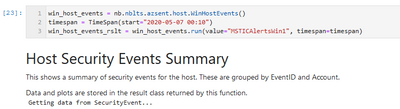
Many notebooklets have additional methods to do further drill-down, data retrieval, visualization or other operations once the run method has completed.
The notebooklet displays output directly to the notebook (although this can be suppressed) — showing text, data tables and visualizations. This data is all saved to a Results object. The data items are simple properties of this results object, for example, DataFrames, plots, or simple Python objects. You can access these individually to get at the data. The results objects also know how to display themselves in a notebook — you can just type its name into and empty cell and run the cell. Here’s an example of what the output might look like:
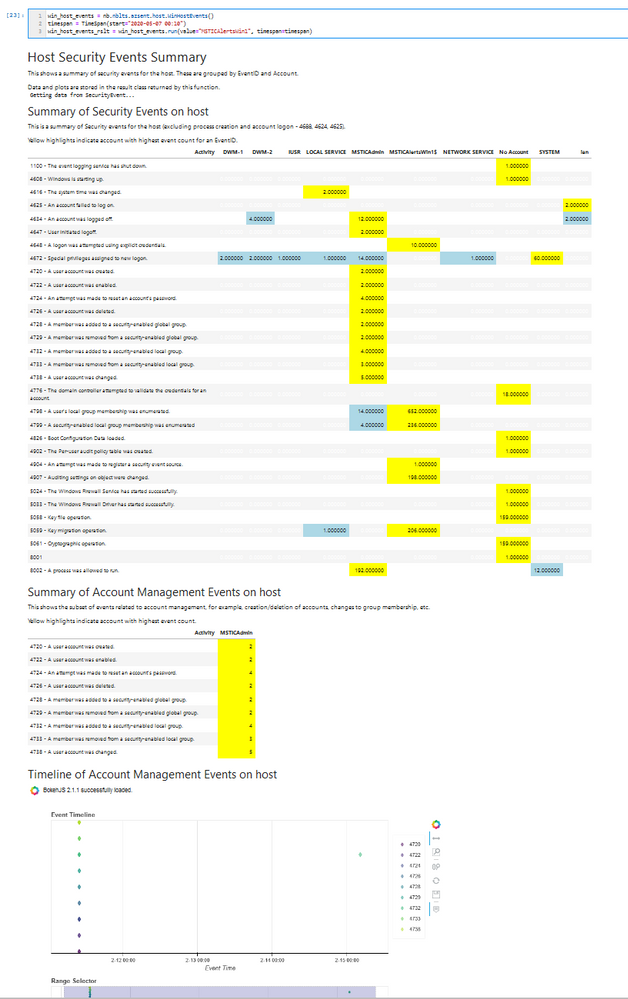 Partial output from WinEventSummary notebooklet
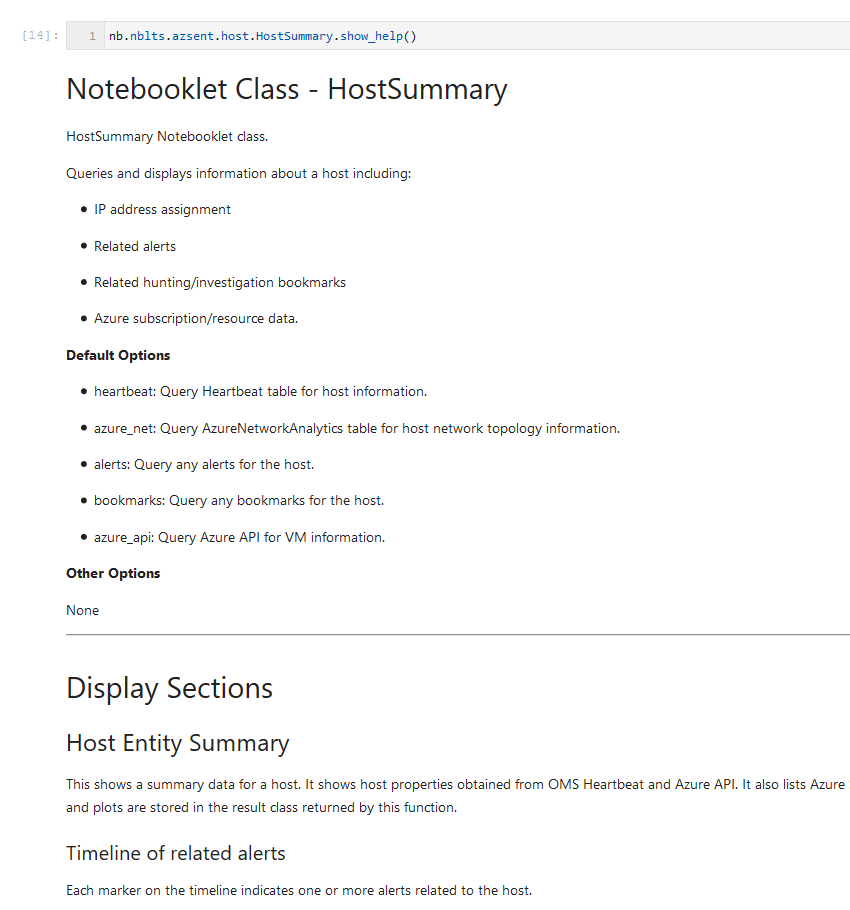
Each notebooklet has extensive built-in help, which is displayed in the browser or can be displayed using the show_help() function.
Current Notebooklets
Our notebooklet authoring is at an early stage but we intend to keep adding them (we have a lot of candidate patterns currently stranded in their original notebooks). All of the current notebooklets are specific to Azure Sentinel data but we would welcome contributions of equivalent or other functionality for other SIEM platforms (we’re always willing to work with you on this).
AccountSummary
Retrieves account summary for an account name. You can see an example of the use of this notebooklet in an notebook here (all in 13 lines of Python code). The notebooklet:
- Searches for matches for the account name in Active Directory, Windows and Linux host logs.
- If one or more matches are found it will return a selection widget that you can use to pick the account.
- Selecting the account displays a summary of recent activity and retrieves any alerts and hunting bookmarks related to the account
- The alerts and bookmarks are browsable using the browse_alerts and browse_bookmarks methods
- You can call the find_additional_datamethod to retrieve and display more detailed activity information for the account.
EnrichAlerts
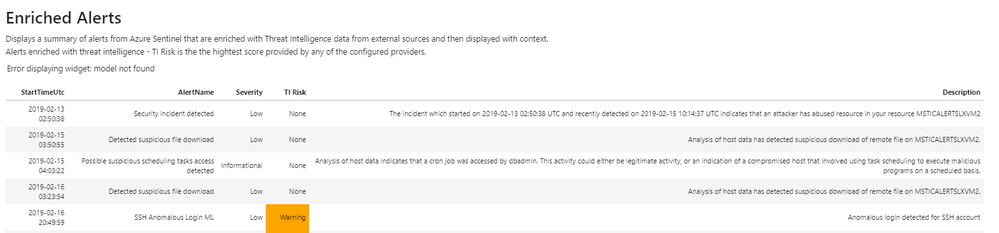
This simple notebooklet takes all alerts for a given time frame and enriches them with a number of external Threat Intelligence (TI) providers. From here users can select an alert to see additional details on the alert itself as well as the associated TI results. This helps analysts triage and prioritize alerts quickly and effectively. This notebooklet uses the TI providers feature of MSTICpy, and as such, users will need to configure TI providers before using this notebooklet.
 Alert enrichment notebooklet
HostSummary
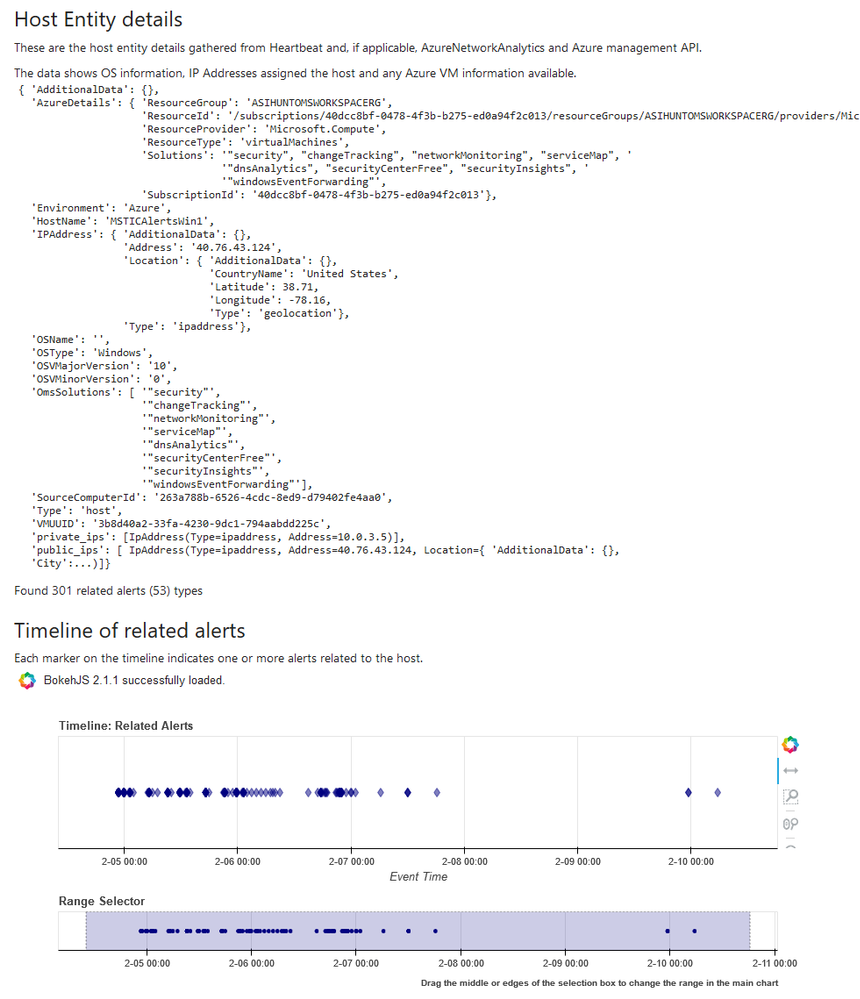
The HostSummary notebooklet queries and displays information about a host (Windows or Linux) including:
- IP address assignment
- Related alerts
- Related hunting/investigation bookmarks
- Azure subscription/resource data.
 Host summary notebooklet
HostLogonsSummary
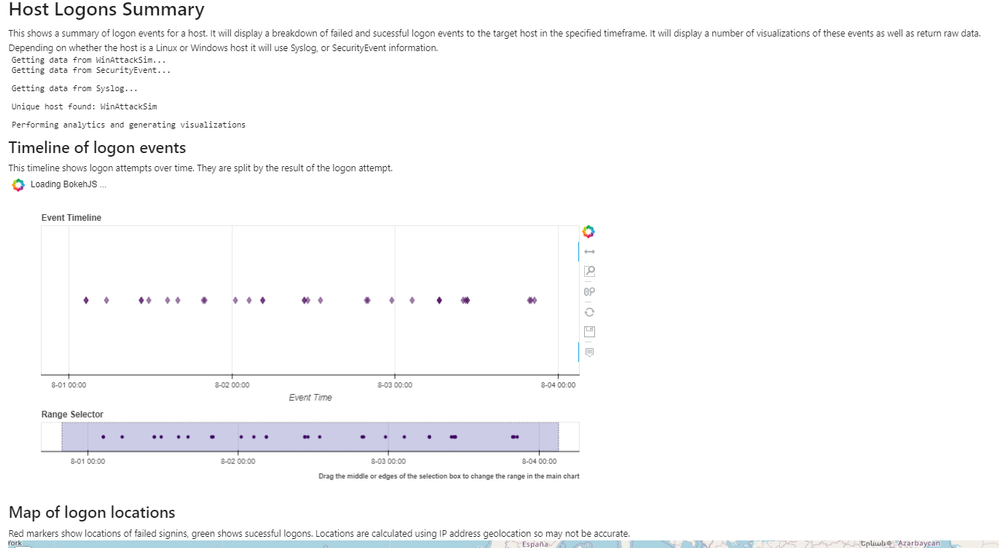
This notebooklet provides a summary of logon events for a given host in a specified time frame. The notebooklet supports both Windows and Linux hosts, all that needs to be provided is a full or partial hostname. The purpose of this notebooklet is to give analysts a high level overview of all logon activity on a host during a timeframe of interest and help them identify specific logon sessions that warrant additional investigation. The notebooklet contains several sections including:
- Logon timeline — a timeline of all logon attempts (both failed and successful) to the host broken down by the logon result. This visual guide makes it easy to identify brute force attempts or other suspicious logon patterns.
- Logon map — an interactive geospatial representation of logon events based on the IP geolocation of the remote IP addresses involved. This helps identify logon events from anomalous or suspicious locations.
- User and process graphs — visual breakdowns of logon attempts by user and by process to help identify primary logon vectors.
- Logon matrix — a heatmap of user, process, and logon results to help identify any specifically high or low volume logon cases for additional investigation.
WinHostEvents
The WindowsHostEvents notebooklet queries and displays Windows Security Events. This focuses on events other than the common process creation (4688) and account logon (4624, 4625) events, aiming to give you a better idea of what else was going on on this host. Some features:
- Summarized display of all security events and accounts that triggered them.
- Extracting and displaying account management events
- Account management event timeline
- Optionally parsing packed XML event data into DataFrame columns for specific event types.
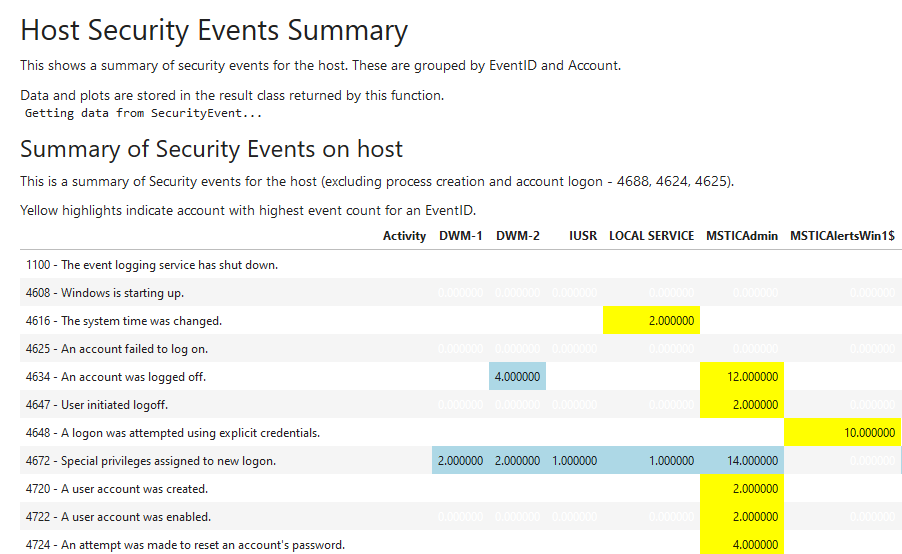 Windows Security Events notebooklet
NetworkFlowSummary
The network flow summary notebooklet queries Azure network data and plots time lines for network traffic to/from a host or IP address.
- Plot flows events by protocol and direction
- Plot flow count by protocol
- Display flow summary table
- Display flow summary by ASN
- Display IP location results on a map
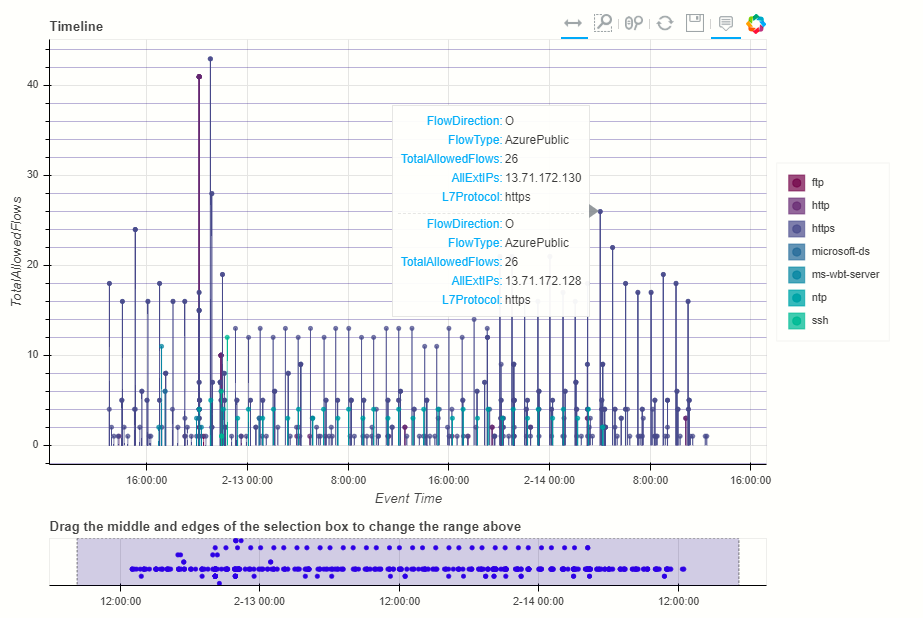
Conclusion
If you’ve made it this far in the document, congratulations!
Over the next few months we’ll be adding to the the repository of notebooklets. One of the things we most want to do is package some of our analytics into an easy-to-use format in notebooklets. We’d love any input on notebooklets you’d like to see.
If you are eager to read more, there is more detailed documentation on our ReadtheDocs pages. The code is all open source and can be seen here. You can install the package from PyPi using pip.
If you want to explore creating your own notebooklets and, either contribute them to the package, or just use them yourself, we’ve created a template notebooklet and accompanying documentation to guide you through the process.
Please post any issues, questions, or requests for new notebooklets on the msticnb GitHub repo or reach out directly on Twitter to ianhellen, MSSPete, AshwinPatil
Ian Hellen
Principal software engineer at Microsoft and one of the authors/maintainers of MSTICpy and MSTICnb
by Scott Muniz | Aug 17, 2020 | Uncategorized
This article is contributed. See the original author and article here.
Starting October 31 2020, Yammer Groups API endpoints will only support the usage of Azure Active Directory (AAD) tokens. Yammer Groups API endpoints will no longer support the usage of Yammer OAuth tokens. Microsoft recommends that customers and partners transition to using Microsoft Authentication Library (MSAL) and AAD tokens with the Yammer API.
Last year, we announced Native Mode, which gets your network ready to experience Microsoft 365 integrations. Native Mode requires that all your users are created in AAD, all Groups are Microsoft 365 Connected and all Yammer Files are stored in SharePoint Online. With the move to files in SharePoint, Yammer Files API started require using AAD tokens.
As Yammer continues its journey to integrate into the Microsoft 365 ecosystem, there will be even more shared Yammer experiences across Microsoft 365, such as with Teams, Outlook and other applications. All of these require using AAD tokens. Yammer’s OAuth token cannot be accepted to conduct these operations. Overtime all Yammer API endpoints will be changed to exclusively support AAD tokens.
Starting October 31, 2020, Yammer Group API endpoints that are used to Update, Delete Groups, and manage Group Membership and Group Admins will only support AAD tokens. Using Yammer OAuth tokens will result in a bad request response from the server. Create and Read operations will be supported with Yammer OAuth tokens, however using AAD tokens for all API scenarios with Yammer is strongly recommended.
Notes:
- All Connected Yammer Groups (including Yammer networks in Native Mode) will require AAD tokens. Using the Yammer OAuth tokens will return a rejected response.
- In non-Native Yammer networks, users without Group creation rights in AAD will be able to create unconnected Yammer Groups.
What should you do?
- Use MSAL to authenticate with Yammer: Microsoft recommends that customers and partners transition their apps to authenticate using the Microsoft Authentication Library (MSAL) to acquire AAD tokens from the Microsoft Identity Platform to operate with the Yammer API. MSAL is available for .NET, JavaScript, Android, and iOS, which support many different application architectures and platforms. Learn about MSAL here.
- Set up AAD Client Application: Follow these instructions to set up a client application and assign Delegated Yammer API Permissions to access Yammer APIs.
Notes:
- Yammer supports Delegated Permissions in Azure Active Directory. This means that your application will access the Yammer API as the signed in user. Application permissions are currently not supported by Yammer in Azure Active Directory.
- Enabling user_impersonation allows the application to access the Yammer platform on behalf of the signed in user.
- Application permissions are currently not supported by Yammer in Azure Active Directory.
Application types:
- Client-side Single page JavaScript Application: If you are using a Single Page AAD App that uses the Implicit Grant Flow, then your AAD App will need to be mapped to its corresponding Yammer platform Application. Please provide details about your application in this form and our team will work with you on the process to map your Yammer and Azure Active Directory client applications. This is required to ensure that your application is not affected by Cross-Origin Resource Sharing (CORS) permissions issues. Learn about CORS here.
- Server-side application: Using the Microsoft identity platform implementation of OAuth 2.0, you can add sign in and API access to your mobile and desktop apps If you are running a server-side app that requires the usage of long-lived AAD tokens, then use the Microsoft Identity Platform OAuth 2.0 authorization code flow to acquire AAD Access Tokens, with a Refresh Token. This enables your app to request a new AAD access token without requiring any user interaction. Take a look at these sample apps that support MSAL 2.0.
Resources:
We’re committed to working with the developer community in transitioning to the new world of AAD tokens! Please check out the resources below, post your questions/comments here or email api@yammer.com.
by Scott Muniz | Aug 17, 2020 | Uncategorized
This article is contributed. See the original author and article here.
Initial Update: Monday, 17 August 2020 18:28 UTC
We are aware of issues within Application Insights and are actively investigating. Some customers may experience the request getting stuck when attempting to register with the Microsoft.Insights resource provider.
- Work Around: None
- Next Update: Before 08/17 20:30 UTC
We are working hard to resolve this issue and apologize for any inconvenience.
-Jeff
by Scott Muniz | Aug 17, 2020 | Azure, Microsoft, Technology, Uncategorized
This article is contributed. See the original author and article here.
In a historic day, Microsoft today announced it has transitioned Azure HDInsight to the Microsoft engineered distribution of Apache Hadoop and Spark, specifically built to drastically improve the performance, improved release cadence of powerful Open Source data analytics frameworks and optimized to natively run at cloud scale in Azure. This transition will further help customers by establishing a common Open Source Analytics distribution across various Azure data services such as Azure Synapse & SQL Server Big Data Clusters.
Starting this week, customers creating Azure HDInsight clusters such as Apache Spark, Hadoop, Kafka & HBase in Azure HDInsight 4.0 will be created using Microsoft distribution of Hadoop and Spark.
As part of today’s release, we are adding following new capabilities to HDInsight 4.0
SparkCruise: Queries in production workloads and interactive data analytics are often overlapping, i.e., multiple queries share parts of the computation. These redundancies increase the processing time and total cost for the users. To reuse computations, many big data processing systems support materialized views. However, it is challenging to manually select common computations in the workload given the size and evolving nature of the query workloads. In this release, we are introducing a new Spark capability called “SparkCruise” that will significantly improve the performance of Spark SQL.
SparkCruise is an automatic computation reuse system that selects the most useful common subexpressions to materialize based on the past query workload. SparkCruise materializes these subexpressions as part of query processing, so you can continue with their query processing just as before and computation reuse is automatically applied in the background — all without any modifications to the Spark code. SparkCruise has shown to improve the overall runtime of a benchmark derived from TPC-DS benchmark queries by 30%.
SparkCruise: Automatic Computation Reuse in Apache Spark
Hive View: Hive is a data warehouse infrastructure built on top of Hadoop. It provides tools to enable
data ETL, a mechanism to put structures on the data, and the capability to query and analyze large data sets that are stored in Hadoop. Hive View is designed to help you to author, optimize, and execute Hive queries. We are bringing Hive View natively to HDInsight 4.0 as part of this release.
Tez View: Tez is a framework for building high-performance batch and interactive data processing applications. When you run a job such as a Hive query Tez, you can use Tez View to track and debug the execution of that job. Tez View is now available in HDInsight 4.0
Frequently asked questions
What is Microsoft distribution of Hadoop & Spark (MDH)?
Microsoft engineered distribution of Apache Hadoop and Spark. Please read the motivation behind this step here
• Apache analytics projects built, delivered, and supported completely by Microsoft
• Apache projects enhanced with Microsoft’s years of experience with Cloud-Scale Big Data analytics
• Innovations by Microsoft offered back to the community
What can I do with HDInsight with MDH?
Easily run popular open-source frameworks—including Apache Hadoop, Spark, and Kafka—using Azure HDInsight, cost-effective, enterprise-grade service for open-source analytics. Effortlessly process massive amounts of data and get all the benefits of the broad open-source ecosystem with the global scale of Azure.
What versions of Apache frameworks available as part of MDH?
|
Component
|
HDInsight 4.0
|
|
Apache Hadoop and YARN
|
3.1.1
|
|
Apache Tez
|
0.9.1
|
|
Apache Pig
|
0.16.0
|
|
Apache Hive
|
3.1.0
|
|
Apache Ranger
|
1.1.0
|
|
Apache HBase
|
2.1.6
|
|
Apache Sqoop
|
1.4.7
|
|
Apache Oozie
|
4.3.1
|
|
Apache Zookeeper
|
3.4.6
|
|
Apache Phoenix
|
5
|
|
Apache Spark
|
2.4.4
|
|
Apache Livy
|
0.5
|
|
Apache Kafka
|
2.1.1
|
|
Apache Ambari
|
2.7.0
|
|
Apache Zeppelin
|
0.8.0
|
In which region Azure HDInsight with MDH is available?
HDInsight with MDH is available in all HDInsight supported regions
What version of HDInsight with MDH will map to?
HDInsight with MDH maps to HDInsight 4.0. We expect 100% compatibility with HDInsight 4.0
Do you support Azure Data Lake Store Gen 2? How about Azure Data Lake Store Gen 1?
Yes, we support storage services such as ADLS Gen 2, ADLS Gen1 and BLOB store
What happens to the existing running cluster created with the HDP distribution?
Existing clusters created with HDP distribution runs without any change.
How can I verify if my cluster is leveraging MDH?
You can verify the stack version (HDInsight 4.1) in Ambari (Ambari–>User–>Versions)
How do I get support?
Support mechanisms are not changing, customers continue to engage support channels such as Microsoft support
Is there a cost difference?
There is no cost or billing change with HDInsight with Microsoft supported distribution of Hadoop & Spark.
Is Microsoft trying to benefit from the open-source community without contributing back?
No. Azure customers are demanding the ability to build and operate analytics applications based on the most innovative open-source analytics projects on the state-of-the-art enterprise features in the Azure platform. Microsoft is committed to meeting the requirements of such customers in the best and fastest way possible. Microsoft is investing deeply in the most popular open-source projects and driving innovations into the same. Microsoft will work with the open-source community to contribute the relevant changes back to the Apache project itself.
Will customers who use the Microsoft distribution get locked into Azure or other Microsoft offerings?
The Microsoft distribution of Apache projects is optimized for the cloud and will be tested extensively to ensure that they work best on Azure. Where needed, the changes will be based on open or industry-standard APIs.
How will Microsoft decide which open-source projects to include in its distribution?
To start with, the Microsoft distribution contains the open-source projects supported in the latest version of Azure HDInsight. Additional projects will be included in the distribution based on feedback from customers, partners, and the open-source community.
Get started
by Scott Muniz | Aug 17, 2020 | Uncategorized
This article is contributed. See the original author and article here.
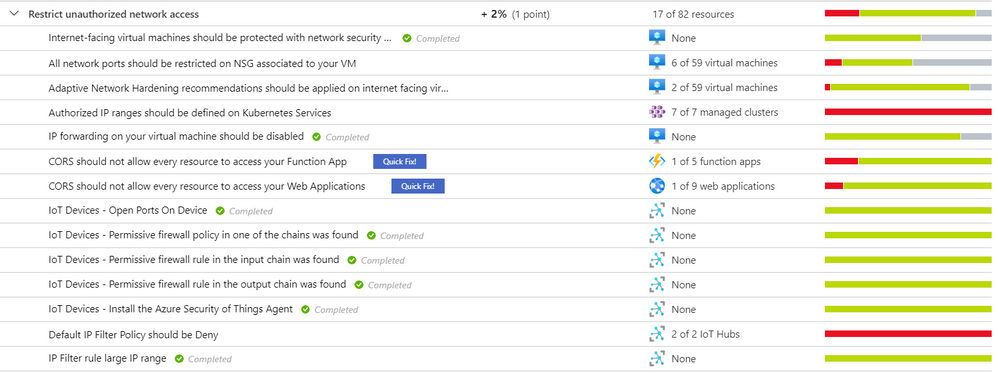
As part of our recent Azure Security Center (ASC) Blog Series, we are diving into the different controls within ASC’s Secure Score. In this post we will be discussing the control of “Restrict Unauthorized Network Access”.
There are many ways to protect your data nowadays; it is all about finding the best tools that adhere to your infrastructure and integrating them in the most efficient and effective way. Azure Security Center has an Enhanced Secure Score which brings specific security recommendations of your hybrid workloads in the cloud (Azure or others) as well as on premises. These advices are meant to keep your resources safe and improve your security hygiene where a continuous teamwork must be placed.
Gaining network access should be based on IP and device restrictions, firewall policies, network ports control, network security rules and more according to your business’s needs. Azure Security Center’s security control “Restrict Unauthorized Network Access” has a series of recommendations for this type of scenario. For a reference on this security control’s definition and others, visit this article.

The type of resources that you have in your infrastructure will dictate the kind of recommendations that are going to appear under “Restrict Unauthorized Network Access” security control. The sections that follows will cover some of the most common security recommendations that belong to this security control.
Internet-facing virtual machines should be protected with network security groups
Azure Security Center identifies virtual machines that are exposed to the Internet without a network security group (NSG) to filter the traffic. Although there are some other options to protect your internet-facing virtual machines, for the purpose of ASC, this is the security recommendation that needs to be remediated. When you go and click that recommendation, there will be a manual remediation you can follow. Once all the VMs have NSGs assigned, the task would be completed.
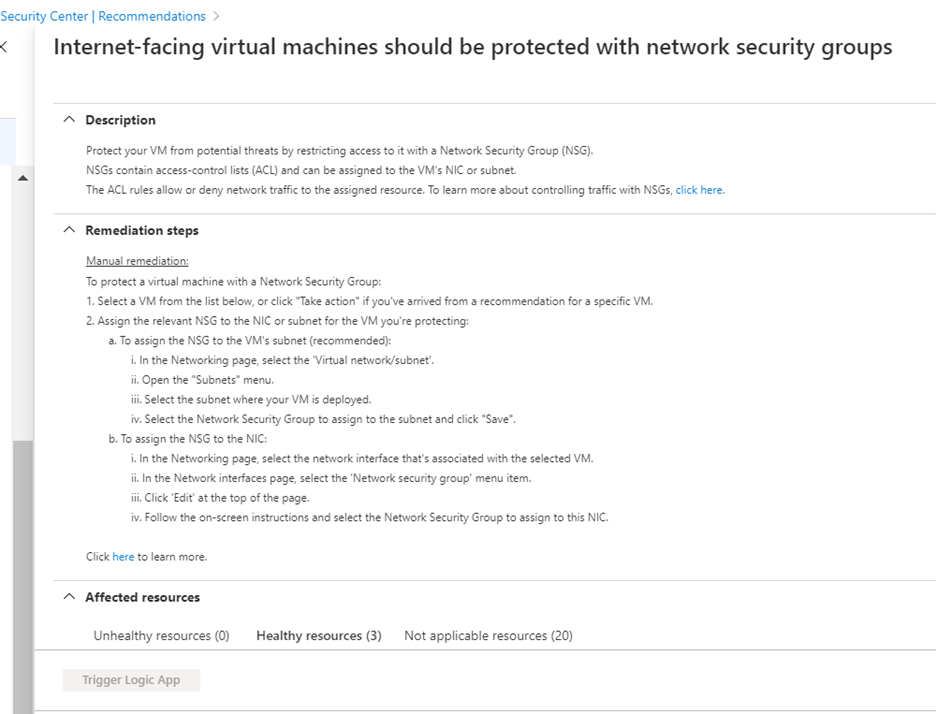
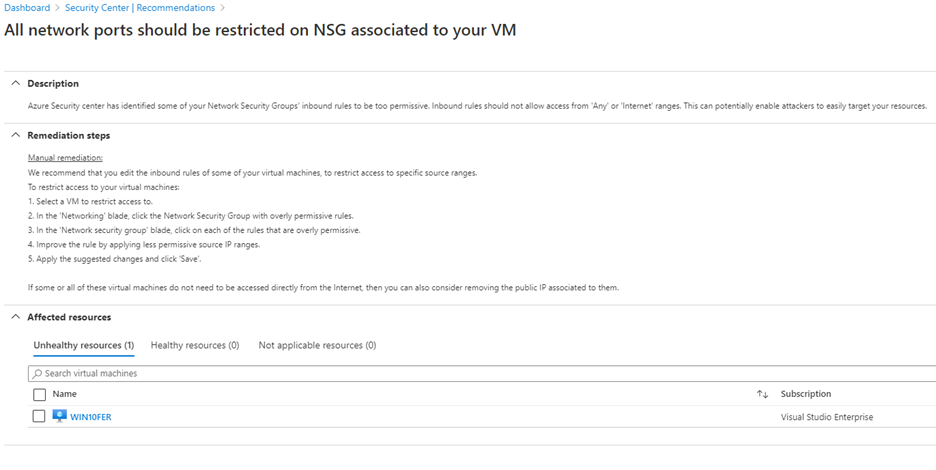
All network ports should be restricted on NSG associated to your VM
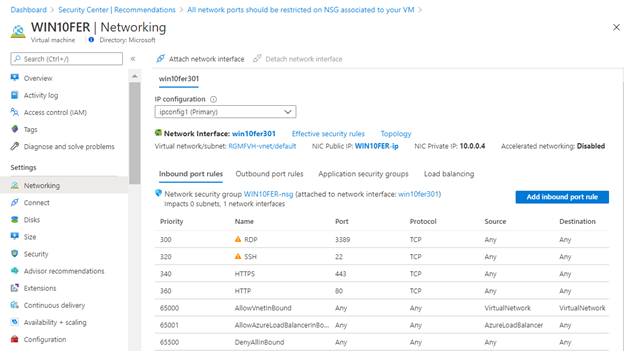
This recommendation appears when Azure Security Center identifies that some of your Network Security Groups’ inbound rules are too permissive. Which means, you have inbound rules that are too broad, for example from “Any” to “Any”. This recommendation is relevant only for virtual machines protected by a network security group, so even if you have virtual machines on NSGs but are not-internet-facing, they will appear in the “Not applicable resources” tab. The manual procedure indicates that you should improve the network security group rule by applying less permissive source IP ranges. Once this is performed, it would appear as completed.
CORS should not allow every resource to access your Function App/Web App
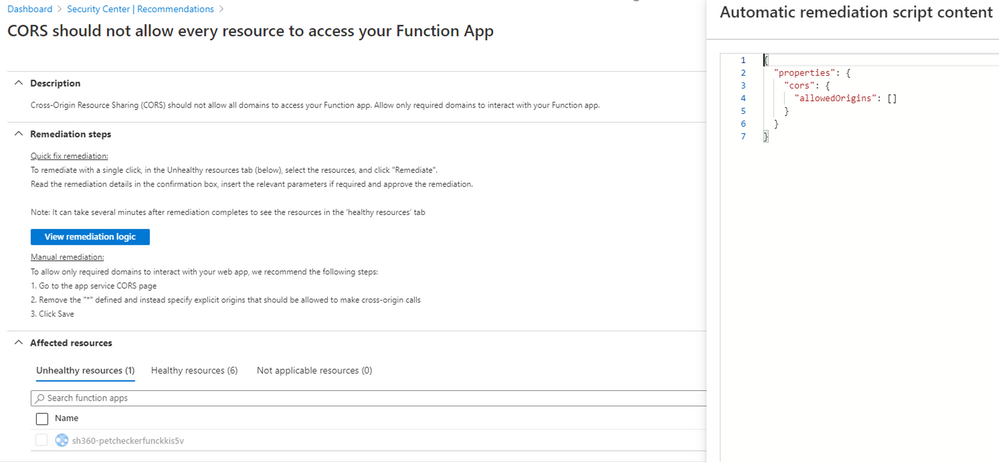
Cross-Origin Resource Sharing (CORS) allows restricted resources on a web page to be requested from another domain. This recommendation aims to harden the list of required domains that can interact with your Function App/Web App. It has the Quick Fix button, which triggers an automatic script (modifiable) to remediate.
Note: The allowedOrigins parameter should be in the format:
["http://localhost","https://functions-staging.azure.com","https://functions.azure.com"]
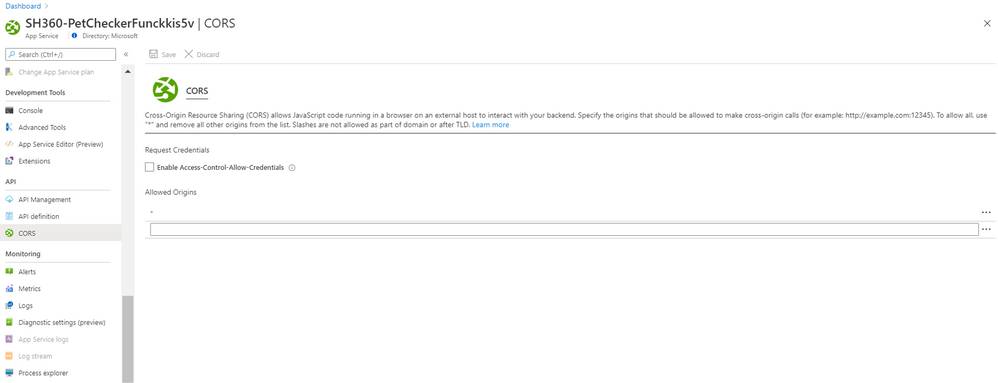
The manual remediation requires that you go to your app service CORS section so you remove the “*” and specify explicit origins that should be allowed to make cross-origin calls.
Default IP Filter Policy should be Deny
When you have any IoT solution based on Azure IoT Hub and the IP Filter grid is by default (a rule that accepts the 0.0.0.0/0 IP address range), your hub will accept connections from any IP address. That is when this recommendation will be displayed.
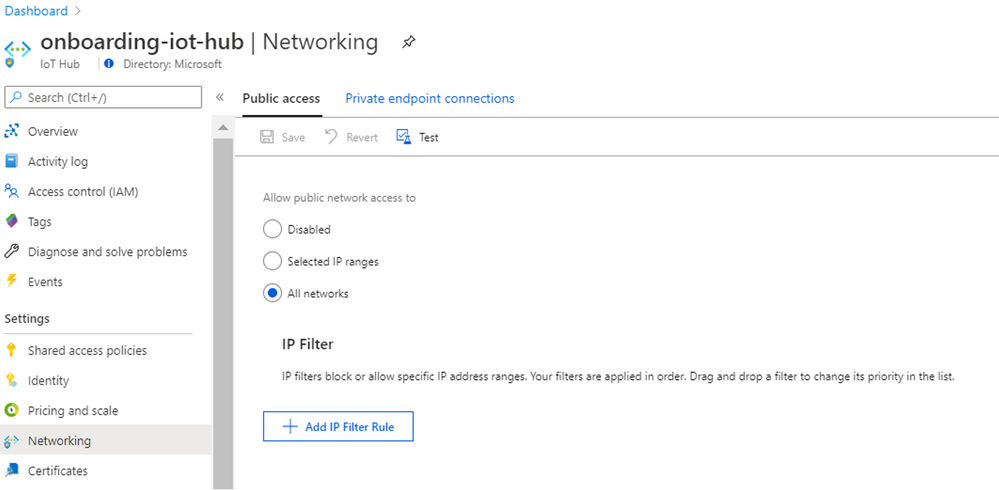
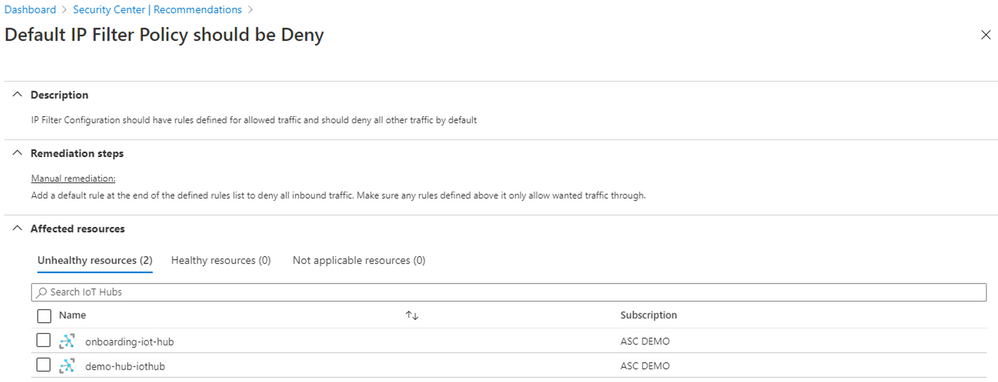
The manual remediation is to go to your IoT solution and edit your IP Filter. Read this article to learn how to add/edit/delete an IP filter rule and more.
IP forwarding on your virtual machine should be disabled
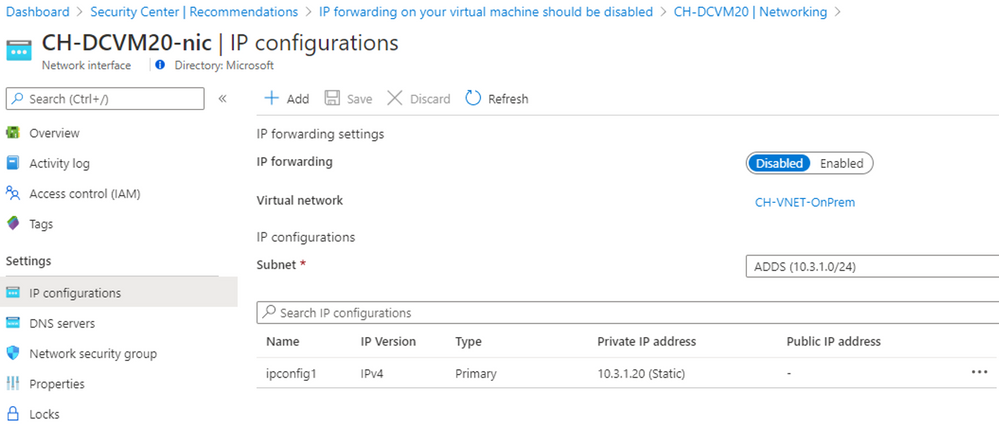
Azure Security Center will show this recommendation when it discovers that IP forwarding is enabled on some of your virtual machines. This allows the VM to accept incoming network packets that should be send to another network. The Azure Security Center GitHub community page has a Logic App Playbook and a PowerShell script sample to resolve the recommendation.
The manual remediation is to go to the VM’s networking blade and under NIC click in IP Configurations to disable “IP Forwarding”.
Conclusion
It is imperative to constantly review your Secure Score and act in the recommendations provided specifically for your infrastructure. You can always disable the recommendations that do not apply to your environment, in fact, it is quite easy; nevertheless, we encourage you to get every team involved in this to analyze the behaviors that should be allowed for each resource.
This blog was written as a collaboration with @Yuri Diogenes


Recent Comments