by Scott Muniz | Aug 20, 2020 | Azure, Microsoft, Technology, Uncategorized
This article is contributed. See the original author and article here.
Final Update: Thursday, 20 August 2020 23:46 UTC
We’ve confirmed that all systems are back to normal with no customer impact as of 8/14/20, 22:12 UTC. Our logs show the incident started on 9/23/19, 00:00 UTC and that during the 326 days that it took to resolve the issue 138 customers using metric alerts based on custom metrics in Brazil South region may have seen incorrect alert activations and or failures.
- Root Cause: The failure was due to a backend storage configuration.
- Incident Timeline: 326 days 22 hours 12 minutes – 9/23/2019, 00:00 UTC through 8/14/2020, 22:12 UTC
We understand that customers rely on Application Insights as a critical service and apologize for any impact this incident caused.
-Jeff
by Scott Muniz | Aug 20, 2020 | Uncategorized
This article is contributed. See the original author and article here.
Windows 10, version 20H2, is now available for commercial customers to begin feature exploration and validation prior to being released for general availability.
As previously announced, version 20H2 will be delivered to devices currently running Windows 10, version 2004 using an enablement package. This is the same technology we used to update devices from Windows 10, version 1903 to version 1909. Do you want to see how quickly devices update from version 2004 to version 20H2, and how little downtime is involved? Do you want to explore the new Local Users and Groups mobile device management (MDM) policy, which allows administrators to make granular changes to a local group on a managed device? Now you can!
You can access Windows 10, version 20H2 through all standard outlets, including Windows Update, Windows Server Update Services (WSUS), and Azure Marketplace, or you can download an ISO file. If you manage updates directly from Windows Update, or have devices enrolled in the Beta Channel (previously the Slow ring) or the Release Preview Channel for validation purposes, you don’t need to take any action. Windows 10, version 20H2 will be automatically deployed to all commercial devices in the Beta and Release Preview Channels and those who have devices on Windows 10, version 2004 will get to experience the remarkably fast update that comes with moving from version 2004 to version 20H2 via an enablement package.
|
Note: We consider a device a commercial device if it isn’t running the Home edition of Windows 10, is being managed by an IT administrator (whether via Microsoft Endpoint Manager or a third-party MDM tool), or if the device has a volume license key, a CommercialID, or is joined to a domain.
|
As with Windows 10, versions 1903 and 1909, versions 2004 and 20H2 share a common core operating system with an identical set of system files. New features are included in monthly quality updates for version 2004 in an inactive and dormant state. These new 20H2 features remain dormant until they are turned on through the “enablement package,” a small, quick-to-install “master switch” that activates the Windows 10, version 20H2 features.
The enablement package is a great option for installing a scoped feature update like Windows 10, version 20H2 as it enables an update from version 2004 to version 20H2 with a single restart, reducing update downtime.
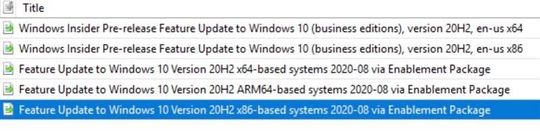
If you are managing updates with WSUS, you will have the option of taking a full feature update to 20H2 or testing out the enablement package path. As with any other validation done on pre-release updates published to WSUS, you will need to first ensure that you have synced the “Windows Insider Preview” category. Once you have synced this category, you should see the following updates show up in your console as shown below:

|
Note: Windows 10, version 20H2 will be made available as an enablement package to devices already running Windows 10, version 2004 that have also installed the June 2020 monthly quality update. It will be available as a full feature update for devices running Windows 10, version 1909 and prior. To see the greatest number of new features, we recommend being on the latest cumulative update.
|
To test out this experience on a virtual machine, check out the Windows 10 Preview on Azure Marketplace or, if you would prefer, you can download the Windows 10, version 20H2 ISO.
We not only want to ensure that you have access to the upcoming Windows 10 feature update payload via any channel you may use today, we also want to enable you to validate with confidence. Therefore, customers in the Windows Insider Program for Business can once again receive Microsoft Support for the Windows 10, version 20H2 build available through WSUS, ISO download, Azure Marketplace, and directly from Windows Update in the Beta and Release Preview Channels. If you run into a severe issue that prevents you or other users in your organization from using a device, or compromises security or personal data, use the online form to request assistance directly from Microsoft Support—at no cost to you.
We hope you enjoy Windows 10, version 20H2!
~ The Windows Insider Program for Business team
For more information, check out these useful links for exploring and validating pre-release Windows feature updates:

by Scott Muniz | Aug 20, 2020 | Uncategorized
This article is contributed. See the original author and article here.
 |
|
I am excited to announce our Microsoft Security Fall 2020 Public Webinars edition!
Another excellent opportunity for our public community to join for free, and be part of the journey that our Microsoft security engineering teams will be sharing through their experiences and provide their recommendations for our security products.
We have more webinars in the pipeline, and will be scheduling them accordingly.
For registration visit us at https://aka.ms/SecurityWebinars.
|
|
Sep 2
Azure Sentinel Webinar: Log Forwarder deep dive: Filtering CEF and Syslog events
|
Presenter: Ofer Shezaf
Description: The Log Forwarder is Azure Sentinel’s prime conduit for collecting Syslog and CEF events, the ubiquitous channel for security and networking telemetry. In this webinar, we will learn more about the Log Forwarded, drill into its internals, learn to troubleshoot, and discover a few tips and tricks, such as filtering events before they are sent to Azure Sentinel.
|
|
Sep 9
Azure Sentinel Webinar: KQL part 3 -Optimizing Azure Sentinel KQL queries performance
|
Presenter: Ofer Shezaf
Description: Azure Sentinel query language is fast. But you can make it faster. Want to make your workbooks faster? Your hunting experience snappier?
Ensure no time outs in your alert rules? In this webinar, we will go over a few simple rules-of-thumb and tips to accelerate your KQL queries. We will also learn how to test your queries’ performance and see the impact of those changes.
|
|
Sep 14
Azure Sentinel Webinar:
Empowering the Azure Sentinel Community with Pre-Recorded Datasets for research and training purposes
|
Presenter: Roberto Rodriguez
Description: As a defensive security practitioner, researching a new technique used by real threat actors to compromise an environment is not as simple as copying, pasting, and running a query. Besides learning about the internals of a technique and ways how it can be executed, eventually, one would need to simulate it. As you may already know, the simulation process takes time and preparation, and usually, the time spent trying to generate data is higher than actually analyzing data. Besides, once you have data, what can you do with it?
|
|
Sep 16
Microsoft Defender Advanced Threat Protection: Get started with Microsoft Defender ATP, from zero to hero
|
Presenter: John Nieves & Steve Newby
Description: Are you ready to hit the ground running with the industry’s leading endpoint security platform – Microsoft Defender ATP? Join this webinar to go from zero to hero in your deployment! During this session, we will take a new Microsoft Defender ATP subscription and walk you through the process of setting up the tenant and its basic settings such as configuring the tenant, tags, groups, and RBAC. Then we will show you how to on-board various endpoints and configure base-line policies (using Microsoft Endpoint Manager). Finally, we will have a deeper look into the configuration options of features and show you how to get your endpoints protected with Microsoft Defender ATP as quickly as possible. We’re looking forward to having you join us!
|
|
Sep 17
Microsoft CyberX:
MITRE ATT&CK for ICS: CyberX Demo and Azure IoT/OT Security Deep Dive
|
Presenter: Phil Neray & Joe DiPietro
Description: MITRE ATT&CK for ICS is a standard framework for understanding the diverse tactics adversaries use to compromise industrial control system (ICS) and operational technology (OT) networks. Unlike ATT&CK for Enterprise, ATT&CK for ICS focuses on adversaries whose primary goal is causing safety incidents, shutting down production, or stealing intellectual property such as proprietary formulas. CyberX, which was recently acquired by Microsoft, is composed of IoT/OT security experts who developed an agentless security platform for IoT/OT providing continuous IoT/OT asset visibility, vulnerability management, and threat monitoring.
|
|
Sep 29
Azure Sentinel: Enabling Entity Behavior Analytics | Hunting for Insider Threats
|
Presenter: Itay Argoety
Description: Learn how to enable Sentinel Behavior Analytics in just two clicks and hunt for insider threats and compromised users leveraging Behavior Analytics.
|
|
Sep 30
Azure Sentinel:
Unleash your Azure Sentinel automation Jedi tricks and build Logic Apps Playbooks like a Boss
|
Presenter: Tiander Turpijn
Description: In this webinar I will be sharing tips and tricks how to create automation Playbooks in Azure Sentinel to more effectively manage incidents and external data sources.
|
|
Oct 26
Azure Security Center: VM Protection
|
Presenter: Aviv Mor
Description: Learn how to better protect your virtual machines using Azure Security Center.
|
|
Oct 28
Azure Security Center: Azure Service Layers protection
|
Presenter: Tal Rosler
Description: In this webinar we will present new threat protection suites in Azure Security Center to protect cloud-native workloads.
|
|
Oct 29
Cybersecurity Basics: Securing Yourself
|
Presenter: Andrew Baze
Description: To stay safe online, one of the best things you can do is stay educated. Join us to learn some quick and simple techniques to secure yourself and your family from the most common and dangerous Internet security threats.
|
by Scott Muniz | Aug 20, 2020 | Uncategorized
This article is contributed. See the original author and article here.
Intune has been working with the Windows team to troubleshoot reports that custom OMA-URI policies with payloads over 350k bytes are not consistently applied in Windows 10 devices. Based on the results of our investigation, we’re going to block Intune creation of any custom OMA-URI policies that are larger than 350k bytes. We do also plan to put an “unsupported” profile type in an upcoming release to help highlight any existing policies greater than 350k.
If you have policies with payloads over 350k bytes, you should see a message center post and actions for you to take to reduce the policy size. To determine the size of the custom OMA-URI policy, check the file properties or the original xml file used to configure the policy. You can remove or reconfigure the unsupported and assigned custom profile names. Remove the non-assigned customURI profiles. Note that when you unassign or remove custom OMA-URI, enrolled devices will continue to stay enrolled, just the policy may not be consistently applied until you resize and assign the policy.
If you have any questions, just let us know @intunesuppteam or through comments on this post.

by Scott Muniz | Aug 20, 2020 | Uncategorized
This article is contributed. See the original author and article here.
Starting in Configuration Manager current branch version 2006, the Company Portal is now the cross-platform app portal experience for Microsoft Endpoint Manager. By configuring co-managed devices to also use the Company Portal, you can provide a consistent user experience on all devices.
The Company Portal supports the following actions:
- Launch the Company Portal app on co-managed devices and sign in with Azure Active Directory (Azure AD) single sign-on (SSO).
- View available and installed Configuration Manager apps in the Company Portal alongside Intune apps.
- Install available Configuration Manager apps from the Company Portal and receive installation status information.
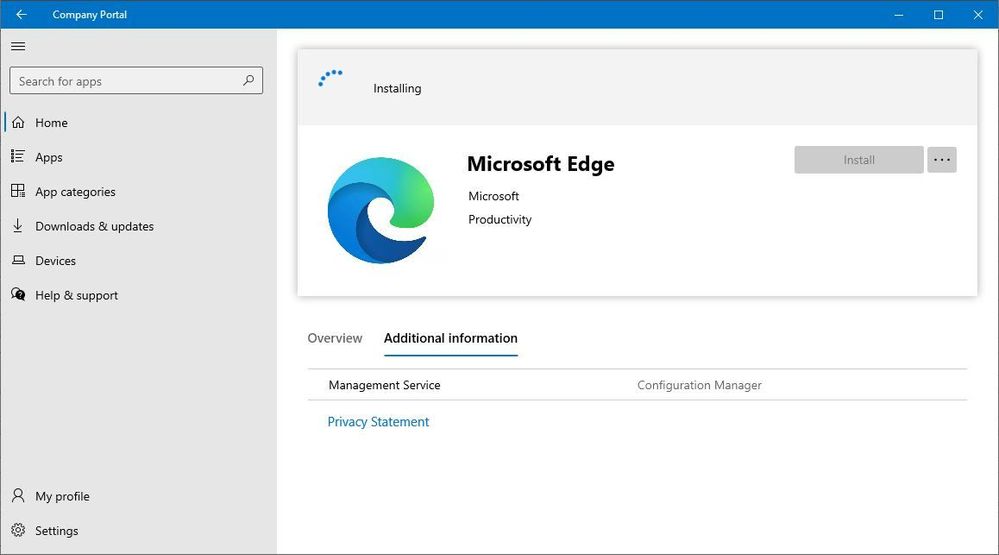 configmgr apps in company portal
Prerequisites include:
- Configuration Manager current branch version 2006 or later
- Windows 10, version 1803 or later:
- The user accounts that sign in to these devices require the following configurations:
- An Azure AD identity
- Assigned an Intune license
Learn more about using the Company Portal app on co-managed devices.
Additional Resources
Update 2006 for Microsoft Endpoint Configuration Manager current branch is now available
by Scott Muniz | Aug 20, 2020 | Azure, Microsoft, Technology, Uncategorized
This article is contributed. See the original author and article here.
Databases > SQL Database
All categories
Intune
Let’s look at each of these updates in greater detail.
Databases > SQL Database
Open your SQL database in Azure Data Studio
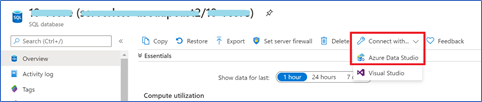
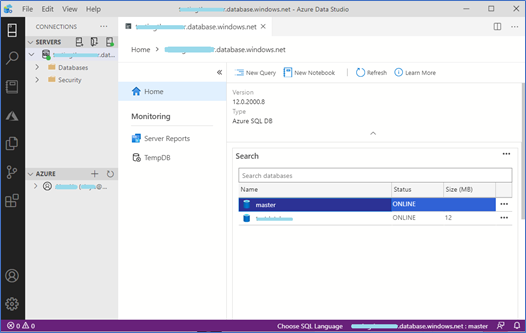
The Azure portal now includes a one-click connection to Azure Data Studio from any Azure SQL Database. Azure Data Studio offers a modern editor experience with IntelliSense, code snippets, source control integration, SQL Notebooks, and an integrated terminal. Simply open the Azure portal, navigate to any SQL Database, and click “Connect with Azure Data Studio”. The experience includes a link to download Azure Data Studio if you do not already have it. The connection info is passed to Azure Data Studio and the connection will automatically go through with AAD or will require just a password to complete the connection.
- Sign in to Azure portal
- Click “All Services”
- Search and select “Azure SQL”
- Find and select any SQL database
- Click “Connect with…”, then click “Azure Data Studio”

6. Click to download or launch Azure Data Studio
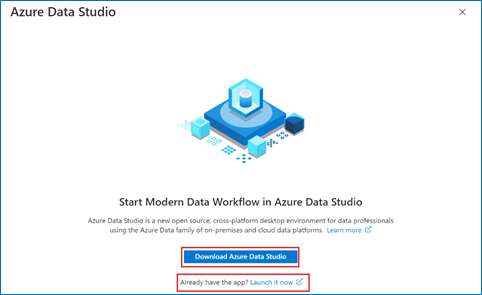
7. Connect to your database and try out Azure Data Studio!
All Categories
Work with a freelancer
It’s now easier than ever to connect and start working with a freelancer who can help you complete your short-term, on-demand Azure projects. Microsoft and Upwork are partnering to provide you with easy access to freelancers with current Azure certifications.
In the upper right corner of the Azure portal, click on the question mark. You’ll see the freelancer information pop up below.
All Categories
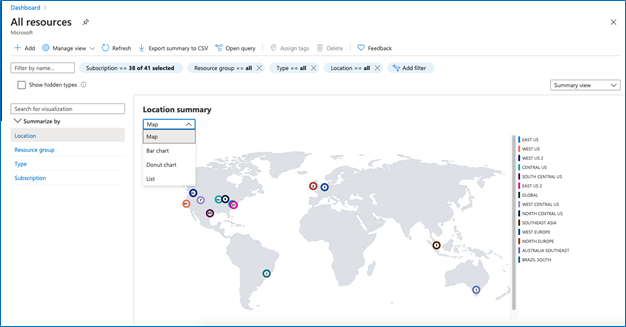
View a summary of your resources on a map and in other charts
On certain resource list views, you can now see a summary count of your resources. This feature allows you to visually represent your resources on a chart, summarizing over location, resource group, subscription, and resource type. A powerful use case of this would be to visually represent your resources on a map.
a. Go to a list of resources. Check if it has a “List view” dropdown at the top right of the list. If so, you can proceed with the demo. Otherwise, use the “All resource” list as an example.
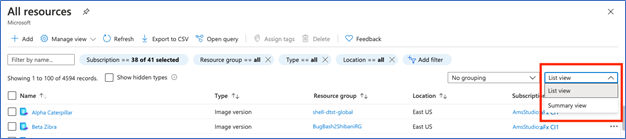
b. In the dropdown, select “Summary view” where you will see a summary count of your resources. You can choose to summarize by location, resources group, subscription, and type, if applicable, from the menu on the left.
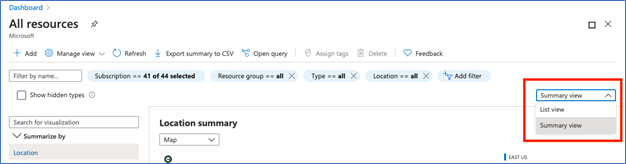
c. You can use the filters to scope your results.
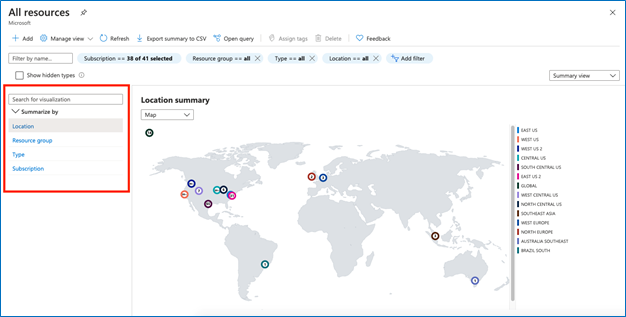
d. In this view, you can change the visualization to a map, bar chart, donut chart, or list. (Note that maps are available for location only).
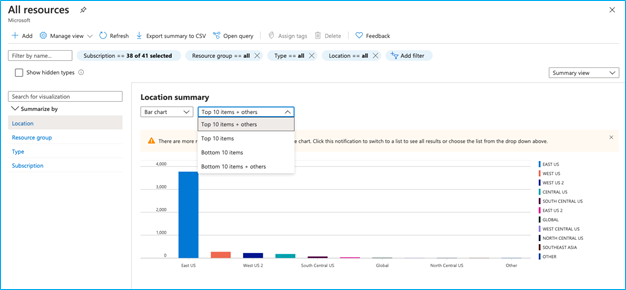
e. If you have more than 10 items in a bar or donut chart, there will be a dropdown to choose your summary preference (see screenshot). If you want to see more than 10 items, change the visualization to “list” as described in step d.
f. If you like this view, you can save it using the “Manage view” dropdown for easy access.

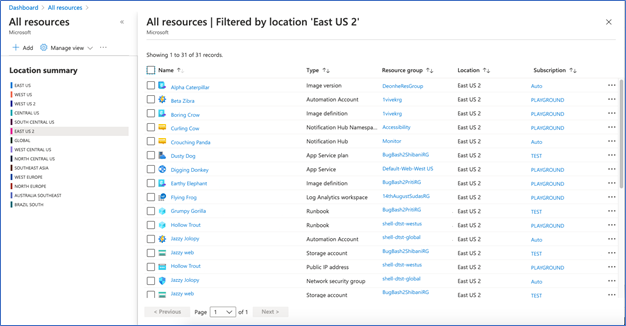
g. If you want to drill down into one of the summary items, click into the item and you will see a list of the resources in that category.
All Categories
Portal search improvements
We have made several improvements to the portal’s search capabilities.
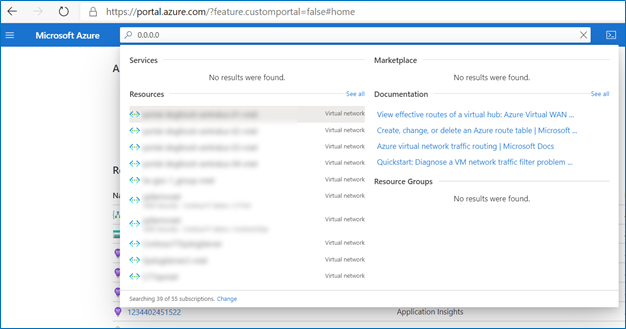
- You can now use the portal’s global search bar to search for resources by IP address. The search will find all resources that have the specified IP address anywhere within their resource properties.
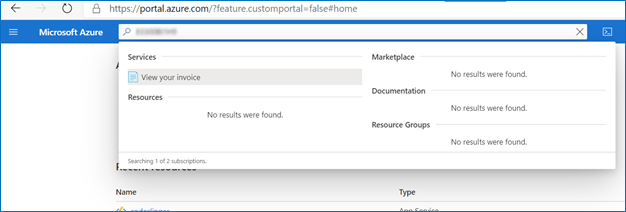
- You can now search for Azure invoices by typing in an invoice id.
- We have improved the search functionality on all pages that have a menu on the left. Previously, a term had to be spelled correctly in order to produce results, but now, slight misspellings are accepted, and any existing results will be shown.
Step 1 – Log into the portal
Step 2 – Paste an IP address or an invoice ID into the global search bar.
Sample search by IP address:
Sample search by Invoice ID:
INTUNE
Updates to Microsoft Intune
The Microsoft Intune team has been hard at work on updates as well. You can find the full list of updates to Intune on the What’s new in Microsoft Intune page, including changes that affect your experience using Intune.
Azure portal “how to” video series
Have you checked out our Azure portal “how to” video series yet? The videos highlight specific aspects of the portal so you can be more efficient and productive while deploying your cloud workloads from the portal. Check out our most recently published videos:
Next steps
The Azure portal has a large team of engineers that wants to hear from you, so please keep providing us your feedback in the comments section below or on Twitter @AzurePortal.
Sign in to the Azure portal now and see for yourself everything that’s new. Download the Azure mobile app to stay connected to your Azure resources anytime, anywhere. See you next month!


Recent Comments