Announcing new capabilities on Android and iOS

Announcing new capabilities on Android and iOS

This article is contributed. See the original author and article here.

Today we are excited to announce new Microsoft Defender for Endpoint capabilities that are generally available for Android and iOS that provide additional breach protection, reduce risk in your organization, simplify the end user experience, and offer secure access to on-prem resources.  


First, customers will notice an updated look to the Microsoft Defender for Endpoint mobile app. The new experience helps end users better understand the capabilities the app provides and enables the user to be more aware of the security threats to their device. Microsoft’s mobile threat defense solution will continue to offer:  


  • Protection against phishing coming from browsing, email, apps, and messaging platforms 

  • Scans for malware and potentially unwanted apps (on Android) 

  • Blocking of unsafe connections as well as access to sensitive data (on Android) 

  • A unified security experience for SecOps in Microsoft 365 Defender   
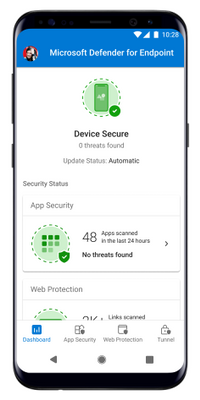

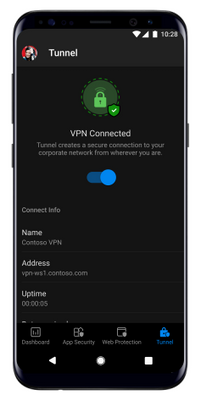
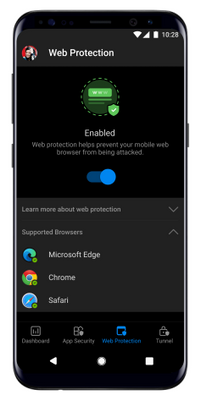
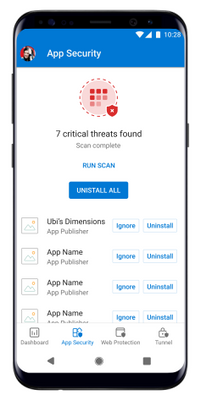
 App Security LightAppSecurity.pngDashboard light.pngTunnel.pngWeb Protection.png


     Figure 1: Microsoft Defender for Endpoint updated mobile app screens in light and dark mode. 


Mobile application management support for non-Intune enrolled devices 


We are pleased to announce the general availability of Microsoft Defender for Endpoint support for mobile application management (MAM) on Android and iOS. Prior to this update, Microsoft Defender for Endpoint worked on devices that were enrolled using Intune mobile device management (MDM) only.  


With this update Microsoft Defender for Endpoint can protect an organization’s data within a managed application for those who aren’t using an MDM but are using Intune to manage mobile applications. It also extends support to customers who use other enterprise mobility management solutions such as AirWatch, MobileIron, MaaS360, and others, while still using Intune for mobile application management.   


Microsoft Defender for Endpoint will continue to evaluate the device risk score based on threats identified on the device and will share that score with app protection policies. These polices provide an additional layer of breach protection by blocking access or selectively wiping a user’s corporate data. 


For setup and configuration details read the blog post.  


Jailbreak detection available for iOS 


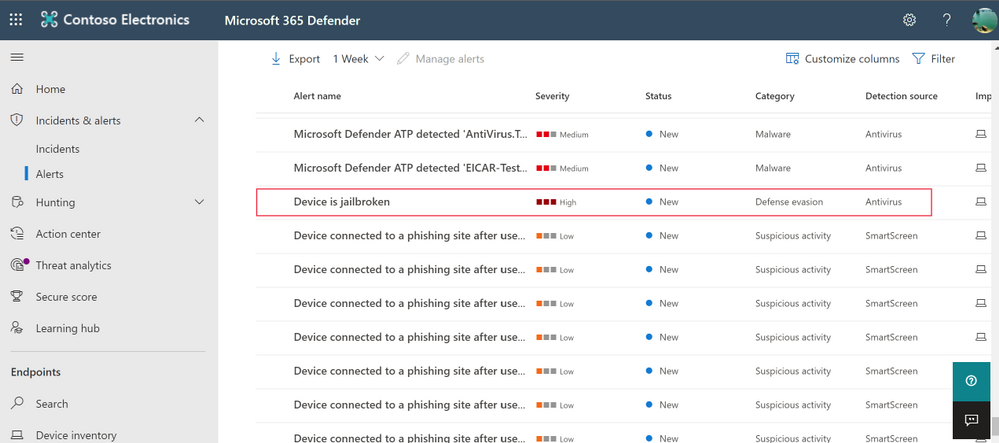
Jailbreaking an iOS device elevates root access that is granted to the user of the device. Once this happens, users can easily sideload potentially malicious applications and the iPhone won’t get critical, automatic iOS updates that may fix security vulnerabilities. These kinds of devices introduce additional risk and a higher probability of a breach to your organization. We are excited to share the general availability of the jailbreak detection capability in Microsoft Defender for Endpoint on iOS. This adds to the phishing protection that already exists.  


Jailbreak-Alert-Console-edit.png


Figure 2: Jailbreak alert in Microsoft 365 Defender  


With this change, Microsoft Defender for Endpoint on iOS will detect both unmanaged and managed devices that are jailbroken. If it’s detected that a device is jail broken, an alert is surfaced to the security team in Microsoft 365 Defender. The device will then be considered as a high risk device and this risk score is shared with your app protection or device compliance policies so that you can block it from accessing corporate resources.  


For more details, please refer to the documentation here. 


Simplified onboarding for iOS users 


As a part of our commitment to continuously improve the experience for end users, we are now also simplifying end user onboarding. Until now, end users needed to provide VPN permissions to allow the iOS app to provide anti-phishing protection. With this update, admins will be able to setup configuration and push the VPN profile to enrolled devices so that VPN related permissions will not have to be provided by end users, thus simplifying their onboarding experience. 


For more information, please refer to the documentation here. 


Microsoft Tunnel VPN integration 


Finally, we’re excited to share the general availability of Microsoft Tunnel VPN capabilities unified in the Microsoft Defender for Endpoint app for Android. This unification enables organizations to offer a simplified end user experience with one security app – offering both mobile threat defense and the ability to access on-prem resources from their mobile device, while security and IT teams are able to maintain the same admin experiences they are familiar with.  


Existing customers of Microsoft Defender for Endpoint, who are also licensed for Microsoft Tunnel, will see Tunnel capabilities in the Defender for Endpoint app on Android. Existing Tunnel customers will switch to using the Microsoft Defender for Endpoint app for VPN. They will not see any other changes to Tunnel features, it will simply now appear within the Defender for Endpoint app. IT administrators will be able to continue to use the Microsoft Endpoint Manager admin center to configure both Defender and Tunnel features. For additional details, read the blog announcing these changes. 


We’re excited to share these new updates with you and continue to build on security capabilities across platforms. We look forward to hearing your feedback! 


Microsoft Defender for Endpoint is an industry-leading, cloud-powered endpoint security solution offering vulnerability management, endpoint protection, endpoint detection and response, and mobile threat defense in a single unified platform. With our solution, threats are no match. If you are not yet taking advantage of Microsoft’s unrivaled threat optics and proven capabilities, sign up for a free trial of Microsoft Defender for Endpoint today. 



Announcing Microsoft Tunnel Gateway GA and Defender for Endpoint with Tunnel client functionality

This article is contributed. See the original author and article here.

We’re pleased to announce the Microsoft Tunnel Gateway is now generally available!


Also, as announced at Ignite, we’ve been working on combining the Microsoft Defender for Endpoint and Microsoft Tunnel apps into a single unified Microsoft Defender for Endpoint client. We’re excited to announce that this new version of Microsoft Defender for Endpoint is available today for Android for all our customers and is no longer in preview.


Beyond what was mentioned in our Ignite announcement, there are some things you should know:


  • If you’re using app configuration policy to configure settings for the Microsoft Defender for Endpoint app for Android Enterprise and are also using Tunnel today, in order to avoid conflict issues on personally-owned devices with work profiles, you’ll need to:

    1. Include the Microsoft Defender for Endpoint settings as custom settings in the Microsoft Tunnel VPN profile.

    2. Remove the app configuration policy.


Conflicting policies prevent the app from connecting to Microsoft Tunnel. These steps and settings are documented here.


  • In order to deploy the new version of Microsoft Defender for Endpoint in Microsoft Intune, you’ll need to sync your apps in the managed Google Play store.

  • If you’re previewing the Microsoft Defender for Endpoint app today, you’ll have the option to stay on the preview track and get the latest builds, or to move to the production track. To move to the production track, you’ll need to:

    1. Find your assignments for the Microsoft Defender for Endpoint app in the Microsoft Endpoint Manager admin center.

    2. For each assignment, click the list under Tracks and clear all checks in the list.

    3. Click OK, then Review + save, then Save.


While today we’re announcing that Microsoft Tunnel Gateway is generally available and are also releasing Microsoft Tunnel functionality in Microsoft Defender for Endpoint for Android, the Microsoft Tunnel client for iOS will remain in public preview for the time being.


The existing Microsoft Tunnel standalone client app for Android will be removed from the store after August 16, 2021, so if you’re previewing Tunnel today, be sure to move your users to the new Microsoft Defender for Endpoint client ahead of this date.


For more information, see:


Meet a recent Microsoft Learn Student Ambassador graduate: Riya Mistry

Meet a recent Microsoft Learn Student Ambassador graduate: Riya Mistry

This article is contributed. See the original author and article here.

This series highlights Microsoft Learn Student Ambassadors who achieved the Gold milestone and have recently graduated from university. Each blog features a different student and highlights their accomplishments, their experience with the Student Ambassadors community, and what they’re up to now. 


Today we’d like to introduce Riya Mistry, who is from India and recently graduated from the Dharmsinh Desai Institute of Technology.  


Student_Developer_Team_0-1623683328775.png


Responses have been edited for clarity and length. 


When you became a Student Ambassador in 2019 in your third year of college, did you have any specific goals you wanted to reach, like attain a skill or work on a particular quality? What were they, and did being a Student Ambassador help you achieve them? How has being in the community impacted you in general? 


Since the idea of global tech communities was not well known in my local college communities, my main goal was to first get familiar with the learning, growth, and opportunities provided by the Student Ambassadors community and then help to expand the reach of it to my college and people around me.  The main technology that I was passionate about initially was cloud computing, and joining this community helped me greatly in terms of learning about Azure.  I now even have the certification in it, so I was able to achieve that goal. Also, in general, being a member of this community helped me gain more confidence to speak up in public, which I had feared the most.  


What were some of the accomplishments that you’re proudest of and why?  


There are many accomplishments, but the one I am most proud about was the day when it was announced that I had reached the Gold milestone [editor’s note: this is the highest level one can attain as a Student Ambassador].  After joining this community and then getting to know about the different milestones, I never thought I would be able to reach the Gold one. Apparently, my hard work and passion for the community caught the attention of the program’s Community Program Managers, who recommended that I be promoted to the status of Gold Ambassador.


The second accomplishment is the event which I hosted, “Introduction to Apache Spark”. It was approximately a 1.5hr event and had the highest number of attendees out of events organized in my institution, even in the lockdown; attendees showed keen interest in learning until the very end. It felt like a huge accomplishment that I had helped people to get familiar with something new. 


What do you have planned after graduation?  What’s next for you?  


I have joined as a Software Engineer Intern at Crest Data Systems, a leading provider of custom solutions in the areas of data analytics, cybersecurity, ITOps/AIOps, DevOps, and cloud. I help them with security analytics and automation projects to detect real-time threats using cloud technology.  In my free time, I do a little bit of coding and give back to the community by conducting sessions and helping others new in the Student Ambassadors program to get familiar with what is required.  


If you could redo your time in the Student Ambassador community, is there anything you would have done differently?   


I am mostly satisfied with the time and opportunities I had being in the program, so I don’t think I would redo anything, although I do feel if something can be changed, I might have joined the community a little bit earlier, in my 2nd year of college. 


If you were to describe the community to a student who is considering joining, what would you say to convince them to join? 


If you love to be around a community of like-minded people, if you love new technology and like to explore each and every new thing you hear, then this is the best place you can join. Come be a part of the most diverse community where you will learn communication, management, marketing–and don’t forget–technical skills. It’s the best experience someone could wish for as a student


And what advice would you give to new Student Ambassadors? 


My advice to new Student Ambassadors is to keep learning new things, talk to folks, ask questions if you have any. There are plenty of people here to help you out in the community. And most importantly, be active in the program, as opportunities are innumerable each and every day. Organize your first event, take part in Hackathons, and contribute to your best to give back to the community.  


Do you have a motto in life, a guiding principle that drives you? 


My motto for life is “Every expert was once a beginner”. That helps me learn and explore new things without having the fear of failure.  


Lastly, on a lighter note, can you share a random fun fact about yourself that few people are aware of? 


Apart from technology, I enjoy cooking and trying different cuisines and creating my own version of it. Also anything is delicious when cheese is added to it! Bit of a cheese lover. 


Thank you, Riya, and good luck to you in all your future endeavors! 

Driving empathetic, connected service experiences with Dynamics 365

Driving empathetic, connected service experiences with Dynamics 365

This article is contributed. See the original author and article here.

The ongoing global pandemic has permanently changed our livesfrom how we interact, where we work, and how we work. If there’s one major takeaway we’ve learned from the continuously evolving macroeconomic climate, it’s that efficient, reliable, and timely service delivery has become more critical than ever. The sophisticated, often complex machinery and equipment that keep our businesses and society running smoothly depend on regular servicing and maintenance.

Efficient field service management is an area that is fast becoming a top priority for organizations worldwide. With the infusion of cutting-edge technology including mixed reality, machine learning, and AI, Microsoft Dynamics 365 Field Service has enabled organizations to deliver timely service to their end customers and drastically reduced the need for onsite visits especially during a time of stringent travel restrictions and border closures.

For frontline workers who previously had to only focus on how to install, diagnose or repair a device, they now needed to focus on getting the job done with minimal in-person contact and social distancing measures. TSIA reported that 78 percent of field service organizations ceased deploying technicians to customer sites during the height of the pandemic.1 This may have been a reaction to 75 percent of consumers not wanting a field technician physically in their home unless absolutely necessary.2

The heart of field service lies in its people-centricitythus, having to physically distance oneself from the customers whom you serve inevitably puts most companies in a challenging position. This frustration led to an evolution in service delivery. The pandemic compelled field service workers to rethink their overall approach to daily operations, including completing initial diagnostics and troubleshooting by telephone, video calling, and other digital tools where possible. To comply with social distancing measures, field technicians often had to arrange onsite visits only when customers would be on break or away from the site. Technicians made every effort to minimize their time onsite and needed to ensure they had all the right parts and tools ready so they would not have to return for follow-up visits to complete the task. These accommodations may have helped to maintain or at least reduce any negative impact on service delivery rates despite limited resources due to travel and other restrictions but may not be sufficient when organizations are faced with a sudden deluge of service requests.

Now, many companies have begun investing in tools like Dynamics 365 Field Service and Dynamics 365 Remote Assist that can help ensure the health and safety of both the technician and customers while maintaining business continuity regardless of ongoing global situations. Together, these tools enable organizations to deliver exceptional servicebe it remote or in-person, if neededto customers, automate time-consuming case creation and work order processes to ultimately help organizations develop resiliency to weather through challenging times.

Adoption of Connected Field Service

During the COVID-19 pandemic, service organizations pivoted to new work arrangements faster than they expected, and companies jumped quickly ahead into the future workplace. One of these pivots was the turn to virtual productivity platforms, namely Connected Field Service, which has provided a wealth of advantages. These platforms allow service providers to fix problems remotely and even proactivelyall while avoiding onsite services that could otherwise compromise employee and customer safety. The enormous value of this technology was realized during the height of the pandemic, making it useful and applicable across many industries. This realization fueled explosive growth in Connected Field Service, which would’ve taken a longer, slower path without the urgency of digital transformation during these critical times.

The global pandemic greatly accelerated innovation in service delivery with Connected Field Service and rapidly became a prerequisite for not only survival, but success in a variety of industries. Transitioning from the typical break/fix model, Connected Field Service has revolutionized this traditional business model, going beyond proactive to now even predictive service models that utilize multiple facets of asset maintenance, Internet of Things (IoT) diagnostics, scheduling, and inventory management on a single platform.

Connected Field Service has been proven to dramatically improve productivity and achieves a quick return on investment. This cohesive solution using Dynamics 365 Field Service and Remote Assist has truly transformed the field service management categorywhat used to take several technicians hours or even days to manage manually can now often be resolved in mere minutes with real-time support from remote experts using 3D mixed reality annotations right within the technician’s real-world environment. Now, service management cases can be easily created, edited, and managed end-to-end through one connected system to help track issues from ticket creation all the way through to issue resolution.

By using Connected Field Service, companies can identify and address issues more effectively with remote monitoring of IoT devices that can send IoT signals and trigger alerts via Dynamics 365 Field Service. Technicians can remotely diagnose and troubleshoot issues even before the customer detects the issue, minimizing costly downtime and time-consuming service calls. Field service organizations can also leverage device diagnostic data to proactively schedule device service and leverage predictive analytics with AI, increasing productivity and reducing costs associated with the reactive break/fix model.

Connected Field Service offers a solution to the dilemma of service delivery in a landscape where physical and digital environments are blending. As devices, sensors, gateways, data, and applications become more advanced and as connectivity methods become more economical like IoT plug and play, more technologies can be easily connected to these networks and achieve even greater efficiencies.

Predicting the future of Field Service Management

The need for Connected Field Service will undoubtedly continue to growaccelerating response times, increasing productivity, reducing operational costs with the ultimate goal of exceeding customers’ expectations to drive long-term customer satisfaction and loyalty. In fact, Juniper Research estimates that the number of IoT devices this year will reach 46 billion and this figure is expected to jump to 125 billion by 2030.3

Contact-free service will continue its evolution as more and more customers become advocates of the experience, embracing the idea of new technologies, processes, and procedures while driving migration to IoT devices. Meanwhile, AI-driven technician scheduling will help organizations optimize resources and minimize costs by ensuring that technicians with the right skillsets are dispatched whenever and wherever they are needed.

Advances in AI and mixed reality will help spur additional growth by increasing productivity with leading-edge tools such as Dynamics 365 Remote Assist on both iOS and Android mobile devices and the HoloLens 2. Field service organizations can enable Dynamics 365 Remote Assist One-Time Calling (OTC) for customers to walk them through processes to deliver remote, contact-free service. Mixed reality will also enable customers to share their real-time views with remote experts to help minimize the need for in-person, onsite support. No wonder some industry analysts expect shipments of mixed reality devices to exceed five million in the next three years.4

Of course, there will always be issues that will require in-person onsite support, such as emergency response or complex machinery repairs, but for a large segment of work, remote work is certainly a valuable option and is likely here to stay. For jobs that must be serviced onsite, advances in AI will help enhance the process by optimizing scheduling resources and dispatching technicians with the right expertise. For instance, advanced AI capabilities within Dynamics 365 Field Service will optimize technician schedules by automatically dispatching the most experienced technician closest to the customer site. Plus, the Field Service mobile app will automatically notify the customer by text so that they are aware of the service technician’s estimated arrival time, and can easily track the technician’s geolocation via the app.

When onsite, technicians can use mixed reality technology like Dynamics 365 Remote Assist on HoloLens 2 to access critical information about the device they’ve been sent to repair, including service history and diagnosticsall anchored within their real-world environment. If they encounter any unexpected complexities during the repair, they can simply connect with a remote expert to share their real-time view, and leverage 3D annotations right in their physical work environment to help guide them along.

Embracing innovation

Cloud-based technologies, the adoption of mobile-based, and Connected Field Service management solutions have all helped create the right conditions to enable field workers to complete their service requests remotely and efficientlymuch to the delight of customers.

These challenging times in human history have taught us to embrace innovationnot just to merely weather through the storm, but to ensure long-term resilience. Connected Field Service is no longer an option and mixed reality technologies like Remote Assist, HoloLens 2, and Dynamics 365 Guides are anything but science fiction. These technologies have all earned their place in service delivery and together, help to fuel business continuity, create additional revenue streams, and most of all, ensure customer satisfaction and long-term engagement. Discover how to deliver empathetic, connected service experiences today.

Find out more on Connected Field Service.

Learn about Dynamics 365 Field Service and delivering proactive service.

Get the latest on Dynamics 35 Remote Assist and Dynamics 365 Guides.


1-“Impact of COVID-19 on OEM Field Service Organizations“, Vele Galovski, TSIA, April 9, 2020

2-“Enhancing Remote Maintenance using Visual Technology“, Andrew Mort, CustomerThink, September 10, 2020

3-“How Many IoT Devices Are There in 2021?“, Juniper Research, March 29, 2021

4-“Mixed Reality For Field Service“, Danny Wieder, Field Service News, June 3, 2019

The post Driving empathetic, connected service experiences with Dynamics 365 appeared first on Microsoft Dynamics 365 Blog.

Brought to you by Dr. Ware, Microsoft Office 365 Silver Partner, Charleston SC.

The New Surface Podcast Series!

This article is contributed. See the original author and article here.

Hey HLS Blog Members!


We’ve been thinking about this for a while and we’ve decided that its time to share a bit more about Microsoft and its journey into the hardware world. We’re taking you down the road to learn a bit more about the Microsoft Surface Business. We’ll be sharing weekly recordings of the current state of the hardware world and how it fits into the world of Health and Life Sciences. We ask that you join us and watch the session available on youtube.