This article is contributed. See the original author and article here.
Every organization—regardless of size—incurs employee expenses for travel, meals, office supplies, mileage, per diem, and more. When these expenses are managed without a structured, automated process, companies may face higher administrative overhead and compliance challenges, compliance risks, while employees can experience delayed reimbursements, limited transparency, and additional friction.
To address this challenge, we’re excited to introduce Expense Agent, a brand‑new AI‑powered experience coming to Dynamics 365 Business Central.
What is Expense Agent?
Expense Agent in Dynamics 365 Business Central is an AI-powered agent designed to simplify how employees capture, submit, and manage expenses, while ensuring organizations maintain control, compliance, and auditability.
Our north‑star vision is simple: make expense management feel effortless for employees.
Expense Agent helps by automatically collecting, categorizing, and preparing expenses and expense reports, so employees typically only need to review and confirm the results. In many scenarios, the agent significantly reduces manual effort by preparing expenses in advance for user review. Paper receipts may still need to be scanned, but digital receipts, mileage, and allowances can be captured automatically.
Importantly, autonomy is configurable. Organizations decide how much they trust the agent and can tune its level of independence to match internal policies and comfort levels.
A new agent model for a new audience
Expense Agent follows a different design philosophy than existing Business Central agents.
Existing Business Central agents are optimized for users working inside ERP. Expense Agent, however, is built for people who are not ERP users at all—field workers, drivers, technicians, travelers, or occasional office staff. These users shouldn’t need to understand financial systems to submit expenses correctly.
As a result, Expense Agent meets users where they already work:
A dedicated web app for non‑Business Central users
Outlook
Microsoft 365 Copilot Chat (coming next)
But also, in Business Central
Business Central licenses are not required for expense submission if working outside of Business Central. Instead, usage is metered through Copilot Credits, providing flexibility and cost alignment based on actual usage.
Built AI‑first—from day one
Expense Agent is not just an agent layered on top of existing functionality. In fact, we didn’t previously have native expense management in Business Central.
This solution was designed with AI as a core component ground up, using:
Model‑driven and eval‑driven development
Continuous learning and quality validation
Deep integration between the agent and Business Central finance capabilities
The result is an experience where AI is not an add‑on—but the foundation.
How it works
When a user uploads or shares a receipt, Expense Agent automatically:
Extracts required data from the receipt across supported languages
Categorizes expenses based on configured expense categories
Add other relevant information
Optionally itemizes receipts, or add other information, if configured
Applies relevant company policies and rules in the background
Once reviewed, expenses are automatically added to an existing expense report—or a new one is automatically created when appropriate. Users simply submit the report for approval.
Expense Agent also supports:
Mileage, per diem, and other types of allowances
Cash, corporate card, and bank‑paid expenses
Project‑related expenses posted directly to project ledgers
Billable expenses that are automatically reinvoiced
Behind the scenes, the agent continuously validates expenses against regulatory and internal policy requirements—helping organizations support compliance requirements while minimizing additional complexity for users.
Availability and what’s next
Expense Agent is currently available in private preview, where we’re collecting early feedback.
Public Preview planned to start in May 2026, as part of 2026 Release Wave 1
The public preview will initially be available in English only and limited to the United States.
Additional languages and country availability are planned to begin rolling out from July 2026
We’ll showcase Expense Agent publicly for the first time at Directions NA, followed by Directions Asia and DynamicsMinds.
Public preview is not a single milestone—it’s an ongoing journey. We have a strong backlog of enhancements already in progress, with new capabilities planned to roll out regularly throughout the year as we expand language coverage, regional availability, and end‑to‑end scenarios.
Our goal is to be a full end-to‑end expense agent supporting employees, approvers, and finance teams across the entire lifecycle, from capture to posting, with minimal manual effort.
This article is contributed. See the original author and article here.
For years, contact centers have shouldered some of the most persistent challenges in customer experience. They’re expected to help differentiate brands, improve customer retention, surface new revenue opportunities, and reduce frontline burnout — all while managing rising interaction volumes and escalating costs. Artificial intelligence has been positioned as the answer, and investment has accelerated accordingly. Yet despite rapid progress in AI capabilities, many contact centers still struggle to translate that innovation into durable, enterprise-scale impact.
The problem isn’t that AI doesn’t work. It’s that it has been applied in pieces. One solution for self-service. Another for agent assist. Separate tools for quality management, analytics, and administration. Each may deliver value in isolation, but together they create fragmentation. This creates disconnected experiences for customers, service representatives, supervisors, and administrators, and AI programs that stall at pilots rather than scaling across the business.
Addressing the challenge
Microsoft is addressing this challenge by rethinking how AI shows up across the entire contact center lifecycle. Instead of delivering disconnected features, Microsoft Dynamics 365 Contact Center introduces a coordinated agent model. Purpose-built AI agents are designed to work together from day one, each aligned to outcomes across engagement, quality, and operations. This approach directly contrasts with traditional CCaaS platforms. Typically, AI is embedded as isolated capabilities operating only within the boundaries of the contact center application, limiting reuse, shared context, and enterprise scale.
Built on a shared intelligence, data, analytics, and orchestration layer, these three contact center agents are designed to continuously learn from every interaction, whether resolved autonomously or with human support. Together, these agents help form the foundation of a truly modern contact center. Because they are built on Copilot Studio rather than a CCaaS-specific AI stack, Dynamics 365 Contact Center agents are not confined to a single vendor ecosystem. They can participate in broader business workflows with consistent governance, security, and learning across the enterprise.
Customer Assist Agent: Frontline for Every Customer Interaction
The Customer Assist Agent is the primary AI agent responsible for customer self-service across voice and digital channels in Dynamics 365 Contact Center.
The newest capability in Customer Assist Agent is support for real-time voice AI. Real-time AI can listen, reason, and respond naturally with ultra-low latency. It handles interruptions, maintains context across turns, and adapts based on customer intent.
Traditional IVR can become brittle as interactions grow complex, while standalone AI voice solutions often lack enterprise control. Customer Assist Agent in Dynamics 365 Contact Center combines both. It uses deterministic logic for precise, auditable moments like payments and compliance, and generative, real-time reasoning for dynamic, multi-intent conversations. Built in Copilot Studio, real-time AI supports natural speech, interruptions, multi-language switching, and DTMF fallback. Connected to enterprise systems, voice becomes a resolution engine. Accuracy can improve over time as business users tune behavior directly in Copilot Studio using real interaction data.
When inquiries fall outside the bounds of automation or involve high-value or sensitive scenarios, the Customer Assist Agent escalates to a human Customer Service Representative (CSR). Importantly, this is not a handoff requiring customers to start over. The full conversation context, including intent, history, and progress, transfers intact so humans can pick up where it left off.
The Customer Assist Agent goes beyond inbound support by enabling proactive engagement—reaching out to customers on their preferred channels. AI agents use context, intent signals, and orchestration to initiate conversations for reminders, delivery updates, payment notifications, or issue resolution. Engagements range from simple notifications to dynamic, multi-step conversations that adapt based on customer responses across voice and digital channels.
Customer Assist Agent is Generally Available.
Quality Assurance Agent: Insight and Continuous Optimization
As AI becomes deeply embedded in customer interactions, quality management can no longer rely on sampling a small percentage of conversations after the fact. The Quality Assurance Agent supports supervisors in an AI and human collaborative model at scale, evaluating interactions in real time and post-conversation.
The Quality Assurance Agent is purpose-built to evaluate customer interactions with the Customer Assist Agent or customer service representatives at scale, in real time and post conversation. It measures conversation quality indicators such as empathy, tone, and business-defined custom quality criteria. Rather than producing static reports, it monitors for anomalies, emerging issues, and quality drops, surfacing alerts or recommended mitigation steps as needed. This is designed to help supervisors intervene earlier, address problems before they escalate, and maintain consistent service quality across both AI-led and human-led interactions.
Working in an autonomous loop with the Customer Assist Agent, the Quality Assurance Agent helps organizations identify opportunities to improve their self-service workflows and the overall quality of conversations.
Quality Assurance Agent is Generally Available.
Service Operations Agent: Accelerating Setup, Governance, and Scale
The Service Operations Agent is an AI assistant designed for contact center administrators and IT teams, focused on improving setup time, configuration, and governance. With more automation, operational complexity often increases. This means more environments to manage, more rules to govern, and more integrations to maintain. The Service Operations Agent can help administrators address this challenge.
Service Operations Agent helps provision and configure contact center environments rapidly, including trials and new deployments. It can potentially automate everything from initial environment setup to workflows and channels. This reduces manual effort and configuration errors, with the potential to significantly shorten time-to-value for new implementations.
The Service Operations Agent also introduces conversation orchestration. This continuously monitors and adapts customer conversations in real time using natural-language playbooks. It also helps improve queue management with capabilities such as dynamic prioritization of waiting conversations and intelligent overflow based on customer service representative availability.
Service Operations Agent is in Public Preview, available in US only.
“As one of the leading electronics retailers in Greece and Cyprus, we operate at scale across retail and after-sales service. Dynamics 365 helps us deliver a more proactive, conversational, and context-aware experience. With Customer Journeys and proactive engagement in D365 Customer Insights and autonomous conversation orchestration in Service Operations Agent for D365 Contact Center, we can anticipate customer needs, route customers intelligently, and carry interactions across SMS and voice, reducing friction and operational costs. At Kotsovolos, we continuously optimize our customer support to enable better living for everyone, everywhere.”
– Ioannis Papidis, CTO, Kotsovolos
Three Agents, One Copilot
Together, the Customer Assist Agent, Quality Assurance Agent, and Service Operations Agent can form the foundation of an autonomous, AI-powered contact center. Copilot ties them together, providing a single control plane where human leaders can oversee AI actions, guide learning, and maintain accountability. Each agent is priced using Copilot credits, providing flexible, consumption-based economics.
Each agent is priced using Copilot credits, providing flexible, consumption-based economics. Credits are consumed based on AI activity such as conversations handled, real-time assistance provided, summaries generated, and quality evaluations performed, rather than per-seat licensing. This allows organizations to start small, scale usage as adoption grows, and align spend directly to value delivered, while continuing to use the same agents across voice and digital channels. This outcome-based agent architecture is intended to replace disjointed tools and manual processes. It creates a coordinated system spanning engagement, quality, and operations.
The result is a blended workforce where humans and AI operate in concert, each focused on what they do best. AI handles scale, speed, and continuous optimization, while people deliver empathy, judgment, and trust. With Dynamics 365 Contact Center, Microsoft is defining a new model for customer engagement, one where AI is not an add-on but the connective tissue designed to enable faster resolution, smarter operations, and more meaningful customer relationships.
This article is contributed. See the original author and article here.
Announcing new agentic customer experience capabilities in Dynamics 365 and Microsoft Copilot Studio across the entire customer lifecycle.
For years, customer experience (CX) leaders have navigated hard tradeoffs between better service and lower costs or faster resolution and deeper personalization, all while customer expectations continue to rise and teams are asked to do more with aging systems and flat headcount. Scaling growth meant scaling people. But that model has its limits.
What’s changed is agentic CX. AI can now move beyond simply assisting work to helping automate routine, predictable tasks throughout the customer journey. That shift frees teams to focus on the moments that require uniquely human skills including judgment, empathy, and creativity. And it has the opportunity to completely transform customer experience into a critical growth engine for organizations that adopt it now.
New real-time voice agents in Microsoft Copilot Studio
Voice becomes even more critical in the era of AI to build trust and resolve complex high-stakes issues. According to research from Metrigy, “82% of all interactions use voice, either initially or as an escalation.“
We’re excited to announce the general availability of real-time voice agents in Copilot Studio, supporting the next generation of real-time voice models, extending traditional Interactive Voice Response (IVR) by using natural and flexible conversations with generative AI. Now, customers can simply talk like they normally would—without having to follow rigid pre-defined prompts. As customers move seamlessly between self-service and human support, the system carries context forward, so customers don’t need to repeat themselves.
Copilot Studio is Microsoft’s enterprise agent building platform allowing IT to build, manage, and deploy sophisticated custom agents. In addition to allowing customers to build custom agents, we’re bringing real-time voice capabilities to pre-built agents in Dynamics 365 Contact Center—available starting today.
Agentic contact center: Where customer intent drives action
Customers want a single, continuous conversation with the brands they love. Instead, they often experience fragmentation because AI in contact centers is often deployed as disconnected tools—self-service, agent assist, quality, and operations—leading to lost context and broken experiences.
Dynamics 365 Contact Center addresses this by treating the customer journey as a single, connected experience rather than a series of isolated moments. With the Customer Assist Agent, Quality Assurance Agent, and Service Operations Agent, AI spans the full contact center lifecycle, from self‑service and agent assistance to quality management and operational governance.
This isn’t about replacing our customer teams—it’s about allowing them to do what they do best: being there for customers when they really need them. By taking the drudgery out of back office work, agentic AI can recommend the next best action and do the heavy lifting behind the scenes, giving our teams more time to support customers and driving better outcomes for both customers and employees.
// Modify player theme based on localStorage value.
let options = {“autoplay”:false,”hideControls”:null,”language”:”en-us”,”loop”:false,”partnerName”:”cloud-blogs”,”poster”:”https://www.microsoft.com/en-us/dynamics-365/blog/wp-content/uploads/2026/04/RF_MSFT_CCaaS_Still1_042326-1.png”,”title”:””,”sources”:[{“src”:”http://cdn-dynmedia-1.microsoft.com/is/content/microsoftcorp/3595400-Dynamics365ContactCenter-0x1080-6439k”,”type”:”video/mp4″,”quality”:”HQ”},{“src”:”http://cdn-dynmedia-1.microsoft.com/is/content/microsoftcorp/3595400-Dynamics365ContactCenter-0x720-3266k”,”type”:”video/mp4″,”quality”:”HD”},{“src”:”http://cdn-dynmedia-1.microsoft.com/is/content/microsoftcorp/3595400-Dynamics365ContactCenter-0x540-2160k”,”type”:”video/mp4″,”quality”:”SD”},{“src”:”http://cdn-dynmedia-1.microsoft.com/is/content/microsoftcorp/3595400-Dynamics365ContactCenter-0x360-958k”,”type”:”video/mp4″,”quality”:”LO”}],”ccFiles”:[{“url”:”https://www.microsoft.com/en-us/dynamics-365/blog/wp-json/bloginabox/v1/get-captions?url=https%3A%2F%2Fwww.microsoft.com%2Fcontent%2Fdam%2Fmicrosoft%2Fbade%2Fvideos%2Fproducts-and-services%2Fen-us%2Fmicrosoft-365%2F3595400-dynamics365contactcenter%2F3595400-Dynamics365ContactCenter_cc_en-us.ttml”,”locale”:”en-us”,”ccType”:”TTML”}],”downloadableFiles”:[{“url”:”https://cdn-dynmedia-1.microsoft.com/is/content/microsoftcorp/3595400-Dynamics365ContactCenter_transcript_en-us”,”locale”:”en-us”,”mediaType”:”transcript”}]};
if (currentTheme) {
options.playButtonTheme = currentTheme;
}
Customer Assist Agent (generally available) manages high‑volume requests across voice and digital channels, carrying context through to resolution, including support for the real‑time voice agents discussed above and proactive communication. Real‑time voice agents, built and configured in Copilot Studio, support natural speech, interruptions, and multi‑language switching to help resolve common issues efficiently and in the way that customers prefer to communicate.
Quality Assurance Agent (generally available) continuously evaluates both AI and human interactions, tracking quality, sentiment, compliance, and resolution effectiveness in real-time, so supervisors can intervene earlier and coach their teams more effectively. Service Operations Agent (public preview) enables leaders to set up, configure, and optimize contact center operations through a guided, conversational experience without requiring deep technical expertise.
Together, these agents span the entire customer lifecycle, from self-service to operations, continuously learning from every interaction to deliver smarter, higher-quality customer experiences.
Sales teams don’t lose deals because they lack data. They lose momentum managing it. Today, we’re introducing five new agentic features in Dynamics 365 Sales that automate routine work, keep data current, and proactively drive next best actions, keeping deals moving forward with greater speed and confidence.
// Modify player theme based on localStorage value.
let options = {“autoplay”:false,”hideControls”:null,”language”:”en-us”,”loop”:false,”partnerName”:”cloud-blogs”,”poster”:”https://cdn-dynmedia-1.microsoft.com/is/image/microsoftcorp/3595250-CRM-In-The-Flow_tbmnl_en-us?wid=1280″,”title”:””,”sources”:[{“src”:”https://cdn-dynmedia-1.microsoft.com/is/content/microsoftcorp/3595250-CRM-In-The-Flow-0x1080-6439k”,”type”:”video/mp4″,”quality”:”HQ”},{“src”:”https://cdn-dynmedia-1.microsoft.com/is/content/microsoftcorp/3595250-CRM-In-The-Flow-0x720-3266k”,”type”:”video/mp4″,”quality”:”HD”},{“src”:”https://cdn-dynmedia-1.microsoft.com/is/content/microsoftcorp/3595250-CRM-In-The-Flow-0x540-2160k”,”type”:”video/mp4″,”quality”:”SD”},{“src”:”https://cdn-dynmedia-1.microsoft.com/is/content/microsoftcorp/3595250-CRM-In-The-Flow-0x360-958k”,”type”:”video/mp4″,”quality”:”LO”}],”ccFiles”:[{“url”:”https://www.microsoft.com/en-us/dynamics-365/blog/wp-json/bloginabox/v1/get-captions?url=https%3A%2F%2Fwww.microsoft.com%2Fcontent%2Fdam%2Fmicrosoft%2Fbade%2Fvideos%2Fproducts-and-services%2Fen-us%2Fmicrosoft-365%2F3595250-crm-in-the-flow%2F3595250-CRM-In-The-Flow_cc_en-us.ttml”,”locale”:”en-us”,”ccType”:”TTML”}],”downloadableFiles”:[{“url”:”https://cdn-dynmedia-1.microsoft.com/is/content/microsoftcorp/3595250-CRM-In-The-Flow_transcript_en-us”,”locale”:”en-us”,”mediaType”:”transcript”},{“url”:”https://cdn-dynmedia-1.microsoft.com/is/content/microsoftcorp/3595250-CRM-In-The-Flow_audio_en-us”,”locale”:”en-us”,”mediaType”:”audio”}]};
if (currentTheme) {
options.playButtonTheme = currentTheme;
}
Smarter signals give sales leaders a clearer, real-time view of the business so they can act sooner and drive opportunities forward. In complex deals, momentum often breaks when customer communications are scattered across emails, meetings, and documents, but Sales Opportunity Agent (generally available)acts as an AI deal brain synthesizing insights across Dynamics 365 and Microsoft 365 to surface risk early, flag shifts in engagement, and guide sellers to the next best actions without manual analysis or context switching.
Alongside it, new Operations Research (generally available for Premium customers) in Sales Research Agent (generally available) brings together pipeline, operational, and financial signals, so leaders walk into forecast calls with clarity on revenue health, risk, and confidence.
// Modify player theme based on localStorage value.
let options = {“autoplay”:true,”hideControls”:null,”language”:”en-us”,”loop”:false,”partnerName”:”cloud-blogs”,”poster”:”http://cdn-dynmedia-1.microsoft.com/is/image/microsoftcorp/3596100-OpportunityAgentGIF_tbmnl_en-us?wid=1280″,”title”:””,”sources”:[{“src”:”https://cdn-dynmedia-1.microsoft.com/is/content/microsoftcorp/3596100-OpportunityAgentGIF-0x1080-6439k”,”type”:”video/mp4″,”quality”:”HQ”},{“src”:”https://cdn-dynmedia-1.microsoft.com/is/content/microsoftcorp/3596100-OpportunityAgentGIF-0x720-3266k”,”type”:”video/mp4″,”quality”:”HD”},{“src”:”https://cdn-dynmedia-1.microsoft.com/is/content/microsoftcorp/3596100-OpportunityAgentGIF-0x540-2160k”,”type”:”video/mp4″,”quality”:”SD”},{“src”:”https://cdn-dynmedia-1.microsoft.com/is/content/microsoftcorp/3596100-OpportunityAgentGIF-0x360-958k”,”type”:”video/mp4″,”quality”:”LO”}]};
if (currentTheme) {
options.playButtonTheme = currentTheme;
}
Two new agentic features that we’re announcing today are designed to increase seller productivity, help keep customer relationship management (CRM) data accurate, and move deals forward. Data Enrichment (generally available for Premium customers) and Recommended Actions (public preview for Premium customers) connect signal directly to action automatically keeping CRM fields like budget, contacts, and close dates up-to-date while surfacing the most impactful next step across leads, opportunities, and accounts right where sellers already work.
With Voice to CRM notes for Outlook and Microsoft 365 mobile applications (public preview), sellers can simply speak to capture updates, such as logging notes, updating opportunities, and surfacing what matters next—reducing manual effort while improving data quality and deal velocity wherever work happens.
AI‑driven data enrichment will improve the quality, consistency, and completeness of customer data in Dynamics, reducing administration for every person on the sales teams while improving our ability to action, analyze, and improve customer outcomes.
—Nick Segger, Head of Sales and Agency Transformation, NFU Mutual
Agentic customer insights: From campaigns to conversations
Conversational Journeys (generally available) in Dynamics 365 Customer Insights and Dynamics 365 Contact Center lets marketers, service reps, and sellers design multi-channel journeys that include AI-powered two-way conversations. Conversational Journeys is already available for phone interactions, and we are expanding this capability to SMS.
Now, the same continuity currently available in voice is extended to text for even more convenience to customers. Users can create AI agents that understand intent, adapt in real-time, and complete tasks end-to-end, stepping in with a human only when it truly matters. The result is simpler service resolution and more growth potential, with marketing teams able to drive action directly within a text whether it’s a reminder, a reorder, or a loyalty moment.
// Modify player theme based on localStorage value.
let options = {“autoplay”:true,”hideControls”:null,”language”:”en-us”,”loop”:false,”partnerName”:”cloud-blogs”,”poster”:”https://cdn-dynmedia-1.microsoft.com/is/image/microsoftcorp/3596151-Conversational-Journeys-Gif_tbmnl_en-us?wid=1280″,”title”:””,”sources”:[{“src”:”https://cdn-dynmedia-1.microsoft.com/is/content/microsoftcorp/3596151-Conversational-Journeys-Gif-0x1080-6439k”,”type”:”video/mp4″,”quality”:”HQ”},{“src”:”https://cdn-dynmedia-1.microsoft.com/is/content/microsoftcorp/3596151-Conversational-Journeys-Gif-0x720-3266k”,”type”:”video/mp4″,”quality”:”HD”},{“src”:”https://cdn-dynmedia-1.microsoft.com/is/content/microsoftcorp/3596151-Conversational-Journeys-Gif-0x540-2160k”,”type”:”video/mp4″,”quality”:”SD”},{“src”:”https://cdn-dynmedia-1.microsoft.com/is/content/microsoftcorp/3596151-Conversational-Journeys-Gif-0x360-958k”,”type”:”video/mp4″,”quality”:”LO”}]};
if (currentTheme) {
options.playButtonTheme = currentTheme;
}
Get started with agentic CX: Real-time voice agents are available now
Ready to get started with these new agents? Connect with your Microsoft sales representative to explore upgrading to Premium or contact sales to learn more. For additional details, check out the Copilot Studio blog on real-time voice agents and our technical Dynamics 365 Contact Center blog, which dives deeper into the three new agents.
Note: Some of the capabilities described are in preview and subject to change. Customer examples are provided for illustrative purposes only. Results may vary. AI-generated insights should be reviewed by qualified personnel before action is taken.
This article is contributed. See the original author and article here.
Manufacturing leaders today are under constant pressure: volatile demand, fragile supply networks, inventory risk, and zero tolerance for missed customer commitments. Plants must protect margins and maintain uptime while responding to disruption with incomplete or delayed information.
To lead in this environment, manufacturers need decision-making that surfaces risk earlier, absorb supply shocks faster, and replans quickly, so production stays aligned to demand and customer commitments.
Microsoft Dynamics 365 is your agentic enterprise resource planning (ERP) foundation
Dynamics 365 gives manufacturers a connected foundation where signals from demand, supply, capacity, and cost can drive action. As part of the Microsoft platform, it brings together data, analytics, automation, and collaboration across the business.
Imagine a manufacturing stack where every part of the business is connected, where data isn’t fragmented across systems but unified into a shared understanding of operations, and where insights don’t sit in dashboards but show up in context, in the flow of work. Where your teams can build AI agents and adapt processes in real time rather than reengineering them months later. Where every person operates with the full context of the business, demand, supply, capacity, and commitments, every decision drives aligned action across the company. This is what it means to close the gap between knowing and doing.
At Hannover Messe 2026, Microsoft is showcasing how agentic ERP with Copilot, agents and Dynamics 365 supports these operational decisions amid constant change, helping manufacturers replan faster, make better production tradeoffs, and meet or exceed customer service SLAs.
From sensing demand shifts to mitigating supplier delays, production constraints, and equipment downtime, these signals must translate into real-time fulfillment and order promise decisions. Agentic ERP can connect planning, sourcing, production, fulfillment and service commerce to execute these decisions across the manufacturing value chain.
Agentic demand planning can sense shifts earlier
Demand planning can help you forecast demand, applying a structured phase in/phase out with external signals to account for market dynamics. Copilot accelerates this data analysis, scenario modeling, and incorporates market intelligence. For structured planning, Demand Planning in Dynamics 365 Supply Chain Management provides an agentic collaborative demand planning solution, powered by best-in-class forecasting algorithms and models, an immersive user experience with AI, intelligent segmentation and signal analysis, and analytics.
“Now, we can see the item-level details and the solution populates Dynamics 365 with that information for master planning. That’s a big step forward because now we essentially have a planned budget and we can easily produce the next production cycle’s budget without manually exporting the data.”
A delayed component or supplier exception is not a paperwork problem. It is a production and operational risk. Today, Microsoft announced the Procurement Agent in Dynamics 365 Supply Chain Management is available in public preview. The Procurement Agent helps teams respond faster to supply disruption by decoding supplier communications and identifying which production orders, inventory positions, and customer commitments are at risk, while keeping humans in control. Beyond triaging supplier communications, the Procurement Agent performs impact analysis so teams can assess downstream effects and act before a supplier issue turns into an on time, in full (OTIF) failure.
“Across the team, Dynamics 365 will save us a total of 20 hours weekly. The big benefit in time savings is that the agent has read the email, found the order, found the lines affected, decoded what the vendor is trying to say, and recommended actions.”
// Modify player theme based on localStorage value.
let options = {“autoplay”:true,”hideControls”:null,”language”:”en-us”,”loop”:true,”partnerName”:”cloud-blogs”,”poster”:”https://cdn-dynmedia-1.microsoft.com/is/image/microsoftcorp/3669965-Procurement-Agent_tbmnl_en-us?wid=1280″,”title”:””,”sources”:[{“src”:”https://cdn-dynmedia-1.microsoft.com/is/content/microsoftcorp/3669965-Procurement-Agent-0x1080-6439k”,”type”:”video/mp4″,”quality”:”HQ”},{“src”:”https://cdn-dynmedia-1.microsoft.com/is/content/microsoftcorp/3669965-Procurement-Agent-0x720-3266k”,”type”:”video/mp4″,”quality”:”HD”},{“src”:”https://cdn-dynmedia-1.microsoft.com/is/content/microsoftcorp/3669965-Procurement-Agent-0x540-2160k”,”type”:”video/mp4″,”quality”:”SD”},{“src”:”https://cdn-dynmedia-1.microsoft.com/is/content/microsoftcorp/3669965-Procurement-Agent-0x360-958k”,”type”:”video/mp4″,”quality”:”LO”}]};
if (currentTheme) {
options.playButtonTheme = currentTheme;
}
For the shop floor, Copilot, connected to Dynamics 365 Supply Chain Management via Dynamics 365 MCP Server (Model Context Protocol), can provide AI-generated insights to schedules, inventory, and orders. Copilot can also surface quality-related alerts and can suggest targeted inspections to prevent recurring recalibration issues enabling supervisors to proactively mitigate resource constraints and shortages before they impact production schedules, triggering downstream inventory repositioning and order promise adjustments across fulfillment and customer commitments.
Dynamics 365 Supply Chain Management provides near real-time visibility to the production floor; with agentic experiences, supervisors can spend less time gathering data and more time on proactive exception management. This translates to higher Overall Equipment Effectiveness (OEE), fewer unplanned stops, and better on-time delivery to customers.
Equipment uptime and asset health are critical inputs to manufacturing performance. Unplanned downtime, delayed service, or poorly coordinated technician schedules can quickly cascade into constrained capacity and missed production targets. The Scheduling Operations Agent in Dynamics 365 Field Service can help maintain equipment availability for constrained production schedules by dynamically coordinating technician assignments based on geography, skills, certification requirements, capacity, travel time, and SLA commitments.
Today, Microsoft announced Researcher in Microsoft 365 Copilot is available in public preview within Dynamics 365 Field Service. With Microsoft 365 Copilot in Dynamics 365 Field Service, manufacturers can use Researcher to quickly view operational information across work orders, asset and service history, and parts availability. Researcher surfaces relevant context from Field Service data and Microsoft 365 signals to help teams understand situations as they arise.
// Modify player theme based on localStorage value.
let options = {“autoplay”:true,”hideControls”:null,”language”:”en-us”,”loop”:true,”partnerName”:”cloud-blogs”,”poster”:”https://cdn-dynmedia-1.microsoft.com/is/image/microsoftcorp/3669964-Field-Service_tbmnl_en-us?wid=1280″,”title”:””,”sources”:[{“src”:”https://cdn-dynmedia-1.microsoft.com/is/content/microsoftcorp/3669964-Field-Service-0x1080-6439k”,”type”:”video/mp4″,”quality”:”HQ”},{“src”:”https://cdn-dynmedia-1.microsoft.com/is/content/microsoftcorp/3669964-Field-Service-0x720-3266k”,”type”:”video/mp4″,”quality”:”HD”},{“src”:”https://cdn-dynmedia-1.microsoft.com/is/content/microsoftcorp/3669964-Field-Service-0x540-2160k”,”type”:”video/mp4″,”quality”:”SD”},{“src”:”https://cdn-dynmedia-1.microsoft.com/is/content/microsoftcorp/3669964-Field-Service-0x360-958k”,”type”:”video/mp4″,”quality”:”LO”}]};
if (currentTheme) {
options.playButtonTheme = currentTheme;
}
“The field technicians understand that AI can be a benefit for them. It’s really about trying to improve their overall experience as well as the customer’s”
Agentic warehouse management can fulfill demand faster
As finished goods hit the warehouse, intelligent inventory on-hand balancing in Dynamics 365 Supply Chain Management warehouse management updates slotting to align demand with pick zones. When inbound put-away happens, workers are directed to the best locations based on the intelligent inventory balancing, keeping the warehouse organized dynamically. On the outbound side, optimized pick routes shorten travel distance. The combined outcome is higher throughput with the same labor—faster fulfillment, lower picking cost.
With Dynamics 365, we trust the system. It’s easy to retrieve information and know it’s correct; people can just drive the forklift over. All the considerations we have for our picking, packing, and customer details, the system is doing it for us.
Agentic B2B Commerce aligns customer orders to production reality
As manufacturers and industrial distributors modernize how they sell, serve, and scale, digital ordering is becoming a core capability of the ERP rather than a standalone channel. Dynamics 365 Commerce enables manufacturers to support complex buying and selling models including business-to-business (B2B), business-to-business-to-business (B2B2B), and multioutlet ordering across direct customers, distributors, and dealer networks.
Agentic B2B commerce can help automate routine ordering, replenishment, and quote-to-order processes while remaining tightly connected to pricing, inventory, warehousing, and production planning. This can allow manufacturers and distributors to accelerate order cycles, strengthen partner collaboration, and scale indirect growth with accuracy and control.
Partner agents to empower manufacturers and solve unmet needs
Frontier Manufacturing Firms can extend ERP embedded‑operational decisioning using Copilot and agents built with the Dynamics 365 ERP MCP Server. Microsoft’s partners are building agents to solve high friction manufacturing workflows, including engineering change impact analysis, product recalls, and configure-price‑quote‑ processes, enabling manufacturers to execute operational decisions across sourcing, production, and fulfillment within the systems they use to run their business.
“With the Experlogix CPQ MCP Server and Dynamics 365 ERP manufacturers can turn Copilot into a revenue agent that understands complex configurations, validates engineering rules and constraints, and generates accurate quotes instantly. This accelerates sales cycles, with many customers reducing time to quote by well over 90%.”
Louis-Philippe Perras, CTO, Experlogix
“Cegeka’s Quality Impact Recall Agent turns disruptive recall events into a controlled, orchestrated process for manufacturers reliant on end-to-end traceability. Running inside Dynamics 365 Supply Chain Management, companies handling batch- or serial-controlled products can identify affected materials across plants and distribution channels in minutes, trigger automated communication flows, and accelerate quality-investigation cycles. This approach supports manufacturers in maintaining continuity, reducing risk, and protecting both customers and brand reputation.”
Stijn Geeroms, VP Business Solutions, Cegeka
“The most expensive moment in manufacturing isn’t when something breaks. It’s when an engineering change gets approved without anyone understanding the impact. Manufacturers don’t need another disconnected AI tool to fix that. They need intelligence embedded where they already work. That’s why we built the Staedean ECM+ Impact Agent natively on Copilot inside Dynamics 365 – your rules, your data, your answer – without asking teams to leave the system they run their business in.”
Michiel Toppers, Chief Product Officer, Staedean
These agents extend ERP-embedded decision execution into engineering, quality, and configure-to-order workflows that directly impact production scheduling and customer commitments.
Become a Frontier Manufacturing Firm
The manufacturers that lead this next era will be the ones who can respond to demand shifts, supplier delays, and equipment constraints by coordinating planning, production, fulfillment, and customer commitments across the value chain in real time.
Microsoft is committed to helping manufacturers make that transition, combining a connected Dynamics 365 foundation with Copilot and agents embedded in everyday workflows plus a partner ecosystem that brings manufacturing expertise to the front line. Join us and become Frontier.
This article is contributed. See the original author and article here.
In contact centers, a voice conversation does not end when the call disconnects. That’s when critical work begins – logging outcomes, updating systems, triggering workflows, and ensuring compliance. Yet today, post-call actions are often delayed, inconsistent, or dependent on manual or external processes.
With caller hang-up event support in Dynamics 365 Contact Center and Copilot Studio, we are changing that.
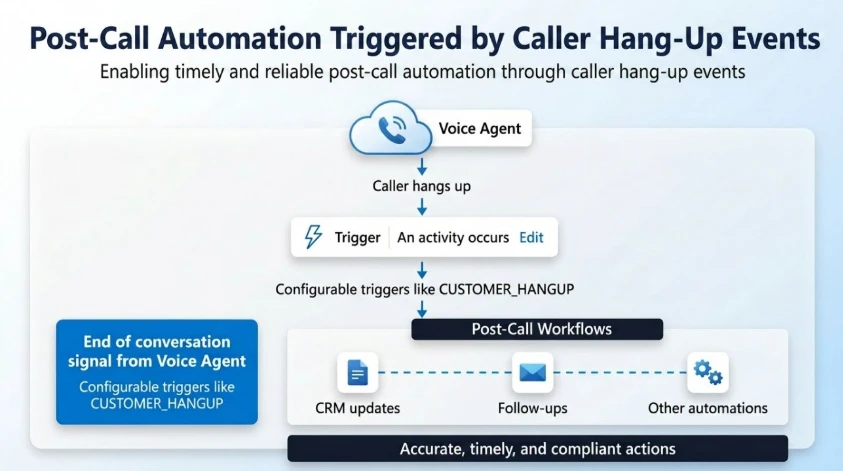
This capability enables real-time, event-driven post-call automation by raising precise caller hang-up events to voice agents. Post-call actions happen immediately, reliably, and at scale.
Why this matters
Post-call actions today often require custom implementations and are not always easy to configure or consistently reliable.
Organizations frequently depend on external orchestration or complex workflows, which can leave gaps, especially when a caller disconnects unexpectedly in the middle of a flow.
For example, when a caller hangs up mid-flow, records can remain locked or reflect stale or incomplete data in downstream systems.
As a result, organizations face:
Missed or delayed post-call actions
Inconsistent or stale data updates
Gaps in reporting and operational workflows
This creates friction across automation and downstream operations.
What’s new
Voice agents can now listen to end-of-conversation events and take action based on how the call ended – directly within their Copilot Studio flow.
For example, you can trigger workflows specifically when:
The customer hangs up
The call is transferred to an external phone number
The call is escalated to customer service representatives in Dynamics 365 Contact Center
This capability is exposed through activity-based triggers in Copilot Studio, enabling makers to configure post-call logic within their voice agent flow in Copilot Studio.
How it works
At the end of every conversation, the platform emits a structured event:
Activity type: End of conversation
Context: Conversation.EndReason (for example, CUSTOMER_HANGUP)
Makers can configure triggers such as:
When activity = End of conversation
AND EndReason = CUSTOMER_HANGUP
Execute post-call workflow
This creates a deterministic and reliable event model for post-call automation.
Key benefits
Immediate and reliable execution: Post-call workflows trigger as soon as the caller disconnects, eliminating delays and missed actions.
Foundation for governance and insights: Accurate call termination signals enable organizations to implement compliance, auditing, and data policies while building custom telemetry, reporting, and customer experience insights.
Real-world scenarios
Automated record updates and follow-ups: Update or unlock CRM records and trigger SMS, email, or callback workflows immediately after the customer disconnects, ensuring the latest state is captured and acted on without delay.
Drop-off detection and recovery: Identify when customers exit during critical flows (such as payment or authentication) and initiate appropriate recovery or risk handling actions.
Operational insights and optimization: Leverage precise end-of-conversation signals to improve data accuracy, escalation tracking, and overall customer experience.






Recent Comments