Customize and access the improved Active Conversation form 

Customize and access the improved Active Conversation form 

This article is contributed. See the original author and article here.

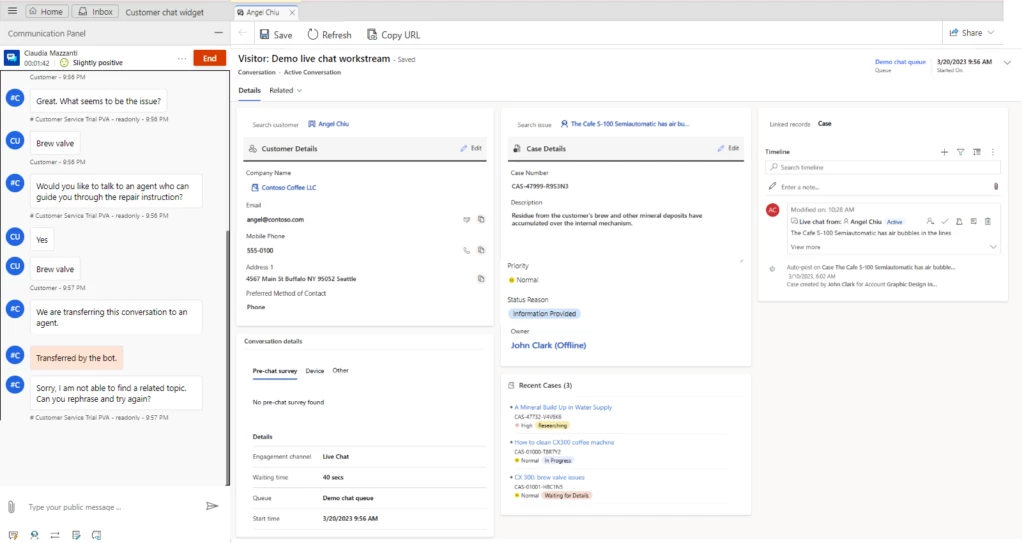
Customer service agents in a digital contact center interact with multiple customers daily through live chat, phone calls, and social media channels. During customer interactions, often they find themselves searching for relevant information on various screens or other systems, resulting in increased wait time for the end customer. Also, they want to quickly capture or update the information about their conversation, in real time without having to create or link a case to a conversation. Recent enhancements to the Active Conversation form allow agents to access and edit relevant information without any screen switching.  

Now, agents have all the relevant information at their fingertips, so that they spend less time looking for information on different screens or systems and help customers quickly. This leads to a reduction in average wait time and better customer satisfaction.  

Customize the Active Conversation form

This feature allows administrators to add custom fields on the conversation form and embed canvas apps to display the information from external sources. To ensure agents can capture information quickly, it offers agents the flexibility to view pre-filled information and update it as needed while interacting with the customer. They can view the records related to the conversation on the sub-grids. 

Access the enhanced Active Conversation form  

The Active Conversation form now displays the Customer 360 card. This allows agents to view information related to the customer. They can also make inline edits without having to navigate to contact or account form. Similarly, it shows case details with information related to the case linked to the conversation and allows agents to make inline edits as needed. Administrators can configure the fields they want to show on both these cards.

Additionally, the form includes the configurable recent cases card. This shows the color-coded priority and case status for easy discoverability by the agents. Moreover, switching from the active to the closed conversation form is restricted when the conversation is still active. The reverse is true as well. 

Administrators can enable these enhancements in the Customer Service workspace application by navigating to the Customer Service Admin center > Workspaces > Active Conversation form settings. 

Learn more 

To learn more, read the documentation:  

View Active Conversation in Omnichannel for Customer Service | Microsoft Learn 

The post Customize and access the improved Active Conversation form  appeared first on Microsoft Dynamics 365 Blog.

Brought to you by Dr. Ware, Microsoft Office 365 Silver Partner, Charleston SC.
Microsoft Defender for IoT moves to site-based licensing for protecting OT environments

Microsoft Defender for IoT moves to site-based licensing for protecting OT environments

This article is contributed. See the original author and article here.

On June 1, 2023, Microsoft Defender for IoT moved to site-based licensing for organizations looking to protect their operation technology (OT) environments. The previous Azure consumption model for this solution will no longer be available for purchase by new customers. Existing customers can choose to transition to site-based licensing or remain on the consumption model.


In today’s digital transformation, operational technology (OT) has become an important part of various industries, from power plants and manufacturing facilities to transportation systems and healthcare institutions. While OT systems play an essential role in smoothly operating critical infrastructure, adversaries often target vulnerabilities in these interconnected systems causing severe business and operational disruption, financial losses, reputational damage, and more. Microsoft Defender for IoT helps organizations reduce these risks by enabling security teams to identify and remediate vulnerable OT systems in their environment – limiting exposure to threats like ransomware and targeted malware attacks.


To help organizations evolve their defenses against the growing attacks on OT environments, we are thrilled to announce site-based licensing for Defender for IoT. This new model brings increased price predictability and flexibility to organizations with sites that vary in size by offering a tiered approach based on the maximum number of OT devices looking to be protected per site. With this solution, organizations can easily determine and manage the cost of securing their OT systems. We believe that by introducing site-based licensing, we are making it more convenient than ever for organizations to empower security teams with the tools needed to manage and protect their operational technology.


Note: A site is a physical location (facility, campus, office building, hospital, rig, etc.).​


How site-based licensing works 


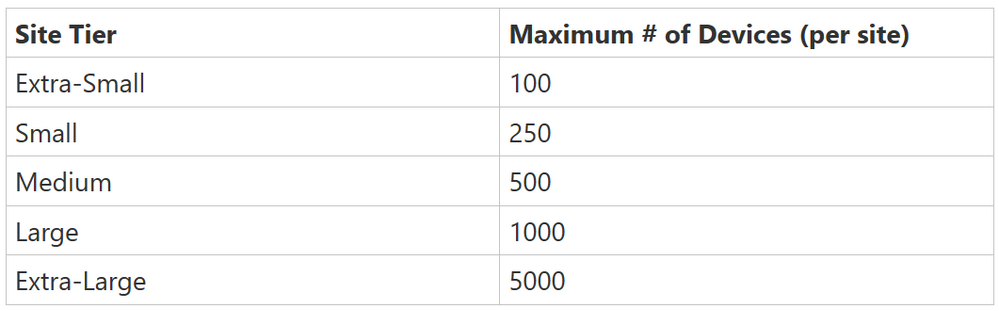
Organizations that want to secure their OT environments with Defender for IoT will now be able to purchase annual licenses with standard pricing based on the maximum number of OT devices they wish to protect at each individual site. Prices are flat rates for each site size and are not prorated based on the numbers of devices. Site sizes are determined by the maximum number of devices per site.


Nick_C_0-1686242914275.png


Note: Defender for IoT site entitlement is licensed annually with standard pricing respective to each site tier.


For example, if an organization wanted to secure all OT devices with Defender for IoT across three of its sites – where site one has 90 OT devices, site two has 700 devices, and site three has 25 devices, the organization would have to buy an Extra-Small license for site one, a Large license for site two, and another Extra-Small license for site three.


Note: For scenarios where an organization wants to secure over 5000 OT devices at a single site, we ask that they contact their Microsoft sales representative.


Let us know what you think


We are excited to provide organizations with a more convenient way to consume Defender for IoT in a manner that is flexible enough to accommodate varying site sizes, while also being predictably priced. If you have any feedback, please feel free to let us know in the comments below.


To learn more about Defender for IoT visit our webpage and MS Learn


Customize the conversation table for your business needs 

Customize the conversation table for your business needs 

This article is contributed. See the original author and article here.

Organizations in different industries need to visualize their customer interactions in different ways. With customized columns in the conversation table, organizations can enable agents to quickly summarize the purpose of the interaction, and they can associate conversations with leads. The ability to customize the conversation table improves agent productivity and creates positive customer outcomes.  

Improve agent productivity and CSAT with conversation table customization 

When agents converse with customers, the Active Conversation form helps capture the details of the interaction. And consequently, supervisors and other agents can easily understand it. 

Ana is a customer service agent at Contoso who works tirelessly, juggling multiple customer problems over chat throughout the day. After every conversation with a customer, she patiently reviews her interaction, summarizes the issue, and writes wrap-up notes. She wishes there were a better way to quickly capture the outcomes of customer interactions and move on to serve other customers instead of spending time wrapping up the conversation.   

Dynamics 365 Customer Service does not have an out-of-the-box solution to serve her needs. However, admins can now customize the conversation table to help agents like Ana wrap up cases more quickly. Conversation table customization now supports adding columns, charts, views and connecting conversations to leads or any other activity-enabled table. 

Now that the conversation table is customizable, contact centers can tailor the agent experience to business-specific use cases like Ana’s. When the conversation table is customizable to Ana’s needs, she can save time, serve more customers, lower wait times for customers, and leave them happy with Contoso’s service.  

Create positive customer outcomes by associating leads with conversations  

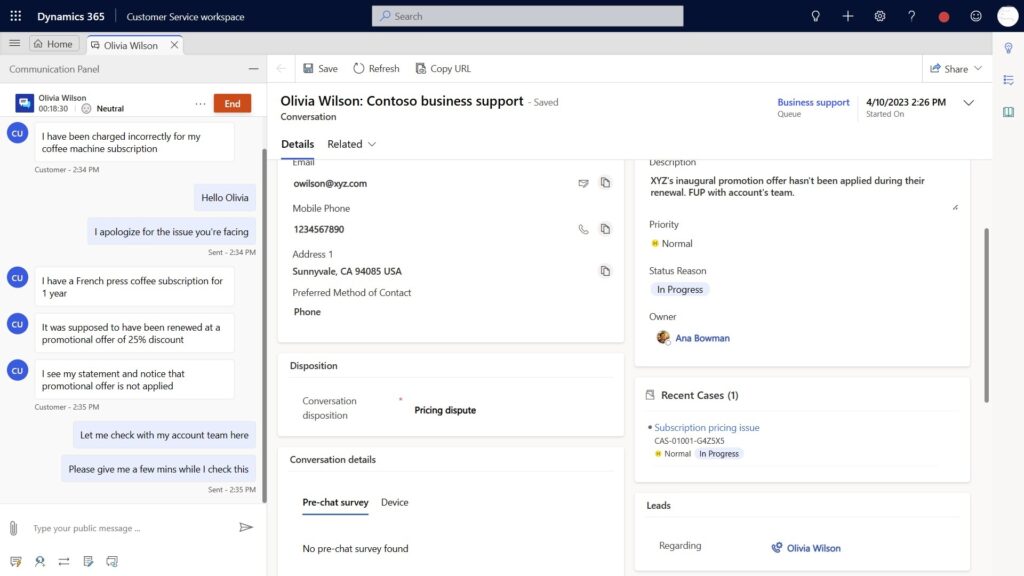
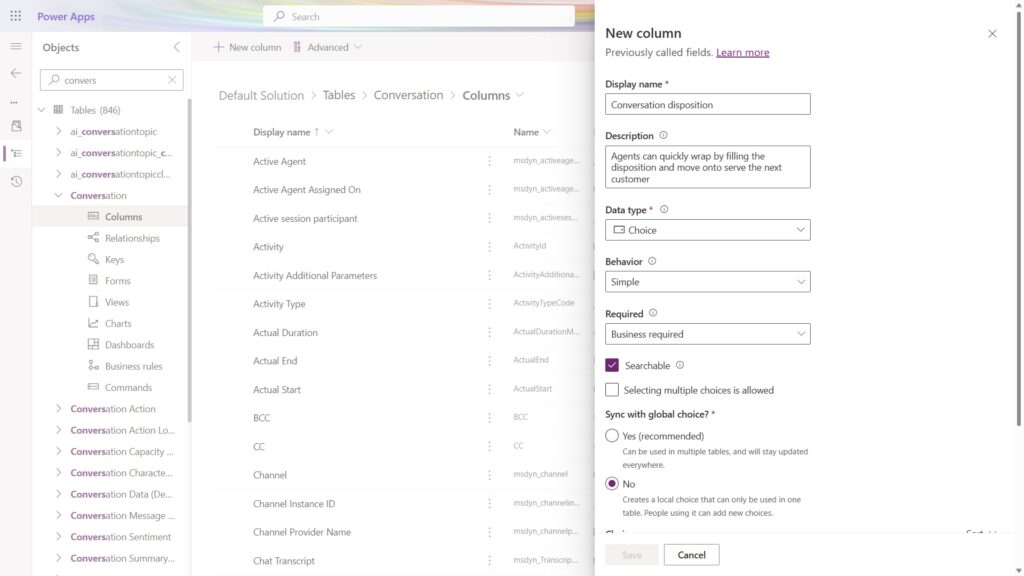
Contoso enabled Conversation disposition as a custom column on the conversation table and added it to the active conversation form.  

Olivia, a Contoso customer, contacts Contoso support over webchat. She wants to find out why she was charged full price for her coffee subscription instead of the promotional price. The agent assigned to address Olivia’s concern, Ana, checks with her account team, and rectifies the error. Ana quickly wraps the conversation by specifying “Pricing dispute” disposition instead of having to write elaborate notes. Ana or any other agent connected to Olivia in the future can quickly get the context and complete interaction history through dispositions instead of having to go through one note after the other.

With the ability to view service and sales data in a single record, Ana can pitch a special offer to Olivia and associate a lead to this conversation immediately in the same form. Contoso’s sales team can follow up with Olivia subsequently through the lead.  This single source of information offers a true end-to-end customer experience without having to juggle between sales and support lines.  

Contact center supervisors can review interactions like Olivia’s pricing dispute or other dispositions and take appropriate preventive measures based on aspects of the conversation such as volume or sentiment.  

The use cases for customization are truly limitless and best left to the imagination of our customers and their business scenarios.  

Customize the conversation table 

Now you can extend the conversation table just like any other Dynamics 365 table from the customization experience in Power Apps. Use the Regarding column to associate any activity enabled entity to Conversation. You can create additional columns, views, and charts. This feature is enabled by default for all customers with our April 2023 release wave.  

Customize the conversation table in Power Apps

Learn more

Watch a quick video introduction.

To find out more about conversation customization in Customer Service, read the documentation:

The post Customize the conversation table for your business needs  appeared first on Microsoft Dynamics 365 Blog.

Brought to you by Dr. Ware, Microsoft Office 365 Silver Partner, Charleston SC.
Accelerate support ramp-ups, handoffs, and wrap-ups with Copilot summarization 

Accelerate support ramp-ups, handoffs, and wrap-ups with Copilot summarization 

This article is contributed. See the original author and article here.

Support agents often have to manage complex and lengthy conversations and cases. These require a lot of time and attention to understand and resolve. Wouldn’t it be great if there was a way to quickly get the gist of what’s going on without having to read through every single message or all the information linked to a case? 

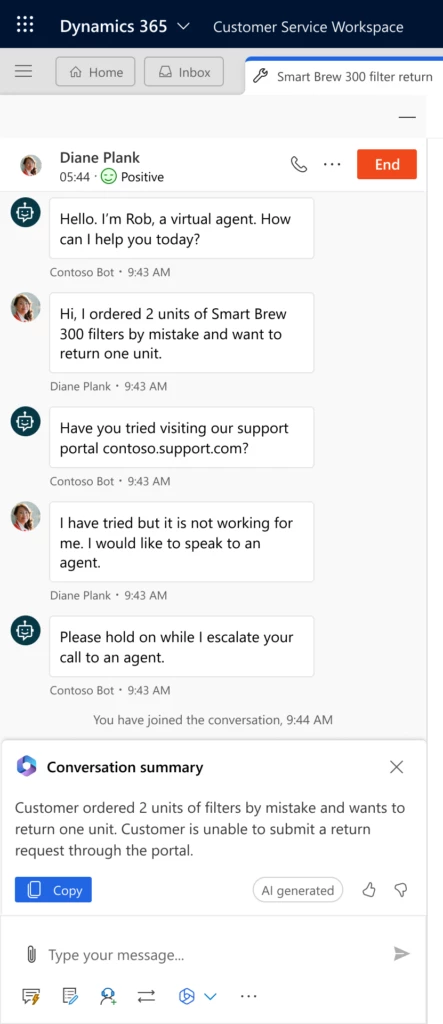
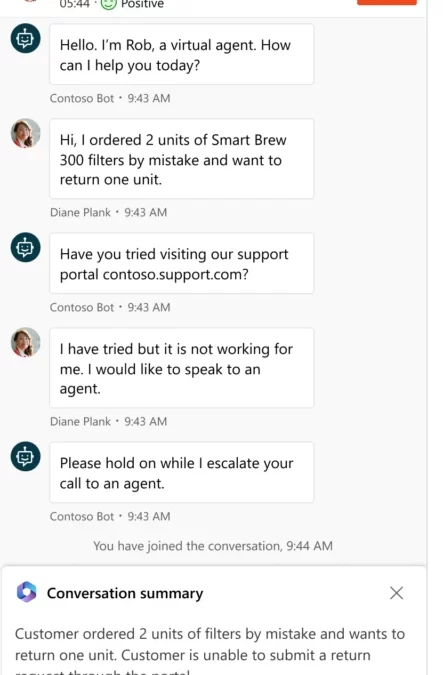
Now agents can use Copilot to ramp up fast. Copilot summarization automatically generates concise and informative summaries of conversations and cases in simple, intuitive natural language. Agents can read these summaries in seconds and get up to speed on the most important details. 

Conversation summarization

Conversation summarization is available for any digital messaging or voice conversation that involves a virtual agent handoff to live support, an agent consult, or conversation wrap-up notes. You can also request a conversation summary on demand at any time during the conversation. 

A conversation summary will capture the key information such as the customer’s name, the issue or request, the steps taken so far, the case status, and any relevant facts or data. It will also highlight any sentiment expressed by the customer or the agent, plus action items or next steps.

Case summarization 

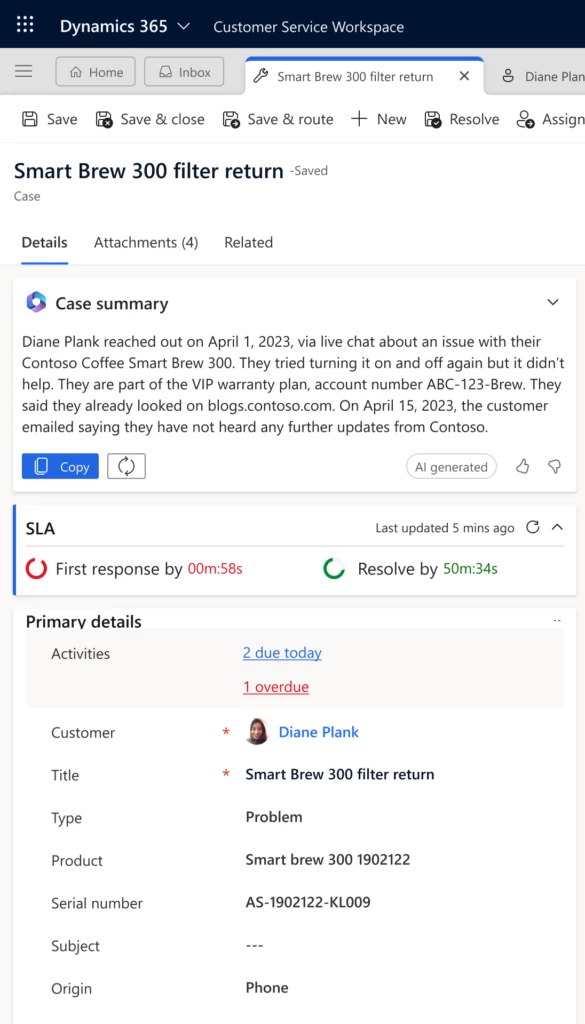
Case summarization is available in a single click, right on the case form. It captures highlights from key case fields such as Customer, Case title, Case type, Subject, Case Description, Product, and Priority. It also considers linked timeline records such as notes, emails and conversation summaries when the conversation summary feature is enabled. Case summaries can help support agents catch up on who has worked on the case so far. They can also see what has happened in previous communications, and any issues that have been addressed to date. This information helps agents quickly determine the best next steps.  

A case summary is valuable during case collaborations, transfers, and final resolutions when support agents are documenting what occurred throughout the case lifecycle. They are especially valuable in accelerating the administrative tasks surrounding multiday or long running cases. 

Extensibility and customization

Copilot summarization is flexible and adaptable to your organization’s needs and preferences. You can customize and extend the feature in various ways. 

With conversation summary, administrators can specify which actions trigger a conversation summary in the Customer Service admin center. For example, you can enable conversation summary only for handoffs and consults, or only for conversation wrap-ups, or for all three. 

With case summary, administrators can add the case summary card to any form that uses the case entity in Power Apps. This makes it easy to extend the functionality to any customized application that support teams use. 

Copilot summarization is a powerful tool that can help you accelerate your support processes and improve customer satisfaction. By providing agents with quick access to the most relevant information, Copilot helps save time, reduce errors, and enhance communication. Try it today and see how it can transform your support experience. 

Plan for future updates

We plan to update Copilot experiences monthly with features and enhancements. The AI models and prompts will be updated regularly behind the scenes, and you’ll see the quality of Copilot’s responses improve over time. The following features are already on our roadmap:  

  • Out-of-box analytics. These reports will give supervisors insight into how their agents are using Copilot and its impact on their tracked support metrics.  
  • SharePoint support for Copilot knowledge. Organizations who have their support content outside of Dynamics today can easily connect to a SharePoint content source. 

AI solutions built responsibly 

Enterprise grade data privacy at its core. Azure OpenAI offers a range of privacy features, including data encryption and secure storage. It allows users to control access to their data and provides detailed auditing and monitoring capabilities. Copilot is built on Azure OpenAI, so enterprises can rest assured that it offers the same level of data privacy and protection. 

Responsible AI by design. We are committed to creating responsible AI by design. Our work is guided by a core set of principles: fairness, reliability and safety, privacy and security, inclusiveness, transparency, and accountability. We are putting those principles into practice across the company to develop and deploy AI that will have a positive impact on society.

Learn more

For more information on extending the case summary, see Configure Copilot features for custom case forms and custom apps | Microsoft Learn 

The post Accelerate support ramp-ups, handoffs, and wrap-ups with Copilot summarization  appeared first on Microsoft Dynamics 365 Blog.

Brought to you by Dr. Ware, Microsoft Office 365 Silver Partner, Charleston SC.
Upgrade Project Service Automation to Project Operations

Upgrade Project Service Automation to Project Operations

This article is contributed. See the original author and article here.

Hello to the Project Service Automation (PSA) Community!

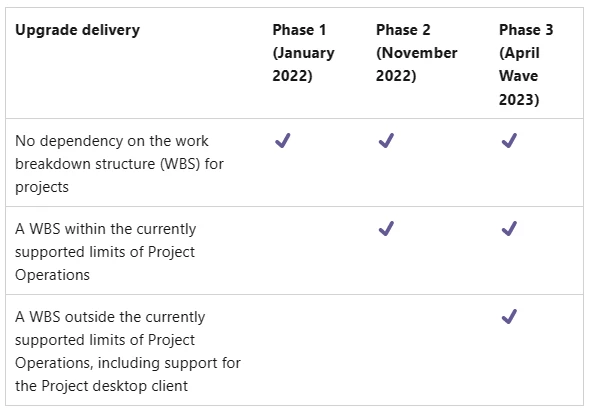
Back in November 2022 we announced the availability of the second phase of Project Service Automation to Project Operations upgrade, making it possible to upgrade projects with up to 500 tasks.  If all projects in your environment contain 500 tasks or less, we strongly encourage you to start your upgrade process as soon as possible so you can take advantage of many new Project Operations features such as: 

  • Integration with Project for the Web with many new advanced scheduling features
  • Project Budgeting and Time-phased forecasting  
  • Date Effective price overrides 
  • Revision and Activation on Quotes   
  • Material usage recording in projects and tasks 
  • Subcontract Management 
  • Advances and Retained-based contracts 
  • Contract not-to-exceed 
  • Task based billing 
  • Multi-customer contracts 

Learn more

Curious to know details about the upgrade process? Please check this link and learn more about it! 
 
Want to learn more about Project Operations? Check this link and navigate to our detailed documentation! 

Want to try Project Operations? Click here and sign up for a 30 days trial! 

Thank you

The Microsoft Project Operations Product Team 

The post Upgrade Project Service Automation to Project Operations appeared first on Microsoft Dynamics 365 Blog.

Brought to you by Dr. Ware, Microsoft Office 365 Silver Partner, Charleston SC.
Process Monitor v3.94

This article is contributed. See the original author and article here.


Process Monitor v3.94


This update to Process Monitor, a utility for observing real-time file system, Registry, and process or thread activity, improves handling of incomplete Procmon Log files (.pml), and restores “Copy All” functionality in the Event Properties window.