This article is contributed. See the original author and article here.
Adapting to evolving customer expectations: staying ahead in the new marketing landscape
Customer experience has significantly transformed in recent years, moving away from linear buying journeys and one-size-fits-all approaches. Nowadays, customers expect digitally enabled, hyper-personalized experiences. To stay competitive, organizations must embrace a customer-first approach, bridging departmental gaps to deliver cohesive experiences. By harnessing the power of their data, organizations can gain a deep understanding of their customers, anticipate behaviors, and craft 1:1 personalized experiences across all touchpoints, including sales, marketing, business operations, and service functions to drive better customer engagement and long-term loyalty. However, that is not enough, to become or stay leaders in their industries, organizations need to take advantage of generative AI to unlock capabilities and levels of productivity that were previously out of reach.
We are making it easier than ever to acquire these capabilities. Today, at Inspire, we announced, that Dynamics 365 Customer Insights and Dynamics 365 Marketing are coming together as one offering named Dynamics 365 Customer Insights, an AI driven solution which will revolutionize your customers experiences. Within this solution are two apps: Customer Insights – Data (currently known as Dynamics 365 Customer Insights) that empowers you to effectively build a unified, real time 360-degree profile of your customers, and Customer Insights – Journeys (currently known as Dynamics 365 Marketing) that allows you to act on this comprehensive understanding to deliver highly personalized experiences. These two apps allow you to start with data or journeys and purchase what you want while providing a 40 percent savings on the base license offer compared to previous packaging.
Transforming customer experiences with real-time marketing and Copilot generative AI capabilities
Recognizing the need for a modern approach to address the high level of engagement demanded by customers, over the next year we will be transitioning all customers of Dynamics 365 Customer Insights – Journeys from outbound to real-time marketing. Transitioning to real-time marketing enables you to do more with less, drives superior business results, caters to the evolving customer experience landscape, and will propel your businesses into the future of marketing. Real-time marketing has already surpassed traditional outbound marketing in functionality, effectiveness, usability testing results, satisfaction surveys. Moreover, our innovations and upcoming AI features are available exclusively in real-time marketing.
Starting August 2023, new customer environments will only include real-time marketing and event management. Existing customers, if necessary, will be able to add outbound marketing through a self-serve interface. We will continue to support outbound marketing but will not be adding new enhancements.
By transitioning to real-time marketing now, you can gain the following benefits:
Leverage AI to do more with less
Embrace generative AI to ensure long-term success by increasing your productivity while delivering superior customer experiences. You can already leverage Copilot features to assist you in targeting the right audience simply by describing your segments using everyday words – without having to learn the underlying data model or construct queries. With content ideas, you can provide key points or select a topic and a tone of voice matching your message to generate engaging email content within seconds. Furthermore, to complement your message, you can easily choose images from your library that resonate with your audience without having to spend time searching for them. In the upcoming months, you will be able to use innovative Copilot capabilities to make your messages more compelling by rewriting your existing content, create journeys just by describing them in simple words, set up quiet times to prevent messages from sending during unwanted times, effortlessly style your emails and forms based on your website design, and receive guidance to authenticate your domains easily. By adopting AI now your organization will be better equipped to stay competitive and thrive in the ever-evolving market landscape, ensuring better business results.
Optimize every interaction
Experience the power of seamless integration between Customer Insights – Data and Customer Insights – Journeys, allowing you to continuously capitalize on customer understanding and insights in real-time, to proactively address customer needs and enhance every interaction. Leverage real-time marketing to craft journeys for contact and lead entities in Dataverse, or profiles from Customer Insights. React to customers’ actions instantly using out-of-the-box triggers, custom triggers, or triggers based on any data change in Dataverse without writing any code. Refine your audience targeting with advanced segmentation capabilities, and an unlimited number of segments. Deliver your messages through out-of-the-box text messages, push notifications, custom channels and benefit from AI-powered channel optimization to reach customers on the most effective channel. Embrace hyper-personalization features like dynamic text and no-code conditional content to support 1:1 responsive campaigns tailored to individual preferences with real-time marketing.
Unify sales and marketing
To win deals, sales and marketing teams must work together – break down silos between these teams to fuel revenue growth and increase pipeline. As a marketer, use our new and improved UX across all capabilities! As part of the enhanced upcoming lead scoring builder, you will be able to define granular qualification criteria to better identify and prioritize leads. Thanks to the deep integration with Dynamics 365 Sales, you can align your efforts with sellers by sharing a unified timeline of customer activities, seamlessly transfer qualified leads to the sales team or engage sales representatives within your customer journey exactly at the right time by assigning a sales call or triggering a sales sequence to further increase the likelihood of closing deals. Continuously optimize your marketing efforts by using AI-powered attribution analytics to understand how your marketing activities contribute to your defined milestones.
Scale your business
Real-time marketing unlocks new opportunities for growth and success. Thanks to business units, brand profiles, and a new consent center you can tailor real-time marketing to cater to your business’ unique requirements. As a scalable, customizable solution, real-time supports up to 100 million marketing contacts with 300 million monthly interactions so you can grow your customer base in new markets, reach additional geographies, promote new products, or expand your prospective customer pipeline to reach higher sales targets.
The future is now: the new Dynamics 365 Customer Insights and real-time marketing
To make sure your transition to real-time marketing is a success, we have designed a user-friendly interface that does not require extensive retraining – you will experience UI enhancements that significantly improve usability and efficiency. To easily kick start delivering experiences using real-time marketing, we have designed an email transition tool, made outbound segments available directly in real-time, and empowered you to generate more engaging content and revisit or create new journeys within minutes thanks to our new AI Copilot features.
We are excited about how this change to an AI powered, unified Dynamics 365 Customer Insights, with a generative AI interface coming to every capability will fundamentally change what your company can achieve and how easily you will be able to achieve it. We look forward to building the future of customer experiences together and have big plans for Dynamics 365 Customer Insights in the coming year and beyond.
This article is contributed. See the original author and article here.
On July 18, 2023, we published the 2023 release wave 2 plans for Microsoft Dynamics 365 and Microsoft Power Platform, a compilation of new capabilities planned to be released between October 2023 and March 2024. This second release wave of the year offers hundreds of new features, including AI capabilities and enhancements, demonstrating our continued investment to power digital transformation for our customers and partners.
This release wave builds on our commitment to create applications and experiences that add value to every role by breaking down silos between data, insights, and people. New capabilities empower new ways to make informed decisions with AI-guided insights and suggested actions, easier ways to automate tasks and processes, and collaboration seamlessly integrated into the flow of work, plus, new low-code ways for anyone to build solutions.
Discover a whole new level of convenience in reviewing release plans for Dynamics 365 and Microsoft Power Platform with the release planner. Experience unparalleled flexibility as you personalize, filter, sort, and effortlessly share plans according to your preferences. Stay organized, stay informed, and stay in control as you effortlessly navigate through multiple active waves of plans. For more information, visit releaseplans.microsoft.com.
Highlights from Dynamics 365
Dynamics 365 Marketing will bring enhancements to Copilot features empowering marketers to quickly create new experiences and will bring unprecedented levels of personalization to email content, images, and layouts. Additionally, business-to-business (B2B) dashboards and directly assigning leads to the right sales rep will align marketers and sellers, enabling them to act as a unified team across the buying journey.
Dynamics 365 Sales will focus on enabling sales organizations to prioritize and manage digital sales processes through enhanced sequence capabilities. We will allow users to assign and monitor lead assignment status with enhanced lead assignment capabilities by providing recommendations, summarizing data, retrieving information, and performing actions in context and within flow of work.
Viva Sales is reimagining how sellers work by delivering advanced AI capabilities like email summarization, CRM recommendations, sales email composition, meeting summarization, and real-time sales tips. Additionally, we are making further investments to collaboration spaces in Microsoft Teams and will deliver new sales Copilot experiences that accelerate deal progression and close sales faster.
Dynamics 365 Customer Service will continue to empower agents to work more efficiently through Copilot capabilities, Join me On Teams, and visual enhancements to the agent workspace, ability to see live chats and voice calls in Inbox and personalizing size of conversational control. Additionally, we are making enhancements to the voice channel, call dialer improvements, and routing calls to agents with longest idle time.
Dynamics 365 Field Service updates will include new capabilities for frontline workers, service managers, and dispatchers. We are delivering several top requests such as converting quotes to work orders, enhancing inspections, and evolving our resource scheduling capabilities.
Dynamics 365 Finance is focused on enhancing organizations’ visibility into their data, continued enhancements for accounts payable and bank statement automation, and expanding out-of-the-box country coverage in Latin America. Additionally, the team will deliver further automation of complex tax scenarios and e-invoicing requirements for new countries and provide organizations ability for business model expansion and agility.
Dynamics 365 Supply Chain Management continues to improve and optimize business processes to deliver the agility and resilience needed for businesses to thrive in an increasingly complex business environment. The sales and procurement processes will be further enhanced, manufacturers will enjoy greater flexibility, and warehouse processes related to counting, customer returns, and product receipts will be improved.
Dynamics 365 Project Operations is investing in enhancements to services procurement scenarios and project contracting and new functionalities and scenarios in pricing models will support the evolving patterns in the service-centric economy. Additionally, improvements to intelligent resource recommendations will provide suggestions based on experience, cost, and utilization across employees and subcontractors.
Dynamics 365 Human Resources will be improving recruiting experiences with functionally rich and intuitive experiences that target recruiters, candidates, and hiring managers. We will expand the human capital management ecosystem to include learning management system integration through public APIs using Microsoft Dataverse along with expanding our payroll partner network.
Dynamics 365 Guides is bringing several new capabilities and enhancements including Object Anchors, Azure Remote Rendering, and availability on Microsoft 365 Government Community Cloud High. Additionally, we are focusing on features allowing seamless integration with systems of record allowing customers to build mixed reality workflows that are integrated with their business data.
Dynamics 365 Commerce is using the power of AI to enable the effortless creation of engaging product content for digital commerce sites. New B2B investments allow distributors to view, accept, and reject orders from a centralized dashboard that enables B2B sellers, distributors, and buyers to all work in the same place.
Dynamics 365 Business Central will focus on core functionality to help companies manage their intercompany and consolidations across environments. We will continue to enhance our Copilot capabilities and will further improve our warehouse capabilities, create more Power Automate templates, and provide developers with more capabilities for automating testing of dependent apps.
Dynamics 365 Customer Insights is enhancing our Copilot features to allow you to ask questions in simple words, to quickly receive insights, and action these immediately. New capabilities in real-time data management will provide the latest view of your customers and easy access to insights within Dynamics 365 apps will allow your team to deliver seamless, personalized experiences across the customer’s lifecycle.
Microsoft Supply Chain Center is enabling resilient supply chain with enhancements in key areas such as Intelligent Order Management for purchase order orchestration, seamless collaboration with external partners via Supplier portal, and Copilot. Additionally, the team will be bringing Advanced Data Analytics to enable Insights to Action as well as new Network Inventory Optimization capabilities.
Power BI is improving the creation experience for individuals by improving and aligning our experiences with Microsoft 365, bringing more parity on the web, and bringing the Power Query diagram view into Power BI Desktop. For teams, we are bringing enhancements to meetings and multitasking. For organizations, we are enabling Git and source control integration to help developers maintain and collaborate on their business intelligence solutions.
Power Apps is expanding the use of Copilot to bring AI-assisted experiences to increase developer productivity, bring natural language to all users, and give insights to admins. We will bring modern controls and rich collaborative experiences to users, as well as improved deployment and governance support to ensure low-code can be enabled organization wide.
Power Pages continues to make strides in the Copilot maker experience to enable building a site. Managed environments will include Power Pages capabilities for maker usage and onboarding. For data, you can connect easily to data where it exists today. Low-code makers can collaborate and detect co-presence.
Power Automate will continue to make it easier to get started building new flows by using natural language across cloud flows and desktop flows, and by improving process mining to jumpstart creation of automation and authoring experiences. Additionally, we’re making it easier to manage work at scale by introducing unified activity view and deeper notifications on capabilities across the product.
Power Virtual Agents will bring general availability for capabilities including Multi-Lingual bot support, Generative Answers and Actions, Standalone interactive voice response (IVR) and IVR integration with Dynamics 365 Customer Service, and our integration with the Conversational Language Understanding service. Additionally, we will continue to enhance our offering for customers by delivering on new Enterprise Trust capabilities.
AI Builder will allow makers to easily process structured and unstructured documents. Using the power of GPT, responses to customer requests can be pre-generated according to enterprise guidelines and will be available in a human validation station allowing makers to easily review and enhance content that is automatically generated from intelligent copilots.
Starting July 31, 2023, customers and partners will be able to validate the latest features in a non-production environment. These features include user experience enhancements that will be automatically enabled for users in production environments during October 2023. To take advantage of the early access period, try out the latest updates in a non-production environment, and effectively plan for your customer rollout. Check out the 2023 release wave 2 early access features for Dynamics 365 and Microsoft Power Platform, or visit the early access FAQ page.
Release planner
Personalize, filter, sort, and effortlessly share plans according to your preferences.
This article is contributed. See the original author and article here.
Copilot is breaking down data silos, turning insights into actions, and giving customers a new reason to embrace the cloud.
Since March, when we introduced Dynamics 365 Copilot—the world’s first copilot for both customer relationship management (CRM) and enterprise resource planning (ERP)—and Copilot in Microsoft Power Platform, we’ve seen an incredible response with more than 63,000 organizations experiencing Copilot in Dynamics 365 and Power Platform. Customers like Campari Group, Leatherman Tool Group, and Northrop & Johnson are able to transform how work is done, from the front office to the back office. Copilot assists employees wherever they are working, surfacing valuable business data and delivering business insights so they can focus on the most meaningful parts of their jobs. And with this momentum in AI, it’s a great time for our customers to move to the cloud.
Microsoft Sales Copilot
Empowering sellers to increase productivity and personalize customer interactions.
Today, we are announcing Microsoft Sales Copilot—a role-based copilot designed for sellers that empowers them to increase productivity and personalize every customer interaction so they can close more deals. Designed to be a seller companion, Sales Copilot can be accessed in the tools where sellers work, whether that is Outlook, Microsoft Teams, or Dynamics 365 Sales, and connects to other CRM systems like Salesforce.
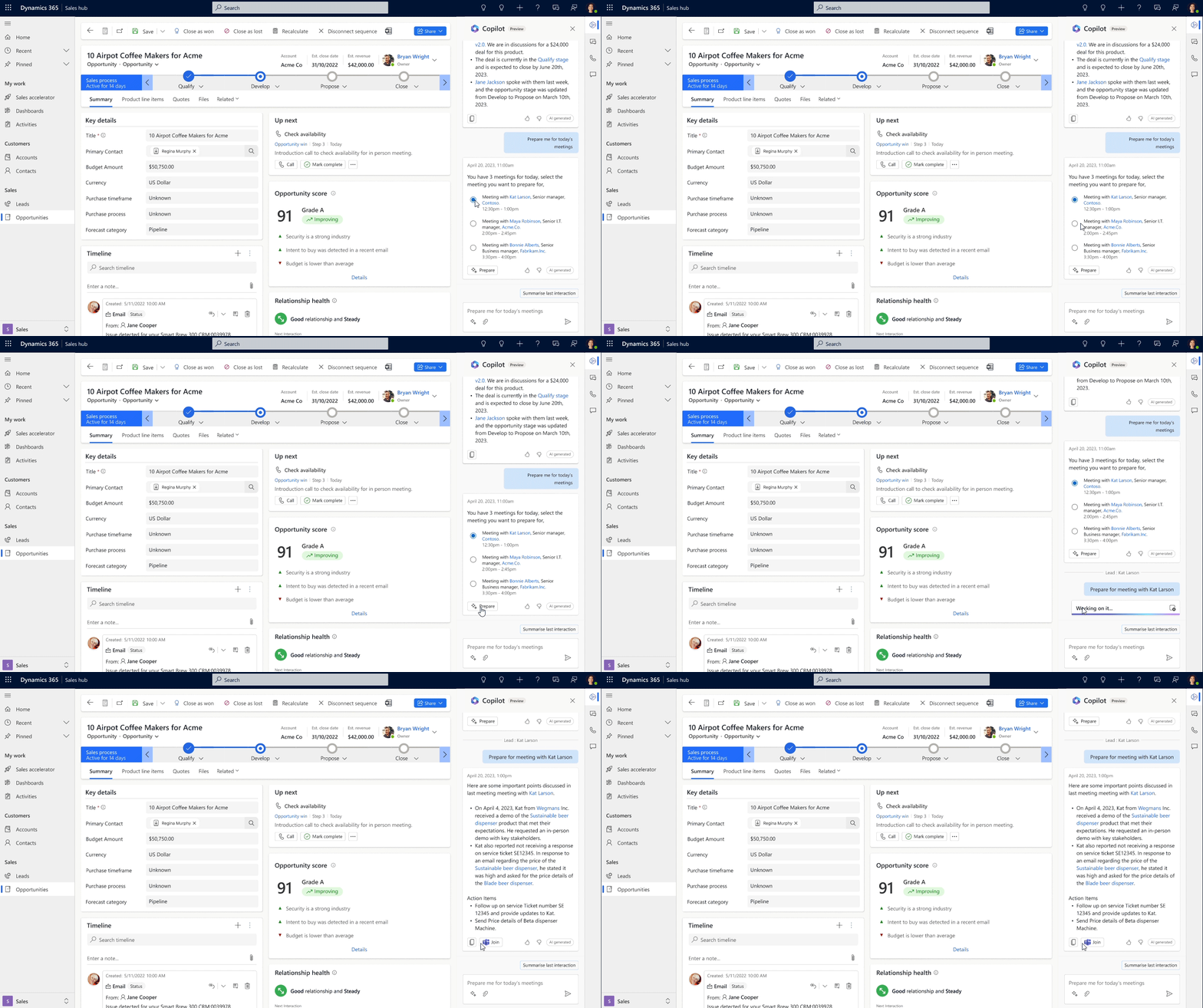
Sales Copilot saves sellers time with CRM task automation, auto-generated email or meeting summaries, and more. Sellers can go from one customer meeting to the next feeling prepared, armed with AI-powered, real-time insights such as top opportunities and customer opportunity summaries. Sales Copilot also helps sellers with customer follow-up by generating AI-assisted content and recommendations, such as contextual emails based on Outlook and CRM data.
Microsoft Viva Sales, announced in June 2022, kick-started our work of transforming seller experiences, and these capabilities are now part of Sales Copilot. In our own sales organization at Microsoft, more than 10,000 sellers have been using Sales Copilot. Early results show that 85 percent of surveyed sellers report completing one or more tasks faster, and 70 percent stated that Sales Copilot helped them improve productivity.
Today, we’re also announcing new Sales Copilot capabilities. Sellers can now:
Get auto-generated opportunity summaries including status, progress, and highlights of key changes, inside Dynamics 365 Sales.
Create contextual emails that utilize customer CRM data to pull in product, customer, and opportunity information, inside Dynamics 365 Sales.
Prepare for customer meetings with a summary view including account information, recent notes, highlights of any issues or concerns, customer news, and more—in Outlook, Teams, or Dynamics 365 Sales.
Get real-time tips and suggested answers during Teams meetings prompted by competitor or brand mentions by the customers to stay ready to handle objections.
“Opportunity summary in Microsoft Sales Copilot is a huge and important leap in our direction to save more time for our sales personnel. With this capability in the hands of our sellers, they can spend more time equipping organizations with best-in-class security solutions to help make our world a safer place.”
—Philip Eklund, Vice President of Client Engagement Platform, Securitas
“At Investec, we are very excited to see how we can leverage Microsoft Sales Copilot and AI within the Microsoft stack to connect our internal teams and to enhance our understanding further of prospective and current clients to ensure we are providing a best-in-class experience.”
—Dan Speirits, CRM Product Manager, Investec
Sales Copilot is generally available today both as a standalone subscription and included as part of customers’ existing Dynamics 365 Sales Enterprise and Premium licenses at no additional cost, with the new capabilities above rolling out this month.
Microsoft Dynamics 365 Customer Insights: AI-powered customer insights and journeys
Delivering exceptional customer experiences is at the heart of what sellers, marketers, and customer service agents do. From building brand loyalty and generating leads to addressing customer issues and closing deals, these roles all rely on knowing the customer in the context of their journey with the brand. Yet, limitations in managing and harnessing customer data in meaningful ways, coupled with organizational silos, have prevented organizations from delivering and realizing the value of a truly connected customer journey.
To help organizations increase the speed of acting on customer insights and orchestrating personalized customer journeys, Dynamics 365 Customer Insights willoffer both customer data platform and customer journey orchestration capabilities as a single solution and continue investments into real-time marketing. In March, we announced content ideas, query assist, and dialogue with data—copilot capabilities for brainstorming marketing copy for email campaigns, creating new targeted marketing segments, and using natural language to infer key insights from your customer data and support better business outcomes. These copilot capabilities are available now for use, and we’re adding enhancements in the coming months to include the ability to refresh and improve existing marketing content as well as to summarize audience definitions and suggest improvements to simplify definition.
Today, we also announce two new copilot capabilities for marketers—all included in the new Dynamics 365 Customer Insights subscription. The new capabilities help you:
Easily style your email, forms, and event registration pages to perfectly match brand guidelines (as simple as using an existing website) using natural language, so you can deliver a consistent brand narrative and customer experience.
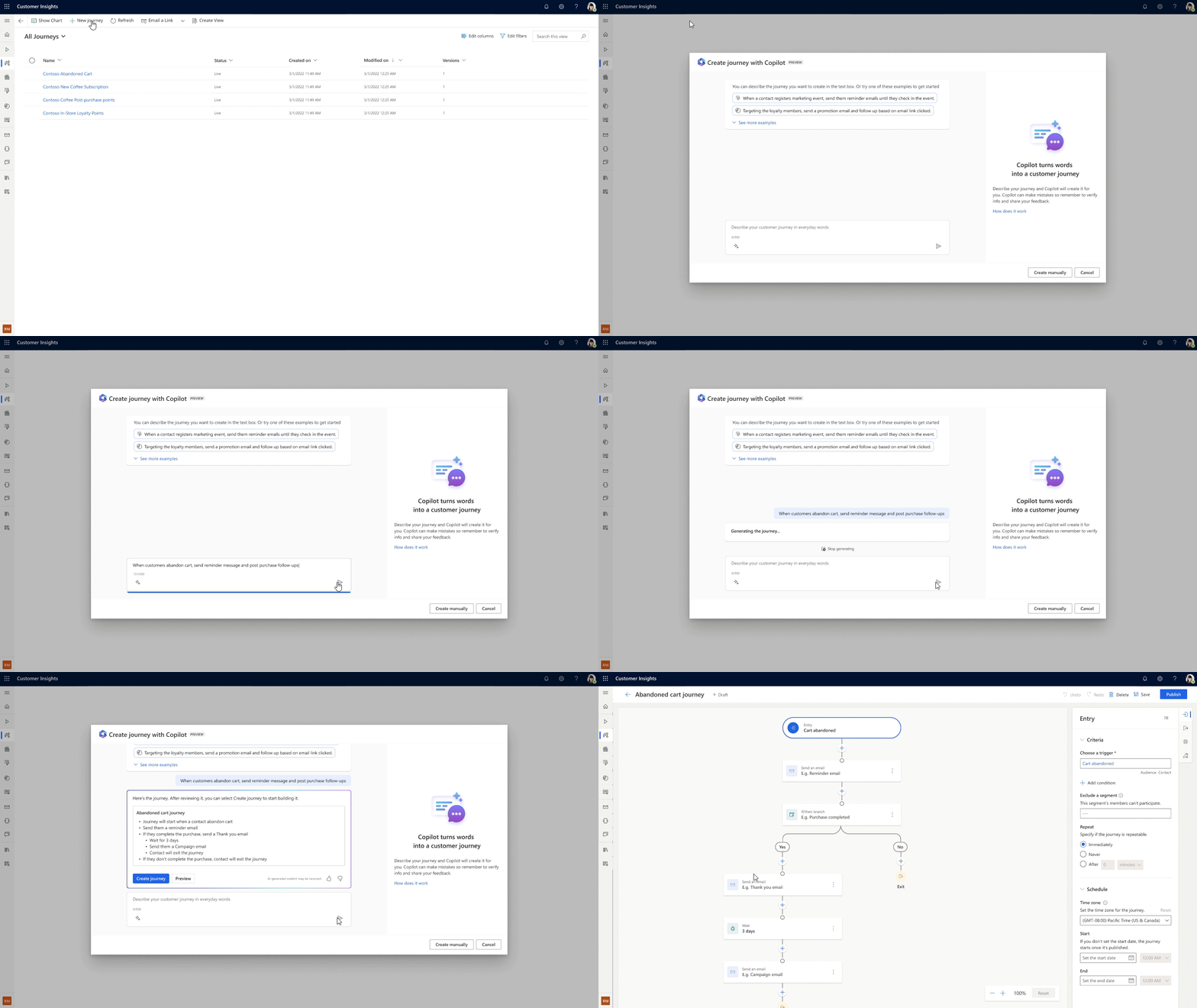
Use natural language to easily orchestrate contextually relevant customer journeys across marketing, sales, and service, so customer actions can be responded to appropriately and quickly, generating sales leads or increasing customer satisfaction.
These new capabilities will start rolling out in preview next month. The new Dynamics 365 Customer Insights offering will be generally available on September 1, 2023.
Dynamics 365 Customer Insights unlocks the full potential of your customer data and elevates customer experiences with predictive real-time insights, contextual and relevant customer journeys, and built-in next-generation AI. When customers combine the power of Microsoft Dynamics 365 Customer Insights, Dynamics 365 Sales, and Dynamics 365 Customer Service, they can create even more seamless leads-to-sales-to-retention cycles with differentiated capabilities, including these features that are available today:
A 360-degree view of the customer profile, associated marketing interactions, and predicted customer lifetime value to guide both sellers and service agents in their customer interactions.
Ability to surface the next best action to the sales team or service team when a lead engages with the marketing team.
“Super exciting—it’s the right move to bring together the customer data and journey capabilities into a single solution”… “this will enable our team to deliver more cohesive experiences quicker and easier.”
—Keith Perfect, Director of Technology & Intelligence, Northrop & Johnson
“At Leatherman, we are thrilled about the potential of generative AI and Microsoft Copilots to advance our business. We are beginning to realize the benefits of improved productivity, streamlined processes, and personalized customer experiences. This technology will undoubtedly propel us towards greater innovation and success.”
Customer service organizations around the globe are using AI technologies to improve service delivery and customer experiences. As examples, AB InBev and Virgin Money are empowering their customer service departments with tailored chatbots built with Copilot in Power Virtual Agents. Within minutes, businesses can train a bot using natural language to reference internal and external knowledge sources, customer service applications, and web data through Bing. Virgin Money’s chatbot addresses more than 195,000 customer interactions a month, helping their service agents to focus on more complex customer inquiries. In the next few months, we’ll be rolling out additional role-based copilots, similar to Microsoft Sales Copilot, that will help customer service agents be more productive and better engage with their customers using the innovation of Copilot in Power Virtual Agents. Learn more about Power Virtual Agents.
AIM for the future with Microsoft
Copilot is redefining productivity, efficiency, and collaboration across business workflows. However, today many businesses are challenged to access new technology innovations, like AI, to improve profitability and maintain a competitive edge because they are still operating on legacy on-premises solutions. At Microsoft, we are committed to helping customers gain access to and take advantage of AI capabilities, starting now.
So, today, we’re also announcing AIM (Accelerate, Innovate, Move), a brand-new program that offers a tailored path for our customers to move from on-premises to cloud-first Microsoft Dynamics 365 business applications.
With AIM, customers of all sizes can accelerate their migration to the cloud to adopt AI-powered technologies starting with AIM assessments. These assessments are designed to help customers understand the business value, expected outcomes, and key steps and dependencies for moving their on-premises business applications. Customers can innovate faster to stay ahead by using the proven Success by Design methodology from Microsoft to implement Dynamics 365 and go live with confidence. Customers get expert implementation guidance and services from FastTrack and its certified partners. And finally, they’ll also be able to move with agility and scale as their business grows. AIM provides exclusive offers that help customers optimize their investments and transform the business processes in an incremental manner.
AIM is a comprehensive offering that unlocks the potential of AI-powered business systems while reducing costs, providing agility for business model innovation, and operating securely with resilience. AIM provides access to a dedicated team of migration advisors, assessments, offers, tools, and support to give customers a faster route to innovation and success.
If you are an existing Dynamics 365 Sales or Marketing or Customer Insights customer, start using the new capabilities in preview. To learn more about the new Dynamics 365 Customer Insights offering, read more here.
If you are a customer using ERP and CRM systems on-premises, and want to migrate to Dynamics 365 in the cloud to accelerate adoption of AI-powered technologies, get started today with AIM.
This article is contributed. See the original author and article here.
Microsoft partners like Connecting Software and Varonis deliver transact-capable offers, which allow you to purchase directly from Azure Marketplace. Learn about these offers below:
CB Dynamics 365 to SharePoint Permissions Replicator: This solution from Connecting Software secures your Microsoft Dynamics 365 CRM documents stored in SharePoint. It covers full security roles, logic support, business unit hierarchy, sharing, cascading behavior, position-based hierarchy, and more.
CB Exchange Server Sync: CB Exchange Server Sync from Connecting Software synchronizes and migrates data between different servers, domains, and versions of Microsoft Exchange and Outlook. It’s ideal for large companies that need to manage shared resources across separate business units.
CB Seamless Attachment Extractor for Dynamics 365: Documents and attachments that harm CRM performance and undermine its functionality often take up most of the space used. Save valuable Microsoft Dynamics 365 database space by automatically moving attachments to alternative storage.
Varonis: Find, Monitor, and Protect Sensitive Data: Varonis is a data security platform that protects data with low-touch, accurate security outcomes by classifying more data, revoking permissions, enforcing policies, and triggering alerts for the Varonis incident response team to review on your behalf.
This article is contributed. See the original author and article here.
Recently, I encountered an intriguing scenario where our customer needed to dynamically create views based on multiple tables, allowing them to efficiently filter and aggregate data. The challenge arose when dealing with varying amounts of data, which required careful consideration for performance optimization. Through this article, I would like to share my insights and present a stored procedure that offers additional options to address this dynamic view creation requirement effectively.
Script Overview: The “SearchAndView” stored procedure accepts several input parameters that define the behavior and structure of the dynamic view to be created. Let’s take a closer look at each parameter and its significance:
1. @SearchField: This parameter specifies the field on which the search operation will be performed within the tables. If provided, the dynamic view will only include rows that match the given criteria.
2. @SearchText: This parameter holds the search text that will be matched against the @SearchField. It complements the search functionality and allows for targeted data retrieval.
3. @TableList: This parameter contains a comma-separated list of tables from which data will be retrieved and combined in the dynamic view. By specifying the desired tables, users can tailor the view to their specific needs.
4. @TableSchema: This parameter defines the schema under which the tables reside. It ensures the correct retrieval of table data within the specified schema context.
5. @ViewSchema: This parameter represents the schema under which the dynamic view will be created. If the schema doesn’t exist, the script dynamically creates it to accommodate the view.
6. @ViewName: This parameter defines the name of the dynamic view. It should be unique within the specified @ViewSchema and serves as an identifier for accessing the combined data.
7. @FieldList: An optional parameter, @FieldList, allows users to specify a list of fields they want to include in the dynamic view. If not provided, all fields from the tables will be included by default.
8. @TopCount: Another optional parameter, @TopCount, determines the maximum number of rows to include in the dynamic view. By setting this value, users can control the amount of data returned and improve query performance.
9. @AddUniqueField: This binary parameter, when set to 1, adds an additional column called “UniqueField” to each row of the dynamic view. The value of this field is generated using the NEWID() function and ensures uniqueness within the view’s result set.
Script Execution:
The “SearchAndView” stored procedure follows a structured workflow to create the dynamic view. Here’s an overview of the execution steps:
1. Parameter Validation: The script first validates the input parameters, ensuring that essential values like @TableSchema, @ViewSchema, @ViewName, and @TableList are provided. If any required parameter is missing, an error is raised, and the procedure is terminated.
2. Schema Creation: The script checks if the specified @ViewSchema exists. If not, it dynamically creates the schema using the CREATE SCHEMA statement. This step ensures that the view is created within the desired schema context.
3. View Existence Check: Before creating the dynamic view, the script verifies if a view with the same @ViewName already exists within the specified @ViewSchema. If found, the existing view is dropped to avoid conflicts during view creation.
4. Dynamic View Creation: The script constructs the CREATE VIEW statement using the specified @ViewSchema, @ViewName, and other parameters. It then iterates over the tables provided in @TableList, generating SELECT statements for each table. The statements include the necessary JOIN or UNION ALL operations to combine data from multiple tables.
5. Optional Functionality: If @FieldList is provided, it is included in the SELECT statement to specify the desired fields in the dynamic view. If @TopCount is specified, a TOP clause is added to limit the number of rows returned. If @AddUniqueField is set to 1, the NEWID() function is used to generate a unique identifier column, which is included in each row of the dynamic view.
6. Dynamic SQL Execution: The constructed SQL statement is executed using sp_executesql to create the dynamic view within the specified @ViewSchema and @ViewName.
7. Error Handling: The script includes error handling logic within a TRY…CATCH block. If any error occurs during view schema creation, dropping the existing view, or creating the dynamic view, an error message is raised, providing details about the encountered error.
CREATE PROCEDURE SearchAndView (
    @SearchField VARCHAR(100),
    @SearchText VARCHAR(100),
    @TableList VARCHAR(MAX),
    @TableSchema VARCHAR(100),
    @ViewSchema VARCHAR(100),
    @ViewName VARCHAR(100),
    @FieldList VARCHAR(MAX) = NULL,
    @TopCount INT = NULL,
    @AddUniqueField BIT = 0
)
AS
BEGIN
    -- Check if TableSchema is empty
    IF @TableSchema IS NULL OR LTRIM(RTRIM(@TableSchema)) = ''
    BEGIN
        RAISERROR('Error: TableSchema is required.', 16, 1)
        RETURN;
    END

    -- Check if ViewSchema is empty
    IF @ViewSchema IS NULL OR LTRIM(RTRIM(@ViewSchema)) = ''
    BEGIN
        RAISERROR('Error: ViewSchema is required.', 16, 1)
        RETURN;
    END

    -- Check if ViewName is empty
    IF @ViewName IS NULL OR LTRIM(RTRIM(@ViewName)) = ''
    BEGIN
        RAISERROR('Error: ViewName is required.', 16, 1)
        RETURN;
    END

    -- Check if TableList is empty
    IF @TableList IS NULL OR LTRIM(RTRIM(@TableList)) = ''
    BEGIN
        RAISERROR('Error: TableList is required.', 16, 1)
        RETURN;
    END

    DECLARE @SQLStatement NVARCHAR(MAX)
    DECLARE @ErrorMessage NVARCHAR(4000)

    -- Check if the view schema exists, if not, create it
    IF NOT EXISTS (SELECT * FROM sys.schemas WHERE name = @ViewSchema)
    BEGIN
        SET @SQLStatement = 'CREATE SCHEMA ' + QUOTENAME(@ViewSchema)

        BEGIN TRY
            EXEC sp_executesql @SQLStatement
        END TRY
        BEGIN CATCH
            -- Handle any errors that occurred during execution
            SET @ErrorMessage = ERROR_MESSAGE()
            RAISERROR('Error occurred while creating the view schema. Error message: %s', 16, 1, @ErrorMessage)
            RETURN
        END CATCH
    END

    -- Check if the view already exists and drop it if necessary
    IF EXISTS (SELECT * FROM sys.views WHERE name = @ViewName AND SCHEMA_NAME(schema_id) = @ViewSchema)
    BEGIN
        SET @SQLStatement = 'DROP VIEW ' + QUOTENAME(@ViewSchema) + '.' + QUOTENAME(@ViewName)

        BEGIN TRY
            EXEC sp_executesql @SQLStatement
        END TRY
        BEGIN CATCH
            -- Handle any errors that occurred during execution
            SET @ErrorMessage = ERROR_MESSAGE()
            RAISERROR('Error occurred while dropping the existing view. Error message: %s', 16, 1, @ErrorMessage)
            RETURN
        END CATCH
    END

    -- Create the view
    SET @SQLStatement = 'CREATE VIEW ' + QUOTENAME(@ViewSchema) + '.' + QUOTENAME(@ViewName) + ' AS '

    -- Split the table list into separate table names
    DECLARE @Tables TABLE (RowNumber INT IDENTITY(1,1), TableName VARCHAR(100))
    INSERT INTO @Tables (TableName)
    SELECT value FROM STRING_SPLIT(@TableList, ',')

    -- Check if FieldList is empty, if so, assign default value '*'
    IF @FieldList IS NULL OR LTRIM(RTRIM(@FieldList)) = ''
        SET @FieldList = '*'

    -- Generate the SELECT statement for each table
    DECLARE @Counter INT = 1
    DECLARE @NumTables INT = (SELECT COUNT(*) FROM @Tables)
    WHILE @Counter <= @NumTables
    BEGIN
        SET @SQLStatement += 'SELECT '

        IF @TopCount IS NOT NULL
        BEGIN
            SET @SQLStatement += 'TOP(' + CAST(@TopCount AS NVARCHAR(10)) + ') '
        END

        IF @AddUniqueField = 1
        BEGIN
            SET @SQLStatement += 'NEWID() AS UniqueField, ' + @FieldList
        END
        ELSE
        BEGIN
            SET @SQLStatement += @FieldList
        END

        SET @SQLStatement += ' FROM ' + QUOTENAME(@TableSchema) + '.' + QUOTENAME((SELECT TableName FROM @Tables WHERE RowNumber = @Counter))

        IF @SearchField  '' AND @SearchText  ''
        BEGIN
            SET @SQLStatement += ' WHERE ' + QUOTENAME(@SearchField) + ' = ''' + @SearchText + ''''
        END

        IF @Counter < @NumTables
            SET @SQLStatement += ' UNION ALL '

        SET @Counter += 1
    END

    -- Execute the dynamic SQL statement
    BEGIN TRY
        EXEC sp_executesql @SQLStatement
    END TRY
    BEGIN CATCH
        -- Handle any errors that occurred during execution
        SET @ErrorMessage = ERROR_MESSAGE()
        RAISERROR('Error occurred while creating the view. Error message: %s', 16, 1, @ErrorMessage)
    END CATCH
END
How to call the stored procedure
BEGIN TRY
    EXEC SearchAndView 'name', 'John',  'Table1,Table2,Table3','dbo','MyView', 'MyView','Age,Name',Null,1
END TRY
BEGIN CATCH
    -- Handle any errors that occurred during execution
    PRINT 'Error occurred while executing the stored procedure.'
    PRINT 'Error message: ' + ERROR_MESSAGE()
END CATCH

WITH cte(AgeMax, Number)
as
(
select MAX(AGE) as AgeMax,COUNT(*) as Number from [MyView].[MyView]
)
select AgeMax, Number from cte
Tables and data example
-- Create EnglishNames table
CREATE TABLE EnglishNames (
    Name varchar(100)
);

-- Insert English names into EnglishNames table
INSERT INTO EnglishNames (Name)
VALUES
    ('John'), ('William'), ('James'), ('Charles'), ('George'),
    ('Thomas'), ('Joseph'), ('Robert'), ('Michael'), ('David'),
    ('Richard'), ('Daniel'), ('Paul'), ('Mark'), ('Donald'),
    ('Edward'), ('Steven'), ('Brian'), ('Kevin'), ('Jason'),
    ('Jeffrey'), ('Scott'), ('Kenneth'), ('Anthony'), ('Eric'),
    ('Stephen'), ('Timothy'), ('Patrick'), ('Gregory'), ('Matthew'),
    ('Andrew'), ('Christopher'), ('Jonathan'), ('Ronald'), ('Dennis'),
    ('Jerry'), ('Gary'), ('Frank'), ('Raymond'), ('Peter'),
    ('Samuel'), ('Charles'), ('Henry'), ('Larry'), ('Jose'),
    ('Albert'), ('Arthur'), ('Ryan'), ('Carl'), ('Roger'),
    ('Benjamin'), ('Wayne'), ('Billy'), ('Walter'), ('Harry'),
    ('Howard'), ('Philip'), ('Stephen'), ('Vincent'), ('Jeremy'),
    ('Ralph'), ('Sean'), ('Johnny'), ('Bobby'), ('Louis'),
    ('Eugene'), ('Randy'), ('Russell'), ('Gerald'), ('Russell'),
    ('Keith'), ('Philip'), ('Franklin'), ('Alan'), ('Willie'),
    ('Roy'), ('Jesse'), ('Frederick'), ('Dustin'), ('Victor'),
    ('Glenn'), ('Alfred'), ('Leonard'), ('Melvin'), ('Lee'),
    ('Eddie'), ('Reginald'), ('Bill'), ('Wayne'), ('Martin'),
    ('Craig'), ('Dale'), ('Randall'), ('Bradley'), ('Jesus'),
    ('Leroy'), ('Curtis'), ('Warren'), ('Clarence'), ('Jerome'),
    ('Lewis'), ('Don'), ('Nathan'), ('Calvin'), ('Keith');

-- Create Table1
CREATE TABLE Table1 (
    Name varchar(100),
    Age int
);

-- Insert random data into Table1 using English names
DECLARE @Counter INT = 1;

WHILE @Counter <= 10000
BEGIN
    INSERT INTO Table1 (Name, Age)
    SELECT
        Name,
        ABS(CHECKSUM(NEWID())) % 100 + 1 -- Random age between 1 and 100
    FROM
        EnglishNames
    ORDER BY NEWID();

    SET @Counter += 1;
END;

-- Create Table2
CREATE TABLE Table2 (
    Name varchar(100),
    Age int
);

-- Insert random data into Table2 using English names
SET @Counter = 1;

WHILE @Counter <= 10000
BEGIN
    INSERT INTO Table2 (Name, Age)
    SELECT
        Name,
        ABS(CHECKSUM(NEWID())) % 100 + 1 -- Random age between 1 and 100
    FROM
        EnglishNames
    ORDER BY NEWID();

    SET @Counter += 1;
END;

-- Create Table3
CREATE TABLE Table3 (
    Name varchar(100),
    Age int
);

-- Insert random data into Table3 using English names
SET @Counter = 1;

WHILE @Counter <= 10000
BEGIN
    INSERT INTO Table3 (Name, Age)
    SELECT
        Name,
        ABS(CHECKSUM(NEWID())) % 100 + 1 -- Random age between 1 and 100
    FROM
        EnglishNames
    ORDER BY NEWID();

    SET @Counter += 1;
END;









Recent Comments