The early reviews are in: Dynamics 365 Copilot helps to reclaim time, drive innovation, and engage customers   

The early reviews are in: Dynamics 365 Copilot helps to reclaim time, drive innovation, and engage customers   

This article is contributed. See the original author and article here.

Only months after announcing Copilot capabilities in Microsoft Dynamics 365 and Power Platform, employees at more than 63,000 organizations—including brands like 3M, Prada Group, Campari, and Kraft Heinz—have had the opportunity to experience some of the AI-assisted features firsthand—and the reviews are pouring in.

A common theme in the feedback we’ve received is a boost in efficiency and productivity, with employees able to reduce the time and effort spent completing common tasks. Organizations also report higher quality work, helped by AI-assisted insights and guidance, from suggested actions and content ideas to faster access to valuable business data.

Man using ear buds at a desk, looking downward.

Dynamics 365 Copilot

Explore what’s possible with Dynamics 365 Copilot.

Valencia Club de Fútbol (CF), a 103-year-old football club in eastern Spain, has used Copilot to help create opportunities for more meaningful and personalized fan engagement. “From creating content or journeys, to segmentation to gaining insights—Copilot enables our teams to deliver fan experiences and business impact faster and easier,” shared Franco Segarra, Innovation Director at Valencia CF. “It’s going to be amazing to uplevel our work with Copilot.”

Northrop & Johnson, the world’s leading superyacht brokerage, shared the team’s early experiences with Copilot. “We’ve tried some machine learning-based AI point solutions before—they were expensive and not as efficient as what we are seeing now with generative AI,” explains Keith Perfect, Director of Tech & Intelligence. “It’s amazing to have Copilot built right into Dynamics 365 as it is in the flow of work, has the business context, adheres to our existing security model, and also doesn’t come with the extra cost.”

Like Valencia CF and Northrop & Johnson, we’re hearing from a range of organizations that expect Copilot to boost results across teams, from customer-facing departments like sales, marketing, and service to operations, finance, and supply chain roles.
Copilot helps sales professionals focus on closing deals

One of the first sales organizations to try Copilot in Viva Sales, launched in March, is Microsoft’s own business-to-business sales team. Nearly 4,000 sales professionals have used its capabilities, and the impact has been significant, with approximately 37,500 draft emails generated through the power of generative AI. Viva Sales was rolled out with a “customer zero” mindset, designed to create the best experience for employees to accelerate innovation and improvements for customers. According to Lori Lamkin, Corporate Vice President (CVP) of Dynamics 365 Customer Experience platform, feedback from the team has influenced new capabilities added to Microsoft Sales Copilot. “Sellers can get real-time suggestions and guidance as they craft emails, pulling insights from automated email summaries. It’s like having a virtual assistant right at their side, helping them to generate compelling content and ensuring that no opportunity is missed. Our sellers have embraced these features with enthusiasm, recognizing how it significantly boosts their productivity and enables them to focus on building strong customer relationships.”

Using Copilot to gain better insights faster from the data in Dynamics 365 is a strategic priority area for Sandvik Coromant, one of the world’s leading suppliers of tools, tooling solutions, and know-how for the metalworking industry. “We are very excited about Sales Copilot helping us accelerate here with opportunity summary,” shared Per Hoffner, Product Owner, Dynamics CRM at Sandvik Coromant, referring to the ability to get auto-generated opportunity summaries including status, progress, and highlights of key changes; all from within Microsoft Dynamics 365 Sales. “The feedback from our pilot groups has been very positive.”

For insight into day-to-day selling assisted by Copilot, read the guide “How Sellers Can Use AI to Better Engage with Customers” at Microsoft WorkLab.

Copilot helps marketers improve customer experiences

We previously announced Copilot capabilities for marketers, including AI assistance to help brainstorm marketing copy for email campaigns, create targeted marketing segments, and use natural language to infer key insights from customer data. These and newly announced Copilot capabilities are available in Microsoft Dynamics 365 Customer Insights which, as reported last month, will offer both customer data platform and customer journey orchestration capabilities as a single solution.

NC Fusion, a professional soccer team and sports organization serving the Triad region of North Carolina, is an early adopter of Copilot. Marketing director Chris Barnhart shared the team’s experience. “Normal engagement runs about 20 to 30 percent and there’s a lot of factors that go into the email itself, but with the email written with content ideas the engagement was about 70 percent.” The content ideas feature helped them save time, too. “[It] helps us tremendously to efficiently produce emails,” said Barnhart. “In fact, I can tell you it was normally at least an hour, and I did it in 15 minutes, it takes me ~25 percent of the time it took before to create email content!” Learn more about how NC Fusion is using Copilot to inspire young soccer players.

Campari Group, a worldwide leader in the spirits industry, is also benefiting from the ability to prompt Copilot to generate content ideas. “Setting the tone allows Campari Group, a global company, to tailor the tone of voice for each brand and region’s communication style saving us hours of copywriting,” said Liam Barnes, Global IT Director – Marketing Technologies at Campari Group. 

“It’s pretty impressive,” said Keith Perfect, Director of Technology and Intelligence from Northrop & Johnson. “Our team has been very happy using the feature. it’s making delivering great content faster and easier.”

Institutions for higher learning can also benefit from Copilot by equipping departments and colleges with Copilot capabilities to better engage a variety of audiences. “Once we share this with our teams, it has the potential to be quite transformational,” shared Sidney Fernandes, Chief Information Officer and Vice President for Technology at the University of South Florida. “Students and staff won’t need to be educated on the nuances of student data or copywriting to engage the right audiences impactfully.”

Coffee + Dunn, a leading technology and customer engagement consulting firm, shared its experience using query assist to use conversational, everyday language to quickly build targeted segments. They can simply describe the attributes of the target segment—such as demographics, psychographics, behaviors, or preferences—and query assist will automatically generate the list of contacts. “Using query assist was quick and easy,” said Tyler McClain, Senior Solution Consultant. “I just typed ‘anniversary within the past five years,’ and it gave me exactly what I was looking for. This feature can further empower our clients to engage their customers with ease, and I’m excited to share it with them.”

To learn more about AI-assisted marketing tasks, read the guide “How Marketers Can Use AI to Unlock Breakthrough Creativity” at Microsoft WorkLab.

Using AI for breakthrough customer service experiences

Customer and field service teams are on the frontline for customer satisfaction and retention. Based on early reviews, Copilot promises to help service agents and field teams to improve service delivery and customer experiences.

Firesafe, a market-leading provider of fire protection components and systems in Nordic countries, will deploy Copilot as part of an extensive customer engagement transformation. “We are excited about the Copilot capabilities for customer service and omnichannel and are looking forward to see the anticipated productivity gains for the customer service agent in real action,” explained Petter Aamot Vangstein, CDO.

Delivering more strategic value across operations, supply chain, and finance roles with AI

With Copilot, you can further unlock the potential of enterprise resource planning (ERP) by bringing together data and AI to accelerate the speed of execution and business outcomes. Bartek is the world’s largest producer of malic and fumaric acid—two key ingredients for many foods, beverages, and industrial applications. With Microsoft Dynamics 365 Business Central, it now has perpetual inventory sales that gives the company visibility to see inventory and customer orders all in one system. “Business Central and the Power Platform really lets us leverage a small team, and create very big outcomes,” explained Steven Chambers, Chief Financial Officer, Bartek. “As we move into more automated planning and bringing in AI-assisted demand planning, I know Microsoft and Business Central are there.”

Explore what’s possible with Dynamics 365 Copilot—and share your review

We are dedicated to helping your employees be more effective and provide customers with amazing experiences. With Copilot, your teams can do more with less and focus on higher-impact work. Best of all, teams across your organization can start experiencing Copilot. Many Copilot capabilities are available now, with more coming over the following months. Explore more about what’s possible with Dynamics 365 Copilot and get started on your journey today.

The post The early reviews are in: Dynamics 365 Copilot helps to reclaim time, drive innovation, and engage customers    appeared first on Microsoft Dynamics 365 Blog.

Brought to you by Dr. Ware, Microsoft Office 365 Silver Partner, Charleston SC.
Use Copilot with SharePoint knowledge to serve your customers 

Use Copilot with SharePoint knowledge to serve your customers 

This article is contributed. See the original author and article here.

We are excited to announce the preview of SharePoint integration with Copilot in Dynamics 365 Customer Service. Dynamics 365 customers can now sign up to preview this capability in their test environments and provide early feedback. 

Copilot in Dynamics 365 Customer Service already works with your internal knowledge base to guide agents and improve their productivity. It can generate suggestions for chat and draft email content. Agents can also use the multi-turn conversational experience to discover high quality information and serve customers with confidence.  

However, our customers currently previewing Copilot capabilities also indicated the need for Copilot to use substantial knowledge across external sources like SharePoint. Acting on this feedback, we are now inviting customers to participate in the preview to help us understand their use cases for this feature. 

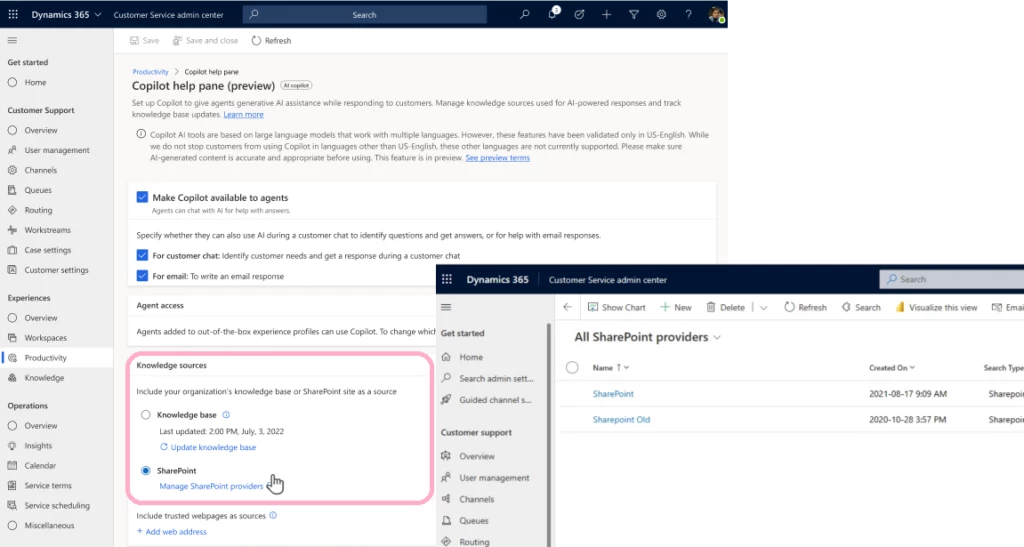
Administrators can easily configure Copilot settings within the Customer Service admin center app to include underlying knowledge sources, which could be either an internal knowledge base or SharePoint. If they choose SharePoint, they must configure and link active SharePoint portals with Copilot as shown below: 

After configuration, Copilot will use the federated search framework within Dynamics 365 with graph search APIs to search for SharePoint content in real time. Copilot will then process it further with Azure Open AI service to generate a relevant response parsed across thousands of lengthy files (Word, PDF, text formats) making the content easy for agents to read and act upon quickly. 

Plan for future Copilot updates

Currently, customers previewing Copilot can use either their internal knowledge base or SharePoint as their primary knowledge source, but not both. Based on feedback and collective assessment, we would like to bring SharePoint and internal knowledge bases together for Copilot to generate unified responses across both sources. The following features are already on our roadmap:   

  • Unified Copilot response: We will be enhancing the ability for Copilot to search and index both internal and SharePoint content together to generate unified response. 
  • Improved quality of response: Use Azure Open AI to improve overall quality and relevance of responses with SharePoint content. 
  • Support for SharePoint site page contents (*.aspx): Enhance Copilot to include site page content in its responses while answering queries. 

AI solutions built responsibly 

Enterprise grade data privacy at its core. Azure OpenAI offers a range of privacy features, including data encryption and secure storage. It allows users to control access to their data and provides detailed auditing and monitoring capabilities. Copilot is built on Azure OpenAI, so enterprises can rest assured that it offers the same level of data privacy and protection. 

Responsible AI by design. We are committed to creating responsible AI by design. Our work is guided by a core set of principles: fairness, reliability and safety, privacy and security, inclusiveness, transparency, and accountability. We are putting those principles into practice across the company to develop and deploy AI that will have a positive impact on society. 

Try Copilot with SharePoint

Customers interested in trying this feature can share their org IDs by filling out a short survey form: Copilot Integration with SharePoint as a Knowledge Source

To try other Copilot features in Customer Service, read the documentation: Enable Copilot features in Customer Service | Microsoft Learn

The post Use Copilot with SharePoint knowledge to serve your customers  appeared first on Microsoft Dynamics 365 Blog.

Brought to you by Dr. Ware, Microsoft Office 365 Silver Partner, Charleston SC.

SharePoint support for labels configured for user-defined permissions

This article is contributed. See the original author and article here.

Rolling out in preview, there’s now limited support for labels configured for user-defined permissions. This encryption configuration refers to the setting Let users assign permissions when they apply the label and the checkbox In Word, PowerPoint, and Excel, prompt users to specify permissions is selected:


  • When a document is labeled with user-defined permissions and uploaded to SharePoint or OneDrive, these services can now process the document so that it can be opened and edited in Office for the web, the label name is displayed in the Sensitivity column, and the encrypted file is returned in search results for the label ID.


  • Labels with this configuration are now displayed in Office for the web. However, currently, users can’t apply these labels in Office for the web and if these labels are selected, users see a message instructing them to apply the label using a desktop app.


  • The contents currently can’t be inspected for search, data loss prevention, or eDiscovery.


To support AutoSave and co-authoring for these encrypted files using a desktop app, you must have enabled co-authoring for files encrypted with sensitivity labels and for your Microsoft 365 Apps for enterprise:


  • Windows: Minimum version of 16.0.16327 from Current Channel (Preview), or minimal version of 16.0.16414 from the Beta Channel

  • macOS: Minimum version of 16.51 from Current Channel (Preview) or from the Beta Channel


Note: If you use earlier versions and co-authoring is enabled for your tenant, AutoSave and co-authoring will be temporarily disabled for documents after users apply a sensitivity label that’s configured with user-defined permissions, or users change the permissions. After they close the document and wait 10 minutes, these features are available again.

Demo 


Thanks for reading!


Microsoft 365 Admin Monthly Digest – July 2023

Microsoft 365 Admin Monthly Digest – July 2023

This article is contributed. See the original author and article here.

a banner depicting the title of the blog with tagline ”Your monthly IT admin blog for all things Microsoft 365”a banner depicting the title of the blog with tagline ”Your monthly IT admin blog for all things Microsoft 365”


Welcome to the Microsoft 365 IT admin blog, your monthly source of tips, insights, and best practices for managing and optimizing your Microsoft 365 environment. In this edition, get ready for the next AMA on Microsoft 365 Copilot, learn about Bing Chat Enterprise, and the latest enhancements to the Microsoft 365 admin center. Read on to catch up about all things Microsoft 365 administration. 


Join the next AMA on Microsoft 365 Copilot


We’ll be hosting the next AMA (Ask Me Anything) focused on Microsoft 365 Copilot and Bing Chat Enterprise on August 10 in the Microsoft 365 Copilot Tech Community. The event was a great opportunity to hear from members like you and have the team of experts answer questions. You can start sending in your questions to the event page now, and a team of experts will join us to help answer them during the event. The first AMA was held on July 13, and focused on preparing for Microsoft 365 Copilot. If you missed it, you can review the full list of questions and answers here. 


Bing Chat Enterprise now in preview 


At Microsoft Inspire, Microsoft announced Bing Chat Enterprise, giving organizations AI-powered chat for work with commercial data protection. Chat data is not saved, Microsoft has no eyes-on access, and your data is not used to train foundation models. This gives users access to better answers, greater efficiency, and new ways to be creative while staying secure. Users can access Bing Chat Enterprise using their work account wherever Bing Chat is supported – Bing.com/chat and Microsoft Edge sidebar. 


To enable the preview, eligible customers can turn on Bing Chat Enterprise by going to https://aka.ms/TurnOnBCE to opt in. You will also need to ensure Microsoft Search in Bing setting in the Microsoft 365 admin center is turned on. Learn more about managing Bing Chat Enterprise here 


Have questions about Bing Chat Enterprise? Check out the FAQ here. 


Highlights across Microsoft 365 administration 


Let’s check out some of the latest features we launched in the Microsoft 365 admin center and how they can help you get things done.  


Learn about Microsoft 365 Backup and Archive 


Microsoft also announced many new AI capabilities across Microsoft 365 at Inspire. Particularly for Microsoft 365 admins, Microsoft 365 Backup was introduced to help you back up and quickly restore your organization’s data to a prior point-in-time after a catastrophic event or unforeseen data loss. Microsoft 365 Archive offers long-term storage of inactive or aging files that you might still want to maintain for compliance or retention requirements. You can also catch up on details on Microsoft 365 Copilot licensing and availability announced during the opening keynote. 


Simplify controls with the Microsoft Edge manager service 


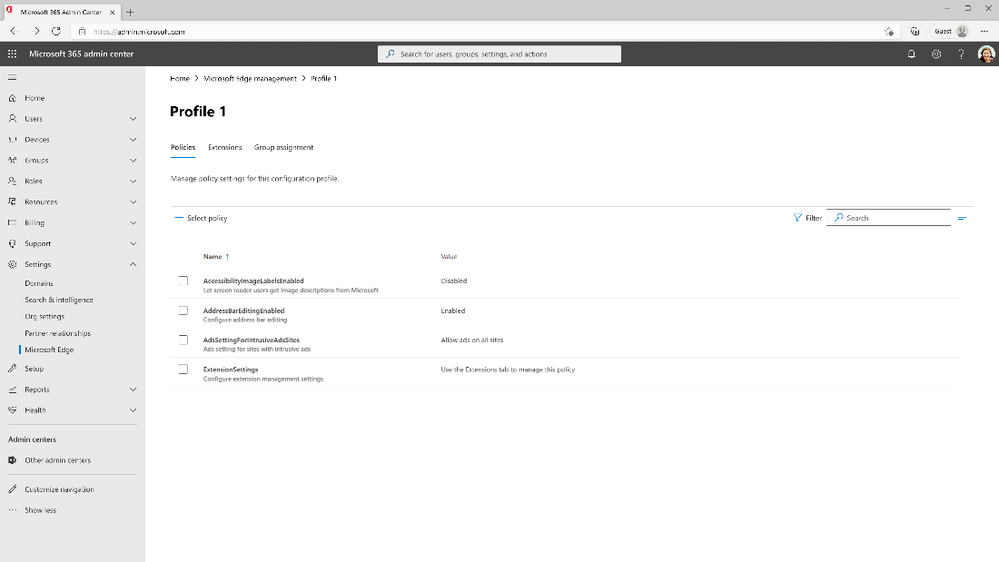
Following our announcement in May, The Microsoft Edge management service is now generally available (Roadmap ID 123856). You can access the service through the Microsoft 365 admin center, Org settings > Microsoft Edge to configure Microsoft Edge browser settings for your organization and apply these settings by group assignment or group policy. Through the portal, you can also manage browser extensions and policies or view user requests for browser extensions. To learn more, read about the Microsoft Edge management service.


An image of the Microsoft Edge management service portalAn image of the Microsoft Edge management service portal


Improve employee experience with Viva Pulse 


Last week, Microsoft announced the general availability of Microsoft Viva Pulse, a new employee feedback experience that is now available for use with your Viva Suite subscription. It empowers managers and project team leaders to request and receive feedback from their teams at any time. Managers and project leads can choose from research-based templates to quickly create a survey and send it to select individuals or groups. They can also track feedback to understand team sentiment over time and show teams they’re being heard by working together to take clear steps to address needs.   


As an admin, you must execute a script in PowerShell for these notifications to appear. After the script is executed successfully, users will receive email notifications when a feedback author requests a Pulse, when feedback providers are reminded to respond, when a feedback author is notified their Pulse request has closed, and when a feedback author shares a Pulse report.  Find the script to enable notifications for your organization here. 


Better plan for change with Feature release status in the message center 


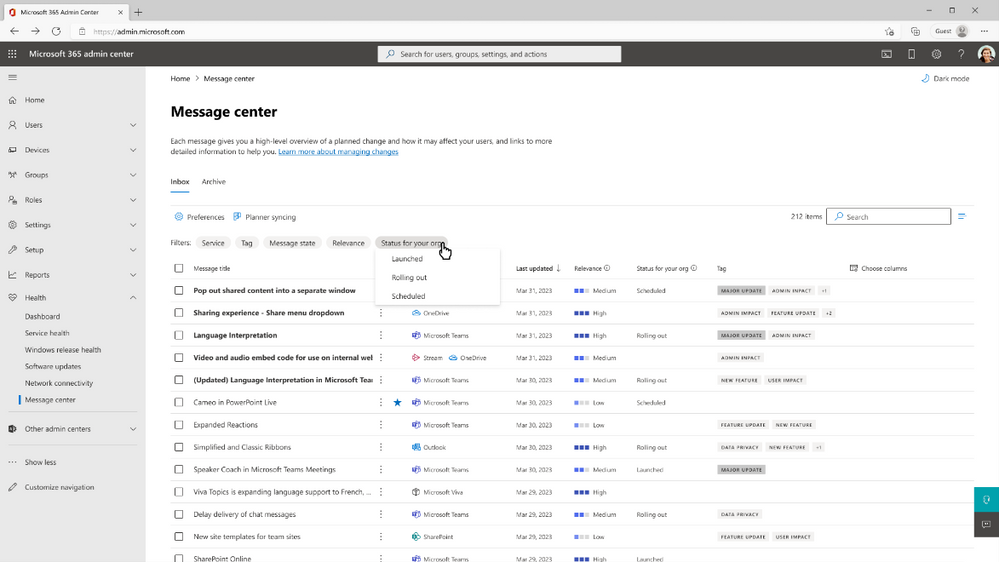
In continued efforts to make it easier for IT departments to manage change with greater predictability, Microsoft recently made feature release status in the message center for Teams, and Outlook on the web, and Microsoft 365 admin center available worldwide to customers. Now, you can have visibility to feature rollout status in the message center, Planner sync for the message center, and Service Communications API, along with the ability to view release status in Targeted and Standard release rings. Additionally, on the message center, you can apply filters based on the status of the releases and the timeframe of their status changes. To learn more, you can read the documentation here. 


An image of the feature release status column in the message centerAn image of the feature release status column in the message center


Stay updated 


As always, stay current with the latest updates Microsoft 365 admin center from the Microsoft 365 roadmap and the message center. In addition, we also highlight new feature releases and enhancements released each month in our What’s new in the Microsoft 365 admin center article.  


Comment below if there are IT admin or change management topics you would like us to explore in the future! 

Customer service is a (Microsoft) Teams sport 

Customer service is a (Microsoft) Teams sport 

This article is contributed. See the original author and article here.

The customer service world has undergone a significant transformation in recent years. With the rise of digitalization and advanced technologies, customers now expect seamless and personalized experiences across multiple channels. Automation and AI have become integral to customer support teams, enabling faster response times and more efficient issue resolution.  

Moreover, post-pandemic, remote work and virtual communication have become the norm, reshaping the way customer support teams operate and collaborate. Agents find themselves in silos, unable to seek immediate help from colleagues in neighboring cubicles like in traditional office settings. 

As businesses strive to meet the escalating demands of customers, contact center leaders must be strategic about agent productivity. They must enhance agent collaboration and efficiency, ensuring the delivery of high-quality customer service even in a dispersed working environment. 

We acknowledge customer service is a collective effort. Hence, by bringing together Dynamics 365 Customer Service and Microsoft Teams, we aim to provide agents with a cohesive environment to get help from experts across the entire company to resolve complex customer issues which they might not have expertise on.  Both experts and agents can use their preferred tools; Dynamics 365 Customer Service for agents and Microsoft Teams for experts. Experts don’t have to be Dynamics users; a Teams license is all they need to participate and collaborate effectively. 

With the enhancements in this release wave, Teams collaboration features (embedded chat, swarming, and Teams meeting integration) are even more robust. Let’s dive into the details of these exciting advancements. 

Keep Teams chat participants informed of updated fields

Reduce overhead for agents by automatically updating all chat participants when an essential field on a connected record is updated. This time-saving feature helps keep everyone in the know without any manual effort. This allows agents to focus on what’s important and helping experts in the chat be aware of pertinent updates.

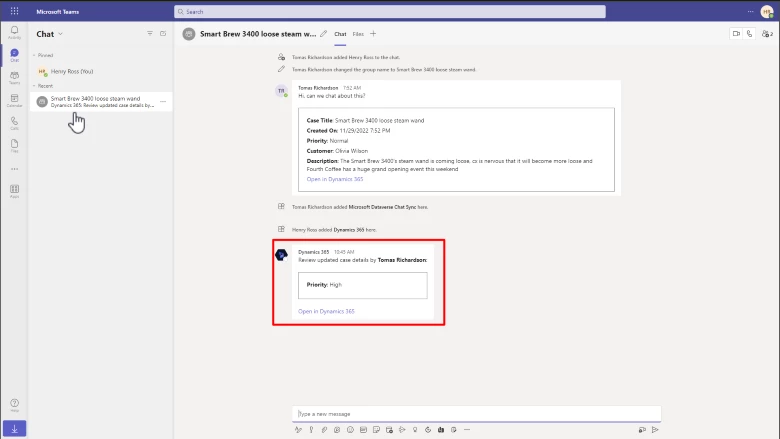
Send a bot event update in the connected Teams chat to inform participants of an updated field on the connected record. With the suite of Teams collaboration features, not only you can start a chat with the users who are connected with Dynamics 365 records, now you can keep them informed when the record changes, without any manual effort. For example, when the priority of a case changes, all the chat participants are notified. 

Microsoft Teams chat showing an update to the priority of a linked case

Dynamics links unfurled in Teams chat

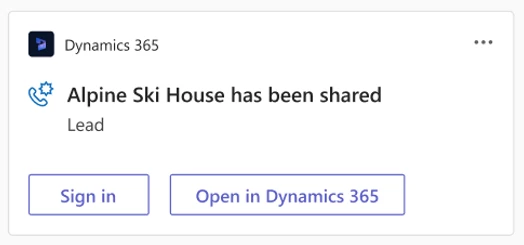
Links to Dynamics 365 and Power Apps records are unfurled when pasted in Microsoft Teams chats and meetings. See the details of your business data in your Microsoft Teams chats and feel confident that the link you’re selecting is an authentic Power Apps link. Now, when you paste a Dynamics 365 Customer Service link into a Microsoft Teams chat, meeting, or channel, participants will see an adaptive card with more details about the shared link. Links to canvas apps will show the app name and record name. Model-driven app links to records show the entity type. The user pasting the link can delete the card in the message compose window before sending the message if they don’t want to send the link as a card. 

Timeline integration

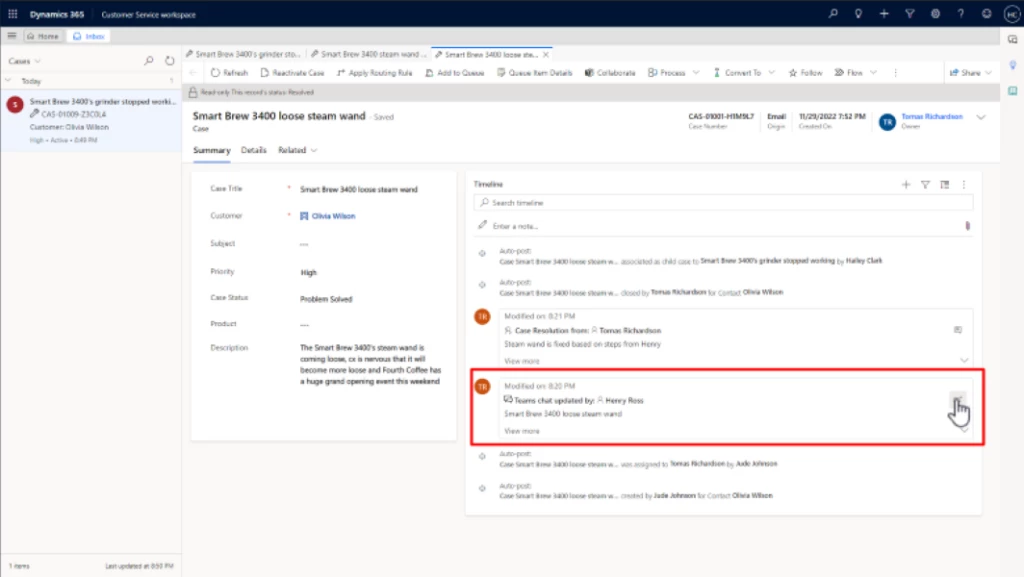
When you start a connected chat or connect an existing chat to a record, you can see it as an activity on the connected record’s timeline. This makes it easy for agents to get the full case view by allowing them to see any chats related to the case or record directly on the timeline. 

If there is an agent hand-off, the next agent, who may not have been a part of the chat initially, can also see the conversation on the timeline. The next agent can directly join the discussion as a chat participant to see the entire chat exchange.  

To enable the feature, the admin can turn on the Join chat toggle in the Customer Service admin center app. This gives users with read and write privileges the ability to join a connected chat. 

Swarming enhancements

Customer support swarming helps agents connect with experts in their organization to solve cases faster. We made the following enhancements to swarming: 

  • Guided admin setup: The guided, step-by-step setup makes it easy for admins to configure and onboard their agents. It significantly reduces the time for admins to configure swarming in their organizations, helping make the onboarding experience more efficient. Now agents can more quickly get the help they need from experts across the organization.
  • Swarm form UI: Administrators can add a tab, section, or field to the swarm form and customize it as needed. The changes they make will promptly reflect in the agent workspace. The swarm creation form now comes with an advanced look and feel. With the visual indicator, agents can view the progress of swarm creation and see the steps completed and those remaining. 
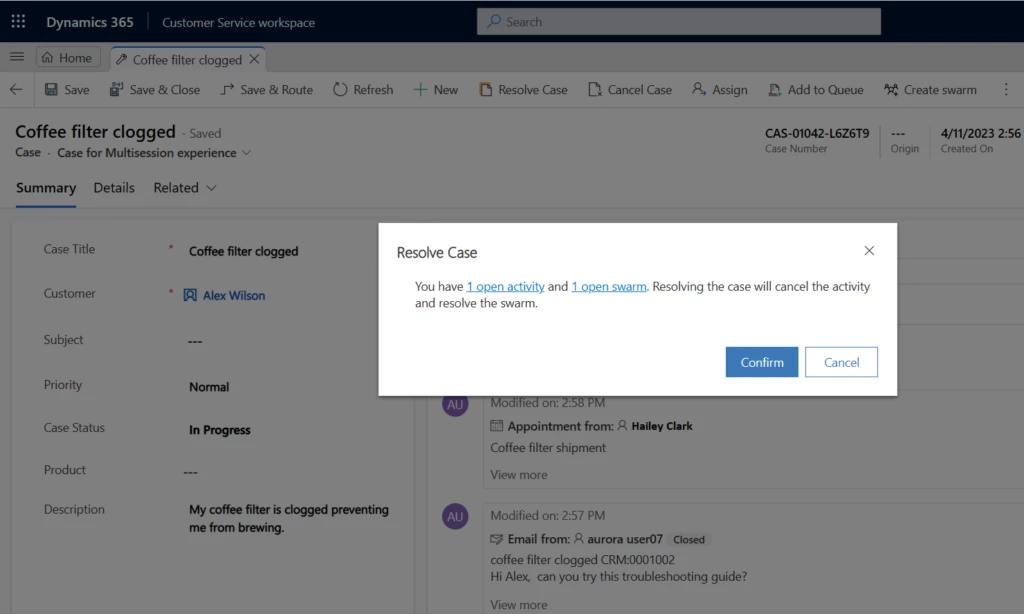
  • Auto resolve swarm: When a case is closed (that is, canceled or resolved), associated swarms are automatically resolved. 
Pop-up window in Dynamics 365 Customer Service to enable the agent to resolve a case and the associated swarm

With Microsoft Teams chat embedded in Dynamics 365 Customer Service, collaborating with colleagues is easier than ever. Both agents and experts can stay informed about important case details without making a lot of manual updates and circling back. Try these features and more with the latest updates to Dynamics 365 Customer Service. 

Learn more

To learn more about Microsoft Teams chat embedded in Dynamics 365 Customer Service, read the documentation: Overview of collaboration in Dynamics 365 Customer Service | Microsoft Learn

The post Customer service is a (Microsoft) Teams sport  appeared first on Microsoft Dynamics 365 Blog.

Brought to you by Dr. Ware, Microsoft Office 365 Silver Partner, Charleston SC.
Introducing Microsoft Clipchamp: Unlock the power of video at work

Introducing Microsoft Clipchamp: Unlock the power of video at work

This article is contributed. See the original author and article here.

With Clipchamp as part of Microsoft 365, it’s easy to know where to turn to make videos and get started. Anyone can confidently create and publish videos, using an intuitive interface and harnessing useful tools. Clipchamp empowers anyone to produce high-quality videos they can be proud of.  

The post Introducing Microsoft Clipchamp: Unlock the power of video at work appeared first on Microsoft 365 Blog.

Brought to you by Dr. Ware, Microsoft Office 365 Silver Partner, Charleston SC.