This article is contributed. See the original author and article here.
Delivering exceptional service is key for building customer preference and loyalty. But timely resolution can get challenging when fragmented tools make it hard to find the right information and service delivery gets delayed with lengthy data-entry processes. Today, we’re introducing Copilot in Dynamics 365 Field Service, bringing the power of next-generation AI to service professionals on the frontline to speed time to resolution. From creating work orders with the right information and assigning them to the right technicians, to equipping the technicians with sufficient support to successfully complete jobs—Copilot will help streamline critical frontline tasks.
New data from Microsoft’s 2023 Work Trend Index Annual Report1 reveals 63 percent of frontline workers struggle with having to do repetitive or menial tasks that take time away from more meaningful work, and 66 percent feel that they don’t have enough time to complete work tasks. The number one thing that frontline leaders value from AI is helping employees with necessary but repetitive/mundane tasks. Whether it’s for a facility inspection, equipment installation, or a maintenance request, frontline service managers want to spend their time figuring out how to improve their team’s efficiency rather than on repetitive tasks such as copying and pasting information from one system to another to create work orders and dispatch technicians. And frontline technicians want the right information at the right time to complete the job, the first time.
Accelerating service delivery
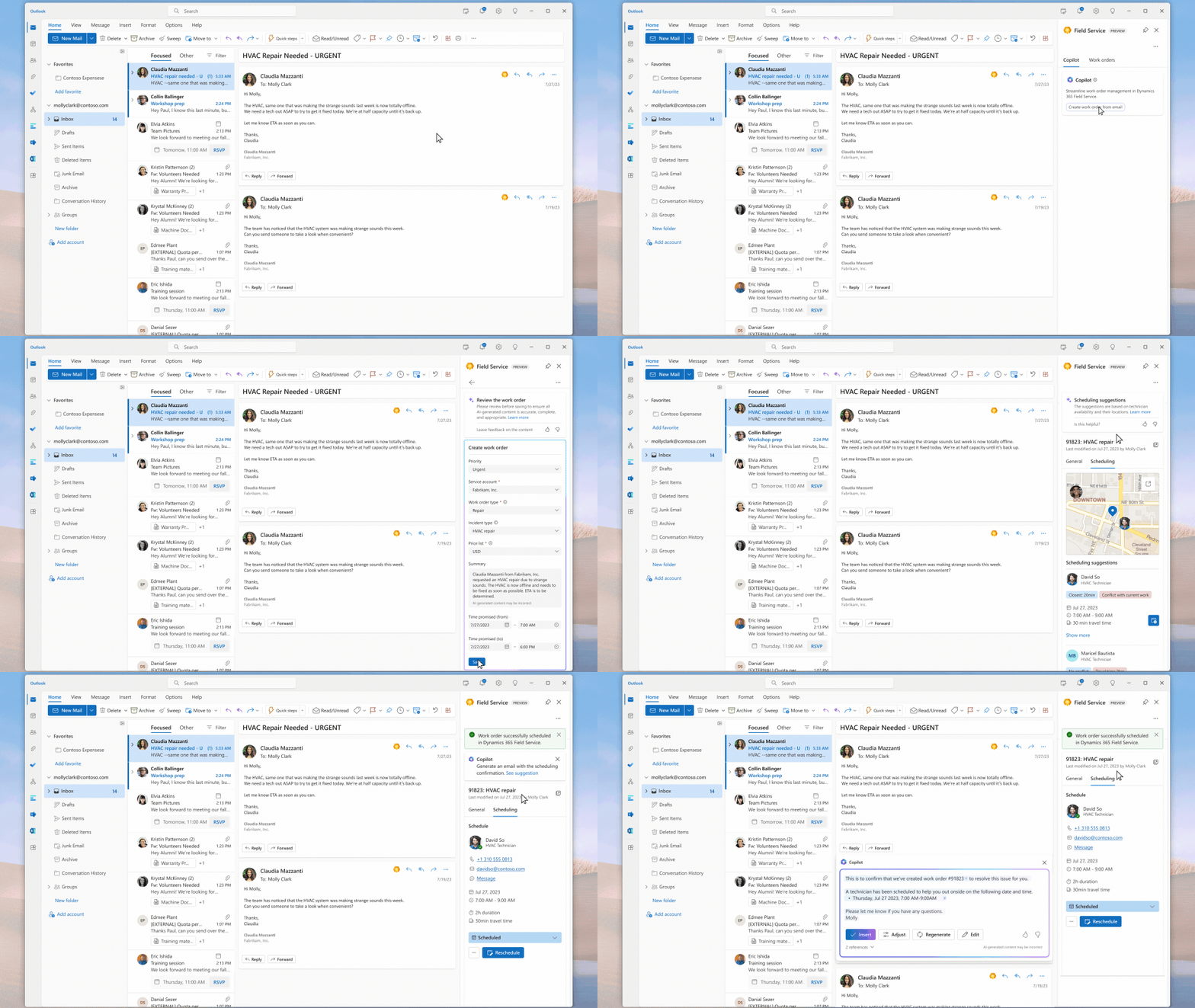
With the preview of Copilot in Dynamics 365 Field Service today, frontline managers who receive service requests or questions via emails can use next-generation AI to streamline work order creation directly within Outlook. Copilot prepopulates relevant data including summaries of customer escalations into draft work orders for managers to review in their flow of work. Once saved, these work orders automatically sync to Microsoft Dynamics 365 Field Service. Additionally, with updates coming this fall, Copilot will streamline technician scheduling by offering data-driven recommendations based on travel time, availability, skill set, and other factors as well as accelerate responses to customer messages by summarizing key details and next steps in email drafts. Copilot will also become available to assist frontline managers in their flow of work within Microsoft Teams.
“I am really excited about working with Copilot capabilities as I believe it will completely change the way our employees at G&J Pepsi interact with Dynamics 365 Field Service. It will be a game changer for our field service and frontline teams, allowing them to enhance their best-in-class service by getting access to the information they need faster than ever before.”
Eric McKinney, Director of Enterprise Infrastructure at G&J Pepsi
Boosting technician productivity
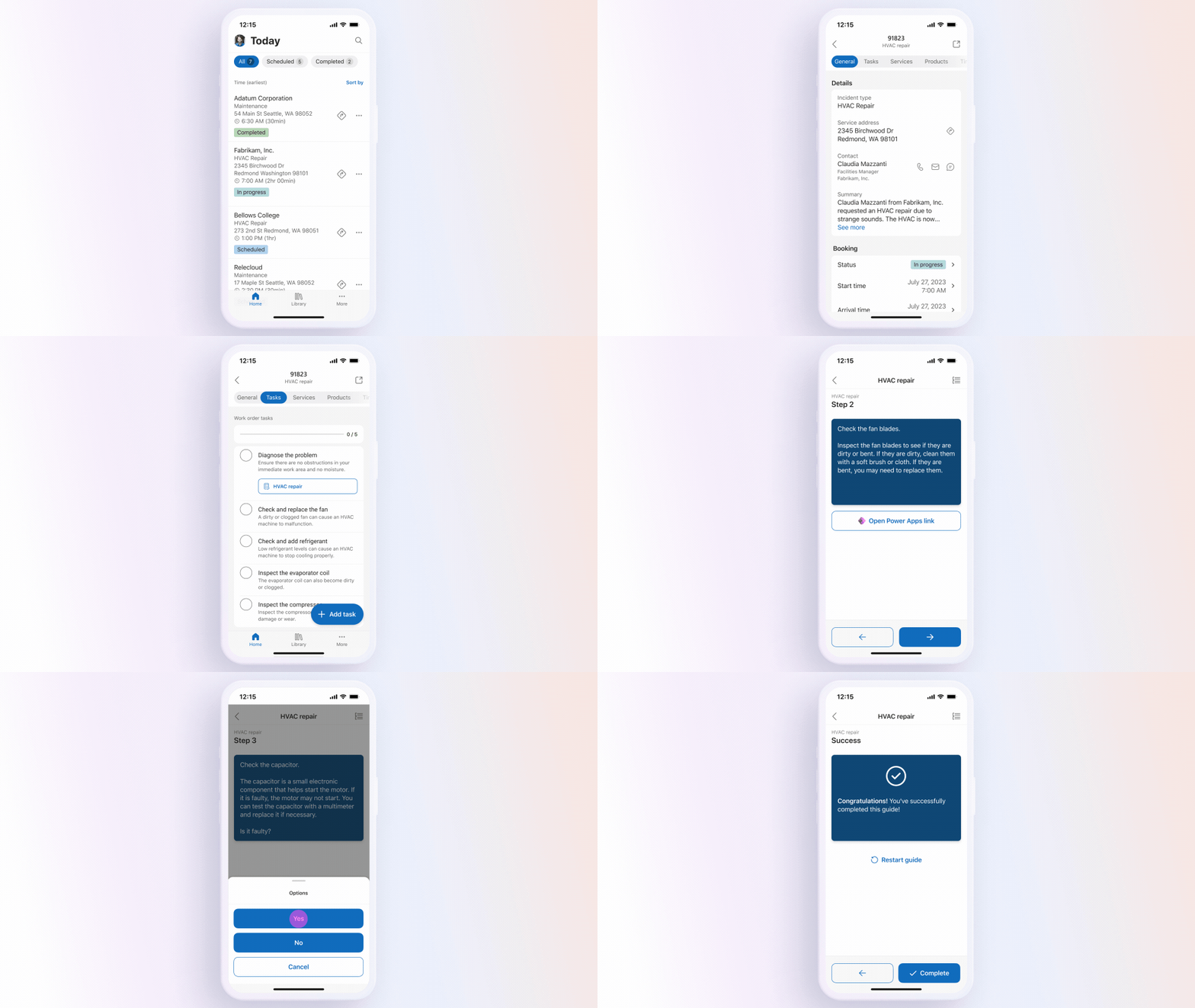
Today, we’re also introducing the preview of a new Dynamics 365 Field Service mobile experience for frontline technicians to swiftly access all the information they need on the go. This modern user experience supports familiar mobile navigation, gestures, and controls to streamline managing work order Tasks, Services, and Products. From changing the status of a booking with a quick swipe to accessing driving directions to a customer site with one tap, the redesign saves valuable technician time for daily work—cutting down the number of taps for key tasks in half. Technicians can not only easily pick, change, or complete work order details, but also add notes with multiple inline images. Technicians who need additional support can now also use Microsoft Dynamics 365 Guides embedded in Field Service mobile. Embedded Dynamics 365 Guides in Field Service provides technicians with step-by-step guided instructions, pictures, and videos explaining the immediate task.
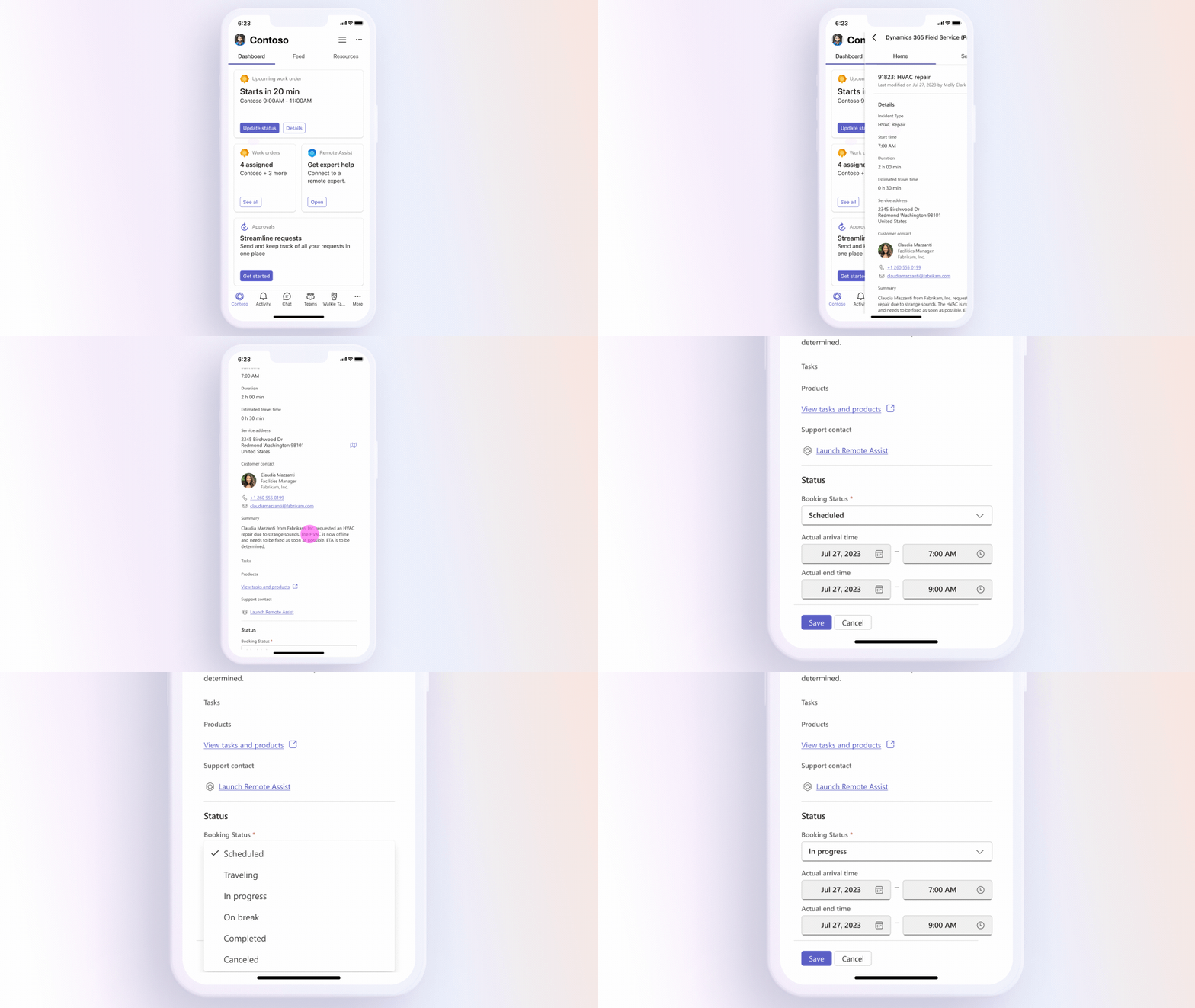
Additionally, with the preview of the Dynamics 365 Field Service app in Teams starting today, frontline technicians can now see upcoming work orders at-a-glance as Tasks in their Microsoft Viva Connections home experience and can easily drill into details such as location or issue type. Frontline technicians can also now share full work order details through cards in Teams and access the Microsoft Dynamics 365 Remote Assist app in one click via their home experience in Teams mobile to problem solve with remote experts in real time using 3D spatial annotations that lock to the physical world.
“Copilot in Dynamics 365 Field Service will support a faster way of working for our organization by simplifying our transactional work order management process. The ease with which an email can be translated into a work order and planned will increase the speed of our customer responses and improve our customer journey. We are also excited to improve the experience for our customer-facing colleagues with the Microsoft 365 integrations. Microsoft Teams is our main internal communication method, and the integration of Field Service into Teams will greatly simplify the communication about a specific work order, account, or other customer case and improve the case lead time.”
Sven van Veldhuizen, CIO/CDO at Joulz
Streamlining work order management
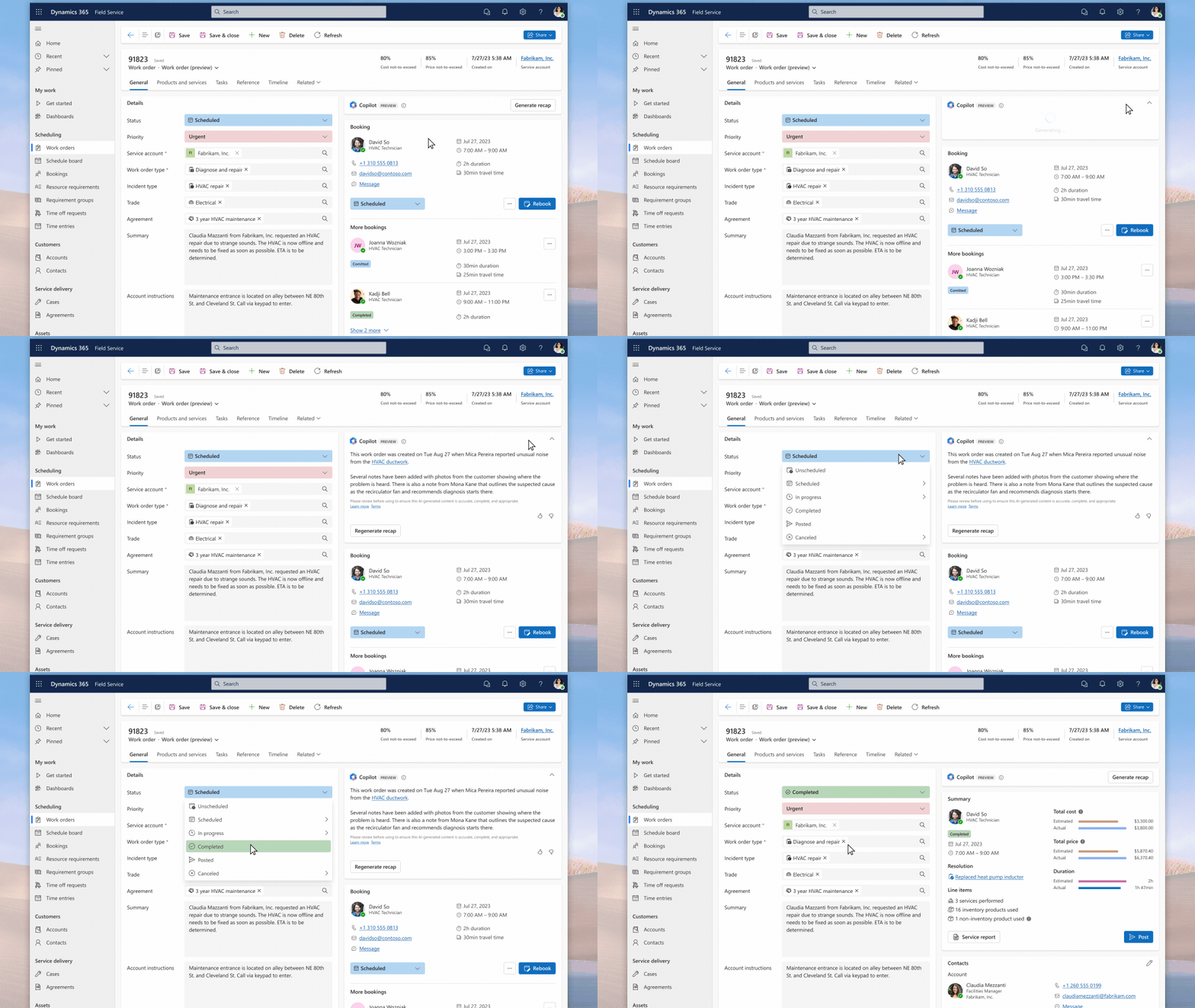
A redesigned Dynamics 365 Field Service work order management experience is now available for early access, featuring a simplified web experience that brings important information front and center—reducing the number of clicks for key tasks by more than a third. The experience not only offers concise information about the work order but also provides relevant next steps based on booking statuses, and supports making quick updates inline or in a side panel to not lose context. Copilot will provide intelligent recaps within this experience to help frontline managers stay up-to-date without having to navigate through all the information in a work order.
Partnering with our ecosystem
Partners have played a key role in helping us refine Copilot in Dynamics 365 Field Service ahead of its public preview and we are excited to share some of their observations as early adopters.
“We are excited to bring Copilot in Dynamics 365 Field Service and Microsoft 365 integrations to augment our sustainable energy customers’ field service workforce—enabling them to stay ahead of the game with increased productivity. Just imagine the productivity gain your service department can realize by having a service-related email translated by AI into a field service work order with the right information, and what field service technicians can accomplish when they get a clear and simple view of all the information they need to focus on in whatever Microsoft 365 tool supports their daily tasks the best.”
Filip Bossuyt, Founder & CEO at 9altitudes Group
“Hitachi Solutions has been working with Microsoft to preview Copilot in Dynamics 365 Field Service and is already seeing how field service organizations will greatly benefit from AI. Our field service customers want solutions fast. With Copilot work order capabilities in Outlook, our customer’s field service managers can stay in the flow of work and immediately assign resources to solve problems, leading to quicker response times and enhanced service delivery.”
Michael Mendoza, Director of Service Transformation at Hitachi Solutions
“Copilot in Dynamics 365 Field Service is like a window into the future, nothing like what I’ve seen before. It’s literally taking steps out of my work stream by summarizing emails and coming up with the work order description—saving me seconds each time which add up to minutes each day. This matters a lot when you think about the volume of emails with service requests in today’s world.”
Greg Somogyi, Field Service Senior Consultant at Ludia Consulting
“We are excited to introduce Copilot in Dynamics 365 Field Service to our facilities clients because we see the power in simplicity. For our clients raising responsive repairs to get the right person with the right skill to the right properties at the right time, Copilot enables frontline teams to go from issue to resolution in just a few clicks.”
Matt Hedges, Products Director at TechLabs London
Lastly, we are excited to announce the interoperation of asset performance solutions from ICONICS and Willow with Dynamics 365 Field Service, making it seamless to share critical insights like equipment health and faults in order to proactively detect and resolve asset issues. The IoT-based solutions elevate asset monitoring and service management to new levels of sophistication, empowering frontline workers to make better-informed decisions based on data when providing service and repairs. The new Copilot capabilities in Dynamics 365 Field Service can also help efficiently summarize and update work orders generated based on these IoT-based solutions. This streamlines service workflows, improves response times, and enhances overall service quality for customers. Read about further details on the solutions here.
Learn more about Copilot in Dynamics 365 Field Service, Microsoft 365 integrations, and more
Today’s announcement builds on recent AI momentum across Microsoft 365, Dynamics 365, and Microsoft Power Platform. Learn more about the latest AI breakthroughs with Microsoft Dynamics 365 Copilot on the Dynamics 365 AI webpage. With Copilot, you’re in control as it is grounded in your business data and automatically inherits your valuable security, compliance and privacy policies, regulations, and processes. Learn about our AI principles that empower impactful responsible AI practices at Microsoft, as well as provide a framework for implementing responsible AI practices at our customers’ organizations.
Copilot in Dynamics 365 Field Service
Next-generation AI helps your frontline deliver exceptional service.
1 The Work Trend Index survey was conducted by an independent research firm, Edelman Data x Intelligence, among 31,000 full-time employed or self-employed workers across 31 markets, 6,019 of which are frontline workers, between February 1, 2023, and March 14, 2023. This survey was 20 minutes in length and conducted online, in either the English language or translated into a local language across markets. One thousand full-time workers were surveyed in each market, and global results have been aggregated across all responses to provide an average. Each market is evenly weighted within the global average. Each market was sampled to be representative of the full-time workforce across age, gender, and region; each sample included a mix of work environments (in-person, remote vs. non-remote, office settings vs. non-office settings, etc.), industries, company sizes, tenures, and job levels. Markets surveyed include: Argentina, Australia, Brazil, Canada, China, Colombia, Czech Republic, Finland, France, Germany, Hong Kong, India, Indonesia, Italy, Japan, Malaysia, Mexico, Netherlands, New Zealand, Philippines, Poland, Singapore, South Korea, Spain, Sweden, Switzerland, Taiwan, Thailand, United Kingdom, United States, and Vietnam.
This article is contributed. See the original author and article here.
Are yer sites and content mean-spirited and aggressive – like our Looney Tunes friend, Yosemite Sam? Let us parlay any angst into an inner admin calm – your Bugs Bunny if you will. You’ll be hootin’-n-tootin’ in no time thanking us for them thar oversharing insights.
In this episode, you’ll hear from Sesha Mani, Partner Group Product Manager at Microsoft focused on security and compliance. We spoke to Sesha about SAM – that’s SharePoint Advanced Management. We cover its core benefits – helping SharePoint and IT Admins address sprawl and oversharing – mapped to what it gives you beyond the core management aspects within the SharePoint admin center. SAM expands on the principles of securing and managing content and data with advanced access policies for secure content collaboration AND advanced sites content lifecycle management.
“When I say whoa, I mean whoa!”– Yosemite Sam. Whoa now, whoa – sit back and enjoy this here episode.
Be sure to visit our show page to hear all episodes, access the show notes, and get bonus content. And stay connected to the SharePoint community blog and the Syntex community blog where we’ll share more information per episode, guest insights, and take any questions or suggestions from our listeners and SharePoint users (TheIntrazone@microsoft.com).
‘This town IS big enough to get yer Intrazone anywheres’
This article is contributed. See the original author and article here.
Greetings, Azure Database for PostgreSQL community! As we step into August, it’s time to look back and reflect on the significant updates and features we introduced in July 2023. At Azure Database for PostgreSQL Flexible Server, our consistent focus is on offering stellar performance, unwavering reliability, and unbeatable security via our flexible server solution. Let’s dive into the key takeaways from the last month.
Feature Highlights Summary
In July, we launched significant updates to optimize your experience with Azure Database for PostgreSQL Flexible Server:
Flexible Server now supports PostgreSQL 15 (general availability)
Automation Tasks for managing your Flexible Server with greater ease (preview)
Flexible Server Migration: Parallel table migration support (general availability)
Flexible Server Migration: Automatic Migration of Users, Roles, Permissions, and Ownerships (general availability)
Introducing AMD Compute SKUs for General Purpose and Memory Optimized Tiers (general availability)
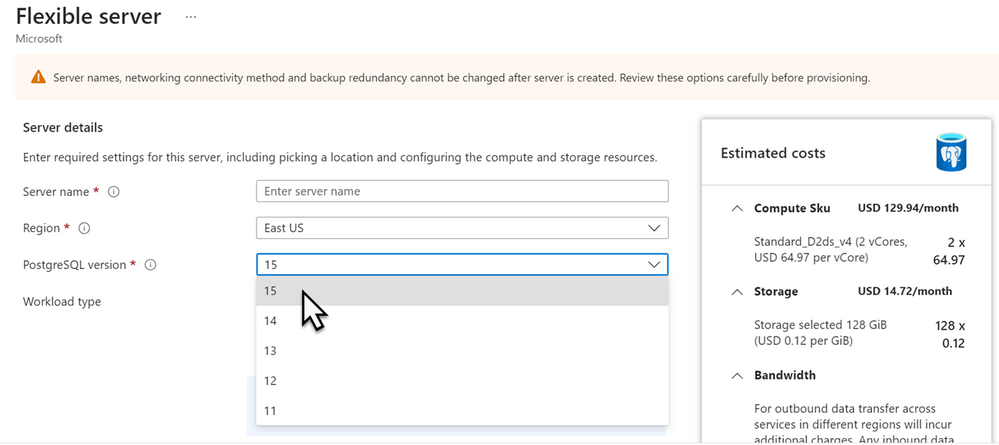
We are excited to announce that PostgreSQL 15 is now Generally Available in Azure Database for PostgreSQL Flexible Server in all supported regions. After a successful preview phase, we’re delighted to offer our users the stability, robust features, and security enhancements of PostgreSQL 15.
PostgreSQL 15 includes several new features, performance improvements, and advanced functionalities to address a variety of use cases for developers and DBAs. The upgraded version ensures improved performance, scalability, and efficiency, as well as tightened security controls, reinforcing our commitment to providing our users with the most advanced database solutions. For steps on how to upgrade to PostgreSQL 15, please refer – Major Version Upgrade for PostgreSQL Flexible Server.
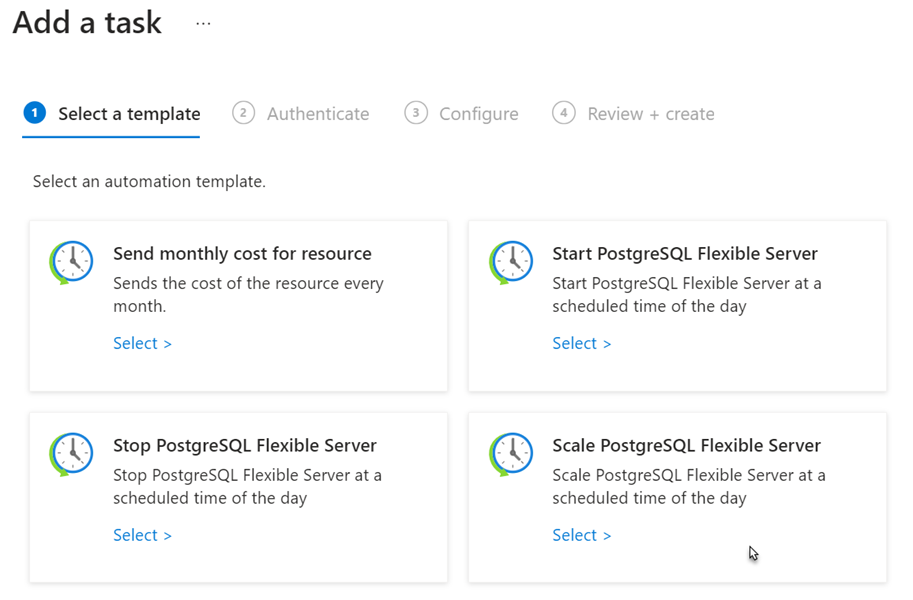
We are pleased to introduce the preview of “Automation Tasks” for Azure Database for PostgreSQL Flexible Server. This feature enables users to automate common management tasks such as starting / stopping servers on schedule, scaling server resources, or sending monthly cost report.
Automation tasks are designed to be basic and lightweight. These tasks are essentially logic app resources that execute workflows at the Azure resource level, powered by the multi-tenant Azure Logic Apps service. Once an automation task has completed at least one run, users can view and edit the underlying workflow in the workflow designer.
Creating an automation task doesn’t incur immediate charges. Instead, the billing model is based on consumption, where metering and billing are driven by triggers and action executions in the underlying logic app workflow. Task history contains a log of task runs and their status. If you wish to modify a task after its creation, they can edit it inline or adjust the underlying workflow in the workflow designer. For more details, refer Manage Azure Database for PostgreSQL – Flexible Server using automation tasks.
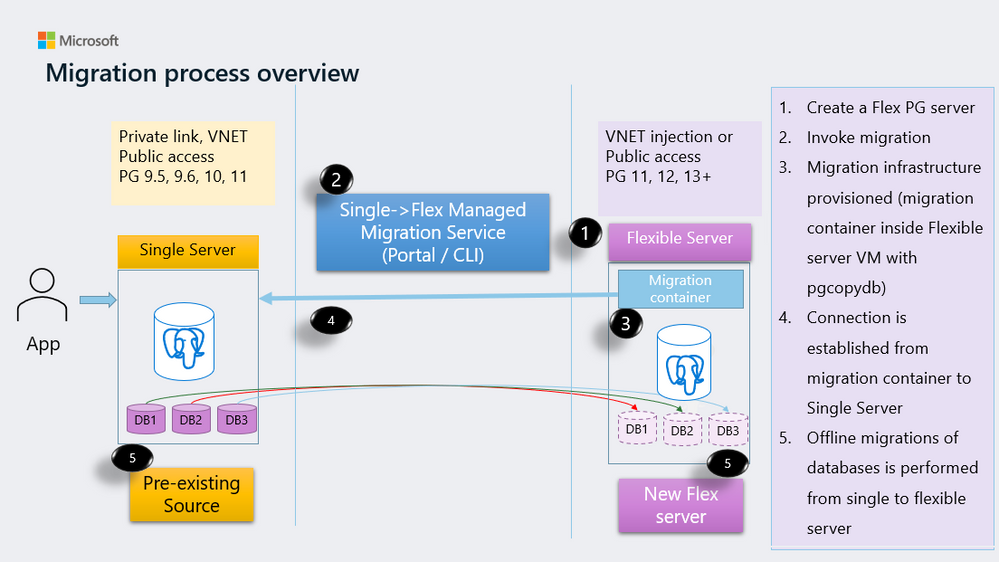
We’re delighted to introduce the Intra-Table Parallelism feature to the Flexible Server Migration tool for Azure Database for PostgreSQL. Designed to simplify the migration of your single server workload to flexible server, this tool now supports simultaneous migration of multiple partitions within a single table. This parallelism substantially minimizes migration time and enhances process efficiency.
This upgrade is particularly beneficial for larger databases, leading to considerable time and resource savings. If you’re contemplating migrating your database to Azure Database for PostgreSQL Flexible Server, the Intra-Table Parallelism feature provides an efficient pathway to expedite the migration process and quicken your database’s operational readiness.
Automatic Migration of Users, Roles, Permissions, and Ownerships
We’ve further upgraded the Flexible Server Migration tool for Azure Database for PostgreSQL by adding the ability to automatically migrate users, roles, permissions, and ownerships from a single server to a flexible server.
This enhancement simplifies the migration process and ensures that all database object ownerships and privileges are correctly assigned to their respective users and roles in the flexible server. This new feature underscores our commitment to making the transition to our flexible server solution as seamless and accurate as possible.
To make the most of these features, refer to our customer guide.
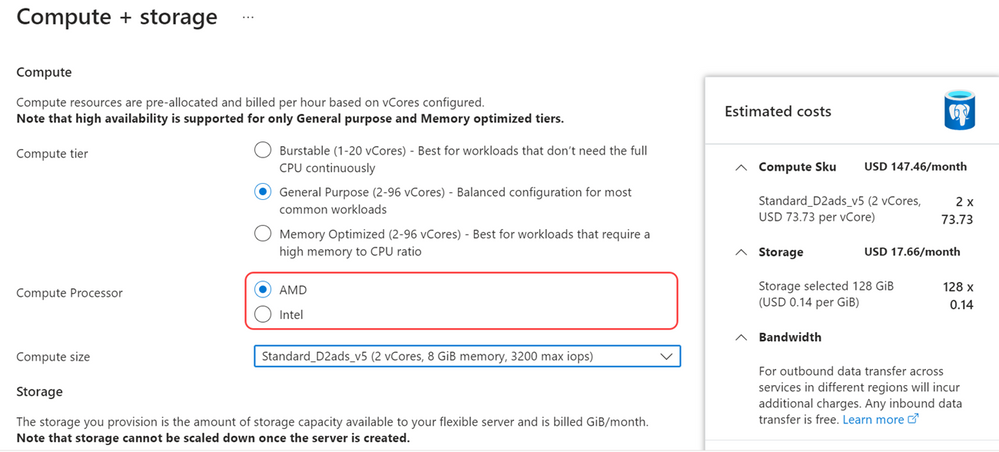
We are delighted to announce that Azure Database for PostgreSQL Flexible Server now offers you the choice between Intel and AMD hardware. This expanded offering extends to our General Purpose (v5-series) and Memory Optimized (v5-series) tiers. The inclusion of AMD SKUs introduces choice of hardware vendors t for both your primary and secondary servers, thereby providing greater control and flexibility over your workload deployment. As part of our commitment to accessibility, these AMD options are now available in more regions and zones.
For a comprehensive understanding of these offerings, see the service pricing page.
This month, we’re thrilled to spotlight the experience of a renowned global IT solutions provider Fujitsu, who employed Azure Database for PostgreSQL Flexible Server in their mission to transform their established EDI solution into a cloud-based offering. Using open-source technologies such as Java and PostgreSQL, they integrated our fully managed PostgreSQL database service into their system, relishing its flexibility, scalability, reliability, and security. The use of our PaaS services significantly reduced operational burden and enabled rapid expansion of their services.
A microservice architecture, linking each PaaS service by API, contributed to superior flexibility, scalability, and improved reliability and stability. This not only increased their operational efficiency but also enhanced the convenience of their cloud services.
This customer story exemplifies the immense potential and robustness of the Azure Database for PostgreSQL Flexible Server, particularly when paired with open-source technologies. For a more detailed account of their success, please check out the Fujitsu Japan rebuilt their solution by fully utilizing Azure PaaS.
Conclusion
As we close out July 2023, we celebrate key strides in Azure Database for PostgreSQL Flexible Server’s development. The launch of PostgreSQL 15, preview of Automation Tasks, enhancements to our Migration tool, and the introduction of AMD Compute SKUs, all contribute to an enriched, efficient user experience.
Thank you for taking the time to stay updated with the recent developments in Azure Database for PostgreSQL Flexible Server. We’re excited to see how these new features will contribute to your success.
This article is contributed. See the original author and article here.
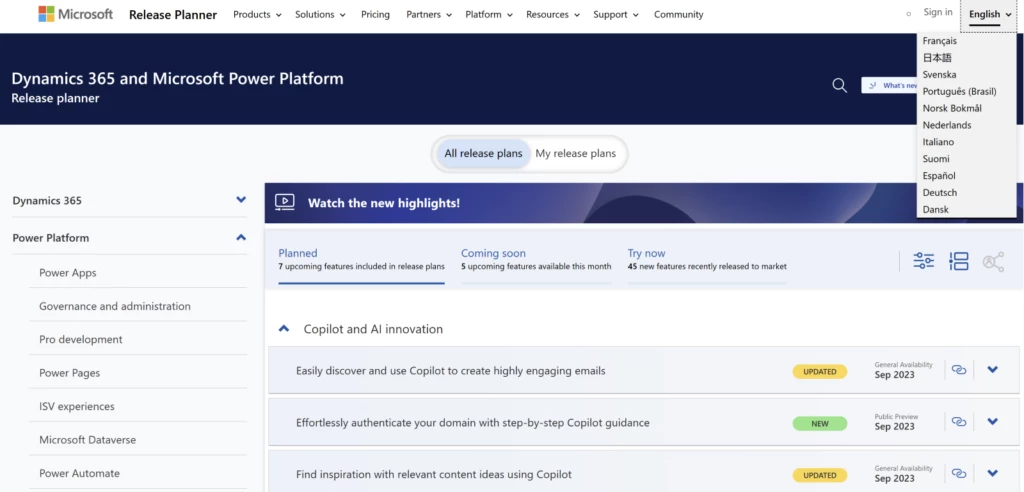
We are excited to announce that starting August 7th, 2023, Microsoft Release Planner will support the content in 11 new languages. Users around the world can now view the release plans of Dynamics 365 and Power Platform in Danish, Dutch, Finnish, French, German, Italian, Japanese, Norwegian, Portuguese (Brazilian), Spanish, Swedish, and English.
This update underscores our commitment to inclusivity. We at Microsoft strongly believe that language should not be a barrier to accessing tools and information. With this update, we aim to provide a more personalized, standardized, and intuitive user experience regardless of where you are in the world.
How to view and manage plans in your preferred language?
Our user-friendly design ensures that the Release Planner automatically loads in your preferred language based on your browser settings. Additionally, you can switch to your desired language through the language switcher in the header.
The Release Planner advantage
The Release planner for Microsoft Dynamics 365 and Microsoft Power Platform allows customers to view and manage release plans across all active release waves in a unified and interactive interface while giving them the option to personalize, filter, sort, and collaborate on release plans.
Under the hood, the Release Planner is powered by the Power Apps portal. It is created based on customer feedback to address the constraints of content suitability, discoverability, and personalization. Our goal is to improve the release planning and change management process where it matters most – help customers identify and track their salient capabilities, included in both the current and upcoming release waves.
Here are some of its key features:
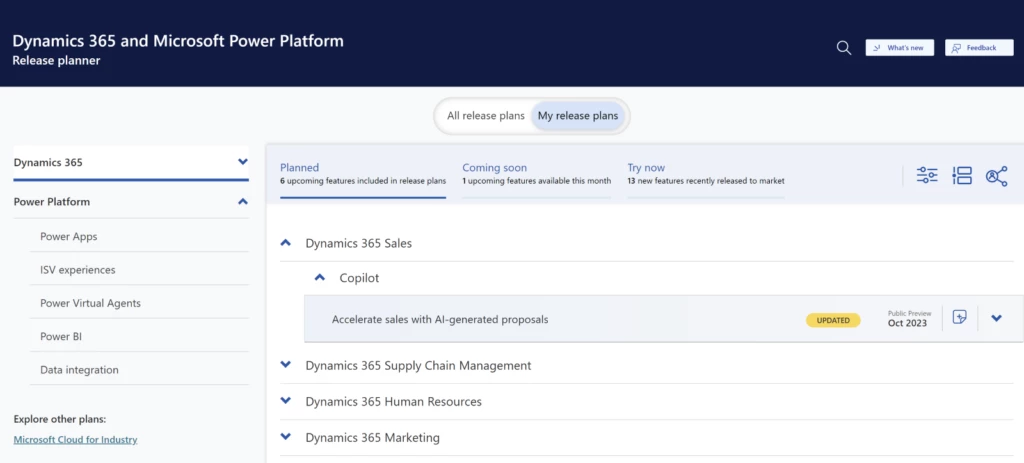
Content personalization through ‘My Release plans’
Create a curated list of release plans you would like to follow. All the release plans across various products can be viewed in a unified view.
Collaborate on plans effortlessly and securely
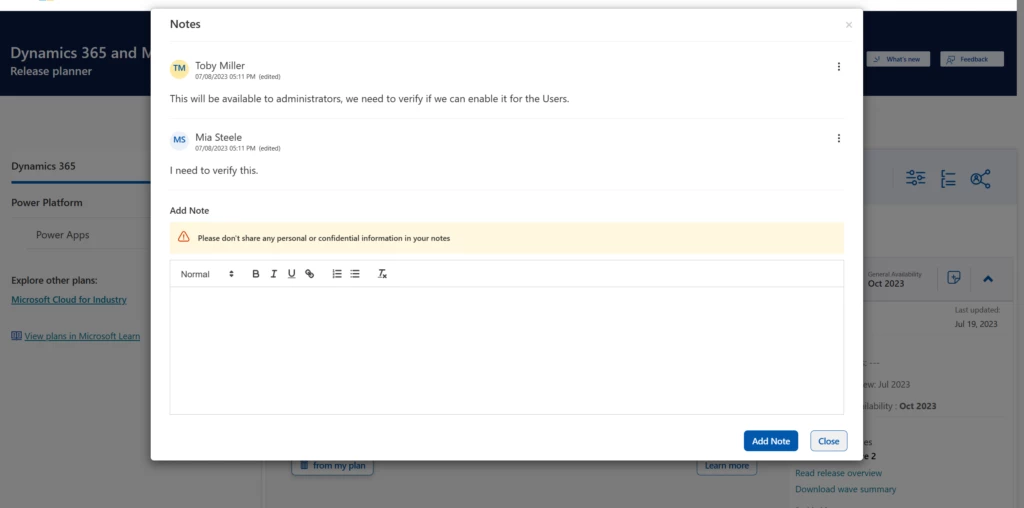
Share your curated list and effortlessly and securely with your stakeholders. Collaborate on individual plans using notes and comments all within the Release Planner experience. Your comments are displayed only to the stakeholders with whom you have shared the plan. The owner of the comment has complete control over editing and deleting the comment.
Filter, sort and group plans based on multiple criteria
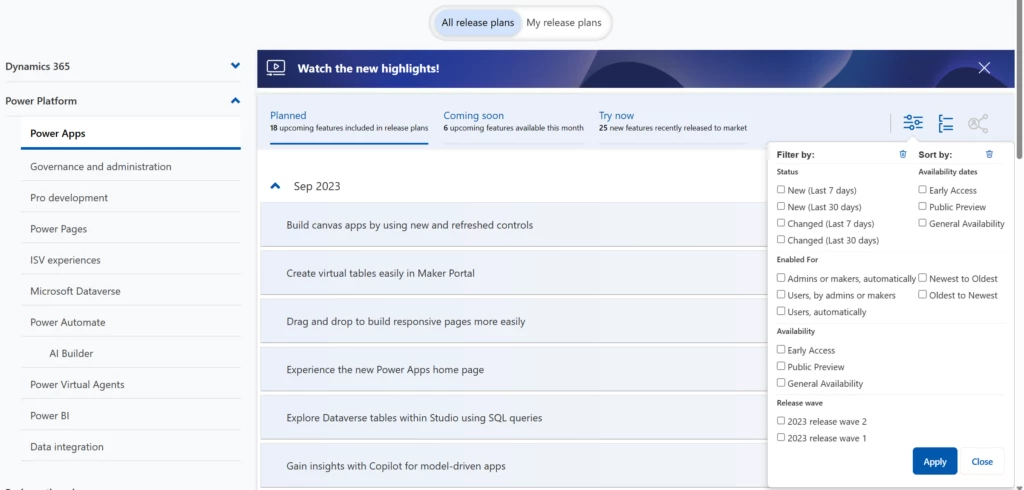
Customize your view by using multiple filters, sorting, and grouping criteria. These criteria are available for both ‘All release plans’ and ‘My release plans’ views. You can also view the plans grouped by product theme or timeline.
Thank you for your continued support as we work to make our product more accessible worldwide. We hope this update sparks more creativity and productivity across our global community! Stay tuned for more exciting updates.
Here’s to breaking down barriers and welcoming a world of new possibilities!
This article is contributed. See the original author and article here.
We are delighted to announce that the export to Azure Logic Apps Standard functionality, available in our Logic Apps (Standard) VS Code extension, has reached general availability. This tool provides customers planning to migrate from Integration Services Environment (ISE) or Azure Logic Apps Consumption with a streamlined way to move workflows from those tiers into a Logic Apps Standard project. You can then locally update, test, and debug your workflows to get them ready for redeployment. When you’re ready, you can deploy either directly from Visual Studio Code or through your own DevOps process.
Common usage scenarios
Exporting Logic Apps workflows from ISE to Standard
With ISE being retired on August 31st 2024, customers need a reliable tool to streamline the process of grouping and exporting workflows to Logic Apps Standard. You can find more information on how to use the tool to export workflows from ISE to Logic Apps Standard here. And you can learn more about ISE Retirement and implications on this FAQ.
Exporting Logic Apps workflows from Consumption to Standard
Some customers currently using Logic Apps Consumption are interested in moving their workflows to Logic Apps Standard, to take advantage of a series of benefits that Logic Apps Standard brings, including: native networking integration and isolation, a group of enterprise connectors that runs natively within the Logic Apps runtime, improving performance and removing throttling limits imposed by Azure Connectors, among others benefits. You can learn more about exporting Logic Apps Consumption workflows to Logic Apps Standard here.
native network integration and isolation,
connector isolation, which removes the throttling limits imposed Azure Connectors
This article is contributed. See the original author and article here.
Microsoft Edge for Business, the new, dedicated work experience currently in preview for the Microsoft Edge browser, is planned to be released with Microsoft Edge stable version 116 (scheduled for the week of August 17, 2023). All customers who sign into Edge using Microsoft Entra ID (formerly Azure Active Directory) will automatically be transitioned to Microsoft Edge for Business as part of the release.
What to expect with Microsoft Edge for Business:
Policies, settings, and configurations previously set by an organization and its Entra ID connected users will be automatically transitioned to Edge for Business.
IT maintains full control over policy and feature management and configuration with Edge for Business.
The icon will be updated to include a briefcase.
An optional personal browsing window, Microsoft Edge, is enabled so users with a personal profile can separate their work and personal browsing and take advantage of the full feature set of Edge for personal use. This will also enable automatic switching from the personal to work browser window when work sites are accessed. The personal browser window is lightly managed, with IT maintaining control over security, compliance, and update policies.
From the beginning, Microsoft Edge was designed with the specific needs of businesses and organizations in mind, with enterprise grade security, productivity, management, and now AI, built in. Microsoft Edge for Business is the next step in the journey to deliver the best browser for business across desktop and mobile, with enhanced separation of work and personal browsing, unmanaged device support, and more coming soon.
General
Is this a new browser?
No, this is not a new browser. This is a new, dedicated Microsoft Edge experience built for work that enables organizations to configure it to maximize productivity and security. It has the same functionality that you’re already familiar with in Microsoft Edge in addition to optional automatic switching built to help meet the evolving needs of users and businesses. Signing in with Microsoft Entra ID will automatically enable Microsoft Edge for Business.
How is Edge for Business differentiated from regular Microsoft Edge?
Microsoft Edge for Business is a dedicated work browsing experience. It’s distinguished through visual elements such as an adjusted icon and other minor visual cues.
IT maintains full control over policy and feature management and configuration with Edge for Business. Meanwhile, Microsoft Edge is lightly managed, with IT maintaining control over security and compliance policies of the personal browsing window. With users separating their work and personal browsing and content, personal data can be excluded from enterprise sync in the work browser window, giving users the privacy they want.
What benefit does Microsoft Edge for Business provide?
For IT, Microsoft Edge for Business can reduce the surface area for cyberattacks, heightening the organization’s security posture, since it offers the opportunity to streamline down to one browser for all use cases. For end users who are signed in with work and personal profiles, Edge for Business can provide a better browsing experience with automatic switching, which has security and privacy benefits.
Does Microsoft Edge for Business require a separate download?
No. Microsoft Edge for Business is automatically triggered by signing in with a Microsoft Entra ID.
User experience
What will the user experience be when Edge for Business becomes available?
After Edge stable version 116 release is deployed, and the browser is restarted:
The Microsoft Edge icon will be updated to the Edge for Business icon
When the user launches Edge for Business, Microsoft Entra ID users will automatically be signed in
A one-time banner will appear at the top of the browser after first launching Edge for Business informing the user of the change with a link to learn more
What impact will the change to Edge for Business have on users?
Users who are only signed in with Microsoft Entra ID
After Edge stable version 116 release is deployed, and the browser is restarted, all users who sign in with Microsoft Entra ID will be transitioned to Edge for Business. Edge for Business inherits all configurations and policies previously set for Microsoft Edge, so the main difference users will see at this time is the Microsoft Edge for Business icon and a new location for their profile photo.
Users who are signed in with both Microsoft Entra ID and Microsoft Account (MSA)
Users who are also signed in with a personal profile (using their Microsoft account (MSA)) can experience automatic switching between their work browser window (Microsoft Edge for Business) and their personal browser window (Microsoft Edge).
With the Edge stable version 116 release:
Switching from the personal browser window to the work browser window will be on by default with the option to turn off by the user
Switching from the work browser window to the personal browser window will be off by default with the option to turn on by the user. Switching from the work browser window to the personal browser window will be default on in future versions of Edge for Business.
To turn on/off automatic switching, visit Edge settings and toggle on/off “Automatic profile switching”.
Work-related sites, such as Microsoft 365 apps and services and sites requiring work login, automatically open in the work browser window. A growing set of popular sites open in the personal browser window once enabled by the user in Edge settings. Users can designate additional sites for work or personal use in settings. (Note: user site designation cannot be overwritten by IT administrators at this time.)
What happens to favorites, passwords, etc.?
Passwords, favorites, and data currently associated with the user’s work profile will be maintained in Edge for Business. Passwords, favorites, and data are not shared between the work browser window and the personal browser window.
What impact will this cause to my default browser settings?
There is no impact to users’ default browser settings.
Will users see both the Edge and Edge for Business icons on the taskbar?
Users that are only signed in with Entra ID will see the Edge for Business icon and not the Edge icon.
Are there materials I can share with my end users to prepare them?
Yes! A downloadable email draft is available and is linked at the bottom of this post.
IT management and controls
Will all policies and configurations previously set by IT be applied to Edge for Business?
Yes, all policies and configurations currently in place will be inherited by Edge for Business.
What controls will IT admins have?
IT maintains control over the security and compliance posture of both Microsoft Edge and Microsoft Edge for Business. Edge is lightly managed, with users able to access all features, while in Edge for Business, IT can control which features are available to users.
IT admins can disable the personal browser window so that their users can only access Edge for Business. Please note that in this case, users will not be able to use Microsoft account based personal profiles and will not experience automatic switching between work and personal browsing.
What policies will be enabled in the personal browser window?
The Microsoft Edge personal browser window is lightly managed, with all security, compliance, and Edge update policies applied, without the additional overhead of managing another browser. To learn more, please visit this site.
How does my organization turn off the personal browser window?
Yes, Edge for Business includes support for unmanaged devices, currently available in preview. Please use these steps to access this preview.
Is Edge for Business available on mobile?
Yes. Edge for Business on mobile is built with enterprise grade security, productivity, management, and now AI, built in. An updated icon, automatic switching, and management via Edge management service in the Microsoft 365 admin center will be available for Edge for Business on mobile the future.
Can anyone with a Microsoft Entra ID (formerly known as Azure Active Directory) can get Microsoft Edge for Business?
Microsoft Edge for Business will be the standard experience for all users with a Microsoft Entra ID.
Will my sites and apps that work in Microsoft Edge work in Microsoft Edge for Business?
Yes, sites and apps that currently work in Microsoft Edge will work in Microsoft Edge for Business.
Are there any functional changes to the Entra ID profile?
No. There are not any functional changes to the Entra ID profile.
Automatic Switching
How do I switch between the Microsoft Edge for Business browser window and the Microsoft Edge browser window?
With the Edge stable version 116 release, URLs entered into the personal browser window that are for work-related sites, such as Microsoft 365 apps and services and sites requiring work login, will automatically open in the work browser window.
Do I need to enable automatic switching?
With this release, switching from the personal browser window to the work browser window will be on by default with the option to turn off by the user. Switching from the work browser window to the personal browser window will be off by default with the option to turn on by the user. This will be enabled by default in a future release. To turn on/off automatic switching, visit Edge settings and toggle on/off “Automatic profile switching”.
Are the work and personal browser window connected?
The work browser window (Microsoft Edge for Business) and personal browser window (Microsoft Edge) will have their own separate caches and storage locations, so information stays separate. This feature does not create any link between the user’s Microsoft Entra ID account and their MSA account, and the organization settings related to linking work and personal accounts are unaffected. There are no functional changes to the Entra ID profile.
How does a user customize the work and personal URL list?
To designate sites to open automatically in the work and personal browser windows, go to edge://settings/profiles/multiProfileSettings and select “Choose preferred browser for sites” to turn off or select a preferred profile for the applicable site.
Is there a group policy to customize the work and personal URL list?
Not at this time.
Is there a group policy to turn on/off automatic switching?
At this time, only users will be able to turn switching between work and personal browser windows on and off.
For organizations that do not want automatic switching or personal profile usage, there is a group policy to turn off multiple profiles.
Is there a group policy to add sites to the site list?
Not at this time.
When the user switches between work and personal browser windows, are they logged out of sites and apps?
No, switching between the work and personal browser windows will not log the user out of sites and apps.
How do I adjust which browser window a site is opened in?
There are two ways to change which browser window is used to open a website:
Click the Switching icon, pictured below, to switch back to the preferred browser window. This action makes the browser remember your choice for that URL.
Go to edge://settings/profiles/multiProfileSettings and select “Choose preferred browser for sites” to turn off or select a preferred profile for the applicable site.





Recent Comments