This article is contributed. See the original author and article here.
As a Microsoft Most Valuable Professional (MVP) and a Microsoft Certified Trainer (MCT), I can say from experience that if you want to improve your skills, expand your knowledge, and advance your career, Microsoft Learn can be an essential resource for you. This family of skill-building offerings brings together all Microsoft technical content, learning tools, and resources, providing practical learning materials both for professionals and beginners. Among the many features that Microsoft Learn offers, four of my favourites are collections, career path training, Practice Assessments, and exam prep videos.
1. Collections
Collections let you customise your own learning journey. Often you come across something on Microsoft Learn that’s interesting, and you want to save it for later. This is where collections come in handy. Collections let you organise and group content on Microsoft Learn—whether it’s a module about a particular topic, a learning path, or an article with technical documentation. You can even share your collections via a link with others.
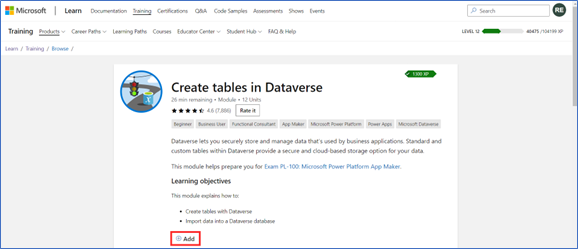
I frequently create collections to keep track of all the content that will be useful in preparing for a Microsoft Certification exam. This might include the official learning path, along with any extra documentation that could help during exam prep. To place a module or learning path into a collection, from the Training tab, on the content of interest, select Add. You can revisit collections from your Microsoft Learn profile.
The Add button on a Microsoft Learn training module.
2. Career path training
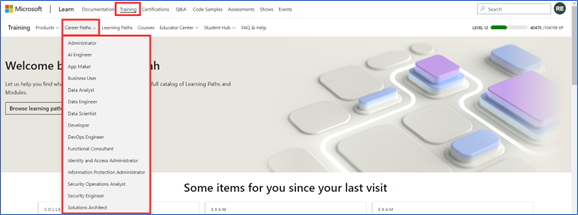
As you may have already discovered, one of the challenges to learning new technologies is finding the right resources for your skill-building needs. Perhaps you’re not sure where to begin your learning journey. I’ve found that a good starting point is to explore learning content based on your career path or on one that interests you. You can find this option on the Microsoft Learn Training tab, and it points you to a collection of modules, learning paths, and certifications that are relevant and tailored to your chosen job role. Whether you want to become a business user, a data scientist, a solutions architect, a security engineer, or a functional consultant, you can find the appropriate learning content for your role and level of expertise. Plus, with career path training, you can learn at your own pace, gain practical experience, and validate your skills with Microsoft Certifications.
Career path collection options on Microsoft Learn.
3. Practice Assessments
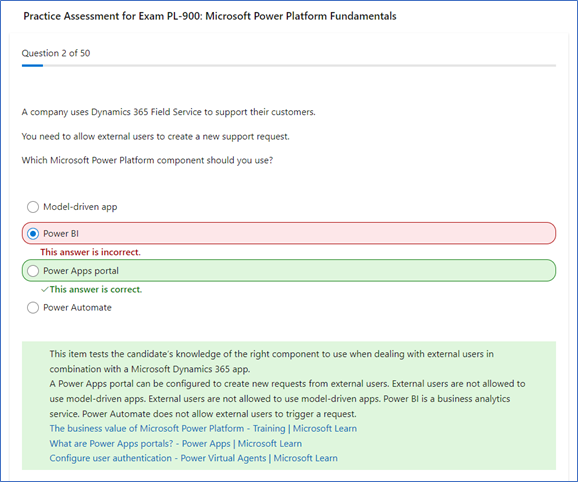
If you’re preparing to earn a Microsoft Certification, you can get an idea of what to expect before you take the associated exam by trying a Practice Assessment. This option is available for some certifications and is a great way to gauge the topics you’re strong in and the ones for which you could use more practice. They help you build confidence by giving you a feel for the types of questions, style of wording, and level of difficulty you might encounter during the actual exam.
Sample Practice Assessment questions.
If your certification exam has a Practice Assessment available, it’s listed on the Microsoft Learn exam page, under Schedule exam. Just select Take a free practice assessment.
4. Exam prep videos
Other valuable Microsoft Learn resources to help you get ready for earning a Microsoft Certification are exam prep videos, available for some certifications. These videos are designed to help you review the key concepts and skills that are covered on the exam and to provide tips and tricks on how to approach the questions. They offer an engaging way to absorb essential knowledge and skills, making it easier to grasp technical concepts and their practical applications. The videos, hosted by industry experts, provide a structured, guided approach to the exam topics.
These exam prep videos complement your other Microsoft Learn study materials. Even if you consider yourself an expert on a topic, the videos are a good way to refresh your memory before exam day. To browse through available exam prep videos, check out the Microsoft Learn Exam Readiness Zone and search for your topic of interest or exam number, or even filter by product.
Share your favourite Microsoft Learn features
Creating your own collections of content, exploring new career paths, or preparing to earn Microsoft Certifications by taking Practice Assessments or watching exam prep videos are just some of the ways that Microsoft Learn can help you achieve your skill-building and certification goals, and they’re some of my favourite features in Microsoft Learn. What are your favourites? Share your top picks with us, and help others on their learning journeys.
Meet Rishona Elijah, Microsoft Learn expert
Rishona Elijah is a Microsoft Most Valuable Professional (MVP) for Business Applications and a Microsoft Certified Trainer (MCT). She works as a Trainer & Evangelist at Microsoft Partner Barhead Solutions, based in Australia. She is also a LinkedIn Learning instructor for Microsoft Power Platform certifications. Rishona has trained thousands of individuals on Microsoft Power Platform and Dynamics 365, delivering impactful training sessions that empower them to use the no-code/low-code technology to build their own apps, chatbots, workflows, and dashboards. She enjoys sharing her knowledge and ideas on her blog, Rishona Elijah, in addition to speaking at community conferences and user groups.
“Power Platform with Rishona Elijah” is a Microsoft learning room that provides a supportive and encouraging environment for people starting their Microsoft Power Platform journey. The room offers assistance and guidance on Microsoft Power Platform topics, including certifications, Power Apps, Power Virtual Agents, Power Automate, and AI Builder. It’s also a great space to network with like-minded peers and to celebrate your success along the way. Sign up for the “Power Platform with Rishona Elijah” learning room.
This article is contributed. See the original author and article here.
Field Service Mobile is a Dynamics Power Platform Model Driven Application. This offers several advantages to the mobile application, including re-use of forms and views and consistency of user experience while accessing on the web, mobile, or tablet.
The Power Platform also offers significant customization opportunities, both when customizing forms, adding business logic or integrations with other Power Platform capabilities like Power Automate, Canvas, or PCF Controls. These capabilities make the Field Service Mobile application uniquely positioned to streamline your workflows, improve data quality and enhance your user experience.
Customization Best Practices
Customizing the Field Service Mobile application is a balance of enabling an ideal workflow for your business and providing the best possible user experience for your Frontline Workers. This balance must consider data availability of the mobile workforce, along with application performance and the overall user experience.
In this blog post we’ll share some of the key best practices when evaluating and implementing customizations.
Use the default Field Service Mobile app module. The out-of-the-box Field Service Mobile app module has all the basic features and functionality your frontline workers require to get started with Field Service. Custom app modules can be used with the Field Service Mobile application but will not include some of the internal business logic such as Travel Calculations. Another advantage of using the default app module is that it will automatically receive product updates over time, while additional effort would be required to merge the same enhancements into a custom app module.
Avoid using HTML Web Resources. Web Resources have many limitations on a mobile application when working with offline mode. It is highly recommended to use PowerApps Component Framework (PCF) controls, which are a better option for a more consistent cross-platform experience without the same limitations.
Tip: If your situation necessitates the use of custom web resources, use code splitting and check code coverage in a browser to ensure only the minimum amount of code is loaded. Package shared code in their own shared web resource library instead of duplicating in each consuming resource.
Tip: If using Offline mode, be sure to test your customizations on the mobile device in Airplane mode and variable cellular network conditions.
Handle errors properly and present the right message to end users. When implementing customizations, it is very important to handle edge-cases and errors in a way that provides a positive experience for your end users. This is especially true for async calls and network errors, where the Frontline Worker may have different results depending on devices network state.
Use XRM Web APIs instead of XHR/Fetch calls directly to the server. XRM Web ApIs will route correctly to the local offline database or server based on offline configuration and network state of the app.
Making direct server calls from the mobile application is not recommended as they can be unreliable and fail unexpectedly with poor network conditions. By ensuring that all dependencies are in the offline data store by configuring the Mobile Offline profile with the correct data necessary for your user scenarios.
If server calls are necessary, build an appropriate user experience to handle cases when the call may fail, or response is slow to return from the server. Making the network calls trigger based on explicit user actions, with a interface giving visual cues that a network call is happening and a response will be needed, will provide a better experience for the Frontline Worker.
If using onload/onchange/command handlers and fetching data using XRM WebAPis, make sure you test the impact of those calls on application performance while in various network conditions.
Optimized resources for bandwidth. If adding custom JavaScript or images, be sure to optimize files which are downloaded to the device. We recommend to always trim and compress your JavaScript files and using SVG images instead of PNG to save bandwidth.
Declare solution dependencies between commands, web resources, and strings. Dependencies must be used to make a Web Resource available offline. For example, when an entity/form is enabled for offline usage, the JavaScript which is attached to the form for onload/onsave, would also be available offline. For other files such as localization XML files, they need to be added as a dependency to your JavaScript so these XML files will also be available offline. Learn more about web resource dependencies.
Be aware of timing issues or race conditions. This is especially relevant when dealing with async calls. Test by adding network latency and CPU throttling to ensure a positive experience in real-world conditions.
Use Business Rules as first choice over custom client-side JavaScript. Business rules provide a mechanism to implement business logic with some guardrails to avoid some of the complexity that comes with custom JavaScript code. Please be aware there are some limitations with business rules, such as cases when OnChange events are required. It is good to evaluate your business scenarios and choose the best path for your organization.
Tip: If using JavaScript-based business logic, make sure you fetch minimal data and avoid joins/sorting if not needed.
Leverage out of box controls. As much as possible use out of the box controls, such as the Booking Calendar Control, which will be easier to support and receive product enhancements over time.
When enabling offline mode, make sure forms and views are aligned with configuration of the mobile offline profile. The individual configuring the forms and views should work closely with the person who will configure the mobile offline profile to ensure tables which are enabled on views will be available while running in offline mode. Be sure to include error handling if there are instances when an entity will not be available while offline.
Leverage tools to debug customizations. Debugging is important when introducing JavaScript customizations to your experience. Debugging a mobile app has unique challenges versus a web browser. This is especially true with capabilities like Offline mode are enabled on the mobile app. To meet this need, leverage debugging tools shipped with the Android and Windows model driven apps. Detailed steps to debug are found in Power Apps documentation.
Customizing a model driven application can be a powerful way to enhance the user experience and functionality of your solution. However, it also requires careful planning and testing to ensure optimal performance, usability, and compatibility. In this blog post, we have shared some best practices and tips on how to customize your model driven application effectively. We hope you have found this information useful and that you will apply it to your own projects. Thank you for reading and happy customizing!
This article is contributed. See the original author and article here.
The Azure Functions team is thrilled to announce General Availability of version 4 of the Node.js programming model! This programming model is part of Azure Functions’ larger effort to provide a more flexible and intuitive experience for all supported languages. You may be aware that we announced General Availability of the new Python programming model for Azure Functions at MS Build this year. The new Node.js experience we ship today is a result of the valuable feedback we received from JavaScript and TypeScript developers through GitHub, surveys, user studies, as well as suggestions from internal Node.js experts working closely with customers.
This blog post aims to highlight the key features of the v4 model and also shed light on the improvements we’ve made since announcing public preview last spring.
What’s improved in the V4 model?
In this section, we highlight several key improvements made in the V4 programming model.
Flexible folder structure
The existing V3 model requires that each trigger be in its own directory, with its own function.json file. This strict structure can make it hard to manage if an app has many triggers. And if you’re a Durable Functions user, having your orchestration, activity, and client functions in different directories decreases code readability, because you must switch between directories to look at the components of one logical unit. The V4 model removes the strict directory structure and gives users the flexibility to organize triggers in ways that makes sense to their Function app. For example, you can have multiple related triggers in one file or have triggers in separate files that are grouped in one directory.
Furthermore, you no longer need to keep a function.json file for each trigger you have in the V4 model as bindings are configured in code! See the HTTP example in the next section and the Durable Functions example in the “More Examples” section.
Define function in code
The V4 model uses an app object as the entry point for registering functions instead of function.json files. For example, to register an HTTP trigger responding to a GET request, you can call app.http() or app.get() which was modeled after other Node.js frameworks like Express.js that also support app.get(). The following shows what has changed when writing an HTTP trigger in the V4 model:
File Type
V3
V4
JavaScript
module.exports = async function (context, req) {
  context.log('HTTP function processed a request');

  const name = req.query.name
    || req.body
    || 'world';

  context.res = {
    body: `Hello, ${name}!`
  };
};
Trigger configuration like methods and authLevel that were specified in a function.json file before are moved to the code itself in V4. We also set several defaults for you, which is why you don’t see authLevel or an output binding in the V4 example.
New HTTP Types
In the V4 model, we’ve adjusted the HTTP request and response types to be a subset of the fetch standard instead of types unique to Azure Functions. We use Node.js’s undici package, which follows the fetch standard and is currently being integrated into Node.js core.
HttpRequest – body
V3
V4
// returns a string, object, or Buffer
const body = request.body;
// returns a string
const body = request.rawBody;
// returns a Buffer
const body = request.bufferBody;
// returns an object representing a form
const body = await request.parseFormBody();
const body = await request.text();
const body = await request.json();
const body = await request.formData();
const body = await request.arrayBuffer();
const body = await request.blob();
To see how other properties like header, query parameters, etc. have changed, see our developer guide.
Better IntelliSense
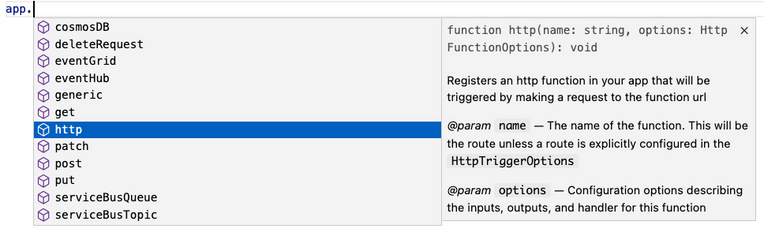
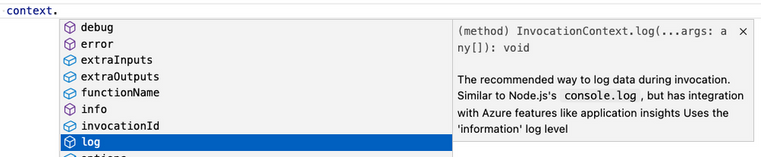
If you’re not familiar with IntelliSense, it covers the features in your editor like autocomplete and documentation directly while you code. We’re big fans of IntelliSense and we hope you are too because it was a priority for us from the initial design stages. The V4 model supports IntelliSense for JavaScript for the first time, and improves on the IntelliSense for TypeScript that already existed in V3. Here are a few examples:
More Examples
NOTE: One of the priorities of the V4 programming model is to ensure parity between JavaScript and TypeScript support. You can use either language to write all the examples in this article, but we only show one language for the sake of article length.
Like in the V3 model, you need the durable-functions package in addition to @azure/functions to write Durable Functions in the V4 model. The example below shows one of the common patterns Durable Functions is useful for – function chaining. In this case, we’re executing a sequence of (simple) functions in a particular order.
In Lines 8-16, we set up and register an orchestration function. In the V4 model, instead of registering the orchestration trigger in function.json, you simply do it through the app object on the durable-functions module (here df). Similar logic applies to the activity (Lines 18-21), client (Lines 23-37), and Entity functions. This means you no longer have to manage multiple function.json files just to get a simple Durable Functions app working!
Lines 23-37 set up and register a client function to start the orchestration. To do that, we pass in an input object from the durable-functions module to the extraInputs array to register the function. Like in the V3 model, we obtain the Durable Client using df.getClient() to execute orchestration management operations like starting a new orchestration. We use an HTTP trigger in this example, but you could use any trigger supported by Azure Functions such as a timer trigger or Service Bus trigger.
We made the following improvements to the v4 programming model since the announcement of Public Preview last spring. Most of these improvements were made to ensure full feature parity between the existing v3 and the new v4 programming model.
AzureWebJobsFeatureFlags no longer needs to be set During preview, you needed to set the application setting “AzureWebJobsFeatureFlags” to “EnableWorkerIndexing” to get a v4 model app working. We removed this requirement as part of the General Availability update. This also allows you to use Azure Static Web Apps with the v4 model. You must be on runtime v4.25+ in Azure or core tools v4.0.5382+ if running locally to benefit from this change.
Model v4 is now the default
We’re confident v4 is ready for you to use everywhere, and it’s now the default version on npm, in documentation, and when creating new apps in Azure Functions Core Tools or VS Code.
Entry point errors are now exposed via Application Insights In the v3 model and in the preview version of the v4 model, errors in entry point files were ignored and weren’t logged in Application Insights. We changed the behavior to make entry point errors more obvious. It’s a breaking change for model v4 as some errors that were previously ignored will now block your app from running. You can use the app setting “FUNCTIONS_NODE_BLOCK_ON_ENTRY_POINT_ERROR” to configure this behavior. We highly recommend setting it to “true” for all v4 apps. For more information, see the App Setting reference documentation.
Support for retry policy
We added support for configuring retry policy when registering a function in the v4 model. The retry policy tells the runtime to rerun a failed execution until either successful completion occurs or the maximum number of retries is reached. A retry policy is evaluated when a Timer, Kafka, CosmosDB or Event Hubs-triggered function raises an uncaught exception. As a best practice, you should catch all exceptions in your code and rethrow any errors that you want to result in a retry. Learn more about Azure Functions Retry policy.
Support for Application Insights npm package Add the Application Insights npm package (v2.8.0+) to your app to discover and rapidly diagnose performance and other issues. This package tracks the following out-of-the-box: incoming and outgoing HTTP requests, important system metrics such as CPU usage, unhandled exceptions, and events from many popular third-party libraries.
Support for more binding types We added support for SQL and Table input and output bindings. We also added Cosmos DB extension v4 types. A highlight of the latest Cosmos DB extension is that it allows you to use managed identities instead of secrets. Learn how to upgrade your Cosmos DB extension here and how to configure an app to use identities here.
Support for hot reload
Hot reload ensures your app will automatically restart when a file in your app is changed. This was not working for model v4 when we announced preview, but has been fixed for GA.
See our Developer Guide to learn more about the V4 model. We’ve also created an upgrade guide to help migrate existing V3 apps to V4.
Please give the V4 model a try and let us know your thoughts!
If you have questions and/or suggestions, please feel free to drop an issue in our GitHub repo. As this is an open-source project, we welcome any PR contributions from the community.
This article is contributed. See the original author and article here.
In the fast-paced world of customer service, efficient outbound calling communication is the cornerstone of success. Dynamics 365 Customer Service has long been a trusted platform for managing customer interactions. With the upcoming October release, we’ve listened to your feedback and delivered a significant enhancement that is set to transform outbound dialing.
Currently, modifying the dialed number proves to be cumbersome given the inability to edit a digit. Additionally, the absence of number validation increases the risk of agents dialing incorrect numbers. This is especially true in the event of missing country codes.
In the October release, you will find a more intuitive, streamlined, and efficient outbound dialing experience.
Editing flexibility
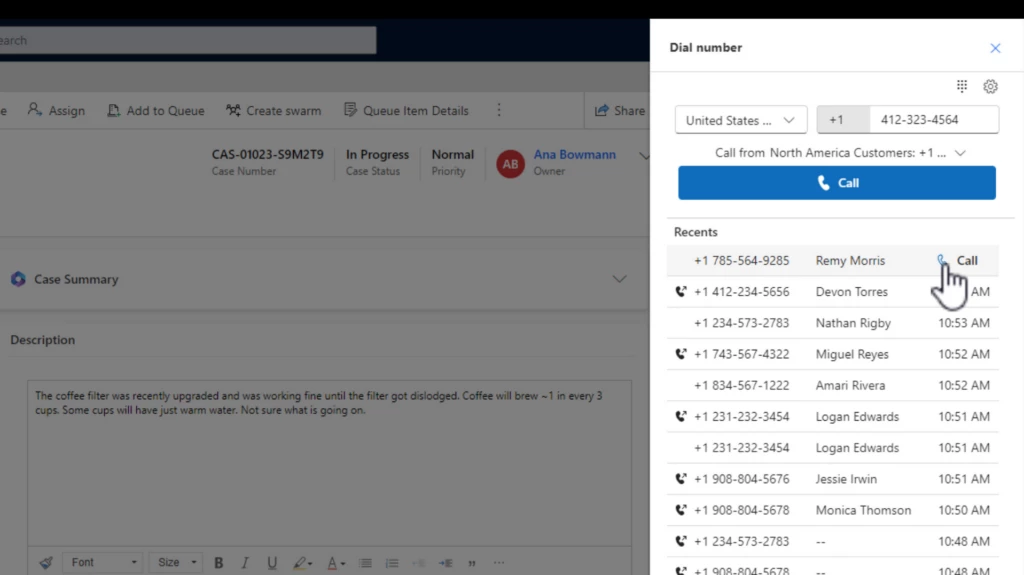
In the new outbound dialing experience, agents can continue to initiate calls from customer records. What’s changed? Now, modifying the dialed number is a breeze. The enhanced interface empowers agents to effortlessly edit the number before placing the call. This new experience also introduces auto-formatting, automatically structuring the number as agents type it. This functionality not only reduces errors but also highlights incomplete or invalid numbers. This newfound flexibility ensures accurate and effective outbound calling experiences.
Smart use of screen real estate
The improved interface is designed to optimize the available screen space. By default, the keypad is hidden, given most agents prefer to use the keyboard, which also allows for a clearer view of essential information. However, should agents need to utilize the keypad, it’s just a click away.
Recall recent numbers
Agents now have the power to swiftly call back recent numbers. With the ability to access the last 20 numbers dialed or received calls, agents can easily reconnect with customers. This feature is a time-saver and helps maintain a seamless communication flow.
Country and region support for outbound dialing
A significant advancement for administrators and agents alike is the support for specific countries and regions. Administrators can customize outbound profiles to allow calls only to selected countries or regions. This prevents accidental calls to unintended destinations, reinforcing precision in customer communication.
Intuitive profile selection and profile matching
Agents with multiple outbound profiles will appreciate the intuitive profile selection process. The dropdown menu displays the collective list of supported countries and regions from all profiles. Simplifying the process even further, agents need only enter the number they wish to dial. The system intelligently identifies the outbound profile supporting the dialed number’s country or region. This feature is coming as a fast follow in October.
The October release of Dynamics 365 Customer Service brings an outbound dialing experience with enhanced editing capabilities, smarter interface design, call history, number auto-formatting and validation, and refined country and region support. Agents can confidently and efficiently connect with customers, bolstering the delivery of exceptional customer service.
To preview this feature, administrators should update the Settings definition for Enhanced outbound dialer experience to set the environment value to Yes. To learn more, see Call a customer in the voice channel | Microsoft Learn.
This article is contributed. See the original author and article here.
Announcements have been a core part of Viva Engage for years but have recently become a critical way to keep employees informed and engaged with leaders. The broad delivery of announcements across Viva Engage, Viva Connections, Outlook, and Microsoft Teams means that employees can use rich engagement features like reactions, replies, and sharing from within the apps that they use every day. Analytics help track the reach of the announcements, meaning our customers have come to rely on announcements to help run their business and measure the impact their communications are having in your network.
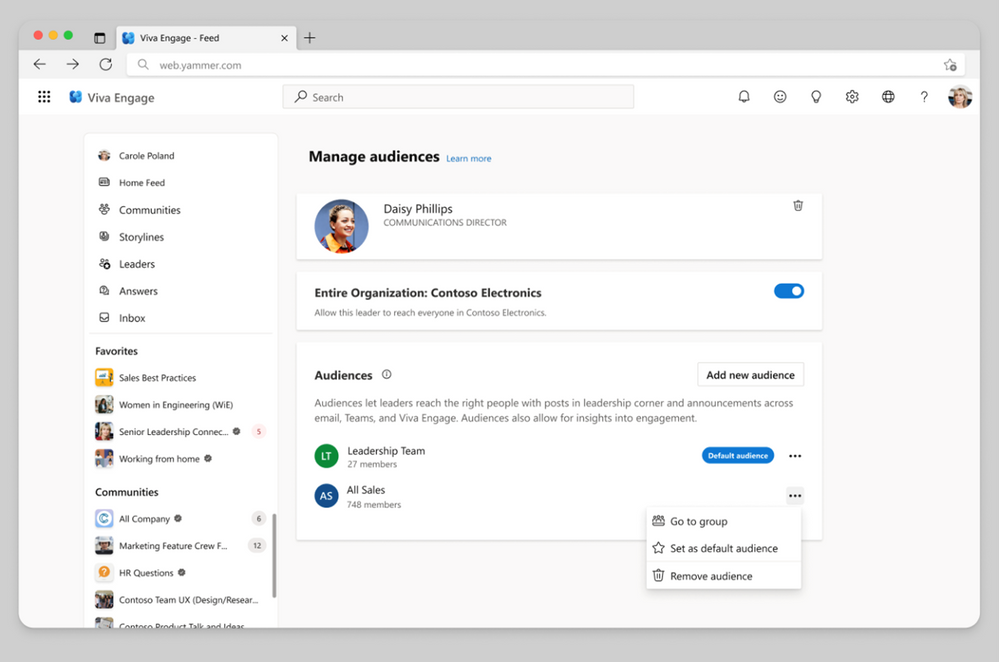
We’ve taken it one step further by enabling specific employees as leaders because we know leaders want to share vision, updates, and perspectives to build culture and manage change. When leaders are selected in Viva Engage, and their audiences have been set up they can send storyline announcements. And now leaders can reach and connect with employees in their organizations and send their posts to multiple audiences. Leaders and their delegates can now configure multiple audiences and effectively target storyline announcements to them.
Leaders can now send targeted storyline announcements to different audiences
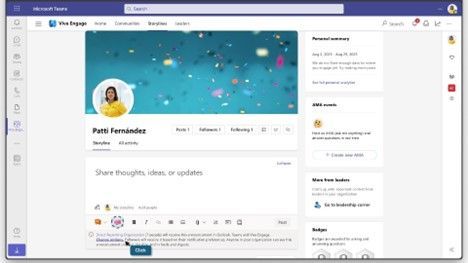
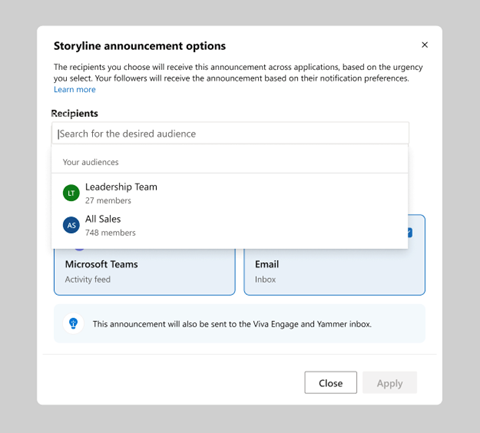
Leaders, and their delegates can now target storyline announcements to preconfigured audiences, expanding the leader’s ability to reach people beyond their direct reporting organization. Upon creating an announcement, the leader’s default audience will be preselected. To add additional audiences, select Change option. This will bring up the Storyline announcements options window in which the default audience can be changed for any of the configured ones. Once an audience is selected, confirm the channels before you send your message.
Set up multiple audiences
To view information about how to configure audiences, please visit Identify leaders and manage audiences in Viva Engage. To define a leader’s audience, you add individual users or groups, such as security, distribution, or Microsoft 365 groups. When you add a group, changes to the group’s membership, including nested members, automatically update the audience within 24 hours. This functionality makes it easy to apply existing groups that define a leader’s organization to define the leader’s audience in Viva Engage. Customers may have existing distribution lists that they use to communicate with an audience by email. You can add those lists to the leader’s audience in Viva Engage for continuous communication.
Send announcements to your audience across apps
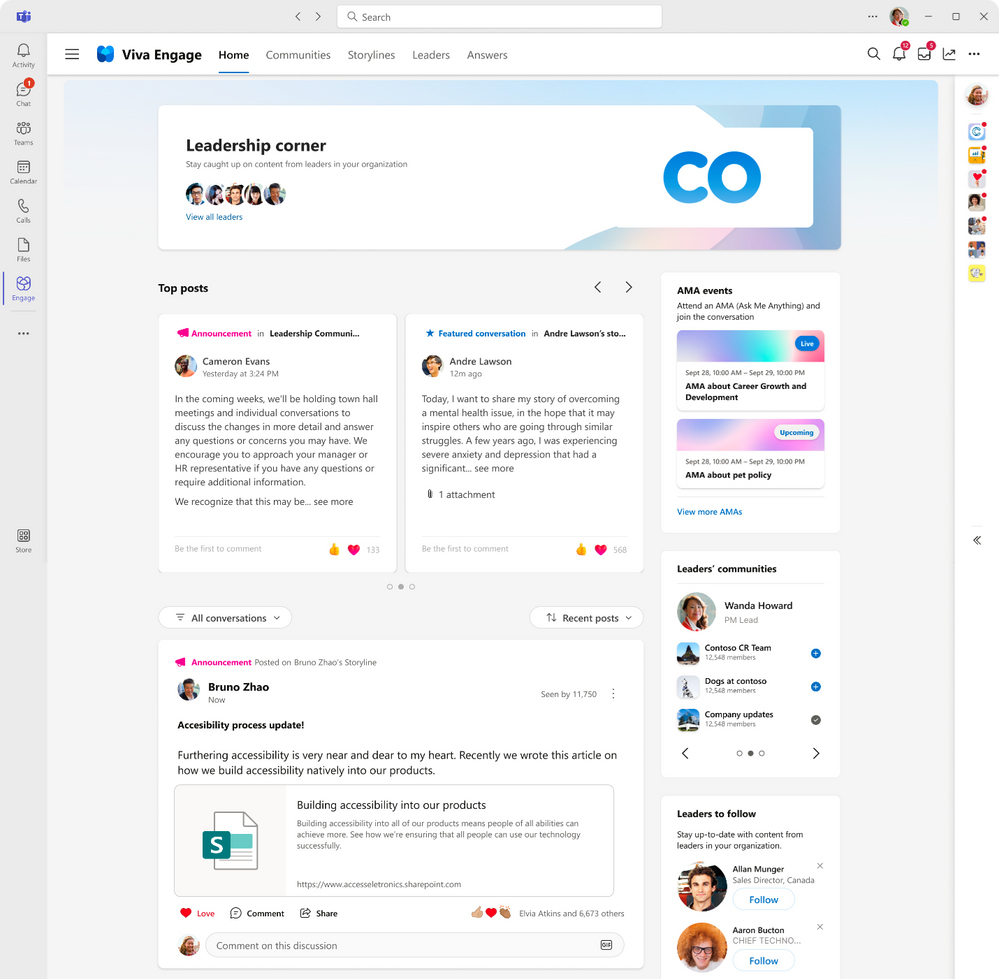
Leaders can make an announcement and select your audience and reach people across apps. Once the announcement is delivered, your audiences can react and reply regardless of what app they receive the announcement. To make your announcements more engaging, attach images or videos, ask a question, pose a poll to your community, or draw attention to specific actions by using rich media within your announcement. Announcements made by leaders will also be highlighted in leadership corner.
Analyze the impact of your communication
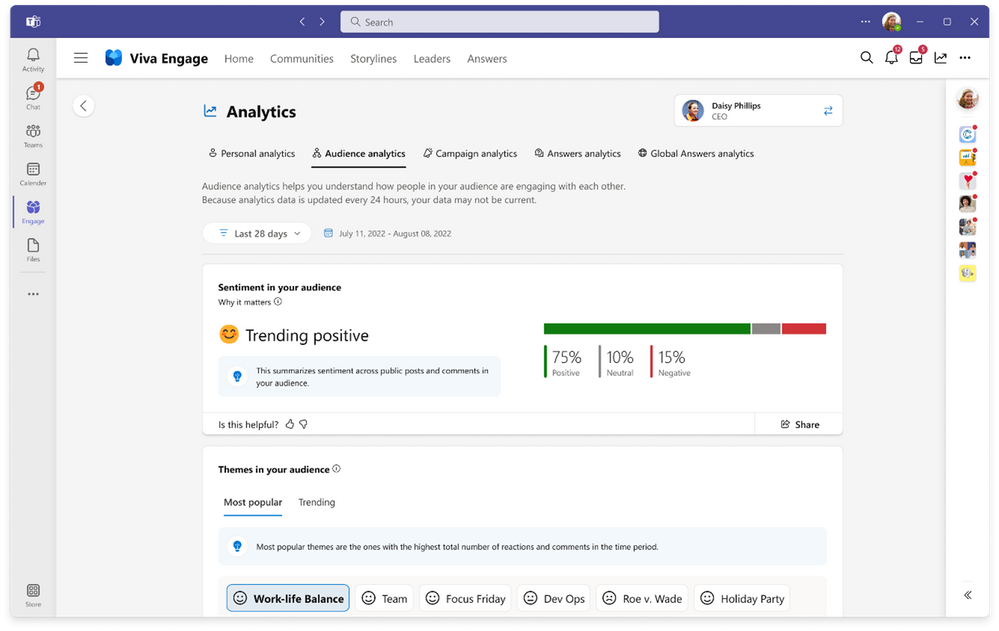
When you post an announcement in Viva Engage, you can expect the message to reach your audience. From the notifications with Microsoft Teams, Outlook interactive messages, Engage notifications, we want to make sure that you understand the impact of your communications by tracking the reach of your communications and the sentiment of your audience. With conversation insights, you’ll be able to view how well your announcement has performed. With personal analytics, you can track the effectiveness across multiple posts and announcements. With audience analytics, leaders can track levels of sentiment analysis to help monitor the engagement, contributions and themes across your audience, beyond what you have sent. You can start to understand and know what your audience thinks is important and can help you identify what to post next.
If you are looking to share important news and information with employees, try using announcements on your storyline posts. With the speed of delivery, ability to measure reach, and a way to spark two-way engagement, announcements are an essential way to keep your employees informed.
This article is contributed. See the original author and article here.
We are re-imagining the way employees come together with Microsoft Mesh, a new three-dimensional (3D) immersive experience and, we are excited to announce Mesh public preview availability in October.






Recent Comments