
by Scott Muniz | Jul 31, 2020 | Alerts, Microsoft, Technology, Uncategorized
This article is contributed. See the original author and article here.
What an action packed week with TWO great live conferences!
Create:Frontend A one of a kind live event from Microsoft about all things frontend.
.NET Conf: Focus on Microservices a free, livestream event that features speakers from the community and .NET teams that are working on designing and building microservice-based applications, tools and frameworks.
Content Round Up
How to Manage SharePoint via PowerShell – Part 1
Anthony Bartolo
In this 2-part series, we’re going to look at how we can manage SharePoint using PowerShell. This is highly focused on SharePoint Online, but if the cmdlets are available, it also applies to SharePoint on-premises. We’ll start with the basics, and then get some real-world scenarios scripts in part 2 to get you started with your daily management tasks. I’ll also you give some tips along the way to make your life easier.
How to Manage SharePoint via PowerShell – Part 2
Anthony Bartolo
In this 2-part series, we’re going to look at how we can manage SharePoint using PowerShell. This is highly focused on SharePoint Online, but if the cmdlets are available, it also applies to SharePoint on-premises. We’ll start with the basics, and then get some real-world scenarios scripts in part 2 to get you started with your daily management tasks. I’ll also you give some tips along the way to make your life easier.
ITOpsTalk: Traditional Failover Clustering in Azure
Pierre Roman
Review of announcements and their impact on running traditional Clusters in Azure
LearnTV: 92 & Pike w/ Jen Looper!
Chloe Condon
On this episode we chat with Jen Looper! 👩🏼?:school: Jen is a Cloud Advocate Lead on the Academic Team at Microsoft where she helps create curriculum, content, and experiences for educators, students, new learners looking to upskill in tech. We chat with Jen about Maya Mystery.
Abhishek Gupta
Welcome to part four of this blog series! So far, we have a Kafka single-node cluster with TLS encryption on top of which we configured different authentication modes (TLS and SASL SCRAM-SHA-512), defined users with the User Operator, connected to the cluster using CLI and Go clients and saw how easy it is to manage Kafka topics with the Topic Operator.
Using Graph Explorer Sample Data via REST
Todd Anglin
If you need a quick and easy way to access sample Graph data, you case use Graph Explorer via REST with the small “hack” discussed in this article.
React For Beginners workshop
Aaron Powell
React is a JavaScript library for creating high-performing, maintainable JavaScript applications and brings a fresh approach to thinking into the JavaScript community.
Being a declarative user interface library that is un-opinionated about the rest of your application it is easy to reason about it is simpler to learn and master the basics than a full application framework like Angular. Also thanks to the simple nature of React, the patterns and lessons you will learn are transferable to other libraries and frameworks.
A Guide to Running a Virtual Workshop
Aaron Powell
In this article I share my experience in delivering an online workshop as part of NDC Melbourne, what works (and what didn’t), the tech side of things and what is useful to know for anyone looking to run their own online workshop.
Demystifying ARM Templates – Variables
Frank Boucher
Variables are very useful in all king of scenarios to simplify things. Azure Resource Manager (ARM) templates aren’t an exception and the variable will offer great flexibility. In this chapter, we will explain how you can use variables inside your template to make them easier to read, or to use.
Learning-ARM tutorials
Frank Boucher
In this repository you will find a series of tutorial paired with videos to guide you through learning the best practice about Azure Resource manager (ARM) template.
Each video is featured in the same page as the content. The videos are part of Azure DevOps – DevOps Lab show.
How to use Azure Go SDK to manage Azure Data Explorer clusters
Abhishek Gupta
by Scott Muniz | Jul 31, 2020 | Alerts, Microsoft, Technology, Uncategorized
This article is contributed. See the original author and article here.
Greetings!
We’re back with another mailbag, this time focusing on your common questions regarding Azure AD Identity Protection. Security is always top of mind and Identity Protection helps you strike a balance between the usability required for end users to be productive while protecting access to resources. We’ve got some really great questions from folks looking to improve the effectiveness of their alerts and to increase their overall security posture. We even have a sample script for you! I’ll let Sarah, Rohini and Mark take it away.
—–
Hey y’all, Mark back again for another mailbag. You’ve been asking some really great questions around Azure AD Identity Protection. So good, in fact, I’ve kept putting this off for an embarrassingly long time. Then I called in for some help from some excellent feature PMs Sarah Handler and Rohini Goyal.
Question 1: I want to bulk dismiss a lot of Users that have risk. How can I do this?
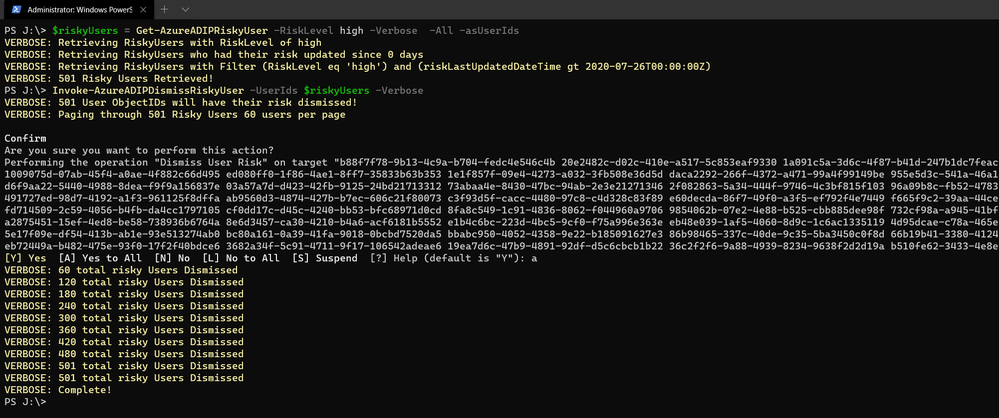
Make sure that before you bulk dismiss users, you’ve already remediated them or determined that they’re not at risk. Then we have a GraphAPI call you can make to dismiss the user risk. We’ve put together a little sample script to help you with doing bulk dismissal.
We’ve provided a sample PowerShell script and examples to enumerate risky users, filter the results, and dismiss the risk for the collection.
Question 2: How do we detect TOR or anonymous VPN? Is it based off exit node or are there ways to bypass this?
We detect anonymizers in a few ways. For Tor, we continually update the list of Tor exit nodes. For VPNs, we use various third-party intelligence to determine whether an anonymizer has been used.
Question 3: How should we handle false positives?
There are two ways to address false positives: giving feedback on false positive detections that occur and reducing the number of false positives that get generated. If while investigating risky sign-ins you find a detection to be a false positive, you should mark “confirm safe” on the risky sign-in. There are two ways to prevent false positives in Identity Protection. The first is to enable sign-in risk policies for your users. When a user is prompted for a sign-in risk policy with MFA and passes the MFA prompt, it gives feedback to the system that the legitimate user signed in and helps to familiarize the sign-in properties for future ones. The second is to mark common locations that you trust as trusted locations in Azure AD.
Question 4: What is the best practice for whitelisting known locations?
First, you want to make sure you’re putting in your public egress end points. This helps with our detection algorithms. We’ve recently increased the named locations to 195 named locations with 2,000 IP ranges per location. You can read more in our docs.
But we know that many times networking teams make changes and don’t notify the Azure AD Admins. It’s good to have a process to work through the Sign-In logs and look for IP ranges that are not part of your named locations and add those as well as remove IPs that no longer are your egress point.
Question 5: Does AAD Leaked credentials connect to Troy Hunt’s Have I been Pwned API? Do I need to supplement with other scans?
Leaked credentials detection does not connect to Troy Hunt’s “Have I been Pwned”. Troy does an excellent job with his service correlating and collecting public dumps. Leaked credentials alerts take into account those public dumps as well as non-public dumps we call out in our docs, more info here. If you want to supplement the Azure AD leaked credentials alerting with other feeds, that is entirely up to you.
Question 6: When I turn on Password Hash Sync does the leaked credential alert on existing ones or only on leaks going forward?
Leaked credentials will only detect on leaks going forward. When we find clear text username and passwords pairs, we don’t keep them. We process them through and delete them. We’ve updated our documentation to call this out and provided more info.
We hope you’ve found this post and this series to be helpful. For any questions you can reach us at AskAzureADBlog@microsoft.com , the Microsoft Forums and on Twitter @AzureAD , @MarkMorow, @Sue_Bohn, and @Alex_A_Simons
-Rohini Goyal, Sarah Handler and Mark Morowczynski
by Scott Muniz | Jul 31, 2020 | Alerts, Microsoft, Technology, Uncategorized
This article is contributed. See the original author and article here.
The release of 20.07 brought along a range of security enhancements and changes to Azure Sphere. As head of the Operating System Platform (OSP) Security team, I want to provide more insights into the efforts to keep Azure Sphere secure as a platform while being as transparent as possible about all the improvements made since our 20.04 release.
The OSP Security team I run for Azure Sphere worked with a diverse group of people and companies to have three separate red team events happen on the platform over the last few months; an internal Microsoft team, Trail of Bits, and the currently active Azure Sphere Security Research Challenge (ASSRC). These efforts are on top of the continued work done by the OSP team over the last three months to harden and further the security of the platform.
Trail of Bits performed a private red team exercise on the system and identified a number of risks that have been fixed for 20.07:
- The /proc file system on Linux is mounted rw giving the ability to write to /proc/self/mem allowing unsigned code execution, /proc/self/mem is now read-only
- The internal GetRandom() function failed to properly fill in buffers that have a length that is not a multiple of 4, all current usage is a multiple of 4 so no risk and code was changed to avoid future impacts
- The Sysctl Linux kernel configuration flags can be hardened, following values enabled
- kernel.kptr_restrict = 1 – limit Linux kernel pointer leakage
- kernel.dmesg_restrict = 1 – prevent access to dmesg to unprivleged processes
- fs.protected_hardlinks = 1 – users cannot create hardlinks unless they own the source file
- fs.protected_symlinks = 1 – symlinks are only followed when not in a world-writable directory, the owner of the symlink and follower match, or the directory owner and fsymlink owner match
- fs.protected_fifos = 2 – limit FIFO creation options when dealing with world writable directories
- fs.protected_regular = 2 – limit regular file creation options when dealing with world writable directories
- The internal security library for setting process information used to return success even if failed to set a process’ capabilities
- DNS name expansion leaked stack memory
- Null pointer dereferences in DMA memory for mtk3620 in the Linux kernel
- Better filtering of the content-type for GatewayD to limit cross-site scripting abuse
Although the ASSRC is still on-going it has provided a range of great findings by the participants, some of which overlapped ToB’s findings like a writable /proc/self/mem. The Linux kernel related issues identified by ToB were not fixed in 20.05 or 20.06 due to the massive Linux kernel uprgade from 4.9 to 5.4, this oversight will be handled better in the future.
Cisco Talos reported the first 2 findings that are fixed in 20.07, ptrace used to bypass the unsigned code execution protections and the Linux kernel message ring buffer being user accessible allowing for information leakage. Along with reporting the first two findings, Cisco Talos also reported the /proc/self/mem finding and found a double free in the azspio Linux kernel driver that have been fixed. Cisco has a blog post up detailing their efforts so far for the ASSRC.
As an excellent example of findings from the ASSRC effort, I would like to describe a specific attack chain that McAfee Advanced Threat Research found for the device that has been fixed for 20.07. This attack chain did require physical access to a device and could not be done remotely due to the steps involved.
- We have multiple environments that devices can be part of, two of them are pre-production and production. McAfee ATR was able to claim a device to both preproduction and production across separate tenants. Due to an oversight in signature handling for device capability images on the cloud, an attacker that claimed a device they did not own to pre-production was allowed to request a capability image for the device that was production signed. This allowed obtaining a capability image for a device and gaining access to a locked down device, this was corrected immediately.
- With the ability to get a capability image for a device, McAfee ATR could unlock a locked down device and also obtain the development capability allowing them to upload their own package to the device. An application package is a signed ASXIPFS image, our file system that is a variation of CramFS with the ability to execute from flash. The original file system code allowed for special inode filesystem entries which McAfee ATR used to create a special inode pointing to the MTD flash giving them read-only access to the on-device flash. 20.07 removes the ability to create any special inodes in the ASXIPFS image.
- Although the user controlled special inode pointing to flash is read-only due to how the file system image is mounted, McAfee ATR found a 0-day in the Linux kernel for the MTD_WRITE ioctl. The ioctl function failed to check permissions before executing the ioctl call allowing flipping bits in flash from 1 to 0 allowing McAfee ATR to use this vulnerability to rewrite the uid_map file for the device. This is patched on our Linux kernel for 20.07 and publicly fixed with https://lkml.org/lkml/2020/7/16/430.
- With the ability to modify flash, McAfee ATR rewrote the uid_map file that maps user IDs to applications to have an application with a maximum user ID where all bits in the user ID are set. The maximum ID resulted in the setresuid and setresgid function calls being passed -1. A -1 value to these functions is a special flag to indicate that the user id and group id should not be modified resulting in an application being ran as the sys user. The uid map parsing code no longer allows for a maxium user ID where all bits are set.
- Under normal operation, a system package can not be uninstalled, however an application running as sys is allowed to modify and change symlinks in various directories resulting in the ability to abuse symlink confusion on packages and force the azcore package to be uninstalled when the uninstaller thinks it is uninstalling another application. From there a user package can be installed in it’s place. Symlinks are no longer allowed in user application packages as of 20.07.
- The user application that replaces azcore does have the proper uid and gid set when executed however because the Linux kernel executes it the capability bits were never cleared out. The user replaced azcore is then able to call setuid(0) and become root on the device. This will be fixed in 20.08.
McAfee ATR did a fantastic job putting together this attack chain and finding a 0-day in the core Linux kernel itself to make it work. The attack chain exposed a weakness in the cloud and multiple weakenesses on the device including a previously unknown Linux kernel vulnerability.
While the above changes were done as a result of external red team findings, the Operating System Platform team continued improving the security of Azure Sphere.
One effort we’ve been working on is minimizing the ability to use ptrace unless in development mode. PTrace is needed by gdb to properly provide debug information however normal customer applications do not have a need for it. Having ptrace be available to customer applications allows an attacker to ptrace the process being attacked and inject unsigned code into memory for execution. 20.07 brings along a Linux kernel change where ptrace is no longer possible unless in development which also brings along a few extra enhancements as a side effect, the largest being that /proc no longer shows any other process pid and is further restricted of what a process can know about itself.
Another security enhancement is moving to wolfSSL 4.4.0 bringing along additional side channel attack hardening. Along with the wolfSSL upgrade is work to begin exposing access to supported wolfSSL functionality, the first set of functions allowing customers to directly call wolfSSL for establishing TLS client connections.
We have added more fuzzing across 5 different components and additional static code analysis tools including extra static analysis tools on every pull request into our repositories. If the static analysis fails then the PR can not be completed, this further strengthens the system by making it more difficult to check in easy to abuse coding flaws. As we expand to add features and functionality more fuzzers are built for parts of the system being updated. The addition of the new static analysis tool detected an off by one calculation in DHCP message handling that allowed reading an extra byte of data past the end of the buffer, this was corrected in 20.07.
You may have noticed that our last couple quality releases did not have a Linux kernel patch bump, this time was used to allow the Linux kernel team to upgrade the Linux kernel from 4.9 to 5.4.44. By doing so we capture Linux kernel security enhancements done between the versions along with keeping up-to-date on the latest changes.
String manipulation functions are a very common way for leaking the stack cookie along with being able to write it when string buffers are not properly null terminated. GLibC helps limit string buffer attacks by forcing the first byte of the stack cookie in memory to be 0 however we use musl on the device for libc. Musl initializes all bytes in the stack cookie instead of leaving the first byte in memory 0 allowing for the potential of stack cookie leaks and abuses. Our version of musl in 20.07 sets the first byte to 0 and the patch was provided to the maintainer incase they wish to add this security measure to musl.
On top of our own changes, MediaTek provided a new version of the firmware for their WiFi subsystem of their MT3620 that is now being used on the platform to deal with a range of issues.
As you can see, a wide range of security improvements have been made to the platform as we continue to strive to be the best in the field. We will continue to be transparent about our efforts and are devoted to being the most secure platform for IoT.
Jewell Seay
Azure Sphere OSP Security Team Lead

by Scott Muniz | Jul 31, 2020 | Alerts, Microsoft, Technology, Uncategorized
This article is contributed. See the original author and article here.

Reduce polygon count
Akihiro Oyamada is a Web Front-End Engineer at PixelGrid inc. in Tokyo, Japan. He specializes in huge product-based websites where CSS scalability and maintainability, as well as performance, are paramount. He is also a community leader as well as an expert in Web graphics technologies, such as SVG, Canvas and WebGL. For more, see his Twitter @yomotsu

Deploy WordPress on Azure Kubernetes Service
Dave Rendón has been a Microsoft Azure MVP for 6 consecutive years. As an IT professional with more than 10 years of experience, he has a strong focus on Microsoft technologies and moreover on Azure since 2010. He supports the business developers and sales teams at Kemp from a technical level. I also support the account managers by developing a firm understanding of their customer’s technical dilemma(s) and providing a sound technical solution. Follow him on Twitter: @DaveRndn

What Is Entity Framework In ASP.NET MVC?
Asma Khalid is an Entrepreneur, ISV, Product Manager, Full Stack .Net Expert, Community Speaker, Contributor, and Aspiring YouTuber. Asma counts more than 7 years of hands-on experience in Leading, Developing & Managing IT related projects and products as an IT industry professional. Asma is the first woman from Pakistan to receive the MVP award three times, and the first to receive C-sharp corner online developer community MVP award four times. See her blog here.

Sergio Govoni is a graduate of Computer Science from “Università degli Studi” in Ferrara, Italy. Following almost two decades at Centro Software, a software house that produces the best ERP for manufacturing companies that are export-oriented, Sergio now manages the Development Product Team and is constantly involved on several team projects. For the provided help to technical communities and for sharing his own experience, since 2010 he has received the Microsoft Data Platform MVP award. During 2011 he contributed to writing the book: SQL Server MVP Deep Dives Volume 2. Follow him on Twitter or read his blogs in Italian and English.

Mohamed El-Qassas is a Microsoft MVP, SharePoint StackExchange (StackOverflow) Moderator, C# Corner MVP, Microsoft TechNet Wiki Judge, Blogger, and Senior Technical Consultant with +10 years of experience in SharePoint, Project Server, and BI.
In SharePoint StackExchange, he has been elected as the 1st Moderator in the GCC, Middle East, and Africa, and ranked as the 2nd top contributor of all the time. Check out his
blog here.
by Scott Muniz | Jul 31, 2020 | Alerts, Microsoft, Technology, Uncategorized
This article is contributed. See the original author and article here.
This week some important Windows Virtual Desktop features moved to be generally available (hello audio and video redirection!), the Android Remote Desktop client now also supports WVD and Azure AD App Proxy now supports the Remote Desktop Services web client,. Azure Blob storage announced (in preview) connectivity using the Network File System 3.0 protocol. And the Azure IoT Device Provisioning Service now supports locking down ingress access to devices connecting via a specified virtual network.
Windows Virtual Desktop and Remote Desktop
New Windows Virtual Desktop capabilities now generally available
New Windows Virtual Desktop capabilities now GA including Azure portal integration for deployment / management and new audio/video redirection capabilities providing seamless meeting and collaboration experience for Microsoft Teams.
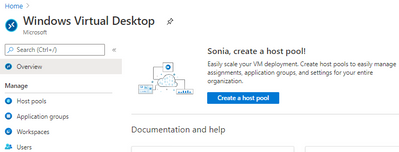 Windows Virtual Desktop blade in the Azure Portal
Remote Desktop client for Android now supports Windows Virtual Desktop connections
The new Remote Desktop client for Android now supports Windows Virtual Desktop connections. This new client (version 10.0.7 or later) features refreshed UI flows for an improved user experience.
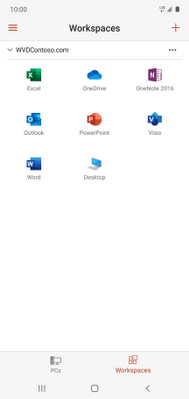
The app also integrates with Microsoft Authenticator on the device to enable conditional access when subscribing to Windows Virtual Desktop workspaces. View the announcement here.
Azure AD Application Proxy now supports the Remote Desktop Services web client
You can now use the RDS web client even when App Proxy provides secure remote access to RDS. The web client works on any HTML5-capable browser such as Microsoft Edge, Internet Explorer 11, Google Chrome, Safari, or Mozilla Firefox (v55.0 and later). You can push full desktops or remote apps to the Remote Desktop web client. The remote apps are hosted on the virtualized machine but appear as if they’re running on the user’s desktop like local applications. The apps also have their own taskbar entry and can be resized and moved across monitors.
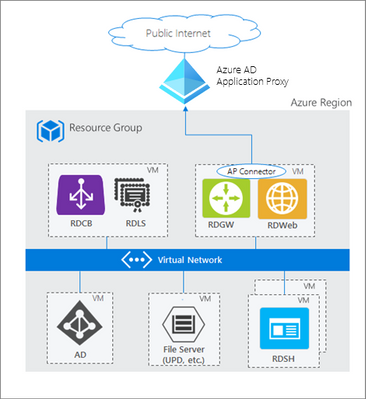 How Azure AD App Proxy works in an RDS deployment
Learn about the requirement to update your App Proxy connectors and configure RDS to work with App Proxy.
NFS 3.0 support for Azure Blob storage is now in preview
Azure Blob storage is the only storage platform that supports the Network File System 3.0 protocol over object storage, natively (with no gateway or data copying required), with crucial object storage economics. This is great news if you need to preserve your legacy data access methods but want to migrate the underlying storage to Azure Blob storage. It also enables you to re-use the same code from on-premises solutions to access files. Learn more, including how to mount a blob container using NFS 3.0.
Azure IoT Device Provisioning Service VNET ingress support is now available
The Azure IoT Device Provisioning Service VNET ingress support feature enables users to lock down DPS ingress access to devices connecting through a specific VNET. DPS egress to IoT Hub uses an internal service-to-service mechanism and does not currently operate over a dedicated VNET.
This core new capability improves the connectivity security and is of special significance to those in the industrial and enterprise sectors with stringent network and compliance requirements. View the documentation Azure IoT Hub Device Provisioning Service (DPS) support for virtual networks.
MS Learn Module of the Week

This week we couldn’t decide, so it’s TWO modules of the week, both about Azure Resource Manager templates.
- Deploy to multiple Azure environments by using ARM templates
Now you understand how ARM templates work, in this module you make your ARM template reusable for different environments by adding variables and expressions via Resource Manager functions. You also add better tracking and organization of your deployed resources by using tags. You complete the goal of improving the flexibility of your deployments by using parameter files.
Those were our highlights this week – tell us about yours! Was something else on the Azure announcements blog relevant to you? Will these announcements help your organization this week? Let us know in the comments.
by Scott Muniz | Jul 30, 2020 | Alerts, Microsoft, Technology, Uncategorized
This article is contributed. See the original author and article here.
What is the issue?
We discovered an issue that affects verification of tenant certificates and we are resolving this by renewing the tenant CA certificates for all impacted tenants. As described in the blog Azure Sphere tenant CA certificate management: certificate rotation, the Azure Sphere tenant certificate authority (CA) certificates that were issued two years ago are being automatically renewed. The Azure Sphere 20.07 SDK, released on July 29, 2020, supports features with which you can download the renewed certificates for your tenants. For certificates created between June 16, 2020 21:00 UTC, and July 28, 2020 00:15 UTC, verification using OpenSSL may fail. The failure is due to a mismatched signature algorithm identifier in the certificate. The error does not compromise the security of these certificates.
Who is impacted?
If the tenant CA certificate issuance date is after June 16, 2020 and before July 28, 2020, the tenant CA certificate may fail to verify with OpenSSL. The Azure Sphere Security Service will renew and activate all impacted certificates as a corrective measure.
What actions should you take?
|
Condition
|
Instructions
|
|
You have not downloaded the tenant CA certificate or tenant CA certificate chain that was issued between June 16, 2020 and July 28, 2020
(If you run ‘azsphere ca list’ in your Azure Sphere Development command prompt, you will see this issue date listed as “Start date”)
|
You don’t have any actions to take and these instructions don’t apply to you.
|
|
You have downloaded the tenant CA certificate or tenant CA certificate chain that was issued between June 16, 2020 and July 28, 2020
|
Between August 5, 2020 and August 18, 2020, please follow the instructions below to ensure that there is no break in service.
- Run ‘azsphere ca list’ in your Azure Sphere Development command prompt
- Use the most recent certificate to register with Azure IoT Hub/Central or other third-party resources following instructions here
|
For tenants that are impacted by this issue, the new and valid tenant CA certificates will be created by August 5, 2020. The new certificates will be activated after August 18, 2020. If you have any additional questions, please reach out to Microsoft Support.
Documentation Resources:



Recent Comments