by Scott Muniz | Aug 13, 2020 | Azure, Microsoft, Technology, Uncategorized
This article is contributed. See the original author and article here.
The Azure Sphere OS quality update 20.08 is now available for evaluation via the Retail Eval feed. The retail evaluation period provides 14 days for backwards compatibility testing. During this time, please verify that your applications and devices operate properly with this release before it’s deployed broadly via the Retail feed. The Retail feed will continue to deliver OS version 20.07 until we publish 20.08.
The 20.08 release includes enhancements and bug fixes in the Azure Sphere OS; it does not include an updated SDK.
The following changes and bug fixes are included:
- Fixed issue with the system time not being maintained with RTC and battery.
- WifiConfig_GetNetworkDiagnostics now returns AuthenticationFailed in a manner consistent with 20.06 and earlier.
- Networking_GetInterfaceConnectionStatus now more accurately reflects the ConnectedToInternet state.
- Fixed issue in 20.07 where device recovery would not result in a random MAC address for Ethernet on an Ethernet configured device.
We have also released new guidance to device manufacturers that should improve the stability of device-to-PC connections, e.g. in a manufacturing setting. In particular, we have updated the FTDI EEPROM configuration file in the azure-sphere-hardware-designs repo on GitHub to use ‘D2XX Direct’ mode instead of Virtual Com Port (VCP) mode. This new file also enables auto-generation of a random serial number, which will enable more reliable and flexible device identification in future releases of the SDK.
For more information
For more information on Azure Sphere OS feeds and setting up an evaluation device group, see Azure Sphere OS feeds.
If you encounter problems
For self-help technical inquiries, please visit Microsoft Q&A or Stack Overflow. If you require technical support and have a support plan, please submit a support ticket in Microsoft Azure Support or work with your Microsoft Technical Account Manager. If you do not have a support plan and require technical support, please explore the Azure support plans.
by Scott Muniz | Aug 13, 2020 | Azure, Microsoft, Technology, Uncategorized
This article is contributed. See the original author and article here.
In 2020 Kubernetes only marked its sixth birthday, but in that time its usage has grown exponentially and it is now considered a core part of many organization’s application platforms. The flexibility and scalability of containerized environments makes deploying applications as microservices in containers very attractive and Kubernetes has emerged as the orchestrator of choice for many. Azure offers Azure Kubernetes Service (AKS) where your Kubernetes cluster is managed and integrated into the platform. In this blog we are going to look at how you can use Azure Sentinel to monitor your AKS clusters for security incidents.
Overview
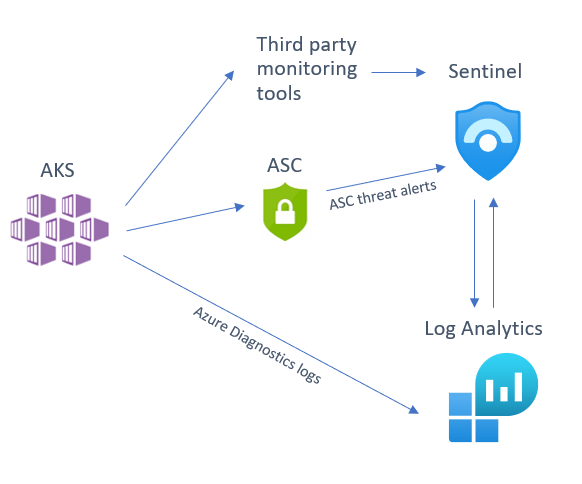
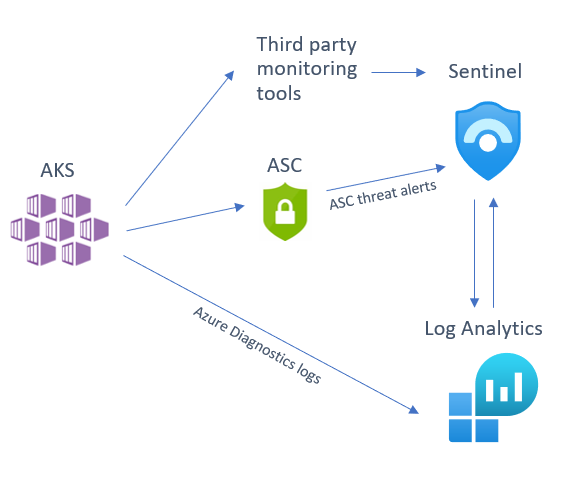
There are several sources that you can use to help monitor your AKS cluster, of which you can deploy one or several in tandem depending on your environment and the security posture of your organization. We will be looking at the following detection sources that you can integrate into Sentinel:
- Azure Security Center (ASC) AKS threat protection
- Azure Diagnostics logs
- Third party tool alert integration
Below is a diagram illustrating how these different sources integrate into Azure Sentinel:
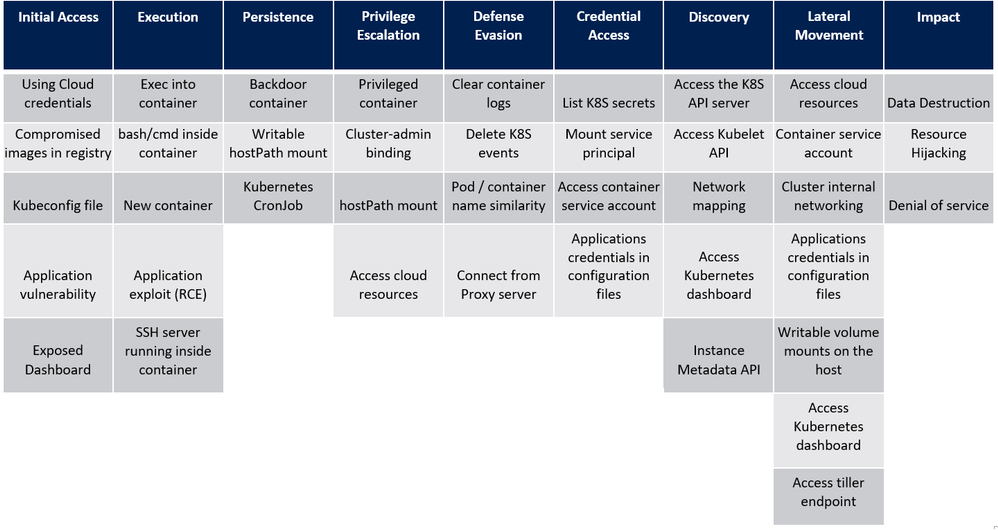
Before we dive into each of these sources, I want to mention an excellent piece of work created by my colleague Yossi Weizman where he created a threat matrix for Kubernetes clusters, aligned to the MITRE ATT&CK framework. You can read his full article here but we will refer to this threat matrix when assessing whether you have considered if this scenario is applicable to your AKS implementation, and if it is, how you can get visibility of this happening in your environment.
Azure Security Center (ASC) AKS threat protection
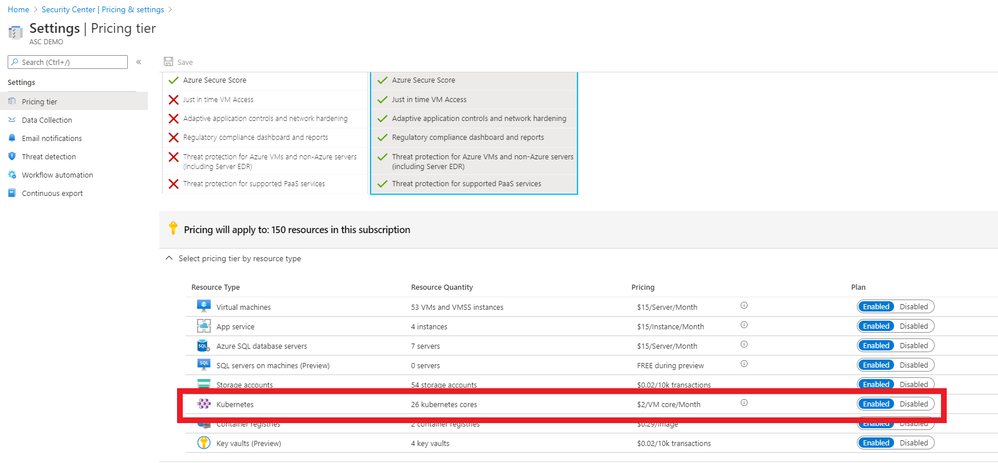
Azure Security Center Standard has threat protection built-in for the resources that it monitors. ASC has an optional Kubernetes bundle that you can enable, and ASC threat protection will look at your AKS cluster for signs of suspicious activity. To enable the AKS bundle in ASC, go to “Pricing & settings”, select the subscription and make sure the “Kubernetes” resource type is enabled, as per the below:
(The ASC Kubernetes bundle also provides security configuration and hardening recommendations for your AKS cluster, but that is outside the scope of this blog post. You can read more about this here.)
If you have already connected ASC threat alerts to your Azure Sentinel workspace via the native ASC connector these AKS threat alerts will also be sent directly into Azure Sentinel. Some of the threats that ASC can detect in your AKS cluster are below:
- Container with a sensitive volume mount detected
- Digital currency mining container detected
- Exposed Kubernetes dashboard detected
For an up-to-date list of ASC AKS-specific detections, please go here.
To turn on Kubernetes in Azure Security Center, go to ASC Pricing & Settings, in the Select pricing tier by resource type, you need to Enable Kubernetes and Container Registries.
Azure Diagnostics logs
If you have use cases not covered by ASC threat detections, you can also turn on AKS diagnostic logs and send to a Log Analytics workspace (you may notice that some documents referenced here refer to Azure Monitor. Note that Log Analytics is part of the larger Azure Monitor platform.) Follow the steps found here to enable resource logging. The logs that can be retrieved from AKS in this manner include:
- kube-apiserver
- kube-controller-manager
- kube-scheduler
- kube-audit
- cluster-autoscaler
After you have enabled the logging to be sent your Log Analytics workspace, you can start to run detections on these logs. These logs will be sent to the AzureDiagnostics table.
Let’s look at a basic query you can on these logs in Sentinel to look at (in this case) an NGINX pod:
AzureDiagnostics
| where Category == "kube-apiserver"
| where log_s contains "pods/nginx"
| project log_s
Now let’s look at some more security-focused queries that you can run on AKS logs. Note that we are using the threat matrix mentioned earlier in this blog as a guide for the manner of detections one may require on an AKS cluster:
# query for cluster-admin clusterrolebinding + extend columns
# detects: kubectl create clusterrolebinding my-svc-acct-admin --clusterrole=cluster-admin --serviceaccount=brianredmond

AzureDiagnostics
| where Category == "kube-audit"
| where parse_json(log_s).verb == "create"
| where parse_json(tostring(parse_json(tostring(parse_json(log_s).requestObject)).roleRef)).name == "cluster-admin"
| where parse_json(tostring(parse_json(log_s).requestObject)).kind == "ClusterRoleBinding"
| extend k8skind = parse_json(tostring(parse_json(log_s).requestObject)).kind
| extend k8sroleref = parse_json(tostring(parse_json(tostring(parse_json(log_s).requestObject)).roleRef)).name
| extend k8suser = parse_json(tostring(parse_json(log_s).user)).username
| extend k8sipaddress = parse_json(tostring(parse_json(log_s).sourceIPs))[0]
# query for CronJob creation

AzureDiagnostics
| where Category == "kube-audit"
| where parse_json(log_s).verb == "create"
| where parse_json(tostring(parse_json(log_s).requestObject)).kind == "CronJob"
# query for actions from standard user account (az aks get-credentials)

AzureDiagnostics
| where Category == "kube-audit"
| project log_s
| where parse_json(tostring(parse_json(log_s).user)).username == "masterclient"
# query for specific source IP

AzureDiagnostics
| where Category == "kube-audit"
| project log_s
| where parse_json(tostring(parse_json(log_s).sourceIPs))[0] == "192.168.1.1"
# query for RBAC result (allow, deny, etc.)

AzureDiagnostics
| where Category == "kube-audit"
| project log_s
| where parse_json(log_s).verb == "create"
| where parse_json(tostring(parse_json(log_s).annotations)).["authorization.k8s.io/decision"] == "allow"
# query for Azure RBAC AKS role assignment

AzureActivity
| where OperationName == "Create role assignment"
| extend RoleDef = tostring(parse_json(tostring(parse_json(tostring(parse_json(Properties).requestbody)).Properties)).RoleDefinitionId)
| extend  Caller = tostring(parse_json(tostring(parse_json(tostring(parse_json(Properties).requestbody)).Properties)).Caller)
| where RoleDef contains "8e3af657-a8ff-443c-a75c-2fe8c4bcb635" or RoleDef contains "b24988ac-6180-42a0-ab88-20f7382dd24c"
| extend AccountCustomEntity = Caller
| extend IPCustomEntity = CallerIpAddress
| extend URLCustomEntity = HTTPRequest
| extend HostCustomEntity = ResourceId
Of course, this is just a start – there are many more AKS detections you could create with these logs that will be specific to your organization’s use cases and environment.
Third party tools
If you are using a third-party Kubernetes monitoring tool, this can also be integrated into Sentinel. At the time of writing, we already have a native connector for Alcide kAudit, but look for more native integrations to come in the future!
Remember, if you are using a third party tool that does not yet have a native connector in Sentinel, you can still integrate the logs using a custom connector. For example, Twistlock offers a number of ways to pull the audit events from the product itself.
Summary
Sentinel offers many options for monitoring AKS clusters, so we recommend that you look at your organization’s environment and the tools you have available to decide on a strategy that works best for you. Do you have some AKS-specific detections, Workbooks or something else to share? Please contribute to our GitHub repo here and share with the community!
With thanks to @GeorgeWilburn for his AKS queries and @Nicholas DiCola (SECURITY JEDI) and @Chi Nguyen for their comments and feedback on this article.
by Scott Muniz | Aug 13, 2020 | Azure, Microsoft, Technology, Uncategorized
This article is contributed. See the original author and article here.
Howdy folks,
Today, we’re excited to share that you can assign groups to Azure Active Directory (Azure AD) roles, now in public preview. Role delegation to groups is one of the most requested features in our feedback forum. Currently this is available for Azure AD groups and Azure AD built-in roles, and we’ll be extending this in the future to on-premises groups as well as Azure AD custom roles.
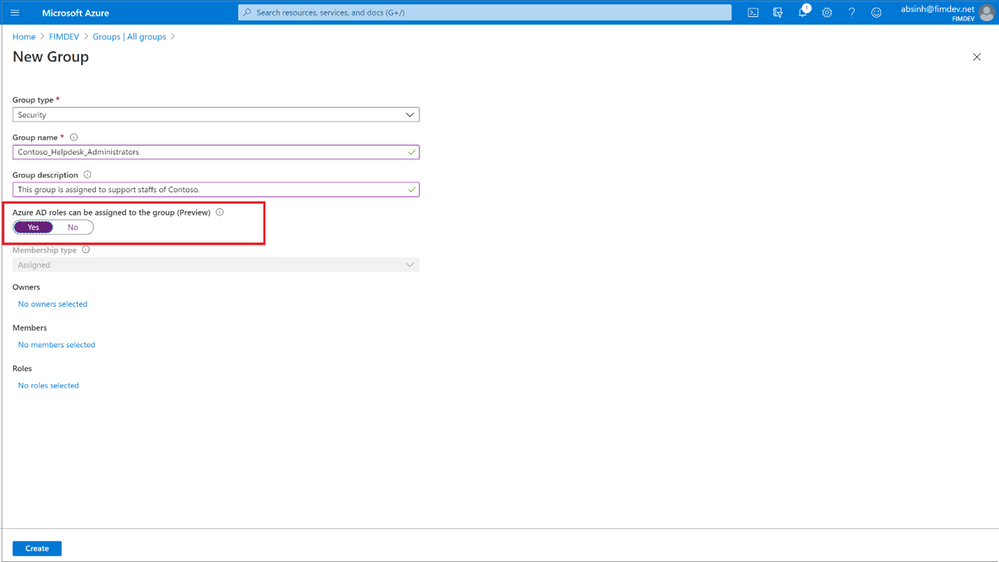
To use this feature, you’ll need to create an Azure AD group and enable it to have roles assigned. This can be done by anyone who is either a Privileged Role Administrator or a Global Administrator.

After that, any of the Azure AD built-in roles, such as Teams Administrator or SharePoint Administrator, can have groups assigned to them.
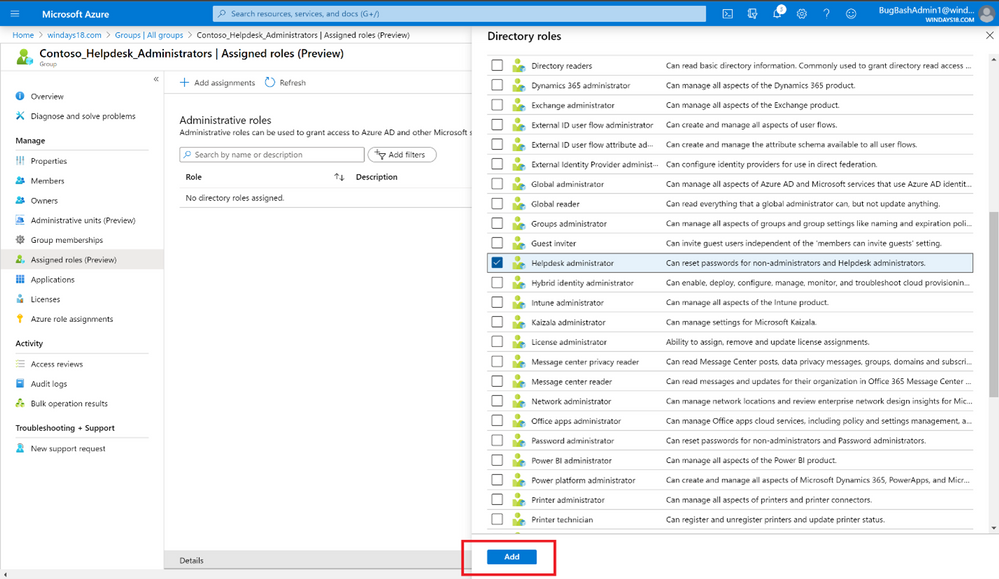
The owner of the group can then manage group memberships and control who can get the role, allowing you to effectively delegate the administration of Azure AD roles and reduce the dependency on Privileged Role Administrator or Global Administrator.
You can also use this along with Privileged Identity Management (PIM) to enable just-in-time role assignment for the group. With this integration, each member of the group activates their role separately when needed and their access is revoked when the role assignment expires.
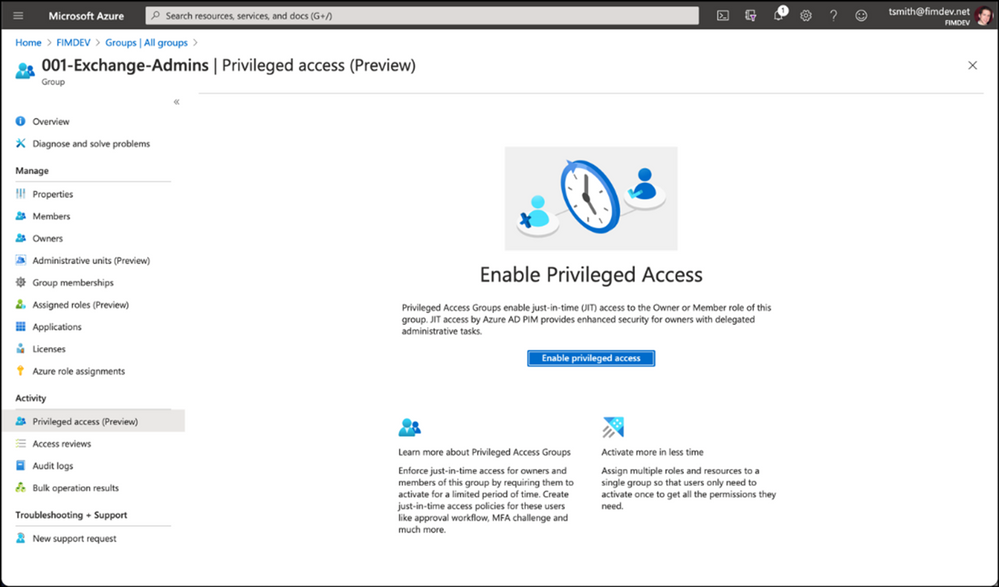
We’ve also added a new preview capability in PIM called Privileged Access Groups. Turning on this capability will allow you to enhance the security of group management, such as just-in-time group ownership and requiring an approval workflow for adding members to the group.
Assigning groups to Azure AD roles requires an Azure AD Premium P1 license. Privileged Identity Management requires Azure AD Premium P2 license. To learn more about these changes, check out our documentation on this topic:
As always, we’d love to hear any feedback or suggestions you may have. Please let us know what you think in the comments below or on the Azure AD feedback forum.
Best regards,
Alex Simons (@Alex_A_Simons)
Corporate VP of Program Management
Microsoft Identity Division
by Scott Muniz | Aug 13, 2020 | Azure, Microsoft, Technology, Uncategorized
This article is contributed. See the original author and article here.
The Azure Service Fabric 7.1 third refresh release includes bug fixes, and performance enhancements for standalone, and Azure environments has started rolling out to the various Azure regions. The updates for .NET SDK, Java SDK and Service Fabric Runtime is available through Web Platform Installer, NuGet packages and Maven repositories in 7-10 days within all regions.
- Service Fabric Runtime
- Windows – 7.1.456.9590
- Ubuntu 16 – 7.1.452.1
- Ubuntu 18 – 7.1.452.1804
- Service Fabric for Windows Server Service Fabric Standalone Installer Package – 7.1.456.9590
- .NET SDK
- Windows .NET SDK – 4.1.456
- Microsoft.ServiceFabric – 7.1.456
- Reliable Services and Reliable Actors – 4.1.456
- ASP.NET Core Service Fabric integration – 4.1.456
- Java SDK – 1.0.6
Key Announcements
- Extended support for 7.0: Support for all 7.0 based Service Fabric releases will be extended by 3 months until October 1st, 2020. We will take measures to ensure support expiration warnings for 7.0 clusters are removed. Please disregard any newsletters regarding support expiration for Service Fabric 7.0, there will be no impact to clusters.
For more details, please read the release notes.
by Scott Muniz | Aug 13, 2020 | Azure, Microsoft, Technology, Uncategorized
This article is contributed. See the original author and article here.
Whether migrating an existing application or designing a brand new one, capacity planning process plays a critical role. Learn how to navigate across Azure SQL Database options like hardware generation, service and compute tiers, and instance sizing principles, trying to find the sweet spot between performance, functionalities, and costs, in the first episode of this three-part series with Silvano Coriani.
Watch on Data Exposed
Additional Resources:
Choose between the vCore and DTU purchasing models
vCore model overview
Service tiers in the DTU-based purchase model
Migrate Azure SQL Database from the DTU-based model to the vCore-based model
Query Performance Insight for Azure SQL Database
Troubleshoot with Intelligent Insights
View/share our latest episodes on Channel 9 and YouTube!


Recent Comments