by Scott Muniz | Aug 26, 2020 | Azure, Microsoft, Technology, Uncategorized
This article is contributed. See the original author and article here.
After an introduction to Enterprise-Scale and further information about possible use cases, I would like to focus on one of the design principles: policy-driven governance.
Policy-driven governance means the usage of Azure Policy to build and provide guardrails, and to enable autonomy for the platform and application teams, regardless of their scale points. Those guardrails ensure that deployed workloads and applications are compliant with your organization’s security and compliance requirements, and therefore a secure path to the public cloud.
What is Azure Policy?
From the Azure Policy overview:[1]
Azure Policy evaluates resources in Azure by comparing the properties of those resources to business rules. These business rules, described in JSON format, are known as policy definitions. To simplify management, several business rules can be grouped together to form a policy initiative (sometimes called a policySet). Once your business rules have been formed, the policy definition or initiative is assigned to any scope of resources that Azure supports, such as management groups, subscriptions, resource groups, or individual resources. The assignment applies to all resources within the scope of that assignment. Subscopes can be excluded, if necessary.
Azure Policy uses a JSON format to form the logic the evaluation uses to determine if a resource is compliant or not. Definitions include metadata and the policy rule. The defined rule can use functions, parameters, logical operators, conditions, and property aliases to match exactly the scenario you want. The policy rule determines which resources in the scope of the assignment get evaluated.
In order to understand the behavior of policies in the context of Enterprise-Scale, some basic Policy characteristics must be known.
- Policy operates at a level above other Azure services by applying policy rules against PUT and PATCH requests and GET responses of resource types going between Azure Resource Manager (ARM) and the owning resource provider (RP).[2]
- A newly assigned policy or policySet, to any supported scope, takes around 30 mins for the assignment to be applied scope.[3]
- Compliance data is updated as follows:[3]
- New policy assignments: 30 mins
- Update existing policy definition: 30 mins
- Update existing policy assignment: 30 mins
- On-demand scan (REST API, PowerShell): 3 mins
- Standard compliance evaluation cycle: 24 hours
- Policy provides different effect types (what happens when the policy rule is evaluated), which do behave differently.[4] The effect types are also evaluated in a specific order, as shown below:[6]
- Disabled
- Append and Modify
- Deny
- Audit
- AuditIfNotExists and DeployIfNotExists
In order to understand how the compliance works and when a resource is marked as non-compliant, you need to understand the following:[5]
- For Audit and Deny: It requires IF statement to be TRUE then effect takes place.
- For Audit resource is marked as non-compliant.
- For Deny, new deployment (for new or update resource) is denied while existing resource is marked as non-complaint.
- For DeployIfNotExists and AuditIfNotExists: It requires IF statement to be TRUE and existence condition to be FALSE.
Azure Policy in the context of Enterprise-Scale
As outlined in the Enterprise-Scale design principles, Policy is used build and provide the required guardrails for all landing zones. For example, a policy ensures that all required activity logs for all subscriptions (selected categories in diagnostic settings) are sent to a central Azure Log Analytics workspace. Or all virtual machines are protected by Azure Backup, as another example. For this, Enterprise-Scale is primarily focusing on proactive and preventive policies (e.g. with DeployIfNotExists, or in short DINE) to enable autonomy for the platform, autonomy for the application teams, and ensures that resources are in their compliant goal state, no matter how those resources got created.
In order to simplify the adoption of those proactive and preventive policies, Enterprise-Scale includes three reference implementations for three different customer use cases, all with an extensive list of policy definitions and policy assignments.[7] For example:
- Enable Azure Security Center with Standard tier
- Deploy a virtual network including network peering
- Deploy and enable security features for Azure SQL Databases (Transparent Data Encryption, auditing, etc.)
The three included reference implementations are:[8]
- Contoso – a hybrid networking example using Azure Virtual WAN
- AdventureWorks – a hybrid networking example using the traditional hub and spoke network architecture
- WingTip – an Azure-only example
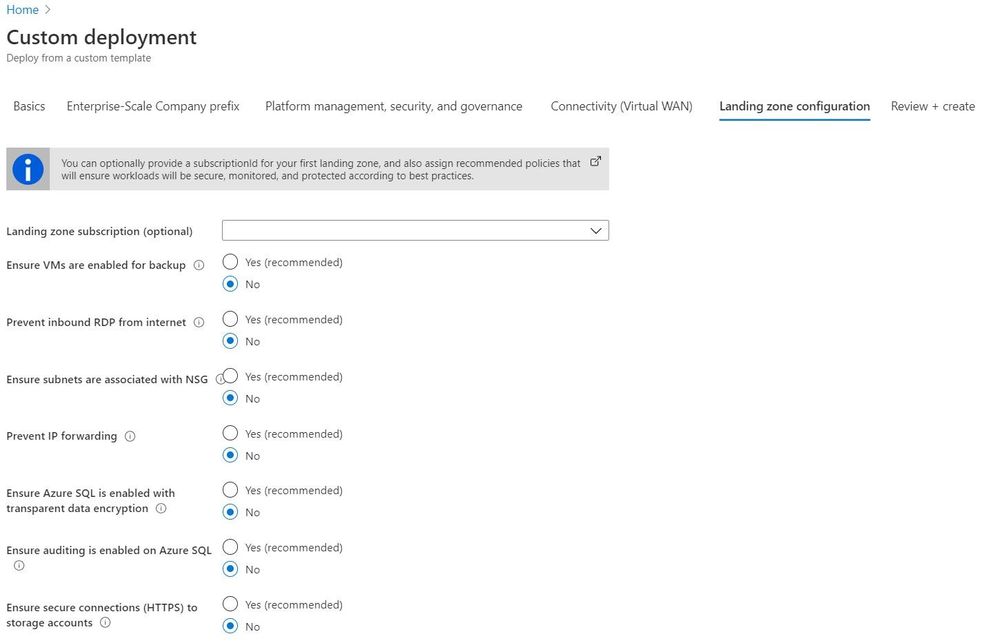
The provided user experience allows you to easily deploy (bootstrap) the selected reference implementation, with all included definitions and assignments. Furthermore, policy definitions and assignments can also be deploy out-of-band on targeted management groups and subscriptions. The user experience when deploying a reference implementation is shown in the figure below:
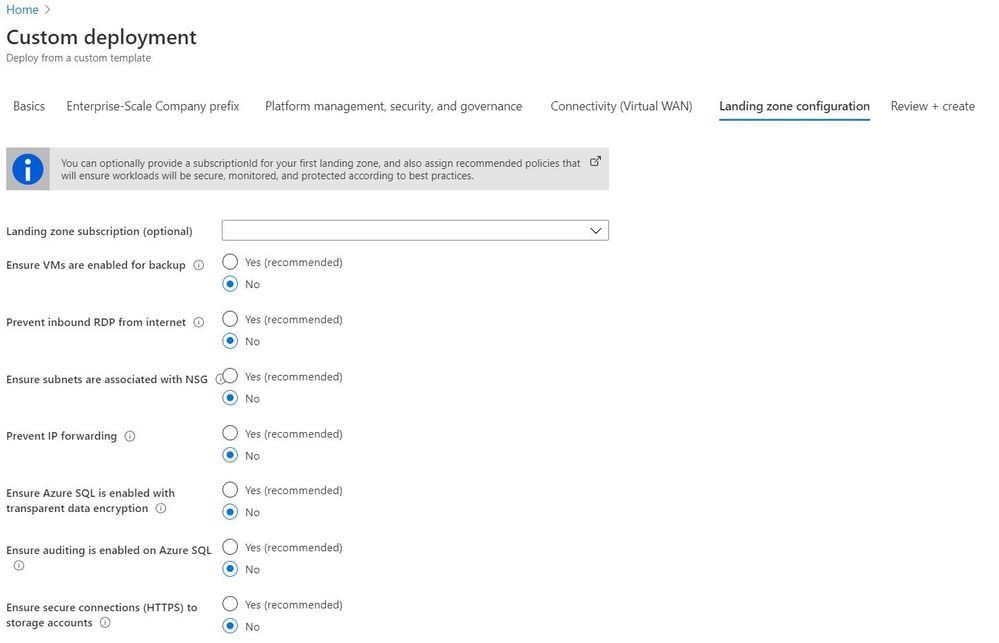 User experience when deploying a reference implementation.
Resource deployment and remediation
Although ARM templates can be deployed to all scopes (tenant, management group, subscription, and resource group scope), policies can only deploy to the subscription and resource group scope.[3] This has an impact on the behavior when deploying resources and policy remediations:
- If a deployment is created via Enterprise-Scale, the remediation for the subscription scope is included; consequently, the policy is evaluated and the specific resources (e.g. with DINE) are deployed.
- If a deployment is created outside of Enterprise-Scale, the remediation is not included; consequently, remediation tasks must be created manually or by using Azure CLI or PowerShell.
Finally, a big thank you to @KristianNese for reviewing and providing feedback.
[1] https://docs.microsoft.com/en-us/azure/governance/policy/overview
[2] https://github.com/Azure/azure-policy
[3] https://docs.microsoft.com/en-us/azure/governance/policy/how-to/get-compliance-data
[4] https://docs.microsoft.com/en-us/azure/governance/policy/concepts/effects
[5] https://docs.microsoft.com/en-us/azure/governance/policy/how-to/get-compliance-data#how-compliance-works
[6] https://docs.microsoft.com/en-us/azure/governance/policy/concepts/effects#order-of-evaluation
[7] https://github.com/Azure/Enterprise-Scale/tree/main/azopsreference
[8] https://github.com/Azure/Enterprise-Scale/blob/main/docs/EnterpriseScale-Deploy-reference-implentations.md

by Scott Muniz | Aug 26, 2020 | Azure, Microsoft, Technology, Uncategorized
This article is contributed. See the original author and article here.
|
Microsoft partners like Zaloni, Seeq Corporation, and CloudEngage deliver transact-capable offers, which allow you to purchase directly from Azure Marketplace. Learn about these offers below:
 |
Zaloni Arena: Arena, an augmented data operations platform by Zaloni, provides an active data catalog that enables self-service data enrichment and consumption. Arena drives business and analytics success while providing the controls and extensibility needed across today’s decentralized, multi-cloud data complexity. Safeguard data assets and conquer data sprawl with Arena.
|
 |
Seeq Software – User License: Seeq from Seeq Corporation is an advanced analytics solution that enables process manufacturers to rapidly investigate and share insights from data on Microsoft Azure, as well as contextual data in manufacturing and business systems. Seeq’s extensive support for time series data accelerates analytics, publishing, and decision-making.
|
 |
Personalization Platform: CloudEngage helps retailers give website visitors a personalized, relevant, and intuitive experience. It works seamlessly with any content management or commerce system, and it automatically builds 360-degree audience profiles and segments with machine learning. Serving content based on the individual needs and interests of site visitors improves customer engagement and increases web and mobile conversion rates.
Chord: CloudEngage’s live-chat product, built on a personalization core with machine learning, makes it easy for customers to connect with a real person when browsing your website. Chord keeps track of a visitor’s interests and browsing history, and smart profile cards show ads, interest categories, geolocation, and weather. Adapt in real time to whatever your customer is looking for, and make it easy for your agents to pick up where they left off.
|
|
by Scott Muniz | Aug 26, 2020 | Azure, Microsoft, Technology, Uncategorized
This article is contributed. See the original author and article here.
Together with the Azure Stack Hub Team we are starting a journey to explore the ways our customers and partners use, deploy, manage, and build solutions on the Azure Stack Hub platform. Together with the Tiberi Radu (Azure Stack Hub PM @rctibi), we created a new Azure Stack Hub Partner solution video series to show how our customers and partners use Azure Stack Hub in their Hybrid Cloud environment. In this series, as we will meet customers that are deploying Azure Stack Hub for their own internal departments, partners that run managed services on behalf of their customers, and a wide range of in-between as we look at how our various partners are using Azure Stack Hub to bring the power of the cloud on-premises.
You can start watching the first videos here:
- The introduction of the Azure Stack Hub Partner Solutions Series
- Our first episode introduces Eversource Energy – that built a hybrid solution across Azure and Azure Stack Hub, creating a consistent operational model and simplifying the deployment of workloads.
- The second episode follows the journey of knowledgepark, akquinet, and BordonaroIT – partners that have built a SaaS-like service that is consumed by over 200 healthcare clients across their region
- Join our Australian partner Byte as we explore how they are using the Azure Stack products to simplify operations, accelerate workload deployment, and enable the teams to focus on creating value rather than “keeping the lights on”.
- Join our partner RFC in Tunisia, as we learn about their managed offerings, their partnerships with various ISVs, and how they’ve used Azure Stack Hub to accelerate Azure adoption
We will add new videos in the upcoming days and weeks.
I hope you enjoyed the series and hope you are looking forward to the next videos. If you have any questions, feel free to leave a comment.
by Scott Muniz | Aug 26, 2020 | Azure, Microsoft, Technology, Uncategorized
This article is contributed. See the original author and article here.
Improve remote learning with speech-enabled apps powered by Azure Cognitive Services
This post was co-authored by Melissa Ma, Yueying Liu, Anny Dow and Sheng Zhao
Online learning has grown rapidly over the last couple of months as schools and organizations adapt to new ways of connecting and methods of education. Speech technology can play a significant role in making distance learning more engaging and accessible to students of all backgrounds. With Azure Cognitive Services, developers can quickly add speech capabilities to applications, bringing online learning to life.
Enhancing language fluency with pronunciation assessment
One key element in language learning is improving pronunciation skills. For new language learners, practicing pronunciation and getting timely feedback is essential to becoming a more fluent speaker. In the current environment, online language learning and the ability to practice anytime, anywhere, has become even more important.
At the Build conference in May, we announced the preview of the pronunciation assessment capability, powered by Speech to Text.
The pronunciation assessment capability evaluates speech pronunciation and gives speakers feedback on the accuracy and fluency of spoken audio, allowing users to benefit from:
- Highly accurate evaluations – Provides consistent and accurate evaluation results using a machine learning-based approach that correlates highly with speech assessments conducted by native experts. The pronunciation assessment model was trained with 100,000+ hours of speech data from native English speakers and is highly robust. It assesses three dimensions of pronunciation: accuracy, fluency and completeness. Pronunciation assessment can provide evaluations at multiple levels of granularity, returning accuracy scores for specific phonemes, words, sentences, or even whole articles.
- Ability to account for inserted and omitted words – Enables rich configuration parameters to support flexibility in using the API. Using NLP techniques and EnableMiscue setting, pronunciation assessment can detect errors such as extra, missing, or repeated words—when compared to reference text—to assist in more accurate scoring. This is particularly useful for longer paragraphs of text.
- Real-time streaming – Supports streaming upload on audio files for immediate feedback.
With pronunciation assessment, language learners can practice, get instant feedback, and improve their pronunciation. Online learning solution providers or educators can use the capability to evaluate pronunciation of multiple speakers in real-time. Pronunciation assessment currently supports the English language.
Educational organizations, like the Tomorrow Advancing Life (TAL) Education Group, are already building applications using pronunciation assessment to help students practice language learning remotely.
“Effectively and efficiently teaching accurate pronunciation to students of different levels is a big challenge, both in class and outside of class. The Speech service’s pronunciation assessment capability provides a powerful solution to address this challenge. We’ve been highly impressed by the robustness of pronunciation assessment and its ability to deal with noisy environments, and how well it correlates with pronunciation evaluations conducted by our teachers.”
– Xiangyu Hu, AI Scientist of Tomorrow Advancing Life (TAL) Education Group
Learn how you can get started with the pronunciation assessment using our tutorial video and download source code from Github to try out.
Developing interactive courses with Text to Speech
Another way that Speech technology can support better online learning experiences is through Text to Speech, a Speech service feature that converts text to lifelike speech. Educators can create interactive materials with highly expressive and humanlike voices using Neural Text to Speech (Neural TTS), now available in 36 voices with 31 languages. (Learn about our most recent languages here.)
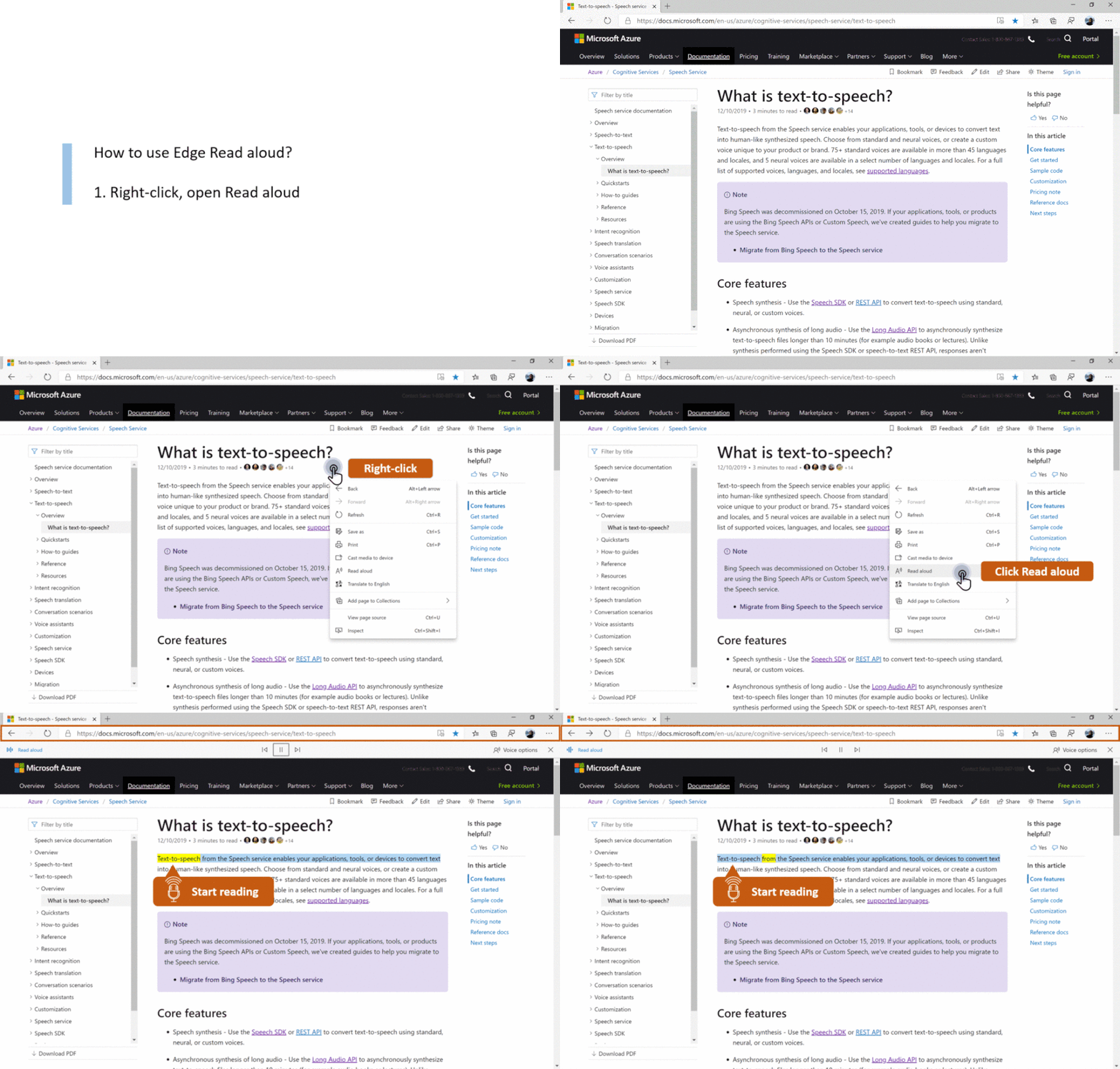
With Neural TTS, developers can add natural-sounding voice to learning materials, for scenarios like slide narration. Neural TTS can also be used for reading aloud any content, facilitating new ways for students to interact with material as well as increasing accessibility for students with learning differences. Educational organizations can also use Neural TTS to create AI-powered virtual “teachers” that interact with students to make online courses more engaging.
 Experience the Neural Voices with the new Edge browser
With the Custom Neural Voice capability, online learning solution providers can further create interactive learning experiences for their students in a voice that represents their brand, or develop unique voices for different characters. For example, Duolingo, one of the world’s most popular language learning apps, is creating unique voices for different characters used in the lessons.
Using SSML or the Audio Content Creation tool, users can further finetune audio characteristics like voice style, rate, pitch, and pronunciation to fit their scenarios—no code required. Text to Speech also supports different speaking styles—like cheerfulness and empathy—making it easier to bring audiobooks to life. Recently we have just added 10 new voice styles, available in Chinese (Xiaoxiao voice) and will be expanded to other languages.
To learn more about Audio Content Creation, watch the video tutorial.
To learn more and get started adding speech to your educational applications, check out our resources below:
Pronunciation Assessment
Text to Speech
by Scott Muniz | Aug 25, 2020 | Azure, Microsoft, Technology, Uncategorized
This article is contributed. See the original author and article here.
Abstract
Encryption of Azure VM disk is a vast topic and an important one. Especially if you are a bank then your info security team is going to run behind it. I have been working with few leading banks in India and encryption of Azure VM disk is one of the longest discussed topic, I experienced in recent times.
While you encrypt the disk of Azure VM using either “Storage [Server] side encryption” or “Azure Disk Encryption”; security teams are always in fear of one question –
“What if someone downloads my VHD from Azure portal? How do I protect my data?”
Well this blog is an answer to above question! So Let us start with some background on encryption and understand why customers or security teams may ask to block the VHD download.
Why security team need to block VHD Download?
Encryption of Azure VM disk is possible in two ways –
- Server Side Encryption
- Azure Disk Encryption
Server side encryption [a.k.a. Storage Side Encryption – hereafter referred as SSE] should suffice the organization security needs in most of the cases.
The most common question I have seen is below –
Question: If my Azure VM is encrypted using SSE and I download the VHD. Then using this VHD if we create a VM will it be encrypted and data on it will be non readable?
Answer: No. As soon as the data leaves the boundary of underlying storage, it is decrypted. Hence if you provision VM vhd or data disk vhd after download, the data will be readable.
Reference blog post mentioning this is here – https://www.sanganakauthority.com/2020/01/azure-vm-disk-encryption-storage-side.html.
This triggers the requirement of “why we want to restrict Azure VM VHD download?”.
This way customer organization can avoid Azure Disk Encryption using Bitlocker or DMCrypt [hereafter referred as ADE] and especially avoid complexities involved in the implementation and management. Here I am not saying ADE is bad. It is still best way to encrypt. However if customer is interested in avoiding operational overheads in ADE, then SSE is really handy.
If SSE is used then after download of Azure VM VHD, the data theft may not be avoided. Therefore it becomes necessary for extra sensitive data VHD’s; to block download from Azure portal completely.
How do I block Azure VM VHD download?
It would have been really easy if we can put up an “Azure Policy” at the subscription level to block the VHD download. Unfortunately there is no such policy inbuilt. We can build custom policy and I have already tried it.
Important aspect for policy is about having an “Action” in policy. However “Actions” in Azure policy is a legacy syntax and as of today it supports only “write” action.
For VHD download we will have to use “Action” equals to “Microsoft.Compute/disks/beginGetAccess/action” which is not a write action and hence we can’t achieve this using Azure policy. I think “Actions” suits better in RBAC section as they reflect permissions for users to execute certain action. Hence we will need to implement “block VHD download” using RBAC.
Implementing RBAC for restricting Azure VHD download
The download permissions on the Azure VM disk is assigned through RBAC setting “Microsoft.Compute/disks/beginGetAccess/action”. So if we restrict this access in an Azure custom role we should be able to achieve “restrict Azure VM disk download” option .
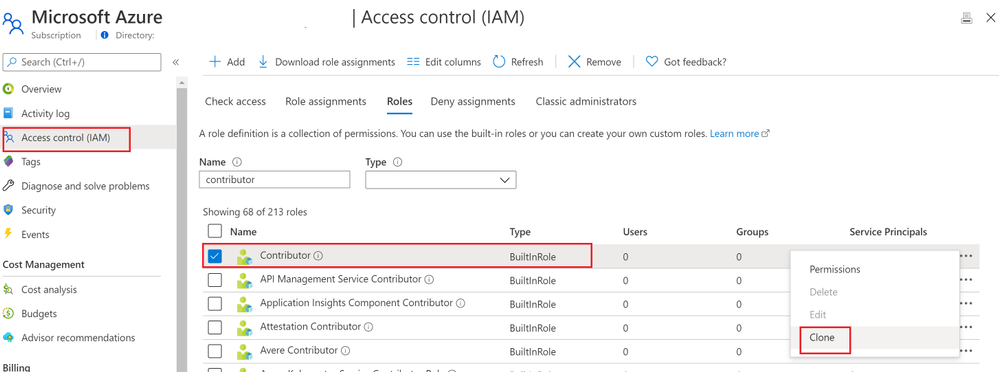
To define an Azure custom role it is always a good start to use any existing Azure built in role. For our requirement “Contributor” roles seems to be best fit. I found out contributor role as shown below from Azure portal. To create custom role with “VHD download deny” permission; clone this role as shown below –
 Clone Azure built Role of Contributor
On the basic information of Clone windows, enter information as shown below. “Custom role name” can be of your choice. Then click on Next.
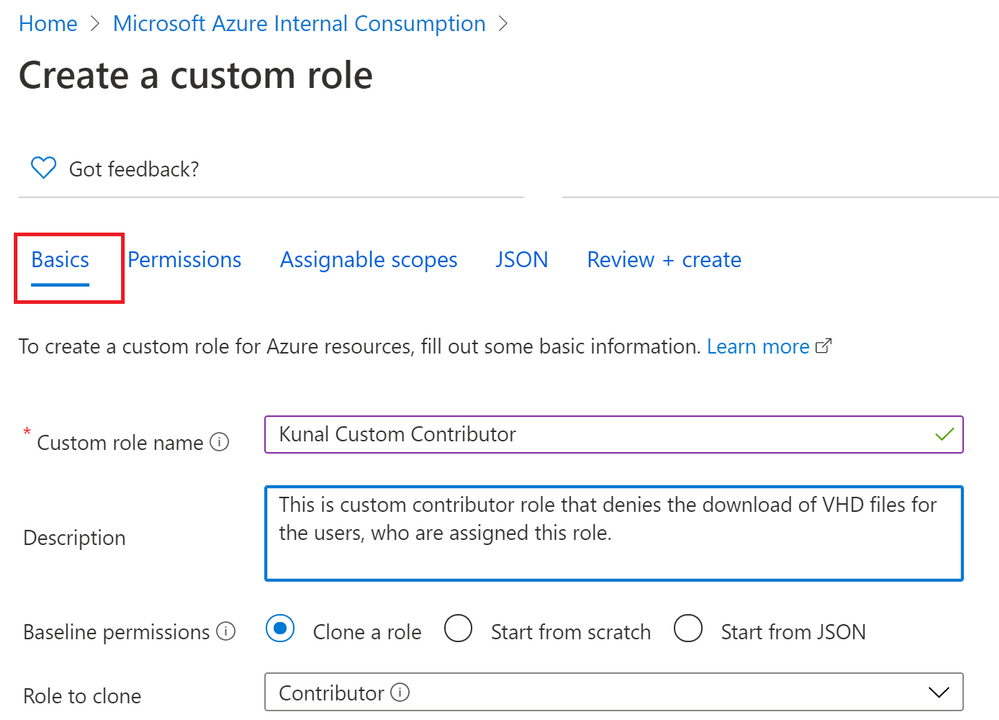 Provide Basic information for creating custom role
You will see Permissions tab with first permission with “*”. Means Contributor role has almost all operations access on Azure portal. Except that Contributor can’t assign a role to any other user.
On the permissions tab itself we will need to “deny VHD download” option. Therefore on Permissions tab click on “Exclude Permissions” as shown below –
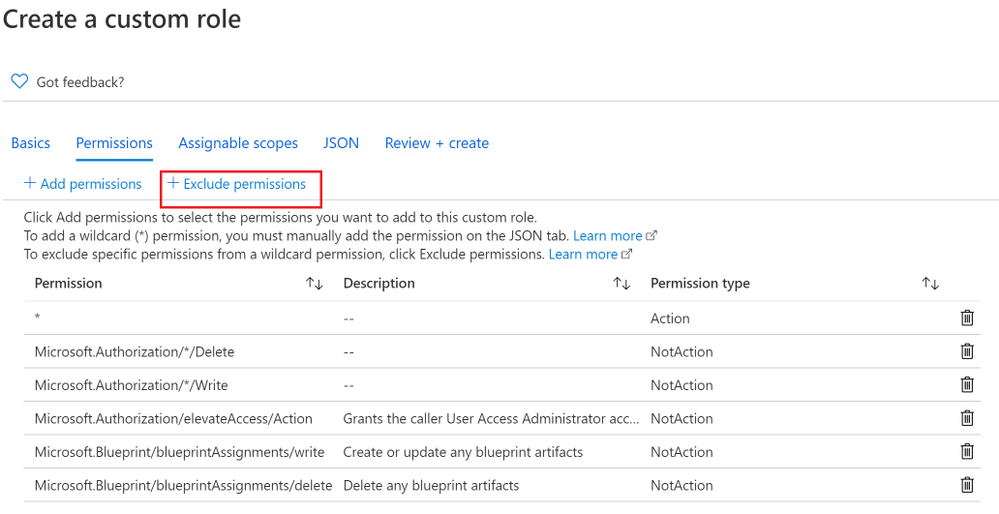 Click on Exclude Permissions
Then search for “disk” and select Compute resource provider as shown below –
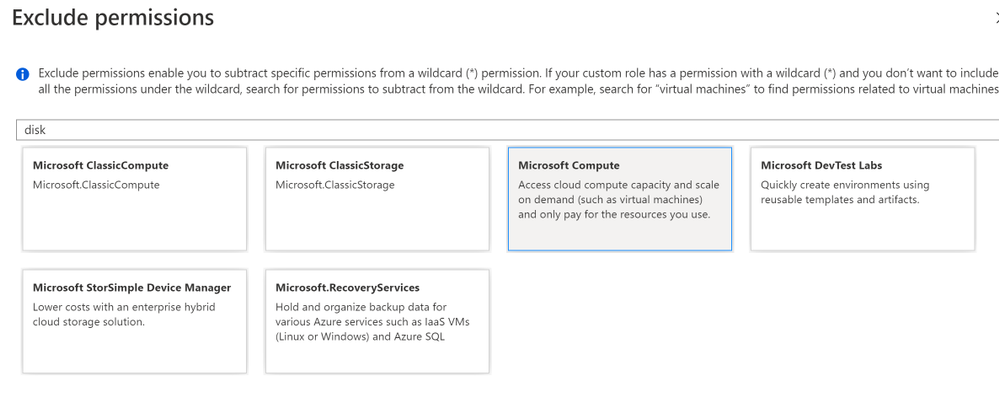 Select Compute
Under Microsoft.Compute permissions screen search for option “Other : Get Disk SAS URI” under Microsoft.Compute/disks as shown below. Select the checkbox against it and click on Add.
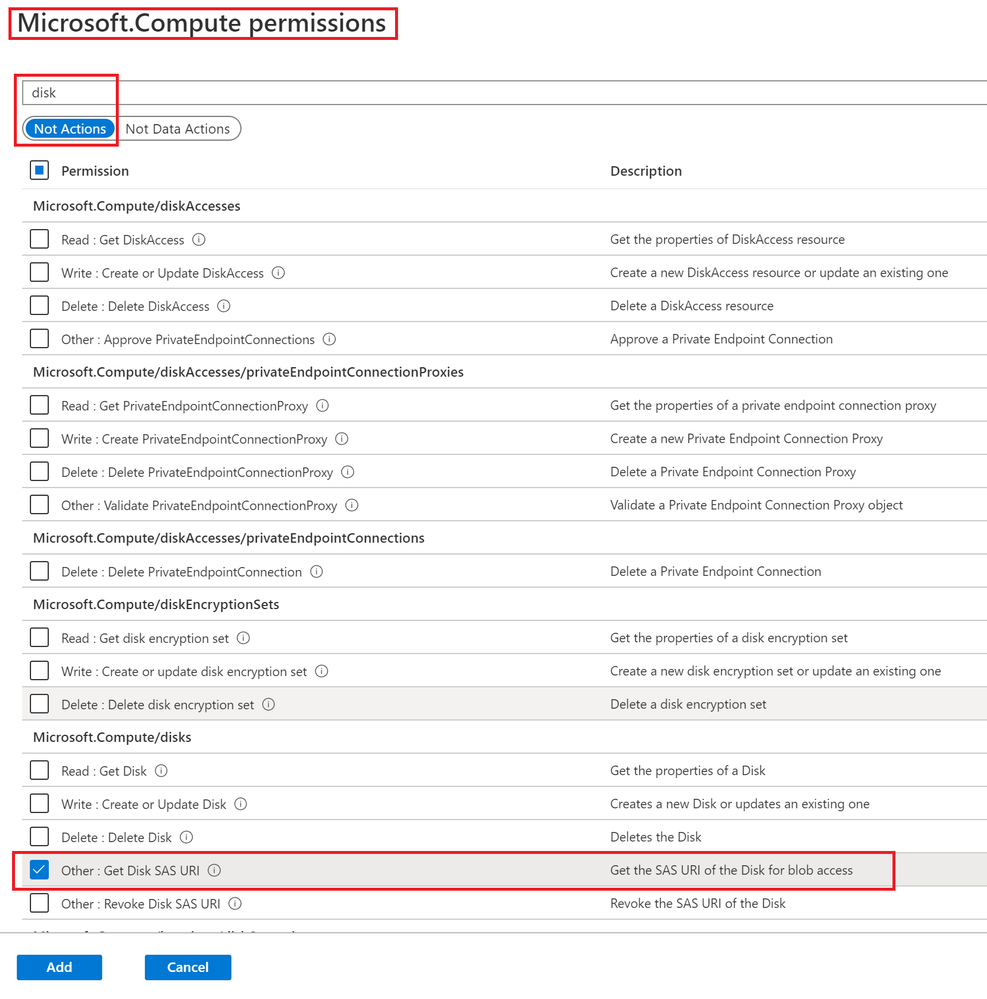 Other : Get Disk SAS URI
After this you will see an action “Microsoft.Compute/disks/beginGetAccess/action” is added in NotAction as shown below –
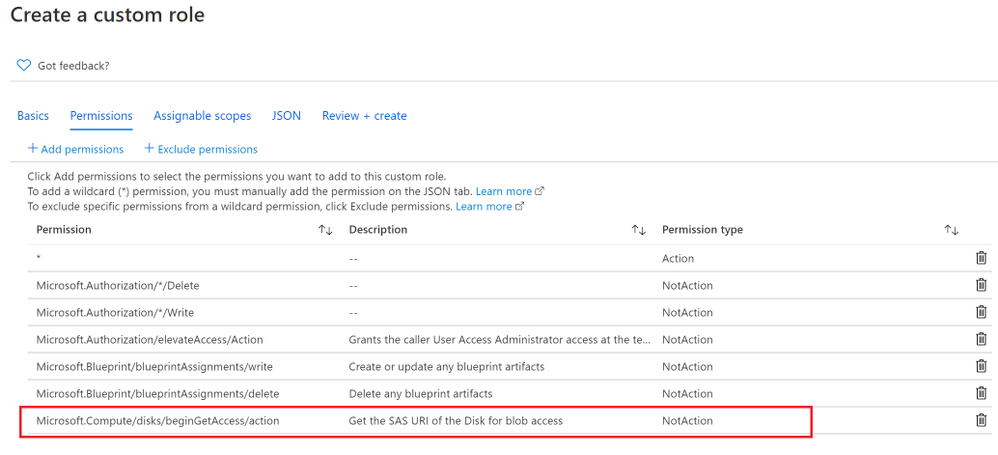 Verify Other : Get Disk SAS URI check is successful
Then click on “Review + Create” option and then click on “Create” to have this role created under your subscription. You can find this role as below to check if role addition is successful.
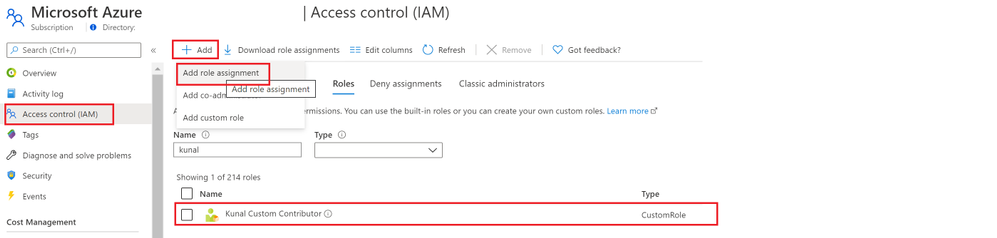 Verify if role is created
Then click on “add” to assign this custom role to a user of your choice.
Verifying of denying Azure VM VHD download
After successful role assignment, login to Azure portal with the user who has assigned the custom role. Open any Virtual Machine from the portal and go to Disks -> Click on OS disk Name. the click on “Disk Export” option and click on Generate URL button. This button actually generates the SAS URL which can be used to download Azure VM disk from Azure portal.
When we click on “Generate URL” button, you will find that download vhd is no more allowed as shown below –
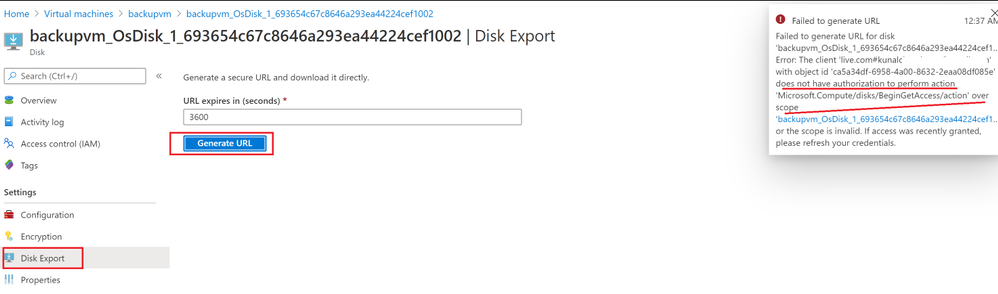 VHD Download is restricted by RBAC role
This is how you can restrict Azure VM disk download from the Azure portal using custom RBAC.
Conclusion
Hope this post will help you to satisfy your security requirement and help you settle with SSE disk encryption.
If you are more interested to know about Azure Disk encryption frequently asked real world questions then visit here.

by Scott Muniz | Aug 25, 2020 | Azure, Microsoft, Technology, Uncategorized
This article is contributed. See the original author and article here.
We are thankful for all the encouragement and positive feedback you’ve shared with us since our recent feature releases enhancing the Azure CLI’s user experience. Since then, we have doubled down our effort and are excited to share with you some more progress in this space. This month, the spotlight will be on the new experimental feature az config alongside its unique capability to dynamically install extensions
Transforming az configure to az config
If you are one of our typical users who script and automate on a regular basis, then you must have tried az configure to configure basic settings. We heard from you that you felt limited by its defaulting capabilities or the lack thereof in this command (since you can only set “defaults” in tool) and therefore have put together a simpler, more familiar version of the command, with more configuration options for you to use.
Az config is the transformed version of the original az configure command. Its subcommands come in the form of positional arguments which makes it more git-like and more syntactically intuitive to use. Our team intended to experiment new ideas with a similar command name, while preserving the current state of az configure — thereby the birth of az config. With az config, you can now config various settings across all sections in az that were previously only configurable by directly editing the configuration file.

Figure1: Comparison between az configure vs. az config
It also enables you to unset and clear configs in tool, which was previously unavailable. This further equip you to smoothly complete your end to end jobs to be done, without ever having to leave the tool
Note: az config is in the experimental state to get more feedback from users like you. Hence, we are currently supporting both this and az configure. We do plan to merge the two and eventually support only one command across all in tool settings so if you have specific preferences/feedback, please do share them with us. We’d love to incorporate your feedback in the final product.
Installing extensions dynamically with az config
Did you know that we have over 80 Azure CLI extensions available for you to use?
If not, we highly encourage you to explore and try them out — Azure service teams have invested tremendous amount of effort to bridge the feature gaps so you can perform all kinds of tricks within az, irrespective of whether you are a newbie or an experienced power user of the Azure CLI (extensions). If you have been frustrated at some point in time with the lack of discoverability and errors around extensions, then the following feature is for you.
Dynamic extension installer is Azure CLI’s intelligent and interactive way to install extensions on your behalf, after you’d attempted to use extension commands when the extension has yet to be installed. It’s now part of Azure CLI core and you can configure the settings via the new az config command.
By default, it’s set to no because we’d like you to be in control with the settings; this means you will receive the command_not_found error as usual if you attempt to use an extension command without the extension being installed. However when it’s set to yes_without_prompt, the tool will automatically install the extensions and rerun your extension command. Consider the following comparison when spinning up a MySQL database using az mysql up:
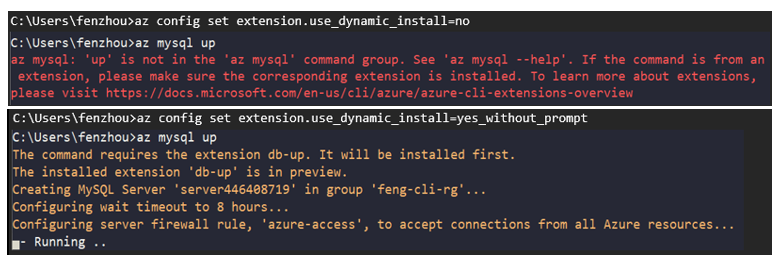
Figure 2: Comparison of dynamic extension installer settings, no vs. yes_without_prompt
We can see that the previously unavoidable error is now out of the picture with this capability
This setting is especially handy in automation use cases – imagine your page long script leverages multiple extension commands that have frequent updates. With the dynamic installer in place, the hassle around extension management is conveniently eliminated
If you prefer using your CLI interactively in a terminal or shell, there are a couple other options for you to choose from. For instance, with az config set extension.use_dynamic_install=yes_prompt, the tool will first prompt you a reminder prior to installing the any extension on your behalf
Here’s where you can learn more about all the settings. Please feel free to try them out and let us know what you think about this feature!
Call to action
We’d love for you to try out these new experiences and share us your feedback on their usability and applicability for your day-to-day use cases.
Similar to last time, some of these improvements are early in the preview or experimental stage but we certainly do look forward to improving them to serve you better. If you’re interested, here is where you can learn more about new features in the ever improving Azure CLI.
Thank you for reading! We’re excited to share with you more delightful features in upcoming releases!


Recent Comments