Manage opportunities more effectively with the new sales pipeline view! 

Manage opportunities more effectively with the new sales pipeline view! 

This article is contributed. See the original author and article here.

The sales pipeline is a visual representation of where prospects are within the sales funnel. Managing the pipeline is one of the core activities of any seller; it helps sellers to stay organized and focused on moving deals forward. A seller who can successfully master the sales pipeline is likely to drive more revenue. 

But mastering a sales pipeline is not easy, especially when sellers must balance multiple active deals, an array of contacts, and conversations across multiple channels, while trying to figure out when the next interaction will occur, what next steps are required, and which app or process will help accomplish the job. 

The opportunity pipeline view in Dynamics 365 Sales is now available for public preview and offers an updated user experience by putting the seller at the center of their workflows, enabling them to view their full pipeline, gather context quickly, take action efficiently, and work in their preferred manner.

Let’s see an overview of how to manage deals in Dynamics 365 Sales: 

This embed requires accepting cookies from the embed’s site to view the embed. Activate the link to accept cookies and view the embedded content.

This site uses cookies for analytics, personalized content and ads. By continuing to browse this site, you agree to this use.

Dynamics 365 Sales opportunity pipeline view

Visualizing the sales pipeline with charts 

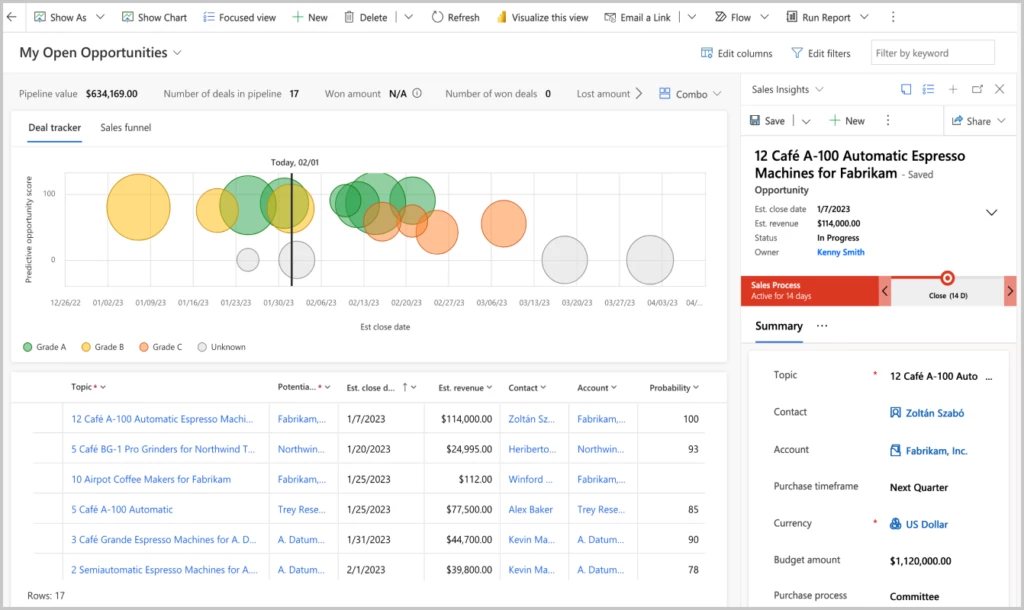
The easiest way to get an overview of the sales pipeline is by visualizing the deals on a chart. Charts form a key component of the opportunity pipeline view. Not only do they provide key insights on opportunities, but in the opportunity pipeline view these charts are interactive, update in real time and allow sellers to quickly locate and focus on the right deals.  

In this release, two charts are available out of the box: 

  • A bubble chart that allows sellers to track risky deals on a timeline. 
  • A funnel chart that allows sellers to see where deals are in the sales process. 

These charts are configurable by administrators. In future releases, we will introduce additional charts. 

Keeping track of key metrics 

Another tool that keeps sellers informed are key performance indicators (KPIs). In the opportunity pipeline view, we’ve introduced tools to track and highlight metrics that help sellers stay on top of their most important KPIs. Sellers can choose from a subset of metrics, re-order them, or even create their own metrics. 

A modern, seller-optimized grid experience 

When it comes to managing deals, it’s no wonder that sellers often use spreadsheets. Spreadsheets provide a table view of all opportunities, with aggregation, quick filtering, sorting, grouping with pivot tables, re-ordering of columns, and the ability to edit fields inline easily. Unfortunately, data in a spreadsheet is static and not connected to the CRM. 

The opportunity pipeline view comes with an inline grid that can be edited. This grid behaves just as a spreadsheet would. Sellers can: 

  • Edit any cell inline 
  • Filter by any column 
  • Hide and show any column from the table 
  • Sort records on the grid 
  • Re-order the columns  
  • Access control on the columns  

Getting context without navigating away 

With the opportunity pipeline view, useful information is easily accessible. When you select a record in the workspace, an optimized form appears in the side panel. This form contains a modern task management experience and provides useful information, such as: 

  • Key entity fields (opportunities, contacts, leads, accounts) 
  • A timeline list of activities 
  • Quick action button to add/view notes and tasks 

Administrators can customize the form to select the most relevant fields for your business.

chart, bubble chart
Dynamics 365 Sales opportunity view

Steps to begin with the opportunity pipeline view 

Where can I see the opportunity pipeline view? 
Click on the “show as” button on the top left in the command bar and select “pipeline view” from the dropdown. 

What if I do not see the option in the dropdown? 
If you do not see the “pipeline view” in the dropdown, ask your administrator to opt in for early access. Please refer the documentation to opt in for early access.  

Can I set pipeline view as the default view? 
Yes, the admin has the capability to set it as the default view. Please refer the documentation to set pipeline view as default view. 

What if I do not want to see it in the dropdown menu? 
Ask your administrator to disable the view. 

Next steps 

Opportunity pipeline view is available in early access now. For more information on how to enable the experience in your environment,read the documentation and watch a brief video 

Not a Dynamics 365 Sales customer yet? Take a guided tour and sign up for a free trial at Dynamics 365 Sales overview

The post Manage opportunities more effectively with the new sales pipeline view!  appeared first on Microsoft Dynamics 365 Blog.

Brought to you by Dr. Ware, Microsoft Office 365 Silver Partner, Charleston SC.

Discover new ways to multitask with Microsoft 365 and Edge

Discover new ways to multitask with Microsoft 365 and Edge

This article is contributed. See the original author and article here.

Despite living in a connected world, the way we use our apps can often feel distinctly disconnected. Today, we’re announcing a new way to help you stay focused with help from two Microsoft apps that many people use daily and consistently together—the classic Microsoft Outlook app on Windows and the Microsoft Edge web browser.

The post Discover new ways to multitask with Microsoft 365 and Edge appeared first on Microsoft 365 Blog.

Brought to you by Dr. Ware, Microsoft Office 365 Silver Partner, Charleston SC.

Parallel cost accounting now available with Global Inventory Accounting Add-in for Supply Chain Management

Parallel cost accounting now available with Global Inventory Accounting Add-in for Supply Chain Management

This article is contributed. See the original author and article here.

With the new Global Inventory Accounting Add-in, Microsoft Dynamics 365 Supply Chain Management now supports parallel cost accounting. The ability to perform inventory accounting using multiple costing ledgers enables organizations that do business internationally to easily comply with multiple accounting standards at the same time.

Global organizations face complex accounting challenges

International organizations face a complex accounting challenge when they produce and sell items across many countries. For each item they produce and sell, they must often calculate multiple representations of inventory costs to comply with local generally accepted accounting principles, statutory accounting principles like the International Financial Reporting Standards (IFRS), and internal management accounting practices, even when these directly conflict with one another.

In addition, companies may need to account inventory costings using both a potentially fluctuating local currency and a solid second currency for statutory compliance. Finally, companies may need to use one cost valuation method internally, and a different one for their local country or region.

Parallel cost accounting made easier

A key feature of the Global Inventory Accounting Add-in is its ability to create a single document that applies multiple accounting rules simultaneously based on different currencies, input measurement bases, and cost flow assumptions. With the new multi-ledger functionality, organizations can define as many costing ledgers as they need. Inventory accounting in dual currencies and in dual valuations are both supported.

For example, a subsidiary in a country with a hyper-fluctuating local currency is required by the local government to account and manage inventory in the local currency. At the same time, to comply with IFRS, the subsidiary must also account and manage inventory in a stable currency like USD or EUR. With Global Inventory Accounting, the subsidiary can record and check values in multiple currencies by switching between various predefined ledgers for a specific sales order.

Because Global Inventory Accounting runs as a micro service, it provides inventory statements, valuations, and variance reporting in cloud-hosted environments such as Microsoft Dataverse.

graphical user interface

Greater visibility into costs with Power BI reporting

Global Inventory Accounting also enables organizations to analyze their costs in greater detail. Organizations can retrieve informative Power BI reports for further analysis, and use the included templates to generate inventory overviews, inventory statements, and more for cost controllers and managers to analyze costs and make decisions about future changes.

graphical user interface, application

Parallel cost accounting: Behind the scenes

Global Inventory Accounting performs inventory accounting in individual ledgers. Organizations can create as many costing ledgers for each of their legal entities as needed to ensure they can obtain multiple inventory representations. All documents (such as purchase orders, sales orders, transfer orders, and so on) that are posted in a legal entity are accounted in all the costing ledgers that are associated with the entity.

The following diagram shows the composition of a Global Inventory Accounting ledger.

diagram

Looking ahead

To empower organizations to achieve compliance while operating internationally, Global Inventory Accounting supports both standard cost and moving average for retail and distribution industries. Future enhancements will target manufacturing companies by adding support for standard cost, moving average, weighted average, first in first out (FIFO), and other calculation methods.

Learn more

Read the product documentation: Global Inventory Accounting home page – Supply Chain Management | Dynamics 365 | Microsoft Learn

Not yet a Dynamics 365 Supply Chain Management customer? Take a guided tour.

The post Parallel cost accounting now available with Global Inventory Accounting Add-in for Supply Chain Management appeared first on Microsoft Dynamics 365 Blog.

Brought to you by Dr. Ware, Microsoft Office 365 Silver Partner, Charleston SC.

Discover new ways to multitask with Microsoft 365 and Edge

Yammer is evolving to Microsoft Viva Engage with new experiences rolling out today

This article is contributed. See the original author and article here.

Today, we’re announcing all of Yammer will become Microsoft Viva Engage. We’ll continue to enhance Viva Engage with new capabilities that encourage leadership engagement, authentic expression, and knowledge discovery, including new experiences rolling out today.

The post Yammer is evolving to Microsoft Viva Engage with new experiences rolling out today appeared first on Microsoft 365 Blog.

Brought to you by Dr. Ware, Microsoft Office 365 Silver Partner, Charleston SC.

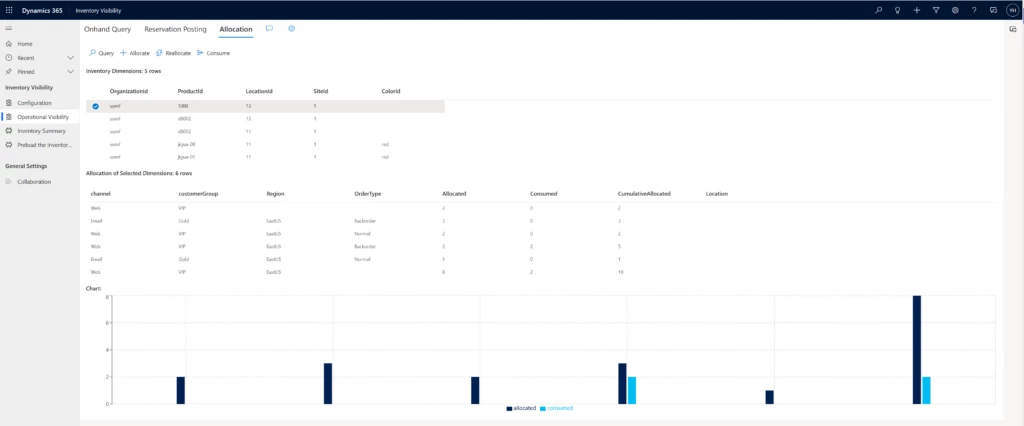
Inventory allocation ensures limited stock goes where it’s most needed

Inventory allocation ensures limited stock goes where it’s most needed

This article is contributed. See the original author and article here.

Companies that operate in more than one channel or region must fulfill orders over networks of ever-increasing complexity. When supply shortages happenand they willhow do you make the best use of limited stock across your most important channels, customer groups, regions, and promotions? And once you decide that, how do you make sure the allocated stock is protected from any other use? With inventory allocation, a new capability of the Microsoft Dynamics 365 Supply Chain Management Inventory Visibility service.

Inventory allocation allows you to virtually apportion your on-hand stock as part of the sales operational planning process before any actual sales are made. It has two purposes:

  • Inventory protection (ring fencing): Protecting the allocated inventory from other allocations, reservations, or sales demands.
  • Oversell control: Restricting allocated quantities so that the receiving party doesn’t over-consume them when the actual sales transaction takes place.

Incorporate inventory allocation into your sales planning

First, let’s define a few terms:

  • Allocation group: The group that owns the allocation, such as a sales channel or a customer group.
  • Allocation group value: The value of each allocation group. For example, “store” might be the value of the sales channel allocation group, and “VIP” might be the value of the customer allocation group.
  • Allocation hierarchy: A combination of allocation groups in a hierarchy that determines how inventory is allocated to each group.
  • Virtual common pool: The quantity of inventory that’s available to allocate.

Now let’s do a case study to see how a company might include inventory allocation in its sales planning process to optimize the distribution and fulfillment flow of limited stock.

Inventory allocation case study

Contoso sells laptops both online and in-store in several countries. Supply chain disruptions severely affected manufacturing capacity of a popular model. The company needs to balance its fulfillment capability between its online and in-store channels in Australia and New Zealand.

  1. First, Contoso determines allocation groups and allocation hierarchies in accordance with the company’s distribution strategy. The allocation is virtual based on current stock numbers. It doesn’t necessarily entail moving physical inventory. Contoso does the initial segmentation and planning of allocation quantities in its planning system, but they could also do it manually based on historical experience. They decide to allocate first by regions (Australia, New Zealand) and then by sales channels (online, store).
  2. Next, Contoso executes the allocation in the Inventory Visibility service to ring-fence each group’s allotted quantity. An allocation can’t be used by another group unless a reallocation adjustment is made.
    The Australia group is allotted 5,000 laptops and the New Zealand group gets 3,000, leaving 2,000 as contingency in the virtual common pool. Of Australia’s 5,000, 3,000 is allotted to its online sales channel group. No stock transfer is needed yet, since the actual sales transactions and fulfillment haven’t taken place.
  3. Next, the company fills its regional and channel demands through physical or soft consumption, ensuring that orders from allocation groups use their allocation.
    A customer visits Contoso’s Australia website and purchases a laptop. The website checks the Inventory Visibility service, confirms that enough of the Australia allocation for the online sales channel is available to fill the order, and allows the order to be processed. The consumed quantity can either be a soft reservation, as in this case, which deducts from the available stock level without affecting physical inventory quantity; or a deduction from physical stock, as in a “cash and carry” transaction in which the store inventory is directly consumed.
  4. Contoso processes and ships the customer’s order as usual.

You can easily incorporate inventory allocation into your order fulfillment process. You’ll have more control over and visibility into your distribution and fulfillment network so that you can make better use of your on-hand stock. Inventory allocation goes beyond planning right through to the execution phase, ensuring allocated stock is protected and helping you keep your promises to sales channels, customer groups, and business partners.

Learn more

Read the product documentation:

Not yet a Supply Chain Management customer? Take a guided tour.

The post Inventory allocation ensures limited stock goes where it’s most needed appeared first on Microsoft Dynamics 365 Blog.

Brought to you by Dr. Ware, Microsoft Office 365 Silver Partner, Charleston SC.

Leap into the future of finance at Finance Reimagined 2023

Leap into the future of finance at Finance Reimagined 2023

This article is contributed. See the original author and article here.

With global volatility and inflation impacting organizations across all industries, business agility has never been more important. Leaders turn to finance teams to get real-time insight into business performance and recommendations on future initiatives that will help them thrive amid disruption. But finance teams are overwhelmed with manual tasks, cobbling together data, and disconnected teams. Achieving game-changing business agility begins with augmenting the human ingenuity of your people with intelligent process automation.

When it comes to reimagining processes with AI, automation, and analytics, many finance leaders don’t know where to start. This year, at the third annual Finance Reimagined digital event, we will delve into real-world best practices from Microsoft and industry leaders that will help you prioritize the right cost optimization, growth acceleration, and workforce transformation initiatives.

A woman sitting at a desk in front of a computer

Finance Reimagined 2023

Tuesday, February 28, 2023, 9:00 AM to 10:15 AM Pacific Time (UTC-7)

Finance Reimagined: Bringing the future of finance into focus

Finance Reimagined is a virtual event bringing together finance leaders from around the world. On February 28, 2023, from 9:00 AM to10:15 AM PT, you can unpack the latest trends shaping the future of finance including the strategic evolution of the role of CFO within organizations, maintaining commitments to multiple stakeholders and bottom lines against a challenging economic environment, and the opportunities to drive transformation through the partnership of human ingenuity and AI.

Learn more and register for Finance Reimagined 2023.

Discover what’s top of mind for CFOs and financial leaders

You’ll discover best practices, trends, and priorities that are top of mind for CFOs and finance leaders. We’ve lined up experts from Microsoft, IDC, Avanade, EY, HSO, KPMG, and PwC to deliver actionable insights on how to strike the right balance between the following:

Human and AI

Find harmony between automation and your organization’s most important assetyour people. We will tackle one of the top concerns for CFOs today: workforce optimization. The heart of productivity sits in employee well-beingor the organization’s ability to increase creativity, job satisfaction, and ultimately, happiness. Human ingenuity is now business’ greatest investment to drive long-term vision and needs to be incentivized. Automation changes the way we work, thus organizational structures, required competencies, and roles must change as well. Get tips at Finance Reimagined on how to prioritize automation initiatives and how to use them to augment your people resources.

Cost optimization and growth acceleration

Embrace a dual role of gatekeeper and innovator to bring more strategic value to your organization. You’ll hear from a panel of finance leaders at Microsoft as they respond to trends from a recent study of more than 500 senior finance leaders from across all industries. Learn how Microsoft is empowering our finance leaders to do more with less to guide teams through these uncertain times. We will discuss tactics to optimize cash flow, increase operational effectiveness, and reinvest to meet growth expectations.

The speed of business and risk mitigation

Organizational health has become increasingly dependent on data and tools to facilitate agile, data-driven decision making. Finance teams are doubling down on their efforts to keep up with our world’s increasingly volatile and interconnected markets that demand more fluid operating models, extending beyond the walls of an organization. This means that the role of the finance leader has evolved from being an economic guardian inside the walls of an enterprise to designing new business models that focus on delivering customer value outside of an enterprise. This evolution is only possible through a tight partnership between the CFO and Chief Technology Officer (CTO) to ensure data security while activating insights at every level of the organization. Join us for a discussion with the CFO and CTO at Robert Walters, a global recruitment and talent management company with a team of experts spanning 31 countries and serving more than 4,300 clients, to hear how they partnered to speed the time to insight within their organization.

Register today to attend Finance Reimagined for your look ahead at the emerging trends and essential insights defining how tomorrow’s businesses will thrive. We hope to see you there.

The post Leap into the future of finance at Finance Reimagined 2023 appeared first on Microsoft Dynamics 365 Blog.

Brought to you by Dr. Ware, Microsoft Office 365 Silver Partner, Charleston SC.