5 customer service trends to watch in 2023

5 customer service trends to watch in 2023

This article is contributed. See the original author and article here.

The past couple years have been challenging for many customer service organizations. Meeting customers’ rising expectations and adapting to their evolving needs within a volatile economic landscape has been a herculean effort. Businesses are investing more in measuring the impact of their customer service, and the investment is paying dividends. In fact, it’s becoming more about the total customer experience and transforming the business models to create effortless experiences for both customers as well as employees. By 2026, Gartner predicts that 60 percent of large enterprises will use total experience to transform their business models to achieve world-class customer and employee advocacy levels.1 This growing acknowledgment is a positive indicator that service is finally recognized as a core business value driver as support teams became pivotal in retaining customer loyalty and winning new customers throughout the COVID-19 pandemic.

But are service organizations ready to face challenges and equipped to provide this level of service at scale? Customer service leaders are turning to modernizing technology and digitization, such as Microsoft Dynamics 365 Customer Service, to provide high-quality customer service experiences.  

Five trends to modernize customer service

1. Recognize and quickly connect with customers

Modern customer service means showing up for your customers on the channel of their choice. Customers increasingly expect companies to offer a robust service experience right in their favorite channel. With each social channel representing diverse customer segments, engaging across these channels offers countless opportunities to deliver excellent service.

  • 63 percent of customers expect companies to offer customer service via their social media channels, and 90 percent of social media users have already used social media as a way to communicate with a brand or business.2

The Omnichannel for Customer Service add-in for Microsoft Dynamics 365 Customer Service offers a wide variety of social engagement options for customers to engage on their preferred channel. Now with 2022 release wave 2, we’ve added Apple Messages for Business to our list of social messaging apps. This rich messaging can be used to generate interactive content and experiences that all take place within the messages application. And remember, when you enable agents to respond using the customer’s channel of choice, it drives brand engagement, creates a positive experience, and builds customer loyalty.

When engaging on social, always remember that you are not interacting with just one customer issue, but a wider audience that may not have context around a customer’s challenge. With an increasing number of eyes on you, it’s crucial to respond with precision, empathy, and quality.

2. Help customers help themselves with self-service

Intelligent self-service empowers customers to conveniently secure answers when and how they want, and this online, anytime support option is growing in popularity with customers. Business-to-business (B2B) and business-to-consumer (B2C) customers are likely to search for an answer to an issue within a knowledge base, online community, or portal before reaching out to a customer support agent. These critical self-service capabilities free up your agents to focus on high-priority, complex issues, and drive customer satisfaction.

  • In a McKinsey survey of customer care leaders, nearly two-thirds of respondents who successfully decreased their call volumes identified improved self-service as a key driver.3

AI-powered chatbots are leading the charge in intelligent self service. Bots serve as the first point of contact for customers, alleviate customer frustrations from long wait times, and provide around-the-clock, immediate online support.

With the right service solution, bots can be deployed as conversational interactive voice responses (IVRs) equipped with natural language processing. A direct benefit of this intelligent, human-like conversation experience, paired with around-the-clock availability, is increased resolution speed. A quick response to a problem can be the difference in keeping a customer or having them pivot to a competitor.

  • By 2027, chatbots will become the primary customer service channel for roughly a quarter of organizations, according to Gartner.4

AI and machine learning advancements continue to make bots even more powerful and more efficient in understanding and conversing with customers. The use of bots in customer service is likely to expand as the technology becomes more and more democratized.

3. Personalize and drive brand loyalty

Customers want businesses to quickly recognize them as individuals and tailor their customer support experiences. Personalization isn’t only about knowing your customers and their histories, it means being able to understand and accordingly respond to their sentiment in real time. The ideal solution creates interactions based on each customer’s profile, which uses their current and past interactions and user data to customize the experience. It can be as simple as greeting a customer by their name and pulling up their order automatically by an email address or phone number, or it can mean taking the first step and implementing proactive customer care.

This trend in personalizing customer service demonstrates the value of the relationship to the customer, enhancing CSAT and strengthening loyalty, while significantly impacting the company’s bottom line.

  • 63 percent of consumers expect personalization as a standard of service and believe they are recognized as an individual when sent special offers.5
  • 80 percent of customers are more likely to make a purchase when businesses provide a customized experience.6
Man sitting at a computer with a headset on.

Improving Customer Satisfaction with AI

Learn how AI is helping customer service leaders drive higher customer satisfaction scores.

4. Improve agent productivity

  • In the past two years, customer service leaders have seen a dramatic shift in the number of employees working from homeup to 85% of their workforces in some cases.7

With agents working from more places than ever, they need new ways to find experts who can help them solve customer challenges. The right data at the right time is key to empowering agents to meet customers’ needs quickly and accurately. However, as omnichannel customer profiles grow, agents need tools that proactively surface insights that matter in the moment.

Advancements in AI technology, especially natural language understanding, enable real-time analysis of conversations and the ability to surface real-time insights and knowledge. Agents can be alerted to similar cases and successful resolution steps, along with knowledge suggestions customized for the current context. All of these capabilities help agents solve customer issues more quickly, improving resolution rates and customer satisfaction.

5. Optimize with automation and run your business lean

Many customer service leaders are making it a priority to transform their departments from cost centers to growth centers. At the same time, they face continuous pressure to keep costs down.

Unifying tools onto a single, cloud-based platform reduces redundancy and enables cost flexibility to meet changing business conditions. If that platform has an open architecture and no-code/low-code development capabilities, the time and cost of development can be dramatically reducedputting innovation within reach across the organization.

Building tomorrow

These are just a few of the trends in customer service, but one thing is for sure: customer service is evolving rapidly. The real challenge is being able to serve customers wherever they are and making sure every customer interaction is captured and available in a single profile for the support agent to use in resolving customer issues.

This embed requires accepting cookies from the embed’s site to view the embed. Activate the link to accept cookies and view the embedded content.

This site uses cookies for analytics, personalized content and ads. By continuing to browse this site, you agree to this use.

Watch this demo on how Microsoft brings all 5 of these customer service trends together.

Microsoft is listening. We’re continually adapting and innovating to provide service leaders with the tools you need to consistently deliver exceptional customer service. We continue to invest in features like self-service, bots, social engagement, and agent productivity tools that bring value to you, your customer service organization, and most of all, to your customers. Our goal is to build intuitive, sophisticated, easy-to-use tools that enhance your service delivery and empower your service representatives to exceed customer and organizational expectations.

Our service product roadmap is filled with new features and innovations that will take your service experience to the next level, differentiate your brand, and ultimately help you rise as a leader in your industry.

Learn more

Learn more about Dynamics 365 Customer Service, and check out Apple Messages for Business.


End notes

1Gartner webinar, The Total Experience Strategy for Better Retail Digital Interactions. GARTNER is a registered trademark and service mark of Gartner, Inc. and/or its affiliates in the U.S. and internationally and is used herein with permission. All rights reserved.

2180+ Social Media Marketing Stats You Can’t Ignore (2023), Dreamgrow.com.

3The state of customer care in 2022 and beyond, McKinsey, 2022.

4 Gartner Press Release, Gartner Predicts Chatbots Will Become a Primary Customer Service Channel Within Five Years, July 27, 2022. GARTNER is a registered trademark and service mark of Gartner, Inc. and/or its affiliates in the U.S. and internationally and is used herein with permission. All rights reserved.

5Consumers expect personalization, reveals report, Retail Customer Experience.

6New Epsilon research indicates 80% of consumers are more likely to make a purchase when brands offer personalized experiences, Epsilon Research.

7The state of customer care in 2022 and beyond, McKinsey, 2022.

The post 5 customer service trends to watch in 2023 appeared first on Microsoft Dynamics 365 Blog.

Brought to you by Dr. Ware, Microsoft Office 365 Silver Partner, Charleston SC.
Optimize sales conversation follow-ups in two easy steps

Optimize sales conversation follow-ups in two easy steps

This article is contributed. See the original author and article here.

Taking time to speak with customers remains one of the best ways to build relationships and close deals faster. However, in a digital world it is often difficult to secure that moment of interaction. So when that moment happens, it is critical to focus on the conversation. Capturing valuable insights and next steps is a distraction at this precious time. Microsoft Dynamics 365 Sales conversation intelligence continues to harness AI technology to assist salespeople with just that it’s there as your chief note taker. Master conversation follow ups by uncovering value from each call and gaining a deeper understanding of your customer interactions.

We’re excited to introduce two new features designed to save time and allow users to quickly access the most relevant and valuable insights from their calls: 

  • Call categorization automatically categorize and tag short calls, making it easier to sift through large numbers of recordings and find valuable information. 
  • Question detection track all questions asked during customer conversations. Thus allowing salespeople to understand their customers’ concerns, areas for follow up, and help managers identify trending questions and coaching opportunities. 

Let’s dive into each one to learn more. 

Call categorization

Call categorization introduces a revolutionary way to manage call recordings and learn more about leads, as well as assist managers with identifying coaching opportunities within their teams. 

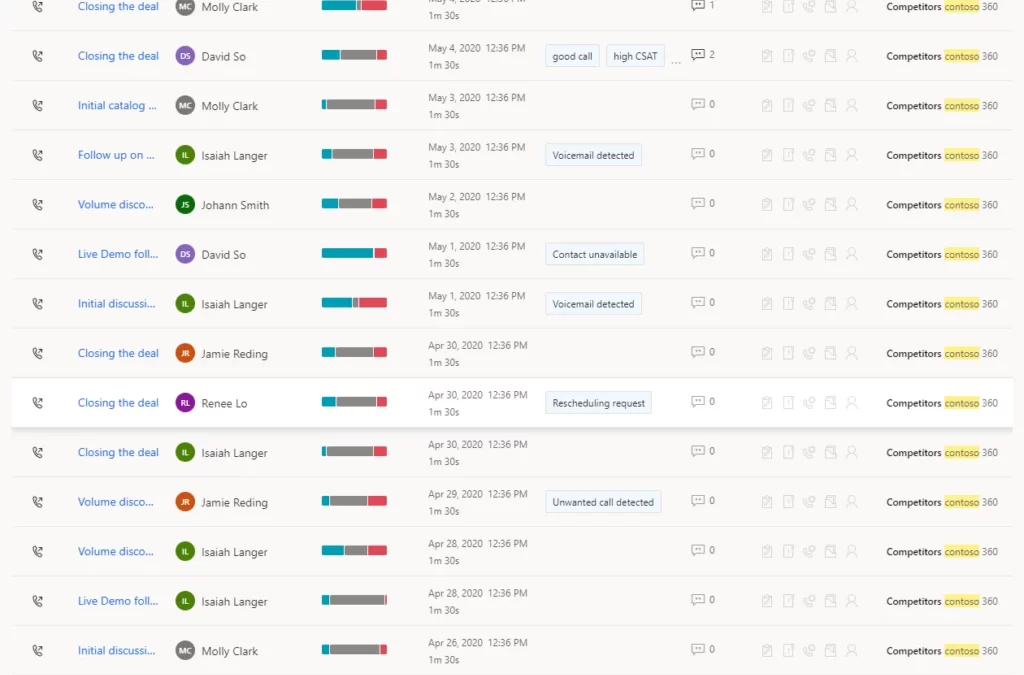
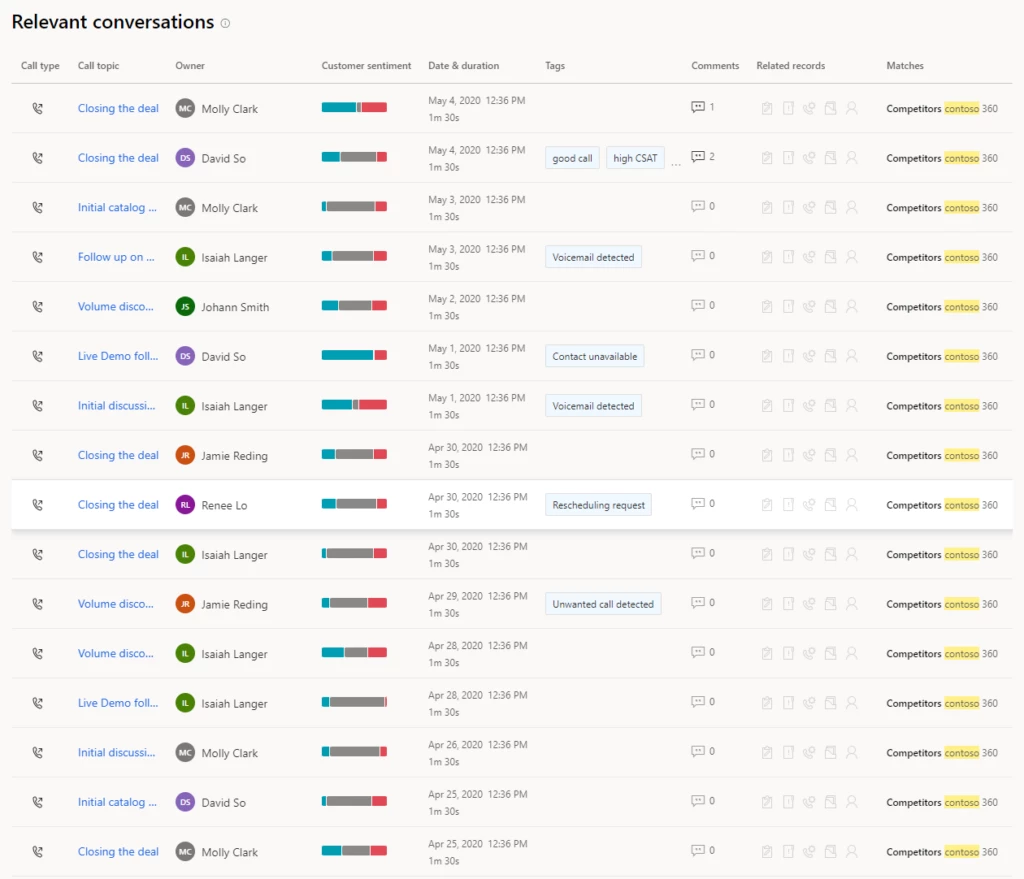
It is common for sales teams and contact centers to conduct many calls which are not successfully connected. This can lead to an overload of irrelevant data in call recording tables and a lot of noise for a seller and manager to wade through when reviewing calls for follow-up or best practice sharing. To address this issue, Dynamics 365 Sales conversation intelligence is introducing the Call categorization feature that automatically categorizes and tags short calls with 4 categories: 

  • Voicemail when a call reaches the customer’s voicemail. 
  • Contact unavailable when the person the seller is trying to reach is not available at that time. 
  • Reschedule request when the lead asks for a quick raincheck. 
  • Unwanted call for those calls where the customers requested to not be contacted again. 

Once the calls are tagged, it becomes easy for sellers, managers, and operations to identify and exclude irrelevant call data. Sales teams can save time by not having to hunt for calls. Instead, with call categorization, they can review relevant conversations to follow up on and share as best practice or learnings.

graphical user interface, application
Figure 1: call categorization

Question detection

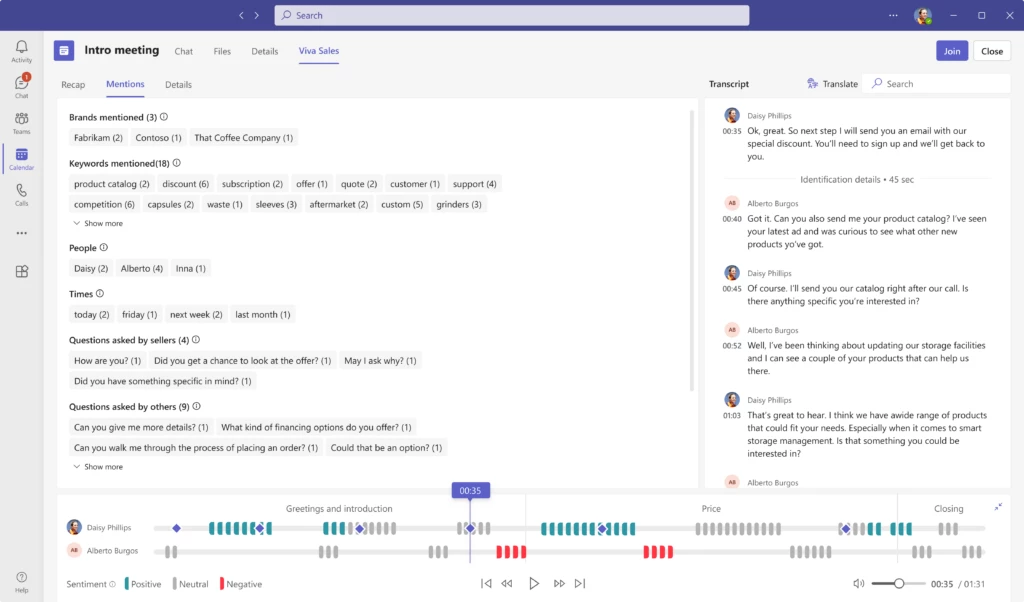
When in the flow of a conversation multiple questions could be asked but the seller may not tackle them all within the call. Dynamics 365 Sales conversation intelligence now tracks all questions raised by customers and sellers during customer conversations. These are readyfor review and follow up almost immediately after the call has ended.

The new feature includes a “Questions” section in each call/meeting summary. The section tracks all questions asked during the call and groups them by customer or seller. This allows sellers and sales managers to easily locate and quickly jump to listen to a specific question within the conversation. By doing so, they gain a more in-depth understanding of the interaction. 

With this insight documented, sellers can quickly drill into customers’ objections and concerns. In addition, they can review those open items for action. 

graphical user interface, application
Figure 2: question detection

Next steps

With these productivity enhancements sellers can focus on engaging customers knowing their systems are working hard to remove complexity and optimize their sales conversation follow ups.  

To get started, enable the public preview of the Call categorization feature: First-run setup experience for conversation intelligence in sales app | Microsoft Learn 

Learn more about the Question detection feature: View and understand call summary page in the Dynamics 365 Sales Hub app | Microsoft Learn 

Learn more about conversation intelligence:Improve seller coaching and sales potential with conversation intelligence | Microsoft Learn 

Enable conversation intelligence in your organization:First-run setup experience for conversation intelligence in sales app | Microsoft Learn 

If you are not already a Dynamics 365 Sales customer and want to know more, take a tour andstart your free trial today

The post Optimize sales conversation follow-ups in two easy steps appeared first on Microsoft Dynamics 365 Blog.

Brought to you by Dr. Ware, Microsoft Office 365 Silver Partner, Charleston SC.
Warehousing telemetry now available in Supply Chain Management

Warehousing telemetry now available in Supply Chain Management

This article is contributed. See the original author and article here.

Telemetry is a crucial tool in monitoring the performance of a system to generate actionable insights that can improve productivity and optimize users’ experience. New warehousing telemetry data in Dynamics 365 Supply Chain Management helps provide insight into the activities and general health of your Warehouse Management tenants and devices, so that you can diagnose problems and analyze operations that affect performance.

With Warehouse Management Application Insights telemetry, you’ll be able to answer questions like these:

  • What’s the state of the Warehouse Management mobile app and the devices it runs on? Are battery usage and network communication latency where you expect them to be, and if not, why not?
  • How are your warehouse processes performing, including the time it takes to release to the warehouse and process waves? What’s the location directive processing time? How many locations are being retrieved?

Answering these kinds of questions can help you make informed decisions about potential improvements in efficiency and automation. Does a process need to be reconfigured, or duplicate or obsolete configurations removed? Can a manual process be automated? Don’t guess; know, with Warehouse Management telemetry data.

Warehousing telemetry data is part of Application Insights

Telemetry data is collected and processed using Application Insights. Warehouse Management Application Insights telemetry is a diagnosis tool that’s available now in Dynamics 365 Supply Chain Management.

The 10.0.29 release of Dynamics 365 Supply Chain Management supports Application Insights telemetry for the Warehouse Management mobile app. The 10.0.31 release supports Supply Chain Management warehouse processes, including wave processing, work creation, and more.

To use Warehouse Management telemetry, you’ll need to configure an Application Insights resource and enable Supply Chain Management to send it telemetry data.

View the warehousing telemetry data

Telemetry data is stored in Azure Monitor Logs in the customEvents table. View the collected data by writing Log queries in the Kusto Query Language (KQL).

Here’s a simple example:

  1. In the Azure portal, open your Application Insights resource.
  2. On the Monitoring menu, select Logs.
  3. On the New Query tab, enter the following code to view the last 100 custom events:
    customEvents
    | take 100
    | sort by timestamp desc

For more examples of how to work with KQL, answers to frequently asked questions, and tips for using Supply Chain Management telemetry data with Excel, Power Automate, Power BI, PowerShell, and more, check the Supply Chain Management telemetry repository on GitHub.

Transform the telemetry data? There’s an app for that

You can use an out-of-the-box Power Apps template to easily connect your Warehouse Management Application Insights telemetry data to your Power BI workspace.

Here’s just some of the data you’ll find in the template:

  • Mobile app processing time (rendering, latency, backend processing), by device, by day, by hour of day
  • Mobile app network latency, breakdown per 100 ms, 99th percentile, percent slower than 1 second, by location, by city, by day, by hour of day
  • Mobile device rendering speed, by device, by power source, by day, by hour of day
  • Mobile device battery usage, drain per hour, hours on battery, battery remaining when recharging, by device, by day, by hour of day
  • Backend next page preparation time, by work execute mode, by step, by day, by hour of day
  • Backend image preparation time, by image, by day, by hour of day
  • Location directive performance, location evaluated, by work order type, by work type, by day, by hour of day, demand per item
  • Wave processing, by wave, by day, by hour of day; filter by load, order, or shipment

Application Insights billing and alerts

Application Insights is billed based on the volume of telemetry data that your application sends (data ingestion) and the length of time that you want data to be available (data retention). See Azure Monitor pricing.

You can easily configure the system to send you an Azure Monitor alert if something occurs in your environment or application that requires immediate action.

Learn more

Read the documentation:

Not yet a Dynamics 365 Supply Chain Management customer? Take a guided tour and start a free trial!

The post Warehousing telemetry now available in Supply Chain Management appeared first on Microsoft Dynamics 365 Blog.

Brought to you by Dr. Ware, Microsoft Office 365 Silver Partner, Charleston SC.
Optimize sales conversation follow-ups in two easy steps

Optimize sales conversation follow ups in 2 easy steps!  

This article is contributed. See the original author and article here.

Taking time to speak with customers remains one of the best ways to build relationships and close deals faster. However, in a digital world it is often difficult to secure that moment of interaction. So when that moment happens, it is critical to focus on the conversation. Capturing valuable insights and next steps is a distraction at this precious time. Microsoft Dynamics 365 Sales conversation intelligence continues to harness AI technology to assist salespeople with just that it’s there as your chief note taker. Master conversation follow ups by uncovering value from each call and gaining a deeper understanding of your customer interactions.

We’re excited to introduce two new features designed to save time and allow users to quickly access the most relevant and valuable insights from their calls: 

  • Call categorization automatically categorize and tag short calls, making it easier to sift through large numbers of recordings and find valuable information. 
  • Question detection track all questions asked during customer conversations. Thus allowing salespeople to understand their customers’ concerns, areas for follow up, and help managers identify trending questions and coaching opportunities. 

Let’s dive into each one to learn more. 

Call categorization

Call categorization introduces a revolutionary way to manage call recordings and learn more about leads, as well as assist managers with identifying coaching opportunities within their teams. 

It is common for sales teams and contact centers to conduct many calls which are not successfully connected. This can lead to an overload of irrelevant data in call recording tables and a lot of noise for a seller and manager to wade through when reviewing calls for follow-up or best practice sharing. To address this issue, Dynamics 365 Sales conversation intelligence is introducing the Call categorization feature that automatically categorizes and tags short calls with 4 categories: 

  • Voicemail when a call reaches the customer’s voicemail. 
  • Contact unavailable when the person the seller is trying to reach is not available at that time. 
  • Reschedule request when the lead asks for a quick raincheck. 
  • Unwanted call for those calls where the customers requested to not be contacted again. 

Once the calls are tagged, it becomes easy for sellers, managers, and operations to identify and exclude irrelevant call data. Sales teams can save time by not having to hunt for calls. Instead, with call categorization, they can review relevant conversations to follow up on and share as best practice or learnings.

graphical user interface, application
Figure 1: call categorization

Question detection

When in the flow of a conversation multiple questions could be asked but the seller may not tackle them all within the call. Dynamics 365 Sales conversation intelligence now tracks all questions raised by customers and sellers during customer conversations. These are readyfor review and follow up almost immediately after the call has ended.

The new feature includes a “Questions” section in each call/meeting summary. The section tracks all questions asked during the call and groups them by customer or seller. This allows sellers and sales managers to easily locate and quickly jump to listen to a specific question within the conversation. By doing so, they gain a more in-depth understanding of the interaction. 

With this insight documented, sellers can quickly drill into customers’ objections and concerns. In addition, they can review those open items for action. 

graphical user interface, application
Figure 2: question detection

Next steps

With these productivity enhancements sellers can focus on engaging customers knowing their systems are working hard to remove complexity and optimize their sales conversation follow ups.  

To get started, enable the public preview of the Call categorization feature: First-run setup experience for conversation intelligence in sales app | Microsoft Learn 

Learn more about the Question detection feature: View and understand call summary page in the Dynamics 365 Sales Hub app | Microsoft Learn 

Learn more about conversation intelligence:Improve seller coaching and sales potential with conversation intelligence | Microsoft Learn 

Enable conversation intelligence in your organization:First-run setup experience for conversation intelligence in sales app | Microsoft Learn 

If you are not already a Dynamics 365 Sales customer and want to know more, take a tour andstart your free trial today

The post Optimize sales conversation follow ups in 2 easy steps!   appeared first on Microsoft Dynamics 365 Blog.

Brought to you by Dr. Ware, Microsoft Office 365 Silver Partner, Charleston SC.

The Microsoft Supply Chain Platform enables resiliency for retailers

The Microsoft Supply Chain Platform enables resiliency for retailers

This article is contributed. See the original author and article here.

Resiliency for retailers might best be understood by thinking about the delight consumers feel when they order that specific, thoughtful gift online for the holidays or when they come across the perfect gift while shopping at a store. To be successful with consumers in these moments, retailers must have the right products in stock at the right time and deliver them quickly and cost-effectively. This is what resiliency for retailers looks like, but how do you build resiliency into your supply chain?

Overhead view of three employees in a warehouse.

Microsoft Supply Chain Center

Reduce supply and demand mismatches by running simulations using AI and real-time, advanced analytics.

McKinsey & Company found that 75 percent of consumer packaged goods (CPG) supply chain leaders prioritize supply chain digitalization, suggesting that resiliency through digitalization is one strategy that retailers are exploring.1 At Microsoft, we believe the path to retail resiliency lies in three interconnected capabilities: connectivity, agility, and sustainability, which we showcase solutions around at this year’s National Retail Federation (NRF) exposition in New York City.

Connectivity

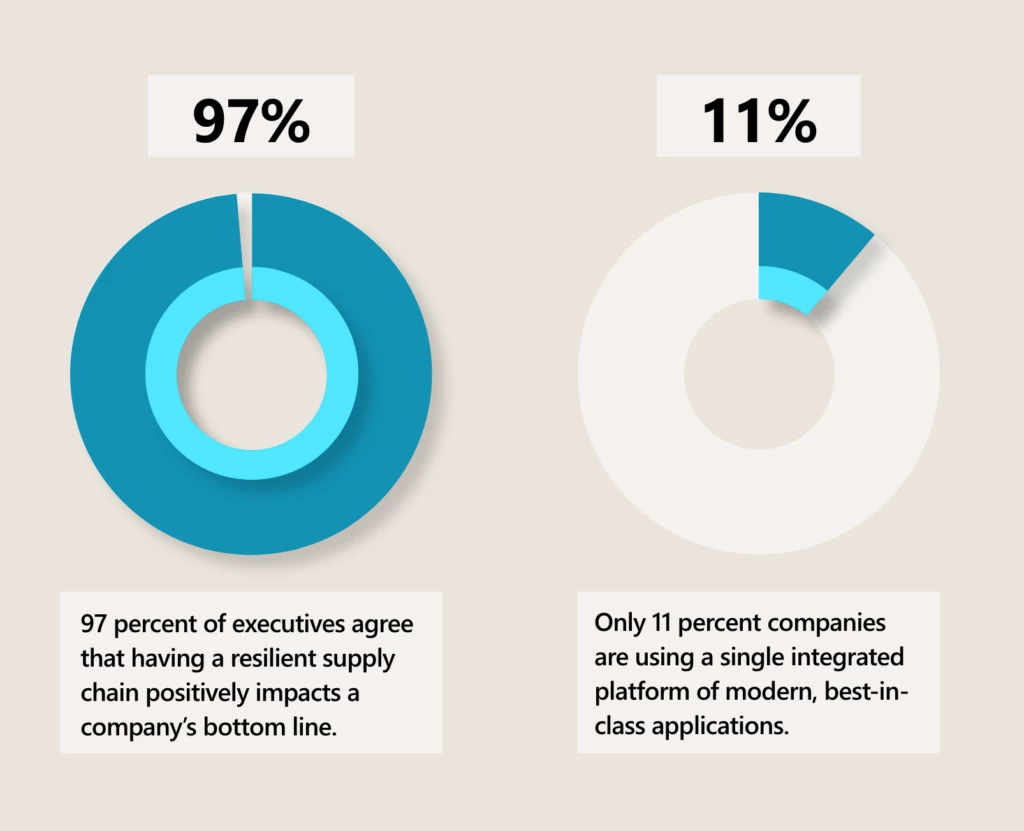
True end-to-end visibility requires a platform capable of connecting and harmonizing data from new and existing sources. According to research commissioned by Microsoft from Harvard Business Review Analytic Services, 97 percent of executives agree that having a resilient supply chain positively impacts a company’s bottom line.2 The same study found that most organizations’ digital infrastructure is composed of a mix of modern and legacy apps, with only 11 percent using a single integrated platform of modern, best-in-class applications.3 This makes any solutions’ connectivity a critical factor in building resilience and agility.

One merchant that is enjoying the benefits of connectivity and visibility is iFIT. iFIT is a leading health and fitness platform that markets several home exercise equipment brands. Recently, iFIT adopted the Microsoft Supply Chain Platform to bring together its systems and data. With this integrated, centralized view, iFIT can reduce the manual effort and guesswork involved in strategically placing inventory in its more than 40 forward-stocking locations. Utilizing built-in AI capabilities, iFIT increased efficiency from 30 to 75 percent on their forward stock inventory resulting in faster delivery timesreduced from a two-week window to two daysand increased customer delight.

This embed requires accepting cookies from the embed’s site to view the embed. Activate the link to accept cookies and view the embedded content.

This site uses cookies for analytics, personalized content and ads. By continuing to browse this site, you agree to this use.

iFIT uses Microsoft Supply Chain Center to optimize inventory and delight customers with rapid delivery times.

Extensible systems increase connectivity, too, such as the ability to leverage highly functional micro-services like the Inventory Visibility Add-in for Microsoft Dynamics 365 Supply Chain Management. Users can enable the Inventory Visibility service free of charge to gain a real-time, global view of on-hand inventory and tracking across all data sources and channels. Additionally, the Inventory Visibility service allows users to avoid overselling by making real-time soft reservations and using the allocation feature to ring-fence valuable on-hand stock for essential customers or channels.

Learn more with the Inventory Visibility Add-in overview.

Another dimension of connectivity is collaboration. Dynamics 365 and Supply Chain Center include Microsoft Teams built-in, unleashing the power of collaborative applications for users, making all your business processes and applications multiplayer. With collaborative applications, team members can connect in real time, surface and act on insights from unified data, and swarm around supply chain issues to mitigate disruptions before they impact customers.

Connected systems and data create the visibility supply chains need to sense risks and illuminate opportunitiesthe necessary precursors to agility, which we look at next.

Agility

To enable agility, supply chain software needs to increase visibility across data sources, predict and mitigate disruptions, streamline collaboration, and fulfill orderssustainably and securely. In short, companies need to understand the entire supply chain network. By connecting disparate systems and harmonizing data across the supply chain, companies gain a more comprehensive understanding of supply and demand. With Supply Chain Center, retailers can connect and harmonize data and generate supply and demand insights using AI to uncover patterns and projections based on historical and real-time inventory and order volumes.

One company using Supply Chain Center to build a more agile supply chain is Northern Tool + Equipment, a manufacturing and omnichannel retailer with 130 stores across the United States. Northern Tool + Equipment’s fragmented supply chain technology infrastructure had pushed lead times for the 100,000 items in its product catalog to four to seven days. In addition, many of the company’s products are very large, like generators and air compressors. The sheer size of these items brings further complexity to the challenge of optimizing shipping routes for cost and sustainability. Similarly, Northern Tool + Equipment struggled to provide firm delivery dates for online and in-store product orders. For a business that serves people who do tough jobs and rely on their tools for their livelihood, being competitive means offering delivery in one to three days and providing accurate delivery times.

This embed requires accepting cookies from the embed’s site to view the embed. Activate the link to accept cookies and view the embedded content.

This site uses cookies for analytics, personalized content and ads. By continuing to browse this site, you agree to this use.

Northern Tool + Equipment partnered with Microsoft to overcome these challenges with an end-to-end supply chain solution. The selection of Supply Chain Center meant that Northern Tool + Equipment could immediately begin to rationalize and connect every node of its supply chain with a solution designed to create a more resilient and sustainable supply chain through an open, flexible, collaborative, and secured platform. The result? Northern Tool + Equipment can provide customers with a committed delivery date and shipping costs while also ensuring one-day to two-day delivery within a specific proximity of its stores.

A significant factor in Northern Tool + Equipment’s lead time improvement is its use of Microsoft Dynamics 365 Intelligent Order Management capabilities, which allows organizations to connect and orchestrate order fulfillment across different platforms and apps. But Supply Chain Center has an assortment of capabilities to serve other retailers on the agility journey.

One such capability is the Supply Chain Center news module, which gathers information about world events and presents articles relevant to your business and supply chain. How can this feature be a functional building block of agility?

Let’s consider an example of a retailer selling portable air conditioners. Using the news module, the retailer could receive a news alert that a specific geography is forecasted to have the hottest summer on record. This would likely increase the expected seasonal demand for the product in the affected region. The retailer could capitalize on this intelligence by increasing their forecast during the planning process so that they can be prepared to quickly shift inventory to ensure coverage. 

In addition, Supply Chain Center connects with Microsoft Dynamics 365 Supply Chain Management, which gives retailers access to advanced warehouse management functionality, such as warehouse automation by integrating with partners like inVia Robotics. It also gives retailers the ability to set up pop-up warehouses in a matter of days in six easy steps. Continuing the example above, our portable air conditioner retailer might utilize the supply chain planning functionality and learn that they have insufficient warehouse capacity to meet the seasonal demand increases. In this case, they could use Dynamics 365 Supply Chain Management to open a new warehouse in a matter of days by utilizing wizards and templates and quickly deploying the mobile app. Similarly, the retailer could then improve warehouse productivity with InVia Robotics by leveraging robots to do the heavy lifting and traveling across the warehouse, freeing up workers to do the more complex task of sorting and packing. The value of these systems is getting the attention of organizations and analyst firms.

Sustainability, circular economies

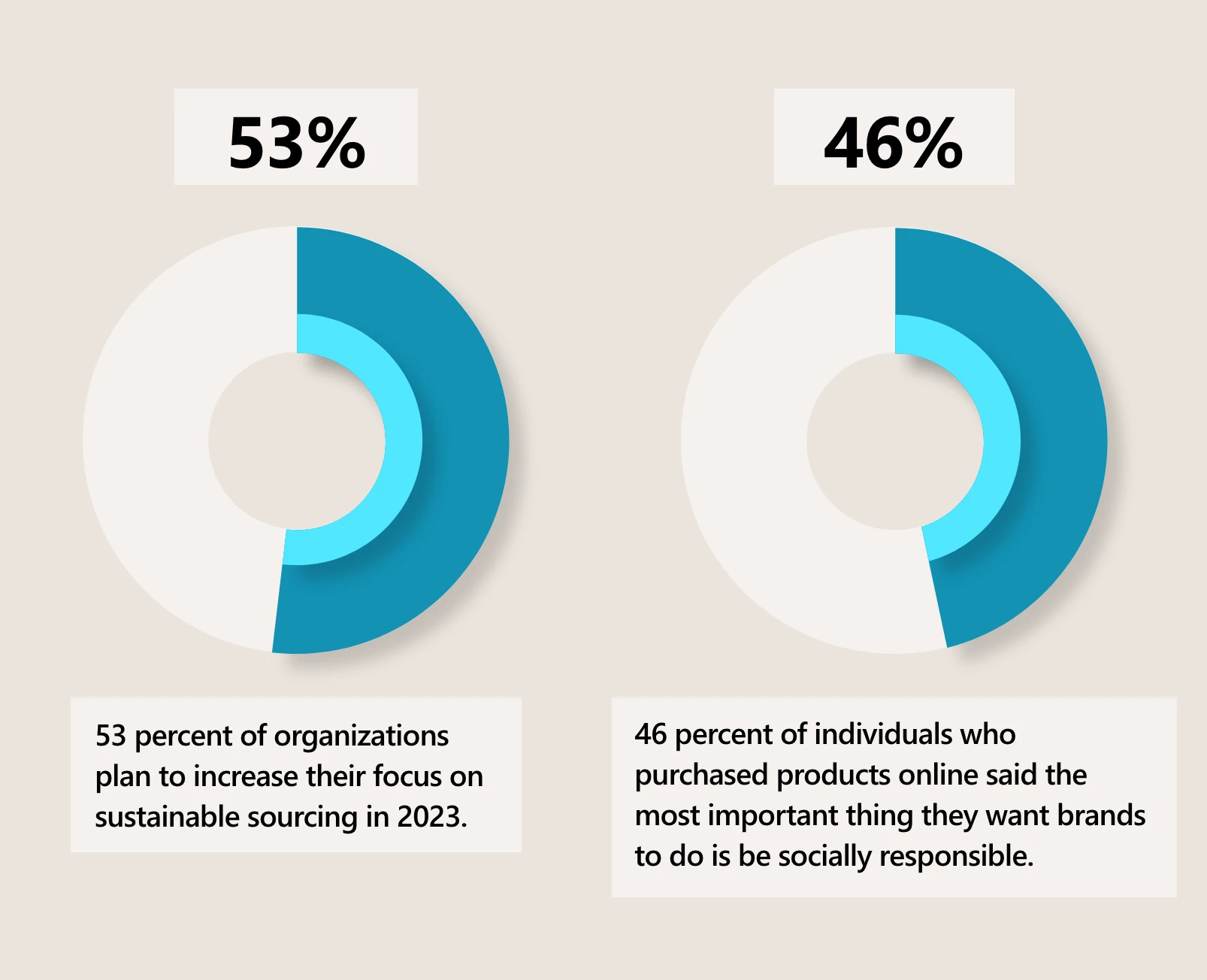
In a recent survey, 46 percent of individuals who purchased products online said the most important thing they want brands to do is be socially responsible.4 This fact helps explain why 53 percent of organizations plan to increase their focus on sustainable sourcing in 2023.5 While there are several dimensions of social responsibility, sustainability is the most relevant to retail supply chain leadership. For retail supply chains, this can be challenging.

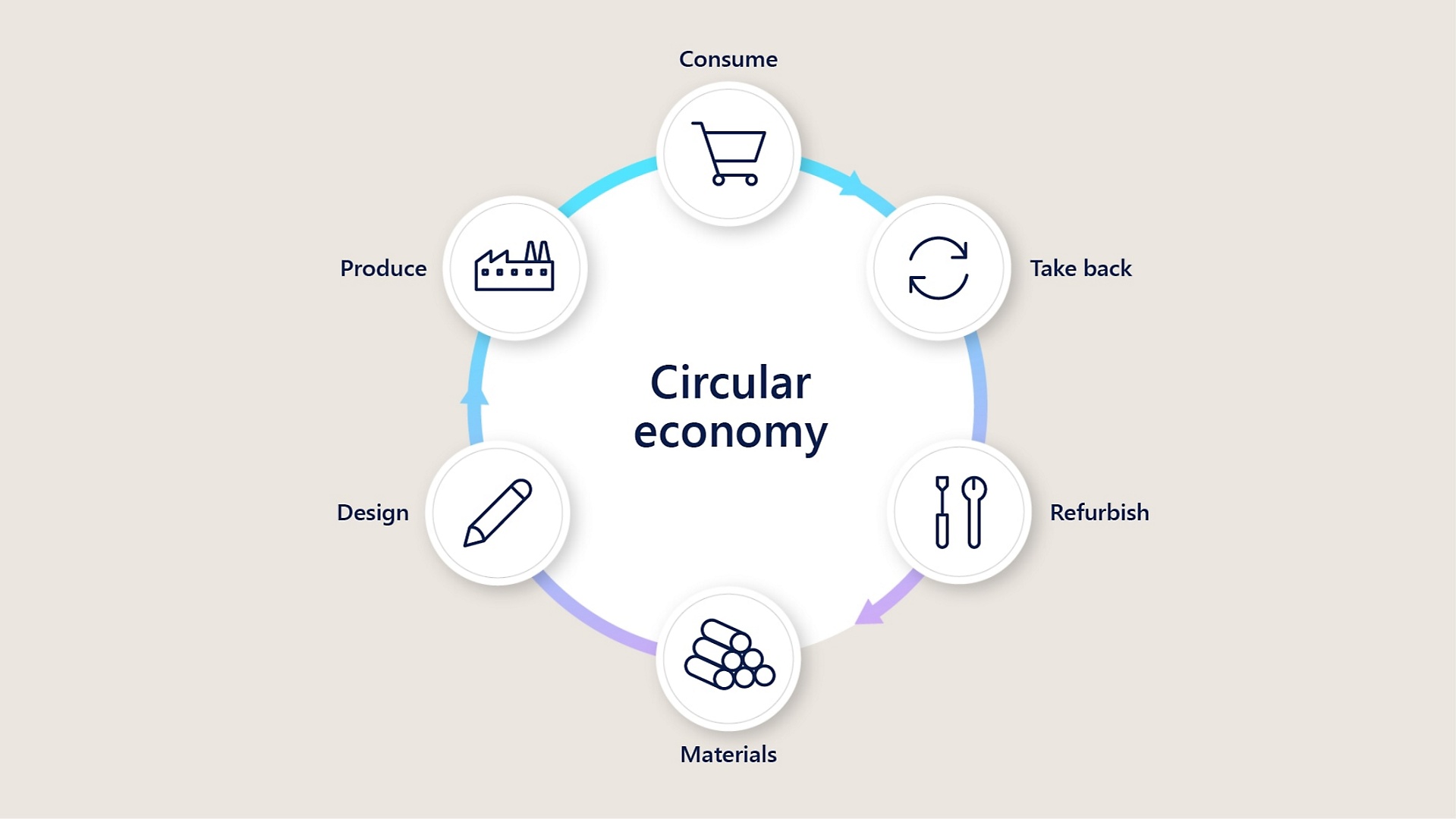
For retailers to lead not just the industry but to exceed consumers’ expectations for social responsibility, another challenge beckonsthe utilization of circular economies. Even leaders in the EU, who successfully decreased material use by 9 percent and increased products derived from recycled waste by 50 percent,6 understand that while their progress is impressive, growth of circular economies is still limited compared to their actual material footprint. Still, the incentive for retailers, beyond the value of doing the right thing, is significant. One survey by Statista expects worldwide revenue of circular economy transactions to more than double from 2022 to 2026, growing from $338 billion to $712 billion.7

diagram

One way that Microsoft is helping brands meet the challenge is with built-in sustainability features for suppliers. One example is the FedEx integration with Intelligent Order Managementwhich is included in Supply Chain Center. The FedEx integration allows users to offer boxless returns to their customers by leveraging environmentally friendly QR codes to return items at more than 60,000 retail FedEx locations. Plus, retailers can utilize the self-service return functionality of the FedEx integration to easily manage all returns with complete visibility of every step in an item’s return to the warehouse.

Learn how FedEx and Dynamics 365 reimagine commerce experiences.

What’s next?

As we have seen here, the path to retail resilience in today’s competitive environment revolves around connectivity, agility, and sustainability. Brands should address disruptions and challenges with solutions that can exceed customer expectations, drive profitability, and improve sustainability.

Ready to see how Supply Chain Center can help your business on the path to retail resiliency? Sign up for a free 180-day trial of Microsoft Supply Chain Center (preview).

For a look back at NRF 2022, check out our previous blog: Dynamics 365 helps build the retail supply chain of the future. And take a look at the following posts to learn more about NRF 2023:


Sources

1McKinsey & Company, 2022. How consumer-packaged-goods companies can drive resilient growth.

2Harvard Business Review Analytic Services, 2022. A Supply Chain Built for Competitive Advantage.

3Harvard Business Review Analytic Services, 2022. A Supply Chain Built for Competitive Advantage.

4GWI, 2022. GWI USA.

5KPMG, 2022. The supply chain trends shaking up 2023.

6The World Bank, 2022. World Bank Releases Its First Report on the Circular Economy in the EU, Says Decoupling Growth From Resource Use in Europe Achievable Within Decade.

7Statista, 2022. Estimated revenue generated from circular economy transactions in 2022 and 2026 worldwide.

The post The Microsoft Supply Chain Platform enables resiliency for retailers appeared first on Microsoft Dynamics 365 Blog.

Brought to you by Dr. Ware, Microsoft Office 365 Silver Partner, Charleston SC.

Microsoft Mesh: Creating connections at the World Economic Forum 2023

Microsoft Mesh: Creating connections at the World Economic Forum 2023

This article is contributed. See the original author and article here.

Discover how Microsoft Mesh enables collaboration, connection, and shared experiences at the World Economic Forum Annual Meeting 2023.

The post Microsoft Mesh: Creating connections at the World Economic Forum 2023 appeared first on Microsoft 365 Blog.

Brought to you by Dr. Ware, Microsoft Office 365 Silver Partner, Charleston SC.