This article is contributed. See the original author and article here.
We are excited to announce the launch of the Dynamics 365 Implementation Portal. The implementation portal is a self-serve tool that helps Dynamics 365 customers and partners manage their project data, users, and reviews. It also provides access to tailored implementation guidance to help ensure a successful cloud deployment.
Manage project data: Manage project data and users, profile projects by selecting the relevant Dynamics 365 products and features, and define other project characteristics.
Execute project reviews: Identify potential risks, mitigation recommendations, and other best practices based on the Success by Design framework to support a successful go-live.
Access tailored guidance: Access tailored implementation guidance, including feature and product documentation, TechTalks, training materials, and case studies.
The implementation portal is based on Success by Design, a systematic approach for successful cloud deployment that was developed by Microsoft. Success by Design provides prescriptive guidance for designing, building, and deploying your new Dynamics 365 solution.
Eligible customers may also collaborate with Microsoft FastTrack solution architects. The FastTrack team of product experts can help you validate the architecture of your solution, mitigate risks, and overcome deployment blockers.
The Dynamics 365 Implementation Portal represents a significant step in equipping all Dynamics 365 customers with the necessary resources to go live with confidence.
This article is contributed. See the original author and article here.
Foster more effective communication, connection, and collaboration in your organization. Learn about the value of Microsoft Teams Phone in a new study conducted by Forrester Consulting.
This article is contributed. See the original author and article here.
Converting leads and opportunities directly contributes to the company’s revenue. To increase conversion rate companies often need a number of factors to align. First, it’s about matching the right seller to take the deal forward. As a business owner or sales manager, finding the best seller to work on the new lead can really make or break a customer relationship. We need to look carefully not just at the seller with the highest close rate, but also balance that with their availability and expertise to attend to the customer’s needs and requirements.
Applying the right business tactic to close a deal at the right moment is the second key to success. We must recognize where the buyer is in their sales journey and employ the right action to engage. If we can use technology to help provide some guidance on the next actions, it could help all sellers do their best to secure the deal.
With the new Dynamics 365 Sales segments and rules, we can help you achieve those goals!
3 easy steps to supercharge sales conversion:
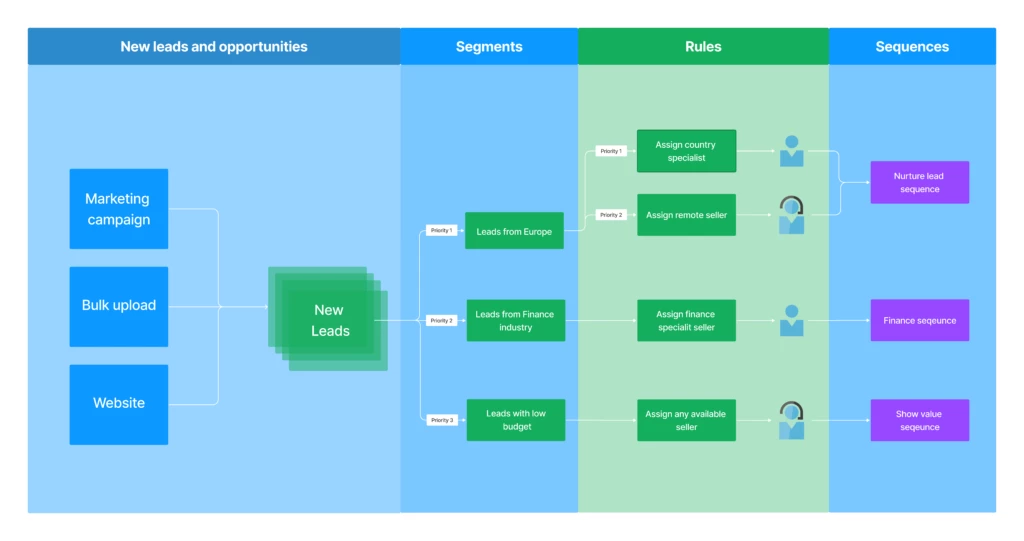
Organizations that run outreach programs to generate interest want to see a positive return on that investment and get it into sellers’ hands fast. To auto-assign sellers to the right leads and guide them with the right tactics, follow this simple 3-step automation process:
Segment leads based on business strategy. A segment is a collection of records that are grouped together based on certain conditions. For example, location, deal value, language, or product.
Auto-assign sellers using assignment rules. Assignment rules enable new leads and opportunities to be automatically assigned to sellers or sales teams.
Auto-connect the relevant sequence to guide the seller.Sequences help provide best practice engagement steps, by introducing a set of suggested actions for sellers to follow while managing their deals. Sequences can adapt to the way the engagement flows, to ensure they remain relevant and insightful.
Automation flow for leads
Increase assignment productivity by removing repetitive tasks
We see that distribution of leads is often in one of two ways:
Via a sales manager or representative who assigns the leads. This could be manual or using some basic pre-set criteria.
First come first serve basis, where sellers pick up leads for action, from a general ‘pool’.
These options open the door for a potential misbalance of assignment and lack of optimization to customer needs, which without tracking could lead to sellers missing leads.
Let’s explore how using segments can reduce missed opportunities to follow up, remove the repetitiveness, and help boost productivity.
Create Segments
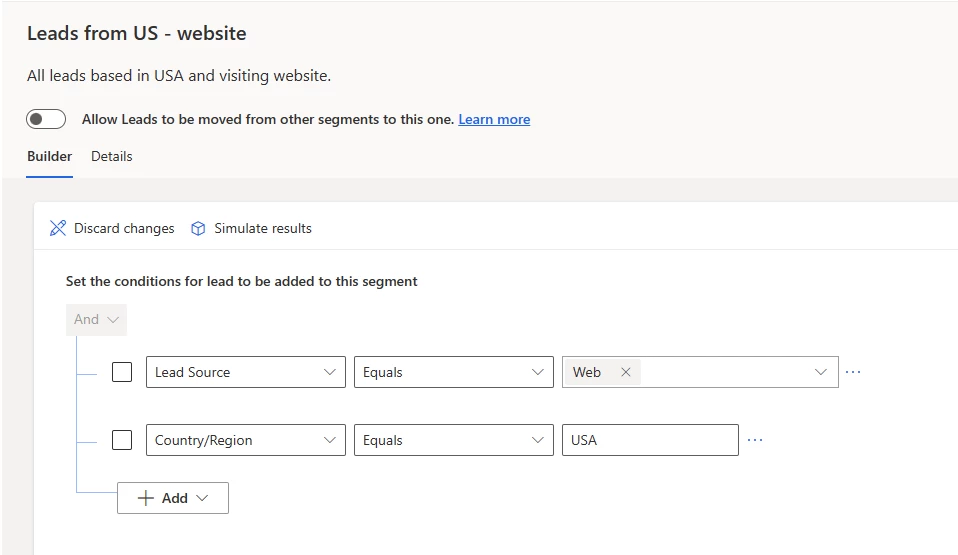
To start with, create segments to classify incoming records based on your business needs. For example, you want to segment all leads coming through your website originating from the USA. In this case, you could create a segment for ‘Leads from US website’.
Create segments – define segment conditions.
Auto-assign sellers to the right lead/opportunity
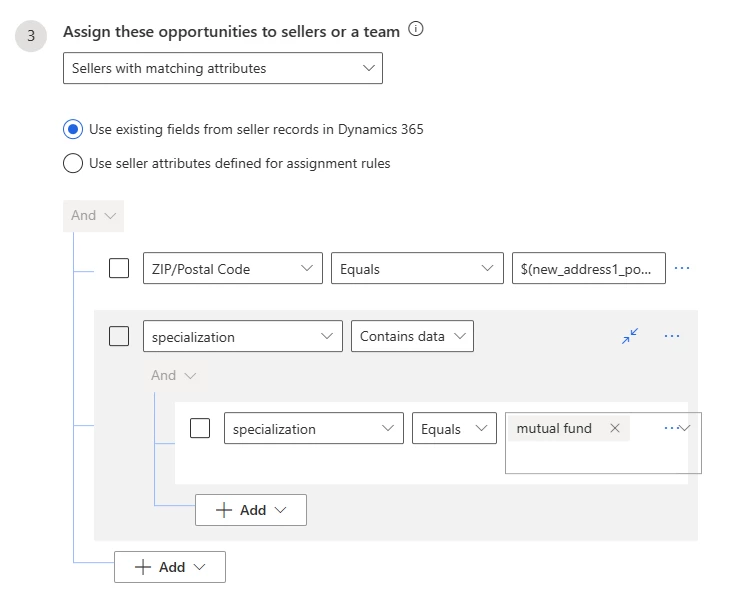
To increase conversion chances, you want the right seller to work on the right lead/opportunity. This assignment is based on their skill, capacity, availability, location, etc. For example, you may want to assign an opportunity to a specialized seller who works in the same location as the lead. To do that, you can define a rule to find a seller based on their location and specialization.
Define conditions to auto-assign seller
Connect a sequence to guide the seller with the next best action
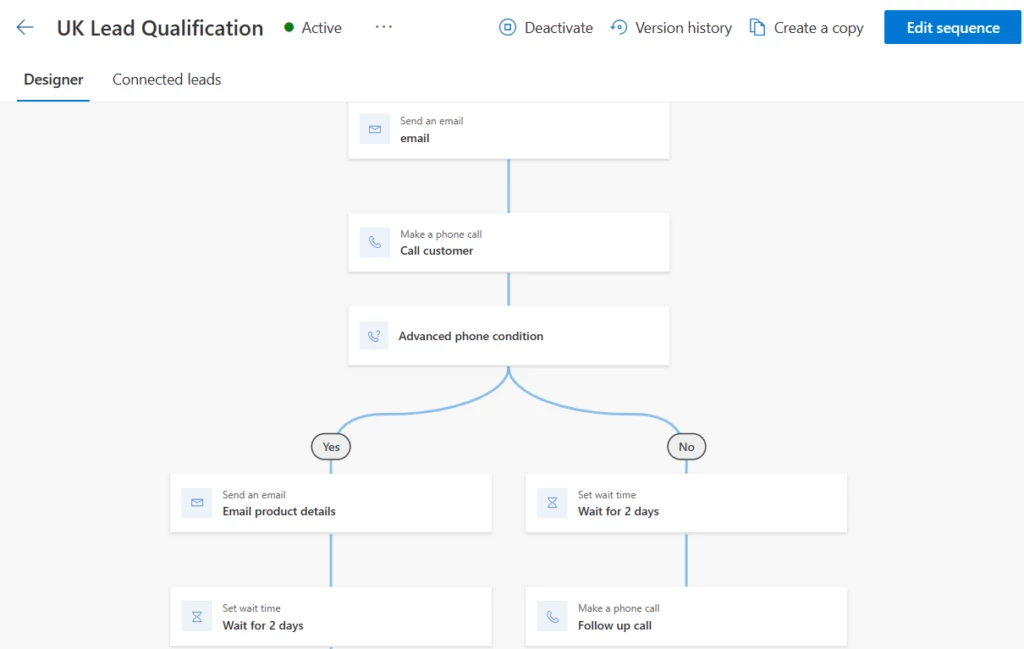
A sequence will guide the seller with best practices to qualify a lead or take the opportunity forward. Auto-connect a sequence to any record that belongs to a segment via rules and you’re good to go!
Sequence
Quick adjustments to suit a market shift
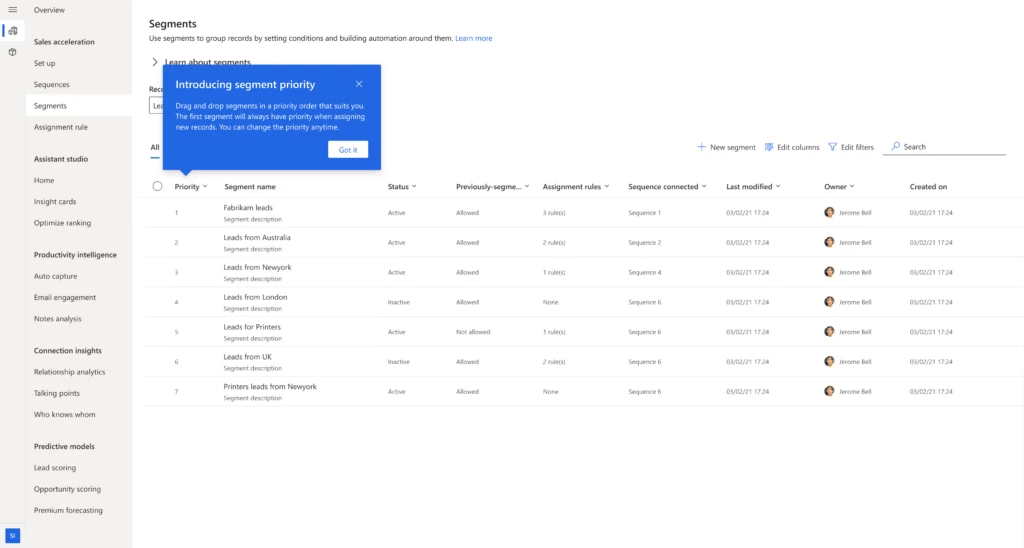
Changes in the market or the business drivers can often prompt a shift in business tactics. A company may adjust their strategy by giving more importance to certain groups of customers and making sure the right salesperson deals with the most important leads. This is achieved by simply changing the priority order of segments or creating new segments with appropriate priority.
Segment priority
Leverage the benefits of a faster response and guided activities
Auto-assign sellers to act quickly and help increase the chances of success.It is important for a seller to contact a lead early. Theearlier they reach out, the greater their chance of making a connection with that lead and converting them into a customer.* The more time that passes after a lead expresses interest, the likelier they are to lose interest. Segments and assignment rules help assign the sellers as soon as leads are created, enabling them to respond faster.
Enable seller productivity with sequences and segments. Sellers may work on multiple leads and/or opportunities. Switching from one opportunity to another can impact seller productivity. With sequences that are auto-connected to segments, sellers get a clear next best action for each lead or opportunity. This clarity helps them stay focused and be successful.
Enable agility and adaptability to change tactics with changing data. As sellers nurture leads, new information that becomes available may require a change in tactic. For example, an engaged seller started with no knowledge of the lead’s budget. Later, they found out that the lead has $2M to spend. The seller is also met with specialist questions on a product not within their expertise. With this new information, it becomes a priority lead. As such, it must move into a higher priority segment and be assigned to an experienced seller who can maximize the chances of conversion. Allowing leads/opportunities to change segments following changes in data enables your sales team to act accordingly and win deals.
This article is contributed. See the original author and article here.
Since the November 2021 launch in select geographic regions of the native voice channel in Microsoft Dynamics 365 Customer Service, we have been expanding worldwide to satisfy growing customer demand. We are proud to announce that we now support local country regions as well. As of April 1, 2023, the voice support channel is live in India and Switzerland.
Native voice support channel capabilities
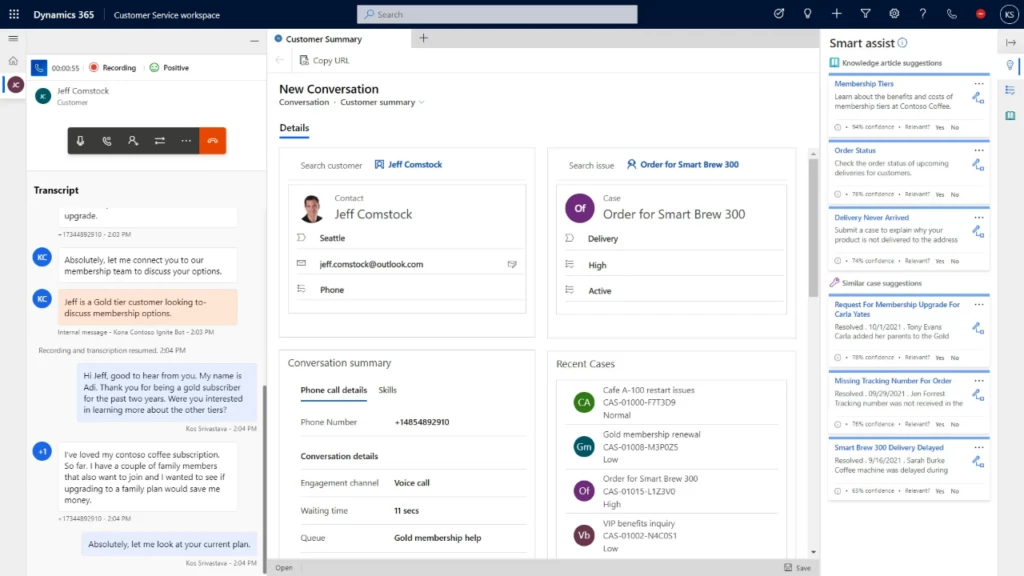
The integrated voice channel allows customer service representatives to communicate with customers on the phone to resolve issues. The India and Switzerland launches include all the features that the voice channel in Customer Service omnichannel environments supports today.
Self-serve voice support channel with Power Virtual Agents
The general availability launch in India and Switzerland also integrates Power Virtual Agents. Subject matter experts can build conversational interactive voice response (IVR) bots in just a few clicks to help customers quickly self-serve, reducing contact center operation costs. Learn how to configure Power Virtual Agents bots for voice.
Azure Communication Services direct routing
The launch of the voice channel in the India and Switzerland is made possible through direct routing from Azure Communication Services, in preview. Direct routing enables you to connect your existing telephony infrastructure to Azure. Learn how you can use the telephony carrier of your choice.
As the native voice channel in Dynamics 365 Customer Service continues to expand in regions, languages, and capabilities, subscribe to this blog for the latest updates. Set up your Dynamics 365 Customer Service environment and install the voice channel today.
The custom help toolkits started out as a way to connect your own help content to Dynamics 365 and to customize Microsoft’s help content. But times change, technology changes with them, and we no longer recommend that you customize our content. Instead, we recommend that you create your own help content using any tools you prefer, and then let that override Microsoft’s content.
After April 11, 2023, the toolkits will be archived.
We’re also removing content from our contributor guides that encourages customizing our content. Everyone can still contribute to our documentation, but in English only.
Why are you making this change?
The custom help toolkits are being used less and less. We know custom solutions are still running on versions that are or soon will be unsupported. We expect those migration projects will be complex enough that existing custom help can’t be easily reused.
If you find that you need one of the tools in the archived toolkits, you can download a release package and extract the one you need.
What about custom help?
If you develop a solution that’s based on Dynamics 365, you should continue to deliver documentation for its users. Use any tools you prefer.
If your solution includes Dynamics 365 Finance, Supply Chain Management, or Commerce, and you need to connect your content to the in-product help pane, download the AzureSearchCustomHelp solution. Learn more at Connect a custom help website to the Help pane.




Recent Comments