This article is contributed. See the original author and article here.
In this blog post, we will show you how to get started on your journey with generative AI for Microsoft Dynamics 365 Business Central. Microsoft’s unique partnership with OpenAI allows us to bring the innovative power of large-scale language models (LLM) to the Business Central ecosystem in a unique, complete, and responsible way. Microsoft Azure OpenAI Service provides access to OpenAI’s advanced models such as GPT-4, GPT-3, Codex, and DALL-E with the security and enterprise features of Azure.
Over the last few months, we’ve listened to many community ideas on how generative AI can enrich existing features, or deliver entirely new customer value, and the follow-up question is always the same: how do I get started with AI in AL and Visual Studio Code? We’ve collected a few tips, including sample code, to make it easy for you to start exploring Azure OpenAI and share your learnings with the community.
New to generative AI?
We appreciate that there is much to learn about this new and exciting technology. If you’re new to this branch of machine learning and Azure OpenAI, these links are a great introduction to understand the basics.
Explore key Responsible AI guidelines and principles at https://aka.ms/RAI
How to get started with your AL code
We’ve shared some sample code as an extension that enables you to explore the possibilities of LLM. This code is designed to simplify the process of setting up and running LLM experiments, starting with easily configuring and testing your connection to the Azure OpenAI service. After that, you can extend your AL logic to do more exciting things with this code.
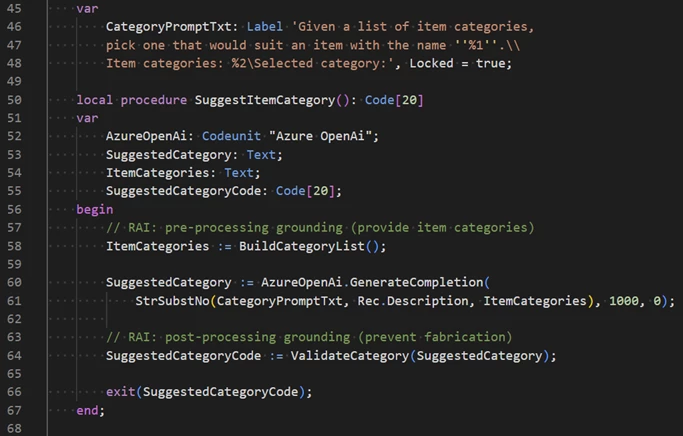
The sample code uses Azure OpenAI to suggest an item category based on the item description field.
The extension’s source code is available at the Business Central BCTech repository on GitHub. You can get to it directly at https://aka.ms/BCStartCodingWithAI. You can either download or install the sample extension to your sandbox environment or clone the source code for your own projects.
How to get an Azure OpenAI key
To use Azure OpenAI Service, you need to have an Azure subscription and apply for access to the service. Azure OpenAI is generally available with a limited access policy to promote responsible use and limit the impact of high-risk use cases. Once you apply and are approved, you will receive an email with instructions on how to create an Azure OpenAI resource and get your API key.
How to use the Azure OpenAI playground
Azure AI Studio offers an Azure OpenAI playground: a web-based interface that allows you to explore the capabilities of generative AI models and try them out with your own prompts and data. You can access the playground from the Azure portal or from this link: Azure OpenAI Studio.
If you’re not a developer but have played around with ChatGPT or similar, you will find the playground to be a convenient place to experiment and assess whether ChatGPT is a suitable tool to solve the problem at hand. It’s perfect for product managers, designers and consultants looking to get their feet wet without having to write code or without having to build a deep understanding of the underlying technology.
And if you’re ready to dive into the more technical side of things, the playground lets you choose a model, a scenario, and a few shot learning examples to generate outputs. You can also modify the parameters such as temperature, top-p, frequency penalty, and presence penalty to control the randomness and diversity of the outputs.
How to get started with prompt engineering
Prompt engineering is the art of crafting effective inputs for generative models to produce desired outputs. Prompt engineering involves understanding the model’s capabilities and limitations, choosing the right format and tone for the input, providing relevant examples and instructions, and evaluating the output quality and reliability. Prompt engineering is a crucial skill for using Azure OpenAI Service effectively and responsibly. Here are some short links that can help you learn more about prompt engineering:
While Microsoft is hard at work bringing more generative AI to Business Central, we hope that these simple tips will get you started on your AI journey with Azure OpenAI. The product team is eager to hear your feedback on how we can support your use cases and help you design, build, and deliver AI solutions quickly and responsibly in the AI era: community partners are invited to join us at the Copilot and AI Innovation group on our Yammer partner community network. And if you’re looking for inspiration on how to enrich your features with generative AI, check out our 30 minute video where we present the details around our first generative AI feature in Business Central: Marketing Text Suggestions.
This article is contributed. See the original author and article here.
Microsoft is delighted to announce that the new Dynamics 365 Community is now live, marking a significant milestone in our journey of empowering users, fostering collaboration, and driving innovation.
With its fresh new look, streamlined experience, and a suite of powerful features, the new Dynamics 365 Community sets a new standard for user engagement and knowledge sharing. We have listened to your feedback, studied your needs, and made significant enhancements to ensure a seamless and immersive experience. Our aim is to create a platform that not only meets your present requirements but also inspires you to explore new possibilities and accelerate your success.
Here are the highlights of some of the new and future features of our new community:
Enhanced User Experience: Navigate through the community effortlessly and find the answers you need quickly. With intuitive search functionality, personalized recommendations, and a modern interface, your journey within the community has never been smoother.
Achievements Elements: Get ready for a fun and rewarding experience! Engage in community activities, earn badges, and unlock new levels as you contribute and grow. We believe that recognizing your valuable contributions is vital to building a thriving community.
AI-Powered Assistance: Our AI-assisted moderation ensures a safe and inclusive environment for all community members. By leveraging intelligent algorithms, we can maintain the quality and relevance of discussions while fostering a sense of belonging and respect.
This is just the beginning of an incredible journey! We are committed to continuous improvement and will be rolling out regular updates and new features to address your evolving needs. Your feedback and suggestions are invaluable to us, and we encourage you to share your thoughts to help shape the future of the Dynamics 365 Community.
As we embark on this exciting chapter together, we are excited to see the positive impact that this community will have on your professional growth, collaboration, and innovation. The Dynamics 365 Community is more than just a platform; it’s a catalyst for driving positive change in the world of business applications.
Microsoft would like to express our sincere gratitude to our incredible community members, MVPs, and User Group leaders who have played an instrumental role in shaping the Dynamics 365 Community. Your passion, expertise, and dedication continue to inspire us as we strive to create an inclusive and thriving ecosystem.
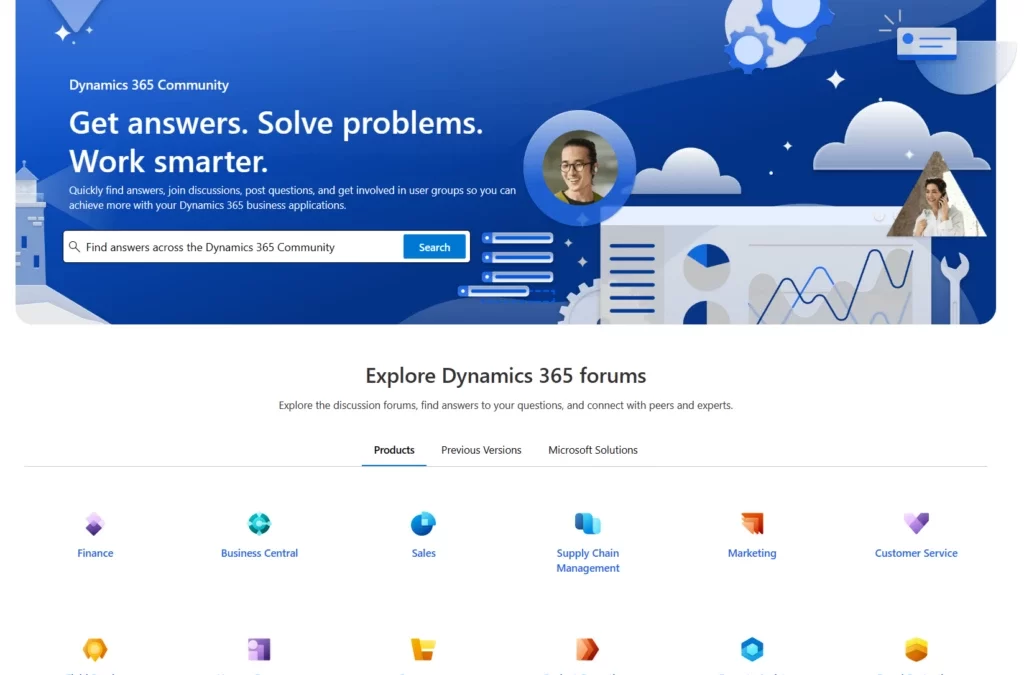
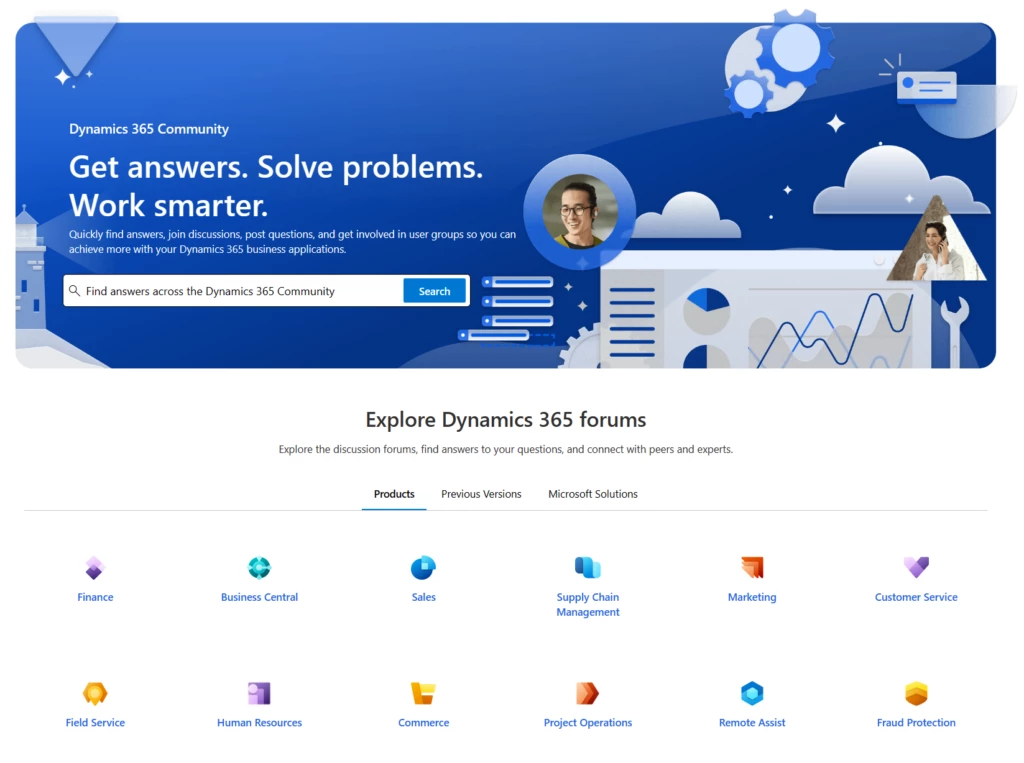
Thank you for being a part of this remarkable community. We invite you to explore the new Dynamics 365 Community at http://community.dynamics.com/ and embark on a journey of learning, collaboration, and success. Together, let’s unleash the full potential of Dynamics 365 and shape the future of business applications.
This article is contributed. See the original author and article here.
We are excited to introduce support for Copilot in Dynamics 365 Customer Service across multiple geographic regions, or cross-geo support. During the past few months, we successfully rolled out Copilot features to customers in the United States. Following this momentum, we are now extending the power of this cutting-edge technology to customers outside of the United States. Now regions across the globe can enhance their customer service operations with ground-breaking generative AI.
Copilot leverages the Microsoft Azure OpenAI Service to provide an intelligent assistant for customer service agents. With Copilot, agents can resolve customer issues faster, automate routine tasks, and boost productivity. In general, tasks that can take minutes or hours are ready for agents to review and complete at the click of a button. This transformative technology enables agents to handle customer inquiries with greater accuracy and speed. Consequently, contact centers attain higher customer satisfaction rates and operational efficiency.
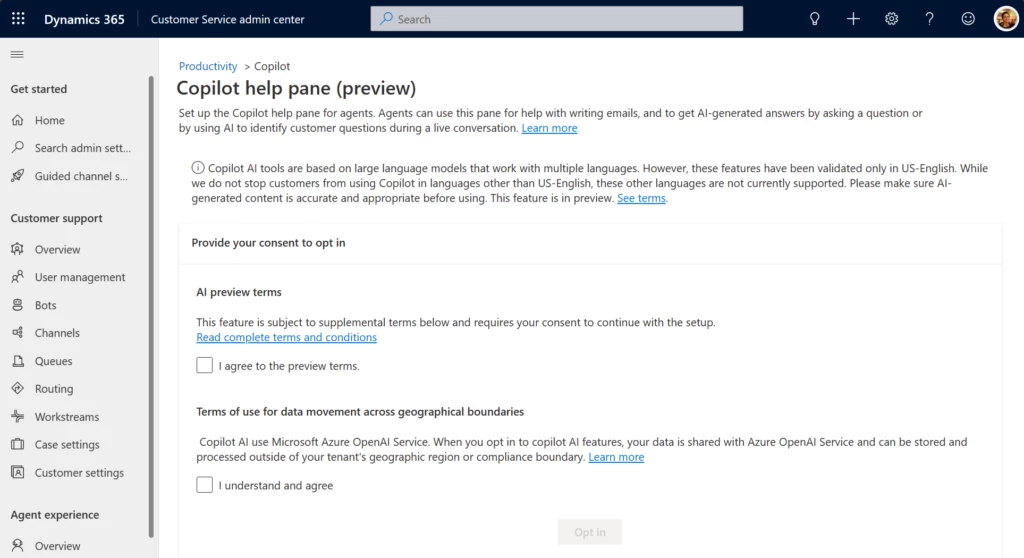
Customers outside the United States can now experience the transformative power of Copilot in their contact centers through a simple opt-in process.
To start using Copilot, customers outside of the United States can request access to the limited preview by emailing d365_csaipreview@microsoft.com. Once you have access, our team will guide you through the process and help you unlock this powerful feature for your contact center.
We invite you to be a part of this transformative journey. With Copilot capabilities, you can revolutionize your customer service operations and deliver exceptional customer experiences. Try the preview and unlock the true potential of Copilot today.
AI solutions built responsibly
Enterprise grade data privacy at its core. Azure OpenAI offers a range of privacy features, including data encryption and secure storage. It allows users to control access to their data and provides detailed auditing and monitoring capabilities. Copilot is built on Azure OpenAI, so enterprises can rest assured that it offers the same level of data privacy and protection.
Responsible AI by design. We are committed to creating responsible AI by design. Our work is guided by a core set of principles: fairness, reliability and safety, privacy and security, inclusiveness, transparency, and accountability. We are putting those principles into practice across the company to develop and deploy AI that will have a positive impact on society.
Learn more about cross-geo support for Copilot
Watch a video to learn how copilot AI searches company knowledge sources and generates optimized responses in a single click.
This article is contributed. See the original author and article here.
Busy sales account managers prioritize their activities by mining information from their accounts. But manually making sense of all that unstructured data takes time and can lead to inaccurate assumptions. They can end up focusing on the wrong activities, which results in a lower impact on business outcomes. The most productive and successful account managers are the ones who focus on the right customers with the right priority. Dynamics 365 Sales account-based seller insights can help.
Account-based seller insights help drive priorities
Account-based seller insights help you set priorities and formulate the best engagement plan for your customers. These are automated, actionable insights that are derived from multiple sources of unstructured data and presented to you in the right context. For instance, you might be shown an upsell insight for an account based on past won opportunities for similar accounts, along with guidance on the next best action to take. Seller insights help you proactively manage the customer journey, from the first engagement to the final sale.
Behind the scenes with seller insights
Account-based seller insights can be generated in three ways:
Bring your own model. Use your own AI model, trained on your data, to generate insights, and work with them in the Dynamics 365 sales accelerator.
Use out-of-the-box models. The account-based seller insights solution comes with its own models, which mine the data in Dynamics 365 Sales to generate insights.
Build a back-end rule framework. You can build your own rule framework that uses Power Automate flows to generate insights when certain conditions are met.
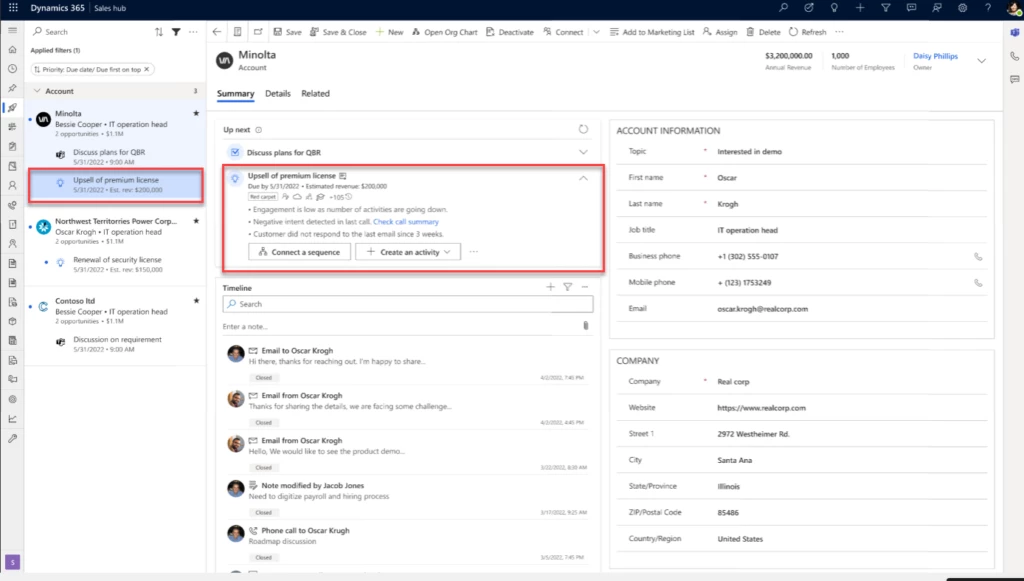
The sales accelerator in Dynamics 365 Sales, with seller insights and next actions highlighted.
How seller insights boost productivity
How can seller insights help you be a more effective sales account manager? Let’s look.
Insight list and actions
First, you get curated insights for all your accounts:
You only see insights that are relevant to you, not your team members.
The insights have expiration dates so that you know the information is fresh and relevant.
You can see the reasons an insight appears in the list.
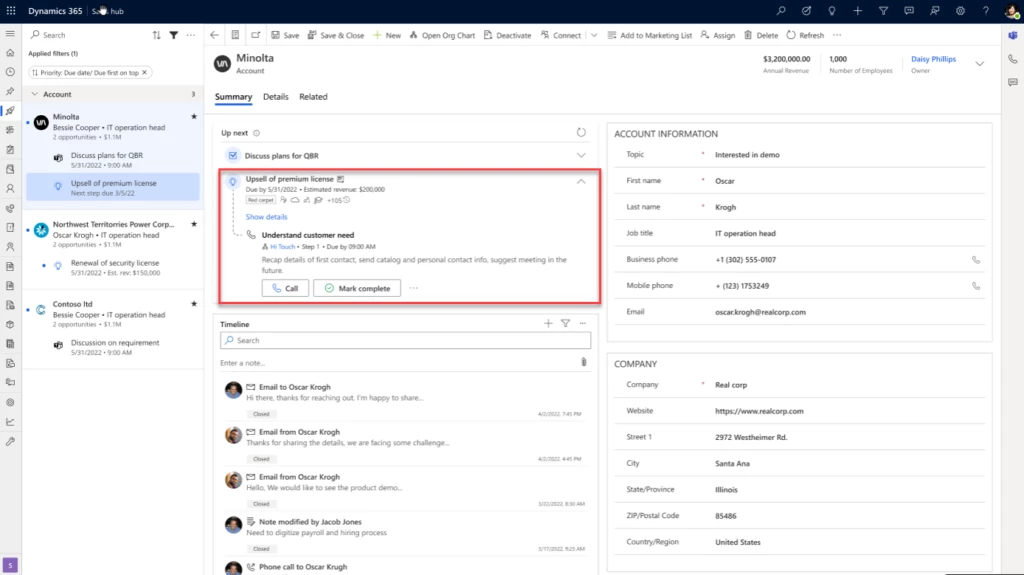
And after you acknowledge an insight, you’re guided through the next best steps to act on it, optimizing the sales workflow for better results. You can also collaborate with team members while you’re working on your insights.
The sales accelerator in Dynamics 365 Sales, with a seller insight and sequence highlighted.
Insight assignment and distribution
Second, although your insights are curated, that doesn’t mean they’re siloed. Insights are assigned to the account owner. If the owner of an entity is a team, an insight can be automatically assigned to the appropriate salesperson on the team, based on role, through the flexible rule framework. Ownership can be transferred from one seller to another, and multiple sellers can work on a single insight.
Insight action history
Finally, you can find all the insights that have been generated for an account on the account’s Insights tab. The list includes status, type, due date, and other helpful information. Filter and sort it to focus on what’s most important. You can easily identify all seller activities for the insights on the timeline view of the account.
By helping you identify your most important and profitable accounts, understand their needs and preferences, tailor your messages and offers, and nurture long-term relationships with them, account-based seller insights can lead to higher revenues, shorter sales cycles, and better customer satisfaction.
This article is contributed. See the original author and article here.
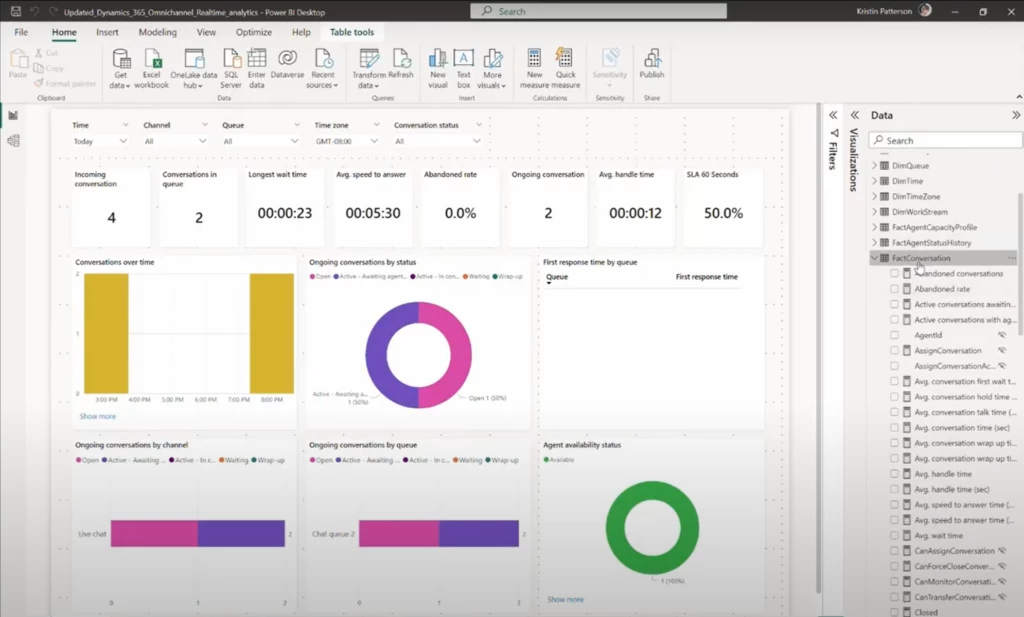
Dynamics 365 Customer Service is a powerful tool for managing your contact center. Its built-in analytic dashboards, such as the recently launched Omnichannel real-time analytics dashboard, provide a wealth of industry standard KPIs and metrics to help you monitor and improve performance. These dashboards are built on Power BI with two components: a data model (or data set) that houses the KPIs, and reports that visualize the data for viewers. Dynamics 365 Customer Service reads the data from Dataverse, performs transformation logic for each of the KPIs, and makes these KPIs available for you within the data model. You can customize data models using data within Dynamics or external data to view metrics tailored to your needs.
Every Dynamics organization that has analytics enabled gets their copy of this solution deployed and available only to them. While the data model is not editable, the reports are fully customizable through visual customization. This way, you can see and use the data in ways that make sense for your organization. You can view metrics outside of what’s in the out-of-box reports. You can also create additional pivots and dimensions to slice the data as needed.
We have received a lot of feedback from you around the need for customizations. You want to modify the data or logic used to calculate metrics in the data set. You also want to create your metrics in addition to the out-of-box metrics available in the data model. Additionally, you want to create variants of existing metrics or calculate metrics differently based on your organization’s unique processes. Another frequent request has been guidance around building custom dashboards that combine KPIs from Dynamics Customer Service with other applications.
To address these scenarios, Dynamics 365 Customer Service launched model customization. This feature deploys a copy of the data set used by the out-of-box reports into your organization’s Power BI workspace. Therefore, you can build composite models that connect to the Dynamics data model.
By leveraging the out-of-box model and only creating the metrics that are unique to your organization, you can reduce the risk of metric definitions going stale as Dynamics updates its capabilities. This also saves you valuable time and development effort. Furthermore, by using model customization, you can build custom reports and dashboards that combine data from multiple applications. This gives you a more complete picture of your contact center’s performance.
Overall, Dynamics 365 Customer Service provides a powerful set of tools for managing your contact center. Its built-in analytic dashboards offer the specific insights you need to improve contact center performance. And with model customization, you can tailor these to your specific needs.
This article is contributed. See the original author and article here.
Since 2019, Microsoft has had a long-standing partnership with OpenAI. The goal: to accelerate breakthroughs in AI and ensure the benefits are broadly shared with the world. A significant milestone in this collaboration occurred in January 2023 with the introduction of Microsoft’s Copilot offerings. Referred to as an “AI collaborator,” Copilot functions as a valuable assistant that works alongside you, enhancing your productivity and efficiency. Our thought leaders across the organization have shared many perspectives on its use spanning approaches to responsible AI to its use in low-code app development. In the last few months, we have also shared several copilot announcements regarding model improvements. AI brings the potential of innovation to every line of business, and in this post we focus on our journey with Copilot in Dynamics 365 Marketing.
The Dynamics 365 Marketing journey began when we launched our first previews of content ideas in May 2022 and query assist in October 2022. The real-world feedback we have received has been instrumental in our learning process. It has allowed us to gain valuable insights, but we acknowledge that there is still much more to learn and accomplish to truly revolutionize the marketing domain. With the technology changing so rapidly, it has also become very clear that we will—the use cases for Copilot in customer experience (CX) are endless. Let’s delve into how these copilot features came to be and highlight our generative AI roadmap moving forward.
Dynamics 365 Marketing
Transform your customer experience with generative AI
Query assist, using Copilot to democratize segmentation
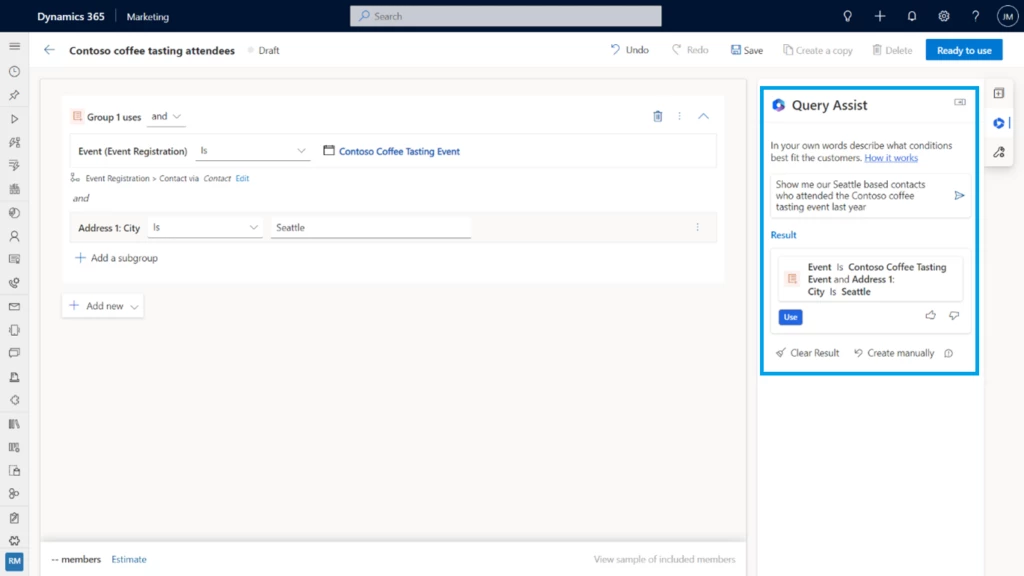
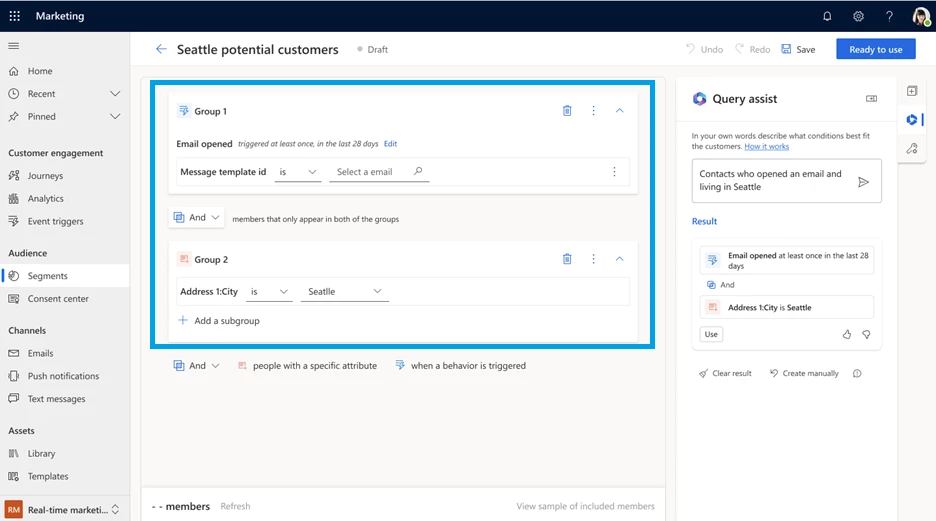
Marketing segmentation enables targeting—choosing an audience based on their characteristics. It could be demographics, psychographics, behaviors, preferences, or a combination thereof. Effective segmentation has traditionally required a thorough understanding of complex data models, database management, and SQL (Structured Query Language). Consequently, marketing organizations frequently face the challenge of relying on a single individual to create segments for the entire team, leading to a bottleneck in the process. The Copilot feature query assist is built upon OpenAI’s GPT foundational model to empower marketers to easily target the right audience by using everyday language to describe and quickly build segments without having to learn data models and construct queries. Directly within their workflow, marketers provide the segment description, and query assist starts to create a new segment and automatically generates the segment rules that marketers can add to the segment definition before publishing the segment.
“Our goal was to develop powerful and user-friendly features to enable everyone to create segments with confidence, while still providing flexibility and power for advanced users. OpenAI was the foundation, but customer needs were the central focus.”
Gaju Gatera, Dynamics 365 Marketing Product Manager for query assist
Ultimately, marketers who use query assist spend less time on segmentation and more time on creating campaigns that truly connect with their customers.
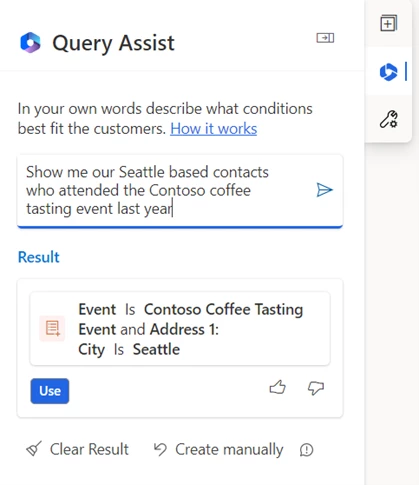
Query assist was initially released with our own AI model. We then experimented with OpenAI GPT and found that query assist could understand different syntaxes from formal language to more conversational language. For instance, users could type “Show me our Seattle based contacts who attended the Contoso coffee tasting event last year” rather than the prior version’s requirement for more structured or SQL-like inputs such as “contacts who live in Seattle city and attended the Contoso coffee tasting event 2022.” This was very encouraging.
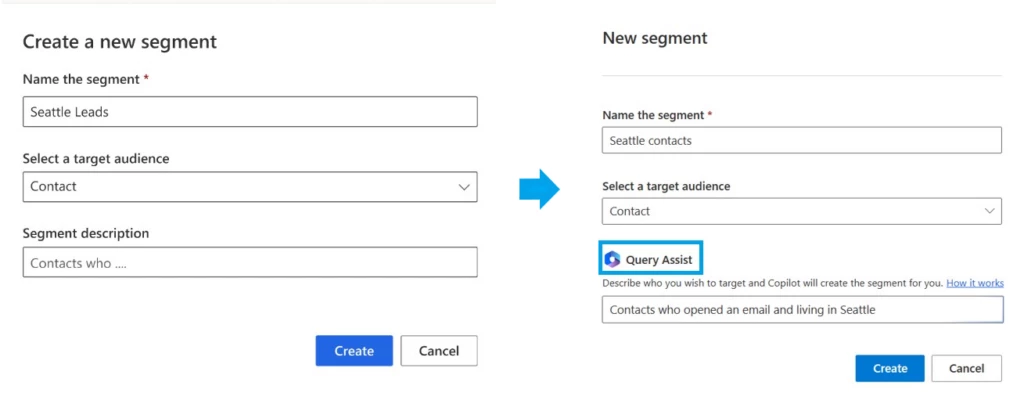
We collaborated with customers to improve the UX and embedded query assist seamlessly into marketers’ workflows. Originally marketers would input a description powered by query assist, land on Copilot, and get stuck without a way to transition back to manual segmentation. So we made sure to highlight query assist in the entry card, and we introduced a button that lets you switch from Copilot and manual segmentation in the canvas, allowing marketers with different levels of expertise to choose the experience that they like most.
We also changed the interaction design and streamlined the UX so that complex segments (requiring relationships traversals) are now created automatically without human intervention; what required three to four manual steps before is now one click as Copilot can create the relationships automatically.
Immediately following the launch of the enhanced version of query assist in March, we’ve seen substantial results where we now see 66 percent of marketers creating segments with query assist. We also saw the accuracy (as measured by thumbs up or down) improve from 15 percent to 86 percent within a month of the release.
We are particularly excited to witness how Copilot is driving positive change and contributing to the success of our customers. Chris Barnhart, Marketing Director at NC Fusion, a professional soccer team and sports organization serving the Triad region of North Carolina is an early adopter of Copilot. As a SQL expert, Chris knows how to design relationships among tables to create segments that engage a wide range of audiences from fans, to parents, to donors. “When I saw how you just type in common phrases and query assist will connect everything for you, I was blown away!” He was thrilled to discover how query assist could simplify his work and make his team more efficient, especially since many of his interns haven’t learned about data structures in school.
Sidney Fernandes, Chief Information Officer and Vice President for Technology at the University of South Florida, shared with us his excitement for the potential of using copilot to empower stakeholders across the organization.
“Once we share this with our teams, it has the potential to be quite transformational. Students and staff won’t need to be educated on the nuances of student data or copywriting to engage the right audiences impactfully.”
Sidney Fernandes, Chief Information Officer and Vice President for Technology at the University of South Florida
Tyler McClain, Senior Solution Consultant with Connected Experience partner Coffee + Dunn tried the feature and shared their experience, saying “Using query assist was quick and easy. I just typed ‘anniversary within the past five years,’ and it gave me exactly what I was looking for. This feature can further empower our clients to engage their customers with ease, and I’m excited to share it with them.”
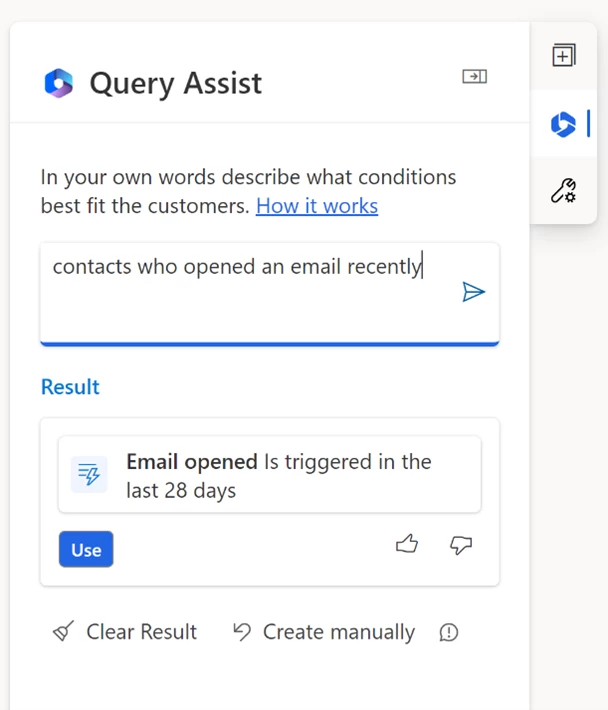
Encouraged by these positive results we continue to iterate on query assist. We are excited to announce that Copilot now supports segments that include marketing interactions or specific customer behaviors such as “customers who opened an email recently” enabling them to optimize segment creation to drive more effective campaign engagement. We can’t wait to see how marketers use it to drive better results and achieve their business goals.
Content ideas, simplifying email creation using Copilot to generate compelling content
Email marketing can be a highly effective way to connect with customers and drive business growth, but it also comes with its challenges. Over time, content can begin to feel stale or repetitive. Producing engaging content for email campaigns is time-consuming and requires significant creative energy.
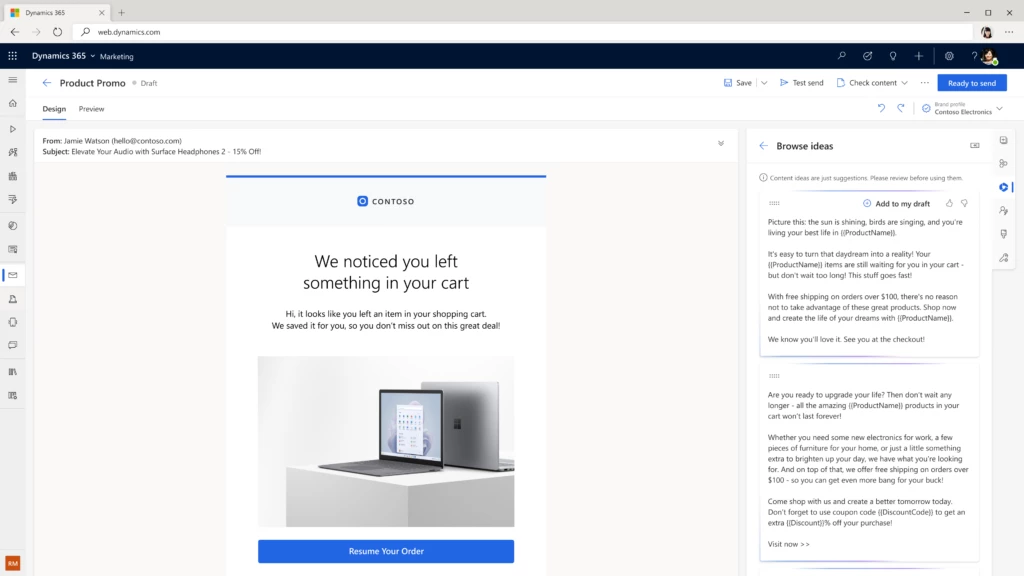
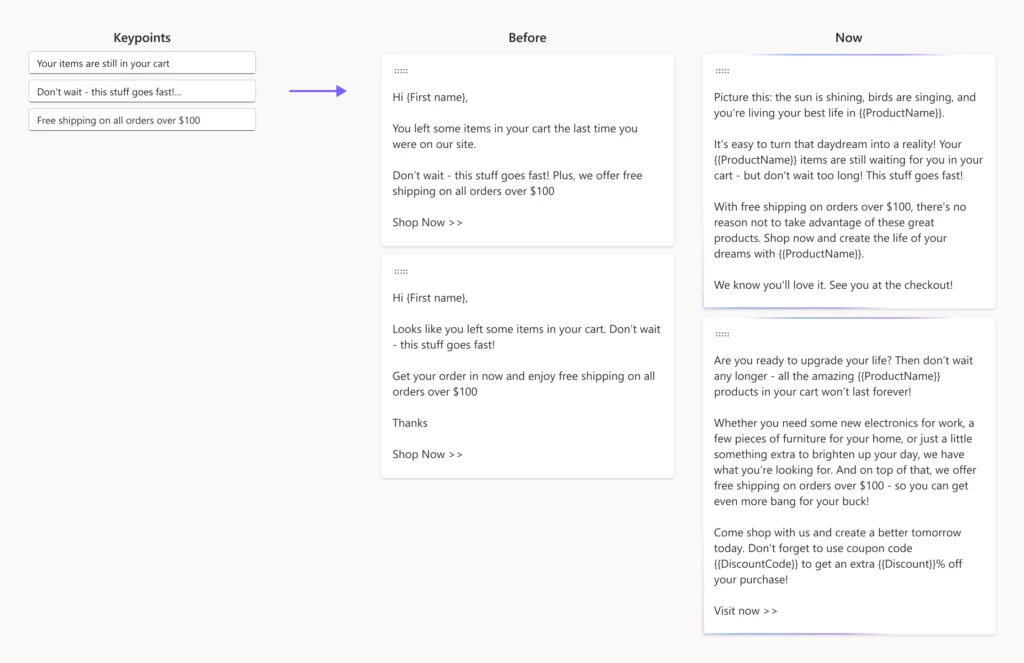
To assist marketers in their email creation, we’ve used OpenAI GPT to develop content ideas. Given a few short key points, Copilot generates engaging email content ideas within seconds that marketers can select from and tweak to perfectly match their needs.
“Content ideas was developed with one goal in mind–saving hours of copywriting, by helping marketers kick-start their email creation and create compelling content within minutes.”
Aga Miskowiec, Principal Product Manager for content ideas
With this innovative tool, writer’s block is becoming a thing of the past, allowing marketers to accelerate the delivery of engaging email campaigns that resonate with their audiences.
After releasing the first iteration of content ideas, we rapidly realized its potential and have been working to refine the approach for over a year. This includes tuning that we haven’t seen in any other products. We tune based on a library of public emails, not for any branding but rather for the type of tone and content a marketer would use. We also enable companies to use content they’ve created in the past to tune the generation of new content.
In March, we took content ideas to the next level by upgrading the language model to OpenAI GPT-3.5, and this had a significant impact on the quality of ideas generated.
Our customers started to see a positive impact on their business Chris Barnhart Marketing director at NC Fusion shared with us that “Normal engagement runs about 20 to 30 percent and there’s a lot of factors that go into the email itself, but with the email written with content ideas the engagement was about 70 percent.”
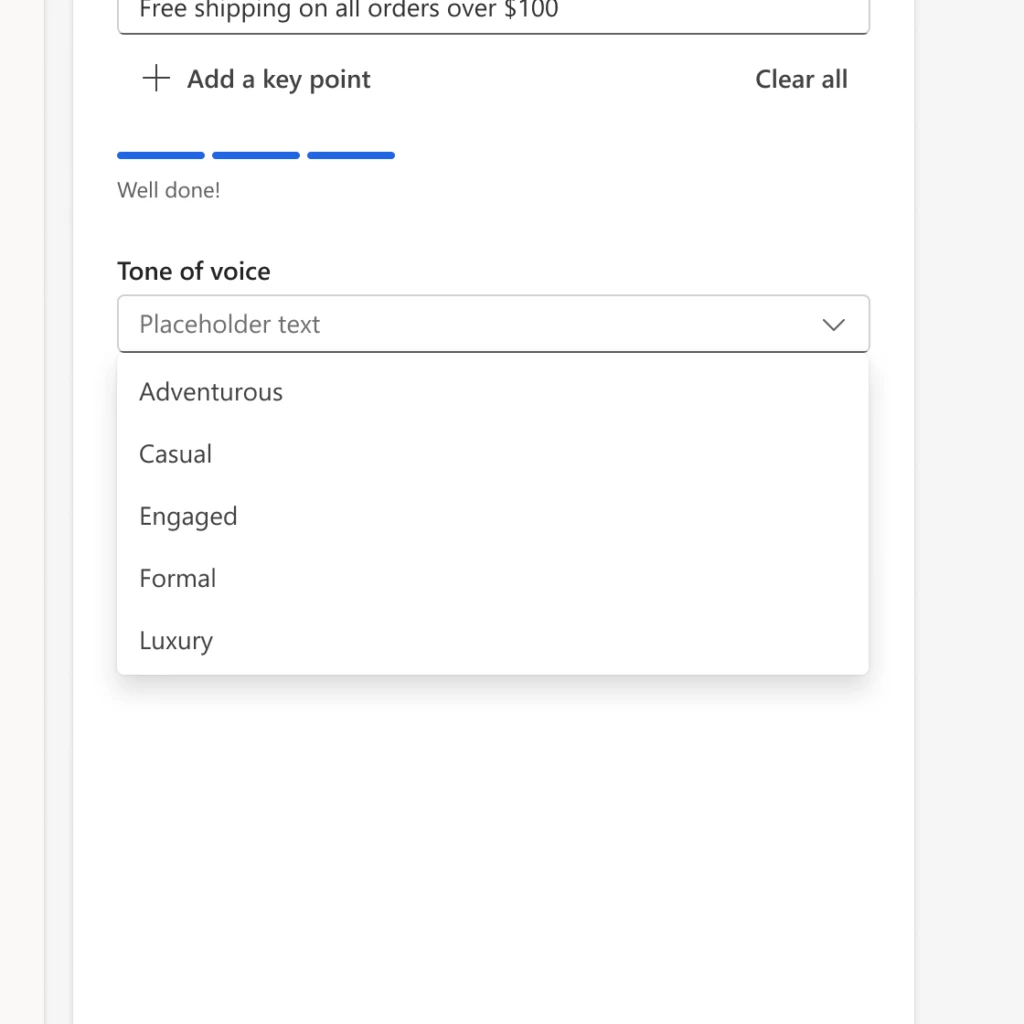
But that’s not all, we’ve also added a range of different tone of voice options to help marketers tailor the content to their brand and audience. Whether they’re looking for an engaging, adventurous, casual, luxury, or formal tone, content ideas has got marketers covered.
“Setting the tone allows Campari Group, a global company, to tailor the tone of voice for each brand and region’s communication style saving us hours of copywriting” according to Liam Barnes, Global IT Director – Marketing Technologies from Campari Group, a worldwide leader in the spirits industry.
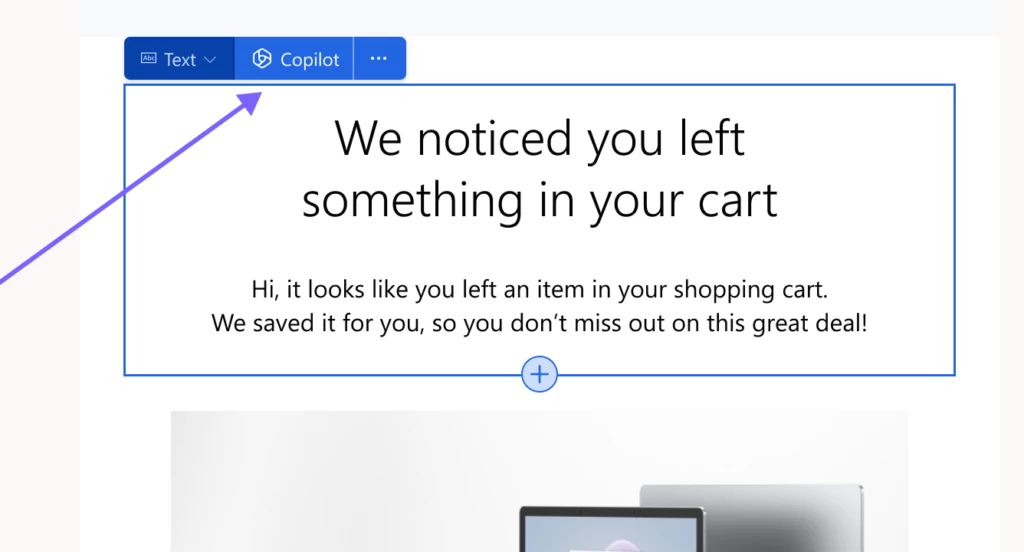
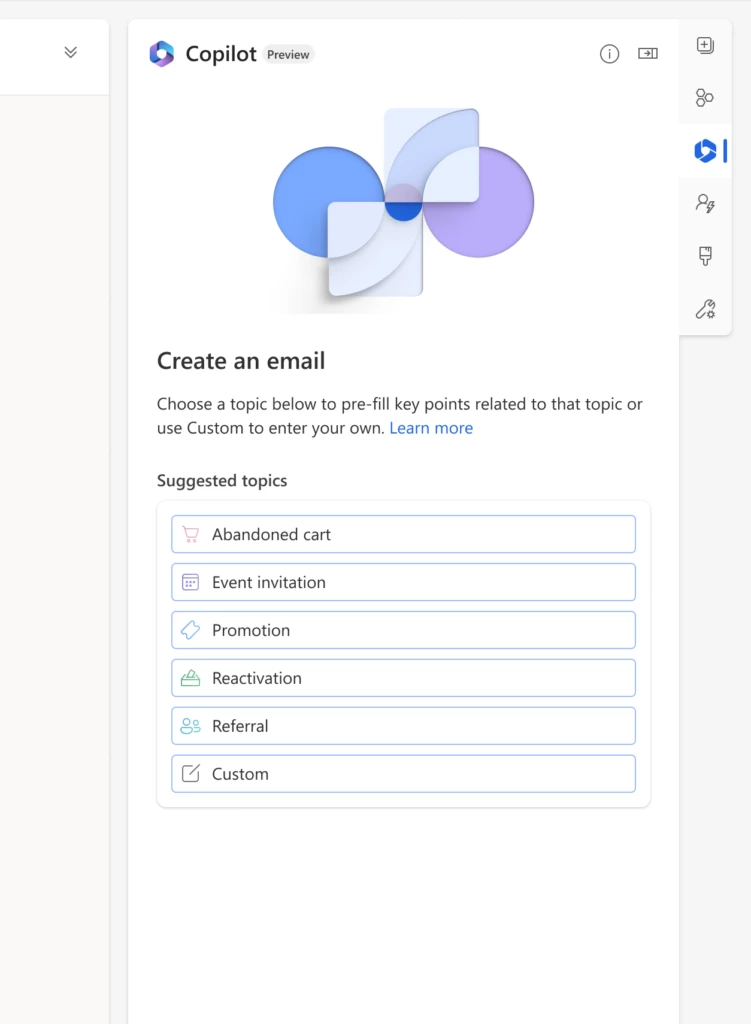
To level up usability, we put content ideas right in the email creation flow where marketers are adding or editing text as our data showed that switching to the Copilot tab was a significant discoverability usage drop off.
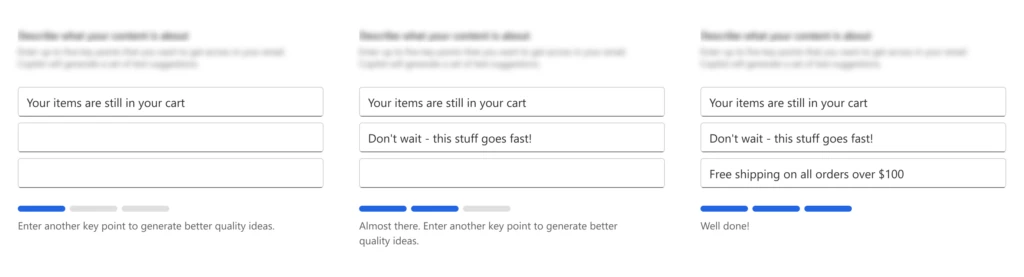
We’ve also gamified our UX to better guide marketers and help them craft higher quality key points used to generate content. “It’s pretty impressive. I was very happy using the feature. Our team has been very happy using the feature–it’s making delivering great content faster and easier.” shared Keith Perfect, Director of Technology and Intelligence from Northrop & Johnson, a luxury yacht brokerage.
As a result, the number of daily users who opened the feature doubled, the percentage of users who generated ideas (out of those who opened the feature) increased by 75 percent. Furthermore, the number of organizations using content ideas daily increased more than 5 times.
Receiving early feedback from our customers and partners who tried the latest version of content ideas was a rewarding experience. Their input helped us prioritize our focus and further enhance customer satisfaction.
“It’s awesome, content ideas helps us tremendously to efficiently produce emails. In fact, I can tell you it was normally at least an hour, and I did it in 15 minutes, it takes me ~25 percent of the time it took before to create email content!”
Chris Barnhart, Marketing Director at NC Fusion
“The results are very creative now, and tone of voice capability is great,” said Steve Smith, Principal Solutions Architect – Data & Artificial Intelligence at TTEC Digital.
And we’re just getting started! We are working on adding personalization, journey creation, brand style creation, and conversation help capabilities, just to name a few.
Our goal is to empower marketers in delivering exceptional customer experiences that drive business success with less effort and time than ever before. With the limitless potential of AI, we eagerly anticipate the future of customer experience.
Get started with Dynamics 365 Marketing
Start using content ideas and query assist today, and see how it can help you boost your productivity while creating deeply personalized experiences.



Recent Comments