
Now generally available: The new Microsoft Dynamics 365 Customer Insights

Now generally available: The new Microsoft Dynamics 365 Customer Insights

This article is contributed. See the original author and article here.

At Microsoft Inspire 2023, we announced that we are bringing together Microsoft Dynamics 365 Marketing and Microsoft Dynamics 365 Customer Insights into one offer, enabling organizations to unify and enrich their customer data to deliver personalized, connected, end-to-end customer journeys across sales, marketing, and service. We are retaining the existing “Dynamics 365 Customer Insights” name to encompass this new offer of both applications. Today, we’re excited to share that the new Dynamics 365 Customer Insights is now generally available for purchase.

For our existing Dynamics 365 Marketing and Dynamics 365 Customer Insights customers, this change signals an acceleration into our “better together” story, where we’ll continue to invest in new capabilities that will enable stronger, insights-based marketing, making it easier for marketers and data analysts to glean insights from customer data. Beginning September 1, 2023, customers who had the previous license for Marketing and/or Customer Insights will only see a product name change in the product; there will be no changes to the core product functionality due to the consolidation of the two products.

The new Customer Insights offers your organization flexibility to meet your business needs, with access to both the customer data platform (Customer Insights—Data) and real-time marketing with customer journey orchestration (Customer Insights—Journeys). The new pricing enables customers to unlock access to both applications and then buy the capacity they need. This gives you, our customers, the power of choice—where you can start with one or both applications and further invest in the capabilities that you’d like to scale. If you’re an existing customer of Microsoft Dynamics 365 Sales or Microsoft Dynamics 365 Customer Service, you can use Customer Insights as the foundation of your customer experience (CX) stack by achieving greater customer understanding and orchestrating contextual customer journeys across every touchpoint of the business.

Watch this video to see the new Dynamics 365 Customer Insights.

Achieve greater personalization with Copilot in Dynamics 365 Customer Insights

With the Customer Insights customer data platform, you can gain a holistic view of your customers, anticipate needs, and discover growth opportunities. And with real-time marketing and journey orchestration, you can deliver personalized, in-the-moment customer-triggered engagements that are relevant and contextual. With Copilot in Customer Insights, you can save time by using natural language to create or enhance target segments. You can also nurture creativity by turning topics into suggested copy, helping marketers move from concept to completion faster.

With the power of Copilot in Dynamics 365 Customer Insights, included at no additional cost, your data analysts and marketers can be more productive and increase their focus on personalizing the customer journey.

Our latest investments in copilot capabilities include the ability to:

Customer success with Dynamics 365 Customer Insights: Lynk & Co

Let’s take a look at an organization that is using Dynamics 365 Customer Insights today.

Lynk & Co is a Sweden-based company that is transforming the way people use cars by offering a simple and flexible experience where customers can choose to buy, borrow, or subscribe to a vehicle. With ambitions to disrupt the automobile industry and launch its business in seven markets in less than two years, Lynk & Co needed to quickly build an infrastructure that could support multi-channel customer engagement and drive highly personalized experiences. The company chose Microsoft Dynamics 365 for its out-of-the-box and customizable tools and the ability it provided to build in modules to create unique processes and prioritize specific customer experiences. Within 18 months, Lynk & Co was able to ramp up a significant digital presence in Belgium, France, Germany, Italy, Netherlands, Spain, and Sweden, as well as open social clubs designed to bring the company’s online brand to life through community-focused events.

The company uses Dynamics 365 Customer Insights to capture actionable customer data and link it with operational data within its cars. This is helping the company create seamless, highly personalized experiences for every customer from their first engagement to every time they use the app, drive a car, have service, or visit a club. It also makes it easy to support customers if they want to move from simply borrowing a car, to a monthly subscription, or to a car purchase. 

With the customer journey orchestration features in Dynamics 365 Customer Insights, customers get personalized messaging and image content. Beyond that, the system sends right-timed information on specific-to-the-customer club event invitations. These events vary from country to country but have included everything from unplugged live music nights and art openings to meet-ups for running and cycling groups, community talks on social issues, or workshops on how to upcycle old sneakers.

Engagement data from these events feeds back into the platform to further personalize member experiences across all lines of business, across all communication channels—and helps Lynk & Co learn and iterate.

Watch this video to see how Lynk & Co is using Dynamics 365 Customer Insights.

Learn more and get started today with Dynamics 365 Customer Insights

To learn more about Dynamics 365 Customer Insights, take the guided tour or start a free 30-day trial. If you have questions about the merging of Dynamics 365 Marketing and the previous Dynamics 365 Customer Insights, including pricing, please reference the FAQ on Microsoft Learn. If you missed Inspire 2023, you can watch the session by Emily He (Corporate Vice President, Business Applications Marketing), on demand, to see the announcements for Business Applications, including the latest innovations in Dynamics 365 Customer Insights.

The new Dynamics 365 Customer Insights

We’re bringing together Marketing and Customer Insights into one offer.


The post Now generally available: The new Microsoft Dynamics 365 Customer Insights appeared first on Microsoft Dynamics 365 Blog.

Brought to you by Dr. Ware, Microsoft Office 365 Silver Partner, Charleston SC.
Keep track of your trade policies with advanced export control

Keep track of your trade policies with advanced export control

This article is contributed. See the original author and article here.

Introduction

Supply Chain Management lets you manage, track, and verify compliance with export control restrictions prior to confirming, picking, packing, shipping, and invoicing sales orders. The new advanced export control functionality allows you to manage your export control policies using a native Microsoft Dataverse solution that interfaces directly with your Supply Chain Management instance. Supply Chain Management then enforces compliance with international trade regulations by consulting your export-control policies in real time.

The export control dataverse solution allows you to keep track of the many different rules and policies, expressing these rules, including complex ones, using formulas similar to those in Microsoft excel. The fact that it is a dataverse-based solution also allows your other systems to access your export control rules thanks to the hundreds of connectors available for Dataverse.

The solution implements five primary concepts:
Jurisdictions

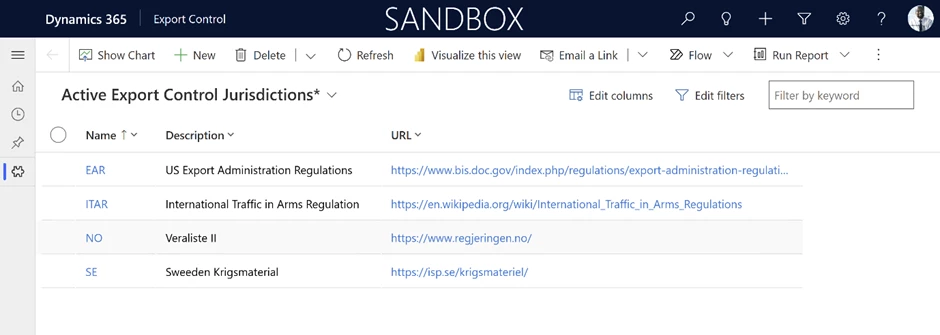
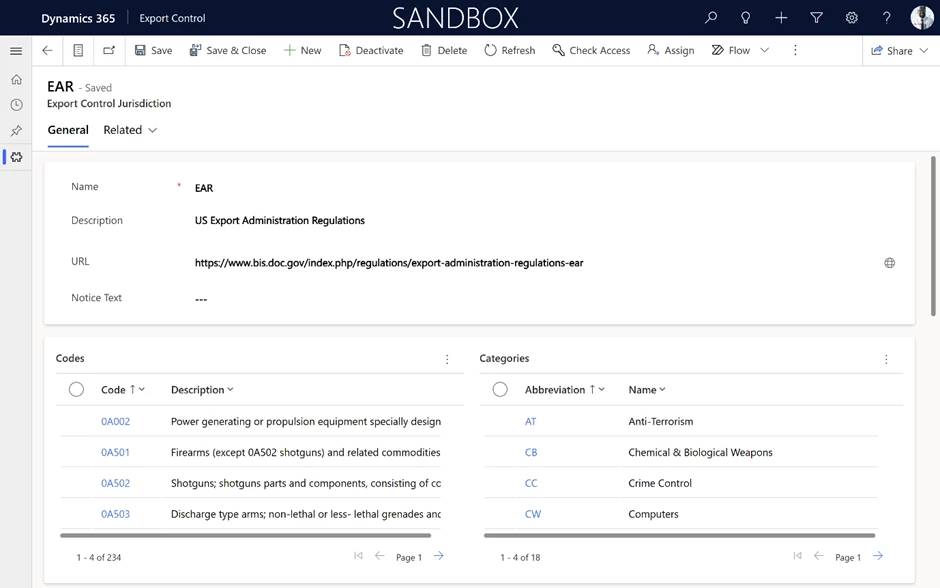
A jurisdiction is a set of codes, categories, restrictions, exceptions and licenses. It represents a set of configurations that apply to incoming requests. Like the US International Traffic in Arms Regulation (ITAR), US Export Administration Regulations (EAR) or EU Dual Use.

You can create as well your own jurisdiction for your companies internal policies.

Codes and categories

The codes that make up a jurisdiction are often referred to as Export Control Classification Numbers (ECCNs).

An example of an export control classification number is 7A994, which is defined by the United States Export Administration Regulations (US EAR) export control jurisdiction. This classification number applied to “Other navigation direction finding equipment, airborne communication equipment, all aircraft inertial navigation systems not controlled under 7A003 or 7A103, and other avionic equipment, including parts and components.” According to the US EAR, ECCN 7A994 is a part of the *Anti Terrorism (AT)* control category.

Restrictions

Each export control jurisdiction defined a set of restrictions under which export control actions should be disallowed unless an exception exists.

Exceptions

Exceptions allow an action even though a restriction would otherwise block it. Common types of exceptions include licenses, blanket exemptions, and corporate policies.

Exceptions are defined the same way as restrictions, but also provide extra requirements that apply when the exception is used, such as the need to display a message to the user o to print text and licenses on documents.

Licenses

Licenses are the specific permissions to be able to trade an item or set of items in a given context. It is common that the authorities are the ones providing the licenses.


For more information see the documentation:

Advanced export control overview – Supply Chain Management | Dynamics 365 | Microsoft Learn

Supply Chain at Microsoft

Take a tour – Supply Chain Management | Microsoft Dynamics 365

Learn more about the latest AI breakthroughs with Microsoft Dynamics 365 Copilot:

Dynamics 365 AI webpage

The post Keep track of your trade policies with advanced export control appeared first on Microsoft Dynamics 365 Blog.

Brought to you by Dr. Ware, Microsoft Office 365 Silver Partner, Charleston SC.
Analyze the impact of AI-enhanced customer service with Copilot analytics 

Analyze the impact of AI-enhanced customer service with Copilot analytics 

This article is contributed. See the original author and article here.

Copilot AI is reshaping customer service just like it’s changing every other aspect of business operations. Before now, customer service managers had no way to gauge the results of their efforts to incorporate AI in their practices. Copilot analytics in Dynamics 365 Customer Service fills that gap, offering deep insights into the operational impact of an organization’s investment in AI-enhanced customer service.

Key metrics and insights

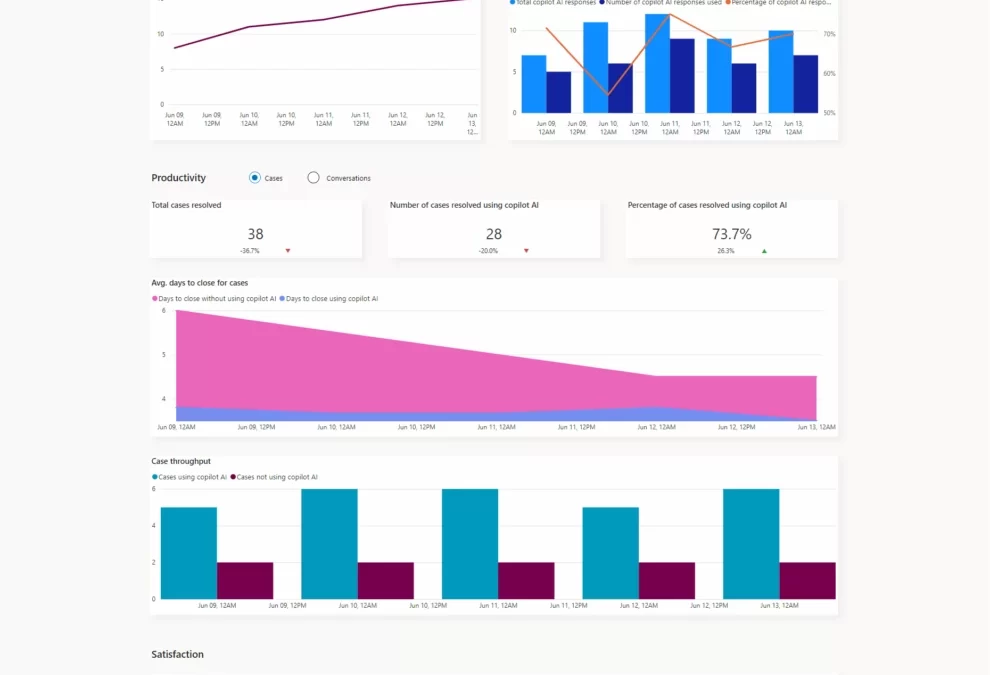
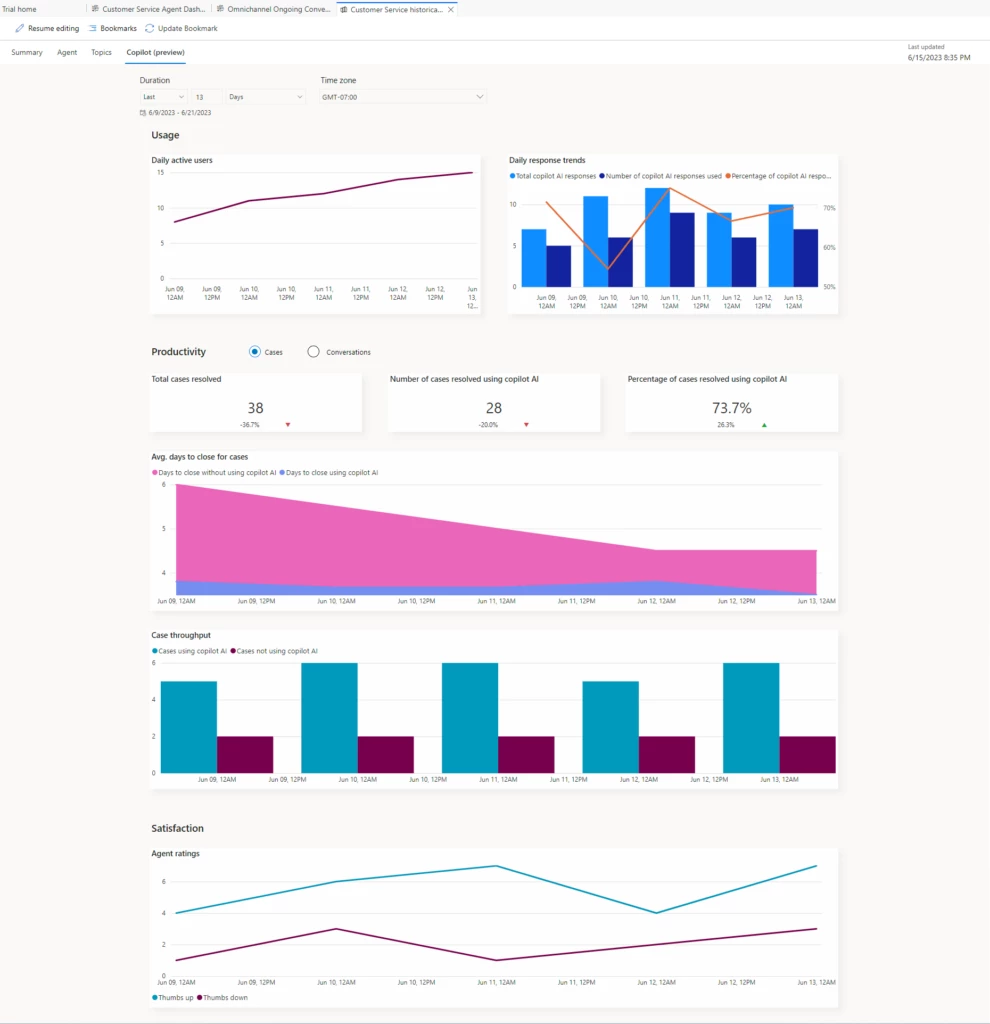
To view Copilot analytics, go to Customer Service historical analytics and select the Copilot tab. Here, comprehensive metrics and insights provide a holistic perspective on the value that Copilot adds to your customer service operations. 

Usage metrics

  • Daily Active Users: The number of individual agents who engaged with Copilot at least once in a day over the specified date range
  • Total Copilot AI Responses: The aggregate number of responses that Copilot provided in a day over the specified date range
  • Number of Responses Used: The number of Copilot responses from which an agent copied text
  • Percentage of Copilot AI Responses Used: The proportion of Copilot responses from which agents copied text 

Productivity metrics: Cases 

  • Total Cases Resolved: The aggregate number of cases that agents resolved while Copilot was available 
  • Number of Cases Resolved Using Copilot AI: The number of cases that agents resolved with Copilot’s help 
  • Percentage of Cases Resolved Using Copilot AI: The proportion of cases that agents resolved with Copilot’s help 
  • Average Days to Close for Cases: The average number of days it took agents to resolve cases, with and without Copilot’s help 
  • Case Throughput: The average number of cases that agents resolved per day, with and without Copilot’s help 

Productivity metrics: Conversations 

  • Total Conversations: The aggregate number of agent-customer interactions that involved Copilot 
  • Number of Conversations Using Copilot AI: The number of completed conversations in which Copilot played a role 
  • Percentage of Conversations Using Copilot AI: The proportion of conversations in which Copilot played a role 
  • Average Conversation Handle Time: The average duration of conversations in which Copilot played a role 
  • Conversation Throughput: The average number of completed conversations (excluding emails and voice interactions) per day in which Copilot played a role 

Satisfaction metrics 

Agent Ratings: Agents’ ratings of Copilot’s responses, both positive and negative 

The potential of Copilot analytics 

Copilot analytics gives leaders of organizations that use Dynamics 365 Customer Service a comprehensive toolset to assess the impact of Copilot on their customer support functions. By analyzing key metrics, supervisors and managers can make informed decisions, optimize processes, and elevate levels of customer satisfaction. 

It’s important to recognize that Copilot analytics is a transformative asset for customer service organizations. As you explore its capabilities, you’ll find that its insights have the potential to drive improvements in the productivity of your customer service teams. 

AI solutions built responsibly 

Enterprise grade data privacy at its core. Azure OpenAI offers a range of privacy features, including data encryption and secure storage. It allows users to control access to their data and provides detailed auditing and monitoring capabilities. Copilot is built on Azure OpenAI, so enterprises can rest assured that it offers the same level of data privacy and protection. 

Responsible AI by design. We are committed to creating responsible AI by design. Our work is guided by a core set of principles: fairness, reliability and safety, privacy and security, inclusiveness, transparency, and accountability. We are putting those principles into practice across the company to develop and deploy AI that will have a positive impact on society. 

Learn more about Copilot analytics

Watch a video to learn how copilot AI searches company knowledge sources and generates optimized responses in a single click. 

Read the documentation:  

The post Analyze the impact of AI-enhanced customer service with Copilot analytics  appeared first on Microsoft Dynamics 365 Blog.

Brought to you by Dr. Ware, Microsoft Office 365 Silver Partner, Charleston SC.
3 ways mixed reality empowers frontline workers

3 ways mixed reality empowers frontline workers

This article is contributed. See the original author and article here.

Manufacturers worldwide are investing heavily in digital transformation, overhauling almost every aspect of their operations and business models. But one key group—frontline workers —are still awaiting their digital renaissance.

Today, many organizations feel their workers are not empowered or digitally well-equipped. Manufacturers struggle with high turnover and the challenge of training and upskilling new workers. Downtime and worker productivity remain nearly universal issues.

To help address these issues, Microsoft is investing in frontline worker enablement across a broad range of technologies. This includes new solutions to help frontline workers deliver exceptional service with next-generation AI, as well as on our ongoing investment in mixed reality hardware and solutions. Microsoft Dynamics 365 Guides cultivates collaborative environments where people put knowledge into action. Here are three ways mixed reality is addressing frontline worker training, support, and knowledge transfer across industries:

1. Resolve issues quickly with remote support and collaboration

Unplanned downtime is costly. The average manufacturer confronts over 800 hours of equipment downtime a year, or 15 hours per week. Industrial manufacturers consequently spend almost USD50 billion on downtime every year.1 In these high-pressure situations, communication across functions can either speed resolution or create blockers to forward progress.

Historically, manufacturing environments fostered knowledge silos with valuable insights confined to individuals, groups, or departments. Mixed reality shifts this dynamic. Workers can share real-time, situational video of their environment, allowing others to experience it firsthand—regardless of location. Expert guidance, troubleshooting, or step-by-step instructions are immediate. This eliminates the need to travel, while minimizing downtime and production disruptions.

Gone are the days where access to experts, communication barriers, or information silos dictate how knowledge is shared or when assets are repaired. Working on assembly or service lines requires specialized skills and expertise. Access to individuals with the relevant, hands-on experience, however, is not always possible. With Dynamics 365 Guides, when specialized skills are required, experts are a Microsoft Teams call away. 

Together, Dynamics 365 Guides and Microsoft Dynamics 365 Remote Assist with Teams connect workers beyond their physical limits. A communication hub, Teams enables collaboration across the workforce. Its integration with Dynamics 365 Guides allows workers to extend this to the physical world on any device.

2. Accelerate training with information in context

Frontline workers are the backbone of industry operations. These roles demand technical savvy, quick decision-making, and resiliency. Traditional in-place training and onboarding processes are often ineffective or add to the cognitive burden of overwhelmed frontline workers.

Hands-on training with physical assets is expensive, time-consuming, and at times dangerous. Inconsistent quality or impersonal training is often the result. However, holographic environments can mitigate these on-ramping risks. Embracing mixed reality accelerates learning by introducing relevant, task-specific knowledge in new immersive and data rich environments.

Using 3D models and digital twins, frontline workers receive a better understanding of the machines and processes at hand. Related materials are retrieved or amended instantly, nurturing knowledge exchange, which is further enhanced by AI. Mixed reality is the eyes and ears of AI. Delving into operation nuances for personalized, in-depth learning becomes easier. When integrated, mixed reality and AI accelerate worker training, shortening steps and supplying users with the working knowledge they need for the task at hand.

With Dynamics 365 Guides frontline and service workers can start accelerating their role-based knowledge today. Workers receive purpose-built, interactive guidance on complex machinery, assembly protocols, or maintenance steps when and where they need it.

3. Ensure transfer of information, insights, and skills

As employees near retirement, their wealth of expertise needs to be captured and shared. These experts understand the assets and processes that keep production moving. Retaining and transferring that knowledge is vital. There’s just one problem: Manufacturing is experiencing a talent exodus. Globalization, unemployment, and a rapidly aging workforce together are compounding operational challenges. Organizations are rightfully concerned. One-third of manufacturing executives claim retaining and replacing high-performing employees as a strategic priority in 2023.2 Mixed reality is poised to help solve this by capturing information for informed decision-making and greater productivity.

Mixed reality facilitates knowledge retention and transfer across an organization through the creation of immersive experiences and simulations, regardless of location or device. The versatility of mixed reality makes up-skilling faster and more accessible. Dynamics 365 Guides offers industrial workers the opportunity to document unique situational processes and procedures not included in asset operating manuals. Step-by-step instructions, annotations, and “on the ground” insights are placed in context and immediately accessible throughout the day.

With Dynamics 365 Guides embedded in Microsoft Dynamics 365 Field Service mobile, mixed reality is democratized for every worker. Organizations now have asset, maintenance, and service information at their fingertips. This combination in one app improves worker accuracy, productivity, and efficiency—while offering powerful guidance on the device at hand.

Realize your future manufacturing potential

Mixed reality is a key part of an emerging technology category known as the industrial metaverse. Its foundational cross-platform technologies—including AI, cloud to edge, digital twins, machine learning, and mixed reality—are shifting our relationship with data from stationary to dynamic experiences.

Mixed reality is an essential glue that visualizes the diverse elements of the industrial metaverse. Seamlessly integrating the physical and digital, mixed reality creates immersive experiences that transcend traditional industrial operations. Guides overlays information atop real-world assets and scenarios, making knowledge available in context where it is needed most.

Prepare your workforce for their smart manufacturing future with mixed reality. Learn how Dynamics 365 Guides can help realize tangible business outcomes.

Dynamics 365 Guides

Optimize operations and solve problems in real-time with holographic guidance.

Woman working in process manufacturing manipulates a 3D model as part of a Guide.


1Manufacturing Without Unplanned Downtime Could Become A Reality Sooner Than You Think, Forbes.

22023 manufacturing industry outlook, Deloitte.

The post 3 ways mixed reality empowers frontline workers appeared first on Microsoft Dynamics 365 Blog.

Brought to you by Dr. Ware, Microsoft Office 365 Silver Partner, Charleston SC.
AI at your service with Copilot in Microsoft Dynamics 365 Field Service

AI at your service with Copilot in Microsoft Dynamics 365 Field Service

This article is contributed. See the original author and article here.

This post was co-authored by Michael Mendoza, Director of Service Transformation, Hitachi Solutions.

The era of AI is here, and it’s transforming how companies service customers in the field.

The field service industry is always evolving. Shifting customer preferences and demands, unpredictable economic forces, and tight labor markets have all required field service leaders to continuously adapt and innovate to succeed.

That said, Michael Mendoza, Director of Service Transformation at Hitachi Solutions, a Microsoft Gold Partner, expects that AI will bring about the most dramatic change yet for the field services industry: “It’s no exaggeration to say that the advent of AI promises to completely redefine what is possible, offer groundbreaking new opportunities to delight customers, and differentiate and reinvent service delivery for every organization on the planet.”

Dynamics 365 Field Service

Deliver a connected service experience

Overhead view of male worker kneeling on manufacturing factory floor and reaching for notes written on paper.

Helping to drive that redefinition is Copilot in Microsoft Dynamics 365 Field Service, an AI-powered assistant that helps accelerate field service productivity and deliver the proactive, “always on” support that customers expect. Three key areas where Copilot impacts field service organizations include:

  • Personalizing service experiences for customers to address issues quickly.
  • Helping frontline technicians work more efficiently.
  • Optimizing service operations for increased productivity.

Let’s walk through a common service scenario to see Copilot’s benefits in action.

Personalizing service experiences

New data from Microsoft’s 2023 Work Trend Index Annual Report reveals 63 percent of frontline workers struggle with having to do repetitive or menial tasks that take time away from more meaningful work. Let’s say a service manager for a parts manufacturing company receives an email in Outlook from a customer asking for a technician to come fix a broken circuit on an assembly machine. Before Copilot, the service employee had to find and review the account information and then create a work order separately in Dynamics 365 Field Service. This meant manually copying and pasting or re-entering information from the email into the required fields. The service manager also had to search for past work orders to better determine which service technicians had the right skills and knowledge to fix the issue, as well as which tools and parts were needed for the job.

But now, with Copilot’s AI capabilities and seamless Outlook integration, work order management is streamlined and available at the service manager’s fingertips.

I’m looking forward to providing customers with the ability to work with Field Service features directly in Outlook and Teams without having to switch applications while working with the tools they already use to communicate with customers and technicians.

Bill Caldwell, Director, Service Delivery at Hitachi Solutions

Now, Copilot processes the language in the customer’s email content to identify that creating a work order is the best next action, and suggests the service manager create a work order—all from their Outlook view. With a quick tap, the service manager can create the work order that Copilot has automatically generated (based on its historical knowledge of past work orders pertaining to that machine and incident type) by inserting the customer information, incident, parts needed, technician skills required, and service activities needed. It can also prioritize work orders by intelligently assessing even vague language to determine whether something is urgent or not based on customer language in the subject or the body of the email.

Hitachi Solutions has been privately previewing Copilot in Dynamics 365 Field Service and is already seeing benefits for customers. One particular benefit is that, with Copilot’s work order capabilities in Outlook, its service managers can immediately assign resources to solve customer issues, without leaving the flow of work. This means customers experience faster response times and enhanced service delivery. In addition, service managers have an easier time managing customer service requests, resulting in greater efficiency. And, most importantly, Hitachi knows that Microsoft is guided by our AI principles and Responsible AI Standard and decades of research on AI, grounding, and privacy-preserving machine learning. That means it can assure customers that it has measures in place to help protect against data leakage.

Helping frontline technicians work more efficiently

The most recent interaction a customer has with your company is also their final impression. Giving your frontline workers the information and tools, they need to be more productive, effective, and efficient in the field ultimately translates to happier, more loyal customers. New data from Microsoft’s 2023 Work Trend Index Annual Report reveals that 65 percent of frontline workers are optimistic that AI will help them in their job.

With Copilot, the technician no longer wastes valuable time determining what tools they need, making wrong guesses, or finding experts who can provide helpful information. Instead, the technician has the relevant information from the Copilot-generated work order and can focus on completing the service tasks at hand. For example, because Copilot uses next-generation AI to create a properly worded and concise description of the work the client needs performed in the work order summary, the technician has a clear understanding of the problem and what needs to be done to complete the task. This means technicians can resolve issues faster and with higher accuracy, minimizing customer downtime and inconvenience, and creating a better customer experience.

Optimizing service operations

Whether dealing with an inspection, installation, or maintenance issue, a happy field service customer is one who receives high-quality service, feels valued, and has a positive overall experience with the service provider—factors that are all ultimately rooted in operational excellence. Timeliness is crucial in field service, and customers value service organizations who prioritize their requests and strive to resolve their issues quickly and effectively without the need for multiple visits or repeat service calls. Now, right in Outlook, the system leverages the power of the Field Service scheduling engine to provide suggestions, so the work order can be dispatched immediately upon creation and even create a reply to the customer with available times for technicians with the appropriate skill set to solve their issue. That means faster, more efficient service.

With Copilot and the power of next-generation AI, service organizations can deliver the personalized and proactive support that customers demand and expect.

Next-generation field service with AI—are you ready?

Service in the era of AI is an exciting time, and Copilot in Dynamics 365 Field Service is an innovative new capability for empowering field service teams to do their best work and deliver an exceptional customer experience. This is just the beginning of AI for field service, and we can’t wait for what’s to come.

Watch a brief video of Copilot in Dynamics 365 Field Service in action.

The post AI at your service with Copilot in Microsoft Dynamics 365 Field Service appeared first on Microsoft Dynamics 365 Blog.

Brought to you by Dr. Ware, Microsoft Office 365 Silver Partner, Charleston SC.

Save costs and drive efficiency with next-generation AI on the frontline with Microsoft Teams

Save costs and drive efficiency with next-generation AI on the frontline with Microsoft Teams

This article is contributed. See the original author and article here.

Frontline workers are the backbone of the global workforce and often the first to interact with customers and manage on-the-ground operations. When organizations invest in fast time to value technology for their frontline workers, it not only drives positive outcomes for businesses’ bottom lines but also for frontline employees.

The post Save costs and drive efficiency with next-generation AI on the frontline with Microsoft Teams appeared first on Microsoft 365 Blog.

Brought to you by Dr. Ware, Microsoft Office 365 Silver Partner, Charleston SC.