

Forrester studies project more than 100% ROI for enterprises and 16-month payback for midmarket organizations using Dynamics 365 ERP

Forrester studies project more than 100% ROI for enterprises and 16-month payback for midmarket organizations using Dynamics 365 ERP

This article is contributed. See the original author and article here.

Enterprise resource planning (ERP) decisions are among the most consequential investments a business can make; shaping how organizations operate, scale, and compete for years to come. Yet many ERP transformations have historically carried risk: high costs, long timelines, heavy customization, and uncertain returns.

To bring clarity to these decisions, Microsoft commissioned Forrester Consulting to conduct two independent Total Economic Impact™ (TEI) studies examining the business value of Microsoft Dynamics 365 ERP on enterprises and midmarket organizations.

From fragmentation to integration: Why ERP modernization matters

Across both 2026 studies, Forrester’s projections showed organizations from a similar place: fragmented ERP landscapes, siloed data, manual processes, and highly customized legacy systems that were difficult to upgrade or scale. These environments could limit real-time visibility, slow decision-making, and increased operational risk; particularly as organizations grew, expanded into new markets, or managed increasingly complex supply chains. These constraints didn’t just slow operations; they could limit a leader’s ability to respond to volatility, growth, and supply chain disruption with confidence.

In response, organizations turned to Microsoft Dynamics 365 ERP to consolidate finance and supply chain operations with a unified, cloud-based platform. By centralizing data and standardizing processes, organizations can improve operational efficiency and gain timely, actionable insights across the business.

Importantly, this shift reframed ERP from a back-office system of record to a platform for informed, faster decision-making that connects data, people, and processes across the enterprise.

Quantifying business value with Forrester’s TEI methodology

The strength of the TEI studies lies in their focus on quantifiable business impact. Forrester evaluated benefits, costs, flexibility, and risks over a multi‑year period, modeling a composite organization based on real customer interviews and survey responses. This approach allows leaders to evaluate ERP investments using a transparent financial framework rather than vendor claims alone.

Enterprise ERP: Financial impact at scale

In the enterprise TEI study, Forrester modeled a composite organization representing large, complex businesses using Dynamics 365 ERP. The analysis projects that over three years, the organization achieved:

  • 101% return on investment (ROI)
  • Net present value (NPV) of $12.9 million

These results were driven by a combination of operational efficiency gains, productivity improvements, and cost reductions, particularly from consolidating legacy systems and reducing infrastructure and IT operations spend.

The study highlights that value did not come from isolated features, but from standardizing processes, unifying data across finance and supply chain functions, and reducing reliance on heavily customized, on-premises ERP environments.

Key enterprise findings business leaders should note

For business decision makers evaluating ERP at scale, several findings stand out:

  • Improved operational efficiency and productivity can be enabled through streamlined workflows and better access to real-time insights
  • Reduced infrastructure and IT operations costs can be enabled by retiring multiple legacy systems and shifting to a cloud-based ERP model
  • Faster, more confident decision making enabled by unified financial and supply-chain data

Together, these benefits contributed directly to the projected positive NPV and ROI modeled in the study, reinforcing ERP modernization as a business investment, not just an IT upgrade.

Midmarket ERP: Enterprise-grade value without enterprise complexity

While enterprises face complexity at scale, midmarket organizations often face a different challenge: how to grow without adding disproportionate cost or operational overhead. Forrester’s Total Economic Impact™ study of Microsoft Dynamics 365 ERP for midmarket organizations examined how modern ERP can support expansion, improve visibility, and standardize operations without the burden of traditional enterprise‑scale implementations.

In the study, Forrester modeled a composite midmarket organization based on customer interviews and survey data. The analysis projects that the organization would achieve:

  • Payback in 16 months
  • Net present value (NPV) of $3.3 million over three years

These outcomes were driven by streamlined finance and supply chain operations, automation of manual processes, and the replacement of disconnected legacy systems with a single, cloud‑based ERP platform. By consolidating systems and standardizing processes, organizations can reduce operational friction while supporting improved visibility and control across the business.

Key midmarket findings business leaders should note

For midmarket decision-makers, the study highlights several critical outcomes:

  • Enabled faster time-to-value, with measurable financial returns realized in just over a year
  • Enabled improvements to operational efficiency and productivity through streamlined finance and supply chain processes and automation of manual tasks
  • Potentially reduced complexity and IT overhead by replacing disconnected legacy systems with a unified cloud ERP platform

These benefits contributed directly to the projected positive NPV and rapid payback modeled in the study, reinforcing ERP modernization as a financially disciplined investment for midmarket organizations focused on growth and resilience.

Why independent research matters for ERP decisions

ERP investments shape the future of an organization for years—sometimes decades. That’s why independent, third-party validation is critical. The Forrester TEI studies do not ask leaders to accept conclusions at face value; instead, they provide:

  • A transparent financial model
  • Explicit assumptions and risk adjustments
  • Clear linkage between operational improvements and economic outcomes

For executives, CFOs, COOs, and IT leaders, these studies offer a common language for aligning stakeholders and setting realistic expectations for ERP transformation.

Go deeper: Explore the full Forrester TEI studies

This summary only scratches the surface. The full Forrester Total Economic Impact™ studies include detailed benefit breakdowns, cost considerations, and financial modeling that business leaders can adapt to their own organizations.

For organizations considering ERP modernization, these studies provide a data-driven foundation to evaluate options, build a credible business case, and make informed decisions with confidence.

The post Forrester studies project more than 100% ROI for enterprises and 16-month payback for midmarket organizations using Dynamics 365 ERP appeared first on Microsoft Dynamics 365 Blog.

Brought to you by Dr. Ware, Microsoft Office 365 Silver Partner, Charleston SC.
Forrester studies project more than 100% ROI for enterprises and 16-month payback for midmarket organizations using Dynamics 365 ERP

Announcing Desktop Companion App (DCA) support for Dynamics 365 Contact Center Embedded in Third-Party CRMs  

This article is contributed. See the original author and article here.

We’re excited to introduce Desktop Companion App (DCA) support for Dynamics 365 Contact Center in Embedded mode, delivering lower latency, improved reliability, and resilient voice continuity when Customer Service Reps (CSR) work inside third party (3P) CRM environments. With DCA running alongside the embedded conversation widget, contact centers can maintain active calls even if the browser refreshes or becomes unresponsive without forcing CSRs to leave their CRM workspace. 

Why it matters 

Embedded deployments let organizations use Dynamics 365 Contact Center inside a nonMicrosoft CRM through a lightweight widget, so Customer Service Representatives (CSR) don’t have to switch tools. Pairing that embedded experience with DCA provides a dedicated voice path that’s independent of the browser, helping eliminate dropped or interrupted calls caused by page reloads, page freezes, or tab navigation. The result is faster call setup, steadier audio, and consistent CSR workflows across CRMs. 

Real world outcomes from earlier DCA adopters include reduced average speed to answer and fewer connectivity issues, underscoring the operational value of a desktop resident voice companion. 

What’s new for Embedded mode 

DCA + Embedded widget: a resilient voice experience inside your CRM UI 

  • Call continuity during browser events 
    • Active calls remain connected when the CRM page refreshes or becomes unresponsive; CSRs can continue the conversation and regain full web context when the tab recovers. 
  • Lower latency, better audio consistency 
    • DCA’s desktop process helps reduce connection delays and smooths device handling, complementing the embedded browser experience 
  • Familiar, lightweight controls 
    • CSRs can mute/unmute and end calls from DCA while the embedded widget reloads; when recording or transcription is enabled in the web app, they continue uninterrupted. 
  • Built for crossCRM 
    • Works alongside the embedded experience in third party CRMs that host the HTML/JavaScript widget. 

The internal brief for Embedded mode reiterates these benefits specifically for external CRM workspaces, including continuity across inbound/outbound workflows. 

How it works 

  1. Route and render: Dynamics 365 Contact Center routes the voice interaction; the embedded widget renders in the CRM for CSR workflows 
  1. Establish desktop voice path: DCA runs as a companion process on the desktop and maintains the call even if the 3P CRM browser reloads, freezes, or loses focus 
  1. Resynchronize: When the page returns, the call state resynchronizes with the embedded widget so the CSR continues in one unified flow. 

Business value 

  • Higher reliability: Fewer dropped calls and better resiliency against browser variability and tab navigation. 
  • Lower latency: Faster connection setup and more responsive audio device handling 
  • CSR productivity: CSRs stay in their CRM UI; DCA protects the call while the page recovers minimizing context loss and reducing redial effort 
  • Operational consistency: A common voice experience across standalone and embedded deployments, aligned to voice best practices. 

Getting started 

  1. Enable Embedded experience 
    • Follow the guide to configure and surface the conversation widget inside your 3P CRM. Retrieve the widget URL from the Copilot Service admin center and complete the setup steps in your CRM. 
  1. Install and manage DCA 
    • Deploy the Desktop Companion App to CSR devices, install the browser extension(s), and (optionally) control updates via policy/registry settings. 
  1. CSR usage 
    • CSRs sign in, handle calls as usual in the embedded widget, and use DCA as needed (e.g., during a refresh). Recording and transcription continue if configured in the web app 
  1. Validate with best practices 
    • Review voice channel best practices for network, device, and telemetry guidance to ensure optimal call performance across your environment 

Learn More

Install and manage Desktop companion application for voice channel | Microsoft Learn 

The post Announcing Desktop Companion App (DCA) support for Dynamics 365 Contact Center Embedded in Third-Party CRMs   appeared first on Microsoft Dynamics 365 Blog.

Brought to you by Dr. Ware, Microsoft Office 365 Silver Partner, Charleston SC.
Reimagining Secure Customer Interactions with Secure Consult & Transfer 

Reimagining Secure Customer Interactions with Secure Consult & Transfer 

This article is contributed. See the original author and article here.

Empowering contact centers to safely handle sensitive, high‑trust customer journeys 

Delivering secure, compliant, and seamless customer experiences is no longer optional — it’s foundational. Across industries such as financial services, healthcare, and public sector, organizations must enable customers to complete high‑trust actions (like payments or identity verification) without exposing sensitive information to agents or core contact center systems. Secure contact center customer journeys enabled through capabilities like Secure Consult & Transfer bring this capability to life by allowing agents to involve external secure endpoints in the conversation while maintaining strict privacy boundaries. 

Today, we’re excited to highlight how Secure Consult & Transfer modernizes sensitive interactions and prepares organizations for the next generation of compliant service workflows. 

How It Works 

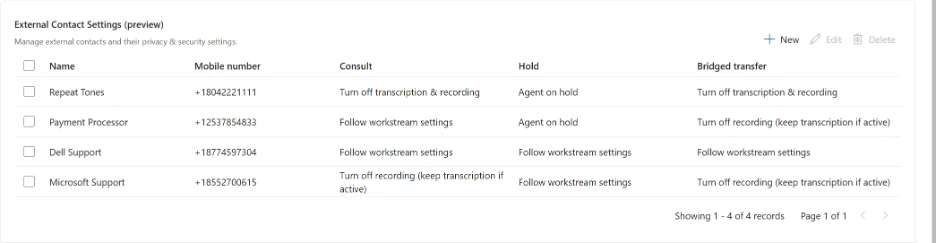
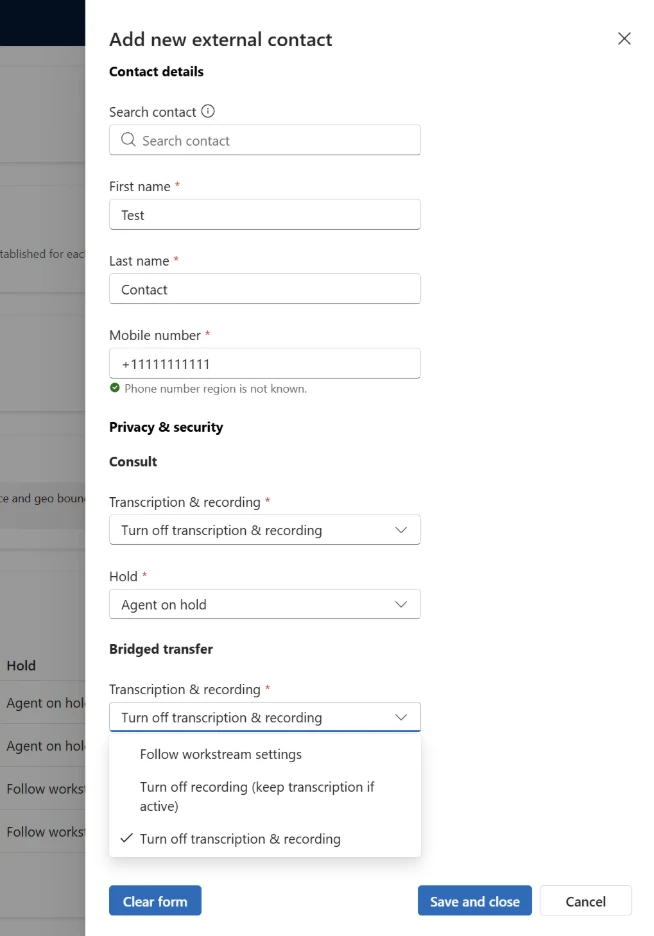
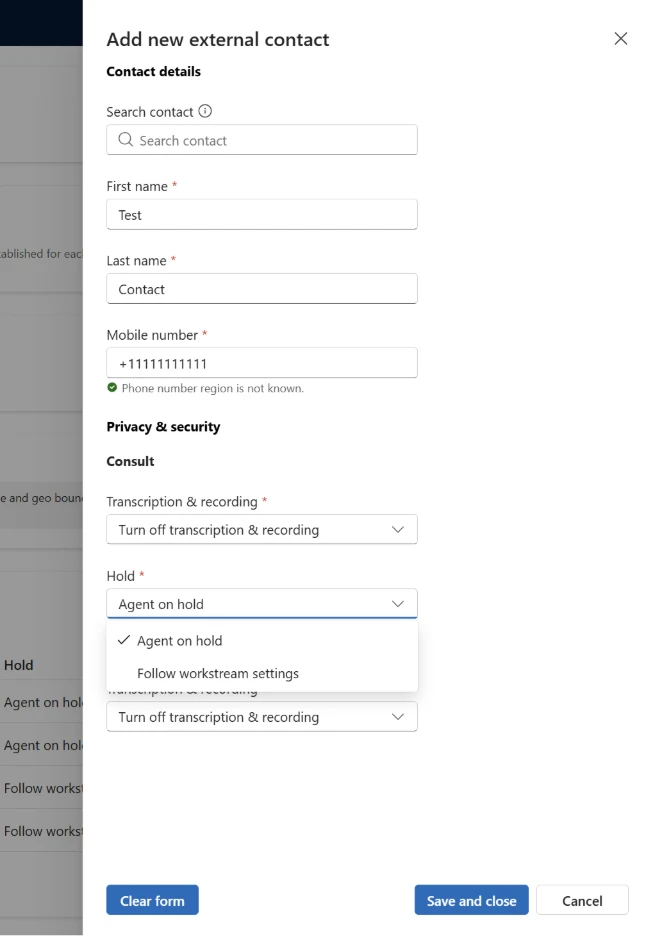
Secure numbers are created by applying specific settings to a contact. During runtime, the platform enforces the necessary protections instantly — without requiring manual intervention. The settings are flexible, and can be applied to only consult or transfer, or both. For consult and transfer the administrator can decide to follow workstream recording & transcription settings, stop recording but continue transcription, or stop both transcription & recording. Additionally, during consult, administrators can choose to either put their representatives on hold, or follow workstream settings to have the customer placed on hold with the representative able to take them off. 

Key Benefits at a Glance 

  • Protect sensitive customer data without disrupting workflows. 
  • Enable secure payment and verification scenarios using external trusted endpoints. 
  • Automate compliance controls — recording and transcription management happens instantly and safely. 

Secure Consult & Transfer ushers in a new era of secure, compliant customer interactions — one where sensitive workflows can happen inside the call experience without adding risk, friction, or operational burden. 

If your organization handles sensitive customer actions, now is the time to explore how this capability can strengthen trust, reduce risk, and streamline your service operations. 

Accelerating Secure Contact Center Customer Journeys with DTMF Broadcast 

A modern foundation for high‑trust, compliant, real‑time voice interactions 

As organizations modernize customer engagement, the need for secure and friction‑free voice workflows has become essential—especially for processes that rely on keypad inputs, such as payment authentication, IVR navigation, or identity verification. Traditional DTMF forwarding approaches rely on slow relays, creating latency, reliability gaps, and compliance concerns. 

DTMF Broadcast introduces a new, faster way for participants in a call to share DTMF tones in real time— addressing these gaps by sending DTMF tones from one participant instantly to all non‑hold participants, far faster than traditional forwarding. 

This includes all legs of the call, meaning that representatives can more reliably send tones to external endpoints, and if representatives drop off after a transfer to an external endpoint, customers will still be able to send DTMF to that endpoint, navigating IVRs independently. 

How to Enable DTMF Broadcast 

The toggle to enable DTMF Broadcast for an organization is in the Copilot Service Admin Center under Support Experience->Workspaces->Voice Experiences. 

The post Reimagining Secure Customer Interactions with Secure Consult & Transfer  appeared first on Microsoft Dynamics 365 Blog.

Brought to you by Dr. Ware, Microsoft Office 365 Silver Partner, Charleston SC.
Microsoft Sovereign Cloud adds governance, productivity, and support for large AI models securely running even when completely disconnected

Microsoft Sovereign Cloud adds governance, productivity, and support for large AI models securely running even when completely disconnected

This article is contributed. See the original author and article here.

Microsoft Sovereign Cloud’s expansion of capabilities includes Azure Local disconnected operations, Microsoft 365 Local disconnected, and Microsoft Foundry addition of large model and modern infrastructure capabilities.

The post Microsoft Sovereign Cloud adds governance, productivity, and support for large AI models securely running even when completely disconnected appeared first on Microsoft 365 Blog.

Brought to you by Dr. Ware, Microsoft Office 365 Silver Partner, Charleston SC.

Forrester studies project more than 100% ROI for enterprises and 16-month payback for midmarket organizations using Dynamics 365 ERP

Announcing End of Support for Dynamics 365 Project Service Automation (PSA) on the U.S. Government cloud

This article is contributed. See the original author and article here.

On March 19, 2024, we announced that support for Dynamics 365 Project Service Automation on the commercial cloud will end on March 31, 2025. As planned, end of support went into effect on that date. 

Today we are announcing the end of support for  Dynamics 365 Project Service Automation on the U.S. Government cloud (GCC) beginning March 31, 2027. Dynamics 365 Project Operations has been available in U.S. Government cloud (GCC) since December 2025 

Beginning March 31, 2027, Microsoft will no longer support PSA on GCC environments. There will not be any feature enhancements, updates, bug fixes, or other updates to this offering. Any support ticket logged for the PSA application on GCC will be closed with instructions to upgrade to Project Operations.    

We strongly encourage all PSA customers on GCC environments to start planning your upgrade process as soon as possible so you can take advantage of many new Project Operations features such as:   

  • Integration with Planner capabilities on Dataverse with many new advanced scheduling features  
  • Project Budgeting and Time-phased forecasting    
  • Date Effective price overrides   
  • Revision and Activation on Quotes     
  • Material usage recording in projects and tasks   
  • Subcontract Management   
  • Advances and Retained-based contracts   
  • Contract not-to-exceed   
  • Task and Progress based billing   
  • Multi-Customer contracts   
  • AI and Copilot based experiences.   

 For Project Service Automation customers on GCC High or DoD, we will have a future announcement regarding the availability of Dynamics 365 Project Operations. 

    Learn more about Dynamics 365 Project Operations  

    Project Operations was first released in October 2020 as a comprehensive product to manage Projects from inception to close by bringing together the strengths of Dataverse, Microsoft Dynamics 365 Finance, Microsoft Dynamics 365 Supply Chain Management, and Microsoft Planner. 

    Want to learn more about Project Operations? Check this link and navigate to our detailed documentation!   

    Want to try Project Operations? Click here and sign up for a 30-day trial!    

    The post Announcing End of Support for Dynamics 365 Project Service Automation (PSA) on the U.S. Government cloud appeared first on Microsoft Dynamics 365 Blog.

    Brought to you by Dr. Ware, Microsoft Office 365 Silver Partner, Charleston SC.

    Microsoft Sovereign Cloud adds governance, productivity, and support for large AI models securely running even when completely disconnected

    The ultimate Microsoft 365 community event returns—your front‑row seat to the future of intelligent work

    This article is contributed. See the original author and article here.

    This event is your front-row seat to everything new and next across Microsoft 365—with hundreds of opportunities to learn directly from product makers and connect with the best community in tech.

    The post The ultimate Microsoft 365 community event returns—your front‑row seat to the future of intelligent work appeared first on Microsoft 365 Blog.

    Brought to you by Dr. Ware, Microsoft Office 365 Silver Partner, Charleston SC.
