This article is contributed. See the original author and article here.
We’re excited to announce two enhancements to Dynamics 365 Contact Center, powered by Azure Communication Services (ACS): SMS mobile numbers and SMS short codes. These capabilities significantly expand our global SMS footprint. Moreover, they provide businesses with more flexibility and control over how they engage with customers through real-time, two-way messaging.
SMS mobile numbers
With the introduction of SMS mobile numbers, ACS-based SMS in Contact Center is now available in ten additional countries: Australia, Belgium, Denmark, Finland, Ireland, Latvia, Netherlands, Poland, Sweden, and the United Kingdom.
This expansion enables businesses in these regions to:
Enable two-way SMS for real-time, conversational customer support.
Engage customers using local mobile numbers, improving trust and deliverability.
Leverage ACS’s native integration with Dynamics 365 Contact Center for seamless setup and management.
Whether it’s resolving a billing question, confirming an order, or assisting with a service issue, mobile numbers allow customer service representatives and bots to engage customers in real time—right from the same unified platform.
ACS SMS short codes
We’re also pleased to introduce ACS SMS short codes. These are short, memorable numbers (e.g., 12345) that are ideal for high-throughput, compliant messaging. Short codes are now available in the United States, Canada, and the United Kingdom.
With this release, organizations can:
Use ACS SMS short codes directly within Contact Center, eliminating the need for third-party SMS providers.
Simplify provisioning and management by staying entirely within the Microsoft and Azure ecosystem.
Ensure compliance and security, as short codes are registered and approved by carriers, reducing the risk of message blocking or spam filtering.
This capability strengthens the Contact Center SMS offering by enabling businesses to scale their customer engagement strategies with secure, carrier-approved messaging, all within a unified Microsoft environment.
Getting started
You can provision both mobile numbers and short codes through Azure Communication Services and integrate them directly into your Contact Center SMS workflows. This streamlines setup and management, allowing your teams to focus on delivering exceptional customer experiences.
Learn more
To learn more about acquiring and configuring SMS numbers with ACS, read the documentation:
This article is contributed. See the original author and article here.
With the latest updates to the Case Management Agent (CMA) in Dynamics 365 Customer Service, Microsoft is helping organizations accelerate their evolution into frontier firms. These organizations lead by empowering AI agents to run entire business processes while humans set direction and monitor progress.
The July 2025 preview updates to CMA introduced powerful capabilities that automate the entire case lifecycle, from creation to closure, with the flexibility to provide enterprise-grade case resolutions.
The release of CMA in April 2025 laid the foundation for intelligent, agent-led automation. We built the agent to autonomously create and update cases, with AI-powered field population and contextual updates. Then, it could semi-autonomously follow up on cases and close them.
Now, CMA offers flexibility for both fully autonomous and semi-autonomous workflows. Here’s how full automation manages the entire case lifecycle:
Case creation and update: Automatically generates and updates cases from chat, voice and email channels using AI-powered field prediction.
Case resolution: Drafts context-aware resolution emails and manages follow-up sequences, including SLA-based timing and escalation logic.
Case follow-up and closure: Automatically drafts context-aware resolution emails to follow up on cases and closes them once resolution criteria are met, with options for agent review or full automation.
These capabilities reduce handle time, improve consistency, and free up customer service representatives to focus on complex, high-value interactions.
Autonomous case creation and update
The Case Management Agent can now create and update cases through any channel of engagement including voice, chat, email and social channels. A case gets created when the customer service representative accepts the chat request and automatically updates it at the end of the conversation. Furthermore, it can update related entities (such as contacts) based on ongoing customer interactions, reducing manual effort and improving data accuracy. The July updates also bring improvements to email channel handling. CMA now supports:
Automated detection of intent for incoming emails and case updates
Automated follow-up emails which outline clarifying questions to get more precise information to help resolve the case
These features are particularly valuable for industries like finance, manufacturing, and services, where customers often send their queries via emails.
Autonomous case resolution
A major advancement in this update is the ability to resolve cases in an autonomous manner. CMA uses intent to determine the best course of action for each case, including drafting resolution emails from knowledge bases and triggering custom agents to resolve customer issues. If CMA can’t resolve a case autonomously, it has the intelligence to proactively escalate to a supervisor or customer service representative.
Support for custom agents means organizations can now configure CMA to work with their own resolution logic, workflows, and data models without limitations. It allows for:
Tailored resolution logic: Organizations can define how to resolve cases based on their unique business rules, processes, escalation paths, and customer segments.
Flexible integration: CMA can now trigger custom flows, invoke external services, or interact with proprietary systems to determine the best resolution path.
Enhanced control: Admins can fine-tune CMA’s behavior to align with internal compliance requirements, service tiers, and operational goals.
Enhanced email channel support
The July updates also bring improvements to email channel handling. CMA now supports:
Automated detection of intent for incoming emails and case updates.
Automated follow-up emails with clarifying questions to get more precise information to help resolve a case.
These features are particularly valuable for industries like finance, manufacturing, and service, where customers often send their queries via emails.
Fully autonomous case follow-up and closure
Another impactful addition in this release is the ability for CMA to handle case follow-up and closure in a fully autonomous manner. Once a resolution is proposed – either manually or autonomously – CMA can initiate follow-up messages to confirm customer satisfaction, track SLA intervals, and automatically close the case if no further action is required. This eliminates the need for customer service representatives to monitor post-resolution status manually and ensures that cases are closed in a timely, consistent, and compliant fashion. It also triggers the Customer Knowledge Management Agent if a knowledge asset needs to be created from the case. Administrators can configure the number of follow-ups, timing intervals, and closure conditions, giving organizations full control over the automation logic while reducing operational overhead.
Configuration and control
Administrators can fine-tune CMA’s behavior using global settings and configuration options. This includes:
Setting up field mappings, related entities and business context for AI based case updates.
Configuring appropriate knowledge, custom agents and other tools to resolve cases
Specifying the email templates, and the number and timing of follow-up and case closure emails
Controlling whether CMA is semi- or fully autonomous
This level of control ensures that any organization can tailor CMA to meet their needs.
If your organization wants to reduce manual effort, improve resolution times, and deliver consistent customer experiences, now is the time to explore what this agent can do. Preview CMA in your Dynamics 365 Customer Service environment today!
This article is contributed. See the original author and article here.
We’re excited to announce that GPT‑5—OpenAI’s best AI system to-date—is rolling out today in Microsoft 365 Copilot and Microsoft Copilot Studio across the world.
This article is contributed. See the original author and article here.
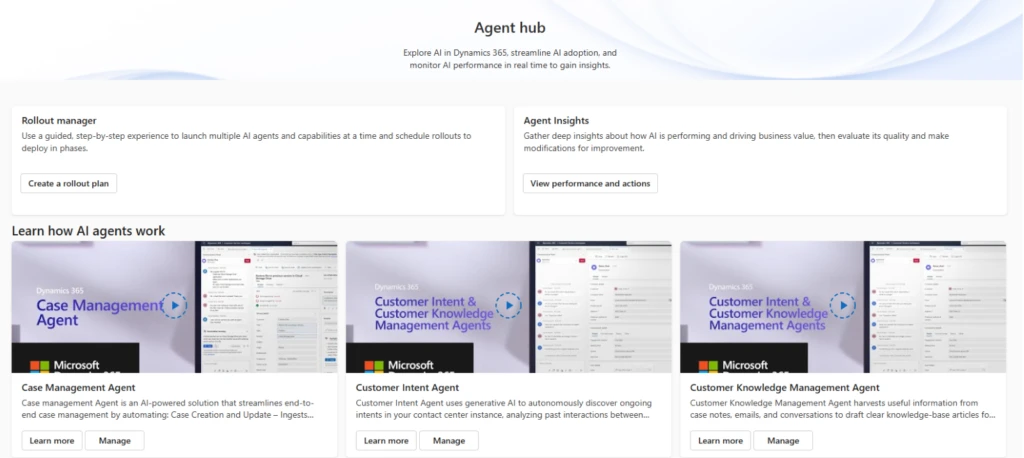
As AI transforms customer service, sales, and operational workflows, organizations are eager to harness its potential. However, questions about control, security, compliance, and performance linger. That’s why we built Agent hub in Dynamics 365. It’s a one-stop hub that empowers customer service and contact center admins and supervisors to safely adopt AI, monitor its impact, and make informed, responsible decisions.
In this blog post, we’ll walk you through why it matters, what it offers, and how it works — featuring our key pillars: Learn, Rollout, and Measure.
Why do we need Agent hub?
Adopting AI in the enterprise isn’t as simple as flipping a switch. Business leaders and IT teams often ask:
Which AI agents are running in our environment?
Are they compliant and secure?
What business value are they driving?
How can we safely test and roll out AI capabilities without disrupting operations?
Agent hub answers those questions by providing transparency, governance, ROI and actionable insights — all in one place.
With Agent hub in Dynamics 365, customers gain:
Transparency — Gain clear visibility into AI agent behavior, security, and compliance posture through the Learn pillar.
Control — Safely adopt AI workflows incrementally by intents and workloads using the Rollout manager.
Performance monitoring — Measure AI agent performance and key KPIs via the performance dashboards in the Measure pillar.
Governance and trust — Drive responsible AI adoption aligned with business priorities and regulatory requirements.
Pillar 1: Learn
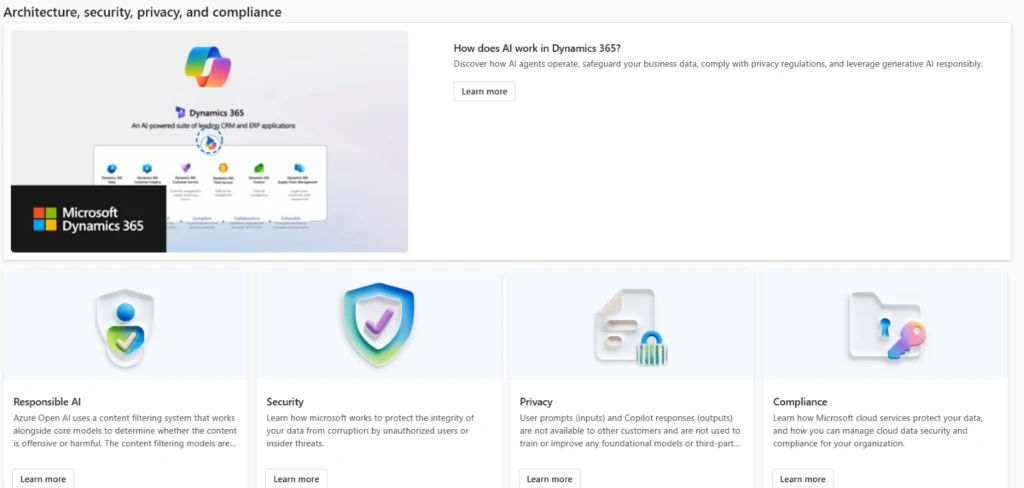
Before enabling AI capabilities, admins can access plain-language, guided overviews of AI agents, security protocols, compliance impacts, and adoption workflows. This helps demystify AI and empowers decision-makers with the knowledge to act confidently.
Key highlights:
Insights into AI agents, Copilot features, and Fully Autonomous Contact Center (FACC) flows
Security, privacy and compliance insights
FAQs on AI in Dynamics 365
Pillar 2: Rollout
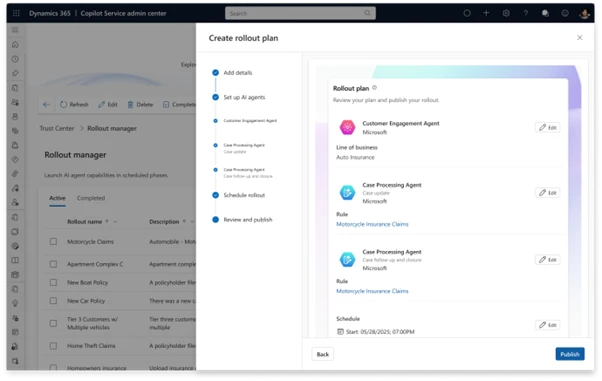
Adopting AI can be safe and controlled. With Rollout manager, you can selectively activate AI agents and autonomous workflows based on specific intents and business rules, giving you full control over which workloads are handled by AI.
Key highlights:
Define rollout plans
Track adoption status and control exposure incrementally
Pillar 3: Measure
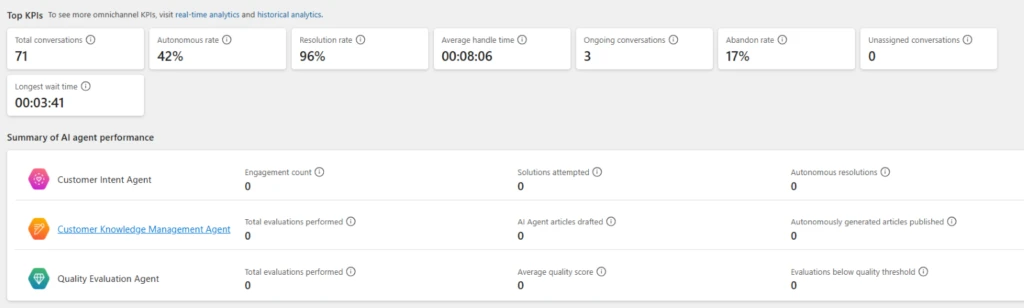
Once an AI agent is live, you need to measure what matters. Performance dashboards for AI agents highlight KPIs like:
Autonomous rate
Resolution rate
Average handle time
Abandon rate
With seamless drill-down to L2 dashboards and actionable insights for AI agents like Knowledge Management Agent, supervisors can continuously measure and optimize AI impact.
The Agent hub in Dynamics 365 isn’t just a tool, it’s a framework for safe, transparent, and value-driven AI adoption. Whether you’re starting your AI journey or scaling enterprise-wide automation, it equips you with the insights and controls you need to move forward with confidence.
Learn more about Agent hub
Ensure your organization stays ahead of customer expectations. Preview Agent hub in Dynamics 365 and share your feedback.
This article is contributed. See the original author and article here.
In today’s connected world, voice communication remains a cornerstone of customer engagement. Whether it’s a support call for customer service or a telehealth session with a doctor, call quality and reliability are critical. That’s where our enriched telemetry and insights come in. Equipped with comprehensive telemetry data, developers and IT teams can monitor, detect, diagnose, and resolve issues with voice call performance, regardless of the calling service provider.
This blog post will guide you through the powerful diagnostics and telemetry tools available in Dynamics 365. You’ll see how they can enhance your contact center’s efficiency and customer satisfaction. By leveraging these tools, you can ensure seamless voice communication, proactively address potential issues, and deliver an exceptional experience to your customers!
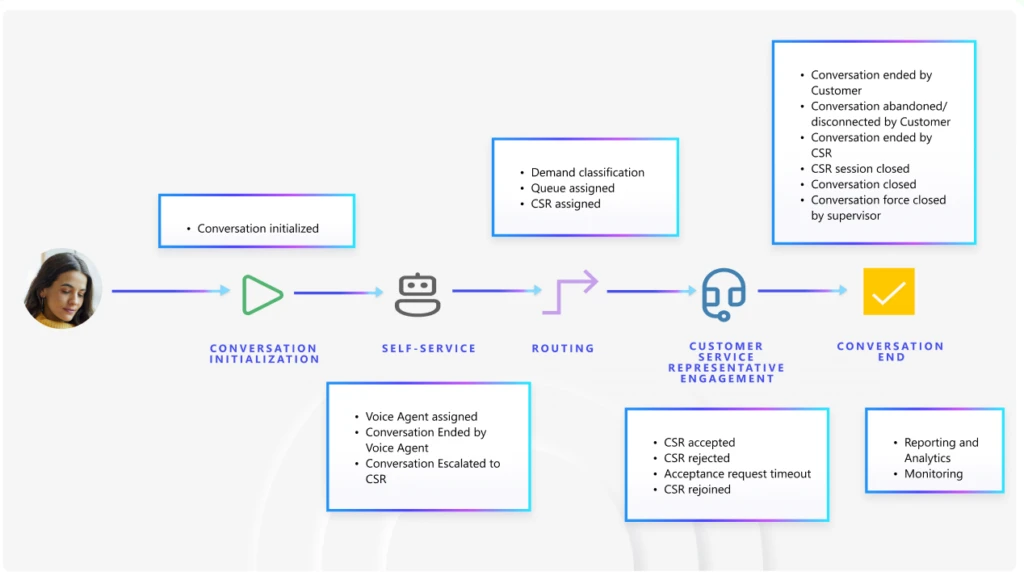
For either an inbound call where callers are calling into the contact center, or outbound calls where agents are contacting customers, there is a lifecycle to every conversation. This lifecycle is typically as below.
We have a wide range of Azure monitoring tools, including Application Insights and Azure Communication Service (ACS) Call Diagnostics in Call Diagnostics Center (CDC). These tools, integrated through Azure Monitor and AppInsights, serve different layers of the communication stack and can be complementary when used together. The telemetry in these tools is usually available within 15 minutes, making them apt for monitoring.
The conversation lifecycle in Application Insights
The conversation lifecycle paints a full picture of the call and does the following:
Captures operationalconversation events: initiation, voice agent handoff, routing to queues, and agent assignment until resolution.
Enables monitoring workflow health, agent performance, and customer service representatives’ performance, as well as customer experience.
Integrates directly with Application Insights to track conversation telemetry and build custom dashboards.
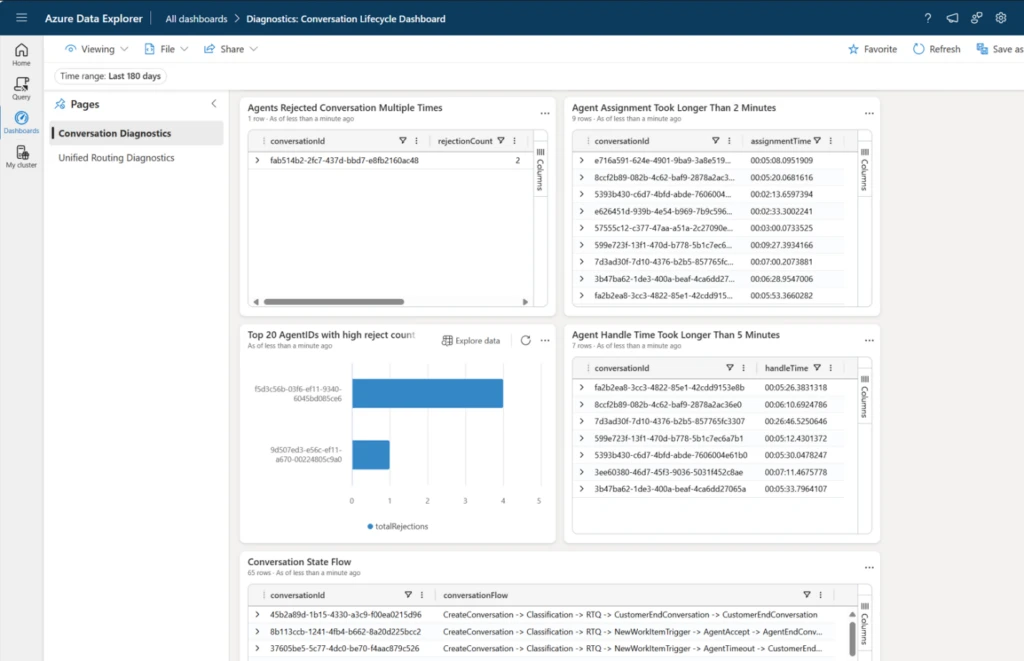
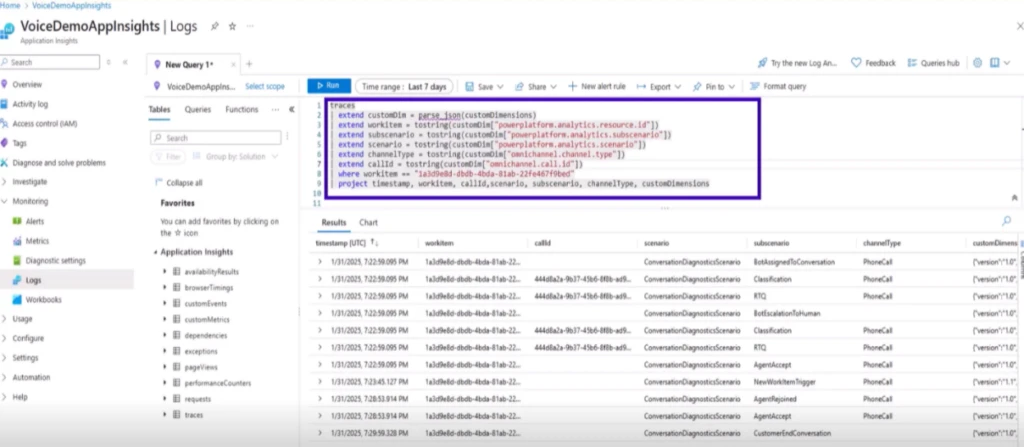
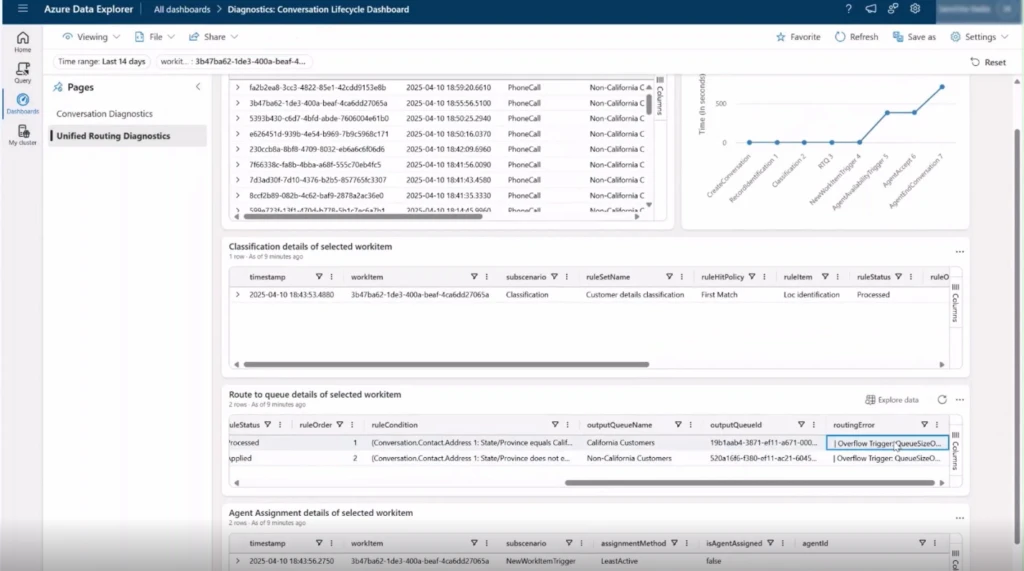
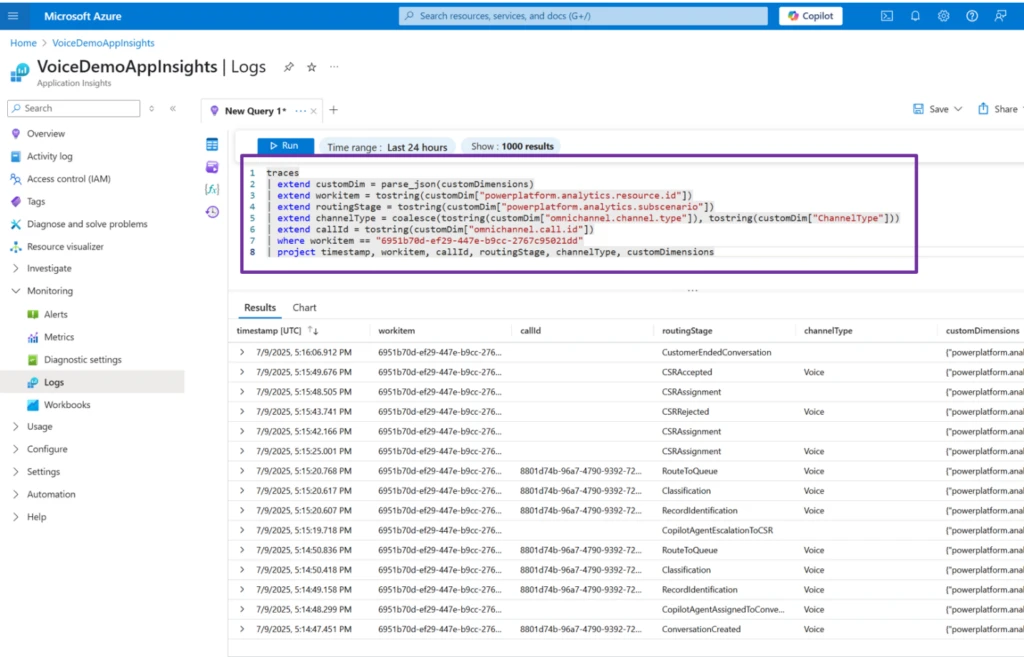
Enables telemetry analysis using our pre-built Azure Data Explorer dashboards. Or, you can simply use these queries to create your own custom queries suited to your business needs. See the sample query here: Configure conversation diagnostics (preview) | Microsoft Learn
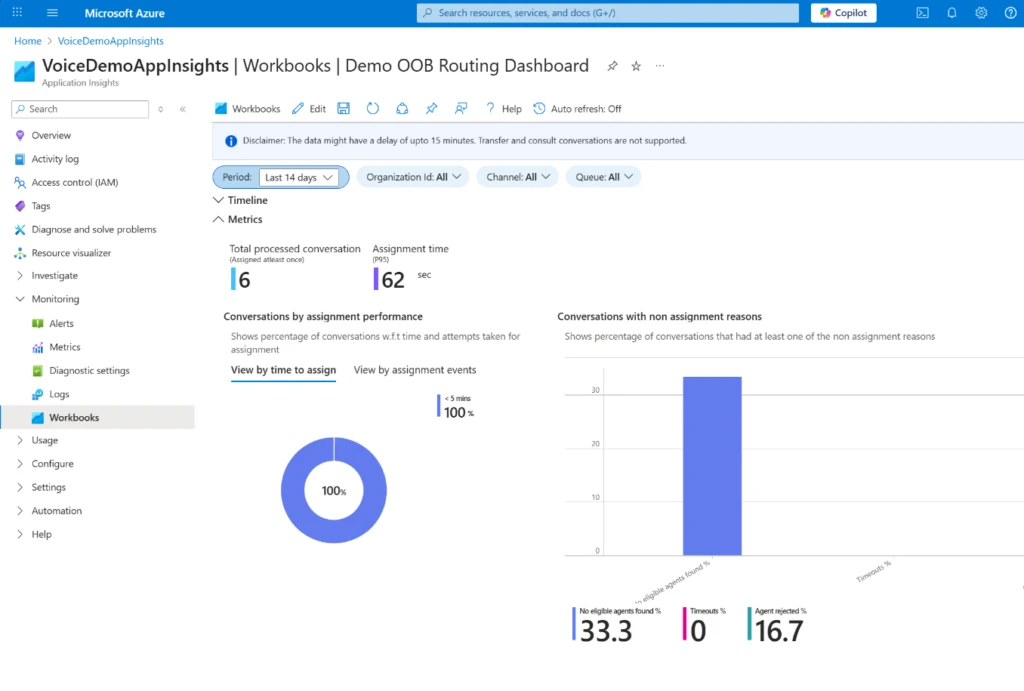
You can now enable out-of-the-box workbooks for viewing all this telemetry in one place. These are in preview right now to try out. Reach out to D365CS_Diagnostics@microsoft.com to enable the reports.
You can also build and edit your own queries in the editor to answer your business questions.
ACS call diagnostics
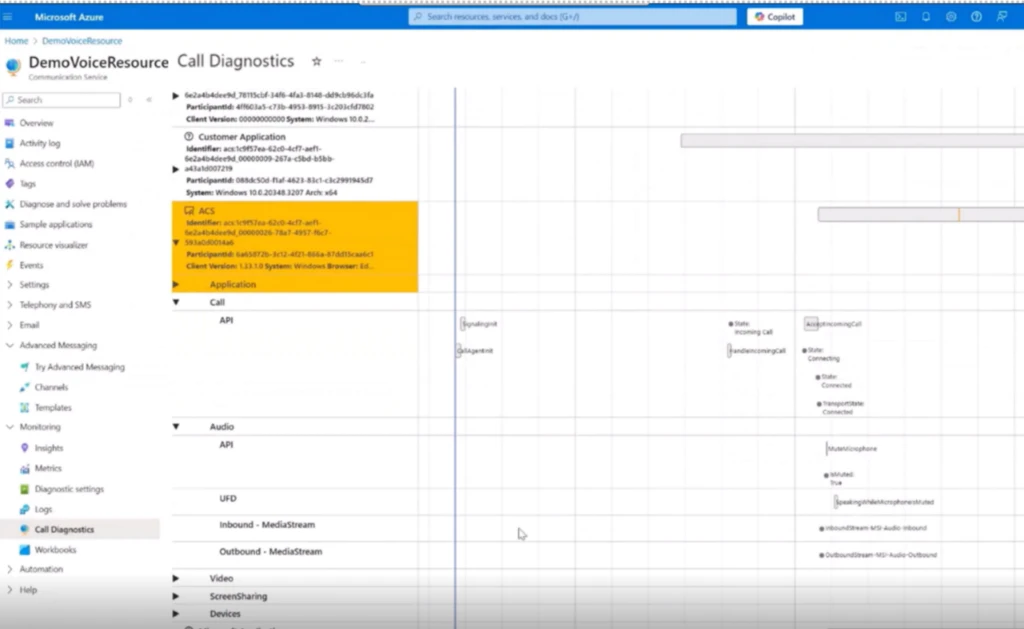
Azure Communication Service (ACS) call diagnostics in Call Diagnostics Center (CDC) help you analyze call telemetry and does the following:
Focuses on media telemetry: audio/video quality, jitter, packet loss, latency, device issues.
Enables technical troubleshooting of call quality and client-side performance.
Can be used for calls from any PSTN operator.
Enables data to be routed to Log Analytics via Azure Monitor for querying and alerting.
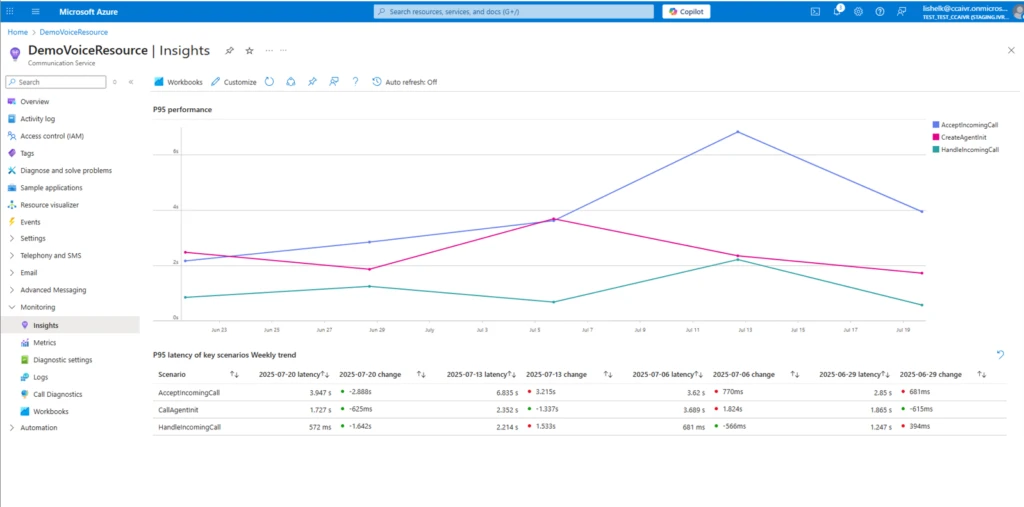
ACS recently rolled out additional telemetry on performance that is handy for identifying and debugging scenarios that have higher than normal latency. You can:
Identify calling SDK APIs that are high latency, for P95 or even P99.
Drill down into individual API scenarios to show detailed performance trend.
You can also see the P95 latency thresholds on this page to use as guidance.
Use cases
Let’s understand how you can use these tools through a couple of common use cases.
Case 1: Optimizing for assignments
As a supervisor, you are tasked with keeping customer service representative assignment time around 3 minutes on average. If assignment time begins to rise, maintaining the same service level requires proactive measures. With assistance from an IT admin, you configure a monitor in Application Insights using conversation lifecycle telemetry. You set the average assignment time to 2 minutes and receive email alerts if the number rises, enabling adjustments.
traces

| extend customDim = parse_json(customDimensions)

| extend

       conversationId =tostring(customDim["powerplatform.analytics.resource.id"]),

       subscenario = tostring(customDim["powerplatform.analytics.subscenario"])

| where subscenario in ("RTQ", "AgentAccept")

| project timestamp, conversationId, subscenario;

let latestRTQsBeforeAgentAccept = subscenarios

| where subscenario == "RTQ"

| join kind=inner (subscenarios

    | where subscenario == "AgentAccept"

    | project agentAcceptTime = timestamp, conversationId) on conversationId

| where timestamp  2min

| project conversationId, assignmentTime
With this query, the alert has a severity of 2, indicating Warning. Additionally, you can select how and when to summarize results, and how frequently to evaluate the calls, and where to send the alerts to. For a critical metric such as assignment time, selecting your evaluation to run every 15 minutes will cost $0.50 a month.
In the midst of a typical day, an alert notifies you that assignment time has exceeded 150 seconds for more than 10 calls in the past 15 minutes. You reach out to the IT admin, who swiftly jumps into action.
Leveraging the tools at their disposal, they begin diagnosing. They first look at the conversations exceeding 150s in the dashboard they set up using Azure Data Explorer Dashboards. There are more than 30 conversations by now where assignment time has exceeded 150 seconds. They choose a few and view their conversation state flow within the built-in views. The IT admin observes an unusually high queue volume. To manage the surge, an overflow rule is triggered, initiating callbacks. The callback duration is then factored into the assignment time, resulting in a higher-than-normal average assignment times.
The IT admin quickly runs a query in AppInsights and identifies a queue with lower call volume. By routing calls to this queue as an overflow action, they can alleviate the strain on the queue experiencing higher assignment times. What once required extensive troubleshooting with Microsoft Support is now effortlessly resolved, with the answers at your fingertips.
Case 2: Optimizing for network issues
As a supervisor, a few of your Customer Service Representatives (CSRs) report dropped calls and network error messages during calls. To investigate, you gather the conversation IDs from your team and reach out to your IT admin for support. The IT admin retrieves the call ID for these conversations by using a query in Application Insights.
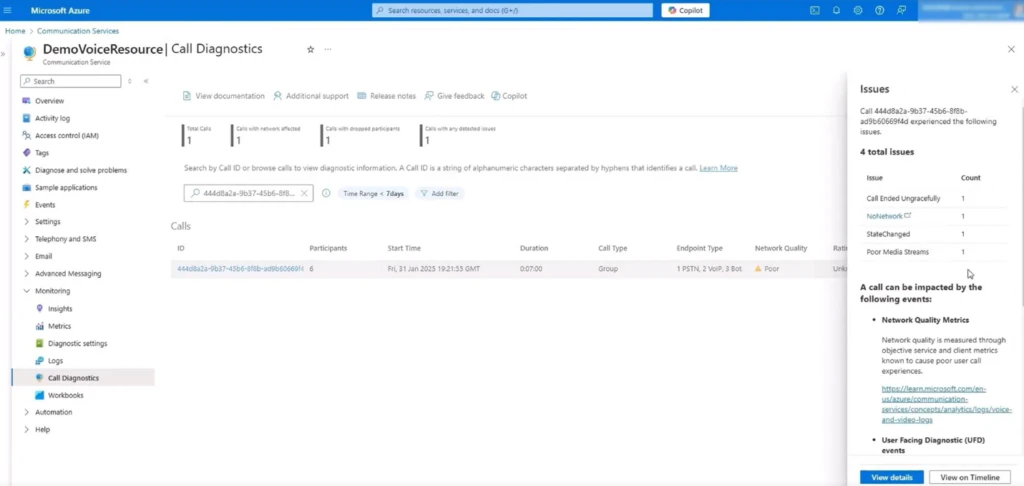
The IT Admin then filters for these call IDs in ACS Call Diagnostics and uncovers a recurring no network error confirming a contact center-wide outage rather than isolated network failures.
To prevent future disruptions, the supervisor ensures calls automatically switch to a backup connection when the primary network goes down, maintaining stability and avoiding dropped calls.
Case 3: Optimizing for call connectivity with SBC
As an IT admin, you are responsible for diagnosing calling issues that may involve a non-Microsoft telephony system connected to Azure Communication Services (ACS) via Direct Routing. These complex calling issues will span both Direct Routing SBCs and ACS. When you see a support ticket about a specific incoming call that traversed your Direct Routing SBC, you start with the call ID generated by the SBC. Your goal is to map this trunk call ID to its corresponding ACS correlation ID and uncover the root cause using end-to-end telemetry.
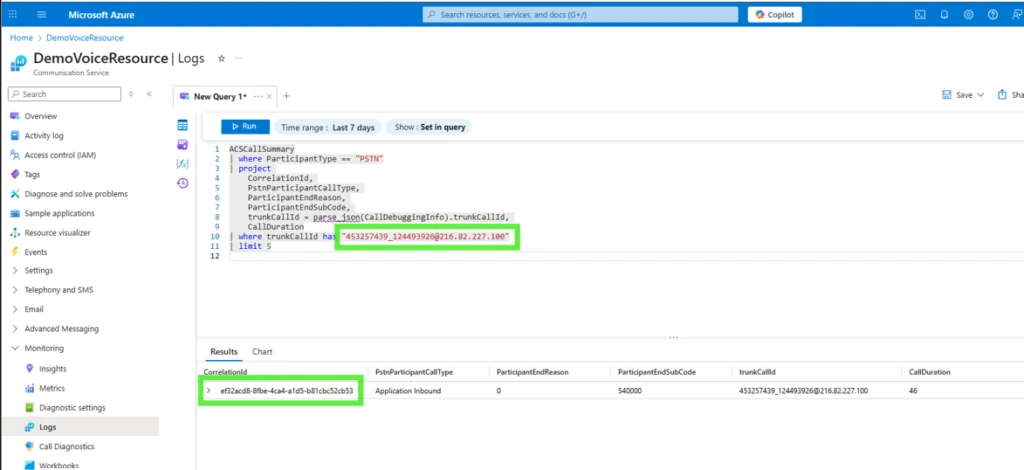
Inside your ACS resource, you navigate to Azure Monitor, then to Monitoring > Logs. There, you run a targeted query on the ACSCallSummary table. Replace trunkCallId with the specific call ID from the Direct Routing SBC for the call you want to troubleshoot.
ACSCallSummary

| where ParticipantType == "PSTN"

| project

    | CorrelationId, PstnParticipantCallType, ParticipantEndReason, ParticipantEndSubCode,

    | trunkCallId = parse_json (CallDebuggingInfo).trunkCallId, CallDuration

| where trunkCallId has ""
This query returns the ACS correlation ID linked to your SBC-generated call ID. With this correlation ID in hand, you proceed to ACS Call Diagnostics. Running the correlation ID through the diagnostic tools, you discover a recurring pattern: “No Network” errors appear consistently for calls routed through this path, confirming that the problem is not isolated to a single user or device.
Instead, your investigation reveals a contact center-wide network outage impacting all calls passing through the affected Direct Routing SBC. With actionable evidence, you escalate the incident for resolution, ensuring future calls are routed via healthy trunks, and document your findings for compliance and proactive monitoring.
By leveraging intuitive dashboards, real-time alerts, and deep integration with Azure services, organizations can quickly identify bottlenecks, optimize performance, and deliver consistently exceptional customer experiences. Embrace these powerful tools to transform your operations, delight your customers, and stay ahead of the competition.





Recent Comments