
by Contributed | Dec 7, 2020 | Microsoft 365, Office 365, Technology
This article is contributed. See the original author and article here.
What is a PowerPoint Party?
Yes, it is a real thing! The PowerPoint party has been growing in popularity since COVID required social distancing began, but PowerPoint parties have been entertaining people long before 2020. PowerPoint Parties are a great way to interact with your family this holiday season! Everyone invited to your party is asked to prepare a short presentation on a topic of their choice, or assigned in advance by the group, and they will present their PowerPoint to the group on their The topics can be fun and lighthearted – we all need that in unprecedented times like this!
How to get a PowerPoint Party planned…
Below are some steps for you to follow to successfully throw an online gathering like this!
- Plan a theme: Throw a virtual game night, online happy hour, formalized “vent session” or watch party!
- Create your deck (and help inspire your friends to create their PowerPoint with these easy templates and tools….
This is an accessible PowerPoint Party template to get you started: PowerPoint party (office.com)
Here are some additional fun templates that may get your creative
- Make it more visually appealing – this isn’t your Father’s PowerPoint
You can use additional PowerPoint features like zoom and morph to make your slides more visually appealing and compelling for your virtual audience!
- Get your party started!
Naturally, we share our presentations via Microsoft Teams. But, you can host a PowerPoint party on the video conferencing platform of your choice. For the best Teams experience, share using PowerPoint sharing in Teams via the share tray. This will provide you with the best experience for both you and your audience: Share content in a meeting in Teams – Office Support (microsoft.com)
- Have Fun!!
- Repeat often!
All in all, PowerPoint Parties are a great way to connect with friends, family, or colleagues over the holidays. Whether you’re planning an online shower, virtual birthday party, or just hanging out, PowerPoint has got you covered.
by Contributed | Dec 4, 2020 | Microsoft 365, Office 365, Technology, Tips and Tricks
This article is contributed. See the original author and article here.
Whether your team is working hybrid or working around the world, it’s always great to stay connected personally and professionally with members of your team. Many teams use scheduled get-together meetings in Teams to hold book clubs, celebrate a special moment, or just gather together and catch up on weekend plans. Conversations are always central in these meet ups – but we also know that every get together can be more fun and connecting with quizzes and games. Within Microsoft Teams, there are several good options for hosting these events, virtually.
Running Kahoot! Quizzes and Trivia in your meeting
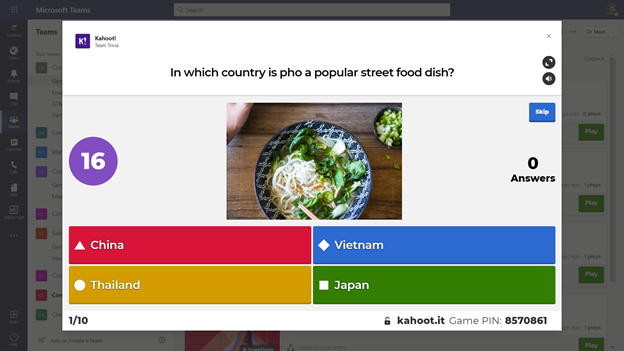
Who doesn’t love great trivia or a friendly competitive quiz? For hosting these for your team, a good option is to use Kahoot! – which is available as a standalone app and with an associated integration directly within Microsoft Teams. Kahoots are engaging quizzes and challenges you can create and re-use within your team. These quizzes can be questions for learning or adding interactivity to presentation experiences, and in addition, you can also use Kahoot! to create team trivia challenges for your next team gathering.
With the Kahoot integration inside of Microsoft Teams, you can see a dashboard of your designed Kahoots, and use them during meetings to spur friendly competition. Before the meeting, design your Kahoots and add questions and answers. In addition to exploring and using questions from popular Kahoots via the Discover option, consider mixing in various forms of general trivia, trivia specific to topics for your team, or maybe trivia about your team specifically.
When it is time for the meeting itself, you can launch a Kahoot from the Kahoot app tab within Teams. Expand the Kahoot! gameplay window, and then share that during a meeting by sharing your screen. Make sure to use the Include computer sound option when you share. Once the Kahoot! gameplay screen is shared, attendees can join in and answer questions from their own devices. Answering question quickly matters, and you’ll soon see a friendly competition bloom. You can find out more about Kahoot! on kahoot.com, and you can add the Kahoot! integration for Microsoft Teams from AppSource.
Using Jackbox Games with Microsoft Teams screen sharing
Jackbox Games are the makers of several party games that are great to play together in person or virtually. From speech games like Talking Points to drawing games like Drawful and witty quip games like Quiplash – there are a wide variety of games and styles to suit every taste. Most games run for about 15-25 minutes with straightforward rules and quick tutorials, so they are easy to pick up and play. Most games support up to 8-10 players, and some have additional audience viewing options if you have extra visitors.
Jackbox Games are available for a wide variety of devices and consoles, but if you want to use Jackbox within a virtual Microsoft Teams streaming session, we’d recommend getting Jackbox on your PC or Mac. The host of the virtual get-together will need a copy; the attendees in the meeting can follow along on their devices. Every player will join the meeting and then connect to the Jackbox game with a room code – which they can do in a web browser or on a separate device, like their phone. It is easy and takes seconds to get everyone started on a game.
You’ll likely want to use Steam – a service for purchasing and installing games – to get Jackbox games. These games come in Party Packs of 5 games each – so each Party Pack provides a lot of choices for different gameplay styles. No one will be bored, and any party pack will work well – the most recent Jackbox Party Pack 7 features both Quiplash 3 and Blather ‘Round which work well in virtual game settings.
As you host your virtual get-together, you’ll want to start up the Jackbox Party pack of your choice. Use the screen sharing option in Teams, and make sure you check the “Include computer sound” option.
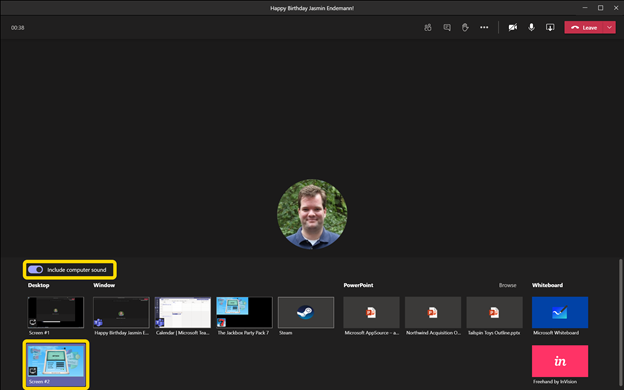
From there, start up a game and your room code will be visible, and attendees can join in.
Tips for using Jackbox Games in a Teams meeting
As you start your Jackbox Games, we recommend a couple of options:
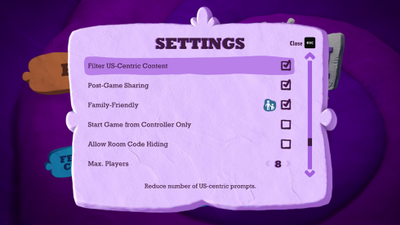
In almost every Jackbox Game, there is a “Family Friendly” checkbox – you may want to consider checking that for your work conversations.
In a few Jackbox Games, there is also an option to filter out US-centric content, if you want to have questions or prompts that are more broadly relevant to teammates around the world.
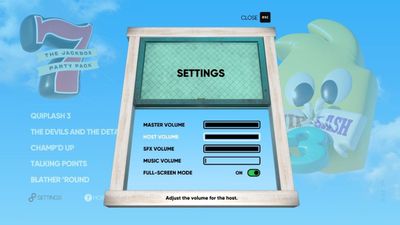
Also, to keep the sound of the game from potentially drowning out your virtual guests and conversation while attending, in some cases you may want to consider turning down the background music.
Also, some more advanced tips can help your virtual party even more:
- If you have it, hosting a game with two screens (e.g., your laptop screen plus a plugged-in monitor) can work better, as you can place Teams on one screen and Jackbox on the other. That way, it is always easy to see your teammates and the game at the same time.
- Using headphones can also help with isolating the sound of the game from the conversation.
We hope you get to explore the wide variety of games and quiz options for having fun, virtually, with your teammates. While the centerpiece of any virtual gathering is the conversations that you’ll have virtual activities through Kahoot! and Jackbox Games, you can help to break the ice, provide some memorable experiences, and heck – have some fun! – in almost any meeting you run.
by Contributed | Dec 3, 2020 | Dynamics 365, Microsoft 365, Technology
This article is contributed. See the original author and article here.
In today’s digital economy, delivering an exceptional customer experience across every touchpoint has quickly become a competitive differentiator. Most organizations realize if they hope to remain successful they must effectively leverage the vast amounts of data available to them in order to support the personalized engagement that customers expect. According to McKinsey, organizations that harness customer data for insights can achieve revenue gains of 5 to 10 percent and reduce costs by 15 to 25 percent within two or three years. Yet, with the numerous applications and systems organizations use across multiple lines of business, it can be challenging enough to unify all of this data to gain a single source of truth and insights, let alone make those insights actionable.
Microsoft Dynamics 365 Customer Insights is a customer data platform (CDP) built to help organizations do just that. Connecting seamlessly to systems of engagement across lines of business and vendors, Dynamics 365 Customer Insights offers data activation on your own termsadding value and complementing your existing investments. Moreover, it allows data to flow both waysfirst ingesting and interpreting all of the data from your various systems, applying artificial intelligence (AI) to derive insights, and then activating those insights directly to the line of business applications that enable action.
Data ingestion and unification
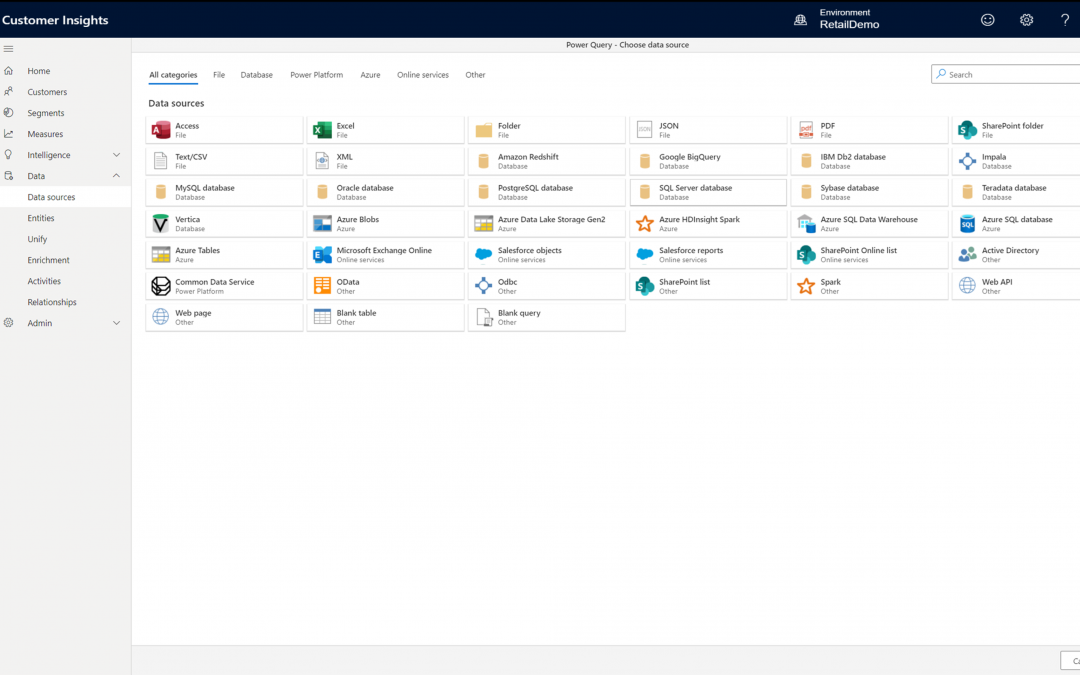
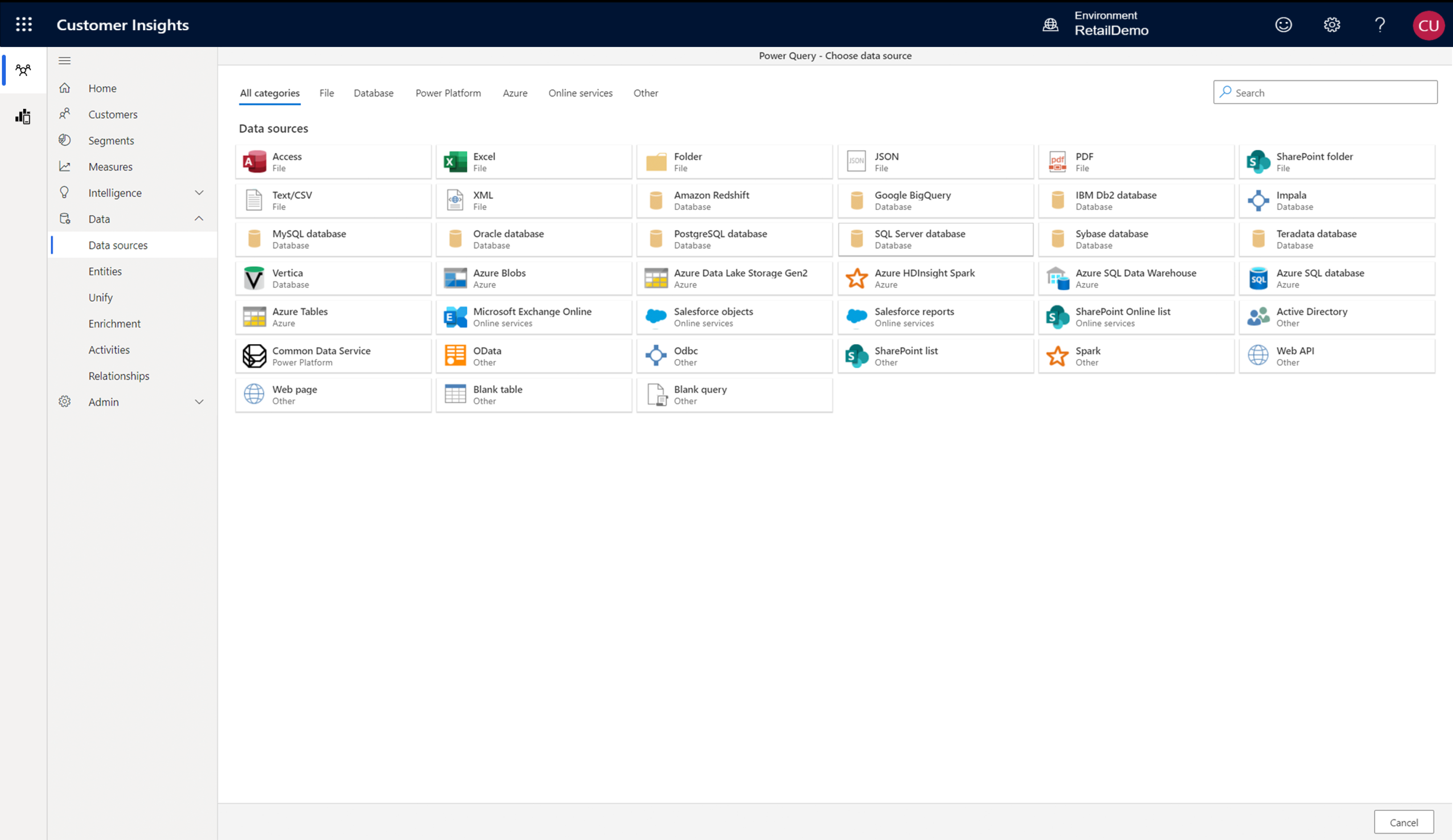
Dynamics 365 Customer Insights reduces the time it takes to collect data from all your business applications, vendors, and engagement sources. Pre-built connectors simplify the process of pulling in data from first- and third-party data sources such as Microsoft Dynamics 365, Microsoft Azure SQL Database, Microsoft Azure Blob Storage, Salesforce, and SAP. The engagement insights (preview) capability in Dynamics 365 Customer Insights captures signals from websites, mobile apps, and connected products. Once the data is ingested, it’s a three-step process to map, match, and merge the data into a single, unified view of every customer.
Activation across lines of business and systems of engagement
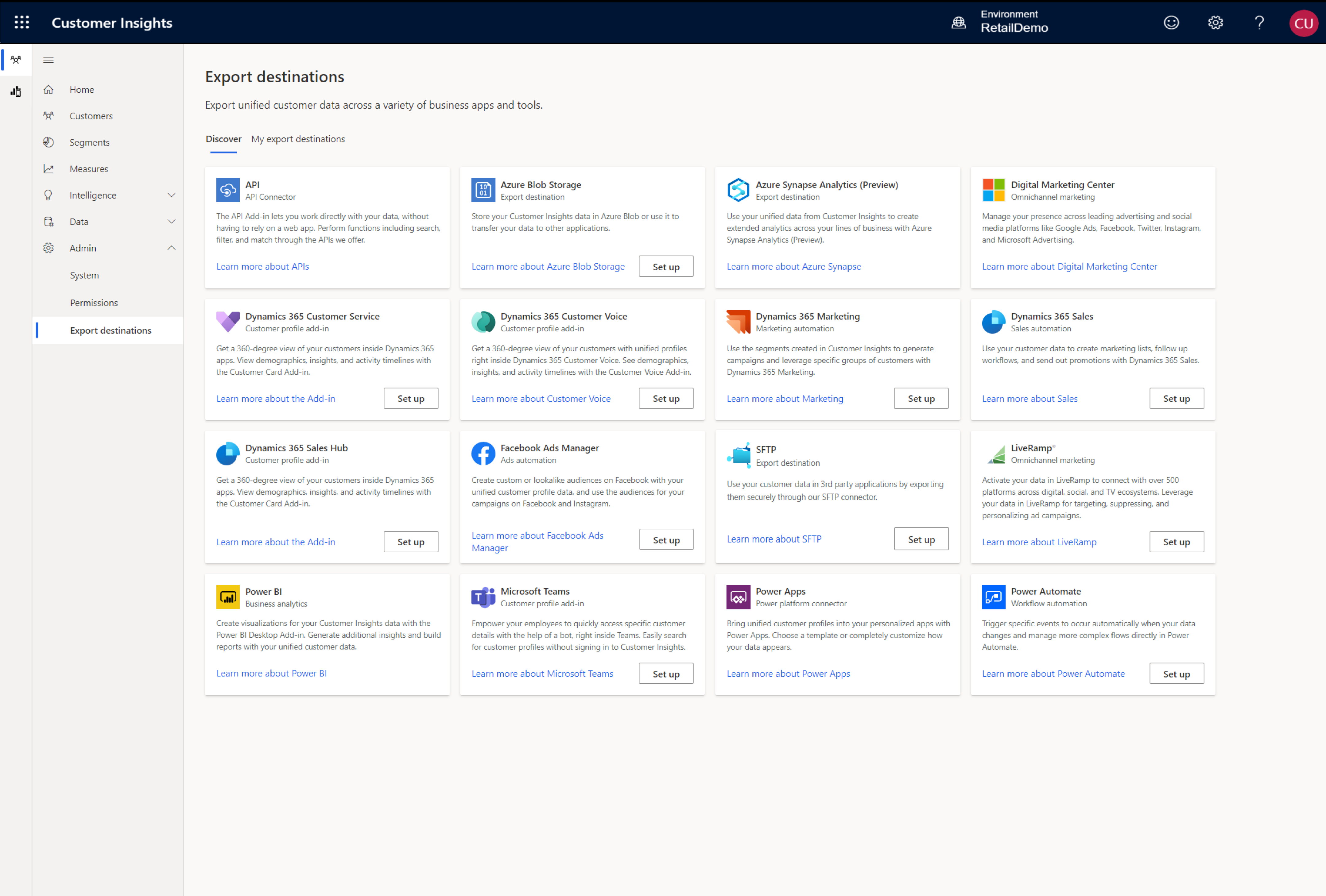
Dynamics 365 Customer Insights helps your organization surface insights directly within the applications and systems your organization uses every day to enable action across all lines of business. Export the unified profiles, measures, or segments to the applications relevant to your business. Provide your marketing team with the customer segments for targeted lead generation, enable sales team with cross-sell and upsell recommendations, and empower customer service to provide pro-active omnichannel support. A rich collection of APIs allows you to connect Dynamics 365 Customer Insights to third-party solutions or your own applications, like CRMs, email automation tools, social media platforms, POS, ERP, and more.
Adapt and extend
Dynamics 365 Customer Insights connects the data within your organization, but it can also scale and support your resources on demand. Pre-built connectors to Microsoft Power Platform solutions make extending even easier, providing more ways to orchestrate and personalize your unique customer journey.
- Build custom apps with embedded customer insights by using Microsoft Power Apps
- Connect your customer data with Microsoft Power BI to customize dashboards and reports
- Trigger workflows in response to customer signals using Microsoft Power Automate
Valuable insights derived from data
Campari Group, a global spirits manufacturer, used Dynamics 365 Customer Insights to unite a technology stack that spanned multiple systems and vendors and used the insights to enhance the value that the company derives from its data. Campari Group has grown rapidly through acquisitions, each bringing with it another IT landscape to integrate including CRM systems from SAP and Salesforce; web experience and content management systems such as Adobe Creative Cloud, WordPress, and Drupal; analytics platforms and tools like SAP Analytics Cloud, Google Analytics, and Power BI; and marketing automation platforms and social media tools such as HubSpot, Sprinklr, Eventbrite, and Constant Contact.
Campari Group established API connectors to the numerous data sources that the company draws from, including social media, event marketing, and Wi-Fi connection databases. They quickly began to benefit, thanks to the out-of-the-box, AI-driven data segmentation capabilities of Dynamics 365 Customer Insights.
“In just two weeks, we connected all of the data points in Customer Insights and deployed our first email marketing automation campaign against those segments in the United States,” says Chad Niemuth, Vice President, Global ITMarketing and Sales at Campari Group. “We then rolled out to the United Kingdom in two weeks and Australia in two weeks. With Dynamics 365, we’re able to be very agile and continuously roll out new capabilities for our campaigns.”
Gain a holistic view of your customers
Take a guided tour to see how your organization can use Dynamics 365 Customer Insights to unlock insights and drive personalized customer experiences.
Join our on-demand webinar, “Deliver connected experiences with customer data platforms” to learn the role of AI and machine learning in a customer data strategy, how to shape a customer journey that extends beyond marketing, and more.
The post Unify ecosystem-wide data with a flexible customer data platform appeared first on Microsoft Dynamics 365 Blog.
Brought to you by Dr. Ware, Microsoft Office 365 Silver Partner, Charleston SC.

by Contributed | Dec 1, 2020 | Microsoft 365, Office 365, Updates
This article is contributed. See the original author and article here.
At Microsoft, we believe that data-driven insights are crucial to empowering people and organizations to achieve more. We also believe that privacy is a human right, and we’re deeply committed to the privacy of every person who uses our products. As part of that commitment, today we’re making changes to Productivity Score.
The post Our commitment to privacy in Microsoft Productivity Score appeared first on Microsoft 365 Blog.
Brought to you by Dr. Ware, Microsoft Office 365 Silver Partner, Charleston SC.

by Contributed | Dec 1, 2020 | Dynamics 365, Microsoft 365, Technology
This article is contributed. See the original author and article here.
Even in challenging times, the holiday season’s irresistible deals attract both customers and fraudsters. A differentiated fraud prevention strategy is essential to keep a merchant’s fraud losses minimized while letting legitimate customers continue to have a smooth shopping experience.
Consumers often change buying and engagement patterns with merchants during the holiday season like shipping to a new address when buying a gift or adding a new card on file that may give them higher rewards or a higher spending limit.
These new consumer behaviors pose a challenge for fraud prevention because it makes it more difficult to differentiate between fraud attempts and legitimate purchases.
Online purchases are expected to increase this year due to social distancing requirements. Now more than ever merchants need to adopt a differentiated strategy for fraud preventionone that helps adapt and respond to changing customer behaviors and minimizes fraud loss.
Here are three tips for the holiday season to help keep fraud low and maximize gains during these peak sales times.
First: Identify your fraud attack zone
While this may sound like a no-brainer on the face of it, identify and make a list of products in your portfolio that fraudsters can benefit from, either by reselling the products or using it themselves.
One of the key strategies in fraud defense is to identify where you are likely to be attacked. A product that is of limited supply or being posted with a high discount is more likely to be targeted than a product that is abundantly available year-round and has a low discount. Digital goods, especially one-time or non-subscription digital goods, tend to be targeted more than physical goods.
Commonly, these will also be the products most of your customers want and are the star items of your holiday deals.
Loosening fraud-decision thresholds on these products could make you a soft target for fraud. Instead, evaluate if you can apply limits such as maximum quantity and then use it in a watch-list fashion for reviews and reporting.
If you have a process in place for manually reviewing some transactions, consider adding confirmation or shipping delays until the review is completed.
Second: Set up rapid internal fraud communication channels
Core sale events and accompanying fraud attempts can last from a few hours to days. During which there will be an outburst of information coming from customer escalations, social engineering attempts, reports of successful purchases, and successful fraud prevention.
Weeding out noise from useful signals in real-time is essential. Normal communication methods such as support tickets and email messages can’t scale to meet these needs.
Set up channels that promote cross-functional communication in real-time, such as incident management tools, command room techniques, or collaboration tools such as Microsoft Teams. Include fraud analysts, review agents, customer support agents, and any other teams involved in handling fraud or customer escalation in these rapid communication channels. This helps with quick resolution of any false positives (customers blocked due to fraud suspicion) and to identify new fraud patterns as well as react to them.
Third: Monitor trends as near to real-time as possible
During the rush of holiday sales activity, it is essential to monitor the trends as near to real-time as possible and as granular as possible. Set up reporting on decisions and trends such as reject rate, approval rate, review rate, and trends of total volume and score distribution with views across slices of products, geographies, and user segments. All teams responsible for fraud prevention should always have a hawk’s eye on these reports and be ready to quickly jump-in if suspicious trends are seen.
How Microsoft can help your business combat fraud efficiently this holiday season
If you are currently using Dynamics 365 Fraud Protection, you can use the virtual fraud analyst capability to get a segmented view across your products and fraud profiles. The scorecard gives you a real-time view of the performance and support tool that helps to search and investigate all transactions including risk information and history. You can also enable the transaction acceptance booster feature to share data with banks in real-time to maximize customer experience and reduce wrongful declines.
Next steps and continued learning
If you are not currently using Dynamics 365 Fraud Protection, you can learn more and start a free trial to see what additional value you can bring to your business and customers.
The post 3 ways to minimize fraud this holiday season appeared first on Microsoft Dynamics 365 Blog.
Brought to you by Dr. Ware, Microsoft Office 365 Silver Partner, Charleston SC.
by Contributed | Nov 30, 2020 | Dynamics 365, Microsoft 365, Technology
This article is contributed. See the original author and article here.
Effective December 1, 2020, for all 10.0+ versions of Dynamics 365 Financial Dimension Framework we are preventing deletion from the following Dimension tables:
- DimensionAttribute
- DimensionAttributeValue
- DimensionAttributeSet
- DimensionAttributeSetItem
- DimensionAttributeValueSet
- DimensionAttributeValueSetItem
- DimensionAttributeValueCombination
- DimensionAttributeValueGroupCombination
- DimensionAttributeValueGroup
- DimensionAttributeLevelValue
This change is applied directly in the database and follows the same business logic that is used within the application.
These changes protect the integrity of the financial accounting data. Any customizations or scripts will need to be immediately updated to comply with these changes. Note that updating data to blank values is not a valid solution because this corrupts data. In the future, we will also not allow table updates.
Why the changes were necessary
These tables were originally designed to be immutable data structures, which means that they are completely controlled by Microsoft or the official X++ APIs designed for extenders. This design allowed for high throughput and durable references that could stand the test of time when performing historical regulatory reporting.
Unfortunately, many extenders have worked around these guidelines to delete records from the tables directly, leading to data corruption and downstream impact. Examples of such issues include:
- Duplicate account rows in financial reports that are frequently used in year-end account reconciliation processes.
- Transactional processing failures that prevent the ability to post documents like Sales order invoices or Purchase order invoices, among others.
- Historical reporting errors and/or changes resulting in the inability to meet auditing and/or regulatory reporting requirements.
- Year-end processing that may be blocked due to out-of-balance errors.
Fixing these issues is extremely error-prone and time-consuming to both customers and Microsoft. Potential fixes also put the accounting data at risk, and greatly limit the ability to focus on go-forward improvements.
Product support
Microsoft does not provide support on customizations or direct SQL queries to the above-mentioned tables. This means that front-line support and engineering teams will not be able to help with issues caused by these customizations. If you encounter data corruption due to customizations or running direct SQL queries, contact our services team or delivery partners for assistance. It is very important that you update all customizations or direct SQL queries that delete records from these tables. In the future, Microsoft will provide a tool for self-service correction of data for targeted scenarios.
Next steps
For detailed information about financial dimensions and the risks of changing data directly, see Part 6: Advanced topics in the “Ledger account combinations” topic. To address one of the known requests of hiding or inactivating values that are no longer relevant, we will prioritize the ability to support “soft-deletions” and the corresponding removal of unused references. If you have additional requests, please share them in the Dynamics 365 Application Ideas portal.
The post Prepare for dimension table changes in Financial Dimension Framework appeared first on Microsoft Dynamics 365 Blog.
Brought to you by Dr. Ware, Microsoft Office 365 Silver Partner, Charleston SC.


Recent Comments