Sales accelerator brings digital scalability within reach

Sales accelerator brings digital scalability within reach

This article is contributed. See the original author and article here.

It’s no secret that fully embracing digital sales experiences is increasingly necessary to stay in the sales game. By 2025, this shift will be business as usual. What does this mean for sales organizations? Gartner analysts breaks it down in a recent trend insight report, “The Future of Sales in 2025: Why B2B Sales Needs a Digital-First Approach.”

  • 80 percent of B2B sales interactions between suppliers and buyers will occur in digital channels. Sales teams will need to merge their sales processes, apps, data, and analytics into a single operational practice that will scale and won’t require weeks of training.
  • 60 percent of B2B sales organizations will transition from conventional wisdom and intuition-based selling to data-driven selling, according to the “Future of Sales 2025: Data-Driven B2B Selling to Drive Digital Commerce.”
  • As buyers become savvier and want less frequent but more informed interaction with sales reps, sellers must figure out how to show up at the right time to help buyers make sense of the research they’ve done.

The right time to reach out

As buyers try to go at it alone, they are often overwhelmed by the volume of trustworthy information available, and over half of buyers have found supplier information can contradict trustworthy sources. Buyers dealing with this kind of complexity often become uncertain in their decision, making them less likely to make a purchasing decision at all. Now is the time for sellers to add guidance and help customers make sense of the research and what’s best for their company. However, most organizations lack the automation, AI augmentation, and digital scalability to deliver the experience buyers seek. By successfully undergoing a digital transformation, organizations should empower human sellers to deliver the right information, at the right time.

Introducing sales accelerator for tailored experiences

For many sales teams, implementing the technology and human skills to keep up with the evolving demands of digitally savvy customers may seem like a stretch, even for 2025. That’s why we’re introducing sales accelerator, a digital selling capability of Microsoft Dynamics 365 Sales. Sales accelerator helps sellers work faster and smarter with a prioritized work list of the next best lead or opportunity, allowing them to engage through their customers’ preferred channel with integrated email, phone dialer, and a Microsoft Teams channel (coming soon). Sellers are equipped with timely, AI-driven insights and recommendations based on customer events and needs, so sales teams know when to offer customer guidance.
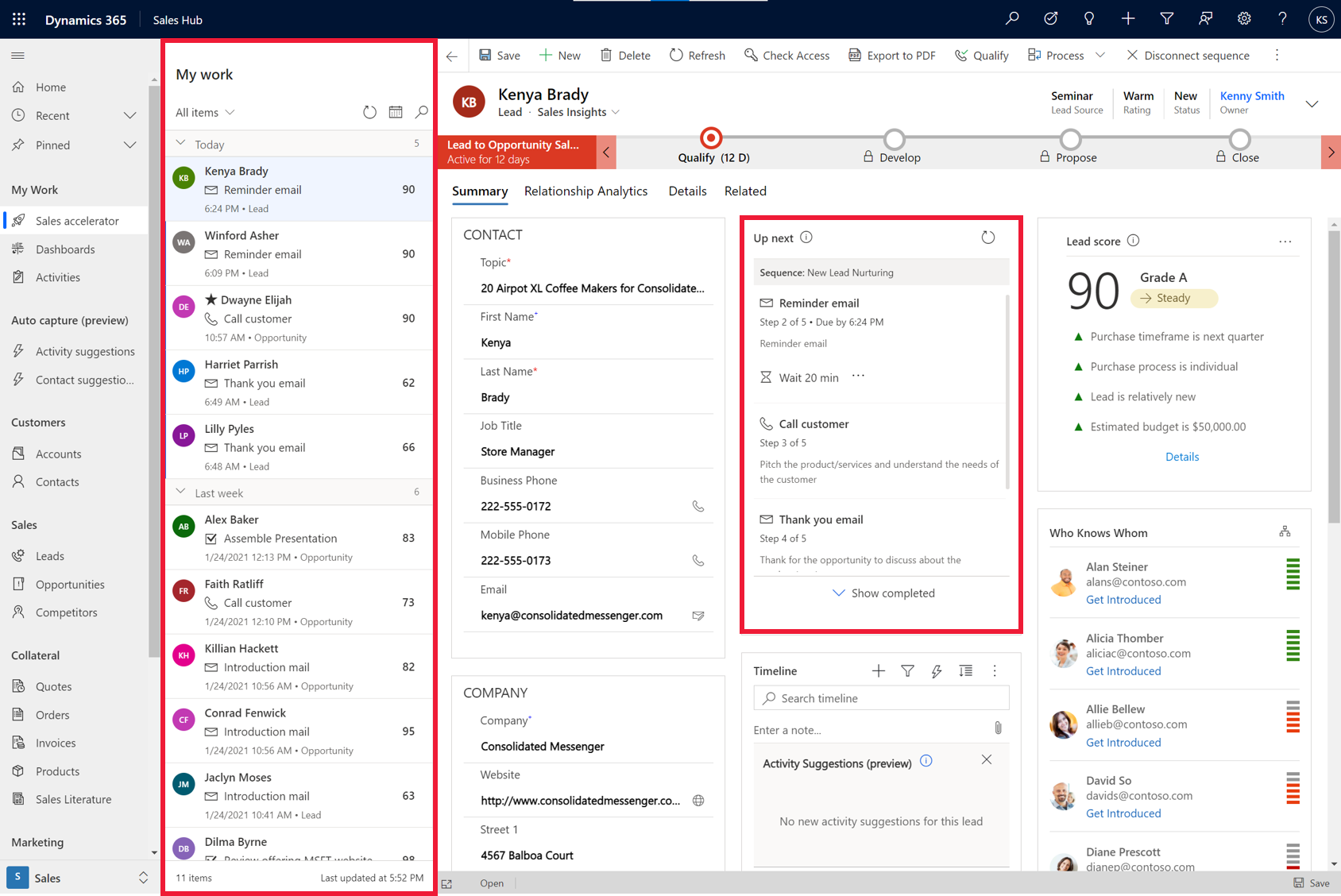
image of sales accelerator UI

“Sales accelerator has provided our agents with a single location to prioritize and conduct their important work every day. Along with sequences we’ve been able to keep the agents more organized and focused on communicating with people interested in staying at our hotels.”

“We receive a tremendous amount of leads daily and the sales accelerator provides a platform for our agents to prioritize and focus on selling without scrolling through a long list of leads to find out what’s next. This along with the addition of sequences has allowed us to create a simple sales cadence that our agents can follow to increase conversion. Once a lead is assigned all of the work is published to the sales accelerator for the agent to follow. They simply log in and start selling,”Brian Miller, Director of Sales for Brittain Resorts and Hotels.

Prioritizing your day and scaling up

As fewer sellers are dealing with a greater number of customers, it can be difficult to determine whom to engage with, or the next best task. With sales accelerator, all actions and activities that need to happen that day are prioritized and organized in a work queue. The seller has flexibility to sort and filter based on key attributes such as scoring, urgency and source. Each record presents the next best action based on organizational sales sequences set up by the seller or their sales manager.

As sellers run through an extensive list of leads, they often struggle to gain a holistic view, including communications history, customer needs, and specific circumstances. This view is necessary for crafting the most relevant pitch to the customer, achieving a positive outcome.

A powerful feature of sales accelerator is the data-driven context it gives sellers for each potential customer’s journey. Without navigating away from their screen, sellers benefit from a comprehensive view that captures and surfaces customer data, past and present activities, and insights into one place to help craft the right message at the right time. Trigger events like a customer doing research on a seller’s site, requesting a white paper, or responding positively to a call or email can prompt suggested actions the seller might take to best nurture the sale.

“The new sales accelerator capabilities in Microsoft Dynamics 365 Sales has been a game changer. Using My Work List and Up Next widget in conjunction with Sequences in the new sales accelerator help our reps stay focused and prioritized so they always know the next most important task to complete.”Lowell Vande Kamp, CIO and Chief of Staff at Synergis Education

Sales accelerator can make digital scalability a reality. Learn more about sales accelerator and Microsoft Dynamics Sales.

Watch a demo or take a guided tour to see how Dynamics 365 Sales can empower your sellers with actionable insights.

For more technical details, check out our blog, “Enable digital selling with the sales accelerator in Dynamics 365 Sales.”

The post Sales accelerator brings digital scalability within reach appeared first on Microsoft Dynamics 365 Blog.

Brought to you by Dr. Ware, Microsoft Office 365 Silver Partner, Charleston SC.

5 scenarios that show how credit limits are determined in Dynamics 365 Finance

5 scenarios that show how credit limits are determined in Dynamics 365 Finance

This article is contributed. See the original author and article here.

In Dynamics 365 Finance, you can use the credit management capability to define a credit limit at the customer level. However, the same customer might also be part of a customer credit group that has its own credit limit. So how does Dynamics 365 Finance determine which limit to use for sales orders when there’s a limit set in both places?

Here are five scenarios that describe how customer credit groups and individual customer credit limits affect each other.

Scenario 1: Individual limit is lower than the group limit

  • Individual customer credit limit = 10,000
  • Customer credit group limit = 15,000

How the credit limit is determined: The customer’s effective credit limit is 10,000 because it’s less than the group limit. Blocking rules first check the group limit, and the customer passes these rules. Blocking rules then check the individual customer credit limit and blocks any orders greater than 10,000.

Scenario 2: Individual limit is higher than the group limit

  • Individual customer credit limit = 20,000
  • Customer credit group limit = 15,000

How the credit limit is determined: The customer’s effective credit limit is 15,000 because blocking rules always check the customer group credit limit first.

Scenario 3: Individual limit is 0.00 and mandatory credit limit is enabled

  • Individual customer credit limit = 0.00 and mandatory credit limit option is set to Yes
  • Customer credit group credit limit = 15,000

How the credit limit is determined: Even though the customer is part of a group, their effective credit limit is 0.00. This supports a scenario where the customer is part of a group, but all orders must go through credit management for additional review.

Scenario 4: Individual limit is 0.00 and unlimited credit is enabled

  • Individual customer credit limit = 0.00 and unlimited credit limit option is set to Yes
  • Customer credit group credit limit = 15,000

How the credit limit is determined: This supports a scenario where the customer is part of a group but their effective credit limit is unlimited.

Scenario 5: Individual limit is 0.00, and neither unlimited credit nor mandatory credit limit is enabled

  • Individual customer credit limit = 0.00 and unlimited credit option is set to No, and mandatory credit limit is set to No
  • Customer credit group credit limit = 15,000

How the credit limit is determined: The customer’s effective credit limit is 15,000 (the same as the group limit).

All these scenarios still have to meet the applicable blocking rule criteria for the customer, table, or group before the order can be sent to credit management.

Next steps

Check out the documentation for Customer credit groups for more information.

The post 5 scenarios that show how credit limits are determined in Dynamics 365 Finance appeared first on Microsoft Dynamics 365 Blog.

Brought to you by Dr. Ware, Microsoft Office 365 Silver Partner, Charleston SC.

Windows 10 in cloud configuration: The cost-effective, secure, and simple solution for the new digital workforce

Windows 10 in cloud configuration: The cost-effective, secure, and simple solution for the new digital workforce

This article is contributed. See the original author and article here.

From remote and hybrid employees to frontline workers in the field, empowering everyone with the secure solution for cloud-optimized devices.

The post Windows 10 in cloud configuration: The cost-effective, secure, and simple solution for the new digital workforce appeared first on Microsoft 365 Blog.

Brought to you by Dr. Ware, Microsoft Office 365 Silver Partner, Charleston SC.

Windows 10 in cloud configuration: The cost-effective, secure, and simple solution for the new digital workforce

The evolution of mobile productivity, even when we’re a little less mobile

This article is contributed. See the original author and article here.

What’s the one essential you’d go back home for if forgotten? Maybe it’s your mask. But also, your mobile phone, right? Your personal organizer, your digital wallet, your instant camera—your mobile device has become the most essential tool you use to stay connected to the people and things that are important at home, at the office,…

The post The evolution of mobile productivity, even when we’re a little less mobile appeared first on Microsoft 365 Blog.

Brought to you by Dr. Ware, Microsoft Office 365 Silver Partner, Charleston SC.

Changing the customer experience for better customer connections

Changing the customer experience for better customer connections

This article is contributed. See the original author and article here.

While we may not have adequate measurement, one of the lasting repercussions of shutdowns, closings, quarantines, and widespread work-from-homes due to the pandemic will be to propel a shift toward a B2C-type experience within B2B impacting how customers expect to be understood and communicated with. It will also compel chief marketing officers (CMO) and marketing operations leaders to re-examine the value proposition offered to their customers and demonstrate how agile they can be in responding to deep, widespread changes in their selling environments.

CMOs: success requires reinvention

A recent Forrester report examining the concerns of European business and technology leaders underscores the need for CMOs to increase their focus on customersensuring that the customer experience is always at the core of leadership, strategy, and operations. Reinvention of marketing leaders’ roles, their teams, and marketing functions will be the theme for successful CMOs in 2021.

The pandemic conditions that disrupted normal marketing and sales created disjointed customer experiences that translated into lost customers and decreased revenue. The challenge ahead is to utilize and optimize new ways to discover, nurture, and gain long-term loyalty from customers.

A worker wearing a protective hairnet checks a shipment of goods.

Forrester states that CMOs will re-emphasize customer loyalty and the programs that strengthen it. The study also predicts that the spend on loyalty and retention marketing will increase by 30 percent in 2021.

30 percent increase in loyalty and retention marketing spending in 2021Forrester Predictions 2021

Move confidently in an unsettled environment

The competitive advantage will go to marketing organizations that can quickly address the new realities and implement solutions that succeed both now and throughout the settling process that will occur in this unsettled environment. Microsoft Dynamics 365 Marketing, in concert with other Microsoft Dynamics 365 products and Microsoft Teams, offers powerful but easy-to-use technology to achieve:

  • Greater personalization
  • Optimized virtual events

Both capabilities are improving the ability of the New Zealand Trade and Enterprise (NZTE) agency to help New Zealand businesses compete around the globe.

An island nation extends its business reach

NZTE is a government agency with a mission to spur trade and help grow the island nation’s economy. The agency works across 50 countries and currently works with more than 6,000 businesses across all industries, ranging from food producers, tech startups, service providers, and manufacturers.

“By using the Dynamics 365 Marketing event management feature, we created a better customer experience and personalized the interactions, resulting in a 400 percent increase in engagement.”Jonathan Southee, Director Digital Delivery, New Zealand Trade and Enterprise

Deeper understanding for greater personalization

Data is the key to a deeper understanding. NZTE is using Dynamics 365 Marketing for email communications, campaigns, and a host of other marketing activities. The agency takes advantage of the Dynamics 365 common platform to make sure its data is fully utilized across Dynamics 365 Marketing, Microsoft Dynamics 365 Sales, and Microsoft Dynamics 365 Customer Service applications. This data is the foundation for the design of orchestrated customer journeys in Dynamics 365 Marketing that help guide the customer and continually strengthen business relationships.

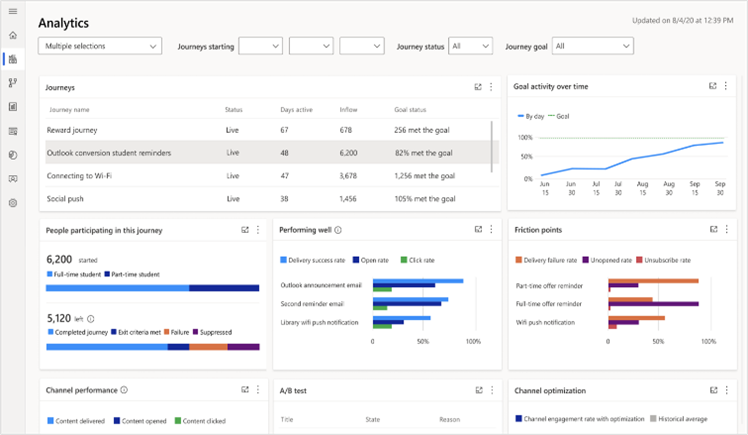
Dynamics 365 Marketing also extends the usefulness of customer data through integrated analytics. An organization such as NTZE can set the business goals for journeys and measure the progress toward those goals. Built-in analytics dashboards provide cross-journey insights and companies provide the ability to monitor customer journeys and channel KPIs in real time. To help organizations respond to changing circumstances during a campaign, Dynamics 365 Marketing provides customizable out- of-the-box templates to target segments and content to get the word out quickly.

In a period when many analysts, including Deloitte, raise concerns about uncertainties in CMO budgets, Dynamics 365 has also helped NZTE reduce operational costs. By consolidating its marketing, sales, event management, and other tools, NZTE has fewer systems to license and maintain. In fact, it allowed the agency to reduce the number of systems it supports to only one, reducing its overall licensing bill by NZD50,000.

Dynamics 365 Marketing analytics help achieve your business goal

Greater results from events

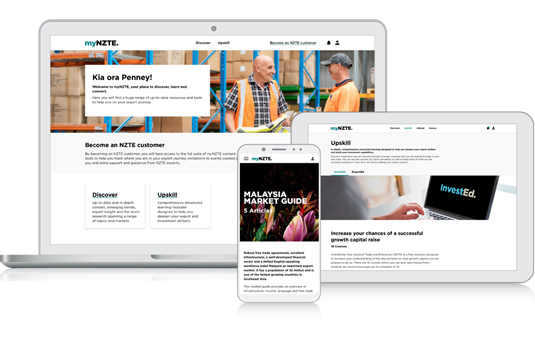
NTZE, including its regional teams, holds more than 300 events a year. In order to optimize how it runs events and utilize the data involved, it began using the Dynamics 365 Marketing event management capabilities. They created a customer-facing, web-based portal that synchs with its Dynamics 365 apps. Through myNZTE, customers can learn about and choose events they want to attend, register online, and access a wide variety of content. Jonathan Southlee, Director Digital Delivery for NTZE, observes that, “Our customers highly value our events, and it’s critical that we provide them with the best experience possible because events can lead directly to trade deals.”

a laptop, cellphone, and tablet with the my N Z T E portal on the screens.

CMOs: focus on customer loyalty

Building and strengthening customer relationships is imperative to a marketing organization’s success, especially in an environment where the customer base is dispersed and often distracted. Gartner reports that loyalty will be a key factor: 79 percent of CMOs surveyed will look to existing customers to fuel growth in a post-Covid-19 environment. Deeper customer understanding, customer journeys that reflect that understanding, and bringing people together without person-to-person interactions are essential to achieving that goal.

Learn more

The post Changing the customer experience for better customer connections appeared first on Microsoft Dynamics 365 Blog.

Brought to you by Dr. Ware, Microsoft Office 365 Silver Partner, Charleston SC.

Enable digital selling with the sales accelerator in Dynamics 365 Sales

Enable digital selling with the sales accelerator in Dynamics 365 Sales

This article is contributed. See the original author and article here.

In the past, many sales organizations looked at customer relationship management applications simply as process-driven data repositories or systems of record. Sales reps spent hours manually entering data and had less time to build profitable relationships and actually sell. However, this approach has become increasingly untenable for businesses now that the norm is for savvy, modern buyers who expect sellers to engage with them in real time across almost every digital channel and platform.

Sales accelerator, a digital selling capability of Dynamics 365 Sales, helps sellers transform the way they work in today’s digital world. Instead of spending so much time on manual data input, sellers rely on the system to gather relevant information from multiple sources, create a prioritized pipeline, offer more context, and surface automated recommendations throughout the sales process. They’re also able to engage with customers on their preferred channels using integrated email and phone calling.

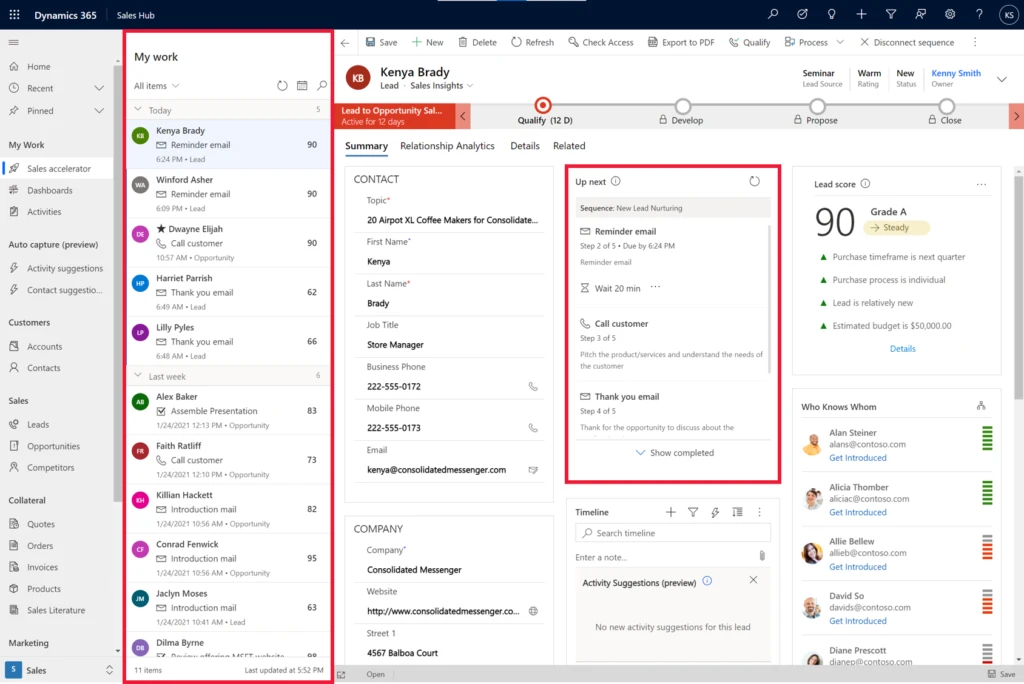
Screenshot showing sales accelerator in Dynamics 365 Sales

Example screenshot showing the intelligent work list and ‘up next’ widget in sales accelerator

Focus on the right deals with an intelligent work list

A typical seller starts the day working on multiple leads and opportunities, with several important tasks competing for their attention at once. With the sales accelerator, all the tasks and activities for their leads and opportunities that are due today, plus upcoming activities, are prioritized and organized in a work queue, enabling these sellers to be more efficient:

  • Work from a prioritized list of customers. With a prioritized work list, sellers can identify the next best lead or opportunity to work on. The intelligent work list surfaces a sorted list of customers with associated next tasks due. Default sorting relies on a composite score, presenting the next best action based on organizational sales sequences.
  • Tailor the intelligent list to meet your needs. Sort, filter, or group by entity attributes (main fields) to meet your needs, like reaching out to customers from a specific source.
  • Identify new leads or opportunities in your pipeline. Identify whenever a new lead or opportunity enters the work list or is reassigned to you, so nothing is accidentally overlooked.

Learn more about how to prioritize the pipeline through work lists

Gain context on customers in one place

As sellers run through a long list of potential customers, they often struggle to gain a holistic view, including history of communications, customer needs, and special circumstances. However, having this type of view is necessary for crafting a relevant sales pitch that’s most likely to achieve a positive outcome. To address this issue, the sales accelerator helps sellers:

  • Get all relevant information in a single place. Benefit from a comprehensive entity form that collects and surfaces customer information and insights from related entities to help craft winning messages for every communication.
  • View historical context for every customer. See past and present activities via an “up next” widget, timeline, notes, and additional details through integrated data across the system, all available with tabs on the entity form.

Use sales sequences to ensure your sales team follows best practices

Consistent experiences and clear communications are a critical aspect of achieving successful outcomes. Best practices from sales enablement managers help to propagate and reinforce winning selling strategies. Infusing suggestions and insights throughout the sales motion helps to keep sellers on track, makes the most out of every customer interaction, and increases the likelihood of successful outcomes.

With sequences, sellers receive in-the-moment guidance toward the correct activity, on time, using an appropriate communication channel with the necessary content. Everyone on the team adheres to organizational best practices, while sales enablement managers are empowered to optimize sales practices for better outcomes through a frictionless cycle and can easily distribute sales strategies.

  • Build sales sequences. Build sales sequences that reflect organizational best practices and sales strategies to help sellers in the moment.
  • Guide sellers in the moment. Offer guidance to sellers toward the next step they need to take. Guidance includes recommending the most suitable channel to reach out to the customer and the best time.

Learn more about the “up next” widget for recommendations

Connect with customers across multiple channels

Sellers can communicate with contacts without leaving Dynamics 365 Sales, using integrated communications across multiple channels that leverage Microsoft Dynamics 365 Channel Integration Framework.

  • Connect with customers easily via email or phone. Benefit from multichannel communications, connecting with customers via email or phone with an integrated dialer, without switching context.
  • Compose emails with templates. Take advantage of email templates aligned with sales sequences to communicate simply and consistently with customers.
  • Call customers with real-time insights using Microsoft Teams. Sellers can place customer calls using an integrated dialer and receive real-time conversation intelligence insights that will boost their productivity on top of those calls.

What’s next

We’re working on some exciting capabilities to be released in public preview in the coming months:

  • Automatic assignment of leads
  • Adaptive sequences for non-linear scenarios
  • Monitoring sequence performance
  • Automated process of capturing call summary with conversation intelligence

Get started with sales accelerator

The sales accelerator is part of Dynamics 365 Sales Premium licenses. Sign up for a free trial and get started with just a few clicks.

Learn how to enable the sales accelerator

Next steps

If you have already tried the sales accelerator and have feedback, questions, or new needs, please share your feedback on our Ideas Portal.

The post Enable digital selling with the sales accelerator in Dynamics 365 Sales appeared first on Microsoft Dynamics 365 Blog.

Brought to you by Dr. Ware, Microsoft Office 365 Silver Partner, Charleston SC.