New communities experiences bolster employee engagement in the age of hybrid work

New communities experiences bolster employee engagement in the age of hybrid work

This article is contributed. See the original author and article here.

In our 2021 Work Trend Index, we detail how Microsoft is planning to navigate these challenges and how focusing on employee experience can help our workforce succeed in a world gone digital.

The post New communities experiences bolster employee engagement in the age of hybrid work appeared first on Microsoft 365 Blog.

Brought to you by Dr. Ware, Microsoft Office 365 Silver Partner, Charleston SC.

Transforming service operations with Connected Field Service

Transforming service operations with Connected Field Service

This article is contributed. See the original author and article here.

You have probably heard of Connected Field Service as a buzzword these days, but some of you may still wonder what it actually entails. Field service management (or FSM) typically refers to the management of a company’s resources employed at or en route to the client’s location.1 FSM typically involves the installation, service, maintenance, or repairs of systems equipment and is usually facilitated by software with cloud-based platforms that aid in the management of field service processes.

Connected Field Service is the ability to add connected devices, powered by the Internet of Things (IoT), and leverages cloud capabilities to augment your existing field service operations. It enables organizations to transform the way they provide service from a costly, reactive break-fix model to a proactive and in some cases, even predictive service model through the holistic combination of IoT diagnostics, scheduling, asset maintenance, and inventory on the same platform.

Field service management and automation software like Microsoft Dynamics 365 Field Service creates value for organizations and can help significantly transform service operations by providing the ability to transmit critical information from IoT-powered equipment directly to service providers and technicians via the cloud. This is made possible by the convergence of multiple technologies including real-time data analytics, machine learning, ubiquitous computing, commodity sensors, and embedded systems.

Connected Field Service: Leveling up from traditional field service

Field service typically involves the traditional process of installation, check-up maintenance, and break-fix (repair) appointments. However, without smart sensors in place, this process is often reactive, time-consuming, and puts the onus on the customer to contact the field service organization to log a ticket for any repairs or schedule maintenance.

With Connected Field Service, the transformation to proactive and ultimately predictive service is made possible as downtime can be effectively mitigated through remote monitoring of IoT-enabled devices. Connected IoT devices can automatically transmit alerts regarding equipment operational anomalies to the field service organization, helping to accelerate service response time. In some cases, fixes can be completed remotely, avoiding the need to schedule and dispatch an onsite technician, thereby helping organizations reduce operation costs. This also saves the customer considerable time and money as repairs can now be proactively completed even before the customer becomes aware of an issue or experiences any impact.

Benefits of Connected Field Service

Connected Field Service offers a plethora of advantages, including:

  • The ability to predict and proactively prevent breakdowns by identifying underperforming or faulty equipment.
  • Improved first-time fix rates and minimizing equipment downtime via proactive IoT alerts from connected devices.
  • Resolving issues faster with remote self-healing capabilities by sending device commands to repair or reset equipment, without requiring onsite technician support.
  • Reducing maintenance costs through remote monitoring and analysis of device data, and if onsite service is required, to help ensure that the right technician with relevant skill sets is dispatched with the necessary tools needed.
  • Providing greater visibility into products, services, performance, and customer satisfaction, and proactively identifying opportunities for improvement using AI-driven data analytics.

Simple setup

Connected Field Service is relatively simple to set up and can be implemented in stages as your organization becomes more comfortable using it. If you are already using a traditional field service management system, the transition to Connected Field Service is straightforward as it is a natural progression.

With Connected Field Service, IoT devices collect relevant information from your equipmentfor example, cycle counts, temperature, humidityand automatically relays it to your field service management system. Machine learning then uses the equipment telemetry data gathered over time to improve responses and provide accurate predictive analytics to enhance your field service management processes.

How Connected Field Service works

As an example, let’s say an IoT sensor is installed on a client’s equipment to collect status reports. The sensor transmits data back to your organization where it is then integrated into your field service software and matched with customer information within your current database. When an anomaly occurs, the error is quickly identified and this data is delivered as an alert via the cloud to the technician en route to the client site, where the complete service history can be viewed in real-time. The data from the IoT sensor helps eliminates the need for the initial onsite diagnostics so that the technician can get right to work in resolving the issue once onsite. A technician with the relevant skillset in that particular issue or anomaly is automatically dispatched via Dynamics 365 Field Service and arrives onsite already armed with critical data relevant to the malfunctioning equipment to resolve the issue.

Enabling business continuity with always-on service in the new normal

The COVID-19 pandemic created an urgent need for contact-free service to protect both field service frontline workers and customers from potential exposure to the virus. During this time, companies reassessed how to enable remote working to accommodate social distancing and other safety precautions, but for field service technicians, the “office” is one client site to another. To safeguard frontline workers and customers, many organizations stopped sending technicians all together or scheduled technicians to only perform service when the customer was absent.

As a result of the global travel restrictions, many companies accelerated the migration to Connected Field Service as it helps to minimize in-person contact to keep both technicians and customers safe. However, that’s just the beginning of the full breadth of benefits. In addition to travel avoidance, service costs were also effectively reduced as the field service organization is now automatically alerted to operational anomalies via IoT-enabled devices. A technician can remotely deploy a fix by sending a command to resolve the issue even before it impacts the customer. The focus of Connected Field Service is the transformation to proactive and ultimately predictive maintenance, turning the field service organization from a cost center to a revenue generator.

Better together

Transform your field service operations today. Come discover how Connected Field Service using Dynamics 365 Field Service, Dynamics 365 Remote Assist, and IoT can help create a seamless service process that enhances customer satisfaction while boosting revenue. Take advantage of smart, internet-ready devices that can detect and diagnose issues, integrating with field service management (FSM) software like Dynamics 365 Field Service, to automatically initiate troubleshooting and, when needed, create work orders to dispatch technicians for onsite service. Learn how you can leverage technology to schedule preventative maintenance based on consumption rather than rely on a regimented schedule. Best of all, enjoy the flexibility of implementing the solution in stages so your team can ramp up via a natural progression.

Learn more about Connected Field Service.

Read about Dynamics 365 Field Service.

Chat with a Field Service expert.


1- “Field service management”, Wikipedia.

The post Transforming service operations with Connected Field Service appeared first on Microsoft Dynamics 365 Blog.

Brought to you by Dr. Ware, Microsoft Office 365 Silver Partner, Charleston SC.

Transforming service operations with Connected Field Service

Tracking forecasts to your company’s fiscal calendar just got easier

This article is contributed. See the original author and article here.

Forecasting revenue and tracking progress in alignment with your organization’s fiscal calendar is crucial for accurate projections and results. To easily meet this need, your sales team can use the custom fiscal calendar feature in Dynamics 365 Sales.

Unexpected revenue fluctuations can occur for numerous reasons, ranging from a holiday season, to weekend spending, to weather conditions. As a result, organizations often adopt a unique fiscal calendar to standardize reporting periods. Unfortunately, organizations tracking their forecasts in a spreadsheet can have difficulty making these normalized comparisons from period to period.

Dynamics 365 Sales helps solve the issue with a configuration setting that allows administrative users to build a forecast to match their organization’s customized fiscal calendar. No more neglecting revenue fluctuations in financial reviews or painstakingly factoring in revenue seasonality via a spreadsheet.

The standard Gregorian calendar works for most businesses and industries, but there are several examples where the standard calendar does not apply. For instance, the commercial broadcast sector has a custom, industry-specific calendar used primarily for the planning and purchase of radio and television programs and advertising.

Adding to the scheduling complexity, broadcast calendar years will have either 52 or 53 weeks. A broadcast calendar will contain 53 weeks in a leap year if January 1 falls on a Saturday or Sunday or, in a non-leap year, if January 1 falls on a Sunday. And just to add another difficult-to-solve wrinkle, a day in the broadcast industry does not typically begin at midnight, but at 5 a.m.

As you can see, this can present a headache when trying to compare period over period. But now Dynamics 365 Sales eliminates the pain with built-in logic to automatically allow sales teams to create a custom fiscal calendar. With this feature, sales teams have the capability to select a custom fiscal period to match that of their business, including a broadcast calendar, calendar patterns with 13-week quarters (such as the 4-4-5 template) and 4-week periods (such as the 3-3-3-4 template), and other variations. In addition, sales forecast administrators have the flexibility needed to set an extra week at the end of any period to account for leap years.

This support for custom fiscal periods improves the accuracy of forecast comparisons so that sales teams have better visibility into their revenue targets and sales progress.

Next steps

To learn more about how to configure your organization’s forecast schedule, check out the documentation.

The post Tracking forecasts to your company’s fiscal calendar just got easier appeared first on Microsoft Dynamics 365 Blog.

Brought to you by Dr. Ware, Microsoft Office 365 Silver Partner, Charleston SC.

New communities experiences bolster employee engagement in the age of hybrid work

Closer together in Tokyo: How Microsoft Teams created a shared virtual experience

This article is contributed. See the original author and article here.

This year we have seen into each other’s homes, with surprise guest appearances from our kids and pets. We have learned about each other, how we can work effectively from home or from anywhere, and what we can achieve when we come together with purpose and empathy. Technology has been our enabler, bringing us closer together through a…

The post Closer together in Tokyo: How Microsoft Teams created a shared virtual experience appeared first on Microsoft 365 Blog.

Brought to you by Dr. Ware, Microsoft Office 365 Silver Partner, Charleston SC.

Turn attendees into loyal customers with Microsoft Teams and Dynamics 365 Marketing

Turn attendees into loyal customers with Microsoft Teams and Dynamics 365 Marketing

This article is contributed. See the original author and article here.

Change. Adapt. Grow. Words we have had to embrace over the past 15 months as we’ve had to change the way we do business. As we start to emerge from the pandemic’s isolation and restrictions, we’re entering a world of a new normal. As consumers, our expectations are higher. To meet ever-changing customer expectations, successful businesses are constantly going through the change, adapt, and grow cycle, especially when it comes to customer experience and virtual events. Many experts project that in-person events will gradually return but the prominence of virtual events is here to stay. And with that comes exciting new opportunities to elevate customer experiences.

To help businesses embrace those opportunities we are announcing the availability of enhanced integration of Microsoft Teams and Microsoft Dynamics 365 Marketing.

We are also announcing a special offer for Microsoft Teams webinar customers with commercial Office 365 E3/E5 or Microsoft 365 E3/E5 subscription with minimum 300 seats can take advantage of that integration by adding six months of Dynamics 365 Marketing at no additional cost to nurture up to 10,000 contacts with personalized emails and engaging customer journeys. This special offer is available through December 31, 2021. More details on the offer and eligibility can be found here.

Win customers and earn loyalty

The new Teams webinars capabilities are remarkable by themselves, but when you add the integration with Dynamics 365 Marketing, they are extraordinary. The power, flexibility, and unlimited possibilities that these two products working together can offer will change the way that you interact with your event attendees. Key capabilities include simplified event management, increased attendee engagement, and effortless follow-up to nurture relationships, win customers, and earn their loyalty faster.

Simplify event management

With the new Teams functionality, you have the power to host secure interactive meetings and webinars that include polls, video sharing, and reactions for up to 1,000 attendees.

You have the flexibility to organize your webinar your wayfrom within Teams or from within Dynamics 365 Marketing, the option is yours. Both ways are easy and intuitive and have improved capabilities.

If you already use event management from within Dynamics 365 Marketing, you will now see a more robust set of event management options that allow you to have better control over your webinar.
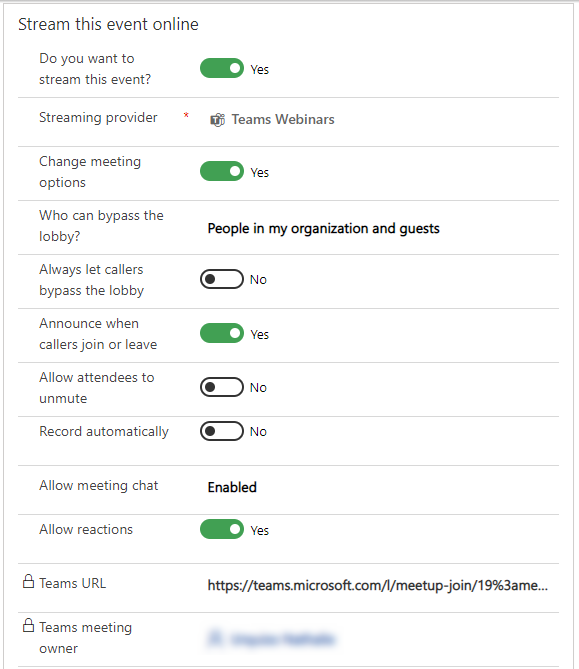
Event Management controls in Dynamics 365 Marketing

If you prefer to create events from within Teams, you will have the same high level of control, but you now have the optional integration and power of Dynamics 365 Marketing to use in elevating your customer journey experience.

Increase attendee engagement

Microsoft Teams makes it easy to catch the attention of your online audience and present like a pro. Use PowerPoint Live and Presenter Mode to deliver more impactful and engaging presentations, and take advantage of new innovations like Standout Mode which enables presenters to appear over content.

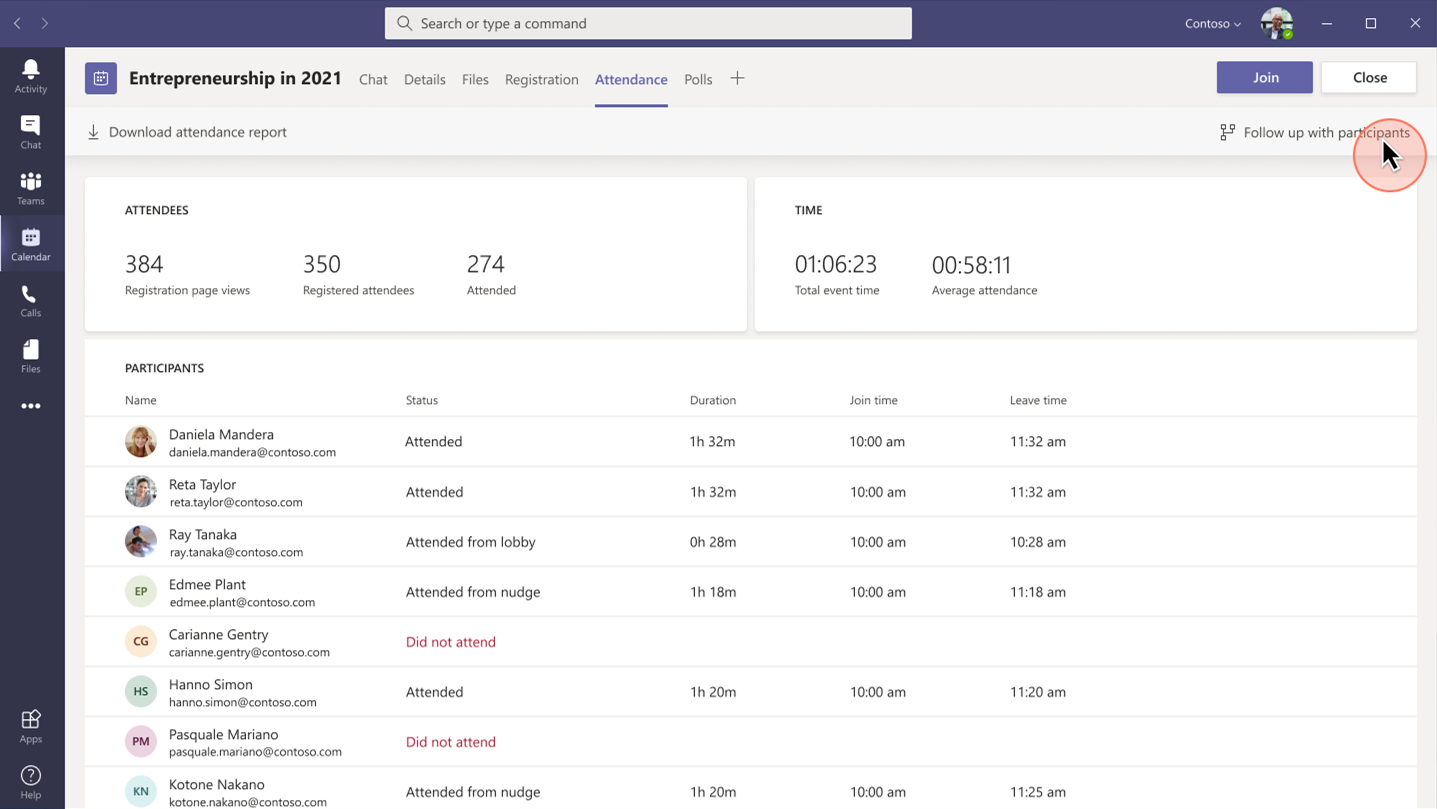
Whether it’s before, during, or after your event, you can easily gain insightful information from attendees with real-time polls and surveys from within Teams. Reports that track attendance are also readily available. Use that information to shape your presentation delivery and personalize post-event follow-up.
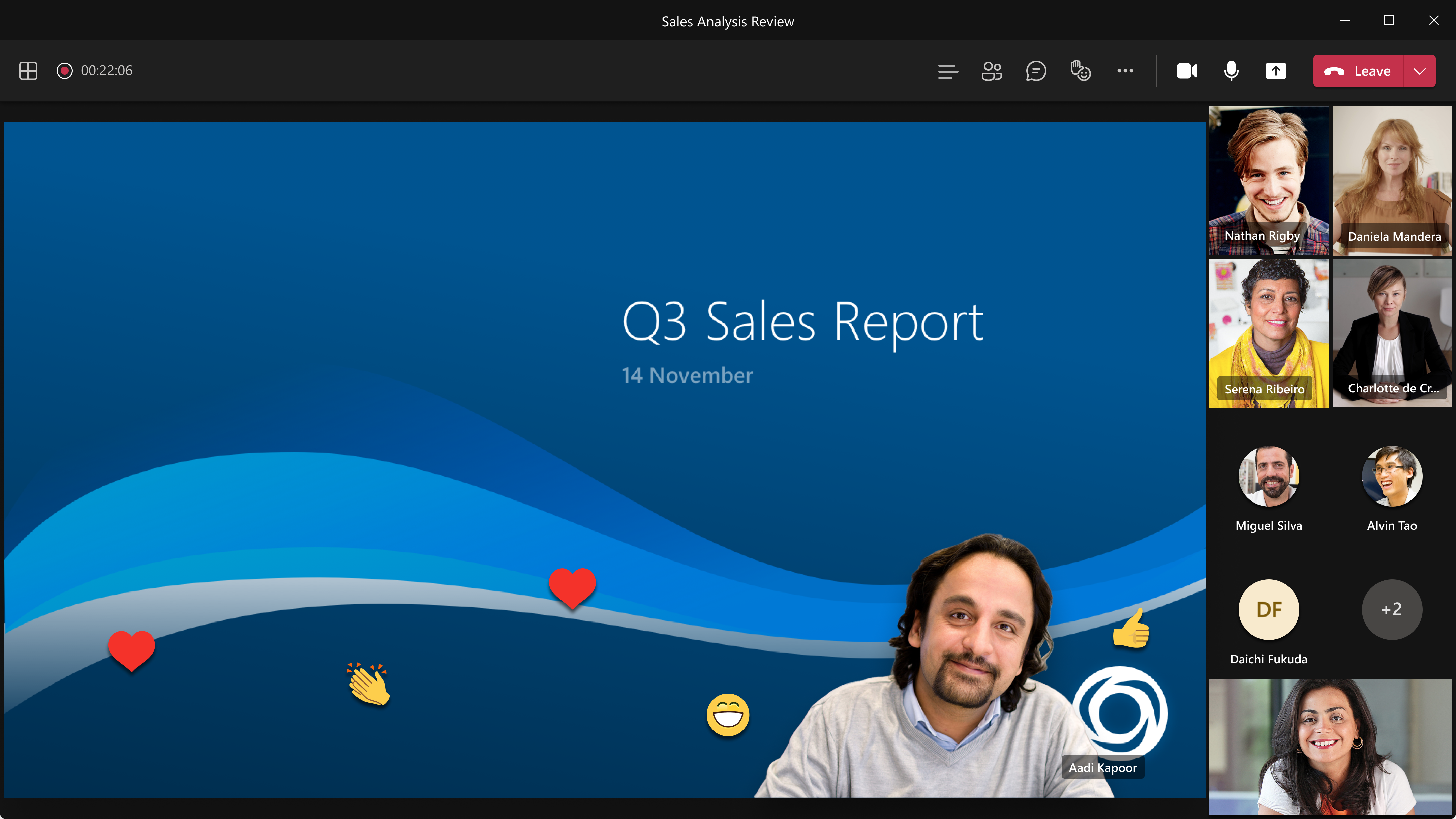
Standout Mode enables presenters to appear over content.

Follow-up to nurture relationships

Keep the lines of communication active after your Teams webinar concludes. With a single mouse click, attendee engagement data is transferred seamlessly into Dynamics 365 Marketing and automatically populated into pre-built, commonly used segments. Each of those segments corresponds to a built-in, ready-to-send, editable email template for personalized post-event communications and customer journey orchestration. Leverage the dashboards and analytics to gain insights about attendees to further personalize and drive post-event engagement.
Placeholder

Project Management Institute boosts events participation and member experience

Project Management Institute, Minnesota logo

“Since we were already familiar with Dynamics 365 and Teams, we were able to pivot quickly to provide virtual events for our members.With Dynamics 365, we’ve removed the struggle from our marketing efforts.”Glory Ikeata, Chair of Volunteer Services Committee, Project Management InstituteMinnesota

Project Management InstituteMinnesota (PMI-MN) provides value to members by sharing project management information and is among the largest PMI chapters in size and member events. PMI-MN aspired to further engage its members and inform them about seminars, certifications, and educational events.

To meet that aspiration, PMI-MN needed a way to centralize disparate member data and use that data to better understand how members interact with their organization. They worked collaboratively with cloud solutions provider TrimaxSecure to implement a comprehensive solution with Microsoft Dynamics 365, Microsoft Teams, and Microsoft Power BI to increase member engagement.

PMI-MN used Dynamics 365 Marketing to build sophisticated marketing journeys to connect with their members via relevant email marketing and the app’s event management capabilities to create event portals to simplify event management for members, volunteers, and speakers.

During the COVID-19 crisis, the chapter was able to shift from in-person to virtual events because it had reliable cloud-based tools to continue to engage its members. PMI-MN used Microsoft Teams for remote events and sent the Teams meeting links through email.

By connecting their event and email marketing efforts, PMI-MN now offers a richer member experience and increased participation in events and workshops. Staff can now quickly and easily manage member information. The chapter has seen retained events revenue increase by almost 90 percent.

Microsoft Core Marketing Engineering turns audiences into customers

Microsoft logo

“By carefully combining technology solutions in our events platform, including Dynamics 365 and Teams, we’ve enabled our marketing business to generate a 400 percent increase in attendees and a 500 percent increase in new known leads.”Vinh Nguyen, Principal Program Manager, Microsoft

The Core Marketing Engineering (CME) unit at Microsoft wanted to enhance event marketing capabilities, reduce operational complexity around in-person and digital events, and explore Microsoft technology for event management. The business unit accelerated the process when it needed to quickly shift from holding in-person events to hosting them digitally due to COVID-19.

It adopted Microsoft Dynamics 365 Marketing and used the event management capabilities to create an event management center. CME gets additional value from Dynamics 365 Marketing by combining it with Microsoft Teams event functionality, Azure Data Lake Storage, and Power Apps portals.

“By using Dynamics 365 and Teams together, we’ve centralized everything for our marketers, so they no longer have to spend time navigating to an outside system when they want to build a digital event,” says Sanarya Salah, Program Manager at Microsoft.

CME reduced its number of third-party tools, cutting costs and removing complexity for its marketers. It now creates more engaging and interactive events, which has led to better customer engagement and increased leads.

Strengthen customer relationships

The powerful integration of Teams and Dynamics 365 Marketing allows you to convert a single interaction into an ongoing relationship to win customers and earn their loyalty. The limited-time special offer for Microsoft Teams customers presents a unique opportunity to use that integration in your own environmentthe possibilities are extraordinary.

Get started with Microsoft Teams and Dynamics 365 Marketing today.

Learn more

We are always looking for feedback and would like to hear from you. Please head to the Dynamics 365 Community to start a discussion, ask questions, and tell us what you think.

The post Turn attendees into loyal customers with Microsoft Teams and Dynamics 365 Marketing appeared first on Microsoft Dynamics 365 Blog.

Brought to you by Dr. Ware, Microsoft Office 365 Silver Partner, Charleston SC.

Transforming service operations with Connected Field Service

Improve seller productivity with the deal manager experience

This article is contributed. See the original author and article here.

The sales pipeline is a visual representation of where prospects are within the sales funnel. Managing the pipeline is one of the core activities of any seller; it helps sellers to stay organized and focused on moving deals forward. A seller who can successfully master the sales pipeline will drive more revenue.

But mastering a sales pipeline is not easy, especially when sellers must balance multiple active deals, an array of contacts, and conversations across multiple channels while trying to figure out when the next interaction will occur, what next steps are required, and which app or process will help accomplish the job.

The deal manager workspace is an updated user experience in Dynamics 365 Sales that puts the seller at the center of their workflows, and is now available for public preview.

This enhanced deal manager workspace allows sellers to get a full view of their pipeline, quickly gather context and take action, collaborate with their colleagues, and effectively work the way they want to work.

Watch this video for an overview of how to manage deals in Dynamics 365 Sales:

Visualizing the pipeline with charts

The easiest way to get an overview of the sales pipeline is by visualizing the deals on a chart. Charts form a key component of the deal manager. Not only do they provide key insights on opportunities, but in the deal manager these charts are interactive and allow sellers to quickly locate and focus on the right deals.

In the July release, two charts are available out of the box:

  • A bubble chart that allows sellers to track risky deals on a timeline.
  • A funnel chart that allows sellers to see where deals are in the sales process.

These charts are configurable by administrators. In future releases, we will introduce additional charts.

Keeping track of key metrics

Another tool that keeps sellers informed are key performance indicators (KPIs). In the deal manager, we’ve introduced tools to track and highlight metrics that help sellers stay on top of their most important KPIs. Sellers can choose from a subset of metrics, re-order them, or even create their own metrics.

A modern, seller-optimized spreadsheet experience

When it comes to managing deals, it’s no wonder that sellers love spreadsheets. Spreadsheets provide a table view of all opportunities, with aggregation, quick filtering, sorting, grouping with pivot tables, re-ordering of columns, and the ability to edit fields inline easily. Unfortunately, data in a spreadsheet is static and not up to date within Dynamics 365.

The deal manager workspace comes with an inline grid that can be edited. This grid behaves just as a spreadsheet would. Sellers can:

  • Edit any cell inline.
  • Filter by any column (advanced querying is also supported).
  • Re-order columns by dragging them into place.
  • Freeze a column.
  • Hide and show any field from the table.
  • Summarize column data by SUM, MAX, MIN, or AVG.
  • Group the data by any field or option set.

The grid has also been optimized for salespeople. Sellers can add special “smart columns” to make their pipeline management even more insightful and efficient:

  • Close date: Intelligently combines the value of the Estimated Close Date and the Actual Close Date fields into one column for sellers to use and update.
  • Revenue: Intelligently combines the value of the Estimated Revenue and the Actual Revenue fields into one column for sellers to use and update.

Getting context without navigating away

With the deal manager workspace, useful information is easily accessible. When you select a record in the workspace, an optimized form appears in the side panel. This form contains a modern task management experience and provides useful information, such as:

  • Key entity fields
  • A timeline list of activities
  • An optimized list of notes

Administrators can customize the form to select the most relevant fields for your business.

Collaborate in context

Selling is a team sport. Now that Microsoft Teams is part of the Dynamics 365 experience, collaborating with your colleagues is seamless. Within the deal manager workspace, sellers are able to instantly follow up with any colleague regarding any deal of interest.

In this release, we have focused on empowering sellers with an intuitive workspace experience allowing sales reps to better manage their pipeline by getting to the information they need quickly.

Next steps

The public preview will gradually roll out over the next few weeks. For more information on how to enable the experience in your environment, read the documentation.

The post Improve seller productivity with the deal manager experience appeared first on Microsoft Dynamics 365 Blog.

Brought to you by Dr. Ware, Microsoft Office 365 Silver Partner, Charleston SC.

