Closer together in Tokyo: How Microsoft Teams created a shared virtual experience

Closer together in Tokyo: How Microsoft Teams created a shared virtual experience

This article is contributed. See the original author and article here.

This year we have seen into each other’s homes, with surprise guest appearances from our kids and pets. We have learned about each other, how we can work effectively from home or from anywhere, and what we can achieve when we come together with purpose and empathy. Technology has been our enabler, bringing us closer together through a…

The post Closer together in Tokyo: How Microsoft Teams created a shared virtual experience appeared first on Microsoft 365 Blog.

Brought to you by Dr. Ware, Microsoft Office 365 Silver Partner, Charleston SC.

Turn attendees into loyal customers with Microsoft Teams and Dynamics 365 Marketing

Turn attendees into loyal customers with Microsoft Teams and Dynamics 365 Marketing

This article is contributed. See the original author and article here.

Change. Adapt. Grow. Words we have had to embrace over the past 15 months as we’ve had to change the way we do business. As we start to emerge from the pandemic’s isolation and restrictions, we’re entering a world of a new normal. As consumers, our expectations are higher. To meet ever-changing customer expectations, successful businesses are constantly going through the change, adapt, and grow cycle, especially when it comes to customer experience and virtual events. Many experts project that in-person events will gradually return but the prominence of virtual events is here to stay. And with that comes exciting new opportunities to elevate customer experiences.

To help businesses embrace those opportunities we are announcing the availability of enhanced integration of Microsoft Teams and Microsoft Dynamics 365 Marketing.

We are also announcing a special offer for Microsoft Teams webinar customers with commercial Office 365 E3/E5 or Microsoft 365 E3/E5 subscription with minimum 300 seats can take advantage of that integration by adding six months of Dynamics 365 Marketing at no additional cost to nurture up to 10,000 contacts with personalized emails and engaging customer journeys. This special offer is available through December 31, 2021. More details on the offer and eligibility can be found here.

Win customers and earn loyalty

The new Teams webinars capabilities are remarkable by themselves, but when you add the integration with Dynamics 365 Marketing, they are extraordinary. The power, flexibility, and unlimited possibilities that these two products working together can offer will change the way that you interact with your event attendees. Key capabilities include simplified event management, increased attendee engagement, and effortless follow-up to nurture relationships, win customers, and earn their loyalty faster.

Simplify event management

With the new Teams functionality, you have the power to host secure interactive meetings and webinars that include polls, video sharing, and reactions for up to 1,000 attendees.

You have the flexibility to organize your webinar your wayfrom within Teams or from within Dynamics 365 Marketing, the option is yours. Both ways are easy and intuitive and have improved capabilities.

If you already use event management from within Dynamics 365 Marketing, you will now see a more robust set of event management options that allow you to have better control over your webinar.
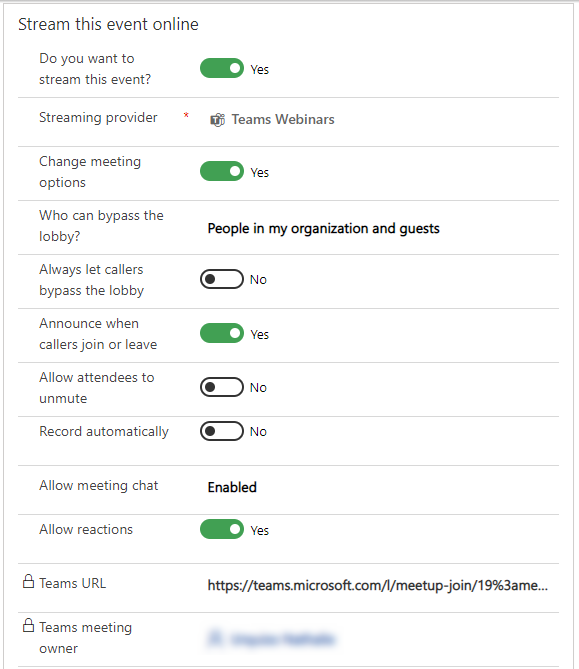
Event Management controls in Dynamics 365 Marketing

If you prefer to create events from within Teams, you will have the same high level of control, but you now have the optional integration and power of Dynamics 365 Marketing to use in elevating your customer journey experience.

Increase attendee engagement

Microsoft Teams makes it easy to catch the attention of your online audience and present like a pro. Use PowerPoint Live and Presenter Mode to deliver more impactful and engaging presentations, and take advantage of new innovations like Standout Mode which enables presenters to appear over content.

Whether it’s before, during, or after your event, you can easily gain insightful information from attendees with real-time polls and surveys from within Teams. Reports that track attendance are also readily available. Use that information to shape your presentation delivery and personalize post-event follow-up.
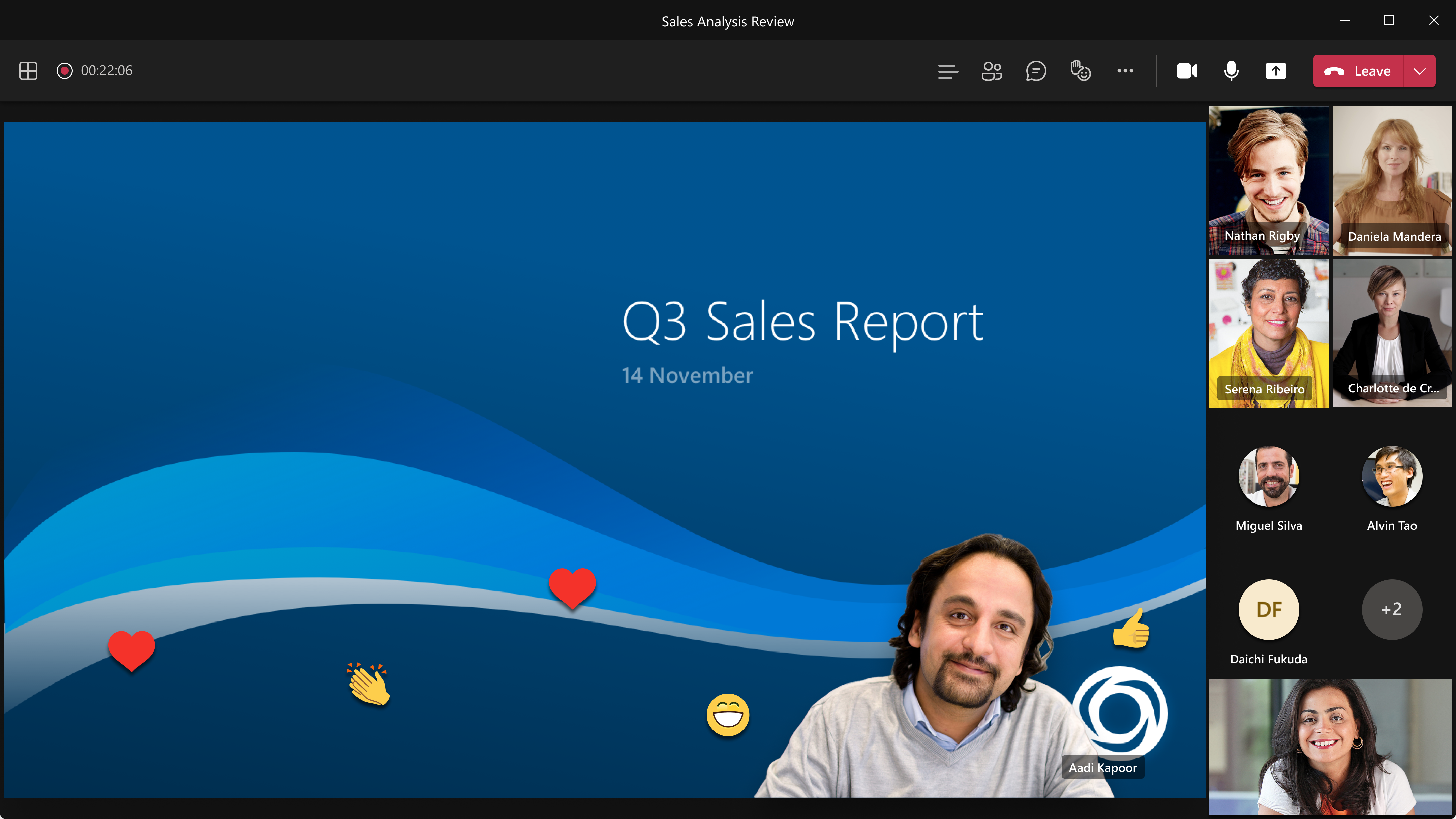
Standout Mode enables presenters to appear over content.

Follow-up to nurture relationships

Keep the lines of communication active after your Teams webinar concludes. With a single mouse click, attendee engagement data is transferred seamlessly into Dynamics 365 Marketing and automatically populated into pre-built, commonly used segments. Each of those segments corresponds to a built-in, ready-to-send, editable email template for personalized post-event communications and customer journey orchestration. Leverage the dashboards and analytics to gain insights about attendees to further personalize and drive post-event engagement.
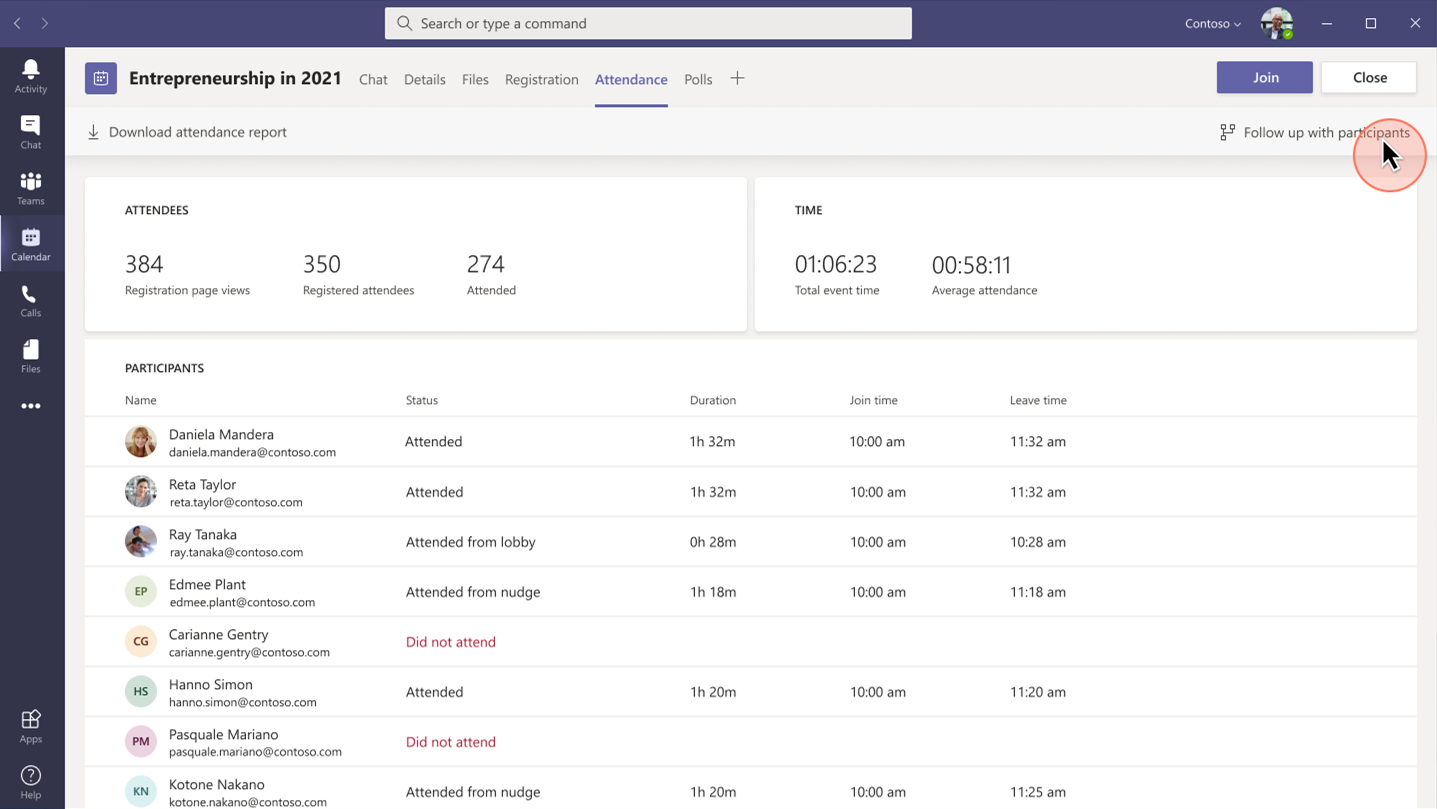
Placeholder

Project Management Institute boosts events participation and member experience

Project Management Institute, Minnesota logo

“Since we were already familiar with Dynamics 365 and Teams, we were able to pivot quickly to provide virtual events for our members.With Dynamics 365, we’ve removed the struggle from our marketing efforts.”Glory Ikeata, Chair of Volunteer Services Committee, Project Management InstituteMinnesota

Project Management InstituteMinnesota (PMI-MN) provides value to members by sharing project management information and is among the largest PMI chapters in size and member events. PMI-MN aspired to further engage its members and inform them about seminars, certifications, and educational events.

To meet that aspiration, PMI-MN needed a way to centralize disparate member data and use that data to better understand how members interact with their organization. They worked collaboratively with cloud solutions provider TrimaxSecure to implement a comprehensive solution with Microsoft Dynamics 365, Microsoft Teams, and Microsoft Power BI to increase member engagement.

PMI-MN used Dynamics 365 Marketing to build sophisticated marketing journeys to connect with their members via relevant email marketing and the app’s event management capabilities to create event portals to simplify event management for members, volunteers, and speakers.

During the COVID-19 crisis, the chapter was able to shift from in-person to virtual events because it had reliable cloud-based tools to continue to engage its members. PMI-MN used Microsoft Teams for remote events and sent the Teams meeting links through email.

By connecting their event and email marketing efforts, PMI-MN now offers a richer member experience and increased participation in events and workshops. Staff can now quickly and easily manage member information. The chapter has seen retained events revenue increase by almost 90 percent.

Microsoft Core Marketing Engineering turns audiences into customers

Microsoft logo

“By carefully combining technology solutions in our events platform, including Dynamics 365 and Teams, we’ve enabled our marketing business to generate a 400 percent increase in attendees and a 500 percent increase in new known leads.”Vinh Nguyen, Principal Program Manager, Microsoft

The Core Marketing Engineering (CME) unit at Microsoft wanted to enhance event marketing capabilities, reduce operational complexity around in-person and digital events, and explore Microsoft technology for event management. The business unit accelerated the process when it needed to quickly shift from holding in-person events to hosting them digitally due to COVID-19.

It adopted Microsoft Dynamics 365 Marketing and used the event management capabilities to create an event management center. CME gets additional value from Dynamics 365 Marketing by combining it with Microsoft Teams event functionality, Azure Data Lake Storage, and Power Apps portals.

“By using Dynamics 365 and Teams together, we’ve centralized everything for our marketers, so they no longer have to spend time navigating to an outside system when they want to build a digital event,” says Sanarya Salah, Program Manager at Microsoft.

CME reduced its number of third-party tools, cutting costs and removing complexity for its marketers. It now creates more engaging and interactive events, which has led to better customer engagement and increased leads.

Strengthen customer relationships

The powerful integration of Teams and Dynamics 365 Marketing allows you to convert a single interaction into an ongoing relationship to win customers and earn their loyalty. The limited-time special offer for Microsoft Teams customers presents a unique opportunity to use that integration in your own environmentthe possibilities are extraordinary.

Get started with Microsoft Teams and Dynamics 365 Marketing today.

Learn more

We are always looking for feedback and would like to hear from you. Please head to the Dynamics 365 Community to start a discussion, ask questions, and tell us what you think.

The post Turn attendees into loyal customers with Microsoft Teams and Dynamics 365 Marketing appeared first on Microsoft Dynamics 365 Blog.

Brought to you by Dr. Ware, Microsoft Office 365 Silver Partner, Charleston SC.

Improve seller productivity with the deal manager experience

Improve seller productivity with the deal manager experience

This article is contributed. See the original author and article here.

The sales pipeline is a visual representation of where prospects are within the sales funnel. Managing the pipeline is one of the core activities of any seller; it helps sellers to stay organized and focused on moving deals forward. A seller who can successfully master the sales pipeline will drive more revenue.

But mastering a sales pipeline is not easy, especially when sellers must balance multiple active deals, an array of contacts, and conversations across multiple channels while trying to figure out when the next interaction will occur, what next steps are required, and which app or process will help accomplish the job.

The deal manager workspace is an updated user experience in Dynamics 365 Sales that puts the seller at the center of their workflows, and is now available for public preview.

This enhanced deal manager workspace allows sellers to get a full view of their pipeline, quickly gather context and take action, collaborate with their colleagues, and effectively work the way they want to work.

Watch this video for an overview of how to manage deals in Dynamics 365 Sales:

Visualizing the pipeline with charts

The easiest way to get an overview of the sales pipeline is by visualizing the deals on a chart. Charts form a key component of the deal manager. Not only do they provide key insights on opportunities, but in the deal manager these charts are interactive and allow sellers to quickly locate and focus on the right deals.

In the July release, two charts are available out of the box:

  • A bubble chart that allows sellers to track risky deals on a timeline.
  • A funnel chart that allows sellers to see where deals are in the sales process.

These charts are configurable by administrators. In future releases, we will introduce additional charts.

Keeping track of key metrics

Another tool that keeps sellers informed are key performance indicators (KPIs). In the deal manager, we’ve introduced tools to track and highlight metrics that help sellers stay on top of their most important KPIs. Sellers can choose from a subset of metrics, re-order them, or even create their own metrics.

A modern, seller-optimized spreadsheet experience

When it comes to managing deals, it’s no wonder that sellers love spreadsheets. Spreadsheets provide a table view of all opportunities, with aggregation, quick filtering, sorting, grouping with pivot tables, re-ordering of columns, and the ability to edit fields inline easily. Unfortunately, data in a spreadsheet is static and not up to date within Dynamics 365.

The deal manager workspace comes with an inline grid that can be edited. This grid behaves just as a spreadsheet would. Sellers can:

  • Edit any cell inline.
  • Filter by any column (advanced querying is also supported).
  • Re-order columns by dragging them into place.
  • Freeze a column.
  • Hide and show any field from the table.
  • Summarize column data by SUM, MAX, MIN, or AVG.
  • Group the data by any field or option set.

The grid has also been optimized for salespeople. Sellers can add special “smart columns” to make their pipeline management even more insightful and efficient:

  • Close date: Intelligently combines the value of the Estimated Close Date and the Actual Close Date fields into one column for sellers to use and update.
  • Revenue: Intelligently combines the value of the Estimated Revenue and the Actual Revenue fields into one column for sellers to use and update.

Getting context without navigating away

With the deal manager workspace, useful information is easily accessible. When you select a record in the workspace, an optimized form appears in the side panel. This form contains a modern task management experience and provides useful information, such as:

  • Key entity fields
  • A timeline list of activities
  • An optimized list of notes

Administrators can customize the form to select the most relevant fields for your business.

Collaborate in context

Selling is a team sport. Now that Microsoft Teams is part of the Dynamics 365 experience, collaborating with your colleagues is seamless. Within the deal manager workspace, sellers are able to instantly follow up with any colleague regarding any deal of interest.

In this release, we have focused on empowering sellers with an intuitive workspace experience allowing sales reps to better manage their pipeline by getting to the information they need quickly.

Next steps

The public preview will gradually roll out over the next few weeks. For more information on how to enable the experience in your environment, read the documentation.

The post Improve seller productivity with the deal manager experience appeared first on Microsoft Dynamics 365 Blog.

Brought to you by Dr. Ware, Microsoft Office 365 Silver Partner, Charleston SC.

Closer together in Tokyo: How Microsoft Teams created a shared virtual experience

Enabling hybrid work with Microsoft 365 and collaborative apps

This article is contributed. See the original author and article here.

The world around us has dramatically changed. Hybrid, global work requires structural changes to how we build and interact with applications. We need a new class of apps that are centered around enabling synchronous and asynchronous modes of collaboration with real-time meetings, ad-hoc messaging, document collaboration, and business processes automation. Microsoft Teams, together with the…

The post Enabling hybrid work with Microsoft 365 and collaborative apps appeared first on Microsoft 365 Blog.

Brought to you by Dr. Ware, Microsoft Office 365 Silver Partner, Charleston SC.

Improve seller productivity with the deal manager experience

How to approach your routing and assignment transformation with unified routing

This article is contributed. See the original author and article here.

Customer service organizations depend on incoming service requests getting to the appropriate agent to ensure high customer satisfaction. Improving routing for your organization can seem like a daunting task, but it is not something that needs to be tackled all at once. The new unified routing capabilities in Dynamics 365 Customer Service can help improve parts of your process without disruption to your overall organization.

The recent blog post Increase customer satisfaction and agent productivity with unified routing describes six benefits of unified routing for your organization. Thanks to the composability of the system, you can break down your approach and benefit from incremental improvements without having to completely overhaul your routing and assignment strategy all at once.

Where to start

The unified routing capability reimagines the routing pipeline into two broad stages: assignment and classification. Get started with your routing transformation by assessing your current system and business structure in both of those stages.

Assignment

How are your customer service agents structured? Do you have teams supporting different regions, priority cases, or languages? Is work assigned to agents based on their skills and specifications or on who has the most capacity? Your queue configuration and assignment strategy should be core to your business processes, and it can be hard to change. But this step can have the greatest impact on improving your core support KPIs.

If your organization is ready to completely adopt automated, skills-based assignments, start by building your ideal queue structure, assign the skills and agents, and ensure your workstream rules update the incoming work items with those corresponding skills. If your organization is starting incrementally, identify a smaller group of agents and a subset of work items, and start a pilot program using one workstream (such as live chat or email) and one queue. The rest of the organization can continue to work as they are today, and the pilot will provide insight into what it would take for your organization to fully migrate.

Classification

What about the cases, emails, conversations, or other incoming service requests your organization needs to route and distribute? How often do these items include all the information required to get to the appropriate agent? Do you have manual or automated steps to look up related data or extract key concepts before it can be routed? The classification stage in unified routing provides configuration and machine learning rules to help organizations ensure the work item has all the necessary details to route it to the right agent or queue.

If your organization is ready to completely adopt this stage, start by examining your existing process for steps that update the work item either manually or through a plug-in, and translate it into a classification rule. If your organization is looking to start small, identify a subset of the work items or maybe a new set of work items not being routed today such as email, and start a pilot using one workstream and one queue. Once again, the rest of the organization can continue to work as they are currently, and the pilot will provide insight into what it would take for your organization to fully use these capabilities.

Increased visibility

Maybe your current system is working well for your agent structure and the incoming work items. But do you have the visibility into the system to understand what’s going well and what needs to be improved? Unified routing provides diagnostics for any item routed, showing you clearly which rules were evaluated, what the results were, and how it was ultimately assigned to the agent. Continued monitoring will provide insight into how your routing rules are running and highlight areas in both workstream and queue configurations that should be reviewed.

How to get started

If you’re a current customer of Dynamics 365 Customer Service, you can enable unified routing in your organization to start streamlining your routing and assignments. You may already be leveraging the routing rulesets, which can still be used alongside the new unified routing workstreams. By crafting intake rules you can determine which cases and work items go through the unified routing engine and which are still processed by your existing routing rules. Don’t forget to use diagnostics to track a work item through your newly configured classification and assignment rules.

If you’re a current customer of chat or digital messaging for Dynamics 365 Customer Service, the good news is you’re already using the improved assignment capabilities. After migrating your workstreams to the new Omnichannel admin center app, you’ll be able to use the new classification capabilities as well.

If you’re not yet a customer of Dynamics 365 Customer Service, head over to Dynamics365.com to connect with a partner or start your own trial.

The post How to approach your routing and assignment transformation with unified routing appeared first on Microsoft Dynamics 365 Blog.

Brought to you by Dr. Ware, Microsoft Office 365 Silver Partner, Charleston SC.

Improve seller productivity with the deal manager experience

2021 release wave 2 plans for Dynamics 365 and Power Platform now available

This article is contributed. See the original author and article here.

On July 14, 2021, we published the 2021 release wave 2 plans for Microsoft Dynamics 365 and Microsoft Power Platform, a compilation of new capabilities that are planned to be released between October 2021 and March 2022. This second release wave of the year offers hundreds of new features and enhancements, demonstrating our continued investment to power digital transformation for our customers and partners.

Highlights from Dynamics 365

  • Dynamics 365 Marketing is improving experiences and capabilities for creating moments-based and segment-based customer journeys that span all customer touchpoints taking personalization to the next level. Marketers will be able to create segments for leads and custom entities in the new segmentation builder experience using natural language to build segments and target audiences quickly and easily. Quickly generate email content using GPT-3 AI and then optimize with our streamlined AB testing tools.
  • Dynamics 365 Sales launches the general availability of Deal Manager, a new, modern workspace for managing your pipeline, as well as enhancements to the integration between Dynamics 365 Sales and Microsoft Teams, including more collaboration tools and calling capabilities. Seller productivity investments include LinkedIn integration enhancements for easy access to Sales Navigator, forecasting updates, and guided selling improvements with Sales Accelerator. Several new capabilities are also coming to the Dynamics 365 Sales mobile application, now available in the iOS and Android app stores.
  • Dynamics 365 Customer Service enhances knowledge authoring with AI-suggested keywords and brief descriptions for knowledge articles. The intelligent routing service uses a combination of AI models and rules to assign incoming service requests from all channels (cases, entities, chat, digital messages, and voice) to the best-suited agents. Additionally, we are investing in routing diagnostics for supervisors, machine learning-based rules for classification such as sentiment analysis and effort estimation, and improved historical analytics.
  • Dynamics 365 Field Service continues down the path of providing easy customer engagement: a new customer portal will incorporate existing capabilities such as technician locator and new general availability capabilities such as self-scheduling and appointment management to enhance service and customer communication. Additionally, a refreshed work order form will enhance user productivity.
  • Dynamics 365 Finance launches the general availability of Finance Insights to focus on data-driven insights empowering customers with out-of-the-box machine learning for their financial operations. To ensure that financial activities close on time, we are enabling our customers to increase productivity when it critically matters the most: we are bringing enhanced usability and performance around fixed assets, year-end close, and financial dimensions. We continue to enhance our globalization offering with additional localizations and the general availability of our Tax Calculation service.
  • Dynamics 365 Supply Chain Management invests in enabling a resilient supply chain with enhancements in key areas such as resource planning, manufacturing, and warehousing. We will enable businesses to optimize their usage of available material and capacity to avoid stockout situations and keep the business flowing. New manufacturing execution scenarios are included to allow integration between Dynamics 365 Supply Chain Management, common manufacturing execution (MES) solutions, and shop floor automation systems for our customers to be able to adopt and integrate new business models with ease.
  • Dynamics 365 Project Operations delivers functionally rich experiences to create and manage subcontracts with vendors for projects, as well as task scheduling enhancements.
  • Dynamics 365 Guides will be updated to further leverage the hand tracking capabilities available on HoloLens 2, making Dynamics 365 Guides an easier to use and more intuitive application. While users will still be able to operate a guide with hands-free interactions, core application workflows will be simpler and faster with a touch-enabled holographic interface.
  • Dynamics 365 Human Resources continues to enhance Benefits management capabilities by investing in a simplified setup and configuration user experience. We are continuing our journey to bring capabilities to employees in their flow of work and enhancing the current capability set as part of our Dynamics 365 Human Resources app for Microsoft Teams. Employees can submit, edit, and cancel their existing leave requests using the Teams app. We are also enhancing the manager’s ability to view more details about their direct reports’ leave balances and have better visibility of the team and company calendar.
  • Dynamics 365 Commerce prioritizes customer segmentation and targeting using site builder to target customer segments with specific page layouts and content as well as improved understanding for how end-users interact with pages across sites, including mouse-action recordings, heatmaps, and analytics by integrating with Microsoft Clarity.
  • Dynamics 365 Fraud Protection will have multiple new features that enhance Payment Service Providers (PSPs) ability to offer Fraud Protection as a value-added service to all their merchants. PSPs will be able to integrate Fraud Protection easily into their existing infrastructure to manage PSPs taxonomies that encompass many merchants and multiple hierarchies within each merchant entity.
  • Dynamics 365 Business Central delivers new capabilities designed to simplify and improve the way our partners administer tenants, and the way administrators manage licensing and permissions. Application enhancements expand the integration with Microsoft 365 and add country and regional expansions with over 10 new markets.
  • Dynamics 365 Customer Voice focuses this release wave on facilitating actionable insights for survey owners to act on feedback. Survey owners will be able to get feedback insights quickly and use Power Automate to define custom workflows to engage the right person at the right time.
  • Dynamics 365 Customer Insights audience insights capabilities enable every organization to unify and understand their B2C and B2B customer data to harness it for intelligent insights and actions. For this release wave, in the B2B area, in addition to churn predictions for individual customer records, audience insights will predict the likelihood of churn for accounts using the same straightforward guided experience. Data ingestion enhancements in Customer Insights include additional Power Query connectors and improvements to the data ingestion process. Engagement insights (preview) in Dynamics 365 Customer Insights enable individual and holistic interactive analytics over web, mobile, and connected products customer journey touchpoints. Engagement insights expand to multichannel analytics over data from other channels for richer customer analytics, downstream actions, and optimizations.

Highlights from Microsoft Power Platform

  • Power BI continues to invest in three key areas that drive a data culture: empower every individual with AI-infused insights, empower every team with BI woven into the fabric where teams work, and empower every organization to meet the most demanding enterprise needs. Power BI Pro continues to invest in our creator experiences with new report authoring tools. Consumer experiences continue to evolve, both in the Power BI service and the Power BI mobile applications. This includes improvements to Excel export from table and matrix visuals and easy creation from Microsoft Dataverse and Dynamics 365. Lastly, Power BI integration in Microsoft Teams continues to evolve, deepening the integration in channels, chats, and notifications within Teams. Power BI Premium continues to invest in the following areas: Auto-scale and pay-as-you-go pricing to scale beyond resource capacity without drops in performance. Interactive experiences over big data by making reports highly performant automatically on big data sources such as Azure Synapse Analytics.
  • Power Apps brings significant improvements for developers of all skill levels, improving the sophistication and usability of apps that can be created across the web and mobile devices. We are launching the unified, modern Power Apps designer to quickly build modern apps leveraging the best of both canvas and model in a single app. Developers can now take advantage of intelligent authoring, using AI in Power Apps Studio to generate code using natural language for rapid app development. Makers will also be able to configure apps for offline use using a reinvented maker experience. PowerApps portals is focused on enhancements in the areas of portals platform, new capabilities for pro-development, and increased developer productivity. Several new capabilities are being added with a specific focus on pro-development such as the general availability of portals support for Power Apps component framework as well as support for continuous integration and continuous deployment (CI/CD) using Power Apps command-line interface (CLI)the first step toward a comprehensive Application Lifecycle Management (ALM) story for developers and ISVs.
  • Power Automate continues to invest in several areas including Cloud flows with templates for Microsoft Teams and further integrations enabling administrators to push solutions that contain flows across the teams in their organization. Document automation, an end-to-end solution for processing documents at scale for document data extraction, becomes generally available during this release wave. Power Automate Desktop brings more WinAutomation actions to Desktop flows as well as new RPA-enabled scenarios for more Dynamics 365 applications, and it will be possible to use Dataverse and over 475 API connectors directly from Desktop flows.
  • Power Virtual Agents brings improvements in the authoring experience with topic suggestions from bot sessions, Power Apps Portals integration, data loss prevention options, proactive bot update messaging in Microsoft Teams, and more. We’re also building on our Power Automate integration with enhanced error handling and new topic trigger management to improve your bot’s triggering capabilities.
  • AI Builder will focus on providing new functionalities centered around intelligent document processing experiences. New functionalities will include the ability to extract a broader set of content types in documents such as checkboxes, signatures, typed fields like date and currency, as well as support for more prebuilt models in the Document Automation solution (for example, receipts and invoices). Integration of AI Models will also be supported through the Power Apps formula bar.

For a complete list of new capabilities, please check out the Dynamics 365 and Microsoft Power Platform 2021 release wave 2 plans.

Early access period

Starting August 2, 2021, customers and partners will be able to validate the latest features in a non-production environment. These features include user experience enhancements that will be automatically enabled for users in production environments during October 2021. Take advantage of the early access period, try out the latest updates in a non-production environment, and get ready to roll out updates to your users with confidence. To see the early access features, check out the Dynamics 365 and Power Platform pages. For questions, please visit the Early Access FAQ page.

Learn more

We’ve done this work to help youour partners, customers, and usersdrive the digital transformation of your business on your terms. Get ready and learn more about the latest product updates and plans, and share your feedback in the community forum for Dynamics 365 or Power Platform.

The post 2021 release wave 2 plans for Dynamics 365 and Power Platform now available appeared first on Microsoft Dynamics 365 Blog.

Brought to you by Dr. Ware, Microsoft Office 365 Silver Partner, Charleston SC.
