

Finance insights is now generally available in Dynamics 365 Finance

Finance insights is now generally available in Dynamics 365 Finance

This article is contributed. See the original author and article here.

Today we are excited to announce the general availability of finance insights, a set of AI-powered capabilities that help customers of Microsoft Dynamics 365 Finance improve the efficiency and quality of financial processes by leveraging intelligent automation.

This embed requires accepting cookies from the embed’s site to view the embed. Activate the link to accept cookies and view the embedded content.

This site uses cookies for analytics, personalized content and ads. By continuing to browse this site, you agree to this use.

Reshaping corporate financial management

A core set of financial management processes and systems support the work of every organization. Yet, while digital transformation has significantly impacted business solutions in workloads like commerce, manufacturing, and warehousing, not much has changed for financial processes, at least by comparison.

At Microsoft, we believe AI and intelligent automation will transform financial workloads. Just as Microsoft Excel transformed finance departments following its release over thirty years ago, AI and machine learning are positioned to reshape corporate financial managementmaking routine and error-prone tasks more efficient, focused, and accurate.

Learn more in our blog: Improve efficiency and quality with AI-infused finance processes or in the webinar, Reshape the Future of FinancialsThrough AI.

Applying AI in finance

Finance professionals have heard a lot about the promise of AI, machine learning, and robotic process automation (RPA) in recent years. However, what has been missing from the discussion were concrete examples of where to apply these emerging technologies to drive higher value outcomes and improve our business and financial processes. Finance insights bridge this gap with customer payment insights, cash flow forecasting, and intelligent budget proposals.

“Our Global Risk Officer at SOLEVO wanted to have more insights on customer payments, especially to take automatic actions based on the historical analysis for each customer. We hope that finance insights can help us setup a more proactive process and help him getting a better overview.”Martin Sengel, CIO of SOLEVO Group.

Customer payment insights

Finance insights customer SOLEVO has been a leading distributor of chemicals and inputs for specific industrial and agricultural segments in Africa for over seventy years. SOLEVO became interested in finance insights as means of providing management with an improved understanding of customer payments. Specifically, they wanted to automate actions based on historical customer data analysis and use these insights to set up a more proactive collections process.

Traditionally, it has been a challenge for businesses to predict when customers will pay their invoices. This lack of insight leads to less accurate cash flow forecasts, collection processes that start too late, and orders released to customers who may default on the payment.

But what if organizations were able to predict if a customer would pay their invoice on time? Or if they will pay it late?

Customer payment insights empower organizations to predict when an invoice will be paid by applying machine learning to financial data. This new capability enables Dynamics 365 Finance to learn from historical invoices, payments, and customer data and is nothing short of transformative for the collection process.

Customer payments insights effectively shift the collection process from reactive to proactive by allowing companies to act on data-driven, AI-derived predictions to proactively automate the task of following up with at-risk customers.

Cash flow forecasting

Cash flow is critical to every business. Even profitable companies can become insolvent by failing to maintain the cash flow required to fund operations. The cash flow forecasting capability in finance insights help companies avoid this undesirable outcome by more effectively monitoring and managing their cash balances.

Intelligent cash flow forecasting enables automatic integration from external systems and reports and uses machine learning to help businesses forecast cash flows more accurately than was previously possible. With more accurate forecasts, managers make more effective decisions, optimizing opportunities within the context of their current cash position. Intelligent cash flow forecasting also enables automatic integration from external systems and reports.

Using time-series, cash flow forecasting in combination with customer payment predictions improves overall cash flow accuracy. The ability to save cash flow forecasts and compare against actual financial results further enables organizations to measure forecast performance and prepare more accurate forecasts in the future.

Intelligent budget proposals

Organizations spend a significant amount of time and resources preparing budgets. Much of this time is spent scrubbing historical data to enable an accurate view of history, a repetitive and low-value add process.

Budget proposals help alleviate much of this work by providing a streamlined mechanism to prepare multiple years of history, analyze the data, and predict what the budget or forecast should look like based on what has happened over time.

Learn more in our recent blog: How finance leaders can leverage intelligent automation to unleash innovation.

Transformational capabilities

Finance insights brings AI and automation functionality to Dynamics 365 Finance to enable data and outcome-driven finance. It is a true game-changer, redefining transactional finance and empowering data and outcome-driven finance. As we have seen here, this is accomplished by effectively leveraging AI, machine learning, and intelligent automation in an interrelated set of three new financial management tools: customer payment insights, cash flow forecasting, and budget proposals.

These tools will allow finance organizations to drive better business decision-making by providing new AI-driven business insights that are clearer and faster while also improving operational efficiency by utilizing intelligent automation. At Microsoft, we are truly excited to make these transformational capabilities available and look forward to adding additional features to finance insights soon.

What’s next?

Dynamics 365 Finance is a leading provider of financial management solutions in the product-centric, cloud-based enterprise resource planning market. Our goal is to make Dynamics 365 Finance the most intelligently automated financial management solution available, and with finance insights, we have moved one step closer.

If you are already a Dynamics 365 Finance user, you can learn more about getting started with finance insights by checking out the finance insights support documentation or by watching the webinar, Reshape the Future of FinancialsThrough AI.

The post Finance insights is now generally available in Dynamics 365 Finance appeared first on Microsoft Dynamics 365 Blog.

Brought to you by Dr. Ware, Microsoft Office 365 Silver Partner, Charleston SC.
Engage with customers in Dynamics 365 Customer Service Community Preview

Engage with customers in Dynamics 365 Customer Service Community Preview

This article is contributed. See the original author and article here.

Organizations have an increasing need to interact with their customers to solicit feedback on products and services, building customer trust with process transparency. Dynamics 365 Customer Service has launched two capabilities in preview to enable organizations to invite customer suggestions and build vibrant communities.

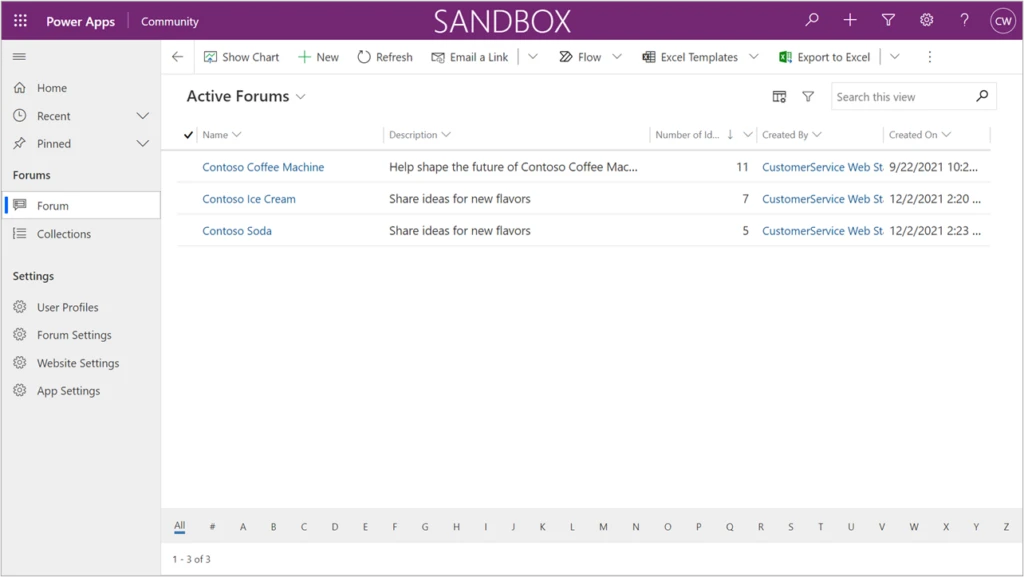
Community managers and moderators can use the first capability, the Dynamics 365 Customer Service Community Preview app, to crowdsource portfolios of ideas and quickly respond to community suggestions.

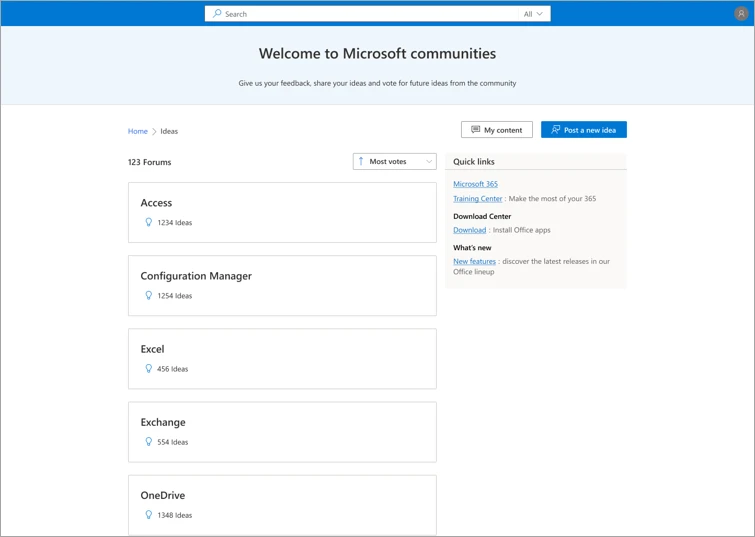
The second capability is offered with the Modern Community (preview) portal template, which enables organizations to provide their customers with delightful and engaging experiences for posting suggestions in community forums and collaborating to shape the future of products they use by upvoting, commenting, sharing, and flagging ideas posted in the community.

To see examples of these capabilities in action, check out the major public feedback portals for Microsoft Azure, Microsoft 365, and Microsoft Edge, which are now powered by Customer Service Community.

Capabilities for community managers and moderators

The Dynamics 365 Customer Service Community app provides community managers and moderators with the necessary capabilities to capture and evaluate ideas. They can be responsive and “close the loop” as community members give input. Now community managers can:

  • Configure the portal to fit their organization’s brand, including colors, custom header and footer, and quick links to digital assets.
  • Enforce acceptance of terms of use and privacy statements by users.
  • Create and manage idea forums.
  • Manage content, including content moderation and merging duplicate ideas.
  • Update the status of ideas or requests and respond to community feedback.
  • Manage users and assign security roles at the forum level.

Community app in Power Apps

Try out the Dynamics 365 Customer Service Community app in your sandbox environment first to learn about its capabilities.

Users experience a vibrant community

The Modern Community (preview) portal template offers all the functions needed to delight users as they share new ideas and collaborate at scale. Users can:

  • Browse, search, filter, and sort idea lists.
  • Post new ideas. This flow includes autosuggestion of existing ideas to prevent duplicates.
  • Collaborate and engage in a community that includes upvoting, commenting, sharing, and following ideas.
  • Flag inappropriate content.
  • Track the status of ideas that they are engaged with.

Community forum example

Next steps

Customer Service Community Preview has launched and is available to use in the public cloud. Refer to the documentation to learn how to install the Community app and get started.

You can also view a short video introduction about the Community app and portal.

Try out Community with our demo portal.

To ask questions of our team, or to view questions that others have asked, use theDynamics 365 Customer Service Community forum. When posting your question, select Community from the Filters list in the form.

Visit theDynamics 365 Customer Service Ideas forum to share feedback and ideas for how we can improve the Community app.

Feel free to reach out in email to the Customer Service Community team as well.

The post Engage with customers in Dynamics 365 Customer Service Community Preview appeared first on Microsoft Dynamics 365 Blog.

Brought to you by Dr. Ware, Microsoft Office 365 Silver Partner, Charleston SC.
Finance insights is now generally available in Dynamics 365 Finance

Achieving personalized engagement in Business to Business organizations

This article is contributed. See the original author and article here.

The business-to-business (B2B) landscape looks drastically different than it used to, thanks to digital acceleration that has reached every corner of our lives. Today’s B2B buyers, accustomed to fast, frictionless, and personalized experiences in their everyday lives, bring those heightened expectations to their roles as business decision-makers in enterprises large and small. To adapt, B2B organizations are taking a page out of the business-to-consumer (B2C) playbook and focusing on personalized experiences instead of a one-size-fits-all approachand Microsoft Dynamics 365 Customer Insights, Microsoft’s customer data platform (CDP), can help organizations gain a 360-degree view of the B2B customer essential for driving personalized engagement.  

B2C-inspired personalized experiences

Not surprisingly, 73 percent of B2B buyers want a personalized, B2C-like experience and have come to expect offers and engagements across all channels to be tailored to their specific needs.1 Buyers are looking for personalized engagement relevant to their industry (think ads, content, or website) or specific to individual needs (think fine-tuned product recommendations or proactive service alert).

And 75 percent2 of B2B buyers say they now prefer digital self-serve and remote human engagement over face-to-face interaction, a sentiment that has steadily intensified even after pandemic lockdowns have ended.1 The most notable sign that the tide has turned is the ease B2B buyers display in making large new purchases and reorders online. The prevailing wisdom used to be that e-commerce was mainly for smaller-ticket items and fast-moving parts. Not so anymore. Notably, 70 percent of B2B decision-makers say they are open to making new, fully self-serve or remote purchases in excess of $50,000, and 27 percent would spend more than $500,000.2

As B2B buyers become increasingly more comfortable engaging via a multitude of digital channels as part of an often long and complex sales cycle, the resulting data ends up siloed across many different systems. Even a small B2B company today has dozens of systems holding different pieces of the customer data puzzle. Assembling those pieces into a complete picture is a complicated task that few B2B organizations and their customer relationship management (CRM) systems can handle.

Without the means to successfully unify all of this data, it’s nearly impossible for organizations and their sellers to deliver the personalized experiences B2B decision-makers expect. True B2B personalization means going the extra mile to understand each buyer’s priorities and add value to the decision-making process. To make that happen, you need accurate data about your customers as well as predictive insights for the buyer and the account.

Bringing the customer into focus

B2B organizations must have a deep understanding of the person on the other side of the table: their priorities, preferences, goals, motivations, communication preferences, etc. To gain these insights, organizations are turning to a 360-degree view of the buyer and the account, a “golden record” shared across business functions that includes real-time descriptive, predictive, and prescription insights including demographics, firmographics, activities, preferences, churn risk, lifetime value, and next best offer or interaction. This 360-degree view identifies individuals and companies over time, despite changes in their identifiers (such as a new email address or phone number). Unified customer data is the indispensable data foundation for generating insights and driving personalization.

How Microsoft can help

With Dynamics 365 Customer Insights, organizations can deliver on the heightened expectations of today’s B2B buyers and enable a personalized, omnichannel experience. The industry-leading CDP brings together account and contact data from across channels (including zero, first, second, and third-party data), enabling a single view of customers and unlocking AI-powered insights to create long-term relationships, while safeguarding customer data and honoring privacy and consent across the entire journey.

To learn how to unlock the value of your customer data to create B2B experiences that surpass expectations, visit Dynamics 365 Customer Insights.


1- Make Music, Not Noise | Accenture Strategy

2- How COVID-19 has changed B2B sales

The post Achieving personalized engagement in Business to Business organizations appeared first on Microsoft Dynamics 365 Blog.

Brought to you by Dr. Ware, Microsoft Office 365 Silver Partner, Charleston SC.
Finance insights is now generally available in Dynamics 365 Finance

Shaping the future of retail with Microsoft Customer Experience Platform

This article is contributed. See the original author and article here.

Today, nothing is certain for brands. Standing still means falling behind. Heritage brands are no different. Now more than ever, brands need to find authentic ways to engage with digitally-savvy consumers no matter where they are. How do brands steeped in tradition create modern experiences that resonate with today’s digital-native consumers?

Heritage brands like Campari and Leatherman are at a pivotal moment in their rich history, as consumer behavior shifts seemingly overnight. To adapt, these established brands turned to Microsoft Customer Experience Platform to forge direct relationships with consumers. Hyper-personalizing experiences while retaining their unique brand personality is made possible by combining digital technology with their brand and marketing strengths to attract and retain customers. Individualized journeys require real-time insights gleaned from customer data and infused into line-of-business applications, and seamless activation across a growing number of customer touchpoints. Privacy-aware, consent-enabled personalization powered by AI enables the brands to engage each customer at precisely the right moment with the right touch, at scale.

Unify and predict to personalize experiences

Campari Group, the 160-year-old alcohol spirits manufacturer, found it challenging to collect and analyze data to accurately predict customer needs. To derive value from the vast amount of customer data, Campari turned to Microsoft Dynamics 365 Customer Insights, a customer data platform (CDP) that’s part of Microsoft Customer Experience Platform to unify fragmented customer data and generate AI-powered insights that reveal the next best action.

Because of the sensitive nature of customer data, security and compliance were very important considerations. With the most advanced data governance and consent management capabilities, Dynamics 365 Customer Insights was the obvious choice.

Moving forward, Campari is taking experiences to the next level with real-time, customer-led journey orchestration in order to hyper-personalize experiences across different touchpointslike email, mobile, social, and in-personaccording to marketing segments and consumer types.

“Customer journey orchestration in Dynamics 365 Marketing promotes contextually relevant and consistent real-time conversations with every customer across all interaction points. We can more precisely align marketing messages for each communication channel to gain the greatest impact. We see the effects in in-store sales and also in e-commerce, which is particularly important during COVID-19We want to use this data in an end-to-end way, from marketing to sales to customer service, capturing and optimizing the entire customer journey.”Chad Niemuth, Vice President, Global IT Marketing and Sales, Campari Group.

By unifying data and deriving insights, Campari is now better prepared for new opportunities, whether it’s launching a new product, entering a new market, or building customer loyalty.

Engage in new ways

Whether customers are engaging with your brand virtually, in-person, or both, Microsoft can help create a seamless customer journey across channels. Leatherman, a leader in high-quality multi-tools, pocket tools, and knives for 37 years, needed a solution to meet their growing direct-to-consumer business. They wanted to curate a more personalized customer journey and to create user experience continuity with their online store. They leveraged customer journey orchestration to deliver an end-to-end welcome journey for their new customers.

Leatherman was able to create multi-touchpoints that allowed them to engage their customers across commerce and marketing using real-time custom events. This journey was executed every time a customer signed up or started to check out on their website. It allowed Leatherman to seamlessly activate new customers and to create opportunities for continued engagement along the way.

“We have the flexibility to trigger our journeys in multiple ways from our website and our other Dynamics products, and products from other vendors. The journey can also react to customer activities in real-time.”Liz Lee, IT Director, Leatherman Tool Group.

Leatherman gained a 360-degree view of their customer, was able to break down silos between existing systems, use the data to drive insights, and better tailor the customer experience.

When you have true multi-channel personalization that keeps your customer top of mind, you not only create a better experience for them, but also build brand loyalty. These individualized customer journeys keep them coming back for more and can turn customers into ambassadors for your brand.

Learn more

Take your brand into the future by creating tailored, delightful customer journeys with Microsoft Customer Experience Platform, an end-to-end solution that safely unifies and protects your customer data while inspiring trust and loyalty.

The post Shaping the future of retail with Microsoft Customer Experience Platform appeared first on Microsoft Dynamics 365 Blog.

Brought to you by Dr. Ware, Microsoft Office 365 Silver Partner, Charleston SC.
Use diagnostics to optimize unified routing for your call center 

Use diagnostics to optimize unified routing for your call center 

This article is contributed. See the original author and article here.

When unified routing is running smoothly for your customer service organization, incoming work items are routed to the best agent and the service workload is optimized and efficient. Depending on the needs of your business, the underlying routing infrastructure can get complex over time. When something goes wrong, it can take some effort to troubleshoot the issue. Recent updates to the unified routing capability in Dynamics 365 Customer Service help you streamline the problem-solving process. 

Unified routing stages for classification and assignment 

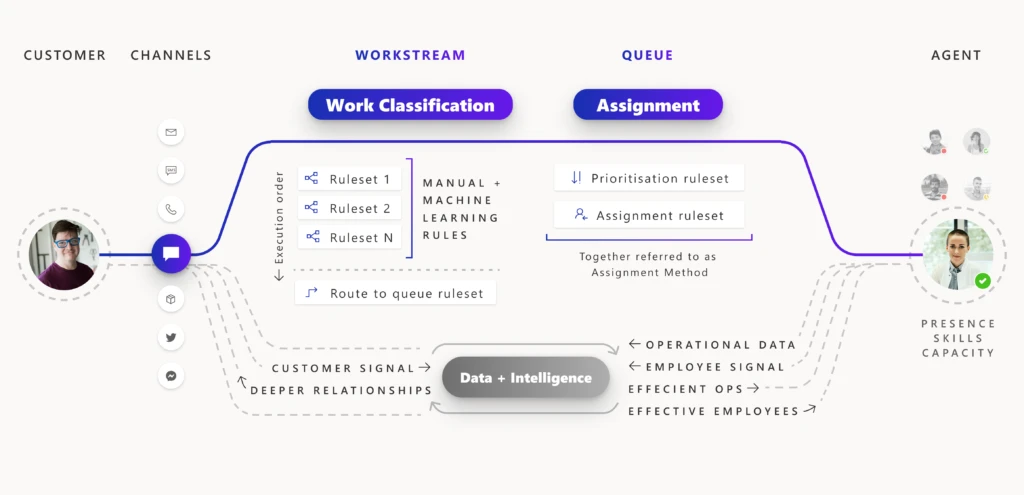
The architecture of unified routing lets you divide your routing setup into stages, and then optimize each stage individually. The classification stage lets you create rules that use customer datawhether direct or subtleto add insights to the incoming work item. You can also use machine-learning models like intelligent skill finder, sentiment prediction, and effort estimation in this stage. The insights added are then used in the assignment stage to prioritize and assign the work item to the best suited agent or queue for resolution.  

Architecture of unified routing, flowchart

For every incoming work item, rules within each applicable stage are processed so that the work item is assigned to the best agent. Diagnostics are generated from this processing, and you can view those diagnostics on each stageYou can look at how a work item was classified, how it was routed to a certain queue, and how it was prioritized and assigned.  

Problem solving with unified routing diagnostics 

When there is a problem with this routing setup, you use diagnostics to get insights into what might be wrong. You can see why certain work items are taking longer to assign, and you can also see why an item could be incorrectly assigned. More information: Diagnostics for unified routing 

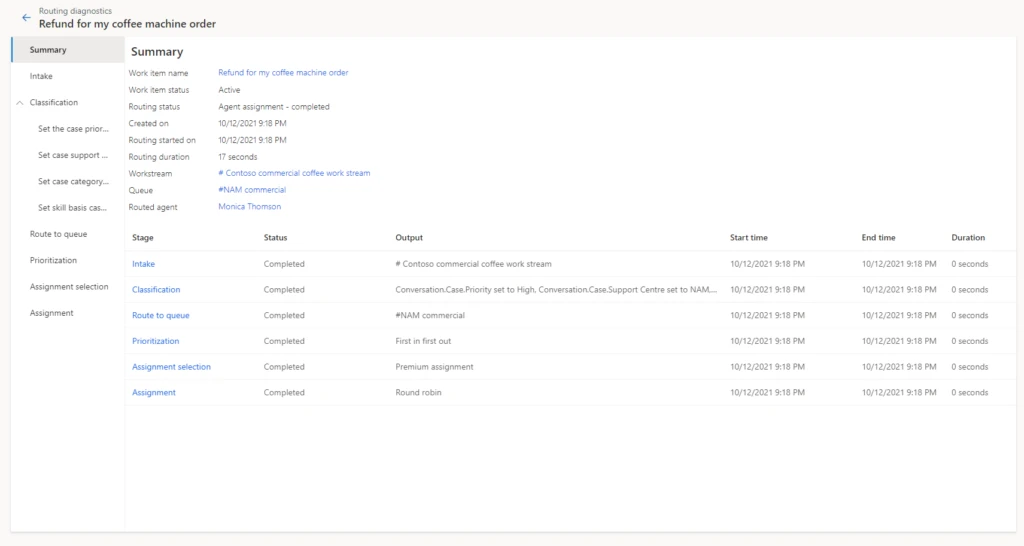
Example of routing diagnostics for a work item

Historically, only administrators had access to diagnostics from Customer Service Hub or the Omnichannel admin center app. So, only the administrator had the ability and responsibility to create rules, view diagnostics, search for misroutes, edit rules to fix issues, and optimize the routing setup.  

But during day-to-day operations, it is the supervisors and customer service managers who are responsible for the performance of the queues and the agents they manage. Issues usually surface here first, before they come to the attention of the administrator. Therefore, supervisors and managers now have access to historical analysis for unified routing. These reports surface KPIs for measuring the efficiency of all resources. While analytics tell your staff that something is not right, they need more tools to dig deep and pinpoint the core issue.  

To help with this, we have extended the access to diagnostics to supervisors. Now supervisors can look at individual work items in queues that they manage and diagnose why each work item was routed in a certain way. If the routing is not as expected, they can inform the administrator and even make suggestions to improve the current setup. 

Unified routing diagnostics scenario 

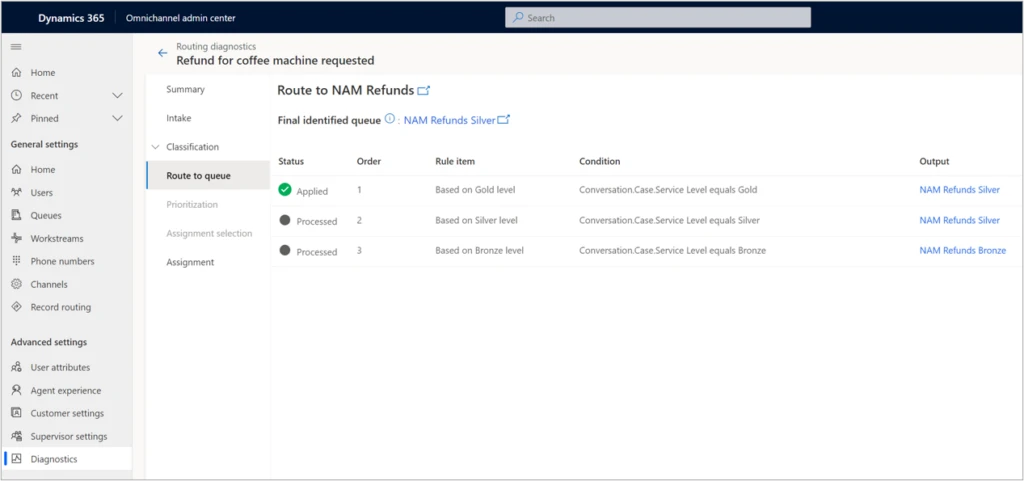
Let’s consider an example. Imagine a scenario where a supervisor is managing queues for coffee machine refund requests. Previously, there were only two queues, one for customers at the Bronze level and one for those at Gold or Silver service levels. Now, the organization has added a third queue exclusively for Gold-level service customers. The supervisor wants to ensure that the new queue for refunds to Gold status customers is working properly.   

Reviewing analytics, the supervisor can see that work items in the Silver queue have a higher session transfer rate. With access to diagnostics, the supervisor can investigate further by opening Routing diagnostics, selecting the Silver queue, and reviewing the diagnostics records for some of the recent work items.

In our scenario, the supervisor looks at the rules that are applied to the work items, as seen in the image below, and quickly notices that the route to queue rule has incorrect logic that sends work items to the Silver refunds queue instead of Gold. Note that the finalidentified queue is displayed at the top of the page in the route to queue stage, which makes it even easier for the supervisor to check the queue identified.

graphical user interface, application, email

To quickly mitigate this issue, the supervisor can manually assign the appropriate work items to the correct queue, where they will then be assigned to the right agents. Now that the supervisor was able to unravel the mystery behind the increase in session transfer rate, they can bring up the issue to the administrator, who can make the required rule change and fix the problem.

Analytics and diagnostics are powerful tools. With broader access to these tools, your organization can gain better efficiency as you more quickly evolve your routing setup.

Next steps

With 2021 release wave 1, take advantage of the benefits of unified routing in Dynamics 365 Customer Service. Check out the system requirements and availability in your region. Also, read more in the documentation:

This blog post is part of a series of deep dives that will help you deploy and use unified routing at your organization. See other posts in the series to learn more.

The post Use diagnostics to optimize unified routing for your call center  appeared first on Microsoft Dynamics 365 Blog.

Brought to you by Dr. Ware, Microsoft Office 365 Silver Partner, Charleston SC.
Finance insights is now generally available in Dynamics 365 Finance

Why AI and real-time visibility are a game-changer for order lifecycle management

This article is contributed. See the original author and article here.

In recent years, retailers, consumer packaged goods (CPG) companies, and manufacturers have incorporated direct-to-consumer (D2C) business models into their go-to-market strategies to give end customers the options to order from anywhere and ship to everywhere. As the use of these online sales channels continues to expand, so too does the number of third-party fulfillment partners and options to evaluate and incorporate into their supply chain and commerce systems. Organizations with business-to-business (B2B), business-to-business-to-consumer (B2B2C), and D2C business models, require technology solutions that give them the ability to manage an increasingly complex order lifecycle from order source through orchestration to intelligent fulfillment and delivery.

According to Gartner, “83 percent of chief information officers (CIOs) stated they were expanding digital channels in 2021, while 79 percent plan to increase the use of self-service by customers and citizens.”1 With Microsoft Dynamics 365 Intelligent Order Management, companies can stay on top of their game through digital channels, as Dynamics 365 Intelligent Order Management enhances their digital order and delivery channels. It provides real-time visibility into each order from order intake to delivery, and customizable dashboards to help track and improve operational decision-making across every touchpoint of the order life cycle.

Overcome fulfillment complexity

Managing the entire order lifecycle is about placing your organization in a position to deliver on your order promise with every customer order. But there are other undeniable benefits, such as reducing logistics costs by overcoming fulfillment complexities that await companies, who demonstrate the ability to do this well. Indeed, according to McKinsey & Company, “since e-commerce fulfillments are significantly more complex, contract logistics can charge around 50 percent more than for traditional store fulfillment. Therefore, those companies that overcome the complexities stand to gain the most.”2

Companies can overcome the complexities of e-commerce fulfillment by utilizing Dynamics 365 Intelligent Order Management rules-based fulfillment orchestration system that uses real-time inventory and AI to optimize order flows. This solution offers advanced analytical capabilities to measure fulfillment effectiveness and business users can use the insights to re-model the order fulfillment journey using drag and drop tools to ensure that their customer needs are met on time and at the lowest possible cost. In addition, Dynamics 365 Intelligent Order Management provides out-of-the-box pre-built connectors to e-commerce order sources such as BigCommerce, Magento, and Orderful; delivery partners such as Flexe, Krber, and ShipStation, and to tax and rebate management partners such as Avalara, Flintfox, and Vertex. All these capabilities provide organizations the agility needed to overcome supply chain constraints and deliver on their order promise.

Apply artificial intelligence

To profitably manage the entire order lifecycle, companies increasingly need to use AI and machine learning (ML) technologies in the supply chain. In fact, according to McKinsey & Company, “successfully implementing AI-enabled supply-chain management has enabled early adopters to improve logistics costs by 15 percent, inventory levels by 35 percent, and service levels by 65 percent, compared with slower-moving competitors.”3

With Dynamics 365 Intelligent Order Management, AI and ML are used to analyze data to find and predict patterns in order flows and fulfillment processes. The results help bring new levels of insights that would not otherwise be possible for human team members to spot alone. These results can then be paired with AI-based classification and anomaly detection models to proactively identify and address fulfillment constraints and to improve delivery times, while simultaneously reducing costs. The use of AI and ML enhances decision-making across all order orchestration flows by delivering the capability to sense and predict constraints, disruptions, and opportunities to improve order and fulfillment processes.

Enhance inventory visibility

Dynamics 365 Intelligent Order Management solution architecture was designed to support the requirements of complex order processing environments, where there are many systems and apps in the overall order-to-fulfillment process. By bringing visibility into many disparate data sources and applications; order flows, inventory, and supporting functions can be significantly improved. Dynamics 365 Intelligent Order Management ships out-of-the-box with an integrated real-time inventory visibility service that is highly scalable and extensible, and provides a single, global view of all inventory positions across all legal entities.

Dynamics 365 Intelligent Order Management not only provides organizations with a single, global view of all inventory positions, but its fulfillment orchestration engine also uses real-time inventory data to optimize fulfillment processes to ensure optimal stock levels are maintained across all stock locations. The result is that companies can increase online product availability, improve cash flow by right-sizing stock levels, and guarantee a delightful customer experience by delivering every order on time and in full.

What’s next?

We have seen that Dynamics 365 Intelligent Order Management is an ideal tool for managing the entire order lifecycle. By utilizing rules-based order orchestration to overcome fulfillment complexities, leveraging AI and ML to derive actionable insights, and optimizing stock levels by applying a real-time inventory visibility service, companies can deliver on their order promise and turn order management into a competitive advantage. Moreover, Dynamics 365 Intelligent Order Management seamlessly integrates with any enterprise resource planning (ERP), customer relationship management (CRM), e-commerce, Dynamics 365, and non-Dynamics 365 applications, allowing organizations to skip costly rip and replace implementations.

If you are ready to see how Microsoft Dynamics 365 Intelligent Order Management can help your organization to manage the entire order lifecycle, we invite you to get started today by contacting us or signing up for a free trial. Or, to learn more about how to meet your growing digital commerce needs and scale easily, while supporting the latest fulfillment methods, check the Dynamics 365 Intelligent Order Management resources on our website: Dynamics 365 Intelligent Order Management.


Sources:

  1. “Gartner, Add Digital Payments as Part of Communications Platform as a Service Offering, Lisa Unden-Farboud, Daniel O’Connell et al, 27 August, 2021.” GARTNER is the registered trademark and service mark of Gartner Inc., and/or its affiliates in the U.S. and internationally and has been used herein with permission. All rights reserved.
  2. McKinsey & Company, Unlocking the omnichannel opportunity in contract logistics, March 12, 2021, Tom Bartman, Scott McConnell, Florian Neuhaus, and Isabell Scheringer.
  3. McKinsey & Company, Succeeding in the AI supply-chain revolution, April 30, 2021, Knut Alicke, Valerio Dilda, Stephan Grner, Lapo Mori, Pierrick Rebuffel, Sebastian Reiter, and Robert Samek.

The post Why AI and real-time visibility are a game-changer for order lifecycle management appeared first on Microsoft Dynamics 365 Blog.

Brought to you by Dr. Ware, Microsoft Office 365 Silver Partner, Charleston SC.
