Empower frontline healthcare workers with Microsoft Teams

Empower frontline healthcare workers with Microsoft Teams

This article is contributed. See the original author and article here.

Healthcare continues to undergo transformation—it’s facing unprecedented challenges, new and complex expectations, and remarkable opportunities for innovation and growth. At the heart of this transformation are frontline healthcare workers—the doctors, nurses, and care team members that work to help keep us safe and healthy.

The post Empower frontline healthcare workers with Microsoft Teams appeared first on Microsoft 365 Blog.

Brought to you by Dr. Ware, Microsoft Office 365 Silver Partner, Charleston SC.

Empower frontline healthcare workers with Microsoft Teams

Microsoft recognized as a Leader in the 2021 Gartner® Magic Quadrant™ for Content Services Platforms

This article is contributed. See the original author and article here.

Microsoft 365 is trusted to keep our customers’ data secure and provide innovative solutions that solve their biggest challenges. We’re excited to share that for the fifth consecutive year, Gartner® has recognized Microsoft as a Leader in its 2021 Magic Quadrant™ for Content Services Platforms.

The post Microsoft recognized as a Leader in the 2021 Gartner® Magic Quadrant™ for Content Services Platforms appeared first on Microsoft 365 Blog.

Brought to you by Dr. Ware, Microsoft Office 365 Silver Partner, Charleston SC.

4 key elements to a successful field service transformation

4 key elements to a successful field service transformation

This article is contributed. See the original author and article here.

A successful digital transformation requires weaving together technology, data, process, and operational change. If one of these domains fails to make the grade, your entire transformation may be in jeopardy.

These four domains have one thing in common and that is they rely on people and what they bring to the table. It’s the people that matter mostfrom formulating a vision to crafting the plan and adjusting it on the fly to calculating every detail many times over.   

When the stars align and each person on the team contributes to the best of their ability, success is exhilarating. Inter-related domains can be blended into one methodical sea of changeinvigorating not just the transformation team, but enveloping the entire organization with a sense of deep pride. The accomplishment is worn like a badge of honor as every employee is positively touched by the success of the transformation.

And there is no better example than G&J Pepsi-Cola Bottlers’.

G&J Pepsi is the largest family-owned and operated Pepsi franchise bottler, employing more than 1,600 people at 13 locations in Ohio and Kentucky, with production facilities in Lexington and Winchester, Kentucky, and in Columbus and Portsmouth, Ohio.

The key to the success of this 10-time Pepsi corporate customer service award winner is G&J Pepsi’s continuous dedication to innovation. They set out to further elevate service delivery by focusing on account acquisition, customer service, and field service core processes. In short, G&J looked to unlock new and existing revenue opportunities by empowering workers and optimizing operations. As a result, G&J Pepsi is now converting more leads to satisfied customers, delivering even better customer service, and increasing field service technicians’ first-time fix rates.

1. Technology

G&J Pepsi needed a digital thread to connect business functions and leaned on Microsoft Dynamics 365 due to its hassle-free integration, allowing for application portfolio simplification and basically, it just played well to G&J Pepsi’s IT strengths.

One of the biggest new business opportunities for G&J Pepsi was its field service workforce to service beverage and non-beverage equipment beyond its current sales territory. Increasing first-time-fix service would allow G&J Pepsi to expand beyond their current market. Leveraging Dynamics 365 Field Service and Dynamics 365 Sales would remove the boundaries that limited G&J Pepsi.

To realize revenue, frontline workers, including sales and field service needed to unify in the customer journey. G&J Pepsi also knew a huge opportunity existed to accelerate its end-to-end customer process. This included steps such as lead generation, new customer account creation, payment establishment, equipment preparation, installation scheduling, equipment installation, equipment servicing, equipment recovery, and every accompanying process. 

2. Data

What was key to creating a unified, optimized customer journey? Centralizing real-time data with a scalable solution. 

G&J Pepsi created a Customer Engagement Management (CEM) platform with Dynamics 365 Field Service and Dynamics 365 Sales. The customer is central to everything the company does; however, its processes and supporting technology said otherwise.

Before CEM, a business development representative (BDR) would scan paper and digital notes, in SharePoint, Power BI, and other apps. There was no view into interactions that had taken place with the BDR, field service technician, or customer service rep. There was no single source of truth, no way to transfer knowledge, and no infrastructure for tracking leads. These inefficiencies cost G&J Pepsi $180,000 in revenue per month from lost sales.   

Data is now centralized in real-time, up-to-the-minute. Dynamics has streamlined communications and provided complete visibility and in doing so it has empowered G&J Pepsi to focus on new business. Previously, sales, field service, and leadership learned what was happening with customers in indirect, incomplete, time-lagging pathways. Now information is up-to-date and accessible by all who impact customers. 

3. Processes

Now that data is up-to-date, processes can be streamlined. The team has mapped out 150 processes and eliminated 200 problems prior to digitizing. How? By working directly with the eventual customers of the systemsales, field service, and frontline workers. One such effort eliminated 170,000 manual touchpoints annually. 

As an example, if a delivery team exchanged a piece of equipment mislabeled on a work order, the technician would have to return to the office to receive a corrected work order. Now, the equipment manager can look up the asset on the desktop, correct the mistake, and seconds later the delivery team has the correct information to complete the job.

Technicians are empowered to arrive at the right time (receive operating hours and suggested installation time from the BDR), on the right schedule (schedulers can review the technician’s other work to optimally schedule), the right way (integrated mapping functionality), and with the right equipment (obtained from the work order supplemented with account history.)

From the mobile app, technicians have all their pertinent information at their fingertipsservice tasks, customer details, product needs, and more. The result? Higher first-time-fix rates, opening the door to utilize field technicians’ time and expertise to create new revenue streams.

4. Operational changes

Now G&J Pepsi has automated some routine tasks, unburdening the employee from tedious operational tasks. Completing certain actions within Dynamics 365 triggers a Power Automate flow to kick off another process. For example, a piece of equipment is requested by a BDR for a new customer. Once the BDR puts in the request for equipment for a new customer, the creation of a new work order is triggered, which moves through equipment prep to scheduling a field technician for installation.  

The little things that used to cause big delays are now gone. The scheduling team utilizes capabilities to assign best resources to a work order and can now look across service locations instead of only selecting from a smaller subset of available technicians. Field service technicians use the mobile app’s built-in map and routing features to optimize travel time and status flags to indicate if they are on-site or traveling. With minimal development effort, G&J extended the mobile app to provide technicians the ability to generate service reports while at a customer site and instantly email.

Learn more about Dynamics 365 Field Service

The positive results have impacted everyone who touches the customer. Improvements are across a wide range of sales, service, and overall company key measures. G&J Pepsi attributes this success to frontline workers and the team, who have made everyone’s ability to serve the customer exponentially better.

And the commitment to innovation continues. Team members are excited to explore Dynamics 365 Remote Assist’s mixed-reality capabilities to both grow their service business as well as build knowledge across existing and newer agents. G&J Pepsi’s first-time-fix use case explores technician access to real-time virtual visual expertise and the ability to increase on-site resolution.  

Read the complete G&J Pepsi-Cola Bottlers’ story.

Read more about Dynamics 365 Field Service.

The post 4 key elements to a successful field service transformation appeared first on Microsoft Dynamics 365 Blog.

Brought to you by Dr. Ware, Microsoft Office 365 Silver Partner, Charleston SC.

Empower frontline healthcare workers with Microsoft Teams

Unleash the power of your small business with Microsoft 365

This article is contributed. See the original author and article here.

Over the past two years, businesses of all industries and sizes have had to adapt to new ways of working, a challenging operating environment, and ever-changing customer expectations. With all this change, it’s hard to overstate the impact of having secure and reliable productivity and collaboration tools.

The post Unleash the power of your small business with Microsoft 365 appeared first on Microsoft 365 Blog.

Brought to you by Dr. Ware, Microsoft Office 365 Silver Partner, Charleston SC.

Streamline maintenance tasks with Dynamics 365 telecommunications accelerator

Streamline maintenance tasks with Dynamics 365 telecommunications accelerator

This article is contributed. See the original author and article here.

In telecommunications, avoiding downtime is Job One. Planning, scheduling, and tracking maintenance operations that can reduce or avoid outages is critical. Plant operators need to have a quick, accurate picture of maintenance while maximizing efficiency.

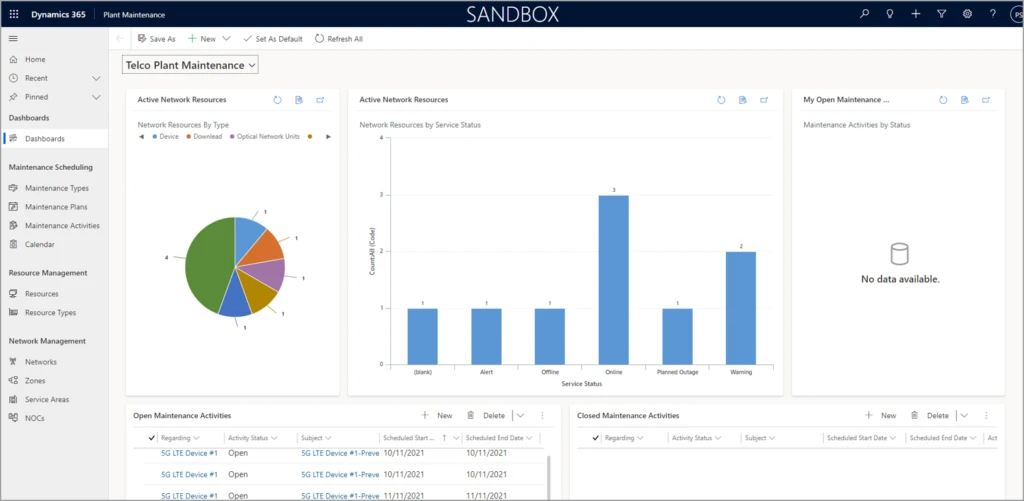
Version 2.0 of Dynamics 365 telecommunications accelerator includes an extended data model and new sample applications to help you meet customer needs and realize time-to-value more quickly.

Dashboard reporting on maintenance activities for telecommunications.

The first release of Dynamics 365 telecommunications accelerator provided place management and telecommunication sales capabilities for network and mobile operators, internet service providers, and others in telecommunications:

  • The ability to tie services, products, and deployed plant and network resources to specific geocoded physical locations such as buildings or a campus
  • Enhanced lead management with built-in service availability, qualification checks, and lookups for network resources, network mapping, and addresses
  • A telecommunications extension for the Common Data Model, with telco-specific data entities and attributes for fast application development

Partners who work with the Microsoft Power Platform can extend the data model or sample applications.

Add support for maintenance types, plans, network resources, and zones

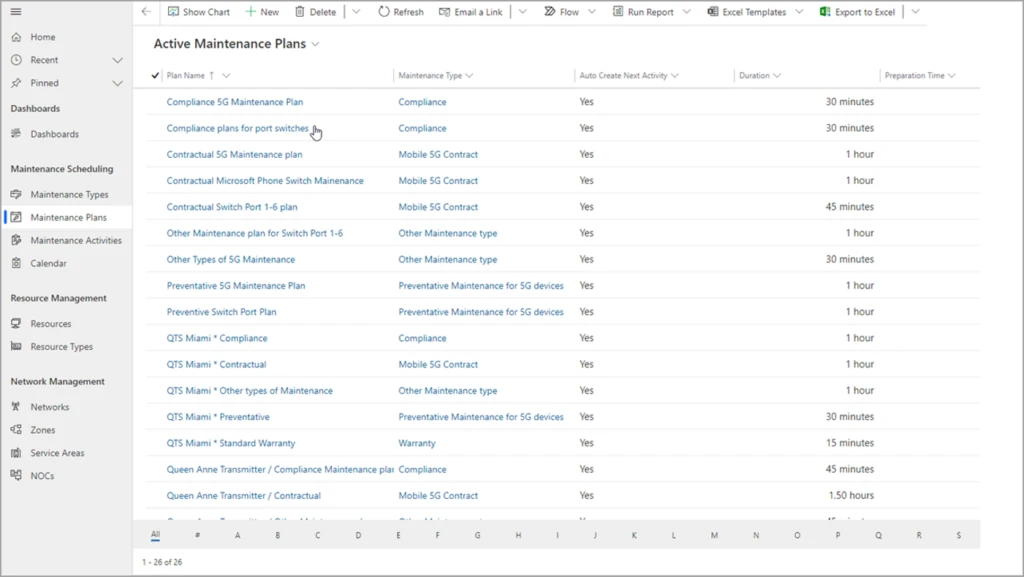
Version 2.0 of the Dynamics 365 telecommunications accelerator enhances the extended data model and adds sample applications. Plant operators can define maintenance types and plans, starting with supplied sample data for warranty, contractual, and compliance.

Operators can also define types of network resources, such as optical network units, antennas, and switches. They can also define network zones and service areas, tracking where they’re deployed, the accounts they serve, and the manufacturer. It’s all fully customizable and configurable out of the box with Dynamics 365.

graphical user interface, application, table

Schedule maintenance plans and repeatable tasks

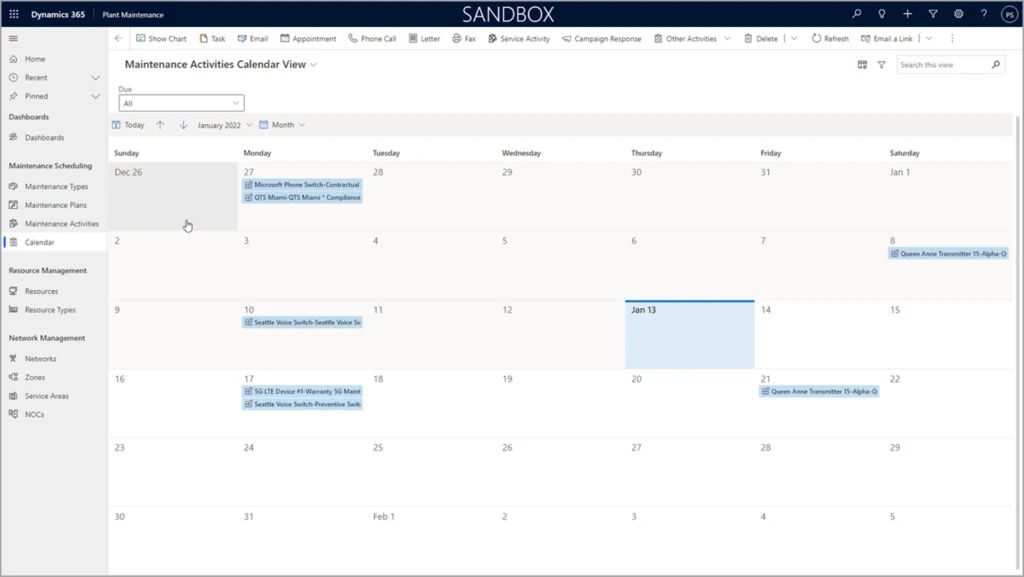
In the latest version of telecommunications accelerator, plant operators can easily schedule repeatable maintenance tasks. This not only streamlines operations, it also helps operators respond to audit and liability questions by tracking maintenance activities.

Calendar of activities for telecom plant maintenance.

What our partners are saying

Rhyan J. Neble, Vice President of Product Innovation at ETI Software: 

Microsoft’s telecommunications accelerator not only makes it possible for ETI to introduce new features to our customers faster, it empowers our team to innovate and extend our solution. For example, the maintenance scheduling features will enable our digital twin solution to identify customers and service areas impacted by planned and unplanned plant maintenance. This will allow proactive notifications to both the customer service teams and the subscribers. By integrating version 2.0 of the telecommunications accelerator into ETI’s Service Management Platform, we are able to immediately provide critical functionality to our customers and reduce costs at the same time.

Joe McDermott, COO of Carma: 

Carma is continually impressed with the collaborative investments Microsoft is making in the Dynamics platform and we’re enthusiastically supporting development of the telecommunications accelerator. The version 2.0 release of the telecom accelerator delivers new functionality that we’ve integrated into Carma’s Network and Digital Infrastructure Platform for our existing and future customers. Planning and documenting preventative and other recurring maintenance is a key activity for datacenter and network operators striving for 100% uptime. With telecommunications accelerator’s plant maintenance features, Carma enables them to manage these activities with ease and visibility across the whole organization.

Next steps

  • Get started right away with a test drive of version 2.0 of the Dynamics 365 telecommunications accelerator on Microsoft AppSource. The data model, solutions, sample applications and data, Power BI reports, and UX controls that come with the telecommunications accelerator are available to any Microsoft Power Platform developer.
  • For supporting documentation and configuration information, visit the telecommunications accelerator overview documentation.

The post Streamline maintenance tasks with Dynamics 365 telecommunications accelerator appeared first on Microsoft Dynamics 365 Blog.

Brought to you by Dr. Ware, Microsoft Office 365 Silver Partner, Charleston SC.

Empower frontline healthcare workers with Microsoft Teams

From hiding your meeting video to Yammer community suggestions—here’s what’s new in Microsoft 365

This article is contributed. See the original author and article here.

This month, we’re bringing new capabilities to Microsoft Teams to help people focus on their presentation and stay on top of required trainings, provision Windows 365 Cloud PCs more easily, and more.

The post From hiding your meeting video to Yammer community suggestions—here’s what’s new in Microsoft 365 appeared first on Microsoft 365 Blog.

Brought to you by Dr. Ware, Microsoft Office 365 Silver Partner, Charleston SC.