Microsoft is named a Leader for Field Service Management

Microsoft is named a Leader for Field Service Management

This article is contributed. See the original author and article here.

The past year has cultivated many personal and professional changes. No person or industry has been untouched. Even field service has embraced seismic changes as a result of the ongoing global pandemic. For many field service organizations, being dispatched to the customer’s location to diagnose and resolve an issue became more complex than ever before. In response, a shift began within field service to less hands-on, more remote, and more dynamic and proactive service operations.

Yes, change is inevitable, and this transformative tidal wave of change within the field service arena has been for the betterfor the service organization, its personnel, and the customers it supports. It is with great pride I share with you our position as a Leader within the IDC MarketScape for the Worldwide Manufacturing Field Service Management Applications Vendor Assessment 2021-2022.

We believe this placement recognizes Microsoft’s continuous investment and authority across our service solution and cloud functionality.
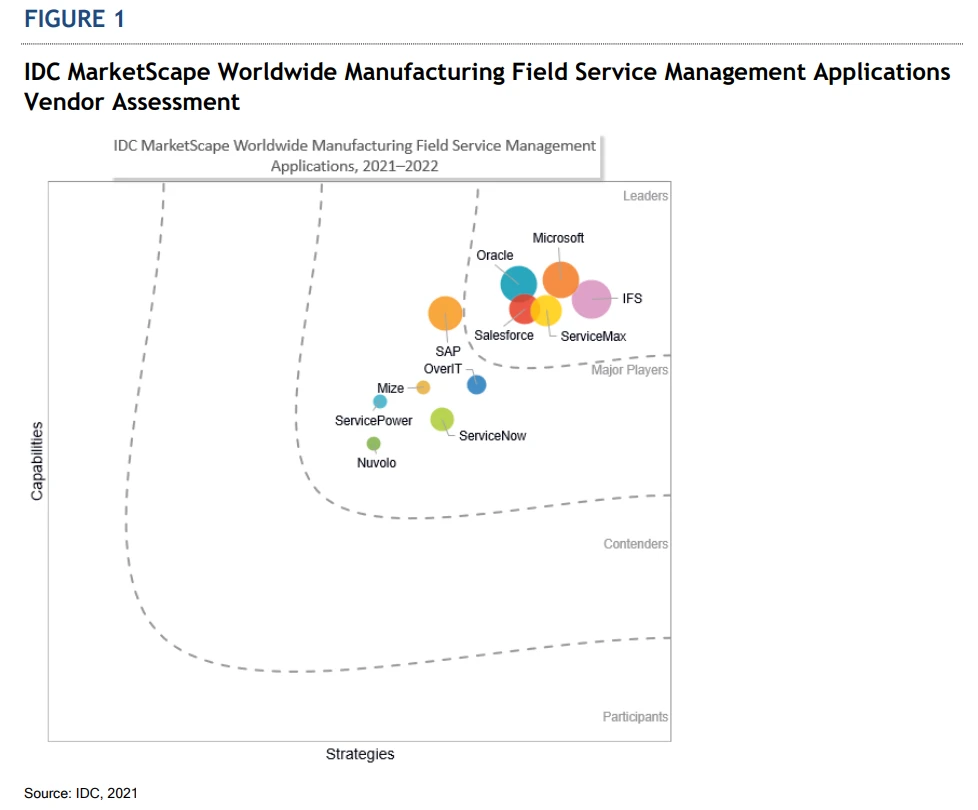
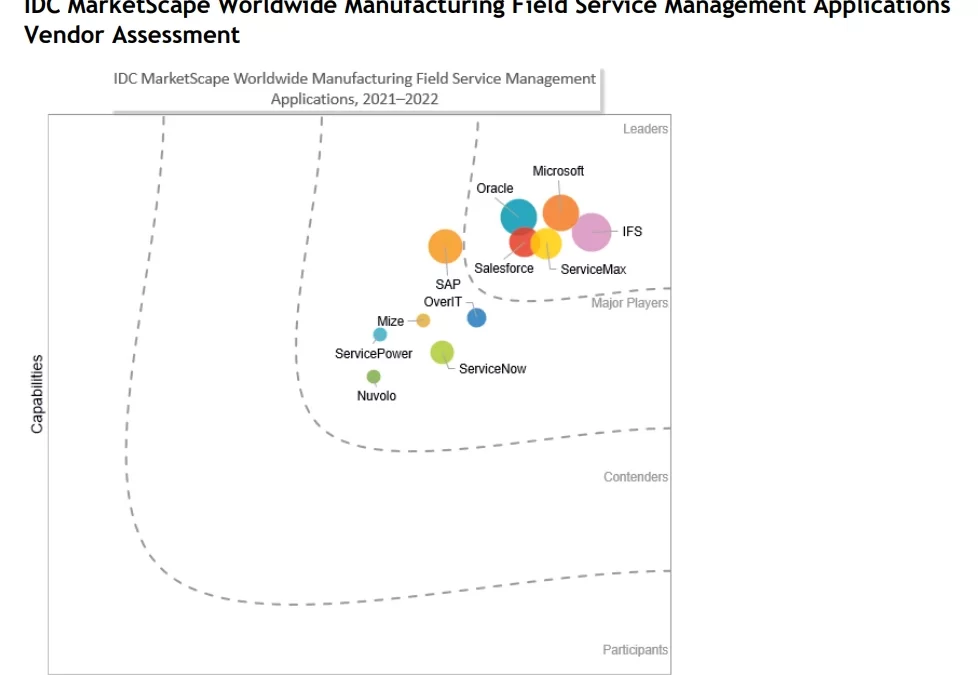
IDC 2021-2022 field service management vendor assessment.
IDC MarketScape vendor analysis model is designed to provide an overview of the competitive fitness of ICT suppliers in a given market. The research methodology utilizes a rigorous scoring methodology based on both qualitative and quantitative criteria that results in a single graphical illustration of each vendor’s position within a given market. The Capabilities score measures vendor product, go-to-market and business execution in the short-term. The Strategy score measures alignment of vendor strategies with customer requirements in a 3-5-year timeframe. Vendor market share is represented by the size of the icons.

Noted capabilities

IDC MarketScape objectively noted the strengths, challenges, and considerations of each vendor. For Microsoft, the IDC MarketScape noted one of our strengths as “The ability to deliver specific capabilities to support the market is critical to rapid adoption and ROI. Customer references also noted that Microsoft’s integration with other enterprise applications and technical capabilities of the application helped speed deployment and achieve value quickly.”

IDC MarketScape also noted “Microsoft’s primary challenge with regard to field service management is with regard to industry-specific innovations. Microsoft has established a culture of innovation around many of its products and highlights service-specific offerings, which demonstrate the future of field service collaboration and execution. However, manufacturers and some service organizations lag behind those in other industries, and companies like Microsoft will need to provide both transformative offerings and incremental innovations that closely align with the risk aversion of the specific subvertical industry.” Fortunately, Microsoft caters to everyone from the intrepid to the risk-averse with both transformative offerings and incremental innovations that closely align with the customer’s palatable level of risk.

The study advised “Manufacturers and service organizations should consider Microsoft when they are looking for an integrated field service product offering that can seamlessly integrate IoT data, remote collaboration, AI, and AR/mixed reality capabilities to enable more predictive and proactive service outcomes. The ability to collaborate in real time and have on-demand insights is transforming the way field service and support can be conducted. Microsoft is helping manufacturers that are on this journey around servitization and the convergence of AI, IoT, and AR in the field.”

And the transformation is occurring in real-time. Take for example, Burckhardt Compression, a global leader in manufacturing and servicing, headquartered in Switzerland. The company builds and services massive compressors weighing up to 240 tons, creating pressure three times higher than at the deepest point in the ocean. This high pressure transforms gas to a liquid state so it has less volume and is transported easier. If the compressor fails, the liquid turns back to gas and the build-up of pressure can be critical for the ship and the crew.

Because maintenance is so critical, Burckhardt Compression had to send a service engineer to wherever the compressor was locatedwhich was time-consuming, resource-intensive, and simply not scalable. To provide support at any location, Burckhardt Compression adopted Microsoft Dynamics 365 Field Service for field service management and Dynamics 365 Remote Assist, a mixed reality application. Now remote service engineers have access to real-time service data and can support the ship’s technicians by engaging in on-demand video chat, providing instruction augmented with a schematic overlay, and creating markups onscreen over the actual compressor. And a case is automatically created in Dynamics 365 Field Service when a call is initiated by Dynamics 365 Remote Assist, and a recording of the repair work is saved.

Burckhardt Compression is serving customers faster by eliminating travel time and sharing expert knowledge across the globe in a matter of minutes increasing trust, safety, and business continuity. Now the company is looking to expand to add non-Burckhardt compressors to its service roster, thereby expanding its market presence and generating additional revenue. Burckhardt Compression is just one of many manufacturing and servicing organizations that have reaped value by deploying Dynamics 365 Field Service and harnessing its capabilities to build stronger, more collaborative, and proactive service delivery.

The bottom line

Many service organizations consist of dispatchers answering service calls, putting customers on hold, asking the same questions repeatedly, while searching for the next available technician to dispatch. This process is inefficient, costly, and unsatisfying to the customer.

The world of field service is changing. Today, service organizations are evolving into profit centers, redefining business models, and creating powerful and fulfilling customer experiencesall supported by leading edge solutions like Dynamics 365 Field Service.

We’re excited to be positioned as an IDC MarketScape Leader and are committed to bringing you the best and most featured field service application available. Depend on the multidimensional capabilities of Dynamics 365 Field Service to help you better personalize customer engagements, improve employee effectiveness, and optimize service operations now and tomorrow.

This is where innovation meets what’s possible.

Read the IDC MarketScape: Worldwide Manufacturing Field Service Management Applications 2021-2022 Vendor Assessment excerpt.

Learn more about Dynamics 365 Field Service.

The post Microsoft is named a Leader for Field Service Management appeared first on Microsoft Dynamics 365 Blog.

Brought to you by Dr. Ware, Microsoft Office 365 Silver Partner, Charleston SC.
Improve seller productivity with a sales cadence

Improve seller productivity with a sales cadence

This article is contributed. See the original author and article here.

In sales, planning is everything. Without a plan, a sales rep might give up too easily on a prospect or appear too aggressive. A potential customer might forget about a proposal or become annoyed by too-frequent contacts. Creating a step-by-step plan for how to follow up with prospects in each stage of the sales process is the basis for a sales cadence. Microsoft Dynamics 365 Sales tools help you create, manage, and scale customized sales cadences across your organization.

The top salespeople have a well-crafted plan to get their desired results, whether they are demonstrating a product or following up with leads. A successful plan, or sales cadence, involves knowing where your prospects are in the buyer’s journey and understanding how to reach them the right way, with the right message, at the right time to move them to the next step.

If you fail to plan, you are planning to fail.

A modern proverb

In this post, you’ll learn:

  • What a sales cadence is
  • What to consider when designing a sales cadence
  • What an effective sales cadence looks like
  • How Dynamics 365 Sales can help you build a sales cadence

What is a sales cadence?

A sales cadence is a detailed plan to connect with prospects and close deals. A sales cadence includes a prescribed sequence of activities, like reaching out on LinkedIn, sending emails, making calls, sharing case studies, arranging meetings, and sending text messages, which happen at specified intervals.

An effective sales cadence improves the efficiency of sales reps. A sales cadence guides sellers on which prospects to connect with, what communication channel to use, and what information to share at each touchpoint. This structured approach reduces guesswork and aims to grow the sales pipeline and conversion rate.

Managers create a sales cadence to guide sales reps in handling different types of prospects and sales scenarios. For example, one cadence could be used for inbound inquiry leads, and another cadence could be used for upcoming renewals.

As organizations mature, they can evolve their cadences to adapt to specific geographies, industries, companies, languages, and other parameters.

A strong sales cadence library also helps you scale your sales organization. Automated sales cadences ease the onboarding process for sellers as you grow, building in best practices and sequencing their activities.

How to design a sales cadence

When you design your sales cadences, consider these five elements:

  • Prospects: It all starts with knowing your potential customers. What challenges or obstacles do they have? Why are they looking for a solution? What platforms do they use? What constraints do they contend with? What are their skills? Who is the decision maker?
  • Communication channel:Reach out to prospects using the right channel, such as email, a phone call, messaging apps, or LinkedIn.
  • Wait time: Consider a strategic delay between subsequent steps. You don’t want to be too soon or too late in your follow-ups.
  • Attempts: Understand the optimal number of touchpoints to establish contact and build a relationship.
  • Messaging:Use the right messaging, content, tone, and personalization to engage with prospects.

It’s important to note that creating an effective plan is not a one-time process. It takes time and iteration to fine-tune your sales cadences.

Example: A sales cadence for inbound inquiries

Here’s an example of a sales cadence for responding to inbound inquiries.

  • Target: Leads that have reached out through your website or other channels.
  • Purpose: Focus on and respond to high-priority inquiries to improve your conversion rate.
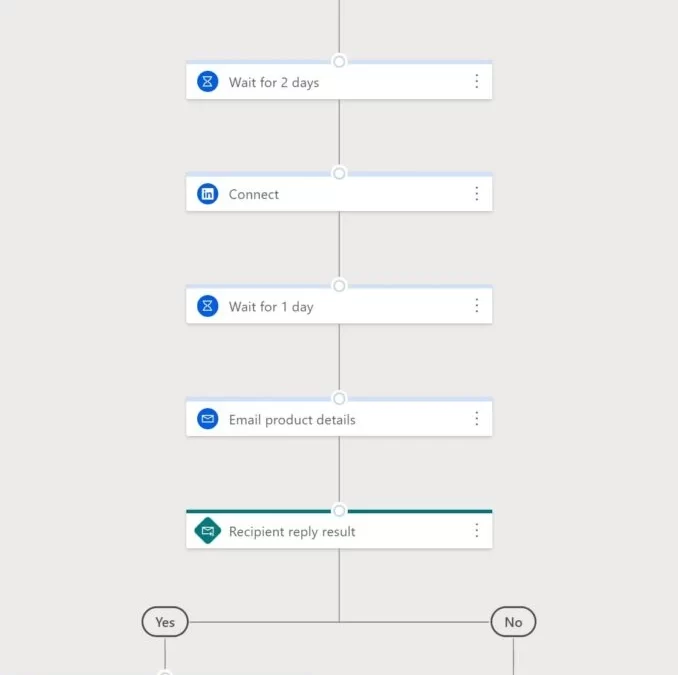
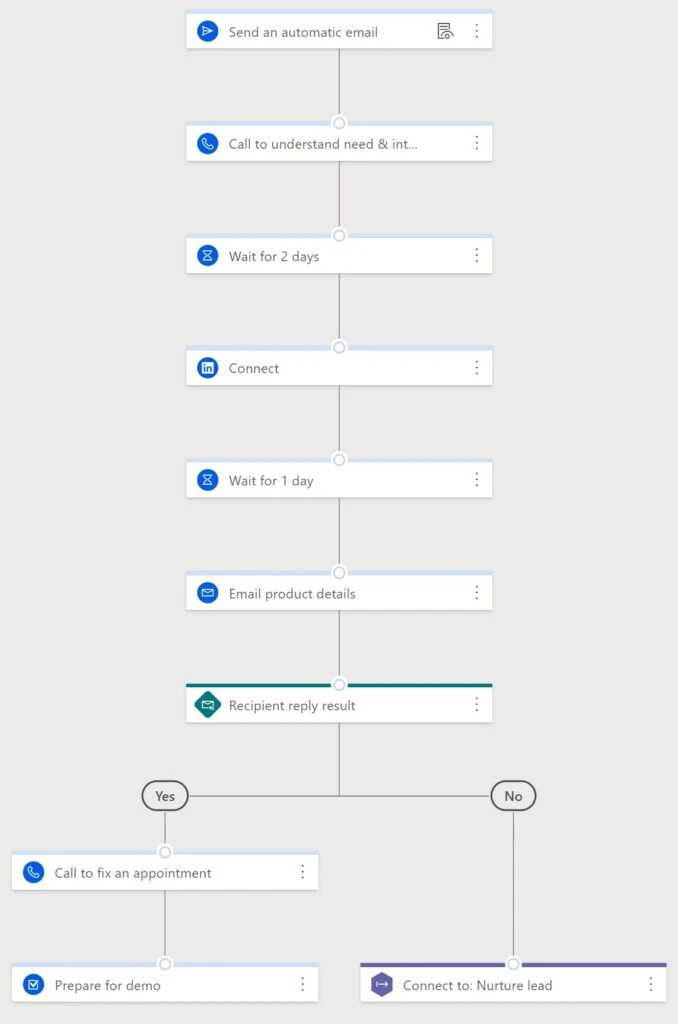
  • Description: By responding immediately and through multiple channels, you are more likely to achieve a higher conversion rate. Since responding within the first hour increases your chance to close the deal by seven times, start with an automated email response, then follow up with a phone call. Connect on a social platform like LinkedIn. Finally, send an email that provides relevant information about your product or services.

Example of a sequence created to support a sales cadence for handling inbound inquiries.

Create a sales cadence with sequence designer

The sales accelerator capability in Dynamics 365 Sales helps sellers spend less time searching for the best next customer to reach out to. Design and build your sales cadences in the sequence designer. Sales accelerator gathers information from multiple sources to build a strong and prioritized pipeline, offers context, and surfaces recommendations throughout each step in the sequence, speeding the sales process.

To create a sequence, you go to the Sales Insights settings area and open the Sequences page. For more details, check out the documentation: Create and activate a sequence.

You can use the sequence designer to configure sequences of activities for specific prospects, leads, opportunities, contacts, and so on, applying different strategies depending on priority. For example, leads of lower priority might have more automated email steps, whereas leads from your targeted accounts might have more personalized touchpoints.

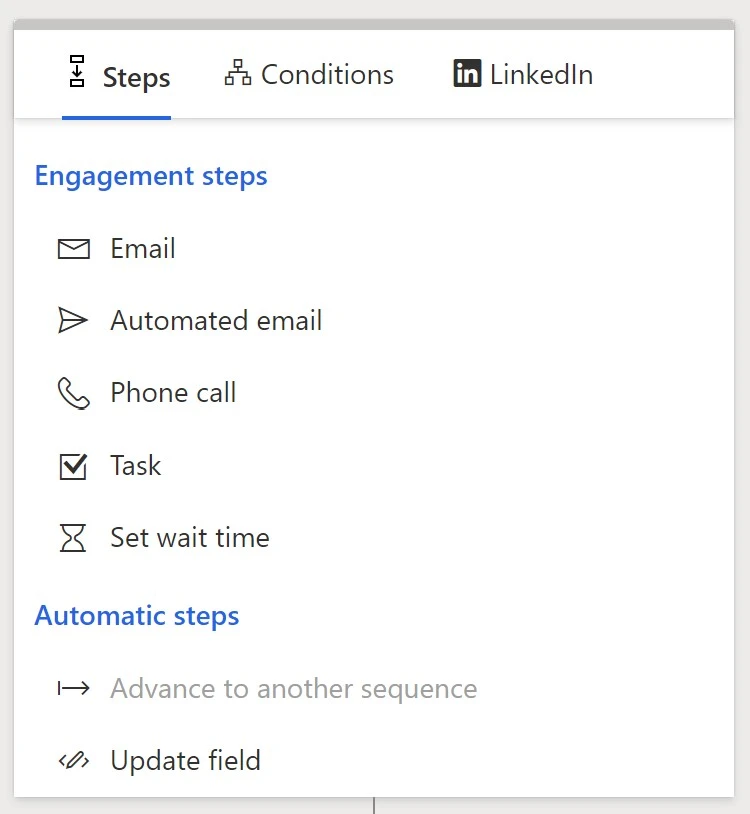
As in the example sales cadence shown earlier, sequences can include multiple activities, with wait times between activities as needed. You can branch activities based on the response, such as if an email is opened or a reply is received. Using sales accelerator’s tight integration with LinkedIn, you can even send LinkedIn InMail or create a connect request as part of your sales cadence.

Options available when adding steps to a sequence in Sales accelerator

Next steps

A good sales cadence is a necessary to improve seller productivity, increase conversion rates, and close more deals. As we adjust to virtual ways of working, digitizing sales becomes a priority for most organizations. To get started, use sales accelerator in Dynamics 365 Sales to set up a sales cadence for the most common scenarios faced by the sales team.

To start building your own sequences in Dynamics 365 Sales, visit the documentation: Manage sequences. If you use a custom app, also refer to this section of the FAQ page for sales accelerator: How to add work list site map to your custom app.

Access to sales accelerator has now been made easier: new and existing customers using Dynamics 365 Sales (excluding Dynamics 365 Sales Professional) will now see sales accelerator and sequences available for quick setup. Read the documentation to learn more about setting up digital selling capabilities.

The post Improve seller productivity with a sales cadence appeared first on Microsoft Dynamics 365 Blog.

Brought to you by Dr. Ware, Microsoft Office 365 Silver Partner, Charleston SC.
Dynamics 365 composable approach enables rapid deployment of a supply chain control tower

Dynamics 365 composable approach enables rapid deployment of a supply chain control tower

This article is contributed. See the original author and article here.

Delays, constraints, and disruptions are frequent challenges for global supply chains. And they are costly. According to Gartner 70 percent of supply chain leaders report that they have been constantly responding to disruptions since 2019.1 Supply chain professionals have long understood that the earlier potential disruptions and constraints are identified, the more successful the measures to adapt and overcome them can be. So, the question becomes, how do we identify disruptions and constraints at the earliest possible opportunity? The answer is real-time, end-to-end visibility across the supply chain, which is precisely what supply chain control towers provide.

While the benefits of supply chain control towers are easily understood, many organizations continue to struggle to make control towers a reality. The composable approach of Microsoft Dynamics 365 is changing this situation however, and providing organizations a path to rapid deployment of supply chain control towers. This article explains the composable approach and why it is an essential ingredient for success in supply chain control tower initiatives.

Learn more in our on-demand webinar: How to rapidly deploy a supply chain control tower with a composable approach.

The future leans towards composable solutions

The future of business applications is composable. We can see this in reports from analyst firms such as Gartner, who predict that “by 2023 organizations, that have adopted a composable approach will outpace their competition by 80 percent.”2 But, what is a composable approach? Before we delve into the composable approach and what makes it different, let’s briefly explore the evolution of enterprise resource planning (ERP) solutions as this will help us understand why composability is key to achieving end-to-end visibility.

The challenge of achieving end-to-end visibility

In the past, ERP systems were sold as one massive application. This meant that they were expensive and difficult to change. As these applications matured, vendors looked for ways to give customers greater flexibility. To provide this flexibility, business functions, like sales and supply chain, were increasingly offered as modular components such as customer relationships management (CRM) systems, warehouse management systems (WMS), transportation management systems (TMS), and supply chain management (SCM) systems. While modularity did provide flexibility, the flexibility itself created other problems, as we discuss next.

The main issue is that once business functions could select the components that best suited their needs, such as CRM or WMS, replacement and implementation of these systems often took place at different times, and systems were often from different vendors. Also, due to the possible differences in maturity levels and solution architectures of these disparate systems, they required time-consuming and expensive custom development to achieve end-to-end integration across the enterprise. And after integration, end-to-end performance was often plagued by latency, synchronization, and data unification issues. This is the situation where many companies find themselves today and it is the primary reason that achieving real-time end-to-end visibility of the supply chain has been so elusive.

Microservices are composable

Technology vendors began offering business solutions assembled application experiences built on microservices architectures in the continuing drive to improve customer applications. Whereas in the past, a specific business function, like warehouse or sales, would select the right system for their needs, such as CRM or WMS, businesses can now choose solutions tailored to individual workloads. For example, a simple order management workload could be composed by bringing together order orchestration, fulfillment, and inventory.

These microservices, such as real-time inventory and fulfillment, not only provide greater flexibility, but because they easily connect to other microservice applications and utilize API-driven messaging, data and actions can be pulled and pushed between different systemsdecreasing latency, improving synchronization, and enabling real-time end-to-end visibility in the process. This is why a composable approach makes the rapid deployment of a supply chain control tower possible.

Our vision

Gartner predicts that by 2026, 80 percent of companies will suffer significant value loss due to failure to merge their digital supply twin and control tower initiatives.3 We agree. And, our solutions help companies avoid this outcome by providing a composable approach that makes merging these initiatives possible.

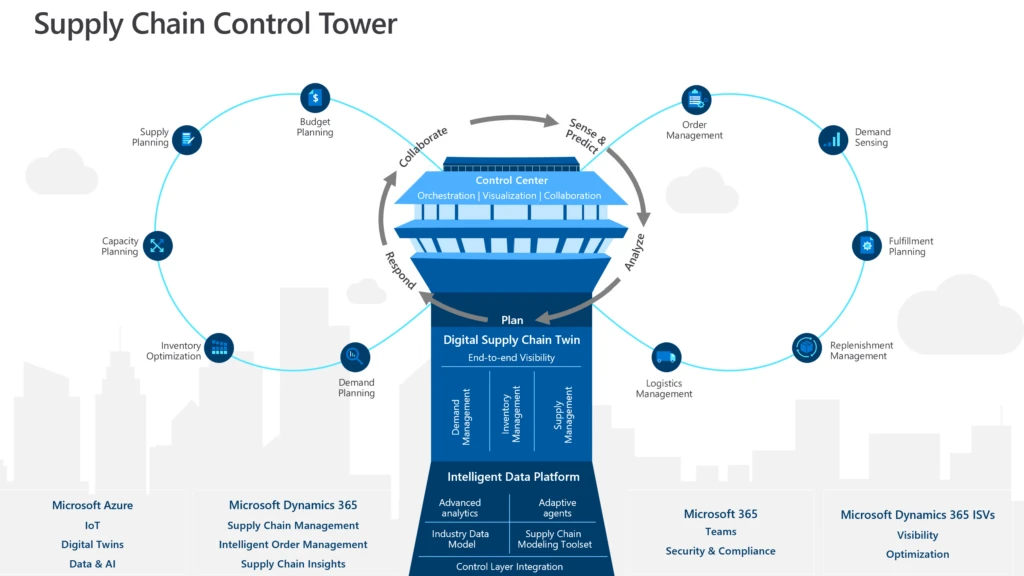
At Microsoft, we see supply chain control towers as a shared service process that can be composed from a mix of supply chain workloads. For example, a supply chain control tower and digital twin can be built using Dynamics 365 Supply Chain Management, Dynamics 365 Intelligent Order Management, Dynamics 365 Supply Chain Insightspreview together with Microsoft Power Platform, and our growing digital supply chain applications ecosystem.

Microsoft Digital Supply Chain Control Tower

Dynamics 365 Intelligent Order Management is often a great place to start when building a supply chain control tower in a retail, distribution, or direct-to-consumer (DTC) manufacturing business. This is because Dynamics 365 Intelligent Order Management is built on a microservice architecture that includes rules-based order orchestration and fulfillment, real-time inventory, and AI. As such, it is step-forward to the composable approach that allows companies to achieve the real-time end-to-end visibility of a supply chain control tower. The composability of the solution also means that organizations can get up running quickly and maximize the benefit of existing investments through easy integration with existing legacy ERP systems.

What’s next

Supply chain control towers that include Dynamics 365 Intelligent Order Management positions organizations to respond faster and more intelligently to disruptions and opportunities. Dynamics 365 Intelligent Order Management works seamlessly with any ERP and CRM system. It is also a stand-alone application that allows customers to start their control tower initiative without dependencies on other Dynamics 365 solutions. It integrates seamlessly with many market-leading API-enabled applications, using our out-of-the-box pre-built connectors to order intake sources, tax calculation, and third-party logistics partners ecosystem. Moreover, it automates and optimizes fulfillment using AI and real-time omnichannel inventory data. Supply chain and commerce professionals can proactively overcome disruptions through quickly order flows reconfigurations with drag and drop actions in a low-code/no-code interface. And by enabling them with all these capabilities, help them accelerate their order management digital transformation and turn order fulfillment into a competitive advantage.

Learn more in the on-demand webinar: How to rapidly deploy a supply chain control Tower with a Composable Approach.


Sources:

  1. Gartner, Hype Cycle for Supply Chain Strategy 2021, September 14, 2021.
  2. Gartner, Composable Commerce Must Be Adopted for the Future of Applications, June 18, 2020.
  3. Gartner, Predicts 2022: Supply Chain Technology, November 17, 2021.

GARTNER is the registered trademark and service mark of Gartner Inc., and/or its affiliates in the U.S. and internationally and has been used herein with permission. All rights reserved.

The post Dynamics 365 composable approach enables rapid deployment of a supply chain control tower appeared first on Microsoft Dynamics 365 Blog.

Brought to you by Dr. Ware, Microsoft Office 365 Silver Partner, Charleston SC.
From empowering frontline workers to accessibility improvements—here’s what’s new in Microsoft 365

From empowering frontline workers to accessibility improvements—here’s what’s new in Microsoft 365

This article is contributed. See the original author and article here.

This month, we’re bringing new capabilities to help empower the frontline workforce, make content more accessible across Microsoft 365, and more.

The post From empowering frontline workers to accessibility improvements—here’s what’s new in Microsoft 365 appeared first on Microsoft 365 Blog.

Brought to you by Dr. Ware, Microsoft Office 365 Silver Partner, Charleston SC.

Gain visibility into your inventory to improve supply chain resiliency

Gain visibility into your inventory to improve supply chain resiliency

This article is contributed. See the original author and article here.

An accurate view of your inventory is key to many decisions that you make as a company, but it is more and more challenging to get timely, correct data drawn from storage locations, sales channels, and a variety of source data systems. Visibility into your inventory is the basis for replenishment decisions, your fulfillment strategy, and even the financial status of the company, yet nearly every activity related to your supply chain can affect inventory at some point.

One of the goals of inventory management is to maintain a flexible stock level and good turnover ratio, but disruptive situations in the supply chain, coupled with delayed or inaccurate data, make forecasting a nightmare.

Perhaps this is why supply chain professionals overwhelmingly plan to invest in agility and resiliency for their supply chains. A 2021 Gartner study about “responding to a disrupted world” found that 89% want to make their supply chains more agile and 87% want more resiliency.

To address these concerns, Microsoft now offers the Inventory Visibility Add-in as part of Microsoft Dynamics 365 Supply Chain Management.

Solution to inventory pain points

The Inventory Visibility Add-in can help you transform your supply chain by tackling your inventory pain points. Inventory Visibility is a highly scalable microservice that can be enabled as an add-in to Dynamics 365 Supply Chain Management and integrate with data sources from Microsoft or third-party logistics providers (3PL). It enables real-time global inventory visibility without the need to do a full-fledged enterprise resource planning (ERP) implementation.

High-volume retailers and manufacturers can easily handle millions of transactions per minute and accurately determine cross-channel inventory.

Inventory currency enables a faster response

For most businesses, it is essential to make decisions based on current, accurate data. Tracking inventory is especially important. Changes in inventory might suggest an understock or overstock situation that demands a fast reaction. Inventory Visibility lets you explore the immediate physical status of inventory, including a status of in-transit, on hand, ordered, or a custom status. This allows the organization to adjust production or sales plans in time.

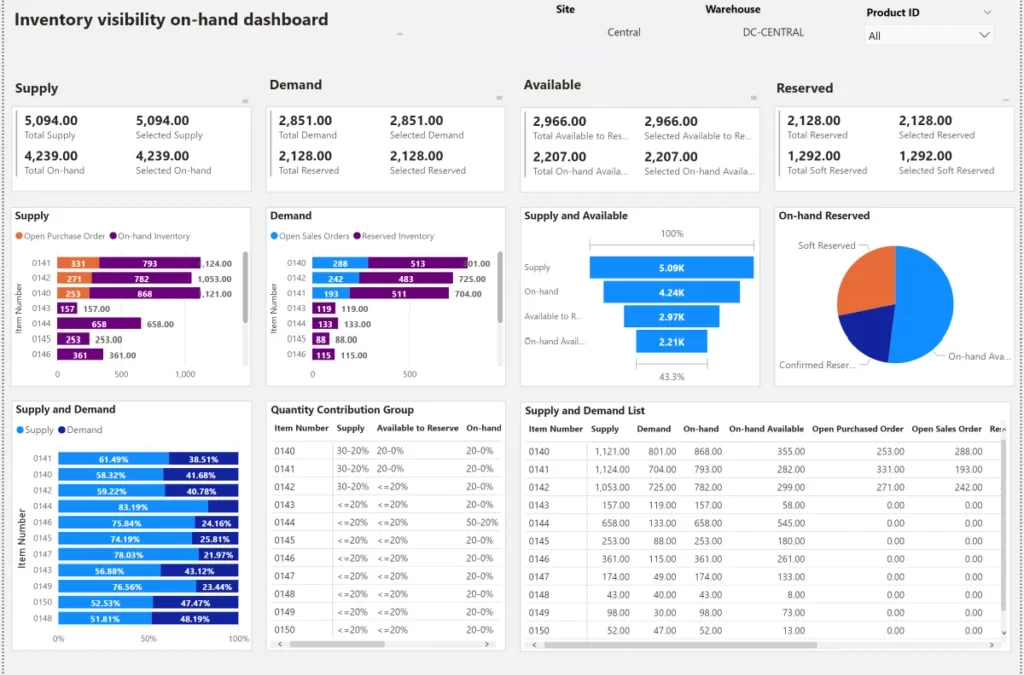
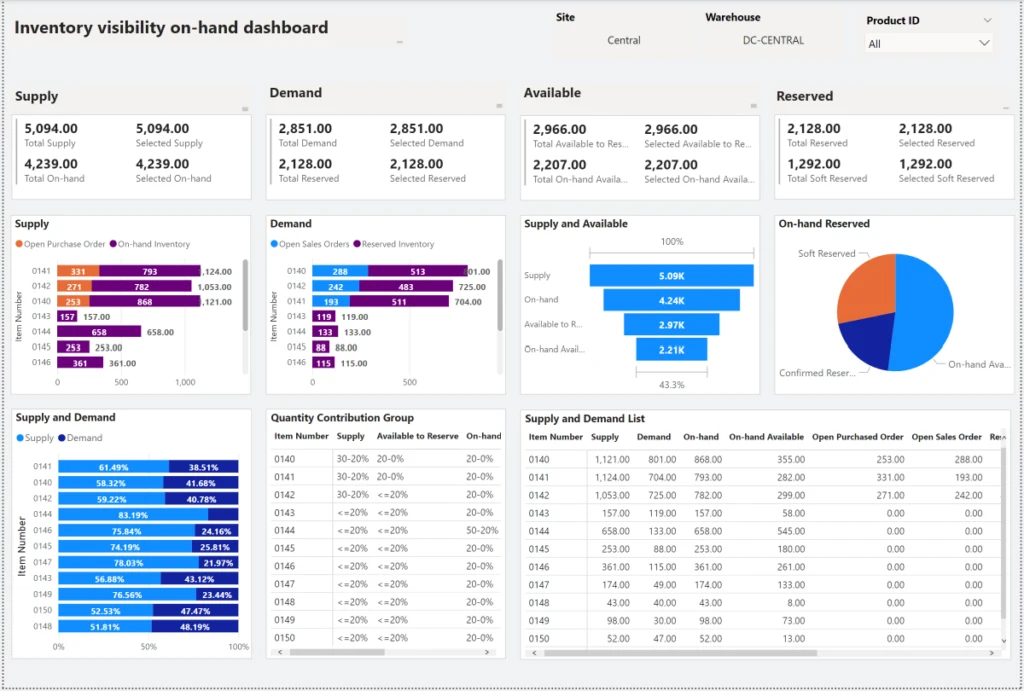
The following shows an Inventory Visibility dashboard with on-hand inventory as well as the supply, demand, and reserved inventory statuses.

On-hand dashboard showing inventory.

Scaling to support resiliency

One way to increase resiliency in your supply chain is to adopt multiple sales channels and storage locations. The combination of online, call center, and in-store sales channels helps companies maximize sales opportunities. Setting up more storage locations, including ones closer to local markets, can better support shipping and fulfillment, especially when disruptions occur.

But companies also find that those new sales channels and expanded storage locations can have different systems, making it difficult to consolidate data for real-time information about stock level and supply and demand. Having that information is crucial to support business operations. Inventory Visibility was designed for this scenario; it is capable of handling millions of transactions across different channels and geographies in seconds.

Another strategy that supply chain executives pursue to gain resiliency is to diversify their vendor sourcing. We have heard from more customers who would like to have a view into their vendors’ inventory. This can support the sell-through or direct sales scenarios or provide better insight about potentially accessible inventory. Such companies want to integrate with the inventory systems of their vendors, and this use case is also supported by Inventory Visibility.

One of our customers, a beverage giant, uses Inventory Visibility to calculate in real time the consumption of the bill of materials (BOM) for every unit of their beverage sold in every store. This supports better planning and accurate cost calculations. Previously, the customer used a time-consuming, manual process to consolidate data from several thousand stores and across regions. Now, all inventory changes can be reflected in less than a minute, with a batch job that pushes data to Inventory Visibility every minute. We are also helping this customer to establish a direct connection between their point-of-sales (POS) systems and Inventory Visibility, which will provide a data sync within seconds.

Next steps

If your organization is on the journey to transition from siloed systems to a unified and transparent inventory platform, consider taking the next step with Inventory Visibility.

The post Gain visibility into your inventory to improve supply chain resiliency appeared first on Microsoft Dynamics 365 Blog.

Brought to you by Dr. Ware, Microsoft Office 365 Silver Partner, Charleston SC.
2022 release wave 1 plans for Dynamics 365 and Power Platform now available

2022 release wave 1 plans for Dynamics 365 and Power Platform now available

This article is contributed. See the original author and article here.

Today, we published the 2022 release wave 1plans for Microsoft Dynamics 365 and Microsoft Power Platform, a compilation of new capabilities that are planned to be released between April 2022 and September 2022. This first release wave of the year offers hundreds of new features and enhancements, demonstrating our continued investment to power digital transformation for our customers and partners.

Highlights from Dynamics 365

  • Dynamics 365 Marketing continues to invest in collaboration by enabling collaborative content creation with Microsoft Teams. Marketers can use content fragments and themes to improve authoring efficiency. Investments in Data and AI enable marketers to also author content with advanced personalization using codeless experiences. Every customer interaction matters, and in this release, we are enabling our customers to continue the conversation with their customers by responding to SMS replies through a personalized experience based on responses using custom keywords that can be added to journeys.
  • Dynamics 365 Sales is putting data to work and enabling seamless collaboration to empower sales professionals to be more productive and deliver value in every customer interaction. Business data is now ambient and actionable from within Microsoft 365 interfaces, enabling sellers to quickly establish context and act on data. Using a single workspace in the Sales Hub, sellers can adjust their sales pitch using AI-guided live feedback and suggestions, and managers can track team performance and provide valuable coaching to help boost customer satisfaction.
  • Dynamics 365 Customer Service continues to invest in delivering capabilities that ensure personalized service across channels, empower agents, and make collaboration easier in an ever-increasing remote world. With the new Customer Service Admin center app, we’re simplifying the setup with guided, task-based experiences making it easier to get up and running quickly. Enhancements to the inbox view allow agents to rapidly work through issues across channels while maintaining a focus on the customer. Investments in collaboration with Microsoft Teams include data integration, AI-suggested contacts, and AI-generated conversation summaries. Lastly, investments in knowledge management include relevance search integration and historical analytics, and unified routing with default queue enhancements and routing diagnostics.
  • Dynamics 365 Field Service brings innovative enhancements and usability improvements to the schedule board. The new schedule board is now at functional parity with the previous version, and we are enhancing the user experience of hourly and multi-day views to improve dispatcher productivity. Additionally, the Field Service mobile application includes enhancements to boost technician productivity and is now fully supported on Windows devices. 
  • Dynamics 365 Finance is launching the general availability of subscription billing to ensure organizations can thrive in a service-based economy. We are enabling our customers to maximize financial visibility and profitability by bringing intelligent automation around vendor invoicing, financial close through ledger settlements, and year-end close services. In addition, we are releasing to market the preview of Tax Audit and Reporting Service. Lastly, we continue to enhance our globalization offerings in Globalization Studio such as Tax Calculation and Electronic Invoicing. With Globalization Studio, these low-code globalization services and their multi-country content will be available to any first and third-party app and extended with prebuilt ISV connectors.
  • Dynamics 365 Supply Chain Management investments continue to focus on driving agility and resilience in the supply chain. Enhanced warehouse and manufacturing execution workloads enable businesses to scale mission-critical operations using cloud and edge scale units. Planning Optimization brings new manufacturing scenarios and planning strategies to help businesses, and manufacturers, shorten planning cycles, reduce inventory levels, and improve customer service. The new global inventory accounting functionality allows inventory accounting in multiple representations to simplify operations for businesses working in multiple currencies or facing different local and global accounting standards.
  • Dynamics 365 Intelligent Order Management brings an expanded set of out-of-the-box provider integrations, enabling rapid deployment and connectivity to an ecosystem of solutions in the order capture, logistics, fulfillment, and delivery process flows. Combined with the rich ecosystem of providers, customers will have the ability to achieve advanced order orchestration using the new expanded set of features and optimizations supported in inventory orchestration, order actions, and fulfillment. This release wave brings a brand-new Returns and Exchange management service directly integrated into e-commerce solutions. This service enables customers to orchestrate journeys that minimize operational costs related to getting merchandise back on shelves and drive clear communication with their consumers.
  • Dynamics 365 Project Operations is investing in enabling capabilities ranging from onboarding, estimating, and using resources from external talent pools helping to boost efficiencies in project planning and delivery. Customers will also be able to upgrade from Project Service Automation to Project Operations using an in-place upgrade experience. In addition, customers can bring their own project management tools through a generic API where task scheduling can happen in the project management tool of choice and then integrate to Project Operations, becoming available to users in a read-only manner. Resource scheduling and booking would remain in Project Operations.
  • Dynamics 365 Guides continues to invest in capabilities that improve the collaboration experiences for authors and operators on HoloLens 2. The application will also be updated to support guest access so that customers can share their guides with users outside of their organization.
  • Dynamics 365 Remote Assist is investing in B2B service scenarios by bringing one-time calling to general availability and supporting additional calling policies for external users. Additionally, we are updating the Remote Assist mobile app to support improved collaboration through the ability to share screens across iOS and Android.
  • Dynamics 365 Human Resources will equip HR professionals with the ability to tailor experiences and automatically complete processes when employees are joining, leaving, and moving within an organization. We will also provide intelligent talent management capabilities to enable companies to understand the gap between the skills needed for the organization and employees to be successful, and the skillset held by the organization’s current workforce. By providing this intelligent talent management capability, Dynamics 365 Human Resources enables companies to ensure the right people are in the right jobs, but also plan for the future.
  • Dynamics 365 Commerce continues to invest in key B2B commerce scenarios, including sales agreements, on-behalf-of ordering, and partner-specific product catalogs and pricing. This release also introduces customer segmentation and targeting with Dynamics 365 Customer Insights, and out-of-box A/B experimentation and analytics tools. The new Store Commerce app streamlines point of sale deployment and servicing while improving performance. New workflows in headquarters, bulk image upload, and manifest-driven upload simplify the management of media assets across channels. Lastly, customer service functionality is easily enabled on your e-commerce site with Power Virtual Agents and Omnichannel for Customer Service.
  • Dynamics 365 Fraud Protection is delivering multiple new capabilities in this release. Operators of Payment Service Providers will be able to offer fraud protection as a service to their businesses, including those that have multi hierarchy business structure. Deep search capabilities enhancing analytics and policy settings have now been enabled as well as integrated case management for purchase protection. In addition, Fraud Protection now offers support for native mobile applications as well as businesses building their offering on top of Power App portals. Finally, customers will be able to choose to have Dynamics 365 Fraud Protection provisioned within Canada if they have specific data residency needs or latency requirements that would require it.
  • Dynamics 365 Business Central continues to simplify the customer onboarding experience by offering a modern Help Pane that gives users guidance and learning content where they need it most, in the context of their work. The Help Pane flattens the learning curve, increasing productivity, and business process adoption. Customers using Microsoft Power Platform can use the new capabilities of our connectors. In this release, we are making it easier to trigger a Power Automate flow directly from Business Central pages, which can save time by automating business processes. Collaborating on Business Central data in Microsoft Teams is smoother because we’ve removed the licensing friction. 
  • Dynamics 365 Customer Insights, Microsoft’s customer data platform, expands the footprint of consent enablement features across more areas within Customer Insights. It enables customers to integrate and harmonize consent data from multiple consent systems and data sources. This will ensure that consent permissions and preferences of your customers are honored during real-time personalization scenarios in Customer Insights. New data enrichment capabilities will enable customers to leverage our safe data collaboration capability to share and enrich their customer data. Safe data collaboration puts you in control of your data with privacy-enabled workflows to join and enrich your data with other datasets.

Highlights from Microsoft Power Platform

  • Power BI continues to invest in empowering every individual, team, and organization to drive a data culture. For individuals, we are improving the create experience through the addition of measures using natural language and allowing users to collaborate via OneDrive. For teams, we are bringing enhancements to Goals focused on enterprise needs, integration with PowerPoint, and adding new capabilities to the Power BI integration in Teams. To empower the organization, we are improving our experience with big data through automatic aggregations, data protection capabilities via data loss prevention (DLP) policies, and providing improved visibility into user activity to admins.
  • Power Apps maintains focus on enabling developers of all skill levels to build enterprise-class apps infused with intelligence and collaboration capabilities. Makers will be able to collaborate on the same app to simultaneously work and merge changes to accelerate development and track collaboration. Makers and developers of all skill levels will be more productive with Dataverse, leveraging intelligence to assist development with natural language to code, powered by advanced AI models such as GPT-3 and PROSE. Most importantly, we are including key updates to ensure organizations can deliver flagship apps across the entire company faster and safer than ever. These include allowing packaging of apps to be deployed on Android and iOS and improvements to ALM and governance capabilities to ensure safe and scalable rollouts.
  • PowerApps portals continue to invest in bringing more out-of-the-box capabilities to support both low-code/no-code development as well for professional developers. Some of the salient capabilities for makers include converting portals into cross-platform mobile applications by enabling them as progressive web apps, an option to use Global search powered via Dataverse search integration, and enhancements for professional developers to do more with portals using Microsoft Power Platform PAC CLI tool.
  • Power Automate is more accessible than ever, which makes it easier to get started automating tasks no matter where you are in Microsoft 365. We have seen customers of all sizes increase the scale of their robotic process automation (RPA) deployments; therefore, we are adding features to make it easier to manage machines in Azure and the credentials of users and accounts. Finally, all the features we are building are increasingly automatable by default, adhering to the API-first approach, so that IT departments can manage their Power Automate infrastructure in whatever way they want.
  • Power Virtual Agents brings improvements in the authoring experience with commenting, Power Apps portals integration, data loss prevention options, proactive bot update messaging in Microsoft Teams, and more.
  • AI Builder is adding capabilities around document automationin particular, the ability to process unstructured documents, such as contracts or e-mails. By extracting insights from the semantic understanding of the text in unstructured documents, customers will be able to extract key information from documents and process them automatically in an end-to-end flow using Power Automate. We are also focusing on building out a Feedback Loop process, enabling improvement of model accuracy by retraining models with data processed in production. Lastly, we are adding capabilities to effectively manage the governance and lifecycle of AI Models.

For a complete list of new capabilities, please check out the Dynamics 365 and Microsoft Power Platform 2022 release wave 1 plans.

Early access period

Starting January 31, 2022, customers and partners will be able to validate the latest features in a non-production environment. These features include user experience enhancements that will be automatically enabled for users in production environments during April 2022. Take advantage of the early access period, try out the latest updates in a non-production environment, and get ready to roll out updates to your users with confidence. To see the early access features, check out the Dynamics 365 and Microsoft Power Platform pages. For questions, please visit the Early Access FAQ page.

We’ve done this work to help youour partners, customers, and usersdrive the digital transformation of your business on your terms. Get ready and learn more about the latest product updates and plans, and share your feedback in the community forum for Dynamics 365 or Microsoft Power Platform.

The post 2022 release wave 1 plans for Dynamics 365 and Power Platform now available appeared first on Microsoft Dynamics 365 Blog.

Brought to you by Dr. Ware, Microsoft Office 365 Silver Partner, Charleston SC.