3 reasons to not delay your migration to Dynamics 365 in the cloud

3 reasons to not delay your migration to Dynamics 365 in the cloud

This article is contributed. See the original author and article here.

The “changing technology landscape” has become a common trope when discussing the cloud. I understand whyit helps contextualize the disruption and advancement we’re experiencing. But you know as well as I do, this “change” has happened. The on-premises solutions and infrastructure you built your business on, though once state-of-the-art, are now less adaptable, less useful, and less secure by the day.

Elasticity, scalability, and accessibility have never been more important, especially as new disruptions continue to test organizations, solutions, and processes alike. Moving to the cloud should be a business priority. Like any large project, it should not happen overnight. Build a plan, prepare your organization, and take manageable steps.

Start by understanding the Microsoft Dynamics 365 Power of the Cloud and the benefits it offers. Challenge the legacy thinking and misconceptions within your organization on whether your on-premises enterprise resource planning (ERP) or customer relationship management (CRM) can deliver on future needs and expectations. Don’t let nostalgia hold you back.

1. Good enough is no longer good enough

The first, and most common thing some business leaders say is, “What we have works just fine.” This can be especially true of customers in the finance and operations spaces, those utilizing Dynamics AX or other on-premises ERP solutions.

The idea of change or adopting something new can trigger this “good enough” reaction. The problem, of course, is that “good enough” masks complacencybecause it maintains the familiar. Within business, complacency is often the death of innovation and growth. Though some leaders still insist their on-premises solution is getting the job done, it’s becoming increasingly clear that the competition is using the cloud to accelerate growth.

Dynamics 365 customers are taking advantage of data integrations, out-of-the-box functionality, plus advanced machine learning and predictive analytic capabilities to optimize legacy processes in real time, outpacing, outmaneuvering, and out-earning their on-premises peers.

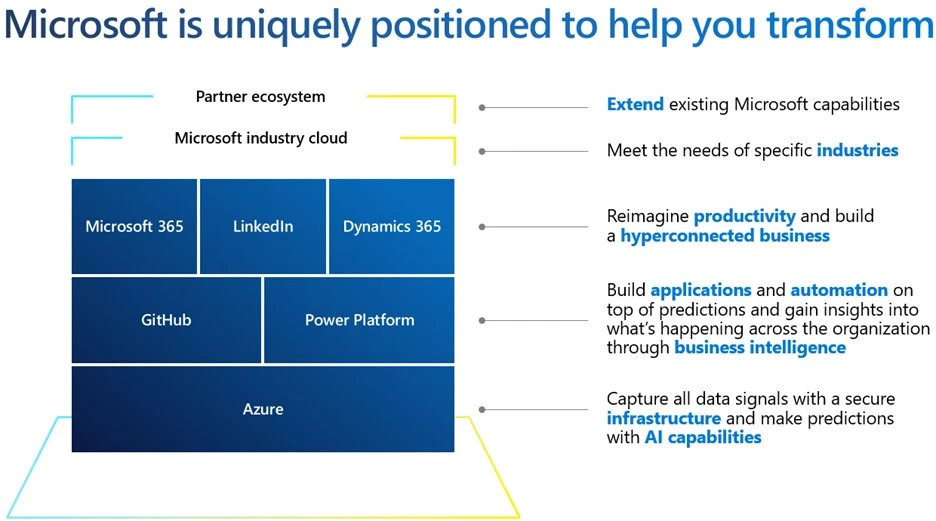
Image showing Microsoft product stack, build on the foundation of Azure, then GitHub and Power Platform, followed by Microsoft 365, LinkedIn, and Dynamics 365, then topped off with Microsoft industry cloud and partner ecosystem.

2. Your needs are not as unique as you think

Another barrier to migration is the idea that your organizational needs are unique. This claim is common among on-premises organizations whose solutions have been heavily customized over the years, often addressing specific, point-in-time business needs.

Migration can enable an organization to eliminate cumbersome customization and their underlying expenses, infrastructure, and processes. Often what a customer views as a “unique” situation is less about the specialized needs of a given IT environment and more about what is perceived to be proprietary and a limited understanding of what is possible in the cloud.

Moreover, Microsoft works hard to advance our cloud solutions and ensure agility and adaptability to meet modern business requirements. Moving to the cloud is no small decisionthese are large technology projects that take planning and resources. While customizations do add complexity, these modifications should not preclude you from moving to the cloud. Out-of-the-box functionality; low-code, no-code; code-extensions; and ISV applications often eliminate the need for your legacy customizations.

Dynamics 365 offers flexibility and scalability designed to grow with customers’ businesses, allowing them to manage their organizations with unified data in real time.

3. Siloed doesn’t ensure security or compliance

Data preservation is a concern for most organizations. Vulnerabilities within your IT infrastructure and processes can leave systems susceptible to external threats and exploitation. Due to media mentions, many organizations believe the cloud is not safe.

The impenetrable solution is a myth, driven by the misconception that most attacks originate from outside an organization. No doubt traditional on-premises data solutions have been the stalwart cornerstone of many businesses’ IT operations. This firewall thinking served us well for a time. Not anymore. The threats have changed. On-premises solutions are reliant on existing policies, technology, and softwarewhich may or may not be up to datealong with their IT staff ensuring that the latest security processes and protocols are being maintained.

Within a modern cloud based solution, customers are able to take advantage of a Zero-Trust security framework. Zero Trust assumes potential threats have already “breached the gates.” Microsoft is proactive in verifying and reverifying credentials and authentications to minimize risks and threats.

Consider that cloud-based systems have millions of programs designed to check and update customers’ systems, creating backups and adjusting to current conditions, while on-premises solutions are reliant on IT staff to do those things individually. When measured against the increasing sophistication, speed, adaptability, and sheer criminal organization of cyber-attacks, it is nearly impossible for any company to protect itself in a siloed, non-cloud environment. Microsoft Cloud solutions regularly provide localized compliance, security, and governance updates. This translates into greater institutional and organizational efficiency and cost savings, allowing your teams and IT staff to focus on other projects and strategic priorities aligning to growth, leaving the security “burden” on Microsoft.
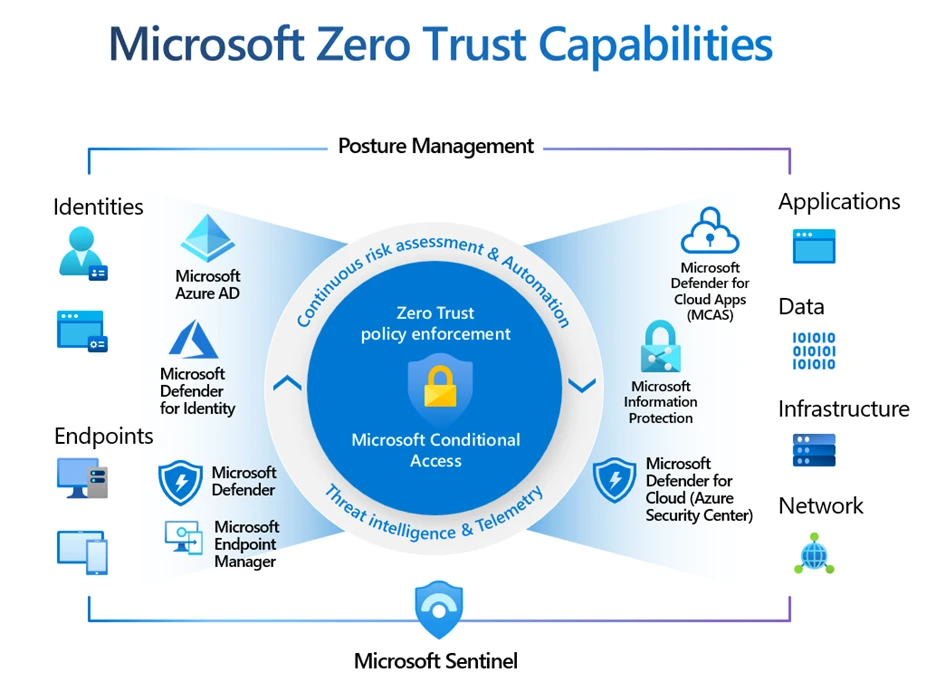
Diagram of Microsoft Zero Trust capabilities, starting with policy enforcement and conditional access at its core, then growing out to Microsoft security solutions, and finally covering things secured through Microsoft, such as identities, endpoints, applications, data, infrastructure and network.

Your business resiliency may depend on when and how you adopt cloud functionality

Migrating to the cloud makes sense for efficiency and growth62 percent of companies that have migrated to the cloud reported an increase in customer satisfaction. Migrating to the cloud makes sense for customization and adaptabilitycompanies that have transitioned to cloud solutions reported a 44 percent increase in the speed of new product launches due to utility and specialized tools available to them. Migrating to the cloud makes sense for security and reliabilitycompanies that have transitioned to the cloud reported a 60 percent reduction in security incidents compared to their on-premises solutions.

Bear in mind that the benefits of the cloud can only fully be realized through successful migration, and Microsoft has developed the tools, resources, and expert support to help companies make the move in a quick, efficient, and cost-effective way.

Learn more

To learn more about how Microsoft Cloud solutions can help you modernize, customize, and keep you more secure, watch the Microsoft Dynamics 365 Power of the Cloud Webinar and join the migration community for resources and expert advice.

The post 3 reasons to not delay your migration to Dynamics 365 in the cloud appeared first on Microsoft Dynamics 365 Blog.

Brought to you by Dr. Ware, Microsoft Office 365 Silver Partner, Charleston SC.
Enrich customer insights with affinity levels and share of voice

Enrich customer insights with affinity levels and share of voice

This article is contributed. See the original author and article here.

Enriched profiles in Microsoft Dynamics 365 Customer Insights help you understand your customers’ brand and interest affinities so that you can provide the hyper-personalized experiences across touchpoints that today’s customers seek.

Brand and interest affinity insights are based on first- and third-party signals and data from people like your customers in age, gender, and location. This month we are announcing two enhancements to the Dynamics 365 Customer Insights enrichment feature:

  1. Affinity level. Every enriched customer profile now includes an affinity level, from low to very high. Levels are in addition to the existing affinity score, which is calculated on a 100-point scale. Either can be used to measure affinity and to aid easy segmentation.
  2. Share of voice. This information can be used to identify which brand or interest is highest for a given demographic segment. Share of voice is a comparison across brands and interests that you select.

Introducing affinity levels

We added the affinity levels enhancement to simplify the process of identifying a demographic segment’s affinity for a brand or interest. Previously, affinities were assigned a numerical score with no fixed scale. Affinity levels map directly to affinity scores and are designed to make the affinity scores more accessible. There are four levels:

  1. Low
  2. Medium
  3. High
  4. Very High

With this enhancement we also fixed the scale of the affinity score. It’s now calculated on a 100-point scale.

The setup experience for affinity enrichments hasn’t changed. Users will see the updated experience automatically.

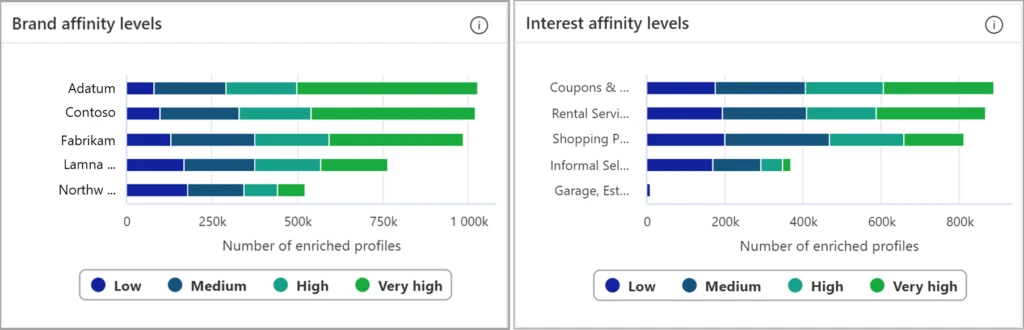
The following image shows how the new affinity levels appear on the My enrichments > BrandAffinity and My enrichments > InterestAffinity views:

Screenshot of the brand affinity levels and interest affinity levels bar charts in Dynamics 365 Customer Insights.

Introducing share of voice

Share of voice identifies which brand or interest has the highest proportion of popularity. It’s an important measure because it helps you understand whether your customer is more likely to engage with you or focus on your competition. The affinity for a brand or interest is calculated as a ratio of its popularity for a given demographic segment (age, gender, location) as compared to other brands or interests.  

Previously, affinities and interests appeared next to each other in the My enrichments dashboard. While there’s a natural tendency to compare them against each other, they’re not directly comparable. Share of voice calculates comparatives across your selected brands or interests using a 100-point scale.

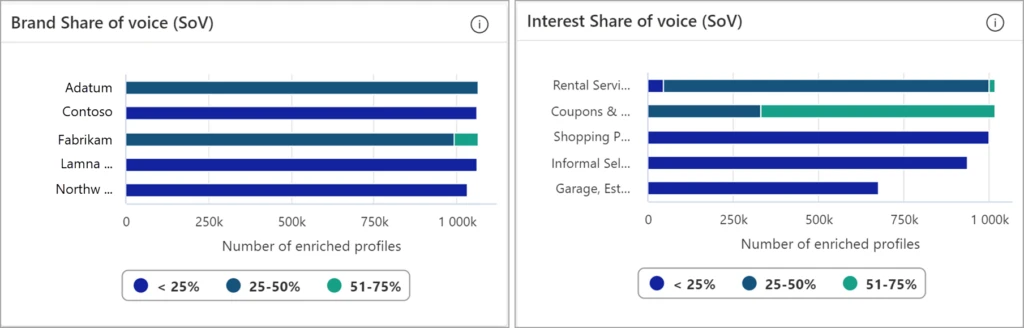
The share of voice numbers for configured brands always add up to 100% and are grouped into four levels:

  1. Less than 25%
  2. 25% to 50%
  3. 51% to 75%
  4. Greater than 75%

The share of voice enhancement doesn’t require any additional setup. As with affinity enrichments, users will see the updated share of voice experience automatically.

The following figure shows the aggregate share of voice for configured brands and interests:

Screenshot of the brand share of voice and interest share of voice bar charts in Dynamics 365 Customer Insights.

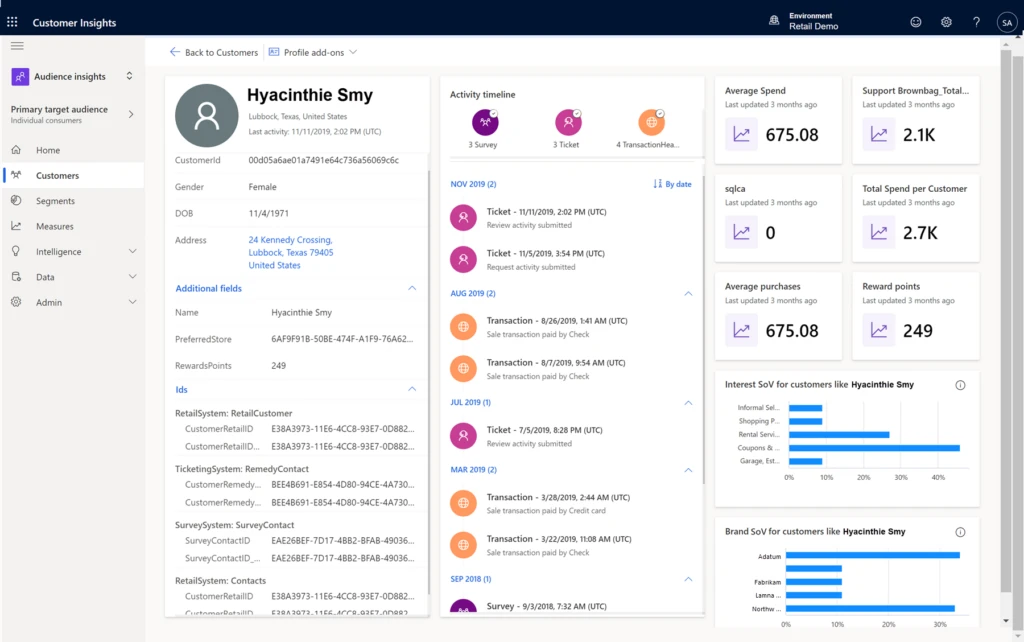
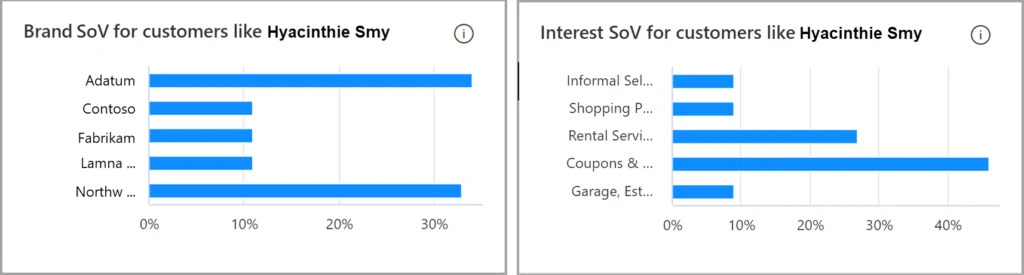
You can also see share of voice for configured brands and interests on individual customer pages:

Screenshot of the customer page in Dynamics 365 Customer Insights.
Screenshot of the brand share of voice and interest share of voice bar charts for a customer in Dynamics 365 Customer Insights.

More information

Learn more about Dynamics 365 Customer Insights.

For more information about these new feature enhancements, see the brands and interests enrichment documentation.

Sign up for a free Dynamics 365 Customer Insights trial to experience how you can enrich your customer profiles with affinities and share of voice. We invite you to try these new feature enhancements and let us know about your experience.

The post Enrich customer insights with affinity levels and share of voice appeared first on Microsoft Dynamics 365 Blog.

Brought to you by Dr. Ware, Microsoft Office 365 Silver Partner, Charleston SC.
Improve CSAT by connecting customers to agents using automatic assignment in unified routing

Improve CSAT by connecting customers to agents using automatic assignment in unified routing

This article is contributed. See the original author and article here.

Automatic assignment of incoming service requests is one of the most powerful capabilities of unified routing, benefiting customers as well as agents and management. A common customer pain point is waiting for a long time to reach an agent, only to find out that the agent is unable to solve the issue. Precise automated assignment directly impacts key KPIs like first call resolution, customer satisfaction, and agent satisfaction. On the management side, the system can determine the best agent to assign to a case, removing the need for supervisors to constantly monitor queues.

How automatic assignment works

To assign incoming service requests from all channels to the best-suited agent, unified routing evaluates the following information until it finds a match:

  • Static characteristics of the agents, such as skills, proficiency, working hours, and location
  • The dynamic characteristic of real-time capacity
  • Aspects of the incoming work, such as answers to pre-chat questions, virtual agent interactions, customer journey context, and required skills

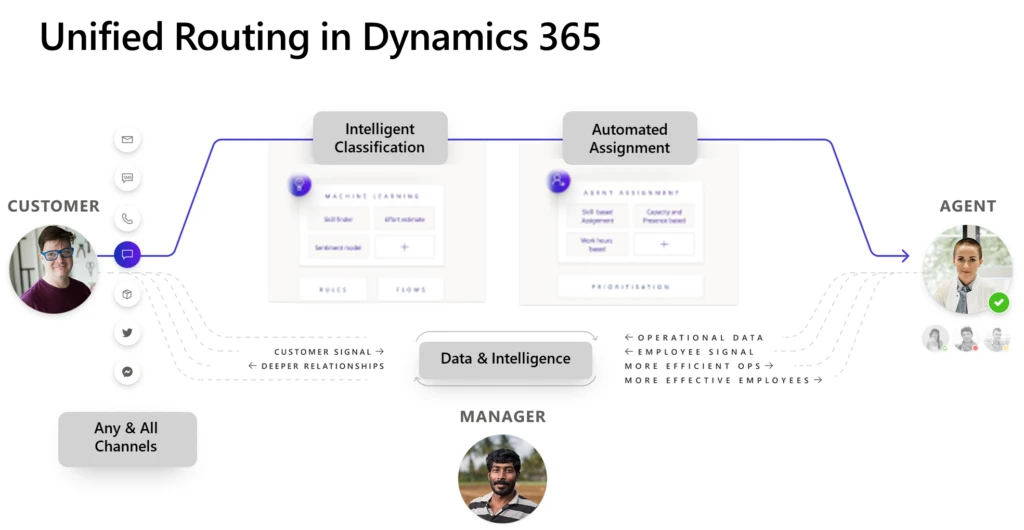
Diagram showing an overview of unified routing in Dynamics 365 Customer Service.

Unified routing first looks at the incoming service request and any responses to bots, IVR, pre-chat surveys, and so on, and classifies or “enriches” the service request using machine learning models or logical rules. This step helps in identifying details like incident category, severity, and priority; determining the best support center from the customer’s location; and recognizing related records.

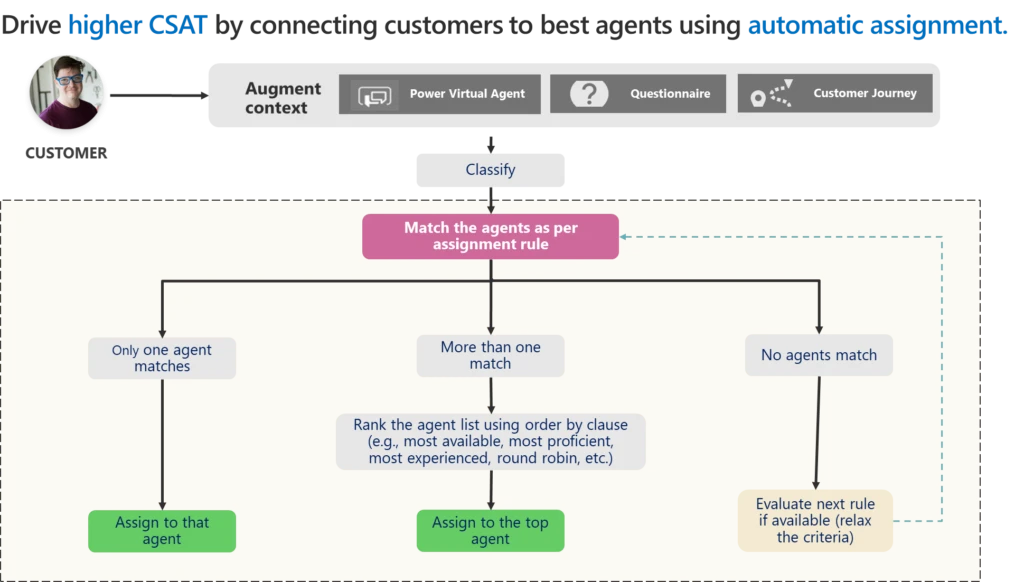
Next, the system uses the enriched information to find the most appropriate agent, as expressed in terms of assignment rules. Unified routing supports multiple assignment rules, executing them one after another until a suitable match is found. Matching can produce three results:

  1. Only one agent matches all the criteria. The system assigns the work to the agent.
  2. Multiple agents match the criteria. The system ranks them against one another, based on their capacity, proficiency, or experience, or simply assigns them in a round robin fashion.
  3. No agents match the criteria. The system provides an option to relax the criteria, or constraints. We call this “gradual relaxation of constraints.” Unified routing evaluates the next matching expression, repeating the process until at least one agent matches.

Diagram showing how unified routing uses enriched service request information and assignment rules to assign agents automatically.

What happens if the automatically assigned agent rejects the assignment or isn’t available? The system tries to reassign the work on its own, supplemented by supervisor intervention, when needed. Unified routing respects the supervisor’s assignment, so if a supervisor wants to step in and assign work to an agent, they can always do so.

With automatic assignment, unified routing helps improve CSAT while lowering the total cost of ownership, removing the need for constant queue supervision.

Related links and more reading

This blog post is part of a series of deep dives that will help you deploy and use unified routing at your organization. See other posts in the series to learn more.

The post Improve CSAT by connecting customers to agents using automatic assignment in unified routing appeared first on Microsoft Dynamics 365 Blog.

Brought to you by Dr. Ware, Microsoft Office 365 Silver Partner, Charleston SC.
How Microsoft is equipping manufacturing workers with the tools of the future  

How Microsoft is equipping manufacturing workers with the tools of the future  

This article is contributed. See the original author and article here.

Across the manufacturing industry, pressure continues to rise as organizations and their workforces balance unpredictable supply chains, complex regulatory and compliance requirements, advanced security threats, and heightened competition. At Microsoft, we are working to empower all manufacturing workers, from the factory floor to the customer’s door, with the solutions they need for sustainable growth and increased productivity.

The post How Microsoft is equipping manufacturing workers with the tools of the future   appeared first on Microsoft 365 Blog.

Brought to you by Dr. Ware, Microsoft Office 365 Silver Partner, Charleston SC.
How Microsoft is equipping manufacturing workers with the tools of the future  

From Viva Goals to Defender for small businesses—here’s what’s new in Microsoft 365

This article is contributed. See the original author and article here.

One of the challenges of hybrid work is enabling teams to remain connected, engaged, and in sync. Ensuring everyone is on the same page may have felt easier when we were all in the office together, but we’re continuing to deliver updates to Microsoft 365 that bridge the digital and physical divide to bring employees closer to each other and to their organization’s mission and goals.

The post From Viva Goals to Defender for small businesses—here’s what’s new in Microsoft 365 appeared first on Microsoft 365 Blog.

Brought to you by Dr. Ware, Microsoft Office 365 Silver Partner, Charleston SC.
Dynamics 365 Business Central now includes a Shopify connector

Dynamics 365 Business Central now includes a Shopify connector

This article is contributed. See the original author and article here.

Last October, we announced a new partnership with Shopify to help our customers create a better shopping experience. The partnership was designed to better connect the easy-to-use e-commerce and merchant experience of Shopify with the comprehensive business management capabilities of Microsoft Dynamics 365 Business Central. Today we are pleased to announce that a new Shopify connector is now available.

“We launched the Shopify Global ERP program to give merchants the power to manage the complexity of their business operations. The new Microsoft Dynamics 365 Business Central connector will help our merchants remain resilient and prepare for the future of commerce using real-time insights from connected data.”Colin Bodell, Vice President of Research and Development, Shopify.

The connector will help our customers get the visibility needed to speed customer inquiry responses, process more timely returns and refunds, and achieve more accurate order processing. Ultimately keeping people focused on customer experiences, by eliminating manual processes through:

Support of multiple Shopify shops

  • Each shop has its own setup, including a collection of products, locations used to calculate inventory, and price lists.

Bi-directional synchronization of items or products

  • Connector will sync images, item variants, barcodes, vendor item numbers, extended texts, and tags between systems.
  • Easily export item attributes to Shopify.
  • Use selected customer price groups and discounts to define how prices will be exported to Shopify.
  • Decide whether items can be created automatically or only allow updates to existing products.

Synchronization of inventory levels

  • Choose to use some or all of the available locations in Dynamics 365 Business Central.
  • Update inventory levels on multiple locations in Shopify.

Bi-directional synchronization of customers

  • Smart-map customers by phone and email.
  • Use country-specific templates when creating customers, which helps ensure that tax settings are correct.

Import of orders from Shopify

  • During import you can automatically create customers in Dynamics 365 Business Central or decide to manage the customers in Shopify.
  • Include orders created in other channels, such as Shopify POS or Amazon.
  • Shipping costs, gift cards, tips, shipping and payment methods, transactions, and risk of fraud.
  • Receive payout information from Shopify Payments.

Easy tracking of fulfillment information

  • Optionally choose to write item tracking information from Dynamics 365 Business Central into Shopify.

Microsoft has partnered with scapta, a Business Central ISV, to acquire their market-tested, feature-rich Shopify connector and embed it directly within Dynamics 365 Business Central. Scapta has many customer testimonials showcasing the power of connecting Dynamics 365 Business Central and Shopify. This approach allows us to offer more value to our customers that need global commerce capabilities.

“We rely on Shopify to manage commerce across three shops and to process thousands of orders each month. The connection with Dynamics 365 Business Central provides us with the visibility needed to adapt faster, work smarter, and perform better.”Stijn Lowette, CEO Kambukka.

Capitalize on the Shopify connector today

More connected data insights can help you reimagine the shopping experience for your customers, while streamlining business operations and financial management. Empower your people with more automated commerce processes so they can stay focused on more strategic work and customer outcomes. By connecting Shopify and Dynamics 365 Business Central you get the flexibility, control, and tracking needed to drive growth. The Shopify connector is available for the online version of Dynamics 365 Business Central. It is not available for on-premises versions. We expect this feature to be available as an extension in all countries where Dynamics 365 Business Central is available. The extension will be pre-installed for new customers. Existing customers can download and install the extension from Microsoft AppSource or the Shopify app store.

The post Dynamics 365 Business Central now includes a Shopify connector appeared first on Microsoft Dynamics 365 Blog.

Brought to you by Dr. Ware, Microsoft Office 365 Silver Partner, Charleston SC.