Customer journey orchestration levels up with advanced tools in Dynamics 365 Marketing

Customer journey orchestration levels up with advanced tools in Dynamics 365 Marketing

This article is contributed. See the original author and article here.

Marketers design customer journeys to provide the right message at the right time for customers to take the next step. With more opportunities than ever for interaction, you must take care not to overwhelm customers with unwanted messages. That’s why we’re delighted to introduce advanced real-time customer journey orchestration tools in Dynamics 365 Marketing that help you engage customers at key moments without bombarding them with spam.

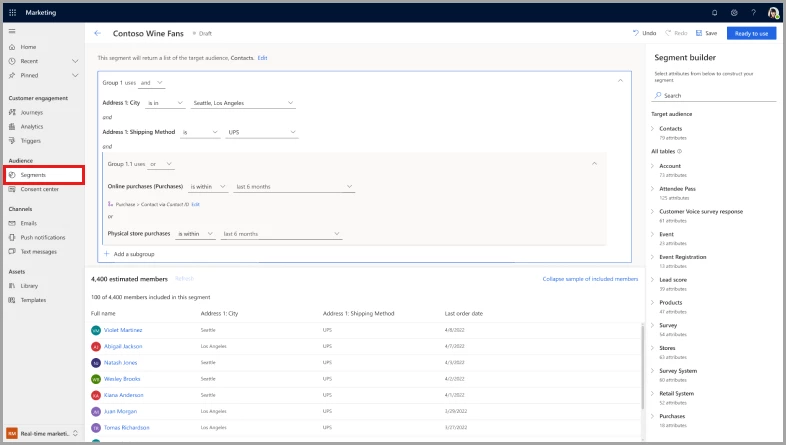
Engage the right audience effortlessly with the new segment builder

Targeting the right audience is critical for creating highly personalized marketing campaigns that yield high conversion rates and improve engagement. Previously, the segment builder in Dynamics 365 Marketing required a deep understanding of database schemas. The new real-time segment builder in customer journey orchestration is marketer friendly. Easily reach customers through segmenting on demographic, firmographic, and behavioral data.

Here are some of the benefits of the new real-time marketing segment builder:

  • It’s powered by artificial intelligence. Just describe, in plain English, how you’d like to create the segment, then review and use it.
  • There’s no need to memorize relationships between tables. The builder automatically populates all the possible paths between customer profiles and the selected data table for you.
  • View segment size and membership estimates before publishing.
  • Enjoy a consistent creation experience between static and dynamic segments.
  • Include or exclude individual members.
  • Query segments based on their customer data in a consistent manner, without having to worry about which segment type to choose first.
  • Adjust segment refresh frequency after publication.

Screenshot of the new segment builder in customer journey orchestration.

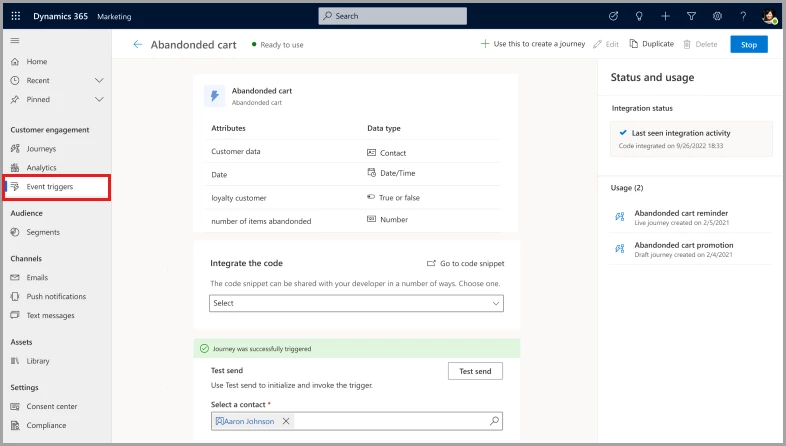
Test your journey triggers to provide seamless experiences

Customers expect consistent and uninterrupted experiences in their interactions with brands. With custom trigger testing, marketers can simulate a customer’s experience, using themselves as a test subject. They can evaluate the journey based on the attributes defined in the custom trigger to identify and address issues before they affect real customers.

Screenshot of the custom trigger test page in Dynamics 365 Marketing customer journey orchestration.

Boost your productivity when sending journey reminders

To improve the effectiveness of your marketing campaigns, it’s crucial to remind customers to take action on key tasks such as filling out a registration form or completing a purchase.

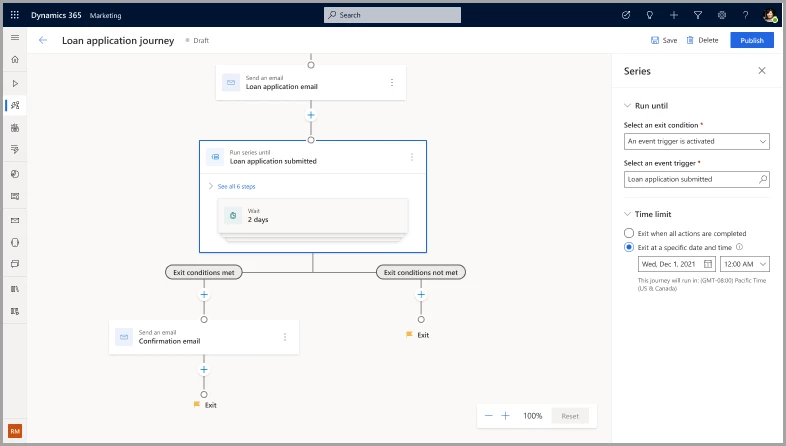
With enhanced real-time customer journey orchestration, it’s easy to set up recurring reminders to streamline the process of moving customers down the funnel. The reminder feature allows sending emails, text messages, and push notifications to increase engagement chances, instead of simply repeating the same marketing messages in the same channels. You can even set the number of repetitions or a time limit to make sure that messages aren’t sent indefinitely.

Track the customer’s exit from the reminder loop, too. By capturing different branches separately, such as cart checked out, cart not checked out, and cart expired, you can target and follow up with each segment appropriately.

Screenshot of the journey reminders page in Dynamics 365 Marketing customer journey orchestration.

Optimize customer engagement by controlling the number of messages sent

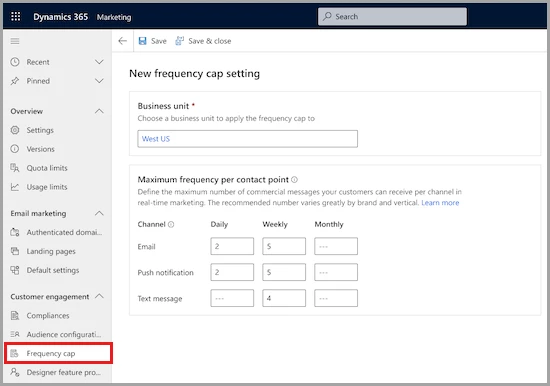
Consumers’ mailboxes are overflowing. Marketers must be careful not to overwhelm their customers with email, which can result in lower message engagement rates, increased unsubscribe rates, spam reports, or important messages being missed. With frequency capping, you can optimize engagement by controlling how many messages are sent.

Frequency capping allows marketers to define the maximum number of messages their customers receive through a particular channel per day, week, and month. Transactional messages are always excluded, and individual journeys can be left out of the cap so that important messages can be received. You can view whether a message was blocked by the frequency cap and for which users.

By monitoring engagement rates with marketing messages, you can fine-tune your message frequency. You’ll make sure that you’re striking the right balance between keeping the brand top-of-mind and overwhelming customers with too many messages.

Screenshot of the email frequency cap settings in Dynamics 365 Marketing.

Deliver personalized experiences at scale with advanced customer journey orchestration tools

Real-time journey orchestration now has interactions capabilities to deliver personalized experiences at scale. Reach up to 100 million contacts and deliver up to 300 million monthly interactions through email, text messages, push notifications, or custom channels, and create segments of up to 30 million contacts. That’s up from the previous limit of 100 million outbound interactions to 30 million contacts and 10 million contacts per segment.

Key takeaways about advanced real-time customer journey orchestration

Get greater engagement from your customers in 2023 with Dynamics 365 Marketing. Thanks to our advanced customer journey orchestration features, you’ll interact with customers on their terms, engaging them when and how they expect, without delivering disjointed experiences or spamming them. You’ll spend less time designing and maintaining your customer journeys and feel more confident that you’re delivering seamless, high-quality experiences.

Next steps

Start using our new features and get ready for the ones coming soon:

Consult the release notes to learn more about exciting updates to Dynamics 365 Marketing, including preview and general availability dates.

Not yet a Dynamics 365 Marketing customer? Take a guided tour and get a free trial!

The post Customer journey orchestration levels up with advanced tools in Dynamics 365 Marketing appeared first on Microsoft Dynamics 365 Blog.

Brought to you by Dr. Ware, Microsoft Office 365 Silver Partner, Charleston SC.

Use the Customer Service workspace app for omnichannel interactions

Use the Customer Service workspace app for omnichannel interactions

This article is contributed. See the original author and article here.

Starting Saturday, April 1, 2023, we will be deprecating the Microsoft Dynamics 365 Omnichannel for Customer Service application and encouraging customers to migrate to the Customer Service workspace application. This upcoming change will affect your multi-session agents currently using the Omnichannel for Customer Service application in Microsoft Dynamics 365 Customer Service.

We have decided to consolidate our two multi-session customer service applications, Omnichannel for Customer Service and Customer Service workspace. This change is being made to ensure that our customers benefit from all Dynamics 365 Customer Service capabilities in a single multi-session application. To this end, we will be focusing our future developments on the Customer Service workspace application.

Key Dates

  • Disclosure Date: January 11, 2023 
    We sent communication to affected customers and partners that we are planning to deprecate the Omnichannel for Customer Service app. 
  • Deprecation Date: April 1, 2023
    After this date, we are no longer going to invest in the Omnichannel for Customer Service app.
  • End of Support: June 2024  
    After this date, we are no longer going to support the Omnichannel for Customer Service app. 
    • End of Life: December 2024   
      The Omnichannel for Customer Service app will be taken out of service.  

        Next Steps

        Starting Saturday, April 1, 2023, we will no longer provide updates to the Omnichannel for Customer Service application. We will continue to support the Omnichannel for Customer Service application, and there will be no change to product availability. 

        To help with this transition and prevent potential interruption of service, we have developed a migration guide detailing the steps to move your configurations from the Omnichannel for Customer Service application to Customer Service workspace. You can also refer to our migration frequently asked questions document to help answer any questions you may have about the migration process. 

        Please contact your Success Manager, FastTrack representative, or Microsoft Support if you have any additional questions.

        The post Use the Customer Service workspace app for omnichannel interactions appeared first on Microsoft Dynamics 365 Blog.

        Brought to you by Dr. Ware, Microsoft Office 365 Silver Partner, Charleston SC.
        Finance Reimagined: Microsoft uses low-code and automation to streamline processes

        Finance Reimagined: Microsoft uses low-code and automation to streamline processes

        This article is contributed. See the original author and article here.

        Innovation is a fundamental element for businesses to remain competitive and achieve success. Innovation leads to increased efficiency and effectiveness and contributes to improved business performance. With the ongoing economic challenges and recession facing global economies, the importance of innovation is even greater. The finance team plays a vital role in this endeavor by incorporating innovation into its strategies and operations. CFOs must not only fulfill their responsibilities as the financial stewards of the business but also actively collaborate with other departments to foster innovation and prepare for potential disruptions. In this challenging environment, CFOs must accomplish more with limited resources; innovation is the key to achieving this goal.

        This blog post will explore the advantages organizations can gain by implementing a Finance Center of Innovation to review internal operations and discover ways to improve efficiency. Additionally, we will highlight a practical example from our Microsoft, where implementing robust and flexible technology enabled swift closing of technical deficiencies and automation of previously labor-intensive manual tasks.

        Finance Reimagined

        Learn how low-code applications can help your finance team accomplish more with less.

        a person standing in front of a computer

        Address complexity, manual processes, and inflexible legacy systems

        One of the biggest challenges facing finance teams today is the sheer amount of data being generated, which can be challenging to manage and use effectively. In many cases, legacy systems that were once sufficient are now unable to keep up with the times and are costly to replace. Furthermore, there needs to be more tools available to finance teams to anticipate the growing complexity of businesses. Manual and inefficient processes and errors continue to plague finance teams and cost valuable time and money. Additionally, with increasing risks and threats worldwide, the regulations and compliance requirements that finance must abide by are growing in complexity. To mitigate these challenges and ensure business success, implementing a Finance Center of Innovation can help identify opportunities to use digital technologies, enabling finance teams to stay focused on the future and remain agile.

        Learn how Microsoft embraces resourcefulness to innovate

        At Microsoft, we are proactively adapting to the dynamic landscape by implementing a resourceful approach throughout our business operations. By embracing this “do more with less” philosophy, we are able to accelerate innovation, empower our employees to accomplish more, and ultimately drive better results. To achieve this, Microsoft has established a “Center of Innovation” strategy to facilitate the collaboration of technical and non-technical finance professionals to optimize existing processes. This allows our finance teams to direct their attention towards high-impact activities that foster growth and increase profitability. By thoroughly evaluating internal operations, the team identifies opportunities for improvement and efficiency, then deploys low-code applications, such as Microsoft Power Platform, to rapidly automate processes and streamline operations.

        How can a Finance Center of Innovation (FCI) benefit my organization?

        A “Finance Center of Innovation” (FCI) is a specialized team or department within an organization focused on driving innovation and creating new solutions in finance. The FCI aims to improve financial performance by exploring innovative technologies, approaches, and business models. FCIs will range from a diverse group of financial experts, engineers, data scientists, and business leaders to a small, dedicated team of finance professionals with an aptitude for using technology and solving problems. The specific composition and approach of an FCI will depend on the organization’s needs and goals. There are many valid approaches to take when building an FCI team, both simple and complex. The benefits of an FCI are numerous, so CFOs should get started with whatever resources are available and add complexity over time.

        Having an FCI can bring many benefits to finance teams, such as:

        • Enhanced financial planning and analysis: The FCI can use data and technology to provide better insights and support more informed decisions, leading to improved financial performance.
        • Streamlined financial processes: The FCI can identify opportunities to automate and optimize financial processes, reducing errors and increasing efficiency.
        • Improved risk management and financial reporting: With access to more advanced tools and analysis, the FCI can help organizations identify and mitigate risks and improve the accuracy and timeliness of financial reports.
        • Compliance: The FCI team can help the organization stay up to date with the latest regulations, reducing the risk of non-compliance.

        Innovate through automation of routine finance tasks

        Assembling a team of experts is a crucial first step toward driving innovation within your organization. However, the next step is equally importantidentifying opportunities for acceleration. Finance teams should work closely with their Center of Innovation to identify and prioritize areas where automation can be introduced to optimize routine tasks. Some common examples include data entry automation, accounts payable and accounts receivable, expense management, compliance, and audit functions. However, it is crucial to note that the implementation and specific tasks will vary depending on your company’s unique needs. By collaborating with your Center of Innovation and identifying critical opportunities for automation, you can streamline processes, reduce costs, and free up your employees to focus on more strategic initiatives that can drive growth and revenue for your organization.

        Accelerate innovation and automation with low-code solutions

        Once optimization priorities have been identified by your FCI, the next step is selecting the appropriate resources to solve the problem. This can be challenging, as many teams are held back by inflexible legacy systems and processes that can only be easily corrected with significant technical resources. However, with low-code automation tools, FCIs can make these improvements and innovations without replacing expensive legacy systems, effectively breathing new life into their solution ecosystem without an expensive rip-and-replace. Microsoft Power Platform offers a powerful solution for finance teams looking to solve complex business challenges within their legacy enterprise resource planning (ERP) quickly. Our low-code tools empower innovation, conquer business hurdles, and open new opportunities to do more with less. Whether you are a pro developer or not, our user-friendly tools allow anyone to create solutions, saving time and costs while reallocating resources to focus on what matters most.

        Case example: Microsoft streamlines payment term exception requests and improves the compliance process with Microsoft Power Platform, saving thousands of hours

        Microsoft identified an opportunity to streamline payment term exception requests and improve the compliance process. Historically, contract payment term exception requests were received through multiple email inboxes, often needing more information for quick and accurate evaluation. The process owner was required to research and develop a compliant response. Still, finance controllers could not track the requests, measure impact, and analyze cash flow implications, leading to a lack of accountability and consistency in understanding payment policies. To improve this, the team used Microsoft Power Platform to automate the payment terms exceptions workflow for intake, dispositioning, decisioning, and reporting. Then, a Power Apps and Power Automate flow was developed to standardize request intake, automate alerts, and establish accountability. Finally, a Power BI dashboard was created to give executives visibility into change requests and cash flow impact. Within six months from the start of the project, the team had a more than 14 percent improvement in payment compliance while saving 5,000 hours (about seven months) per year of manual processing time, which reduced the average service time from 8 to 10 days to approximately 3 days.

        Help finance stay strong for the future

        At Microsoft, we understand the various challenges that finance teams and CFOs face in today’s business landscape. To address our challenges, we have implemented a finance-first innovation approach that utilizes our low-code platforms to enable the rapid creation of solutions to handle almost any business challenge. Our low-code apps are compatible with any ERP, including Microsoft’s own Dynamics 365 Finance,making it easy to get started. With easy-to-use technologies and helpful best practices, you can help your organization to optimize its resources and free up time for more value-adding activities, demonstrating the power of doing more with less. By embracing this approach, you can transform many manual and time-intensive activities into streamlined and efficient financial operations, keeping your organization agile and prepared for the future.

        Learn more at Finance Reimagined

        Discover the power of innovation and automation at Finance Reimagined on February 28, 2023. Join us for a session specifically designed for CFOs to learn how low-code applications can help your finance team accomplish more with less. Register now to take the first step towards revolutionizing your financial process.

        The post Finance Reimagined: Microsoft uses low-code and automation to streamline processes appeared first on Microsoft Dynamics 365 Blog.

        Brought to you by Dr. Ware, Microsoft Office 365 Silver Partner, Charleston SC.
        Create a Digital Contact Center in seconds with the Customer Service free trial

        Create a Digital Contact Center in seconds with the Customer Service free trial

        This article is contributed. See the original author and article here.

        We know how important it can be to see a product, test drive all its capabilities, and explore different features before you are ready to buy. With the Dynamics 365 Customer Service trials, you can quickly and easily experience the product for free. There is no credit card required or software to install! Here is what you get: 

        • A tenant with preloaded sample data that you can modify, plus the ability to create new data  
        • The ability to visualize the power of out-of-box analytics based on the sample data  
        • A voice and chat channel experience for both the customer and the agent that simulates real contact center processes with no configuration 

        You’ll learn how these intelligent business applications go beyond traditional customer relationship management (CRM) systems to help you adapt, innovate, and delight every customer. You can even make customizations to the trial to see how the product would look within your organization. 

        In the trial, you’ll discover how to: 

        • Engage customers and provide omnichannel support 
          • Empower agents with the right information at the right time for quick resolutions 
          • Monitor and improve operations with insights for increased productivity 

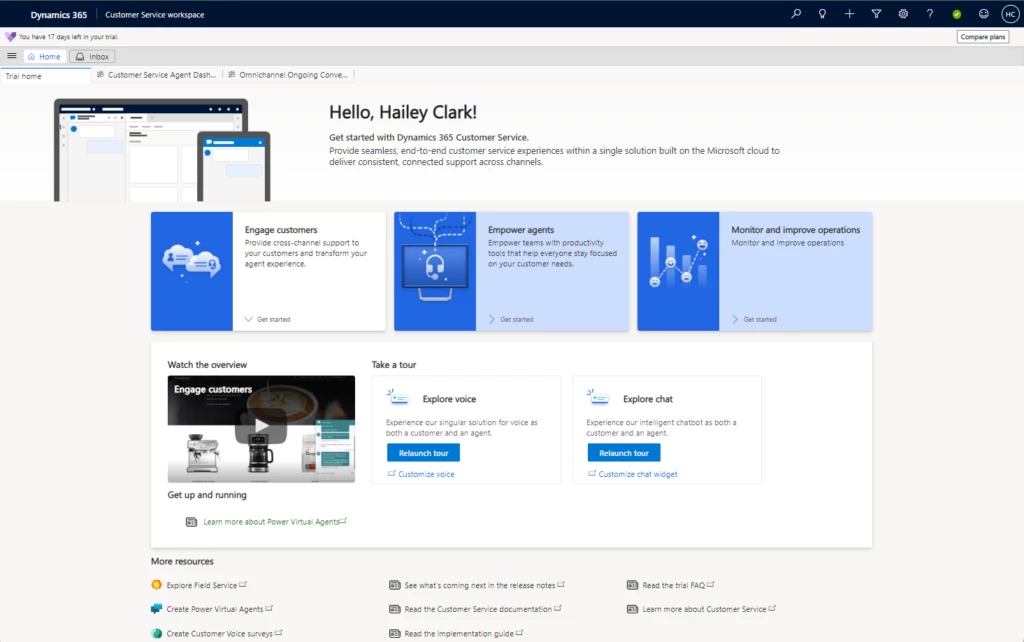
          Sign up, launch the product, and then follow along with curated tours that show the breadth and depth of Dynamics 365 Customer Service capabilities without any manual effort required.

          graphical user interface, application
          Dynamics 365 Customer Service trial landing page

          How to Sign up

          You can sign up for a trial with a work account (onmicrosoft) here or a personal (Gmail, Outlook, Yahoo) account here. To learn more, watch this short demo.

          There are a few differences in the trial experience depending on whether you log in with a work account or a personal account. With a personal account, you will have access to the full trial except the ability to do the following: 

          • Extend the trial beyond 30 days 
          • Buy now and purchase a license directly from the trial environment
            • Customize the PVA bot (the default out-of-box bot will work)  
            • Enable some features like case swarming 

            But no matter which email you use to sign up, you will get the out-of-box Power Virtual Agents (PVA), omnichannel, unified routing, and other core D365 Customer Service capabilities as part of the trial. You can see the full list of licenses that come with the trial here.  

            Once you’re logged in and on the home page, you can watch a short video showcasing the all-encompassing value of engaging customers with Dynamics 365 Customer Service, and then start the tours. 

            Engage customers and provide omnichannel support

            Voice tour

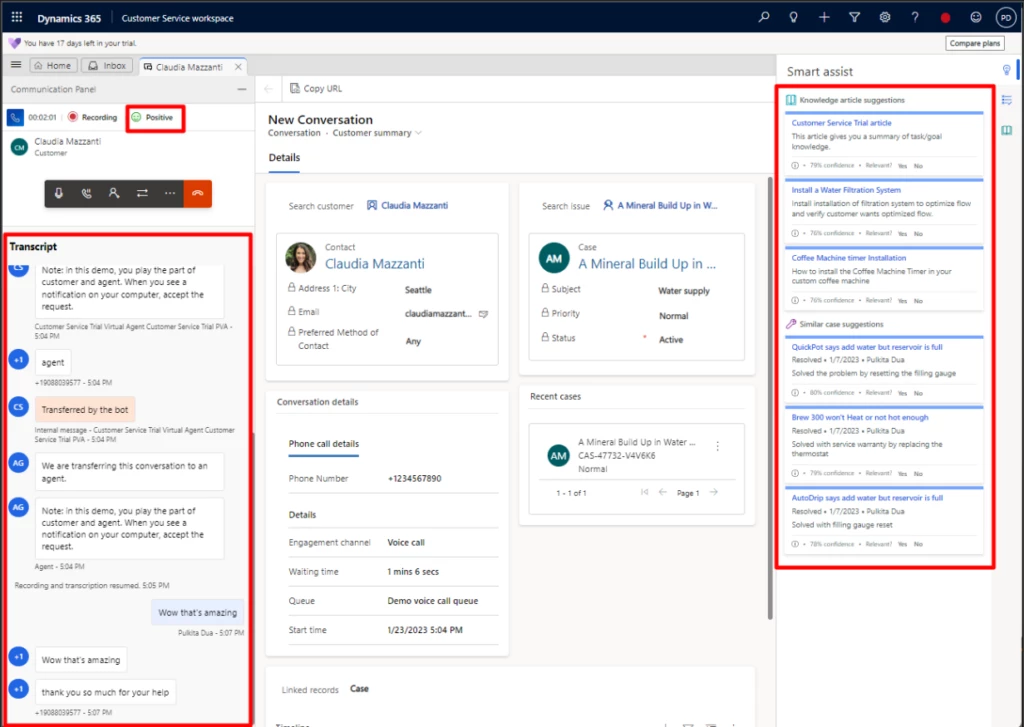
            You can now simulate the end-to-end experience of a customer calling your company and how it will be routed to an agent. You can see real-time sentiment analysis, real-time transcription, knowledge articles, and agent scripts already populated. 

            graphical user interface, application
            Agent view of a customer call

            Chat tour

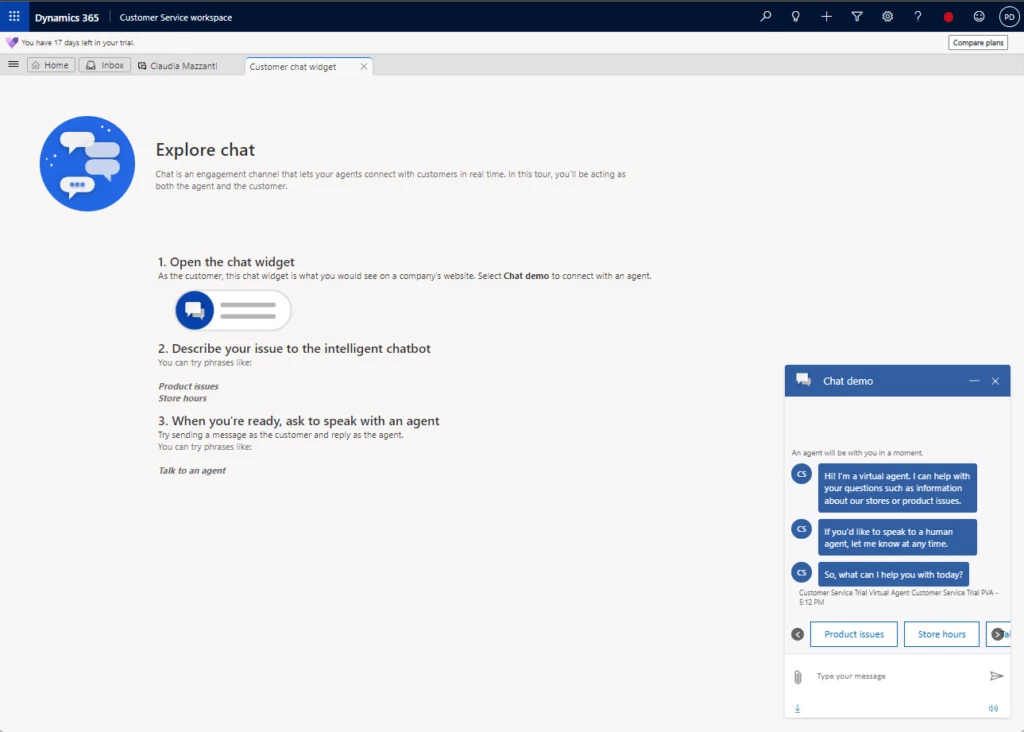
            Like the voice tour, you can explore how customers will interact with your company through your company’s chat widget. Just click the Chat demo and see how the PVA bot greets customers and how they are routed to agents. 

            graphical user interface, text, application, email
            Agent view of a customer chat

            Empower agents with the right information at the right time for quick resolutions 

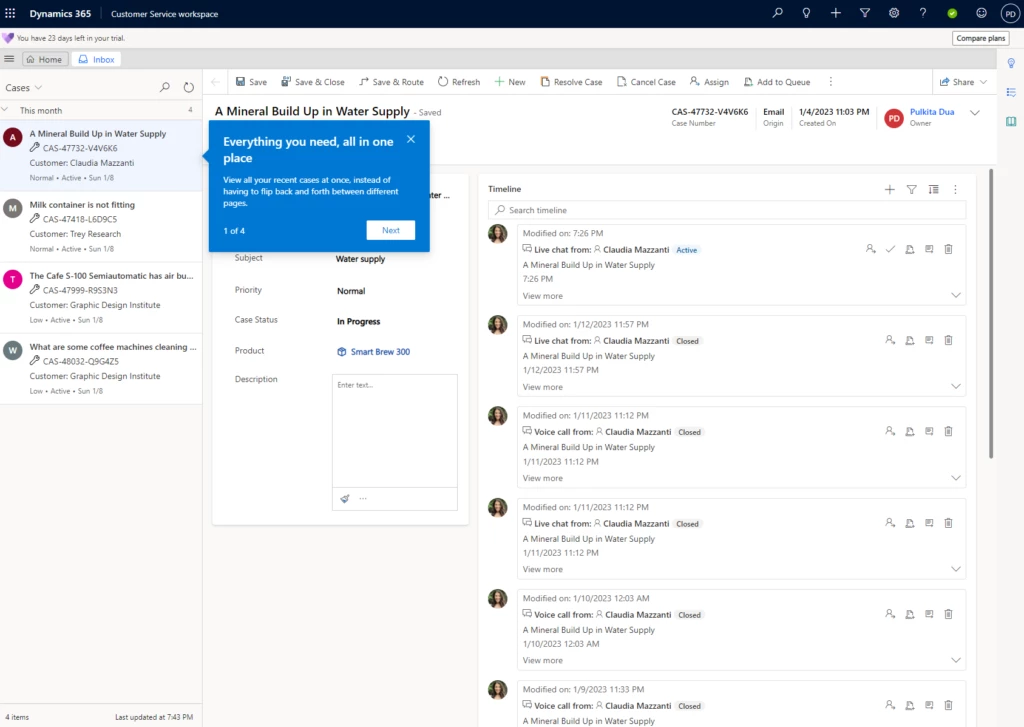
            Explore cases by seeing what it’s like to take a case in the unified agent workspace. See incoming items for agents across a wide spectrum of channels. While issues can come from any supported channel, Customer Service workspace helps agents stay on top of their work with one unified agent desktop. 

            graphical user interface, text, application
            Agent view of active cases

            Monitor and improve operations

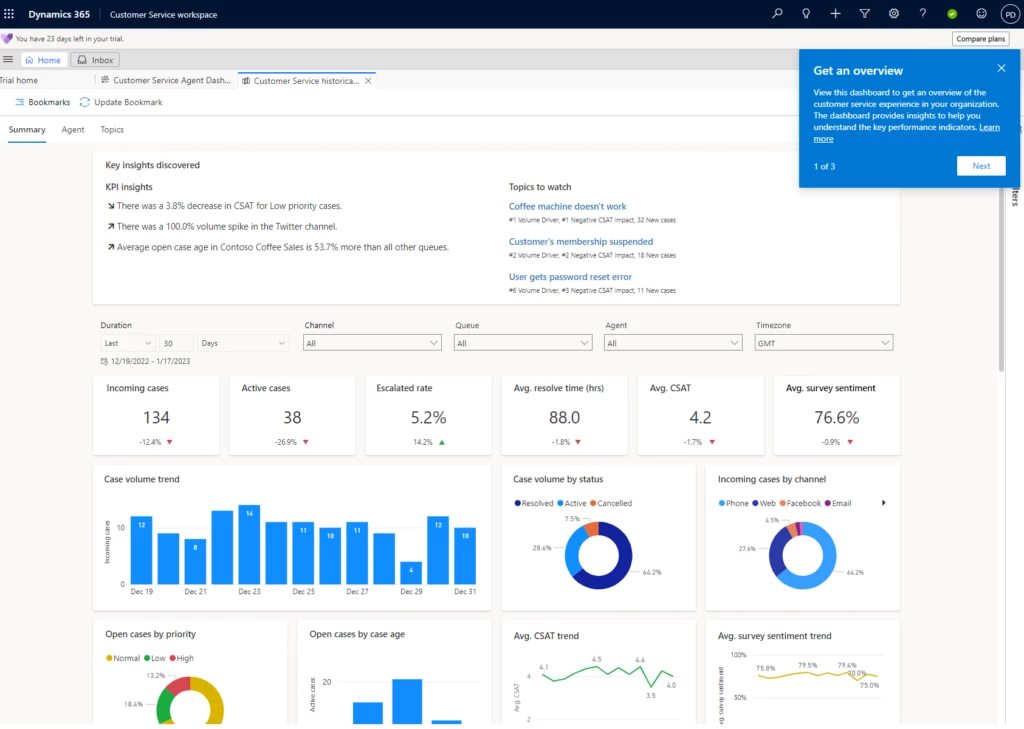
            Delve into the depth and breadth of our insight capabilities that help supervisors learn about their operations and provide meaningful, actionable data.

            graphical user interface, application
            Supervisor view of case insights

            With these features, you can test drive all that Dynamics 365 Customer Service has to offer in seconds. Embark on your journey to empower your agents and set up your organization for success. And if you like what you see, and you logged in with a work account (onmicrosoft.com email), you can buy a license today! 

            Resources

            Get your free trial.

            Read the trial FAQ.

            The post Create a Digital Contact Center in seconds with the Customer Service free trial appeared first on Microsoft Dynamics 365 Blog.

            Brought to you by Dr. Ware, Microsoft Office 365 Silver Partner, Charleston SC.
            2023 release wave 1 plans for Microsoft Dynamics 365 and Power Platform now available

            2023 release wave 1 plans for Microsoft Dynamics 365 and Power Platform now available

            This article is contributed. See the original author and article here.

            On January 25, 2023, we published the 2023 release wave 1 plans for Microsoft Dynamics 365 and Microsoft Power Platform, a compilation of new capabilities planned to be released between April 2023 and September 2023. This first release wave of the year offers hundreds of new features and enhancements, demonstrating our continued investment to power digital transformation for our customers and partners. 

            This release wave builds on our commitment to create applications and experiences that add value to every role by breaking down silos between data, insights, and people. New capabilities empower new ways to make informed decisions with AI-guided insights and suggested actions, easier ways to automate tasks and processes, and collaboration seamlessly integrated into the flow of work, plus, new low-code ways for anyone to build solutions.

            As part of our commitment to creating great customer experiences, we have introduced a new way to interact with release plans. The release planner for Dynamics 365 and Microsoft Power Platform enables users to view and manage release plans across all active waves in a unified and interactive interface while giving them the option to personalize, filter, sort, and share these plans.

            Highlights from Dynamics 365 

            Dynamics 365 Marketing delivers connected sales and marketing capabilities to enable marketers and sellers to act as a unified team and accelerate their pipelines. New features such as a new business-to-business (B2B) analytics dashboard, frequency capping, multiple email recipient activation, emails timeline, customizable preference centers, and Urchin Tracking Module (UTM) marketing tagging will be released in this wave to allow businesses to increase their output, organizational efficiency, and analyze the impact of their campaigns to reach higher levels of marketing maturity.

            Dynamics 365 Sales brings new features such as enhanced sequence capabilities supporting personalized and account-based engagement, actionable AI-powered suggestions within the seller workflow, an updated form layout, and new opportunity management workspace. Additionally, enhanced email templates, content suggestions and text message capabilities, as well as various new abilities to create, loop, and optimize sales sequences will be released during this wave.

            Dynamics 365 Customer Service empowers agents to work more efficiently with enhancements to voice features, unified routing, embedded Microsoft Teams collaboration, and elements of the agent workspace such as the case form, timeline, and conversation control. Throughout this wave, we will continue to invest in AI across the contact center with intelligent-suggested replies and robust real-time analytics with customization.

            Dynamics 365 Field Service is continuing to improve the new schedule board for dispatchers this wave. We are also supporting our frontline workers by allowing them to see their appointments in Outlook, find information faster through improved global search, and recognize improvements in performance and reliability on the mobile app.

            Dynamics 365 Finance is focused on enhancing organizations’ visibility into their data, continuing finance automation, and expanding out-of-the-box country coverage in Latin America. Other enhancements such as further automation of complex tax scenarios, full end-to-end automation of accounts payable and ledger settlements to expedite the close and enable talented finance users to spend more time focusing on value-added activities will also be released.

            Dynamics 365 Supply Chain Management continues to deliver increased agility and resilience across the supply chain with enhancements to omnichannel sales strategies with improved ways of managing attribute-based pricing, integrated soft reservations, and optimized end-to-end process integration across Dynamics 365 Sales and Supply Chain Management. Investments to improve agility and increase efficiency for discrete manufacturers, maintenance workers, and warehouse workers will also be a focus for this wave.

            Dynamics 365 Project Operations is continuing to invest in capabilities to empower project managers and project teams with new features like expanding the project budgeting and time-phased forecasting to resource/non-stocked deployment modes and completely lighting up the core experiences for expense management on the web and mobile form factors. Across-the-board investments in performance and usability with an uptake of modern and fluent controls in sales, billing and pricing, and subcontracting experiences are also targeted for this release wave.

            Dynamics 365 Guides will continue investing in capabilities to improve collaboration experiences for users on HoloLens 2. Key updates include improvements in handling incoming calls, join settings, and more accurate mixed reality annotations will also be coming in this wave. We will also be adding new holographic workflows and features like the ability to manipulate a hologram as an operator and taking a photo while in a guide.

            Dynamics 365 Human Resources will continue to expand the human capital management (HCM) ecosystem and further investment in expanding our payroll partner network to provide broader coverage for global organizations. We will also be providing better experiences to resource managers in Project Operations by integrating employee skill, compensation, and leave information while helping employees grow their careers by bringing project and experience information back into employee profiles.  

            Dynamics 365 Commerce is enabling new and updated B2B experiences, including the modeling of distributers as sellers, introducing a distributer fulfillment dashboard, and improving the out-of-the-box B2B user sign-up flow. We are revising and improving our payment flows and enabling network health checks to diagnose network-related issues that can impact point of sale (POS) uptime for POS and Store Commerce users. We will also be investing in asynchronous payment capabilities to provide support for Klarna and other “buy now, pay later” methods and ACH real-time banking.

            Dynamics 365 Fraud Protection is introducing Assessments API in 2023 release wave 1 that will allow customers to define their own fraud event (in addition to the default events covered by Fraud Protection such as Purchase Protection and Account Protection). This functionality will allow customers to configure Fraud Protection to protect against fraud events specific to their businesses.

            Dynamics 365 Business Central will continue developing enhanced finance capabilities for intercompany transactions as well as several improvements to the warehouse management area to make customers’ processes more efficient. More default setup data will also be provided during this wave to expedite customers’ onboarding procedures. Furthermore, Microsoft Power Platform and Microsoft 365, including Teams, capabilities will be improved enabling better reporting, automation, and collaboration opportunities.

            Dynamics 365 Customer Insights will bring enhancements such as improved data interoperability and governance features allowing the ability to control and restrict access to data, configurations, and actions; an increased maturity around application lifecycle management and enterprise lifecycle management; increased activation capabilities through tighter integration with Microsoft Dataverse; and will receive navigational guidance, AI-powered suggestions, and task assistance increasing the depth of insights obtained from the product with less time investment.    

            Dynamics 365 Connected Spaces delivers alerts and notifications via Teams or Outlook when business AI-skills detect actionable patterns within a space containing vehiclesstationary or mobile. Throughout this wave, improvements will be released enabling customers to use the Microsoft Azure Stack HCI devices for configuring Connected Spaces to run AI models at the edge in addition to the existing Microsoft Azure Stack Edge devices.

            Dynamics 365 Customer Voice is investing infunctionalities to unblock key scenarios for customers and is focusing on improving the overall usage experience along with the architecture evolution and stability fixes for survey owners and responders. We will focus on delivering features such as the transfer ownership of an orphan project in case a project owner has left the organization, as well as allowing survey responders to record partial survey responses.

            Microsoft Supply Chain Center delivers improvements to organizations’ management of their supply chain by enhancing their end-to-end visibility of their supply chain, improving AI-based recommendations, and enabling them to seamlessly collaborate with their teams and suppliers on the workflow, resulting in better orchestrated business processes.

            Implementation portal

            We are launching a new implementation portal to provide contextual guidance and recommended practices for Dynamics 365 implementations, in order to enable greater success once implementations go live. This portal is based on the Success by Design for Dynamics 365 framework put together by the FastTrack for Dynamics 365 team.

            Portrait of a woman smiling, looking at the camera.

            2023 release wave 1 for Dynamics 365

            Check out new capabilities for Dynamics 365 with the 2023 release wave 1 plan.

            Highlights from Microsoft Power Platform 

            Power BI continues to invest in empowering individuals, teams, and organizations to drive a data culture. For individuals, we’re enhancing the creation experience, bringing more parity on the web, and adding the Power Query diagram view into Power BI. For teams, we’re bringing enhancements to meetings and multitasking to help users seamlessly work with their data wherever they work.

            Power Apps is focusing on reducing risk for organizations with advanced governance capabilitiesensuring easy onboarding and using low-code capabilities in a manageable way for the organization to scale. Makers and developers of all skill levels will be more productive with modern experiences to build apps, manage data, and logic. Customers will benefit from modernization of web and mobile experiences ensuring modern and fast experiences across apps.

            Power Pages continues to invest in bringing more out-of-the-box capabilities to support both low-code and no-code development as well as professional developers. New features in this release will allow makers to have additional capabilities and solution templates in the design studio. Professional developers will be able to perform additional actions and work with code productively using the Microsoft Power Platform CLI tool and Microsoft Visual Studio Code, and administrators will be enabled to better manage and govern their Power Pages sites.

            Power Automate is releasing new capabilities to simplify creating new flows by describing them in natural language. This, with other experience improvements for creating and authoring flows, means it’ll be easier than ever for new users to get started. These improvements include introducing work queues where automatable tasks can be viewed and managed together as well as providing simpler connectivity to a machine for desktop flows, eliminating the need for additional installs and managing password management.

            Power Virtual Agents offers a new unified authoring canvas that is Microsoft’s single conversational AI studio for all bot-building needs. With the continuing integration with Microsoft Bot Framework capabilities and Microsoft Azure Cognitive Services, bot creatorsfrom subject matter experts to developersare empowered to begin building today with the public preview. The advanced authoring canvas will be generally available this wave.

            AI Builder will bring document processing improvements that will include more prebuilt model capabilities like contract processing, the ability to identify personal information, and the possibility to extract field types from documents. We’re also focusing on facilitating model governance and licensing by improving our admin interfaces to make it easier to govern how AI Builder credits are used across environments, apps, and flows.

            For a complete list of new capabilities, please check out the Dynamics 365 2023 release wave 1 plan and the Microsoft Power Platform 2023 release wave 1 plan

            2023 release wave 1 for Microsoft Power Platform

            The first release wave of the year offers many new features and enhancements for Microsoft Power Platform.

            Close-up side view of a woman wearing a headset.

            Early access period 

            Starting January 30, 2023, customers and partners will be able to validate the latest features in a non-production environment. These features include user experience enhancements that will be automatically enabled for users in production environments during April 2023. To take advantage of the early access period, try out the latest updates in a non-production environment and effectively plan for your customer rollout. To take advantage of the early access period, try out the latest updates in a non-production environment, and effectively plan for your customer rollout. Check out the 2023 release wave 1 early access features for Dynamics 365 and Power Platform or visit the early access FAQ page.

            View the latest product updates and release highlights, and share your feedback in the community forums via Dynamics 365 or Power Platform

            The post 2023 release wave 1 plans for Microsoft Dynamics 365 and Power Platform now available appeared first on Microsoft Dynamics 365 Blog.

            Brought to you by Dr. Ware, Microsoft Office 365 Silver Partner, Charleston SC.
            Optimize Dynamics 365 Sales product usage with new reports!

            Optimize Dynamics 365 Sales product usage with new reports!

            This article is contributed. See the original author and article here.

            Data is one of the key resources to making informed, contextual decisions. Without data, without being able to measure telemetry and usage, it’s challenging to identify areas of improvement. But it’s not just the data itself that matters, it’s that this data is actionable, helping users understand not only the what, but also the how and why. With Dynamics 365 Sales product usage reports, we’re happy to offer administrators and sales managers the ability to get data at their fingertips.

            The new feature allows sales managers and sales administrators to track the usage of Contacts, Opportunities, Leads and Accounts (COLA entities) by their sellers. With this information, they will be able to make critical decisions about the work processes within their teams. For example, they will be able to see which teams use the COLA entities less than others, and double-down on expanding CRM usage best practices to those teams. In another example, managers, with the help of product usage reports, will be able to easily identify the top performing sellers in terms of using the application, for rewarding or benchmark purposes.

            Understand seller performance with product usage reports.

            The Dynamics 365 Sales product usage insights are Power BI embedded dashboards, that allow sales managers, sales administrators and other users to view the usage of COLA entities within the application. They can easily understand and assess the performance of sellers with respect to various transactional sales entities.

            Sales managers can easily access the dashboards with a simple enable switch. Sales administrators or managers can also provide permissions to access these dashboards further to other users, based on configuration.

            At this stage, we are releasing the following dashboards:

            • Opportunity usage
            • Lead usage
            • Account usage
            • Contact usage

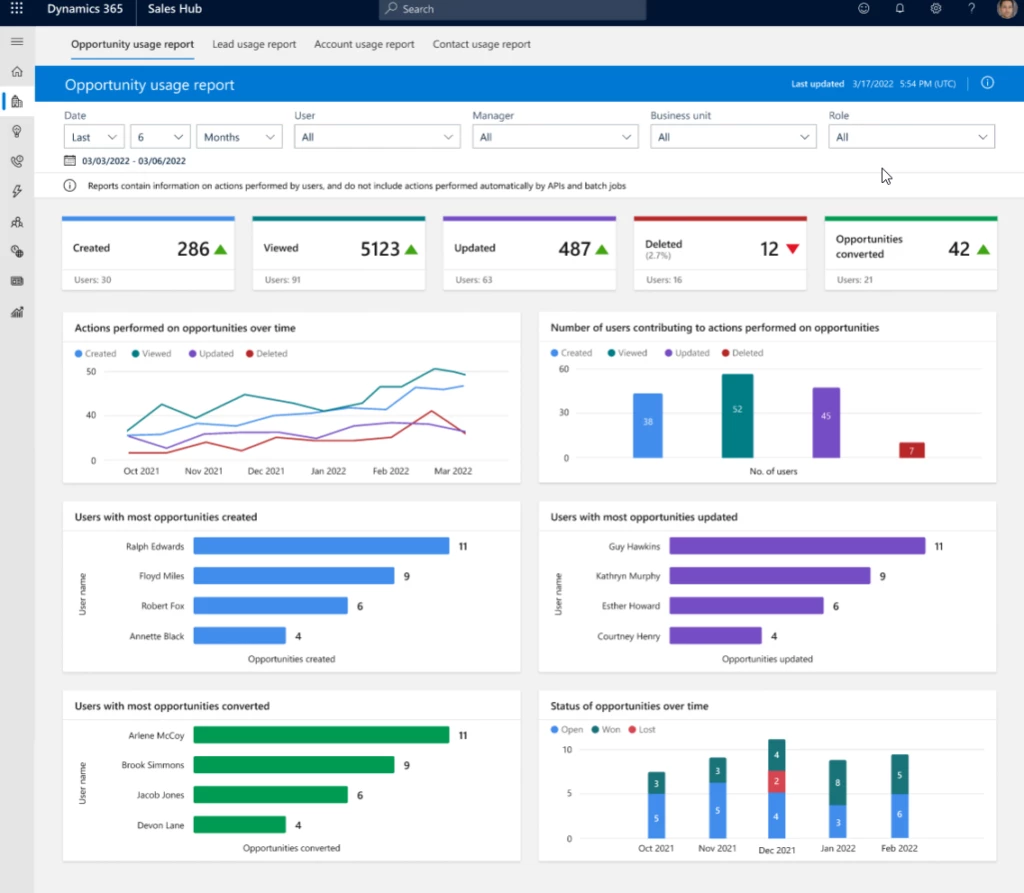
            Each dashboard can be divided into three broad sections.

            • Filters Slice and dice the data to have different views. Filtering parameters include data range, business unit, roles, manager name etc.
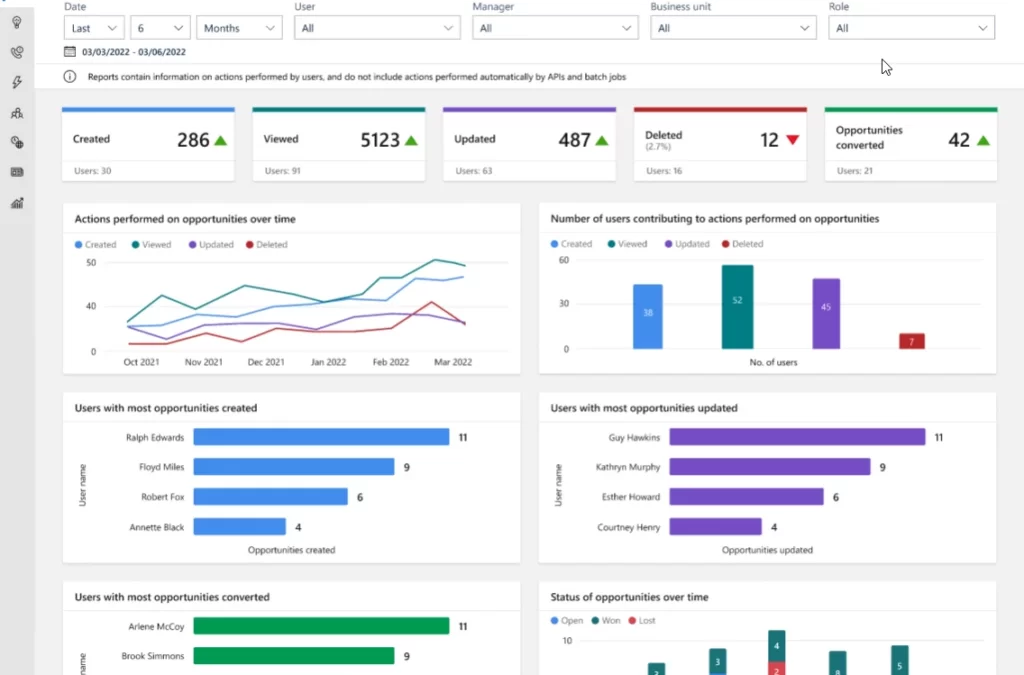
            • KPI charts Summarize KPIs for the specified date and the percentage change during the period. This view includes a trend to show how the KPI is doing in the selected timeframe compared with the previous timeframe. A green upward triangle indicates an improvement in the score, and a red downward triangle indicates a decline in the score.
            • Metric charts A detailed view of the individual values of records. For example, created date, status, and who created and converted the record.

            graphical user interface
            Lead usage report

            Gain insights on how sellers work

            On top of the benefits of the Dynamics sales usage reports to sales managers mentioned above, there are also benefits for sales administrators.

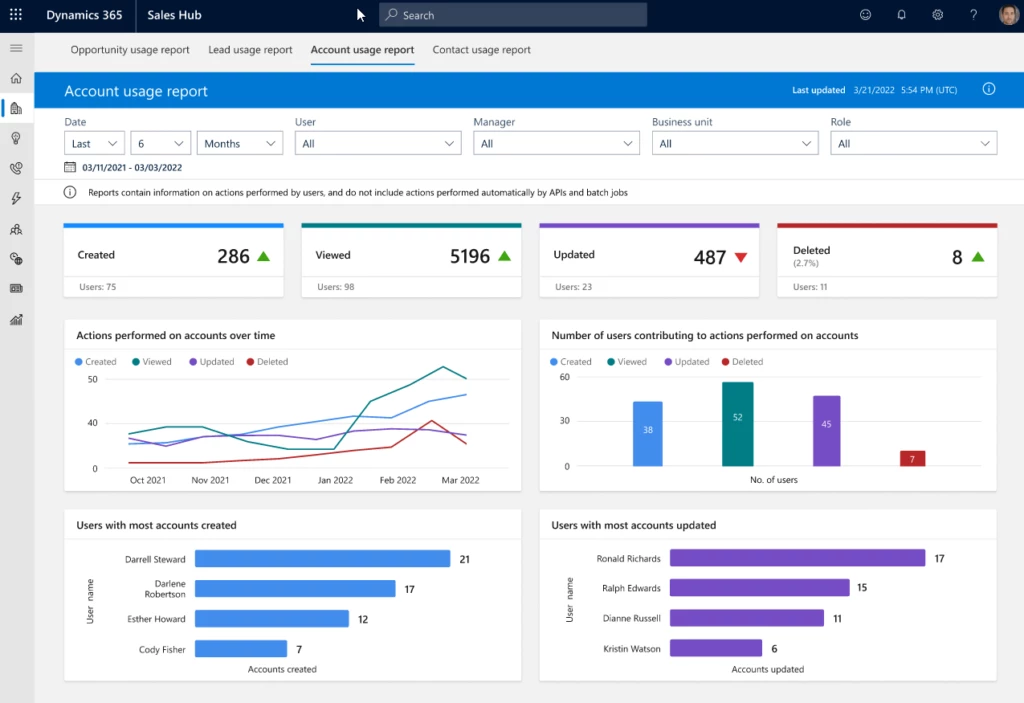
            Sales administrators can analyze the Create, Read, Update, and Delete (CRUD) operations that sellers perform on their COLA entities. To help this analysis, the usage report dashboards have the following charts:

            • CRUD operations over a period To help the admin user to understand the usage of COLA entities by the sellers.
            • Users contributing to the CRUD operations To allow the admin user to easily find the usage of leads and opportunities by sellers or groups of sellers.
            • Top users contributing to CRUD operations To help the admin user to identify the top performing sellers in terms of using the sales entities.
            • Leads & Opportunity overtime chart To help understand the qualification/win rate of the entities over a period of time.

            graphical user interface, chart
            Account usage report

            Next steps

            Learn more about the sales usage reports: View and understand sales usage reports | Microsoft Learn

            Enable reports by following the instructions: Enable sales usage reports for sales managers | Microsoft Learn

            The post Optimize Dynamics 365 Sales product usage with new reports! appeared first on Microsoft Dynamics 365 Blog.

            Brought to you by Dr. Ware, Microsoft Office 365 Silver Partner, Charleston SC.