Working With Field Service Mobile Customizations 

Working With Field Service Mobile Customizations 

This article is contributed. See the original author and article here.

Field Service Mobile is a Dynamics Power Platform Model Driven Application. This offers several advantages to the mobile application, including re-use of forms and views and consistency of user experience while accessing on the web, mobile, or tablet.  

The Power Platform also offers significant customization opportunities, both when customizing forms, adding business logic or integrations with other Power Platform capabilities like Power Automate, Canvas, or PCF Controls.  These capabilities make the Field Service Mobile application uniquely positioned to streamline your workflows, improve data quality and enhance your user experience.  

Customization Best Practices 

Customizing the Field Service Mobile application is a balance of enabling an ideal workflow for your business and providing the best possible user experience for your Frontline Workers. This balance must consider data availability of the mobile workforce, along with application performance and the overall user experience.  

In this blog post we’ll share some of the key best practices when evaluating and implementing customizations. 

  1. Use the default Field Service Mobile app module. The out-of-the-box Field Service Mobile app module has all the basic features and functionality your frontline workers require to get started with Field Service. Custom app modules can be used with the Field Service Mobile application but will not include some of the internal business logic such as Travel Calculations. Another advantage of using the default app module is that it will automatically receive product updates over time, while additional effort would be required to merge the same enhancements into a custom app module.  
  2. Avoid using HTML Web Resources.  Web Resources have many limitations on a mobile application when working with offline mode. It is highly recommended to use PowerApps Component Framework (PCF) controls, which are a better option for a more consistent cross-platform experience without the same limitations. 
    • Tip: If your situation necessitates the use of custom web resources, use code splitting and check code coverage in a browser to ensure only the minimum amount of code is loaded. Package shared code in their own shared web resource library instead of duplicating in each consuming resource. 
    • Tip: Be sure to define a unique namespace for custom JavaScript libraries to avoid having functions overwritten by other functions in another library. Learn how to write your first client script in model-driven apps
    • Tip: If using Offline mode, be sure to test your customizations on the mobile device in Airplane mode and variable cellular network conditions.  
  3. Handle errors properly and present the right message to end users. When implementing customizations, it is very important to handle edge-cases and errors in a way that provides a positive experience for your end users. This is especially true for async calls and network errors, where the Frontline Worker may have different results depending on devices network state.  
  4. Use XRM Web APIs instead of XHR/Fetch calls directly to the server.  XRM Web ApIs will route correctly to the local offline database or server based on offline configuration and network state of the app. 
    • Making direct server calls from the mobile application is not recommended as they can be unreliable and fail unexpectedly with poor network conditions.  By ensuring that all dependencies are in the offline data store by configuring the Mobile Offline profile with the correct data necessary for your user scenarios.   
    • If server calls are necessary, build an appropriate user experience to handle cases when the call may fail, or response is slow to return from the server. Making the network calls trigger based on explicit user actions, with a interface giving visual cues that a network call is happening and a response will be needed, will provide a better experience for the Frontline Worker.  
    • If using onload/onchange/command handlers and fetching data using XRM WebAPis, make sure you test the impact of those calls on application performance while in various network conditions. 
  5. Optimized resources for bandwidth. If adding custom JavaScript or images, be sure to optimize files which are downloaded to the device. We recommend to always trim and compress your JavaScript files and using SVG images instead of PNG to save bandwidth.  
  6. Declare solution dependencies between commands, web resources, and strings. Dependencies must be used to make a Web Resource available offline. For example, when an entity/form is enabled for offline usage, the JavaScript which is attached to the form for onload/onsave, would also be available offline.  For other files such as localization XML files, they need to be added as a dependency to your JavaScript so these XML files will also be available offline. Learn more about web resource dependencies
  7. Be aware of timing issues or race conditions. This is especially relevant when dealing with async calls. Test by adding network latency and CPU throttling to ensure a positive experience in real-world conditions. 
  8. Use Business Rules as first choice over custom client-side JavaScript. Business rules provide a mechanism to implement business logic with some guardrails to avoid some of the complexity that comes with custom JavaScript code. Please be aware there are some limitations with business rules, such as cases when OnChange events are required.  It is good to evaluate your business scenarios and choose the best path for your organization. 
    • Tip: If using JavaScript-based business logic, make sure you fetch minimal data and avoid joins/sorting if not needed.  
  9. Leverage out of box controls. As much as possible use out of the box controls, such as the Booking Calendar Control, which will be easier to support and receive product enhancements over time. 
  10. When enabling offline mode, make sure forms and views are aligned with configuration of the mobile offline profile. The individual configuring the forms and views should work closely with the person who will configure the mobile offline profile to ensure tables which are enabled on views will be available while running in offline mode. Be sure to include error handling if there are instances when an entity will not be available while offline.  
  11. Leverage tools to debug customizations. Debugging is important when introducing JavaScript customizations to your experience. Debugging a mobile app has unique challenges versus a web browser. This is especially true with capabilities like Offline mode are enabled on the mobile app. To meet this need, leverage debugging tools shipped with the Android and Windows model driven apps. Detailed steps to debug are found in Power Apps documentation.  

Customizing a model driven application can be a powerful way to enhance the user experience and functionality of your solution. However, it also requires careful planning and testing to ensure optimal performance, usability, and compatibility. In this blog post, we have shared some best practices and tips on how to customize your model driven application effectively. We hope you have found this information useful and that you will apply it to your own projects. Thank you for reading and happy customizing! 

Additional Resources 

The post Working With Field Service Mobile Customizations  appeared first on Microsoft Dynamics 365 Blog.

Brought to you by Dr. Ware, Microsoft Office 365 Silver Partner, Charleston SC.
Try the new outbound dialing experience in Dynamics 365 Customer Service 

Try the new outbound dialing experience in Dynamics 365 Customer Service 

This article is contributed. See the original author and article here.

In the fast-paced world of customer service, efficient outbound calling communication is the cornerstone of success. Dynamics 365 Customer Service has long been a trusted platform for managing customer interactions. With the upcoming October release, we’ve listened to your feedback and delivered a significant enhancement that is set to transform outbound dialing.  

Currently, modifying the dialed number proves to be cumbersome given the inability to edit a digit. Additionally, the absence of number validation increases the risk of agents dialing incorrect numbers. This is especially true in the event of missing country codes. 

In the October release, you will find a more intuitive, streamlined, and efficient outbound dialing experience.

Editing flexibility

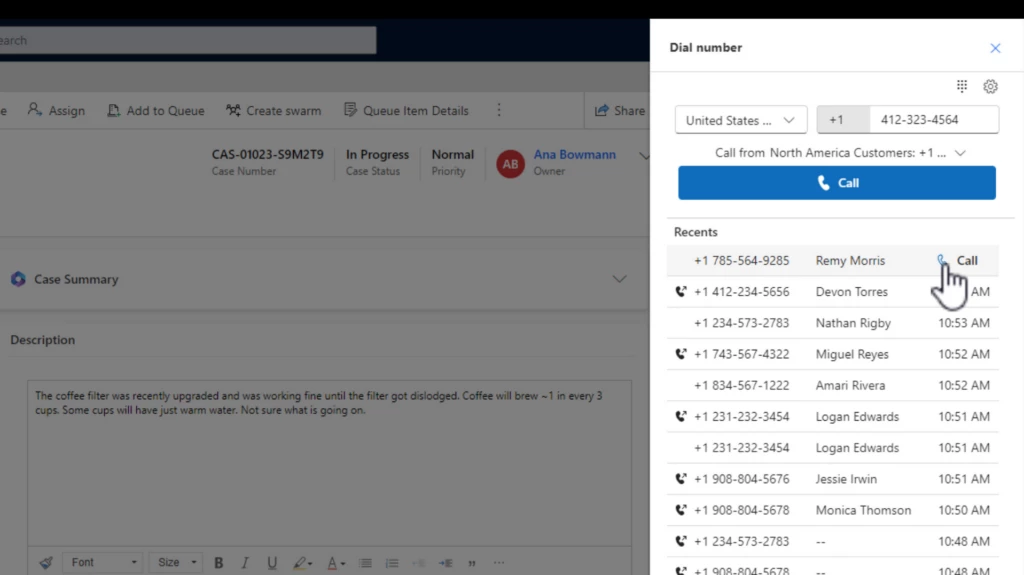
In the new outbound dialing experience, agents can continue to initiate calls from customer records. What’s changed? Now, modifying the dialed number is a breeze. The enhanced interface empowers agents to effortlessly edit the number before placing the call. This new experience also introduces auto-formatting, automatically structuring the number as agents type it. This functionality not only reduces errors but also highlights incomplete or invalid numbers. This newfound flexibility ensures accurate and effective outbound calling experiences.

Smart use of screen real estate

The improved interface is designed to optimize the available screen space. By default, the keypad is hidden, given most agents prefer to use the keyboard, which also allows for a clearer view of essential information. However, should agents need to utilize the keypad, it’s just a click away.

Recall recent numbers

Agents now have the power to swiftly call back recent numbers. With the ability to access the last 20 numbers dialed or received calls, agents can easily reconnect with customers. This feature is a time-saver and helps maintain a seamless communication flow.

Country and region support for outbound dialing

A significant advancement for administrators and agents alike is the support for specific countries and regions. Administrators can customize outbound profiles to allow calls only to selected countries or regions. This prevents accidental calls to unintended destinations, reinforcing precision in customer communication.

Intuitive profile selection and profile matching

Agents with multiple outbound profiles will appreciate the intuitive profile selection process. The dropdown menu displays the collective list of supported countries and regions from all profiles. Simplifying the process even further, agents need only enter the number they wish to dial. The system intelligently identifies the outbound profile supporting the dialed number’s country or region. This feature is coming as a fast follow in October.

The October release of Dynamics 365 Customer Service brings an outbound dialing experience with enhanced editing capabilities, smarter interface design, call history, number auto-formatting and validation, and refined country and region support. Agents can confidently and efficiently connect with customers, bolstering the delivery of exceptional customer service.

Learn more about outbound dialing

Watch a quick video demonstration.

To preview this feature, administrators should update the Settings definition for Enhanced outbound dialer experience to set the environment value to Yes. To learn more, see Call a customer in the voice channel | Microsoft Learn.

The post Try the new outbound dialing experience in Dynamics 365 Customer Service  appeared first on Microsoft Dynamics 365 Blog.

Brought to you by Dr. Ware, Microsoft Office 365 Silver Partner, Charleston SC.
Microsoft is named a Leader in 2023 Gartner® Magic Quadrant™ for B2B Marketing Automation Platform

Microsoft is named a Leader in 2023 Gartner® Magic Quadrant™ for B2B Marketing Automation Platform

This article is contributed. See the original author and article here.

Note: As announced at Microsoft Inspire 2023, as of September 1, 2023, Microsoft Dynamics 365 Marketing and Microsoft Dynamics 365 Customer Insights have been brought together into one offering. We are retaining the existing Dynamics 365 Customer Insights name to encompass this new offer of both applications. Customers can start with one or both applications and then further invest in the application they want to scale by buying the capacity they need.

In today’s turbulent economic times, companies are facing critical business challenges such as customer acquisition, increasing customer loyalty, and maximizing lifetime value. Often, to save time, they follow a one-size-fits-all approach—resulting in impersonal marketing strategies with low customer engagement. According to the Microsoft Work Trend Index, 89 percent of marketers say they struggle with having time to do their jobs.

To meet these complex challenges, it is crucial for companies to shift their approach from traditional mass communication to personalized engagement based on a deep understanding of each customer’s preferences and actions while ensuring their marketers have more time to leverage their creative and strategic skills to engage their customers. With this very goal in mind, Microsoft launched Dynamics 365 Marketing in 2018.

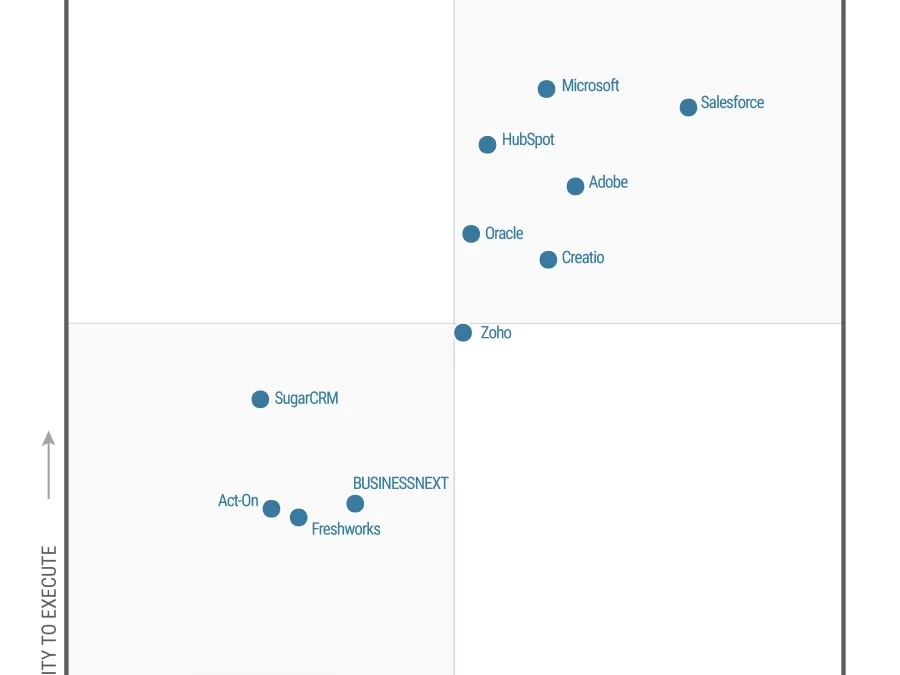
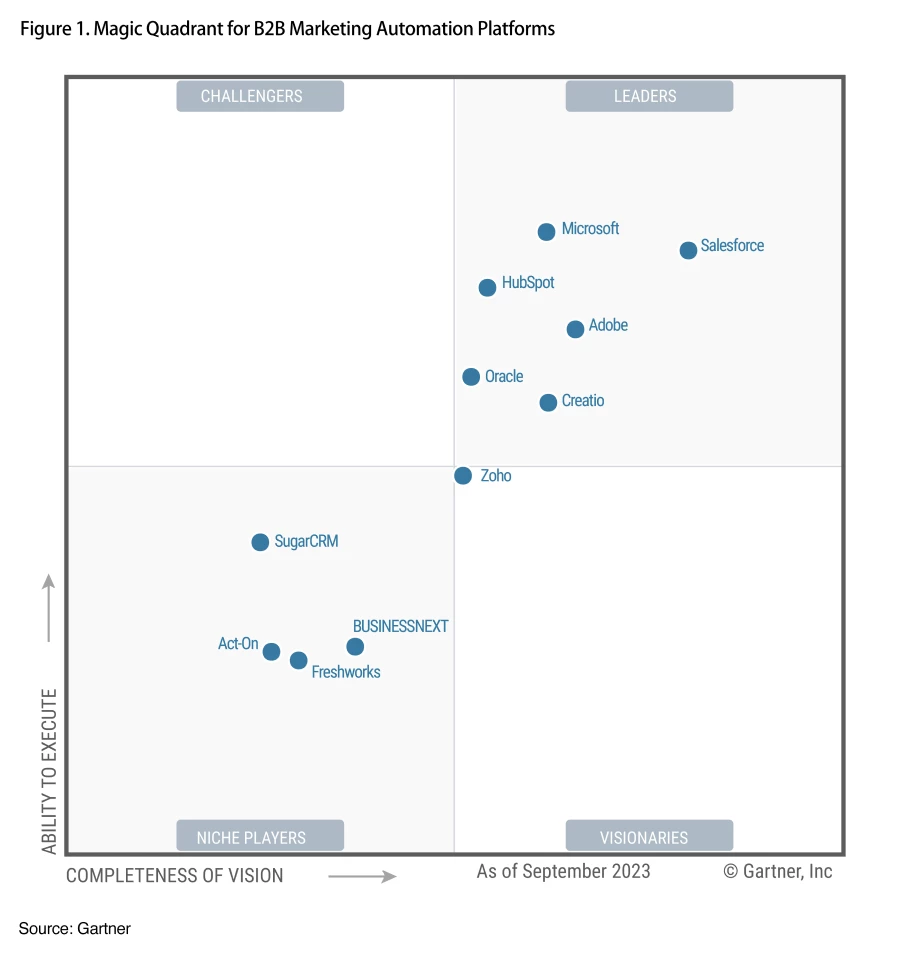
We are pleased and honored to share that in a short span of five years in market, Microsoft has been recognized as a Leader within the 2023 Gartner Magic Quadrant for B2B Marketing Automation Platforms* for the second consecutive year. In this year’s report, Microsoft is positioned highest in Ability to Execute.

A Gartner Magic Quadrant for B2B Marketing Automation Platforms graph with relative positions of the market’s technology providers, including Microsoft.
Figure 1: Gartner Magic Quadrant for B2B Marketing Automation Platforms**

For Microsoft, this placement recognizes our commitment to help companies better connect with their customers at scale, across all departments, to make this simple and easy for any company with a broad range of skillsets to employ.

Accelerating the journey to more personalized customer engagement

We started our Dynamics 365 Marketing journey in April 2018. Since then, we’ve gathered feedback and continued to learn at a rapid pace to help our customers on their journey to drive meaningful customer engagement, ensure long-term loyalty, and accelerate business success. To be competitive in today’s market, organizations must harness the power of data to gain a deeper understanding of their customers, anticipate behaviors, and craft one-on-one personalized experiences across all touchpoints, including sales, marketing, business operations, and service functions. Generative AI makes these capabilities within reach for every company. That’s why we’ve brought together Dynamics 365 Marketing and Dynamics 365 Customer Insights as one offering named Dynamics 365 Customer Insights, an AI-led solution to revolutionize customer experience. The new Customer Insights enables our customers to be more flexible by giving them access to both a modern, AI-driven customer data platform (Customer Insights data application) and real-time marketing with customer journey orchestration (Customer Insights journeys application). Customers can start with one or both applications and invest in the areas where they most want to scale.

To drive the necessary customer experience (CX) transformation, companies cannot rely on piecemeal integration of sales, service, and marketing products. Gartner predicts that by 2026, 50 percent of replacement customer relationship management (CRM) sales technology decisions will involve solutions including non-sales software comprising other modules from a CRM or a CX suite.[1] However, the reality is that only a few companies are currently delivering on these expectations. Customer experiences often remain fragmented across channels and departments, leading to inconsistencies. Microsoft is uniquely positioned to help customers overcome these challenges, and Dynamics 365 Customer Insights was built exactly for this purpose—to support customers throughout their end-to-end CX journeys.

Like all Dynamics 365 offerings, Customer Insights relies on Microsoft Dataverse to store CRM software data, which enables our customers to securely store and manage their data and harness the true power of that data by removing silos across sales, service, and marketing via a unified platform approach. Customer Insights helps marketers and customer engagement professionals gain a holistic view of their customers, anticipate their needs, and discover growth opportunities. Marketers can also deliver more relevant, contextual, customer-triggered engagements through the power of Copilot in Dynamics 365 Customer Insights. Some of our most recent Copilot capabilities in Customer Insights enable marketers to:

Enabling our customers to increase their reach

Zurich Insurance Group, a global insurer serving people and businesses in more than 200 countries, wanted to optimize marketing processes to help create more personalized customer experiences. Its Switzerland business unit connects to its customers through hosting online and in-person events—but to drive the highest impact, it must be sure it invites the right customers to the right events. It wanted to improve its ability to track if customers opened event invitations—or even received them, as well as the connection to registration and attendance. It also wanted a formalized way to collect feedback or easily use engagement data to continue to optimize the sales process after the event. Zurich selected Dynamics 365 Marketing to give it the flexibility to reach customers in new ways and drive more effective follow-ups to help shape their journeys. With Dynamics 365 Marketing, Zurich increased its lead quality by over 40 percent.

Over the past decade, Natuzzi, a globally hailed creator of exceptional luxury furniture that delivers a harmonious combination of design, function, aesthetics, and ethics, has seen a rapid global expansion of its heralded luxury brand. Natuzzi lacked a customer engagement platform capable of unifying data from its retail point of sale (POS), enterprise resource planning (ERP) system, and CRM systems. The company also wanted a way to bring together its business-to-business (B2B) and business-to-consumer (B2C) related data sets to drive greater insight between audiences. Adopting Dynamics 365 Marketing and Dynamics 365 Customer Insights, Natuzzi implemented an extensive customer experience platform to transform how its luxury brand discovers and sustains its customers. It uses customer data and insights to nurture customers and prospects through personalized campaigns, delivering emails, SMS texts, promotions, events, sales appointment reminders, and other relationship-building messages.

Microsoft named a Leader by Gartner

Microsoft is named a Leader in the 2023 Gartner Magic Quadrant for B2B Marketing Automation Platforms.

Learn more about Dynamics 365 Customer Insights

We’re excited to have been recognized as a Leader in the Gartner Magic Quadrant and are committed to helping our customers unify and enrich their customer data to deliver personalized, connected, end-to-end customer journeys across sales, marketing, and service. We truly believe that bringing together Dynamics 365 Marketing and Dynamics 365 Customer Insights enables us to continue investing in capabilities that will enable stronger, insights-based marketing that helps marketers and data analysts glean insights from customer data.

Read the 2023 Gartner Magic Quadrant for B2B Marketing Automation Platforms report.

Learn more about:

Contact your Microsoft representative to learn more about the value and return on investments, as well as the latest Microsoft Dynamics 365 Customer Insights offer.


  1. Gartner Forecast Analysis: CRM Sales Software, Worldwide, Roland Johnson, Amarendra, Julian Poulter, 12 December 2022.

Source: Gartner, Magic Quadrant for B2B Marketing Automation Platforms, Rick LaFond, Jeffrey L. Cohen, Matt Wakeman, Jeff Goldberg, Alan Antin, 20 September 2023.

*Gartner is a registered trademark and service mark and Magic Quadrant is a registered trademark of Gartner, Inc. and/or its affiliates in the U.S. and internationally and are used herein with permission. All rights reserved. Gartner does not endorse any vendor, product or service depicted in its research publications, and does not advise technology users to select only those vendors with the highest ratings or other designation. Gartner research publications consist of the opinions of Gartner’s research organization and should not be construed as statements of fact. Gartner disclaims all warranties, expressed or implied, with respect to this research, including any warranties of merchantability or fitness for a particular purpose.

**This graphic was published by Gartner, Inc. as part of a larger research document and should be evaluated in the context of the entire document. The Gartner document is available upon request from Microsoft.


The post Microsoft is named a Leader in 2023 Gartner® Magic Quadrant™ for B2B Marketing Automation Platform appeared first on Microsoft Dynamics 365 Blog.

Brought to you by Dr. Ware, Microsoft Office 365 Silver Partner, Charleston SC.
Announcing Unified Trial and Developer Environments for Dynamics 365 Finance and Operations apps 

Announcing Unified Trial and Developer Environments for Dynamics 365 Finance and Operations apps 

This article is contributed. See the original author and article here.

This is a continuation of an earlier blog post on unified environment management options in Power Platform admin center.  

Customers of finance and operations apps have historically had two choices for deploying their development workloads: self-hosted as a virtual machine on-premises or hosted on a customer-provided Azure subscription.  Both of these models have been available through the Dynamics Lifecycle Services (LCS) admin center and have been heavily used by more than 99% of customers.  This speaks to the extensibility requirements that enterprise customers have to enrich the products, creating competitive advantage and tackling unique circumstances. 

Over the last couple of years, customers have been increasingly seeking faster and low-code extensibility options to complement their core Dynamics 365 business software.   To that end, Microsoft is announcing the public preview of unified, developer environments that IT administrators can deploy directly from Power Platform admin center. 

New environment templates in Power Platform 

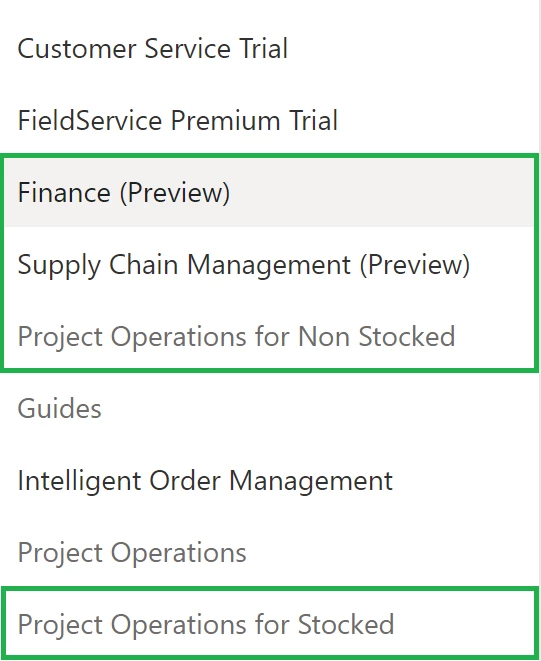
Customers who have purchased Dynamics 365 customer engagement have been able to enjoy a concept in Power Platform known as environment templates, which allow for faster creation of new sandbox environments that include Microsoft Dataverse, their Dynamics 365 application of choice, and several other related apps in a single deployment workflow.  Now, finance and operations apps customers will find new templates available to them in Power Platform admin center for Finance (Preview), Supply Chain Management (Preview), and Project Operations for ERP (Preview).  This will include Dataverse, the finance and operations core enterprise resource planning (ERP) application, and related apps for dual-write, virtual tables, and business events pre-installed and configured so that they are ready for immediate use. 

How to deploy these new templates 

If you want to simply try the deployment process for free, you can read about signing up for a no-cost, subscription-based, trial offer.  After which, you will see templates such as these when you deploy a new trial environment via Power Platform: 

Trial subscriptions are limited to 30 days, and you can only deploy up to 3 trial environments at the same time.  During preview, we will not support converting the trial to a sandbox environment. However, this restriction will eventually be removed. 

For the unified developer environments, during the preview these are limited to deployment via Power Platform for administrators PowerShell.  For more information, see the step-by-step tutorial.   

Storage-based provisioning model 

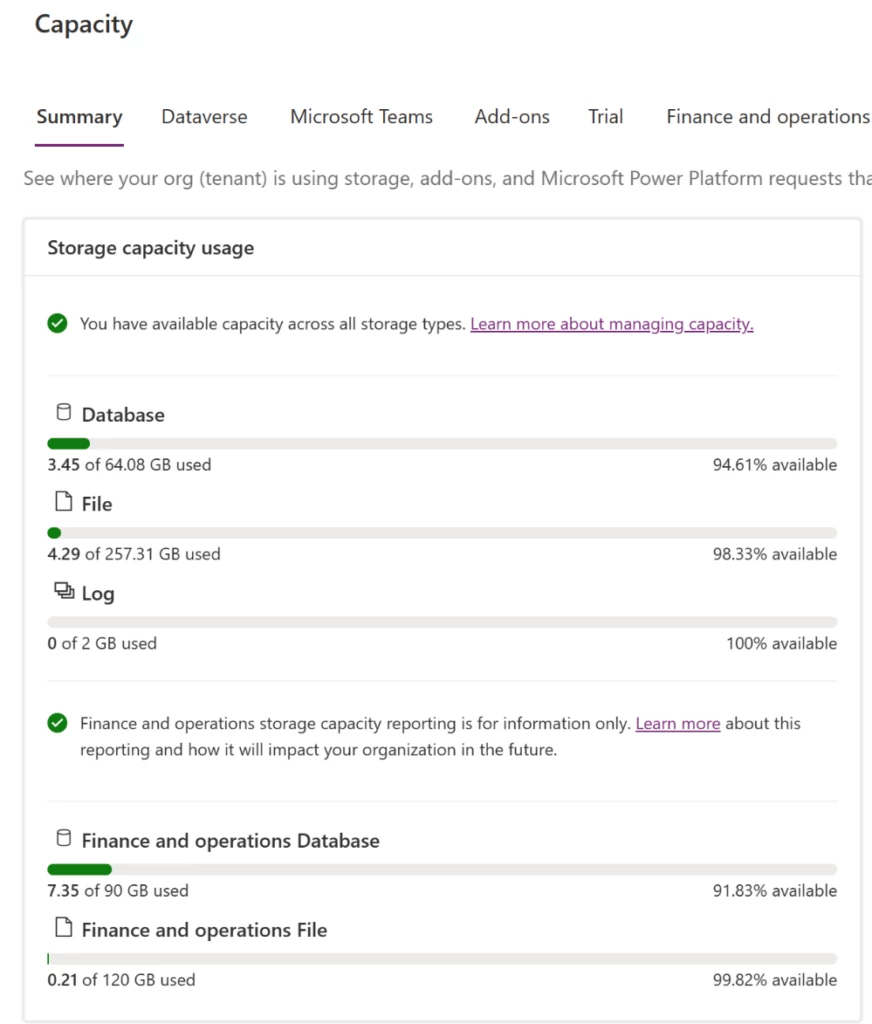
As part of this preview, the new unified, developer environments will utilize the storage-based provisioning model that other Dynamics 365 applications rely upon today.  For finance and operations apps customers, they will have two main categories of storage to manage: Dataverse database and Finance and operations database

Every new environment requires at least 1 gigabyte (GB) of available storage for both Dataverse and Operations database capacity to deploy.  Capacity is granted from finance and operations apps user licenses, sandbox add-on purchases, as well as add-on capacity packs.  For more information on storage, as it relates to finance and operations apps, see the documentation

Customers, partners, and ISVs can leverage this storage-based capacity model, and it will not bill to your Azure subscription.   

More capabilities for admins and developers 

Historically administrators for finance and operations apps have needed to manage time-consuming and complex tasks on behalf of the development teams they support.  Such examples include backing up and restoring copies of production data over to the developer VMs hosted on-premises or in Azure, manually deploying new environments and assigning remote desktop credentials to a developer, and managing virtual machine uptime schedules to reduce cost.   

Now administrators can: 

  • Deploy environments at scale using admin tools like PowerShell or the Power Platform API.   
  • Copy Lifecycle Services-based production or sandbox environments directly to the new, unified, developer environments both via the new admin center or via admin tools. 
  • Add developers in Dataverse to give them permissions to deploy X++ to the new environment. 
  • Add microservice add-ins to the developer environments such as Planning Optimization, and Export to Data Lake. 
  • Enable customer-managed keys (CMK) for Dataverse and finance and operations apps together. 

And more capabilities are coming!  For developers, they can enjoy a simpler way of writing and deploying X++ alongside Dataverse solutions. For more information, see the related Unified Developer blog post

Call to action 

Ready to get started?  Check out the Unified admin experience for finance and operations apps article to learn about this new way of provisioning developer and trial workloads.  If you have any questions or feedback, please join our community in Viva Engage.  We look forward to hearing from you! 

The post Announcing Unified Trial and Developer Environments for Dynamics 365 Finance and Operations apps  appeared first on Microsoft Dynamics 365 Blog.

Brought to you by Dr. Ware, Microsoft Office 365 Silver Partner, Charleston SC.

Working With Field Service Mobile Customizations 

Leverage Warehouse management only mode to optimize your business 

This article is contributed. See the original author and article here.

Introduction

In the fast-paced realm of modern business, companies often find themselves in need of agile warehousing solutions that can quickly adapt to changing customer demands. This evolution frequently involves a departure from their central ERP(enterprise resource planning) system, enabling the rapid establishment of a new warehousing entity. This shift requires the separation of warehouse management functionality from the broader ERP functions. In certain cases, the inexorable shift towards cloud-based operations drives the adoption of cloud-based warehouse systems.

The swift adoption of advanced warehouse management systems in a two-tier environment, working in harmony with any ERP system, represents a significant leap forward in operational efficiency. This dynamic solution provides robust core Warehouse Management System (WMS) capabilities, supports shared warehousing, seamlessly facilitates extended warehousing scenarios beyond advanced core WMS capabilities through pre-configured integrations with Microsoft’s suite of cloud solutions, including Sustainability Cloud, Intelligent Order Management, PowerBi, and a wide array of others. At the same time, it offers the flexibility to effortlessly integrate with numerous third-party Material Handling Equipment (MHE) systems, cloud-based printing solutions, and carrier hub cloud platforms.

Depending on specific operational requirements, businesses may choose to implement a Warehouse Management Only solution to address temporary or growing warehousing needs. These solutions offer customizable deployment options finely tuned to align with the enterprise’s unique demands. Operating in Warehouse management only mode enhances warehouse capabilities, ensuring a trifecta of flexibility, efficiency, and scalability—all achieved without necessitating a comprehensive overhaul of the existing system.

The embrace of Warehouse Management Only mode optimizes warehouse operations in an exceptionally effective manner, unlocking transformative potential that should not be underestimated. Take the plunge into these possibilities today by exploring the preview release and immersing yourself in the profound impact it can have on your business.

You can use lightweight source documents that are dedicated to inbound and outbound shipment orders to communicate between the systems. These documents focus exclusively on warehouse management, so they can replace multiple types of general-purpose documents (such as sales orders, purchase orders, and transfer orders) from a pure warehouse management perspective.

Warehouse management only mode also provides several deployment options to support your business needs. You can use Supply Chain Management to handle only warehouse operations, or you can use it to handle warehousing plus a wider range of processes (such as sales, purchase, and production orders). You can also set up a dedicated legal entity in Supply Chain Management that handles only the warehouse management processes for external systems.

To learn more about how Warehouse management only mode works and how to set it up, see Warehouse management only mode in Supply Chain Management.

Conclusion

Warehouse management only mode is a great way to enhance your warehouse management capabilities without having to overhaul your existing systems. It offers flexibility, efficiency, and scalability for your warehouse operations. Don’t miss this opportunity to try out this feature and see how it can transform your business. Try out the preview release today and get ready to experience the power of Warehouse management only mode. 


Supply Chain at Microsoft

Take a tour – Supply Chain Management | Microsoft Dynamics 365

Learn more about the latest AI breakthroughs with Microsoft Dynamics 365 Copilot: Dynamics 365 AI webpage

The post Leverage Warehouse management only mode to optimize your business  appeared first on Microsoft Dynamics 365 Blog.

Brought to you by Dr. Ware, Microsoft Office 365 Silver Partner, Charleston SC.
Adding Regional Formats to Reports in Business Central

Adding Regional Formats to Reports in Business Central

This article is contributed. See the original author and article here.

Business Central 2023 release wave 2 introduces regional formats for reports, which adds a new dimension of customization for reports. This feature gives you more flexibility to tailor how reports print, according to your unique needs. Addressing inherent limitations, such as the inability to customize region formats for specific reports, the absence of support for designating a specific format for Customers and Vendors, and the reliance on report format settings from My Settings, this enhancement simplifies the reporting experience in Business Central. In this article, we’ll dive into the mechanics of these changes and explore how they enhance the overall reporting process in Business Central.

Behavior and Priority Order

To understand how the new regional format feature works, let’s explore its behavior and order of priority. This insight will help you grasp how Business Central determines the language and format to use for reports in different situations, so you can adjust these settings to suit your business requirements.

1. Request Page: Advanced Settings Take Center Stage

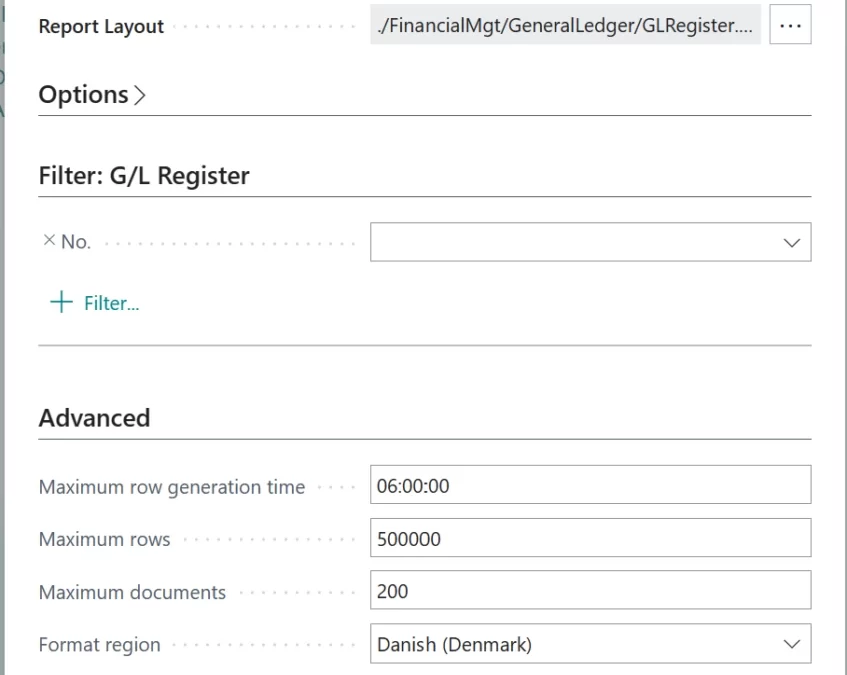
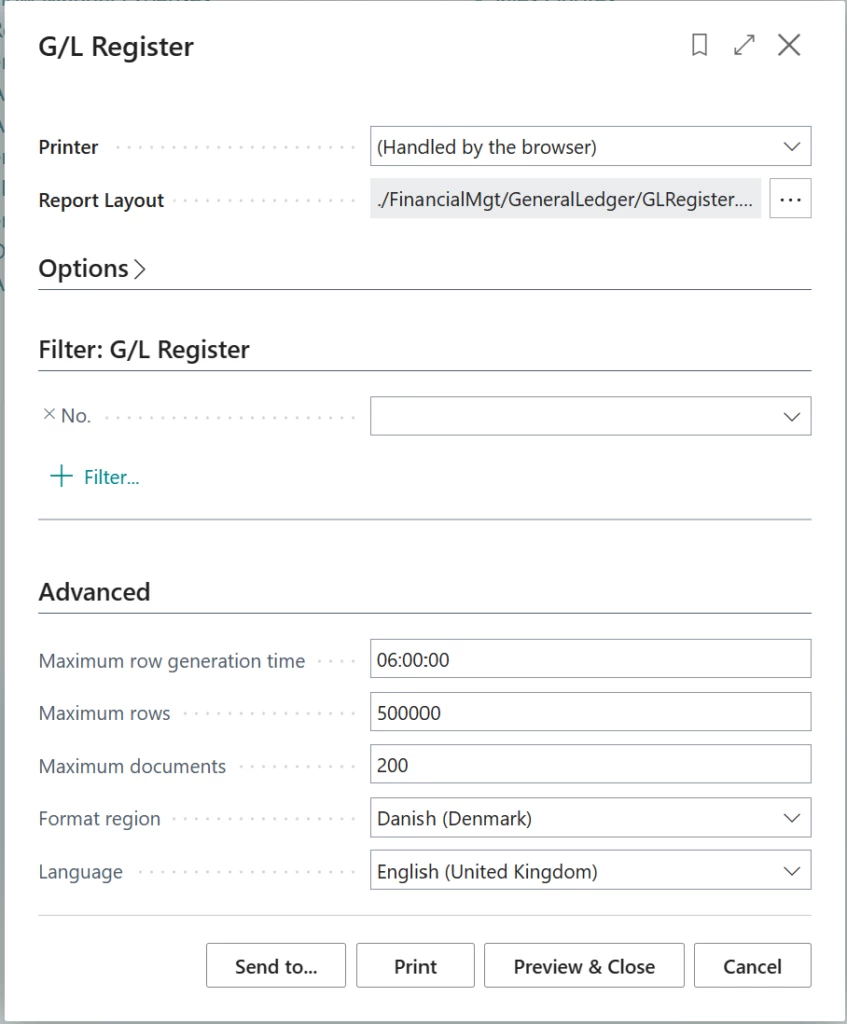
The highest priority in the report generation process resides with the advanced settings on the report request page. When you generate a report, you can specify the language and format you want to use for the report.

Advanced settings in the report request page

2. Report Object in AL: Precise Configuration

The heart of the matter lies in the AL triggers associated with the report object. Reports now include two important properties: Report.Language and Report.FormatRegion. These properties, defined within the AL triggers, play a key role in configuring reports. For many standard document reports in the Base App, these properties are set based on the Language Code and Format Region fields from the document itself. These fields get their values from the corresponding entity settings. For example, the Sales Header report gets its settings from the customer entity.

3. Language and Format in Customer/Vendor Card

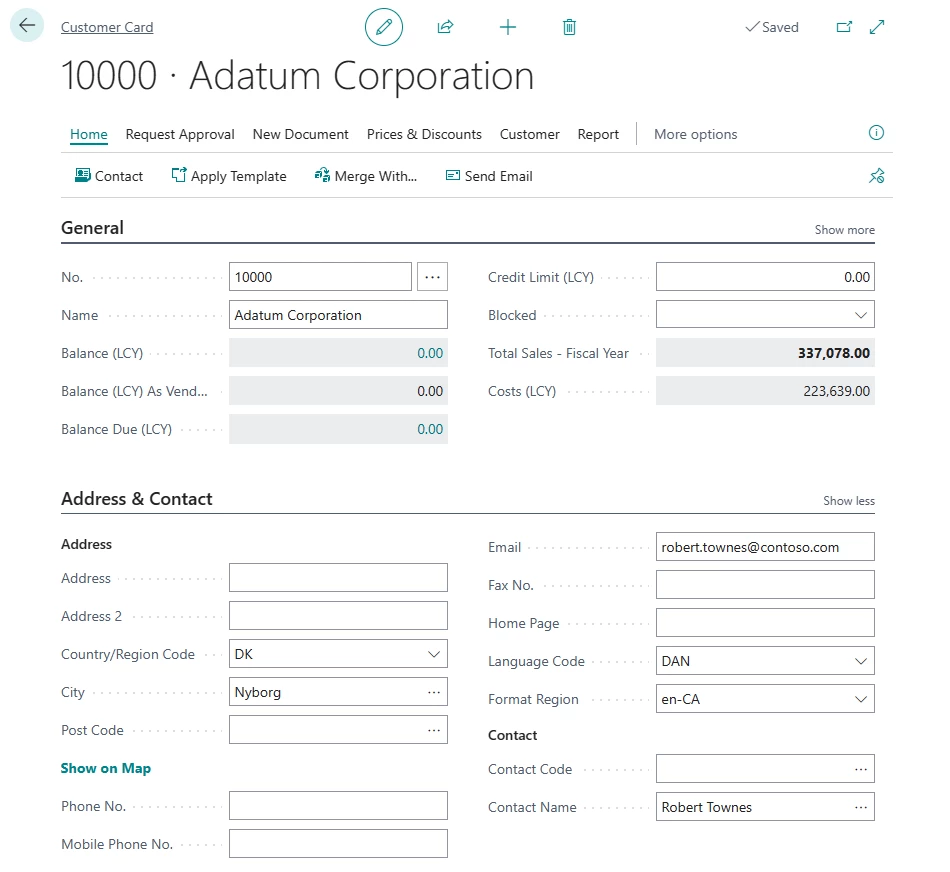
If a report should be printed in the language of the recipient rather than in the working language, the developer can add code in the report to handle this. This functionality is already enabled for most reports in the standard Business Central database. The document is printed in the language that is specified in the Language Code field on the Customer or Vendor Card page.

Example of Language and Format Region Codes on the Customer page

4. Language and Format in My Settings

If the report properties mentioned earlier aren’t configured within the AL triggers, Business Central then refers to the settings in My Settings. For example, consider a scenario where a regional format isn’t defined for a customer. In this case, when you print documents associated with the customer, the Report.FormatRegion property won’t have a specific regional format set. Consequently, Business Central will turn to the regional format setting in My Settings as a fallback. While My Settings had a more prominent role in earlier versions, its current function is to step in when no alternative settings are available.

By using this order of priority, Business Central ensures that the report output language and format are based on the most relevant and specific configurations. This approach gives you greater control over language and format customization for individual reports. Ultimately, this feature streamlines the reporting process, making it more efficient and user-centric.

The post Adding Regional Formats to Reports in Business Central appeared first on Microsoft Dynamics 365 Blog.

Brought to you by Dr. Ware, Microsoft Office 365 Silver Partner, Charleston SC.