Why a knowledge base is important in delivering exceptional customer service

Why a knowledge base is important in delivering exceptional customer service

This article is contributed. See the original author and article here.

Is a well-defined knowledge base valuable for delivering exceptional service? No matter the business, the answer is a resounding “yes.” In a recent survey, 91 percent of customers would use an online knowledge base if it were available and tailored to their needs, and in another published report, respondents preferred knowledge bases over all other self-service channels. It’s clear that a well-structured, well-written, and easily consumable knowledge base empowers customers to obtain self-service support anywhere, anytime. Allowing flexibility and accessibility for customers may positively influence customer satisfaction.

A knowledge base isn’t just a helpful self-service tool for customersit’s also an indispensable tool for customer service staff. It can serve as a learning tool for support staff to deepen their service or product knowledge. It’s also a valued commodity in the transfer of information from support agent to the customer by bridging the knowledge gap that prevents the customer from achieving a specific goal, thereby creating a positive customer experience and increasing customer loyalty.

In this post, we will cover how self-service tools within Microsoft Dynamics 365 can help your customer service team deliver personalized customer care, fill knowledge gaps, and streamline productivity.

A thought-provoking tool

A modern knowledge base is a collection or library of digital articles containing relevant content, videos, images, and other useful information about your service or product. Typically, it contains published documentation such as frequently asked questions, quick-start and how-to guides, and troubleshooting instructions. It acts as the source of truth for the service or product for its stakeholders such as customers, employees, and partners, and should be easy to use for finding and locating solutions to problems without requiring additional company support.

A well-fed, well-maintained, and easily accessible knowledge base can become the cornerstone of your customer service team’s self-service strategy. A knowledge base can be a cost-effective component of a company’s self-service portal or part of a website as it reduces the time and effort the customer spends on getting an issue resolved. It’s a tool that is immediately valued by both support agents and customers alike. Support agents can refer to a knowledge base article or share the actual article with a customer, answering a query quickly rather than spending time asking a colleague for guidance or taking the time trying multiple solutions until finding the right one. Customers can quickly and easily search the knowledge base for articles that answer their questions, eliminating the need to interact with another layer of company support and keeping live agents’ time free to focus on more complex issues.

Deliver enhanced customer care

A well-maintained knowledge base is the backbone of any organization to deliver world-class customer care, but how do you keep your knowledge base current?

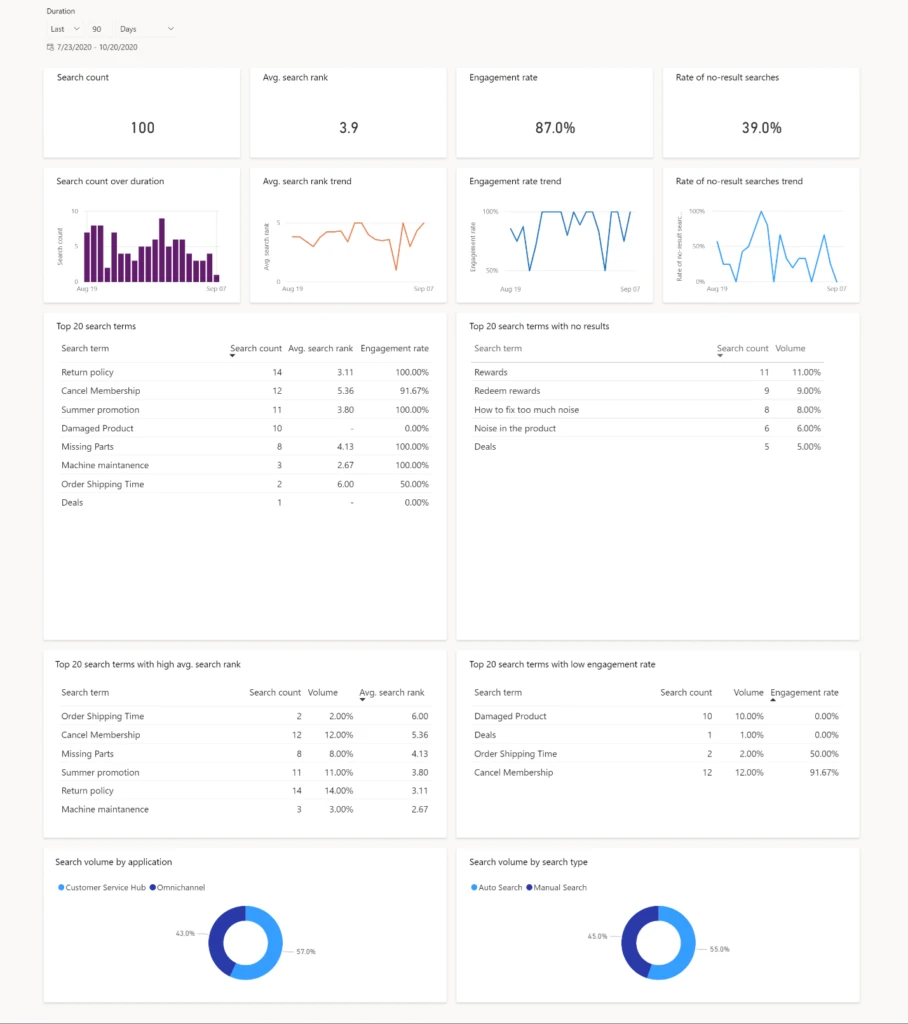
Understanding what agents are searching for to resolve customer issues can help improve knowledge base content, which in turn improves the agent’s ability to support customers more efficiently. With Microsoft Dynamics 365 Customer Service, knowledge search analytics can be used to gain visibility into the effectiveness of the knowledge base for your support agents. Managers need visibility into issues support agents face and whether the knowledge content effectively addresses the issues customers raise. Managers can easily run reports such as “top search terms with no matching knowledge articles” or “top search terms with poor engagement rate” to quickly identify and fill gaps in content. By identifying searches that have low success or return no results, the knowledge search analytics dashboard can help identify knowledge gaps, improve search results, and surface the most relevant articles.

The knowledge search analytics dashboard within Dynamics 365 Customer Service helps managers quickly surface metrics concerning content effectiveness.
Figure 1: The knowledge search analytics dashboard within Dynamics 365 Customer Service helps managers quickly surface metrics concerning content effectiveness.

Fill gaps between fragmented knowledge

Once content gaps are identified, how do you fill them? The challenge for most companies is that knowledge is typically fragmented across an organization and stored in different formats, such as documents, images, videos, blogs, wikis, structured knowledge, and the list goes on. The engagement points for surfacing knowledge have also increased with the advent of digital messaging (such as SMS and WhatsApp), chatbots, and social apps. These disparate formats and source points make it difficult to curate and surface the right content.

This month, we are releasing our preview of federated knowledge search within Dynamics 365 Customer Service. As knowledge is typically held in a wide variety of formats, spread across multiple sources like SharePoint sites, OneDrive, and third-party knowledge management systems, federated knowledge search provides the ability to find and share knowledge from as many sources as possible to help agents be more productive and resolve customer issues quickly.

Making federated knowledge search work for you is easy: simply plug a connector from an external search provider (such as SharePoint search, Microsoft search, or cross-Dynamics 365 search) into the knowledge search experience.
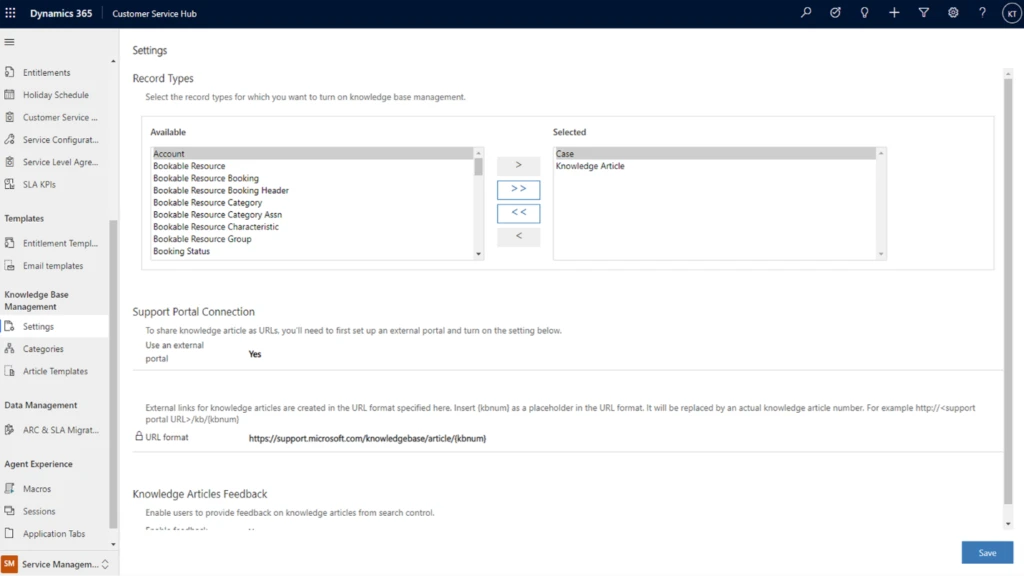
Federated knowledge search helps keep your knowledge base fresh by curating content across various formats and sources.
Figure 2: Federated knowledge search helps keep your knowledge base fresh by curating content across various formats and sources.

Federated knowledge search is an essential tool in providing knowledge base content, pivotal to maintaining a rich and current knowledge base to help resolve customer issues fast and accurately.

At Microsoft, we know that effective knowledge management is an essential element to delivering high quality customer service across all engagement modalitiesself-service, assisted service, and onsite service. We are continuing to innovate by extending the capabilities of our knowledge management offering within Dynamics 365 Customer Service so you, your support agents, and your customers always receive the right content at the right time, no matter the format or source.

2021 release wave 1 features

Federated knowledge search and knowledge analytics are just the start. A few of the 2021 release wave 1 knowledge management features being released April 1, include the ability to customize article search filters, personalize language settings for article authors, and a new form designer. We are continually extending the reach of Dynamics 365 Customer Service to deliver the features you want along with the features you need.

The post Why a knowledge base is important in delivering exceptional customer service appeared first on Microsoft Dynamics 365 Blog.

Brought to you by Dr. Ware, Microsoft Office 365 Silver Partner, Charleston SC.

Webinar: Tips for using AI in retail loss prevention to fight against fraud

Webinar: Tips for using AI in retail loss prevention to fight against fraud

This article is contributed. See the original author and article here.

If you’re looking for ways to harness the power of AI to help prevent retail loss, please join us for a free webinar at 10:00 AM PST on Wednesday, February 10, 2021.

Attendees will gain insight into how Dynamics 365 Fraud Protection loss prevention has helped fashion company, BESTSELLER, quickly identify and investigate potential sources of fraud and inventory loss in thousands of its stores and how that technology can help the retail industry.

The webinar will be hosted by:

  • Kim Guldager, BESTSELLER Program Manager and Product Owner
  • Sondra Feinberg, Global Payments and Fraud Executive at Microsoft
  • Venkat Ganesan, Principal Program Manager at Microsoft

Sign up for the webinar

Webinar registration link


The post Webinar: Tips for using AI in retail loss prevention to fight against fraud appeared first on Microsoft Dynamics 365 Blog.

Brought to you by Dr. Ware, Microsoft Office 365 Silver Partner, Charleston SC.
3 reasons to accelerate your migration journey to Dynamics 365

3 reasons to accelerate your migration journey to Dynamics 365

This article is contributed. See the original author and article here.

Having spoken to over 300 Microsoft Dynamics 365 on-premises customers, I have a lot of empathy for companies that are faced with the decision to migrate to the cloud. Most commonly I’ve heard that changing business software can appear risky, daunting, and expensive, but the customers that have successfully migrated to Dynamics 365 will tell you that the benefits of cloud far exceed the perceived risks of going through migration, or simply remaining on-premises. For me, I think of cloud migration as buying a house. You can enjoy the benefits right away while investing in your future. Take the first step toward cloud success by migrating your on-premises solution with expert guidance from Microsoft. Below are the three main reasons why you should accelerate your journey to the cloud with Dynamics 365.

1. Peace of mind

COVID-19 has established that having your business applications in the cloud is critical for ensuring business continuity through unexpected external events that are out of your control. Companies that are on Dynamics 365 in the cloud are able to pivot their resources and processes to respond to the unprecedented circumstances. These companies are able to quickly switch to a fully remote work environment, and swiftly manage the variability in supply and demand. Moreover, since Dynamics 365 is a fully managed software as a service (SaaS), they don’t have to worry about upgrades or security enabling them to invest in strategic work rather than managing IT. This is a unique time in history that may become the new normal for businesses, so now is the time to migrate your on-premises applications to Dynamics 365 in the cloud to stay resilient and flexible.

2. Enhanced functionality

Dynamics 365 provides increased productivity from latest functionality, such as real-time insights and customized modern reporting optionshelping business owners get a 360-degree view of their business. With Dynamics 365 you are always on the latest software version with improved features that address industry and regulatory trends. Dynamics 365along with Microsoft Teams, Microsoft Office, Microsoft Azure, and Microsoft Power Platformoffers extended functionality and competitive advantages for you to always stay ahead. With these enhanced capabilities, several companies on Dynamics 365 can fundamentally reimagine their business processes while being more agile and responding to change even faster.

Read additional details how leading recreational vehicle maker, Lippert Components, Inc., advanced scalability by migrating from Dynamics 365 on-premises to Dynamics 365 in the cloud.

3. Economic value

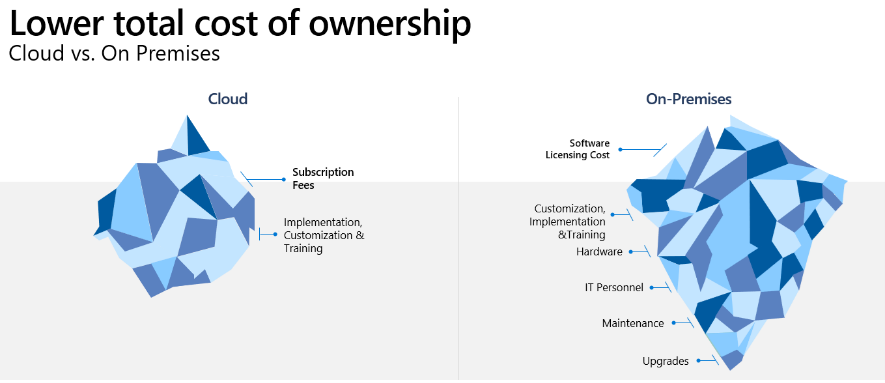
Organizations on Dynamics 365 have often observed that they have higher financial returns when compared to staying on on-premises business applications. The primary cost savings come from improved business and IT productivity. Plus, when you compare your on-premises costs to cloud, don’t stop at the cost of software licenseslook at the total economic impact. For example, companies in the cloud don’t have to manage servers, IT-focused maintenance, or periodic upgrades anymore. According to a recent Forrester study, when migrating from Microsoft Dynamics AX to Microsoft Dynamics 365 Finance + Operations, there was a 109 percent ROI with a payback period of six months. Likewise, when migrating from Microsoft Dynamics CRM to Dynamics CE, there was a ROI of 63 percent with a payback period of 10 months.

Image of two icebergs representing the lower cost of ownership of cloud verses on premises costs.

Get started with the Dynamics 365 Migration Program assessment

COVID-19 has accelerated the cloud journey of many companies. If you are on Dynamics AX or Dynamics CRM then you can apply to take part in the Dynamics 365 Migration Program. The migration program offers access to a dedicated team of migration advisors, no-charge migration assessments, pricing offers, tools, and migration support for qualified customers.

Learn more about the no-charge Standard Migration Assessment. This virtual technical assessment helps you to:

  • Understand the benefits of moving from an older, on-premises solution to the cloud.
  • Identify business objectives and tie those into the functionality of Dynamics 365.
  • Learn how to optimize the migration process with a focus on reducing effort and costs.
  • Determine your next steps toward cloud transformation.

Join many customers who have benefited from the program.

“I was impressed about the information received from the migration assessment. The results will give us confidence for the next steps.”Senior Business Analysist


“Our migration advisor was very thorough. He did great degree of analysis and provided greater insights on the good, the bad, and the ugly. He was knowledgeable and took the time to answer every question my team had along the way.”Senior Vice President and Chief Information Officer

To apply or learn more, visit the Dynamics 365 Migration Program to take the first step toward cloud success.

The post 3 reasons to accelerate your migration journey to Dynamics 365 appeared first on Microsoft Dynamics 365 Blog.

Brought to you by Dr. Ware, Microsoft Office 365 Silver Partner, Charleston SC.
Webinar: Tips for using AI in retail loss prevention to fight against fraud

Do you monitor the pulse of your fraud protection operations?

This article is contributed. See the original author and article here.

When your business depends on you to make informed strategic, tactical, and operational decisions, being able to gain actionable insights from your fraud protection system is crucial. Data should drive everything from reconfiguring rules to targeting new fraud vectors, manually reviewing transactions, presenting at monthly business meetings, or even monitoring and troubleshooting technical issues.

Built on an extensive data platform, Dynamics 365 Fraud Protection enables you to develop a toolkit with custom reports and applications that help you establish a robust fraud management strategy while providing ongoing insights into your business.

Detecting and understanding fraud

Minimizing fraud begins with understanding fraud by identifying trends and patterns. Reporting helps you do just that by providing a historical view of fraud volume for your business. A customized fraud tracker is one example of a report that you can add to your fraud protection toolkit. These types of reports enable analysts to filter historical data and view score distributions by dimensions (for example, country or region, payment instrument type, or product category) to highlight high-risk segments. These reports can then be used to configure new or existing rules to target those events.

Tracking and raising awareness of high-level fraud trends also provides valuable insight for business planning. Reports used for monthly business reviews can be used to drive conversations around monthly targets, how your fraud protection system is performing, areas for improvement, and plans for upcoming product or process changes that could impact fraud rates.

Defining the analytics that matter for your business is imperative. Measuring success and understanding the impact, scale, fraud pressure, and efficacy of your systems will play a large role in influencing your business strategies.

Managing services and operations

Fraud operations often require multiple touchpoints for members within the organization to either review, monitor, or act on events occurring across various systems. Often businesses choose to develop custom applications to cover these overarching use cases. They will weigh the cost of maintaining these custom applications with the potential improvement in operational efficiency.

For example, if you have an IT organization that manages the service health of multiple business applications, it may be valuable to create a single application to monitor and alert on the health of them all. Sending API request times and errors for your fraud protection solution within the context of all of the other service notifications on a single application would streamline the process altogether. Adding these custom applications to your fraud protection toolkit will not only improve the health of your risk management solutions but also your business all-up.

How Dynamics 365 Fraud Protection can help

Dynamics 365 Fraud Protection provides in-app reporting through scorecards, monitoring dashboards, and a virtual fraud analyst. In addition, understanding the power of joining data across multiple business systems and each business’ unique reporting needs, we have also provided a platform to easily extract and manipulate the data available within Fraud Protection.

Event tracing provides both a real-time and bulk data egress mechanism to send data to your own Azure Event Hubs or Azure Blob Storage locations. By subscribing to events to track transactions, portal actions, or API performance through our Event Tracing page, you can easily analyze your service, extract insights, and develop custom reports by using Azure Stream Analytics or Logic Apps and Dataverse. Here you can join to other datasets available within your tenant to create a rich set of real-time reports such as audit logs, fraud trackers, or monthly business reports.

You can also utilize the data available in Event Tracing to create custom mobile or desktop applications to target unique use cases, which support your business with the help of Power Apps. Utilize Microsoft’s low-code app development platform to create fraud investigation tools for your support agents, latency monitoring applications, and more.

Next steps

Developing a well-rounded fraud protection toolkit that is customized for your business needs will improve your fraud management strategy. The use of custom reports and applications to address unique needs for your business is a great way to extend existing business processes while incorporating insights from your fraud protection solution. Dynamics 365 Fraud Protection and the event tracing capability can provide the data platform to easily enable your business to configure these new experiences.

Get started today with Dynamics 365 Fraud Protection

Configure event tracing

Get started with sample reports

Get started with sample apps

The post Do you monitor the pulse of your fraud protection operations? appeared first on Microsoft Dynamics 365 Blog.

Brought to you by Dr. Ware, Microsoft Office 365 Silver Partner, Charleston SC.
How Dynamics 365 Guides is transforming remote nursing education

How Dynamics 365 Guides is transforming remote nursing education

This article is contributed. See the original author and article here.

The pandemic has profoundly impacted educators across the world. Video calling technology has enabled millions of classes to continue at a distance but, it has shortcomings when it comes to teaching hands-on skills. This fall, the School of Nursing at the University of Michigan turned to mixed reality and Microsoft Dynamics 365 Guides for an alternative solution to these new challenges.

Dynamics 365 Guides is a mixed reality application for Microsoft HoloLens that allows users to create step-by-step instructions in 3D. Guide authors use text, images, videos, and holographic content to help workers learn complex physical procedures.

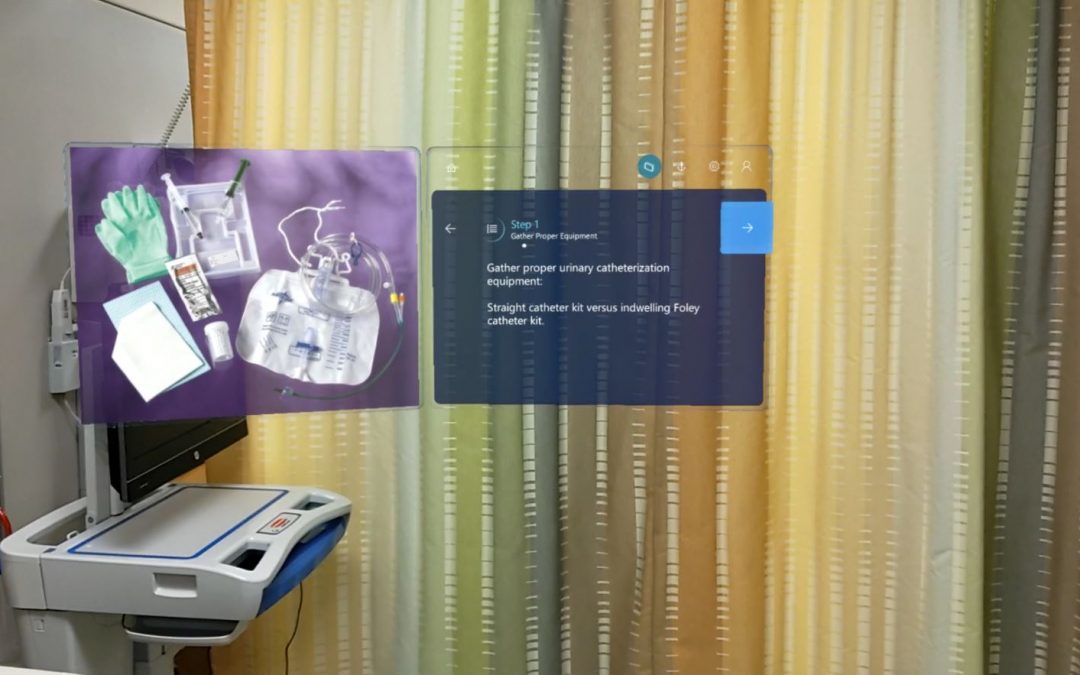
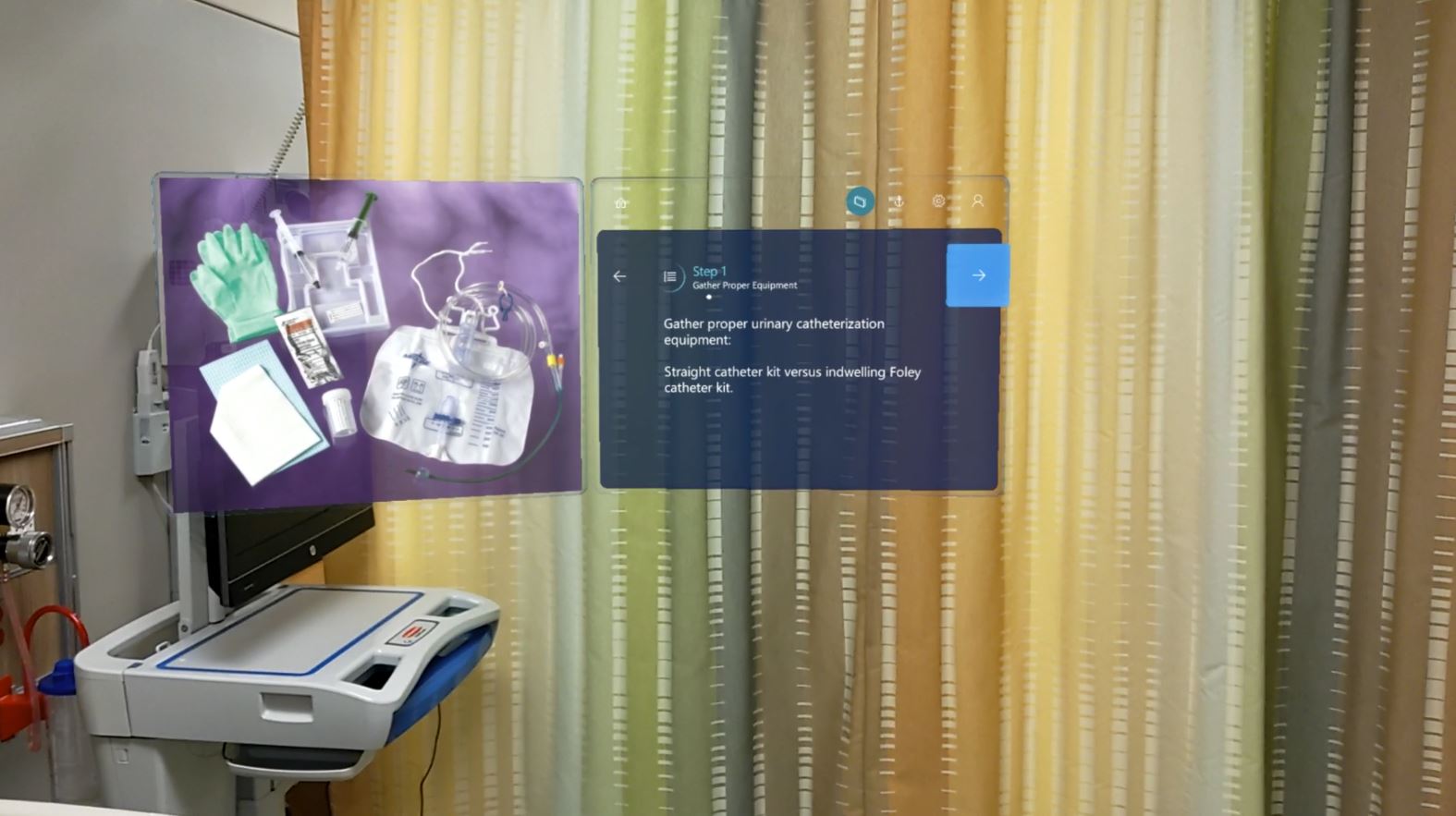
Screen with Hololens 2
A hologram of a Guides instruction card in a hospital room, providing instructions for a urinary catheterization.

“Once we were introduced to the Microsoft HoloLens () we learned about Dynamics 365 Guides, and it was pretty exciting because we did realize that we could use the guides to create training tools to teach the nursing students how to do these necessary, rudimentary, required skills, and procedures that they have to do in order to move to the next level and go out and practice.”Melissa Bathish, clinical assistant professor and center co-director and undergraduate faculty lead

Over the past few months, the Dynamics 365 Guides product development team collaborated with the School of Nursing to define a pilot to test how this new medium can help deliver a competency-based nursing curriculum. The aim is to create a program that standardizes the education students receive for each procedure, gives flexibility to both faculty and students by enabling the latter to be more independent in their learning, and by removing the location restrictions of in-person training.

Traditionally, students practice procedures on mannequins that resemble the human body and provide the haptic feedback of performing certain actions. Often, they struggle because the procedures can be very complex, with lots of steps and things to take care of simultaneously.

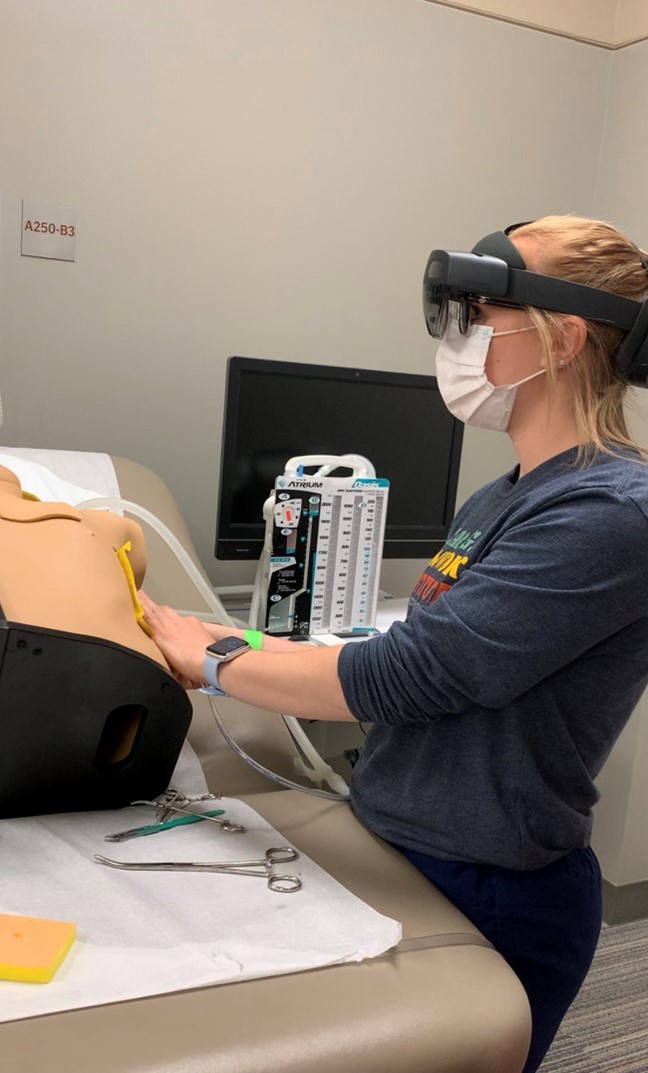
A nursing student practicing a catheterization procedure on a mannequin with HoloLens 2.
A nursing student practicing a catheterization procedure on a mannequin with Microsoft HoloLens 2.

With Dynamics 365 Guides, students can go through a procedure one step at a time or as many times as they need. HoloLens shows them a holographic instruction card with directions overlaid in their space. Because the interface is hands free, they can perform the procedures on the mannequin at the same time and then move on to the next step when they are ready. Each step tells them what to do with a few lines of text, how to do the next step with videos or pictures, and where to do it with 3D objects placed in their space.

“We like the flexibility; we like that they can go as slow or as fast as they want through a guide depending on how well they know the procedure.”Deborah Lee, clinical assistant professor, and co-director and graduate faculty lead

Another benefit of the technology is that a student can perform a procedure from anywhere in the world and a faculty member can call in and see them do it through their HoloLens’ camera. This increases flexibility and enables evaluations to be done without location restrictions.

Over the next year, the School of Nursing will continue to develop more guides for more advanced procedures, train more people to author them, and collaborate with the Medical School on procedures that both medical residents and advanced nursing practitioners need to master.

Learn more

Dynamics 365 Guides enables organizations to enhance learning and standardize processes, reduce errors, and accelerate time to value with holographic step-by-step instructions and process insights. Questions? Contact your Microsoft sales representative to learn more about Dynamics 365 Guides.

The post How Dynamics 365 Guides is transforming remote nursing education appeared first on Microsoft Dynamics 365 Blog.

Brought to you by Dr. Ware, Microsoft Office 365 Silver Partner, Charleston SC.
Dynamics 365 (Preview) app for Windows comes with offline access

Dynamics 365 (Preview) app for Windows comes with offline access

This article is contributed. See the original author and article here.

The Microsoft Dynamics 365 (Preview) app for Windows is optimized to help your team stay productive whether they’re connected or working offline.

The app provides your salespeople, agents, and supervisors with tools they need to track their tasks, arrive prepared for appointments, take notes, and access customer records.

It is seamless to deploy because employees can install the app themselves from the Microsoft Store, and then with one sign-in access all the Dynamics 365 apps enabled for your organization, with no additional configuration.

If you want to customize the app, you can tailor it to meet your business requirements using the Microsoft Power Apps app designer and extensibility points, and configure it to work offline. The seamless setup experience enables you configure the app once, and then deploy it everywhere on iOS, Android, or Windows devices.

Key capabilities

The Dynamics 365 (Preview) app for Windows delivers these key capabilities:

  • A personalized action hub to help users get to common tasks, suggestions, and records quickly
  • Offline access with synchronization, so users can be productive on the go
  • Access records from an easy-to-use home page
  • Track progress for key performance indicators visually with charts
  • Access personalized views of lists and grids so that users see the data most important to them

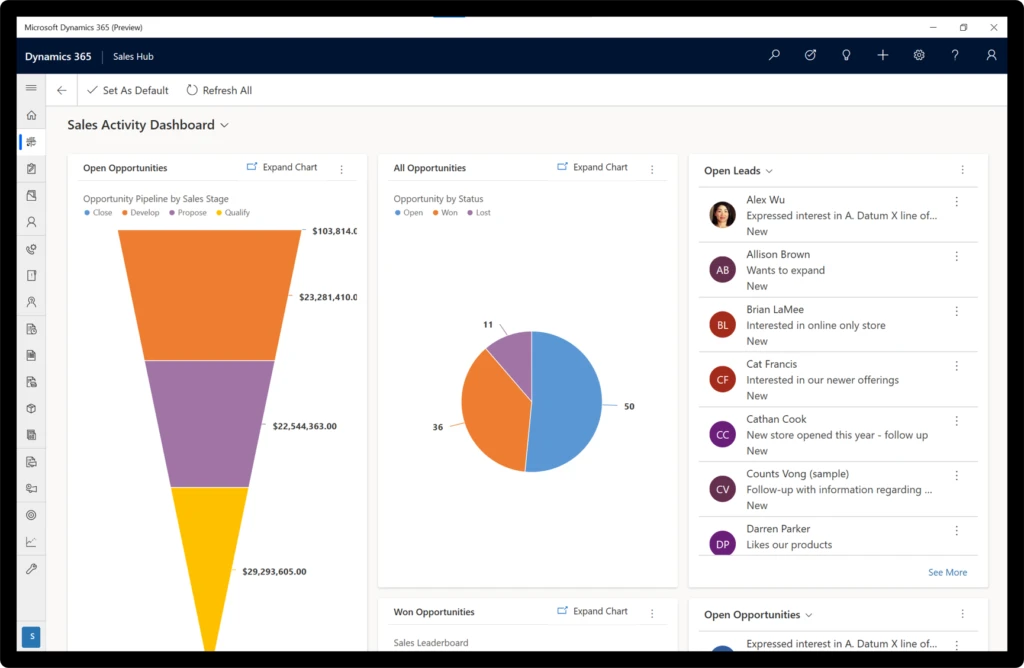
Screenshot showing Windows app dashboard

We’ll continue to improve the app, adding features that are currently available in the iOS and Android mobile versions including:

  • Ability to capture video, photo, and audio in the timeline when adding notes
  • GPS geolocation
  • Integrated barcode scanner

Next steps and continued learning

To learn more about the Dynamics 365 (Preview) app for Windows, check out the documentation for more details on the capabilities, setup process, and to get the link to install the app.

We’d like to hear from you. Please send us your feedback.

The post Dynamics 365 (Preview) app for Windows comes with offline access appeared first on Microsoft Dynamics 365 Blog.

Brought to you by Dr. Ware, Microsoft Office 365 Silver Partner, Charleston SC.