Gartner® Recognizes Microsoft as a Leader in the 2021 Gartner Magic Quadrant™ for Cloud ERP for Product-Centric Enterprises

Gartner® Recognizes Microsoft as a Leader in the 2021 Gartner Magic Quadrant™ for Cloud ERP for Product-Centric Enterprises

This article is contributed. See the original author and article here.

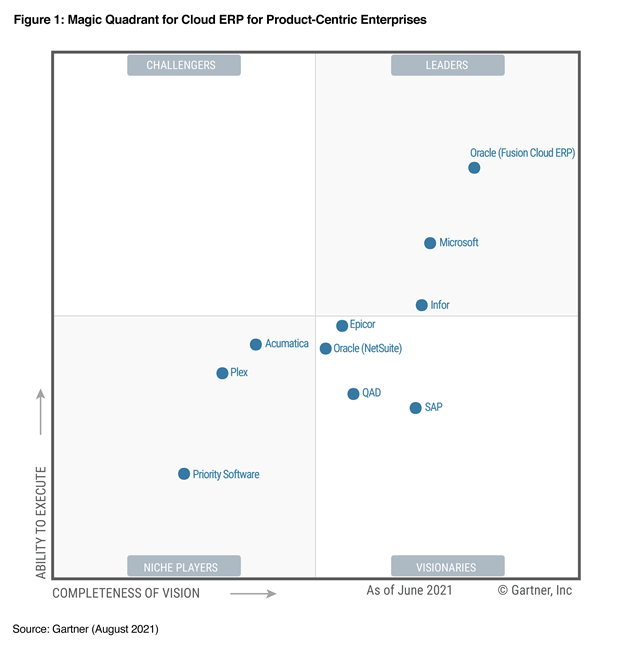
We are thrilled that Gartner has recognized Microsoft as a Leader in the 2021 Magic Quadrant for Cloud ERP for Product-Centric Enterprises for Microsoft Dynamics 365.

Magic Quadrant for Cloud ERP for Product-Centric Enterprises, August 2021.

Dynamics 365 Supply Chain Management and Dynamics 365 Finance offer businesses two standardized enterprise resource planning (ERP) capabilities on a composable ERP platform, functioning as stand-alone solutions or as a tightly integrated and extensible system. As product-centric enterprises look to renovate their existing ERP platform to improve systems and processes by moving them to the cloud, Dynamics 365 is enabling the transformation and improving IT agility to deliver business outcomes in the process.

For example, Bel Fuse recently selected Dynamics 365 Finance and Dynamics 365 Supply Chain Management to move away from a legacy version of Oracle that was highly customized and difficult to update. Bel Fuse was able to unify its data and can now more easily manage its supply chain operations and finance processes, gaining more agility to respond quickly to changes in the market.

Dynamics 365 also delivers an enterprise SaaS application capable of providing data, analytical insight, and operational application services by running on the Microsoft Azure cloud. The Azure cloud enables clients to use Microsoft Power Platform for analytics and Microsoft Power Apps for low-code/no-code extensions, allowing organizations to improve operations with real-time, AI-based predictive insights across a broader ERP strategy.

An excellent example of a company leveraging these capabilities is GN Group. GN Group recently adopted Dynamics 365 Supply Chain Management and Dynamics 365 Finance to centralize all its ERP data in the cloud. With help from Microsoft Partner Network member SCALES Group, GN Group evolved its supply chain processes to be more agile and structured. It uses Dynamics 365 Finance to unify financial data and gain AI-based predictive insights in real-time. The company also adopted Microsoft Power Platform to extend its Dynamics 365 business applications. So far, GN Group uses Microsoft Power BI for reporting and analytics and Microsoft Power Apps to build a custom, vendor-managed inventory (VMI) solution that seamlessly connects to Dynamics 365 Supply Chain Management.

And we continue to invest and expand our capabilities. At the end of July, we acquired Suplari, a leading provider of supplier spend insights that enable companies to proactively manage supplier spend by transforming data from multiple sources, such as contracts, purchase orders, invoices, expenses, and supplier risk, into valuable insight. By bringing Suplari’s spend intelligence insights together with the existing Dynamics 365 capabilities, Microsoft is further helping organizations become insight-driven and enabling business leaders to take strategic action. In August, Dynamics 365 Intelligent Order Management became generally available. It enables enterprises to optimize and automate fulfillment using real-time inventory, AI, and machine learning. Organizations can truly gain the agility they need to quickly adapt to changing business models, support the latest fulfillment methods, add new order intake channels by seamlessly integrating their existing ERP systems to manage the entire order lifecycle from intake to fulfillment.

Request a demo or take a guided tour of Dynamics 365 Supply Chain Management and Dynamics 365 Finance.

* This graphic was published by Gartner, Inc. as part of a larger research document and should be evaluated in the context of the entire document. The Gartner document is available upon request from Microsoft.

GARTNER and Magic Quadrant are registered trademarks and service mark of Gartner, Inc. and/or its affiliates in the U.S. and internationally and are used herein with permission. All rights reserved. Gartner does not endorse any vendor, product or service depicted in its research publications, and does not advise technology users to select only those vendors with the highest ratings or other designation. Gartner research publications consist of the opinions of Gartner’s research organization and should not be construed as statements of fact. Gartner disclaims all warranties, expressed or implied, with respect to this research, including any warranties of merchantability or fitness for a particular purpose.

Gartner, Magic Quadrant for Cloud ERP for Product-Centric Enterprises, 24 August 2021, Tim Faith, Denis Torii, Paul Schenck, Dixie John, Abhishek Singh.

The post Gartner® Recognizes Microsoft as a Leader in the 2021 Gartner Magic Quadrant™ for Cloud ERP for Product-Centric Enterprises appeared first on Microsoft Dynamics 365 Blog.

Brought to you by Dr. Ware, Microsoft Office 365 Silver Partner, Charleston SC.

Finance and Operations authentication upgraded to OpenIDConnect

Finance and Operations authentication upgraded to OpenIDConnect

This article is contributed. See the original author and article here.

For our customers using the client for Finance and Operations apps, we’re retiring the out-of-support WS-Federation authentication protocol, and replacing it with the industry standard OpenIdConnect OAuth security protocol. OpenIdConnect OAuth security protocol supports modern authentication, which includes multi-factor authentication and conditional access policy.

This upgrade, which will not result in any downtime or require customers to make changes to their system, was released in July 2021. It is available starting from in product version 10.0.20, platform version 7.0.6060.0 or later. The upgrade applies to all environment types except Dev Box, customer-hosted and IaaS environments.

For more information, see Authentication for Finance and Operations app upgraded to OWIN OpenIDConnect in the release plans.

Next steps

This feature is automatically enabled for customers who are on version 10.0.20 or later. If you aren’t on this version and want to upgrade, see the instructions to Self-service upgrade to the latest version.

The post Finance and Operations authentication upgraded to OpenIDConnect appeared first on Microsoft Dynamics 365 Blog.

Brought to you by Dr. Ware, Microsoft Office 365 Silver Partner, Charleston SC.
Dynamics 365 Intelligent Order Management accelerates adaptability

Dynamics 365 Intelligent Order Management accelerates adaptability

This article is contributed. See the original author and article here.

Businesses are moving away from rigid and monolithic solutions towards agile business applications that can be deployed quickly, integrated seamlessly with other existing systems, and can collect and unify extensive amounts of data from various touchpoints unlocking siloed data. According to Forrester, siloed data inhibits organizations from creating a comprehensive profile of customer needs, a challenge for 44 percent1 of retail decision-makers.

To drive better personalization, organizations also need to create a single view of their orders across all engagement channels. Propelling this shift is the realization by business leaders that they can leverage best-of-breed applications to avoid costly and time-consuming rip and replace business processes while still achieving the same objectives.

Last month we announced the general availability of Microsoft Dynamics 365 Intelligent Order Management, a solution that enables businesses to accelerate agility by leveraging easy-to-deploy out-of-the-box connectors within a low-code or no-code environment. This month, we are pleased to share several integrations and enhancements that further expand the capabilities of Dynamics 365 Intelligent Order Management.

Learn more: Dynamics 365 Intelligent Order Management is now generally available

Rapidly scale with partner connectors

McKinsey2 recently interviewed 60 senior supply-chain executives from across industries and geographies. 85 percent of respondents reported that they struggled with inefficient digital technologies to address logistic disruptions, shortages of parts and materials, and sudden swings in demand caused by the COVID-19 pandemic. designed to allow businesses to rapidly scale with out-of-box, pre-built partner connectors to e-commerce platforms, fulfillment services, delivery partners, and other back-office systems. Through our growing ecosystem of partners, we provide companies with new levels of agility by seamlessly integrating with other best-of-breed solutions.

Some of the order intake systems that Intelligent Order Management offers pre-built connectors are Orderful and BigCommerce. BigCommerce is a cloud-based e-commerce SaaS platform, and Orderful is a cloud-based electronic data interchange (EDI) platform that allows enterprises to integrate EDI transactions from Orderful’s network. These new order intake sources enable more nimble operations, allowing businesses to capitalize on new opportunities faster by accepting orders from anywhere.

Another integration that we are proud to announce is with ShipStation. ShipStation is a web-based e-commerce shipping platform that helps merchants quickly generate shipping labels for their online orders. By integrating ShipStation with the Intelligent Order Management platform, users can bring all their carriers and order sources together within one unified solution.

Finally, Intelligent Order Management users can now connect to Avalara, an automated tax compliance solution that determines order tax rates based on geolocation and product classification, and also Flexe, a cloud-based platform that unifies warehouse sourcing and streamlines material handling operations.

By adding these pre-built partner connectors to Intelligent Order Management, our solution provides a foundation for businesses to build agility and resiliency into their order management processes and free themselves from legacy and inefficient digital technologies.

Learn more: Intelligent Order Management partners with leading service providers to optimize order management

Accelerate time to market

Organizations can no longer afford to be rigid and reactive, and the push is for flexible, adaptable, and agile architecture. A survey conducted by McKinsey showed that highly successful agile transformations typically delivered around 30 percent gains in efficiency, customer satisfaction, employee engagement, and operational performance, making the organization 5 to 10 times faster and turbocharging innovation.

Thanks to our partnership with ShipStation, Intelligent Order Management now saves users time with the capability to print shipping labels directly from its own application.

We are also making updates to system functionality such as adding internal to external ID transformation. With internal to external ID transformation, users can establish different mappings with different providers. For example, a user can map different names for the same product or SKU from an e-commerce system, such as BigCommerce, to Intelligent Order Management. This type of internal to external ID mapping is critical because Intelligent Order Management is used in complex order environments where data is communicated between many internal and external systems.

We have also added localized Business Event definitions and Provider definition metadata to localizations. The updates to localization also extended localization beyond English to the following languages: Arabic, Danish, Dutch, German, Italian, Japanese, and Spanish.

Additionally, users will now enjoy an enriched Power BI architecture including a set of dashboards embedded into the user interface that is based on Microsoft Power BI technology. The Power BI dashboards provide longer-range insights into the order and fulfillment data that is moving through the app.

Improve order accuracy with fulfillment insights

According to a recent “final mile” survey by Gartner, just 18 percent of organizations report fulfillment accuracy rates of 95 percent or better4. At Microsoft, we believe that digital solutions are a promising path to improving this key performance indicator, and our new Order insights dashboard can help companies do exactly that.

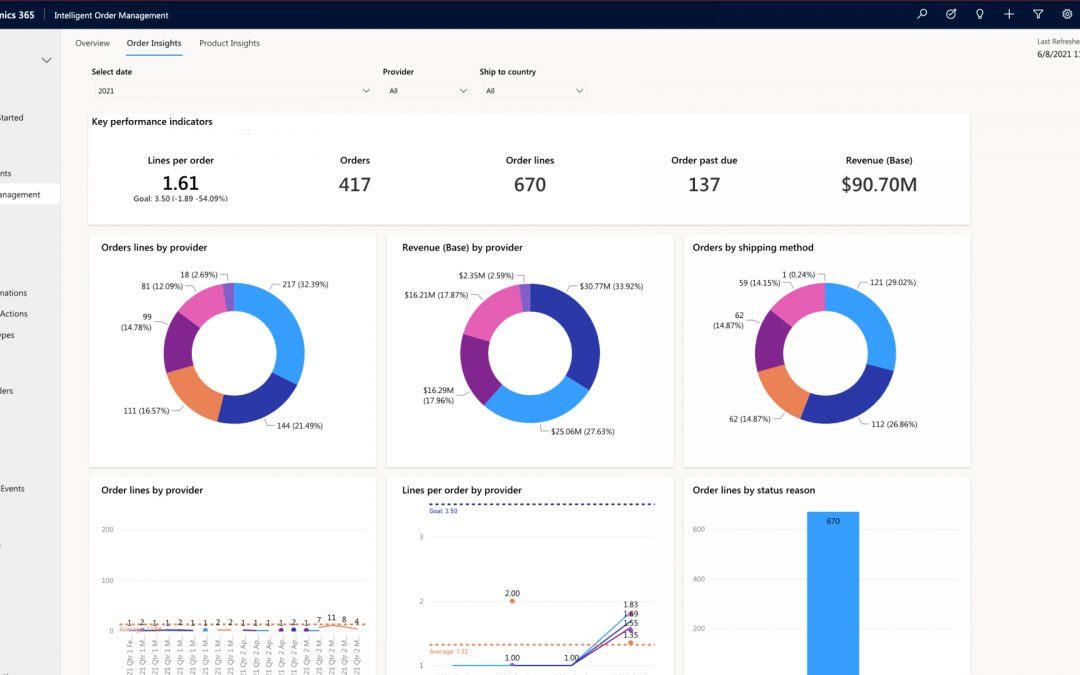
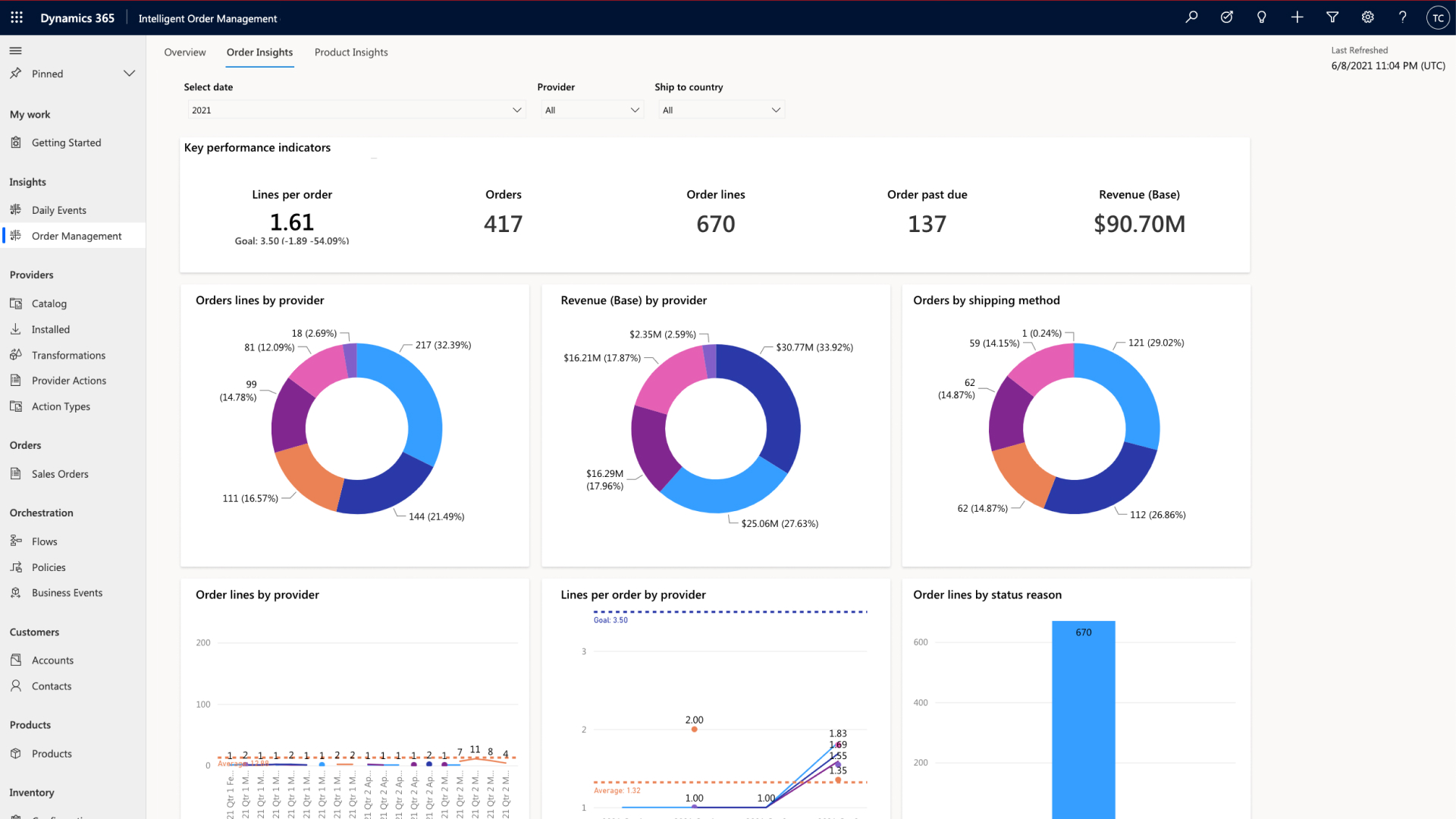
Dynamics 365 Intelligent Order Management data driven and AI infused Order Insights Dashboard

The order insights dashboard (shown above) provides in-depth visibility into aggregated order fulfillment activities flowing through Intelligent Order Management. From a single screen, users can quickly review key performance indicators such as Lines per order on average, Order count, Number of order lines, and Orders past due. Users can also see performance metrics of individual providers, and if there is an issue, they can drill down into the provider’s details to learn more.

Within the Insights menu, we have also introduced different dashboard views to provide users with the whole picture of what is happening with an order. For example, the Daily Events dashboard gives users an overview of any failed order orchestration steps, flagging them to help in the decision-making process.

Learn more in our recent webinar: Turn Order Fulfillment into a Competitive Advantage

What’s next?

As businesses continue to improve their ability to quickly adapt to changing demands, they must rely on flexible solutions like Dynamics 365 Intelligent Order Management that seamlessly integrate with other best-of-breed applications. By providing organizations with the ability to scale rapidly, go to market faster, and improve order accuracy with fulfillment insights, we are enabling businesses to increase organizational agility.

If you are interested in seeing how these features can work for your organization, you can get started today with a free Dynamics 365 Intelligent Order Management trial.


1A Forrester Consulting Thought Leadership Paper Commissioned by Microsoft. The Digital Commerce Imperative. January 2021.

2 McKinsey, Resetting supply chains for the next normal. July 2020 | Article. By Knut Alicke, Richa Gupta, and Vera Trautwein.

3McKinsey, The impact of agility: How to shape your organization to compete. May 25, 2021 | Survey. By By Wouter Aghina, Christopher Handscomb, Olli Salo, and Shail Thaker.

4Gartner, Top Trends in Retail Digital Transformation and Innovation for 2021. 5 February 2021. By Kelsie Marian, Miriam Burt, Max Hammond, Hanna Karki, Robert Hetu, Sandeep Unni.

GARTNER is a registered trademark and service mark of the Gartner Inc., in the U.S. and internationally and is used herein with permission. All rights reserved.

The post Dynamics 365 Intelligent Order Management accelerates adaptability appeared first on Microsoft Dynamics 365 Blog.

Brought to you by Dr. Ware, Microsoft Office 365 Silver Partner, Charleston SC.
Finance and Operations authentication upgraded to OpenIDConnect

How finance leaders can leverage intelligent automation to unleash innovation

This article is contributed. See the original author and article here.

For organizations to thrive in the modern environment, they need to innovate, and innovation takes time. Leaders that expect teams to be innovative without creating time for the innovation process will likely be disappointed by the results. But how can teams deliver more with less? One possible opportunity for finance leaders is to leverage intelligent automation and other emerging technologies.

It’s widely accepted that intelligent automation can improve efficiency, reduce costs, and improve productivity. It can also increase team member engagement and satisfaction. However, what’s often overlooked is the broader impact on innovation. With less time spent on manual tasks, employees can reinvest their energy into work that requires more creativity and critical thinking. Adopting intelligent automation and emerging technology now allows forward-thinking finance leaders to remain competitive amidst today’s complex challenges.

Meet rising expectations

As business complexity rises, organizations increasingly turn to their senior finance leaders for strategic direction and to drive business transformation. Chief financial officers (CFOs) play significant roles in companies’ transformation efforts, and the transformations demand expanded support from finance.

As these expectations continue to rise for finance leaders, they must look for opportunities to leverage technology, such as AI-driven insights, to enhance financial decision-making within their organizations. Moreover, by projecting future outcomes, organizations can make more informed decisions today. Microsoft Dynamics 365 Finance is helping leading organizations in these efforts and paving the way for innovation in the process.

Take advantage of emerging technologies

To meet the demands of modern business, many finance teams are turning to emerging technologies, such as intelligent automation, AI, and machine learning, to help streamline processes, improve accuracy, and maximize compliance. Much of finance operations can be fully or partially automated using currently available technologies. It follows that leaders’ who embrace emerging technologies to automate finance operations can free up significant resources in their organizations to focus on strategic leadership and innovation.

Indeed, financial institutions surveyed by Statista who are already using AI reported reduced operational costs, increased data-driven decision making, and even improved customer satisfaction. Internally, these institutions also saw benefits like reducing team member workload.1

Despite the benefits, the adoption of AI technologies remains low. A potential reason for the low adoption rate is that AI is seen as more complicated and has a less proven use case, unlike other emerging technologies such as the cloud. In financial firms, significantly fewer used AI-driven technologies than cloud-based platforms.

Considering AI’s reported and potential benefits alongside its lower adoption rate, the case can be made that finance leaders who leverage this technology now can do more than free up time for team members to focus on innovation. They can also create a strategic advantage for their organization in the short term.

With so much to gain, let’s look at a few specific examples of where organizations can leverage AI to increase efficiency and improve competitive advantage.

Accounts receivable

Organizations often find it difficult to predict when a customer will pay their invoices. This situation can lead to less accurate cash flow forecasts, collections processes that are started too late, and orders released to customers who may default on their payment.

Compounding the problem is the fact that cash collection is generally a reactive process. All too often, managers are stuck with rising receivables and manual data entry. It’s why many people are still pulling data from their enterprise resource planning (ERP) into Excel spreadsheets a process that quickly eats through valuable time. Therefore, the ability to shift towards a proactive, intelligent approach to cash collection is invaluable.

For example, in Dynamics 365 Finance, it’s now possible to develop a prediction model to manage accounts receivable with AI-driven technologies. In this scenario, an AI model predicts which customers are likely to pay on time, which are not, and even provides a margin of error to consider. Organizations can use predictions in this way to create collection strategies to enable intelligent automations. This enables finance leaders to proactively encourage customers to pay ahead of time or develop new strategies and systems to make payments more manageable. Leveraging an automated, AI-based prediction model also means more time for employees to focus on higher-level problem solving, planning, or customer service.

Ultimately, a proactive, automated collections process enables teams to improve margins and efficiency while reducing risk and late payments.

Cash flow forecasting

Traditional cash flow forecasting can be tedious and problematic. For example, data often gets stuck in siloes, leaving people with complex Excel spreadsheets that are disconnected, time-consuming, and error-prone. It can also be hard to develop and deploy models when cash flow forecasting is based on institutional knowledge. And when it comes to measuring performance and accuracy, excel spreadsheets often fall short.

At Microsoft, we have built an intelligent cash flow solution that uses AI and machine learning. This new solution allows users to first integrate data from external systems to Dynamics 365 Finance using the data import and export framework. Then, users can create a forecast of cash flow and cash positions based on customer payment predictions as well as bank balance and time series forecasting. The system also allows users to save cash flow forecasts and then measure forecast performance when the financials have been realized.

Learn more in our recent webinar: Optimize financial operations with AI-infused processes.

Dynamics 365 Finance

Dynamics 365 Finance is a financial management suite that enables enterprise organizations to monitor the performance of their global financial operations in real-time, predict future outcomes, and make data-driven decisions to drive growth. If your organization is looking for ways to leverage automation and AI, Dynamics 365 Finance can help to unify your data and automate your business processes.

You can learn more about how Dynamics 365 Finance can enable your organization to improve efficiency and quality with AI-infused finance processes in our recent “Improve efficiency and quality with AI-infused finance processes” blog or get started today with a Dynamics 365 demo or free trial.


1- “Benefits from adoption of AI in financial services sector worldwide 2020, by region”, F. Norrestad, Statista, Jun. 28, 2021.

The post How finance leaders can leverage intelligent automation to unleash innovation appeared first on Microsoft Dynamics 365 Blog.

Brought to you by Dr. Ware, Microsoft Office 365 Silver Partner, Charleston SC.
Finance and Operations authentication upgraded to OpenIDConnect

Download the training module for Field Service (Dynamics 365) mobile app

This article is contributed. See the original author and article here.

The Field Service (Dynamics 365) mobile app helps frontline workers stay connected to essential information while out in the field. Frontline workers use the mobile app to view schedules, record notes, and examine customer, work order, and asset information.

Download the training module, Field Service (Dynamics 365) mobile app in a day, to learn how to set up, use, and configure the Field Service (Dynamics 365) mobile app. This self-paced, on-demand training is a step-by-step guide through exercises based on business scenarios from real customers.

What you’ll learn

After completing the online training module, which can be completed in about four hours, you will be able to:

  • Download and sign in to the mobile app and interact with Dynamics 365 Field Service information like bookings and work orders.
  • Perform common configurations like editing the tables, forms, views, and columns displayed in the mobile app. Set up “offline first” synchronization so the mobile app works without internet access.
  • Perform more advanced configurations and customizations like location tracking, push notifications, barcode scanning, and mobile workflows to accommodate more business requirements and processes.
  • Learn best practices to implement the Field Service (Dynamics 365) mobile app, including migrating from the previous mobile app.

What you’ll need

To complete the “Field Service (Dynamics 365) mobile app in a day” training, you will need:

  • Internet connection
  • PC computer or laptop
  • Android or iOS mobile phone or tablet

No prior experience is needed. The module starts with setting up a new Dynamics 365 Field Service environment from scratch and builds from there. If you are already using Dynamics 365 Field Service, you can use your existing environment.

More about the Field Service (Dynamics 365) mobile app

The Field Service (Dynamics 365) mobile app is a model-driven app built on Microsoft Power Platformthat is optimized for mobile interfaces. This means the process to manage, configure, customize, and upgrade the mobile app is the same process as it is for other web-based Dynamics 365 apps. It also means the mobile app uses Microsoft Power Platform functions and leverages new platform capabilities.

Next steps

To begin your self-paced tutorial, download the training module Field Service (Dynamics 365) mobile app in a day.

The post Download the training module for Field Service (Dynamics 365) mobile app appeared first on Microsoft Dynamics 365 Blog.

Brought to you by Dr. Ware, Microsoft Office 365 Silver Partner, Charleston SC.
Power Apps and Dynamics 365 Guides brings data to frontline workers

Power Apps and Dynamics 365 Guides brings data to frontline workers

This article is contributed. See the original author and article here.

Data is everywhere, data is decision making power

The emergence of data is changing the way organizations do business. From our mobile devices to our machinery, everyday activities and interactions create trillions of data points generated by inanimate objects. Unfortunately, data is often stored across disparate systems depriving organizations of access to valuable information and connected insights. To keep up with today’s fast-paced data hierarchy, organizations must rely on solutions that effectively integrate data to derive important business insights, empower frontline workers to make data-driven decisions, and streamline operational efficiency.

Break down information siloes with Microsoft Dynamics 365 Guides, HoloLens 2, and Power Apps

Infusing Power Apps with Dynamics 365 Guides and HoloLens 2 has enabled organizations to give their frontline workers step-by-step holographic instructions while also bringing critical, connected data into view. Using Power Apps, you can connect to your business data stored in on-premises data sources and rapidly build customizable workflows for your unique operational processes.

With Power Apps, you can embed your apps directly into Dynamics 365 Guides, displayed on HoloLens 2. Embedding Power Apps apps into Dynamics 365 Guides enables you to:

  • Create and trigger automated workflows based on captured asset data to simplify business processes seamlessly.
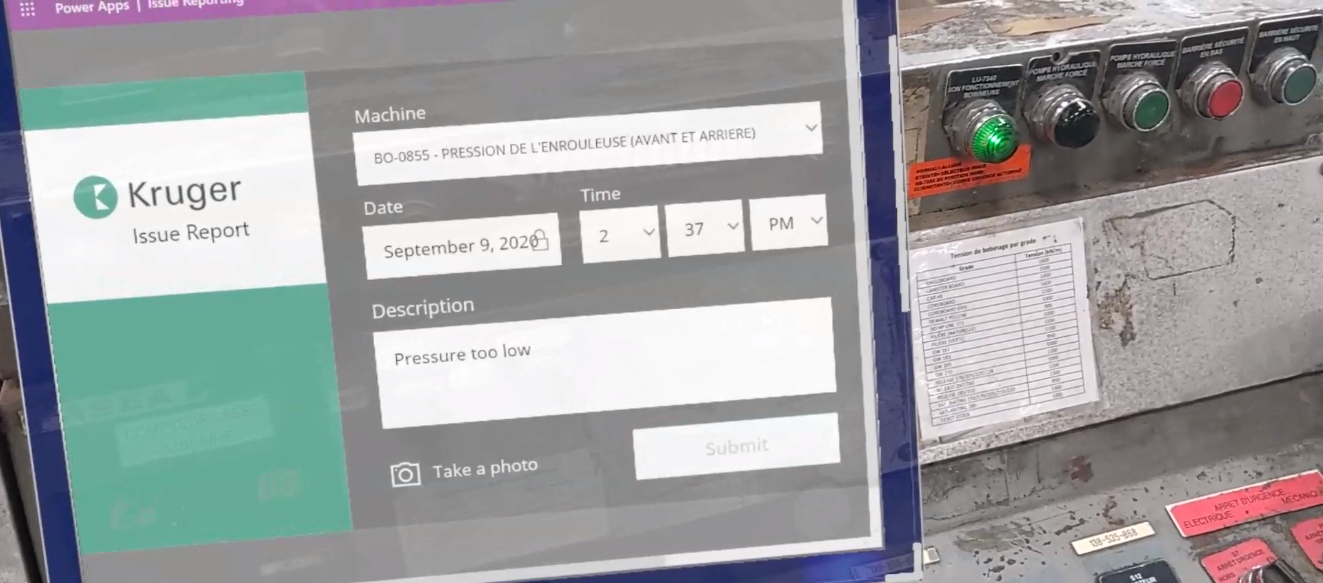
  • Develop issue reports, incorporated into your existing workflow within Dynamics 365 Guides.
  • Report issues directly within the workflow in a non-disruptive and efficient way.
  • Understand historical data and relevant insights.

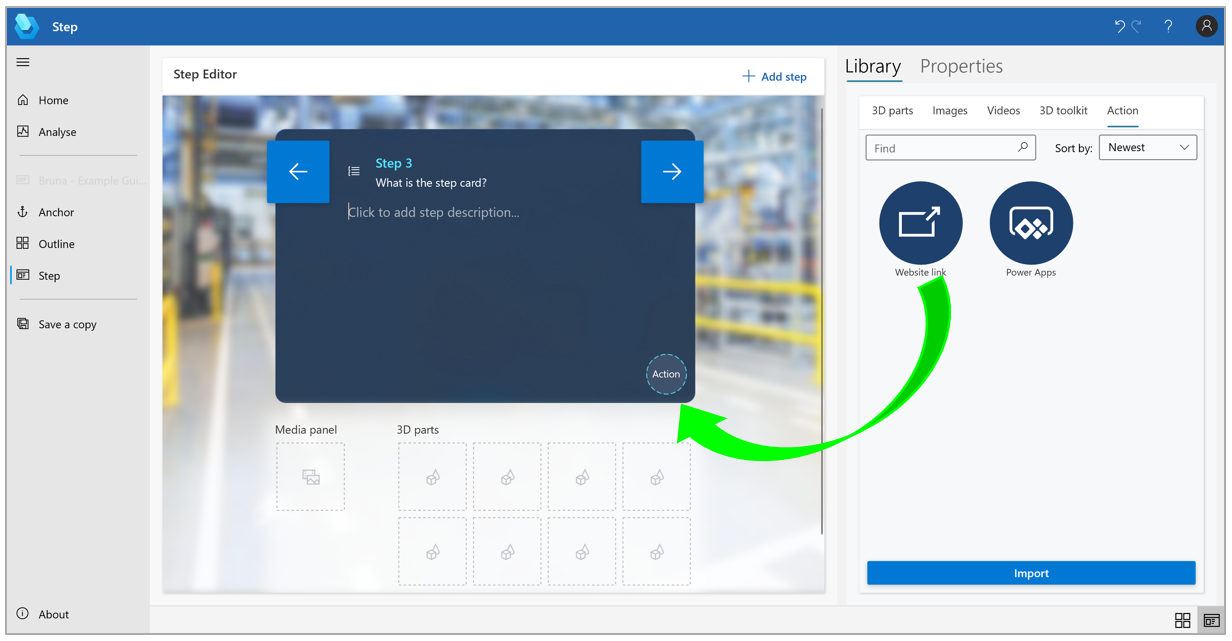
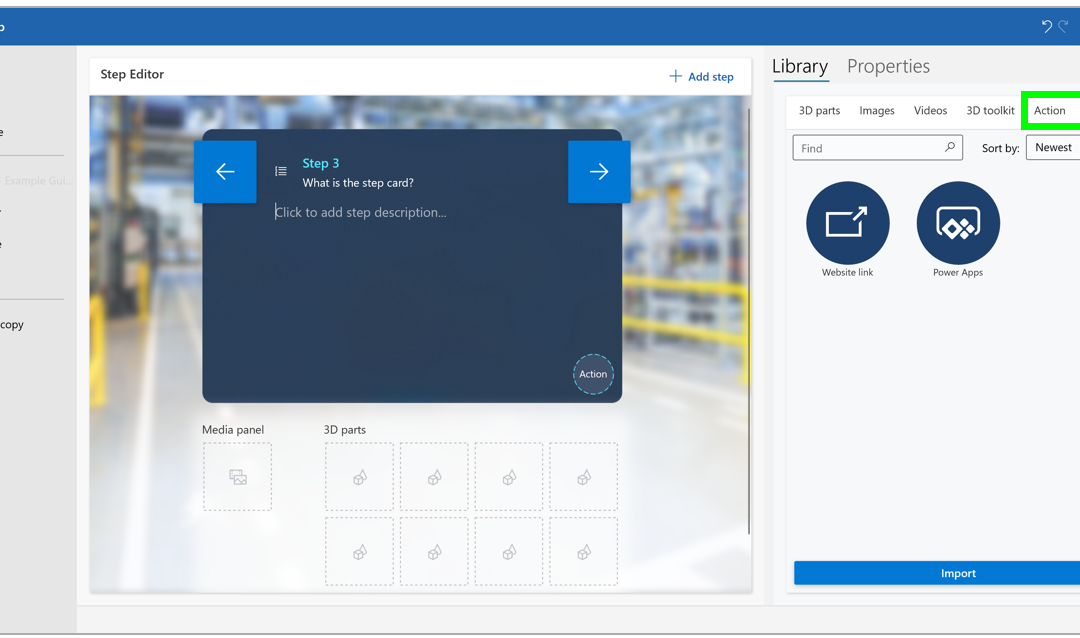
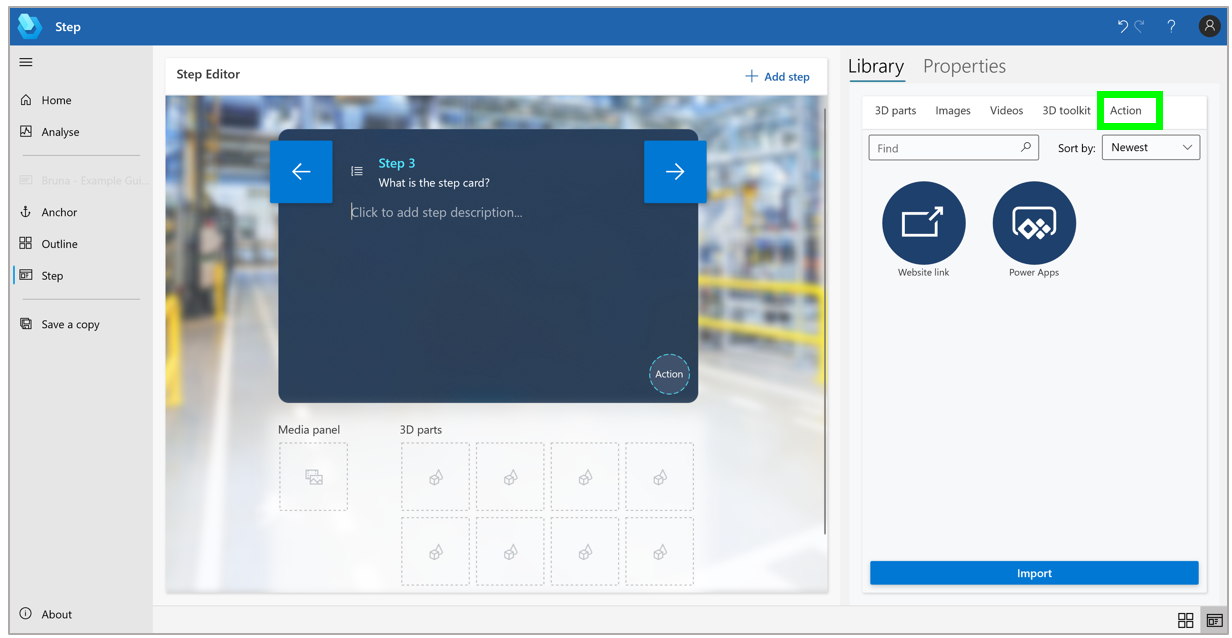
Guide that shows that within the PC Authoring app, go to the appropriate step, then select the Action tab.

An example of Issue Reporting integrated into Dynamics 365 Guides using Power Apps

Additionally, using Dynamics 365 Guides PC authoring, you can add a website link or directly link to Power Apps apps in your guides, making the opportunities endless for content linking and quick access to resources such as reference manuals, interactive quizzes, or parts re-ordering systems, or an app that provides the latest status of IoT sensors. This feature enables authors to create a seamless workflow for operators so that there is no need to switch from the workflow to access outside documentation as the information is displayed seamlessly in the line of sight.

It doesn’t end there. By integrating Power Apps with Dynamics 365 Remote Assist, you can ensure your operators are connected to apps when performing tasks on the go. Simply connect to Power Apps via your Microsoft Edge browser to access Remote Assist Helper to manage your tasks, apps, and documentation with a remote expert.

Drag the Website link circle to the Action circle in the lower-right corner of the Step Editor pane.

An example of adding in Website link using the Step Editor pane.

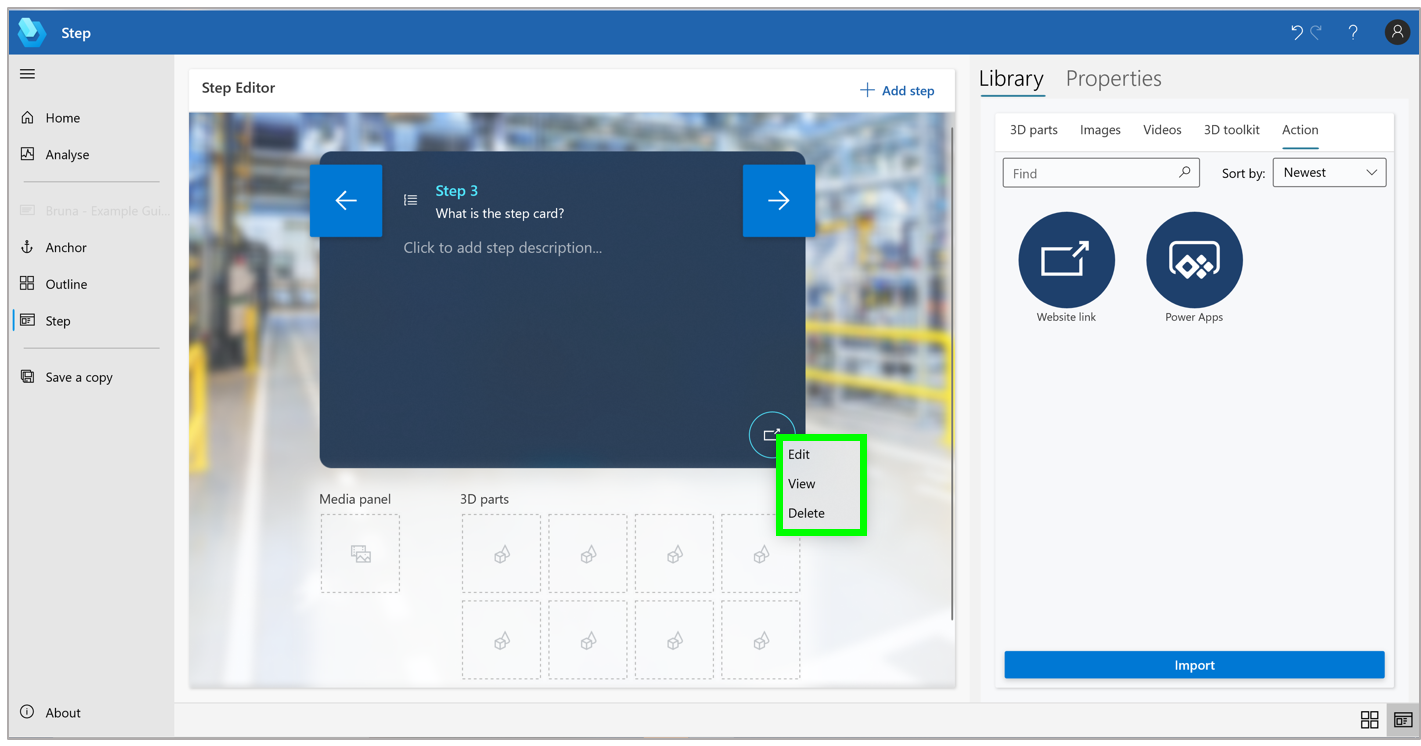
Guide that shows a step card where you can view, edit, or delete the link, right-click the Website link button in the Step Editor pane, and then select the appropriate command.

To view, edit, or delete the link, right-click the Website link button in the Step Editor pane and then select the appropriate command.

Auger Groupe Conseil uses Power Apps with Dynamics 365 Guides

Auger Groupe Conseil is a firm specializing in industrial process engineering, with a focus on helping organizations accomplish “Industry 4.0” procedural updates. On a recent client visit at Kruger Paper Inc., Auger Groupe Conseil recognized the opportunity to unify vast amounts of unused data stored across disparate sources with Power Apps with Dynamics 365 Guides.

Using the Power Apps connector in Dynamics 365 Guides, Auger Groupe Conseil was able to bring all of this unused data to their employees in real-time on the shop floor. With the Power Apps connector, the organization was able to take the Dynamics 365 Guides solution a step further by customizing workflows, submitting issue reports, and making optimal adjustments live in their real work environment. The customizable workflows let them create what they need within a workflow, for example, an alert or a report. Overall, this low-code, versatile solution has enabled their organization to effectively maximize their operations and employee performance.

“We realized that all these companies have an enormous amount of data sources and the best way to bring all this data to the employee is to use Power Apps in Guides. Power Apps allows you to customize any workflow.” Alan Marchand, IT Director at Auger Groupe Conseil, in charge of solutions architecture.

a man standing in front of a computer

Frontline worker uses Power Apps and Guides to click into step to customize a workflow, create an alert and submit an issue report.

Get started

The post Power Apps and Dynamics 365 Guides brings data to frontline workers appeared first on Microsoft Dynamics 365 Blog.

Brought to you by Dr. Ware, Microsoft Office 365 Silver Partner, Charleston SC.