
by Scott Muniz | Sep 8, 2020 | Uncategorized
This article is contributed. See the original author and article here.
 This month, we have THREE wallpaper options for you!
Hello, world!
It’s me again, with your monthly digital swag!
This month, we are celebrating #SkillUpSeptember and will be sharing resources for everyone from the person who is brand new to coding all the way up to the seasoned pro!
So, to get your month and learning adventure started right, here are THREE new wallpapers / Teams backgrounds for you. Choose your favorite out of blue, purple, and orange (or switch between all three, we won’t judge ;))!
What do you plan on learning this month? Post in the comments below and we will help you find the best place to get started :party_popper:
Down the wallpapers / Teams backgrounds here ⬇
by Scott Muniz | Sep 8, 2020 | Uncategorized
This article is contributed. See the original author and article here.
By: Caroline Lee & Sebastien Molendijk
Update on where to find our Power Automate templates: we will post all of our templates on GitHub (https://github.com/microsoft/Microsoft-Cloud-App-Security/tree/master/Playbooks) including instructions on how to import the templates into your Power Automate instance. Comment below with any questions!
Welcome back to the Automation in Cloud App Security series with Sebastien & Caroline. For those of you who are reading for the first time, this series covers advanced scenarios for our Microsoft Cloud App Security (MCAS) users; providing Power Automate flows to solve the most common customer asks the Customer Experience team sees today.
Go check out our first blog to see how we auto-remediated information protection alerts https://aka.ms/MCAS/Auto-Blog. In today’s post, we will be covering how to use Power Automate in Cloud App Security to dismiss Infrequent Country alerts.
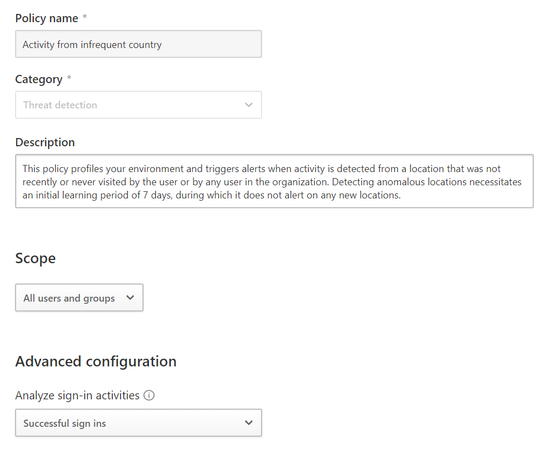
The Infrequent Country Alert in Cloud App Security is a popular detection for many companies. The alert triggers when there is sign-in activity outside of normal user locations. For example, imagine you have an employee who normally works out of the New York corporate office but then you see there is a sign-in activity for that person from China, you probably want to investigate this type of alert. In MCAS, you can tune the policy by scoping it to specific users, groups and by the type of sign in activity (see below template).

Activity from infrequent country template in MCAS
We’ve also recently published an anomaly detection alerts investigation guide to aid administrators in distinguishing true positives vs. benign true positives vs. false positives. But what about when employees go on vacation? Or are travelling outside of the country for work? How do you manage the volume of alerts especially for large enterprises?
We have developed a new flow in Power Automate to answer these questions. (Note: You will be able to select the template within the Power Automate gallery by searching for “Microsoft Cloud App Security.”) If you haven’t configured a Power Automate Flow in MCAS before, check out these steps in our documentation. So, how does this flow work? Essentially, when an infrequent country alert gets triggered, we’ll send it to Power Automate. In the flow, it will look at a couple of different details:
- The user profile (job title, department, email address, etc.)
- If the user has an out of office (OOO) message enabled
- Any groups the user is a part of
Based off these details, we can set conditions to auto-resolve the alert or request further investigation. The logic will be: If the user has an OOO message, then resolve the alert. You could also add more conditions around the user groups. For example, if you have a user who is part of a sensitive group such as Security Administrators, you could add logic to say if the user has no OOO message and is in the Security Admin group, then you may want to investigate the alert.
As folks start to take leave for vacation or staycation, this flow could help to save time in the alert investigation as admins will be able to focus on the most critical activities and lessen the sheer volume of alerts seen in MCAS. Keep an eye out for our next post and comment below if there are any other topics you’d like us to cover!
by Scott Muniz | Sep 8, 2020 | Azure, Technology, Uncategorized
This article is contributed. See the original author and article here.
Microsoft Learn offers several different fundamentals training and certifications for Azure—Azure Fundamentals, Azure Data Fundamentals, and Azure AI Fundamentals. Choose the ones that work for you. Use these foundational certifications as a starting point to explore more training for Azure technologies and to chart your path forward. If you’re looking to advance your career or to jump-start a new one, the message is the same: establish your foundations.
Azure opens a world of possibilities for you in this cloud-based, digital era. Let’s explore a few of them and how they can fit with your plans for growing your skills and expertise.
How you can use Azure to grow your career
Azure offers an ever-expanding set of cloud services that can help companies meet business challenges. It offers the freedom to build, manage, and deploy applications on a massive global network using an organization’s favorite tools and frameworks. This opens up many opportunities for IT professionals, depending on their talents and interests.
If you’re a developer, you can get your work done faster, take your skills to the next level, and imagine and build tomorrow’s applications.
If you’re an IT administrator, Azure cloud infrastructure helps you simplify management, reduce costs, rapidly adjust to changing business demands, and enhance security.
If you’re a data specialist, Azure can help you unlock the potential of data. Azure enables rapid growth and innovation with a portfolio of secure, enterprise grade database services that support open-source database engines.
If you’re an artificial intelligence (AI) specialist, Azure offers your application an edge over the competition. Just imagine what you can build—an app that translates speech in real time as you’re speaking or an app that helps you identify parts of a motor in a mixed-reality training. The possibilities are endless.
Get the Azure training that fits your background and interests
Interested in Azure, and want to learn more? Use our training offerings to explore the fundamentals of the cloud platform, foundational database concepts in Azure, and the basics of Azure AI.
Use Azure fundamentals training to learn the essentials of Azure—architectural components and core Azure services and solutions, plus management tools, compliance, security, and data protection. Learn how to get the best of Azure by growing your skills on cloud computing concepts, models, and services, including public, private, and hybrid cloud. In this training, explore cloud concepts, such as high availability, scalability, elasticity, agility, fault tolerance, and disaster recovery, and get strategies for transitioning to the cloud. To help you start this foundational training, we’ve curated the Azure Fundamentals collection on Microsoft Learn.
Use Azure database training to learn the fundamentals of database concepts in a cloud environment, get basic skilling in cloud data services, and build your foundational knowledge of cloud data services within Azure. Learn core data concepts, such as relational, nonrelational, big data, analytics, and roles, plus tasks and responsibilities in the world of data. To start this foundational training, check out the Azure Data Fundamentals collection on Microsoft Learn we’ve curated for you.
Use Azure AI training to explore how Azure provides easy-to-use services to help you get started with building AI solutions. Learn about many areas of AI, including machine learning, which is at the core of AI, and how many modern applications and services depend on predictive machine learning models. Explore computer vision, an area of AI in which software systems are designed to perceive the world visually, though cameras, images, and video. Plus, get the details on natural language processing (NLP), which supports applications that can see, hear, speak with, and understand users, and conversational AI, which deals with dialogs between AI agents and human users. We’ve curated the Azure AI Fundamentals collection on Microsoft Learn to help you start this foundational training.
Choose the right certification for you
Combine your training with a certification that announces your proficiency to the world. A comprehensive path forward for your Azure learning might begin with the foundations of cloud services and could be followed with core data concepts, after which it might move to common machine learning and AI workloads.
If you’re a system administrator, developer, or data and AI professional just starting out with Azure or the cloud, consider the Azure Fundamentals certification. This validates your basic knowledge of cloud services and how those services are provided with Azure. It can also help to prepare you for other Azure certifications, but it’s not a prerequisite for any of them.
Looking to grow your cloud database expertise? If you’re a developer or a data and AI pro—or even if you’re just beginning to work with data in the cloud—the new Azure Data Fundamentals certification can help you prove your knowledge of core data concepts and how they’re implemented using Azure data services.
If you’re getting started in the AI world, consider the Azure AI Fundamentals certification. Use this certification to demonstrate your knowledge of common AI and machine learning workloads and how to implement them on Azure. You don’t need to be a technical professional to take this exam. General programming knowledge will help, but data science or software engineering experience isn’t required.
Although not part of the Azure portfolio, the Power Platform Fundamentals certification can help data analysts and Azure developers validate their understanding of core Microsoft Power Platform capabilities, including Power Apps and Power BI.
Time to start mastering the basics!
It’s time to start growing your skills and building your reputation as an Azure expert. Go to Microsoft Learn, and explore the fundamentals training and related certifications: Azure Fundamentals. . . checked? Azure Data Fundamentals . . . checked? Azure AI Fundamentals. . . checked? Excellent. You’re on the path to getting the recognition that you deserve.
Related posts
Understanding Microsoft Azure certifications
Finding the right Microsoft Azure certification for you

by Scott Muniz | Sep 8, 2020 | Uncategorized
This article is contributed. See the original author and article here.
We have identified key trends that define how customers are using meeting and calling solutions and rethinking how your communications infrastructure can support long term resilience and productivity.
The post New discounts on meeting and calling experiences in Microsoft Teams appeared first on Microsoft 365 Blog.
Brought to you by Dr. Ware, Microsoft Office 365 Silver Partner, Charleston SC.
by Scott Muniz | Sep 8, 2020 | Uncategorized
This article is contributed. See the original author and article here.
Like a rabbit out of the hat. An ace up their sleeve. Disappearing right before your eyes … OK, I think you get it. There are people out there that wield magic – technical magic – power at their fingertips. They take the ordinary and go beyond. They make Houdini look like he takes PowerNaps. The real difference is their willingness to share their secrets. Listen closely to the makers and the magic can be yours.
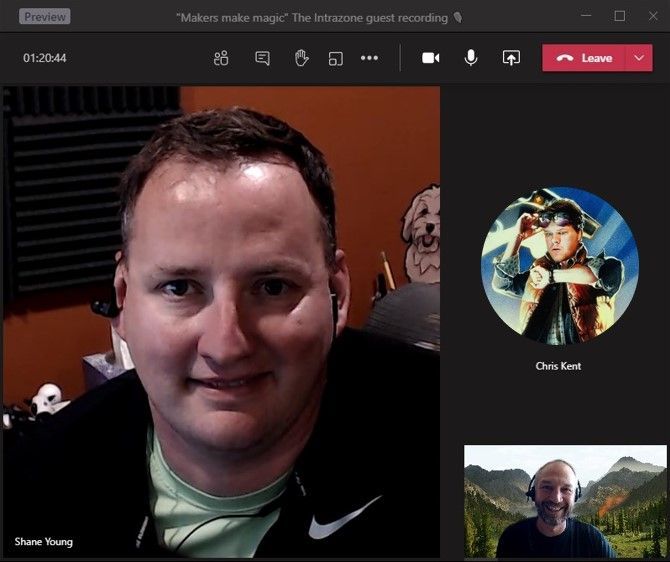
In this episode, Chris and I talk with Shane Young (Power Apps guru from PowerApps911) and Chris Kent (Office 365 Practice Lead at DMI) – maker magicians both – Shane a Power Apps sorcerer and Chris a wizard of lists. Throughout the discussion, we learn how makers make, the approach to making – which tools – what techniques, and how you, too, can be a maker.
Listen to podcast below (and then start making magic of your own)
Subscribe to The Intrazone podcast! And listen to episode 56 now + show links and more below.
 Intrazone guests – clockwise, Shane Young (Power Apps guru | PowerApps911) and Chris Kent (Office 365 Practice Lead | DMI), with co-host, Mark Kashman (senior product manager | Microsoft).
Links to important on-demand recordings and articles mentioned in this episode:
- Articles and sites
- Events
- Hosts and guests
Subscribe today!
Listen to the show! If you like what you hear, we’d love for you to Subscribe, Rate and Review it on iTunes or wherever you get your podcasts.
Be sure to visit our show page to hear all the episodes, access the show notes, and get bonus content. And stay connected to the SharePoint community blog where we’ll share more information per episode, guest insights, and take any questions from our listeners and SharePoint users (TheIntrazone@microsoft.com). We, too, welcome your ideas for future episodes topics and segments. Keep the discussion going in comments below; we’re hear to listen and grow.
Subscribe to The Intrazone podcast! And listen to episode 56 now.
Thanks for listening
The SharePoint and Power Platform teams wants you to unleash your magic, creativity, and productivity. And we will do this, together, one poof of magic at a time.
The Intrazone links
+ Listen to other Microsoft podcasts at aka.ms/microsoft/podcasts.
![Left to right [The Intrazone co-hosts]: Chris McNulty, director PMM (SharePoint, #ProjectCortex – Microsoft) and Mark Kashman, senior product manager (SharePoint – Microsoft).](https://www.drware.com/wp-content/uploads/2020/09/large-259 "Mark Kashman_1-1583812153608.jpeg") Left to right [The Intrazone co-hosts]: Chris McNulty, director PMM (SharePoint, #ProjectCortex – Microsoft) and Mark Kashman, senior product manager (SharePoint – Microsoft).
Left to right [The Intrazone co-hosts]: Chris McNulty, director PMM (SharePoint, #ProjectCortex – Microsoft) and Mark Kashman, senior product manager (SharePoint – Microsoft).
 The Intrazone – a show about the Microsoft 365 intelligent intranet (https://aka.ms/TheIntrazone)
by Scott Muniz | Sep 8, 2020 | Uncategorized
This article is contributed. See the original author and article here.
Azure Synapse Analytics is an analytics platform that provides productive developer experiences such as the Synapse Studio bulk load wizard helping data engineers quickly get data ingested and datasets onboarded through a code-less experience. The platform also comes with other low-code authoring experiences for data integration where it is now even easier to take the next step and further orchestrate and operationalize loads in just a few clicks. You can use built-in data pipelines that are extremely flexible where you can customize them according to your requirements all within the Synapse studio for maximum productivity.
This how to guide walks you through how to quickly set up a continuous data pipeline that automatically loads data as the files arrive in your storage account of your SQL pool.
1. Generate your COPY statement within a stored procedure by using the Synapse Studio bulk load wizard.
2. Use familiar dynamic SQL syntax to parameterize the COPY statement’s storage account location. You can also generate the time of ingestion using default values within the COPY statement. Sample code:
CREATE PROC [dbo].[loadSales] @storagelocation nvarchar(100) AS

    DECLARE @loadtime nvarchar(30);
    DECLARE @COPY_statement nvarchar(4000);

    SET @loadtime = GetDate();
    SET @COPY_statement =
        N'COPY INTO [dbo].[Trip]
		(
			[DateID] 1,
			[MedallionID] 2,
			[HackneyLicenseID] 3,
			[PickupTimeID] 4,
			[DropoffTimeID] 5,
			[PickupGeographyID] 6,
			[DropoffGeographyID] 7,
			[PickupLatitude] 8,
			[PickupLongitude] 9,
			[PickupLatLong] 10,
			[DropoffLatitude] 11,
			[DropoffLongitude] 12,
			[DropoffLatLong] 13,
			[PassengerCount] 14,
			[TripDurationSeconds] 15,
			[TripDistanceMiles] 16,
			[PaymentType] 17,
			[FareAmount] 18,
			[SurchargeAmount] 19,
			[TaxAmount] 20,
			[TipAmount] 21,
			[TollsAmount] 22,
			[TotalAmount] 23,
			[loadTime] default ''' + @loadtime + ''' 24
	)
		FROM '''  + @storagelocation + '''
		WITH (
			FIELDTERMINATOR=''|'',
			ROWTERMINATOR=''0x0A''
		) OPTION (LABEL = ''loadTime: ' + @loadtime + ''');';

        EXEC sp_executesql @COPY_statement;
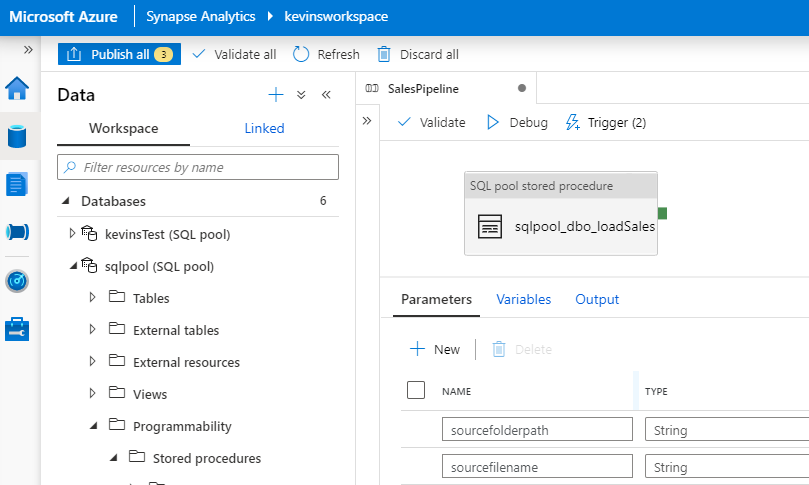
3. Create a Synapse pipeline in the Synapse Studio with an event-based trigger for when a blob is created in your storage container and parameterize the blob path (folder path and file name) as part of the pipeline. Additional documentation on pipeline triggers is here.
Parameterized pipeline:

Event-based trigger:
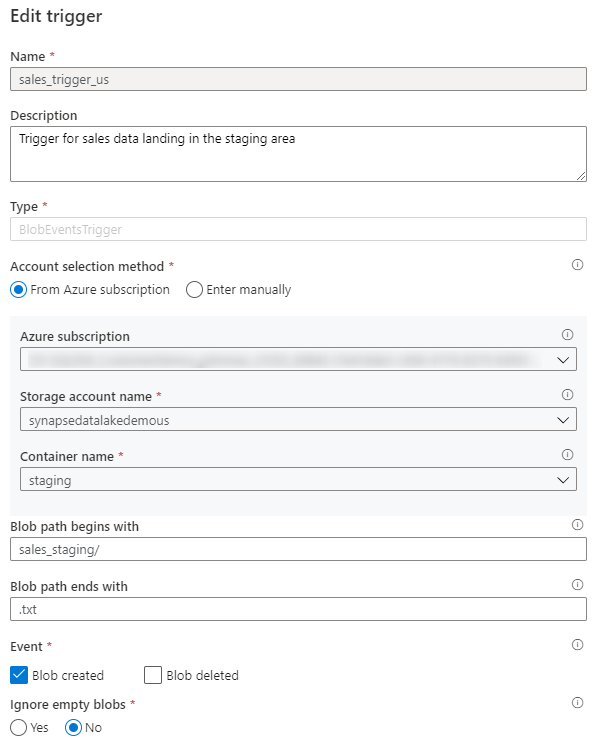
Trigger parameters:
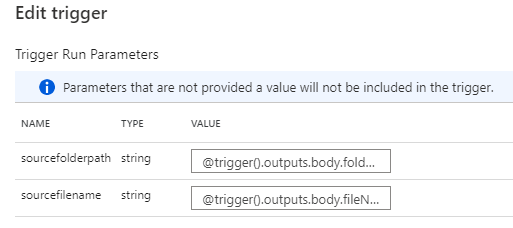
4. Add the stored procedure to a stored procedure activity in your pipeline where the stored procedure parameter is the blob path pipeline parameter and publish your pipeline to your workspace. Additional documentation on the stored procedure activity is here.
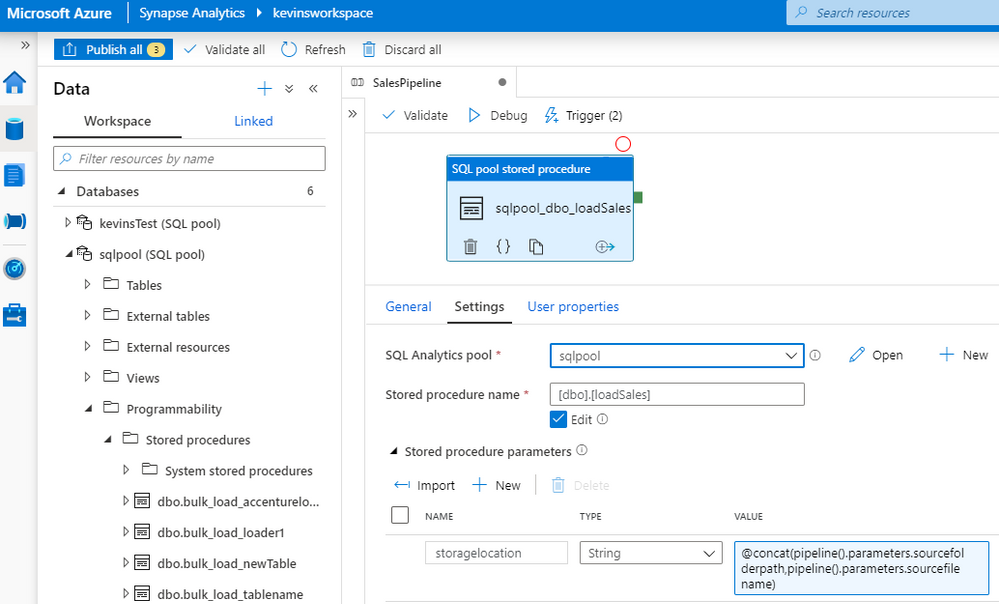
In just 4 steps, you have now created a data pipeline which automatically and continuously loads files as they land in your staging storage account location using the COPY statement in a stored procedure. You did not need to provision or integrate any event notification services such as Azure Event Grid or Azure Queue Storage to support this auto-ingestion workflow and there were minimal code changes.
Synapse pipelines are flexible where there is a range of configurations and customization you can set to address your scenarios. Here are some other considerations when operationalizing your data pipelines:
- Add additional transformation logic for further processing within your stored procedure or create additional stored procedures (activities) in your pipeline
- Instead of creating a stored procedure, you can leverage the pipeline COPY activity with the COPY statement. This will make your data pipeline authoring experience code-less. You can configure the COPY activity to ingest data based on blobs’ last modified date.
- Use data flows where you can quickly use pre-defined templates for handling common ETL patterns such as SCD1 and SCD2 in your pipeline – code free dimensional and fact processing.
- You can batch up files instead and leverage a schedule-based trigger. You can use a static storage location as your staging area to upload files. Note you may need to move and clean up files at the end of your pipeline to prevent duplicate loads if you follow this pattern – Synapse pipelines also has this capability built-in through the delete activity or move template.
For more information on Synapse data pipelines and getting started with data integration, visit the following documentation:
by Scott Muniz | Sep 8, 2020 | Azure, Technology, Uncategorized
This article is contributed. See the original author and article here.
Azure provides several mechanisms how to secure Azure platform.
The most popular approach is through Azure Security Center.
ASC is a unified infrastructure security management system that strengthens the security posture of your data centers, and provides advanced threat protection across your hybrid workloads in the cloud – whether they’re in Azure or not – as well as on premises.
https://docs.microsoft.com/en-us/azure/security-center/security-center-intro
I’d like to highlight also another framework which I’m seeing in use with other customers – Secure DevOps Kit for Azure (AzSK)
https://azsk.azurewebsites.net/
The Secure DevOps Kit for Azure (AzSK) was created by the Core Services Engineering & Operations (CSEO) division at Microsoft, to help accelerate Microsoft IT’s adoption of Azure. Documentation with the community to provide guidance for rapidly scanning, deploying and operationalizing cloud resources, across the different stages of DevOps, while maintaining controls on security and governance.
by Scott Muniz | Sep 8, 2020 | Azure, Technology, Uncategorized
This article is contributed. See the original author and article here.
This is nice framework customers were waiting for. Framework is guiding Architects through pillars of architecture excellence: Cost Optimization, Operational Excellence, Performance Efficiency, Reliability, and Security.
https://docs.microsoft.com/en-us/azure/architecture/framework/
See also Design Patterns: https://docs.microsoft.com/en-us/azure/architecture/patterns/
And Azure Architecture Center: https://docs.microsoft.com/en-us/azure/architecture/
by Scott Muniz | Sep 8, 2020 | Azure, Technology, Uncategorized
This article is contributed. See the original author and article here.
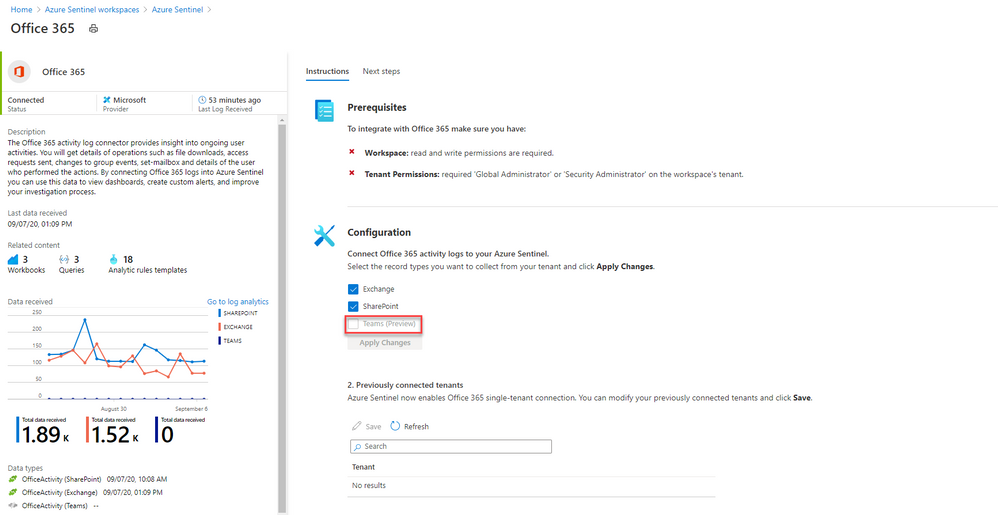
Security is in everything and with Azure Sentinel, you can consolidate different sources of security signals into a single “glass of pain.” Azure Sentinel is pleased to announce the Microsoft Teams connector is now in Public Preview, so lets take a look.
Whether you have on-premises servers and also use software-as-a-service platforms (like Microsoft 365), or you’re a fully cloud workplace, or you’re somewhere in between, there are so many different things to monitor which could be a sign of a security breach. Many people start out with Azure Sentinel (Microsoft’s cloud-based Security Information and Events Management system) to monitor virtual machines, on-premises infrastructure or their own custom built applications. But the product is worth taking a look at by Microsoft 365 administrators, for the Office 365 connector which now supports logs from Microsoft Teams (in public preview).
What events can I see from Microsoft Teams, in Azure Sentinel?
Azure Sentinel connects to the Microsoft 365 audit log. There are currently 27 different user and admin activities that are logged for Microsoft Teams, including:
– Added/removed bot to a team
– Added/deleted channel
– Added/removed connector
– Changed channel/organization/team setting
– Added/removed members
– Installed/uninstalled app
– User signed in to Teams
For details, see Teams activities.
There are also additional activities logged if you use the Shifts app in Teams and Microsoft Teams Healthcare activities in the Patients application.
What are the pre-requisites?
First, remember that as a public preview feature, this is provided without a service level agreement. Don’t build a mission-critical security strategy for your production workloads that are reliant on this capability, but if you do try it out, we welcome your feedback.
With that said, you need:
– To have read and write permissions on your Azure Sentinel workspace (or create a new one with these permissions)
– To be a global administrator or security administrator on your tenant
– And your Office 365 deployment must be on the same tenant as your Azure Sentinel workspace
– Plus, unified audit logging must be enabled on your Microsoft 365 deployment. To check or enable that, visit Turn audit log search on or off.
How do I connect Microsoft Teams to Azure Sentinel?
Sarah Young (Senior Program Manager, Azure Security) has a blog on how to add the Office 365 data connector to Sentinel here: What’s new: Microsoft Teams connector in Public Preview
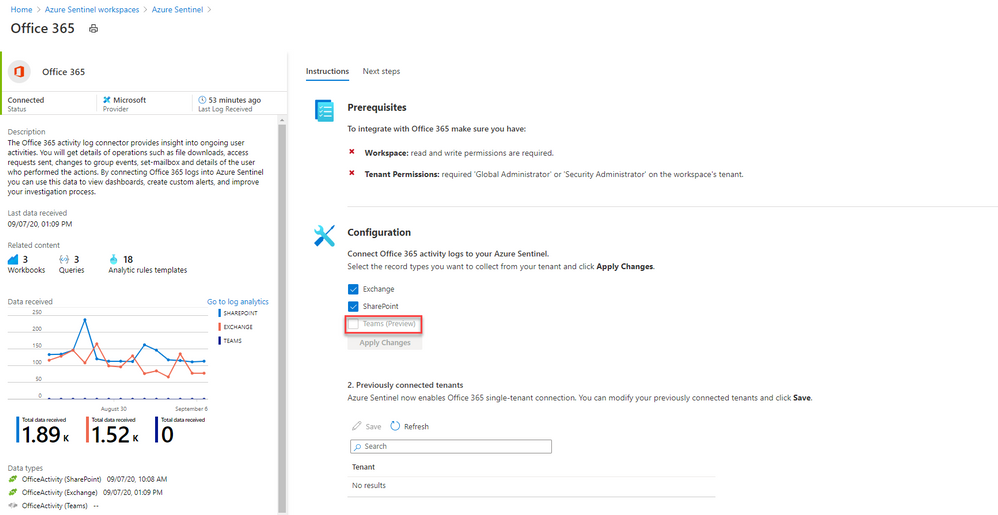
In essence, you create a log analytics workspace and add it to Azure Sentinel (or create a new log analytics workspace), then you’ll find Office 365 under the list of Data connectors you can add. This data connector also allows you to connect activity logs for Exchange and SharePoint, but you can toggle those off independently.
Once my logs are connected, then what can I do?
Searching logs is one thing, and that’s useful if you want to investigate a scenario (like a Teams channel disappeared – who deleted it?).
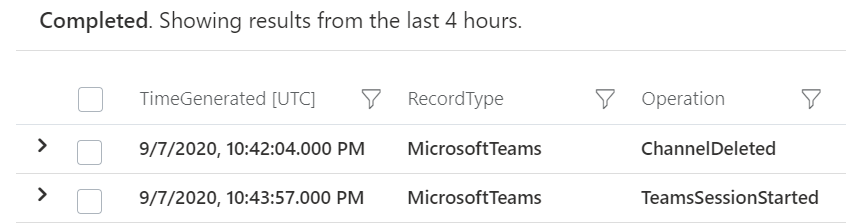
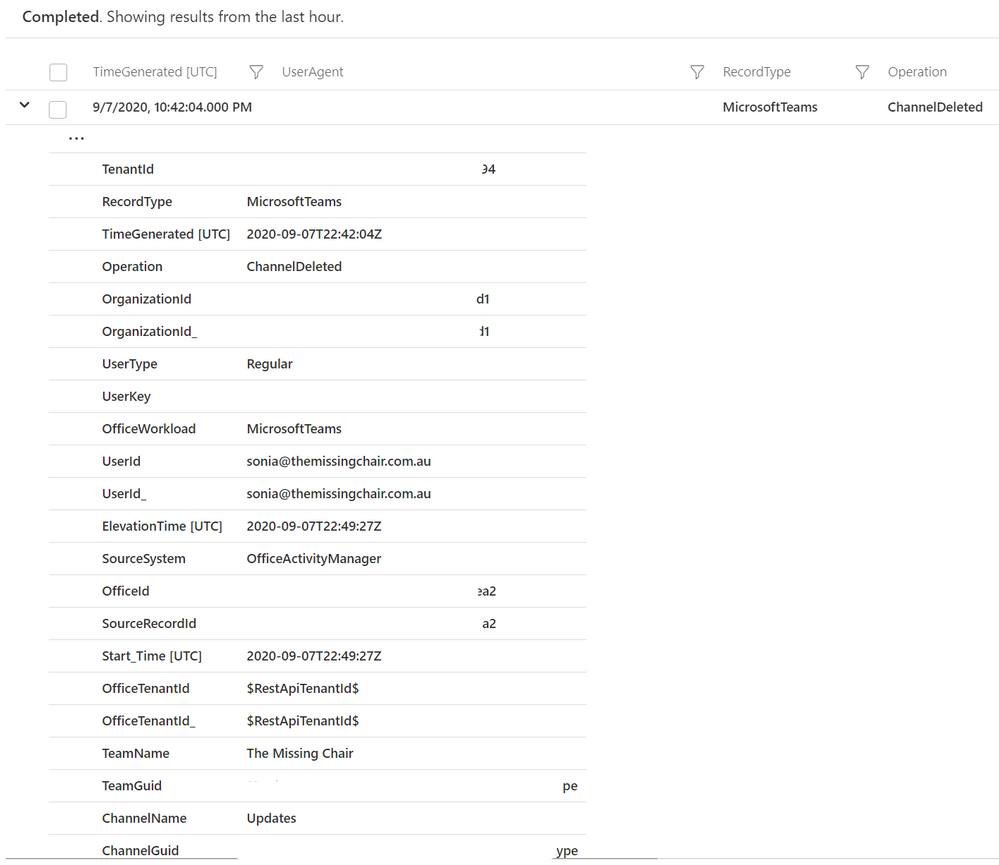
But now you can also add Microsoft teams activities into Azure Sentinel workbooks, to build your own simple data presentation or complex graphing & investigative maps. Check out Matt Lowe’s article on Azure Sentinel Workbooks 101.
You can also leverage the power of Azure Sentinel’s powerful hunting search and query tools, and bookmark findings that look unusual or suspicious. Learn more at Hunt for threats with Azure Sentinel.
Contribute your feedback
The Azure Sentinel product group has a community page on Github, which also has great links on resources to get you started with the different features of Azure Sentinel. Visit the resources section to learn how you can contribute your feedback about the Microsoft Teams component of the Office 365 data connector, and Azure Sentinel in general.
Whether you’re a security professional looking to expand the scope of what you are monitoring across your organization, or you are a Microsoft 365 administrator with no Azure Sentinel experience, this new capability further ties Microsoft’s products together to help make your job easier. Will you try this out? Let us know in the comments!
-SCuffy
by Scott Muniz | Sep 8, 2020 | Uncategorized
This article is contributed. See the original author and article here.
Documentation says:
“SQL on-demand is serverless, hence there is no infrastructure to setup or clusters to maintain. A default endpoint for this service is provided within every Azure Synapse workspace, so you can start querying data as soon as the workspace is created. There is no charge for resources reserved, you are only being charged for the data scanned by queries you run, hence this model is a true pay-per-use model.
If you use Apache Spark for Azure Synapse in your data pipeline, for data preparation, cleansing or enrichment, you can query external Spark tables you’ve created in the process, directly from SQL on-demand.” https://docs.microsoft.com/en-us/azure/synapse-analytics/sql/on-demand-workspace-overview
About Spark: https://docs.microsoft.com/en-us/azure/synapse-analytics/spark/apache-spark-overview
“Apache Spark provides primitives for in-memory cluster computing. A Spark job can load and cache data into memory and query it repeatedly. In-memory computing is much faster than disk-based applications. Spark also integrates with multiple programming languages to let you manipulate distributed data sets like local collections. There’s no need to structure everything as map and reduce operations.”
Using Synapse I have the intention to provide Lab loading data into Spark table and querying from SQL OD.
This was an option for a customer that wanted to build some reports querying from SQL OD.
You need:
1) A Synapse Workspace ( SQL OD will be there after the workspace creation)
2)Add Spark to the workspace
You do not need:
1) SQL Pool.
Step by Step
Launch Synapse Studio and create a new notebook. Add the following code ( phyton):

%%pyspark


from pyspark.sql.functions import col, when

df = spark.read.load('abfss://<container>@<storageAccount>.dfs.core.windows.net/folder/file.snappy.parquet', format='parquet')

df.createOrReplaceTempView("pysparkdftemptable")
Add some magic by include another cell and running Scala on it:
%%spark

spark.sql("CREATE DATABASE IF NOT EXISTS SeverlessDB")

val scala_df = spark.sqlContext.sql ("select * from pysparkdftemptable")

scala_df.write.mode("overwrite").saveAsTable("SeverlessDB.Parquet_file")
Run.
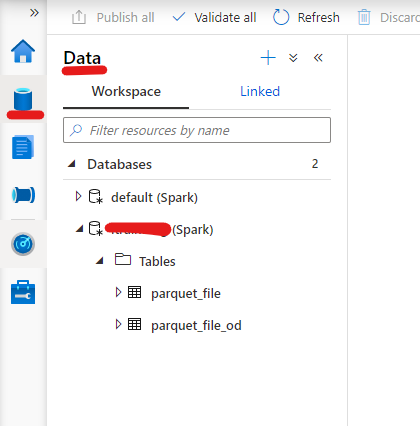
If everything ran successfully you should be able to see your new database and table under the Data Option:

Now it is the easy part. Query the table ( Right button -> New SQL Script -> Select):
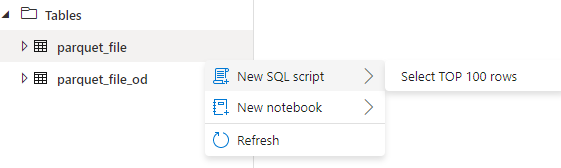
Super quick and easy.
That is it!
Liliam C Leme
UK Engineer


Recent Comments