by Contributed | Nov 15, 2020 | Technology
This article is contributed. See the original author and article here.
Initial Update: Monday, 16 November 2020 01:06 UTC
We are aware of issues within Log Analytics and are actively investigating.
Some customers may experience issues with missed, delayed or wrongly fired alerts or experience difficulties accessing data for resources hosted in West US2 and North Europe. - Work Around: None
- Next Update: Before 11/16 03:30 UTC
We are working hard to resolve this issue and apologize for any inconvenience.
-Eric Singleton
by Contributed | Nov 15, 2020 | Technology
This article is contributed. See the original author and article here.
There is an open-source project that generates an Open API document on-the-fly on an Azure Functions app. The open-source project also provides a NuGet package library. This project has been supporting the whole Azure Functions runtimes from v1 since Day 1. Although it does, the v1 runtime has got its own limitation that cannot generate the Open API document automatically. But, as always, there’s a workaround. I’m going to show how to generate the Open API document on-the-fly and execute the v1 function through the Azure Function Proxy feature.
Legacy V1 Azure Function
Generally speaking, many legacy enterprise applications still need Azure Functions v1 runtime due to their reference dependencies. Let’s assume that the Azure Functions v1 endpoint looks like the following:
    namespace MyV1ProxyFunctionApp

    {

        public static class LoremIpsumHttpTrigger

        {

            [FunctionName(“LoremIpsumHttpTrigger”)]

            public static async Task Run(

                [HttpTrigger(AuthorizationLevel.Function, “GET”, Route = “lorem/ipsum”)] HttpRequest req,

                ILogger log)

            {

                return await Task.FromResult(new OkResult()).ConfigureAwait(false);

            }

        }

    }
The v1 runtime has a strong tie to the Newtonsoft.Json package version 9.0.1. Therefore, if the return object of MyReturnObject has a dependency on Newtonsoft.Json v10.0.1 and later, the Open API extension cannot be used.
Azure Functions Proxy for Open API Document
The Azure Functions Proxy feature comes the rescue! Although it’s not a perfect solution, it provides with the same developer experience, which is worth trying. Let’s build an Azure Functions app targeting the v3 runtime. The name of the proxy function is MyV1ProxyFunctionApp (line #1). All the rest are set to be the same as the legacy v1 app (line #3-7). However, make sure this is the proxy purpose, meaning it does nothing but returns an OK response (line #10).
    namespace MyV1ProxyFunctionApp

    {

        public static class LoremIpsumHttpTrigger

        {

            [FunctionName(“LoremIpsumHttpTrigger”)]

            public static async Task Run(

                [HttpTrigger(AuthorizationLevel.Function, “GET”, Route = “lorem/ipsum”)] HttpRequest req,

                ILogger log)

            {

                return await Task.FromResult(new OkResult()).ConfigureAwait(false);

            }

        }

    }
Once installed the Open API library, let’s add decorators above the FunctionName(…) decorator (line #5-9).
    namespace MyV1ProxyFunctionApp

    {

        public static class LoremIpsumHttpTrigger

        {

            [OpenApiOperation(operationId: “getIpsum”, tags: new[] { “ipsum” }, Summary = “Gets Ipsum from Lorem”, Description = “This gets Ipsum from Lorem.”, Visibility = OpenApiVisibilityType.Important)]

            [OpenApiParameter(name: “name”, In = ParameterLocation.Query, Required = true, Type = typeof(string), Summary = “Lorem name”, Description = “Lorem name”, Visibility = OpenApiVisibilityType.Important)]

            [OpenApiResponseWithBody(statusCode: HttpStatusCode.OK, contentType: “application/json”, bodyType: typeof(MyReturnObject), Summary = “The Ipsum response”, Description = “This returns the Ipsum response”)]

            [OpenApiResponseWithoutBody(statusCode: HttpStatusCode.NotFound, Summary = “Name not found”, Description = “Name parameter is not found”)]

            [OpenApiResponseWithoutBody(statusCode: HttpStatusCode.BadRequest, Summary = “Invalid Lorem”, Description = “Lorem is not valid”)]
            [FunctionName(“LoremIpsumHttpTrigger”)]

            public static async Task Run(

                [HttpTrigger(AuthorizationLevel.Function, “GET”, Route = “lorem/ipsum”)] HttpRequest req,

                ILogger log)

            {

                return await Task.FromResult(new OkResult()).ConfigureAwait(false);

            }

        }

    }
All done! Run this proxy app, and you will be able to see the Swagger UI page. As I mentioned above, this app doesn’t work but show the UI page. For this app to work, extra work needs to be done.
proxies.json to Legacy Azure Functions V1
Add the proxies.json file to the root folder. As we added the same endpoint as the legacy function app on purpose (line #6,11), API consumers should have the same developer experience as before except the hostname change. In addition to that, both querystring values and request headers are relayed to the legacy app (line #13-14).
    {

        “$schema”: “http://json.schemastore.org/proxies”,

        “proxies”: {

          “DummyOnOff”: {

            “matchCondition”: {

              “route”: “/api/lorem/ipsum”,

              “methods”: [

                “GET”

              ]

            },

            “backendUri”: “https://mylegacyfunctionapp.azurewebsites.net/api/lorem/ipsum”,

            “requestOverrides”: {

              “backend.request.headers”: “{request.headers}”,

              “backend.request.querystring”: “{request.querystring}”

            }

          }

        }

      }
Then update the .csproj file to deploy the proxies.json file together (line #10-12).
    <Project Sdk=”Microsoft.NET.Sdk”>

      <PropertyGroup>

        <TargetFramework>netcoreapp3.1</TargetFramework>

        <AzureFunctionsVersion>v3</AzureFunctionsVersion>

        …

      </PropertyGroup>

      …

      <ItemGroup>

        …

        <None Update=”proxies.json”>

          <CopyToOutputDirectory>PreserveNewest</CopyToOutputDirectory>

        </None>

      </ItemGroup>

      …

    </Project>
All done! Run this proxy function on your local machine or deploy it to Azure, and hit the proxy API endpoint. Then you’ll be able to see the Open API document generated on-the-fly and execute the legacy API through the proxy.
So far, we have created an Azure Functions app using the Azure Functions Proxy feature. It also supports the Open API document generation for the v1 runtime app. The flip-side of this approach costs doubled because all API requests hit the proxy then the legacy. The cost optimisation should be investigated from the enterprise architecture perspective.
This article was originally published on Dev Kimchi.
by Contributed | Nov 14, 2020 | Technology
This article is contributed. See the original author and article here.
Initial Update: Sunday, 15 November 2020 01:18 UTC
We are aware of issues within Log Analytics and are actively investigating.
Some customers may experience issues with missed, delayed or wrongly fired alerts or experience difficulties accessing data for resources hosted in West US2 and North Europe. .
- Work Around: None
- Next Update: Before 11/15 03:30 UTC
We are working hard to resolve this issue and apologize for any inconvenience.
-Eric Singleton
by Contributed | Nov 14, 2020 | Technology
This article is contributed. See the original author and article here.
After several last minutes improvements and bugfixes this week, SharePointDsc v4.4 saw the daylight on Saturday November 14th. This version contains a lot of bugfixes that were fixed over the last period.
The biggest changes in this release are:
- The switch in SPFarm from a Lock database to a Lock table in the TempDB. This is done to fully support pre-created databases and the fact that most of the time this means that SharePoint admins don’t have dbcreator permissions and therefore cannot create the Lock database.
- More diagnostic logging to the event log. When the code throws an exception, the error is now also logged to the custom SPDsc event log. This functionality will be extended over time. For more information see our previous blog post.
You can find the SharePointDsc v4.4 in the PowerShell Gallery!
NOTE: We can always use additional help in making SharePointDsc even better. So if you are interested in contributing to SharePointDsc, check-out the open issues in the issue list, check-out this post in our Wiki or leave a comment on this blog post.
Improvement/Fixes in v4.4:
Added
- SharePointDsc
- Added logging to the event log when the code throws an exception
- Added support for trusted domains to Test-SPDscIsADUser helper function
- SPInstall
- Added documentation about a SharePoint 2019 installer issue
Changed
- SharePointDsc
- Updated Convert-SPDscHashtableToString to output the username when parameter is a PSCredential
- SPFarm
- Switched from creating a Lock database to a Lock table in the TempDB. This to allow the use of precreated databases.
- Updated code to properly output used credential parameters to verbose logging
- SPSite
- Added more explanation to documentation on which parameters are checked
- SPWeb
- Added more explanation to documentation on using this resource
Fixed
- SPConfigWizard
- Fixes issue where a CU installation wasn’t registered properly in the config database. Added logic to run the Product Version timer job
- SPSearchTopology
- Fixes issue where applying a topology failed when the search service instance was disabled instead of offline
- SPSecureStoreServiceApP
- Fixes issue where custom database name was no longer used since v4.3
- SPShellAdmins
- Fixed issue with Get-DscConfiguration which threw an error when only one item was returned by the Get method
- SPWordAutomationServiceApp
- Fixed issue where provisioning the service app requires a second run to update all specified parameters
- SPWorkflowService
- Fixed issue configuring workflow service when no workflow service is currently configured
A huge thanks to the following guy for contributing to this project:
Jens Otto Hatlevold
Also a huge thanks to everybody who submitted issues and all that support this project. It wasn’t possible without all of your help!
For more information about how to install SharePointDsc, check our Readme.md.
Let us know in the comments what you think of this release! If you find any issues, please submit them in the issue list on GitHub.
Happy SharePointing!!
by Contributed | Nov 13, 2020 | Technology
This article is contributed. See the original author and article here.
News this week includes:
New Sentry Connector for Microsoft Teams
Improved incident queue in Microsoft 365 Defender
Security Unlocked—a new Podcast on the Technology and People Powering Microsoft Security
Aelisya is the Member of the Week, and a great contributor to the Microsoft Edge Insider community.
View the Weekly Roundup for Nov 9-13th in Sway and attached PDF document.
https://sway.office.com/s/CSJkXevUxVYSFlCW/embed
by Contributed | Nov 13, 2020 | Technology
This article is contributed. See the original author and article here.
Final Update: Saturday, 14 November 2020 01:52 UTC
We’ve confirmed that all systems are back to normal with no customer impact as of 11/14, 01:30 UTC. Our logs show the incident started on 11/14, 00:25 UTC and that during the 55 minutes that it took to resolve the issue customers experienced issues with missed or delayed Log Search Alerts or experienced difficulties accessing data for resources hosted in West US2 and North Europe.
- Root Cause: The failure was due to a backend service.
- Incident Timeline: 55 minutes – 11/14, 00:25 UTC through 11/14, 01:30 UTC
We understand that customers rely on Azure Log Analytics as a critical service and apologize for any impact this incident caused.
-Eric Singleton
by Contributed | Nov 13, 2020 | Technology
This article is contributed. See the original author and article here.
Overview
Magento is an open-source e-commerce application based on the LAMP (Linux, Apache, MySQL, and PHP) stack. As more customers using Magento move from on-premises implementations or other cloud platforms to Azure, we wanted to provide out-of-the-box configuration recommendations to ensure easy deployment and stable, solid performance.
We spent months testing Magento performance on Azure, and we learned a lot during the process. Today we’re pleased to announce the availability of Magento e-commerce in Azure Kubernetes Service (AKS) guidance on the Azure Architecture Center. This detail is designed for developers and architects who are planning to deploy Magento on Azure.
Solution architecture
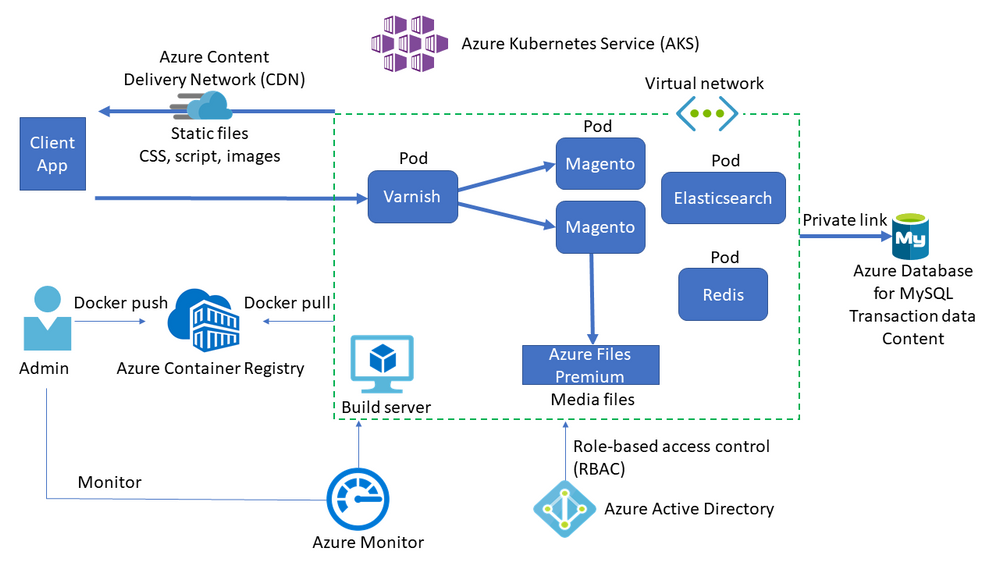
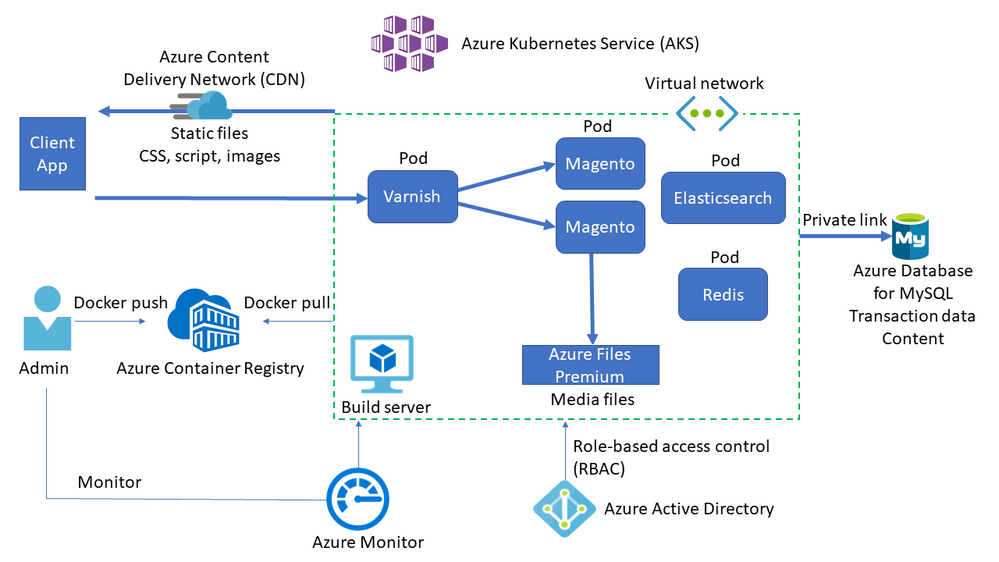
The solution architecture for Magento running in AKS is shown in the following diagram.
Key services
The key services involved in this solution architecture are described below.
- AKS deploys the Kubernetes cluster of Varnish, Magento, Redis, and Elasticsearch in different pods.
- AKS creates a virtual network to deploy the agent nodes. Create the virtual network in advance to set up subnet configuration, private link, and egress restriction.
- Varnish installs in front of the HTTP servers to act as a full-page cache.
- Azure Database for MySQL stores transaction data such as orders and catalogs. Using version 8.0 is recommended.
- Azure Files Premium or an equivalent network-attached storage (NAS) system stores media files such as product images. Magento needs a Kubernetes-compatible file system such as Azure Files Premium or Azure NetApp Files, which can mount a volume in ReadWriteMany mode.
- A content delivery network (CDN) serves static content such as CSS, JavaScript, and images. Serving content through a CDN minimizes network latency between users and the datacenter. A CDN can remove significant load from NAS by caching and serving static content.
- Redis stores session data. Hosting Redis on containers is recommended for performance reasons.
- AKS uses an Azure Active Directory (Azure AD) identity to create and manage other Azure resources like Azure load balancers, user authentication, role-based access control, and managed identity.
- Azure Container Registry stores the private Docker images that are deployed to the AKS cluster. You can use other container registries like Docker Hub. Note that the default Magento install writes some secrets to the image.
- Azure Monitor collects and stores metrics and logs, including Azure service platform metrics and application telemetry. Azure Monitor integrates with AKS to collect controller, node, and container metrics, and container and master node logs.
Key learnings
A summary of the key learnings we gained during this engagement are listed below.
- We achieved more throughput by additional components such as Varnish, Redis, etc.
- Turning off product count from layered navigation reduced the MySQL CPU consumption.
- %CPU at NFS significantly went down by caching static content in CDN.
- Turning off weblog from Varnish gave us additional performance gain.
I hope you find this guidance useful when setting up Magento in your own environment!
If you have questions or issues setting up Magento using Azure Database for MySQL, please contact the Azure Database for MySQL team at AskAzureDBforMySQL@service.microsoft.com.
Acknowledgements
My thanks go out to everyone who contributed to this project. I’d especially like to thank Darren Rich, Anil Dogra, Garima Gupta, Sumit Dua, Krishnakumar Ravi, Raj Sellappan, and Sakthi Vetrivel, who helped us conduct the performance testing and found/fixed many bottlenecks. In addition, Andrew Oakley, Lakshmikant Gundavarapu, and Parichit Sahay organized and executed countless work items to us achieve our goal.
![[Announcement] Community Mentors App Update: Desktop Version Available Now!](https://www.drware.com/wp-content/uploads/2020/11/medium-97)
by Contributed | Nov 13, 2020 | Technology
This article is contributed. See the original author and article here.
Have you been looking for an easier way to mentor any time and any place across your devices? Well, good news! We’ve just launched the Desktop version of the Community Mentors App.
What is the Humans of IT Community Mentors App?
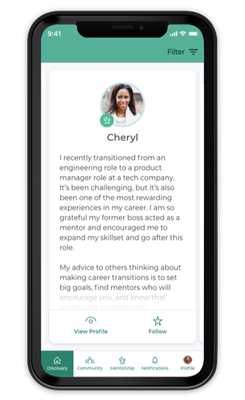
The Microsoft Humans of IT Community Mentorship App is a modern mentorship app that fosters continuous learning, authentic connection, and any-time (anywhere) access.
Introducing More Ways to Connect!
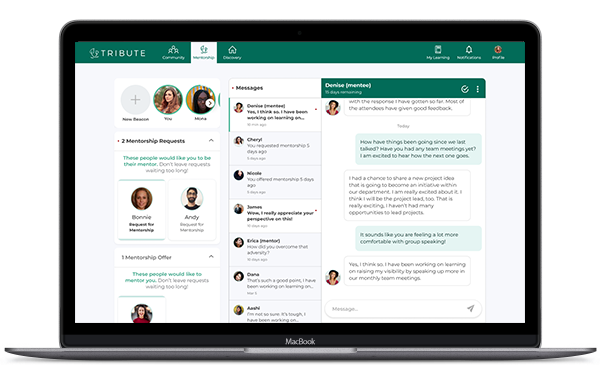
The Community Mentors App has added several new features helping to meet employees where they are, offering both desktop and mobile options. This month we released the highly anticipated Community Mentors App for desktop, giving mentors and mentees access to platform via web browser. The availability of both options enables everyone to engage in the most effective way.
Here are some other new features you should definitely check out!
- Search Functionality: You are now able to search by name in the Discovery Section on Desktop
- My Learning: Explore contact aimed at teaching us all how to have effective mentorships.
- Reflections: Share your knowledge with the community by posting a quick reflection.
If you are on the mobile version, be sure to update to our latest version to have access to all of our new features.
Just getting started on the app? Watch our walkthrough demo to learn how to navigate the Community Mentors mobile app where we empower Humans of IT like you to get mentored and be mentored by other tech professionals around the world! In this video, we will walk you through how the app works, and ways you can get all set up so you can dive into the world of mentoring!
Have ideas on new features you’d like to see, or experiences to add? Submit your ideas here, or feel free to drop us a note at msftcmp@microsoft.com.
Become a mentor/mentee on our Community Mentors app today!
- Go to https://aka.ms/communitymentors and download our mentorship app
- Watch our newly released Community Mentors App: Walkthrough Demo
- Once you’re in the app, explore new featured stories, mentorship enhancements, reactions, and notifications.
- Check out the new desktop version at: https://aka.ms/CMPDesktop
Happy Mentoring!
#HumansofIT
#Mentorship
#CommunityMentors

by Contributed | Nov 13, 2020 | Technology
This article is contributed. See the original author and article here.
PostgreSQL is a transactional database, and it keeps a record for all DML operations and transactions like Update, Insert, and Delete in WAL (Write-Ahead Log) file. WAL logs are PostgreSQL transaction log files used to ensuring data integrity. This log is written after changes has been applied to the record and eventually once reach the checkpoint threshold the log file will be flushed from memory to storage to save it permanently.
A checkpoint is a point in the write-ahead log sequence at which all data files have been updated to reflect the information in the log. All data files will be flushed to disk. Refer to WAL Configuration for more details about what happens during a checkpoint.
Why an Azure Database for PostgreSQL restarts?
The Azure Database for PostgreSQL – Single Server service provides a guaranteed high level of availability with the financially backed service level agreement (SLA) of 99.99% uptime. Azure Database for PostgreSQL provides high availability during planned events such as user-initiated scale compute operation, and when unplanned events such as underlying hardware, software, or network failures occur. Azure Database for PostgreSQL can quickly recover from most critical circumstances, ensuring virtually no application down time when using this service. Refer to High availability in Azure Database for PostgreSQL – Single Server
Causes of server restarts:
- User initiated management operation (scale Vcores, pricing tier, etc.)
- User Initiated restarts: Users may restart their server if they are performing a server update that requires restart such as changing a static server parameter.
- Planned Maintenance: Azure Database for PostgreSQL performs periodic maintenance to keep your managed database secure, stable, and up to date. During maintenance, the server gets new features, updates, and patches. Refer to: Planned maintenance notification in Azure Database for PostgreSQL. You may sign up for notification to be prepared for this scheduled maintenance using this tutorial.
- Unplanned downtime
Unplanned downtime can occur because of unforeseen failures, including underlying hardware fault, networking issues, and software bugs. If the database server goes down unexpectedly,
What causes long recovery on Azure Database for PostgreSQL
Recent checkpoints are critical for fast server recovery. Once a restart happens, either it was a new instance (failover to healthy instance) or same instance (in-place restart) will connect to disk that has all logs, all WAL logs after the last successful checkpoint need to be applied to the data pages before the server starts to accept connections again. Those logs are called REDO logs and will be applied via the recovery operation. Applying a WAL log runs through the following steps:
- Reading WAL file to see all the transactions inside it and all database objects and correspondently their data pages/blocks that need to be updated.
- Fetching those pages/blocks into memory
- Updating them using WAL file content.
Recovery time depends on how recent the last checkpoint was and the amount of inside those log files, that said, the best practice is that application developer needs to avoid log running transactions and tune checkpoint frequency to avoid long recovery.
Checkpoint Frequency:
Checkpoint frequency can be adjusted by configuring server parameters. controlled by checkpoint_completion_target which determines the total time between checkpoints. Another parameter that you may consider is bgwriter_delay which specifies the delay between activity rounds for the background writer.
Long running transactions:
Long running transactions are queries that are running for too long which impact database perfromance and can potentially cause issues during restarts. You may check all running transactions by querying pg_stat_activity, to list queries which running for more than 3 minutes, use the following query:
select current_timestamp-query_start as runtime,
datname,usename, query FROM pg_stat_activity
where state=’active’ and current_timestamp-query_start> ‘3 min’
order by 1 desc;
Please note that you can kill any long running PID using pg_terminate_backend. Let’s say you have PID “12345” and you want to kill this process, you may simply run the following query to kill it.
select pg_terminate_backend(pid)
from pg_stat_activity
where pid = ‘12345’;
If you want to kill all process on the server, run the following command:
SELECT pg_terminate_backend(pg_stat_activity.pid)
FROM pg_stat_activity
WHERE pg_stat_activity.datname = ‘TARGET_DB’ — ← change this to your DB
AND pid <> pg_backend_pid();
How to Prepare for Azure Database for PostgreSQL planned server restart
Now that we learned what causes long recovery, we will need to prepare for planned restarts either it was user initiate or system initiated.
- Ensure no long running transactions.
As discussed earlier recovery rolls back all inflight but uncommitted transactions at the time of restart, and during this time the database is unavailable for additional requests. If there are any large transactions to rollback this activity takes time proportional to the size of the active transactions, check for long running transactions before initiating a restart and/or before maintenance window.
- Stop or reduce the application intensity workload.
This should reduce the amount of traffic on the server, if you are planning to resize your server or know that maintenance is happening on your server, consider either stopping your application or reduce the amount of workload at that time which will significantly reduce the down time for the server.
- Force a manual Checkpoint.
Manual checkpoint or even a recursive manual checkpoint helps tremendously in reducing recovery time. Please note that checkpoint is per database and not per server, if you have more than one database in your Azure Database for PostgreSQL server, consider running double checkpoints back-to-back before initiating the restart.
Please note if your server is under status restarting, scaling, restoring please avoid initiating another restart, this will cause longer recovery. You may check the server status on Azure Portal Overview blade for your Azure Database for PostgreSQL Server.

by Contributed | Nov 13, 2020 | Technology
This article is contributed. See the original author and article here.
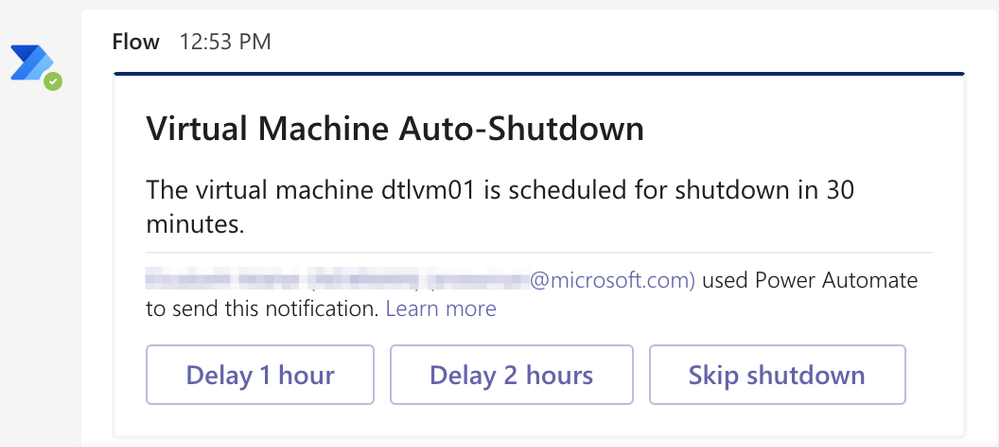
Azure DevTest Labs automatic shutdown policies can save money by ensuring that VMs are shut down every night and do not sit idle indefinitely. On those occasions when a lab user works late, the shutdown notification settings allow lab users to be warned when the machine is about to be shutdown. In this blog post, we will cover how to use the Webhook URL setting for auto-shutdown notification settings to send a direct chat message to someone working late and warn them that their machine is about to be turned off. We will also cover how to create the chat message so the user can delay the shutdown by an hour or two by clicking a button in the chat message.
Create Logic App to receive shutdown notifications
- Create a Logic App.
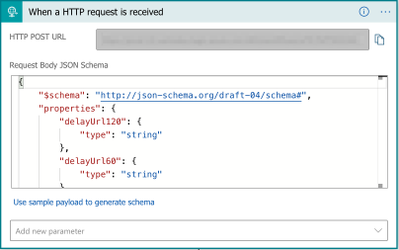
- Add When an HTTP request is received trigger to the Logic App.
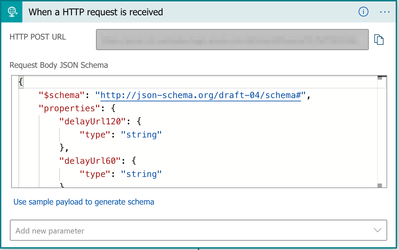
As seen in the picture above, this action needs a JSON schema so information in the request body can be used by actions in the Logic App. Schema for the request is below for convenience. The Configure autoshutdown for lab and compute virtual machines in Azure DevTest Labs article contains the latest JSON schema for shutdown notifications.
{
“$schema”: “http://json-schema.org/draft-04/schema#“,
“properties”: {
“delayUrl120”: {
“type”: “string”
},
“delayUrl60”: {
“type”: “string”
},
“eventType”: {
“type”: “string”
},
“guid”: {
“type”: “string”
},
“labName”: {
“type”: “string”
},
“owner”: {
“type”: “string”
},
“resourceGroupName”: {
“type”: “string”
},
“skipUrl”: {
“type”: “string”
},
“subscriptionId”: {
“type”: “string”
},
“text”: {
“type”: “string”
},
“vmName”: {
“type”: “string”
},
“vmUrl”: {
“type”: “string”
},
“minutesUntilShutdown”: {
“type”: “string”
}
},
“required”: [
“skipUrl”,
“delayUrl60”,
“delayUrl120”,
“vmName”,
“guid”,
“owner”,
“eventType”,
“text”,
“subscriptionId”,
“resourceGroupName”,
“labName”,
“vmUrl”,
“minutesUntilShutdown”
],
“type”: “object”
}
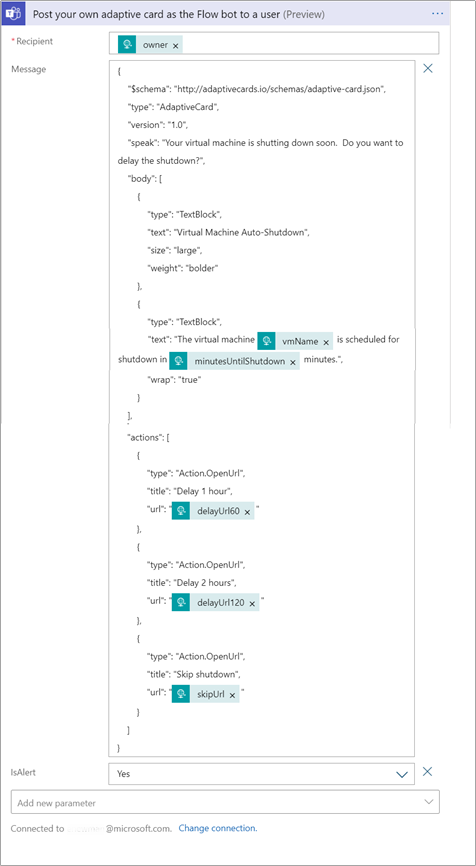
- Add a Post your own adaptive card as the Flow bot to a user (preview) action to the Logic App. This action will send a chat message from the Flow bot to a specific user. This action also allows an adaptive card to be sent to a user, which means we can add buttons to the message. This action does require a connection of a Microsoft Account.
The recipient of the message should be the owner of the VM. Get the owner’s email by searching for the ‘owner’ dynamic content from the HTTP request trigger.
The message in this action will be JSON that uses the Adaptive Card JSON schema. For our example, we have a simple message to the user telling them that their VM will be shutdown soon and buttons to allow the user to skip the shutdown, delay the shutdown 1 hour or delay the shutdown 2 hours.
{
“$schema”: “http://adaptivecards.io/schemas/adaptive-card.json“,
“type”: “AdaptiveCard”,
“version”: “1.0”,
“speak”: “Your virtual machine is shutting down soon. Do you want to delay the shutdown?”,
“body”: [
{
“type”: “TextBlock”,
“text”: “Virtual Machine Auto-Shutdown”,
“size”: “large”,
“weight”: “bolder”
},
{
“type”: “TextBlock”,
“text”: “The virtual machine @{triggerBody()[‘vmName’]} is scheduled for shutdown in @{triggerBody()?[‘minutesUntilShutdown’]} minutes.”,
“wrap”: “true”
}
],
“actions”: [
{
“type”: “Action.OpenUrl”,
“title”: “Delay 1 hour”,
“url”: “@{triggerBody()[‘delayUrl60’]}”
},
{
“type”: “Action.OpenUrl”,
“title”: “Delay 2 hours”,
“url”: “@{triggerBody()[‘delayUrl120’]}”
},
{
“type”: “Action.OpenUrl”,
“title”: “Skip shutdown”,
“url”: “@{triggerBody()[‘skipUrl’]}”
}
]
}
The ‘@triggerBody()’ statements tell the LogicApp to get the value from the HTTP request trigger we created in the previous step.
Lastly, set the IsAlert setting in the action to ‘Yes’. This will cause the user to be notified in their Activity stream when the message is sent.
Action should look like the following picture.
- Add a HTTP Response action. Set the status code to 200 to indicate everything was successful.
Now that we have our Logic App that can handle sending a message to a user, it’s time to setup the DevTest Lab to send notifications to our Logic App. We will need the url to call the Logic App. To get the url, expand the When an HTTP request is received trigger step and copy the HTTP POST URL property.
Configure lab auto-shutdown settings
Auto-shutdown settings are configured at either the lab level or individual lab VM level. Individual settings for auto-shutdown notifications are only allowed if the lab owner sets the auto-shutdown policy to allow individual users to override the lab auto-shutdown settings. See Configure auto-shutdown for lab in Azure DevTest Labs for further details.
Let’s cover how to use the Logic App we created above by configuring auto-shutdown settings at a lab level.
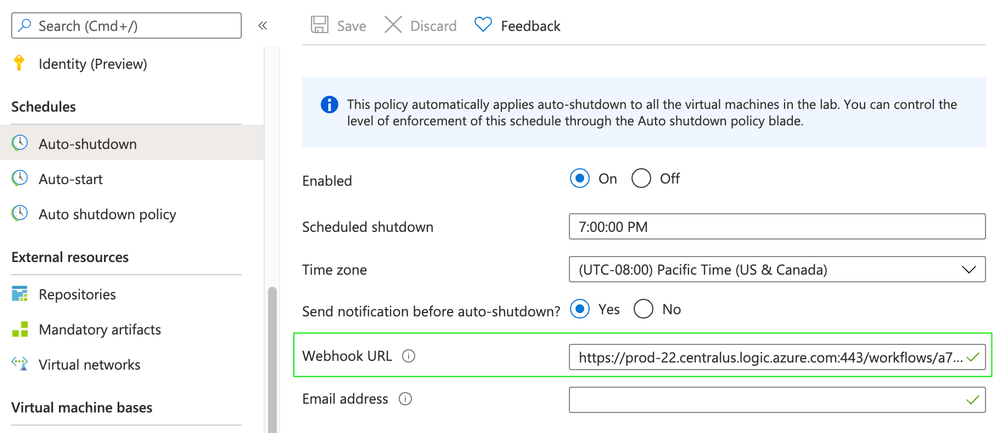
- On the home page for your lab, select Configuration and policies.
- Select Auto-shutdown in the Schedules section of the left menu.
- Select On to enable auto-shutdown policy.
- For Webhook URL, paste the url for the Logic App we created earlier.
- Select Save.
Conclusion
That’s all we need to do! Next time a lab VM in our lab is about to be shutdown, the lab VM owner will be sent a chat message in Teams. The message will allow the lab VM owner to quickly delay shutdown using the action buttons on the bottom of the message.


Recent Comments